Project Zomboid Mods & Plugins
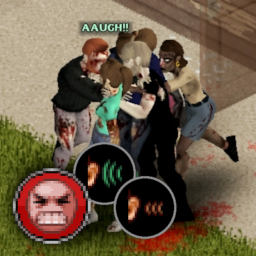
Arithmechick's Screams of Pain
76561198095825414 द्वारा
Description Causes your character to scream out loud when they're in extreme pain. The character also has a chance of audibly wincing in pain when an injury occurs. The loudness and sound radius are affected by the severity of the injury (This feature can be adjusted or disabled entirely in the sandbox settings). On top of adding immersion, this mod is incredibly useful for letting you know when your character gets injured (i.e. scratched by a tree branch). If you're bad at keeping an eye on your moodles like I am, this mod is a must-have. Sandbox Options - Character's pain threshold - Noise radius - Enable/disable zombie attraction - Enable/disable screaming caused by the player being on fire Compatible with versions of PZ up to 41.77 Workshop ID: 2902192016 Mod ID: TSW_ScreamsOfPain
I Might Need A Lighter 42.12
76561198048535871 द्वारा
THIS MOD IS NOT YET AVAILABLE FOR 42.13.x Philosophy behind this mod The first iteration of this mod I Don't Need A Lighter missed the balance I was aiming at when writing it. It made the Smoker trait even more a freebie point than it should. With this version I want to keep the vanilla's lighters as the best option to light a cigarette, but also provide the player with more risky and/or scarce alternate options . DISCLAIMER : - You can submit bug reports (here <3) - Changelog : https://steamcommunity.com/sharedfiles/filedetails//changelog/2883633728/ Car lighter overhaul : - Car lighters are no longer guaranteed to be found in every car. The car lighter socket can be empty or even in need of repair before becoming usable. - Car lighter is now an object that can be carried by players, removed from cars containing one or installed in cars in need of one. - The time it takes to warm up a car lighter is now directly tied to the car battery durability and charge level. Stove smoking overhaul : - Lighting a cigarette on a stove top now comes with a risk. If you accumulate too much malus(possible malus are currently coming from : Fatigue/Pain/Panic/Drunkeness/Hand Injuries) you risk having an accident when doing so. - The time it take to light up a cigarette on a stove top is now directly tied to multiple current stat of your survivor ( Panic / Pain / Fatigue / Drunkenness / Hand injuries ) Mod Compatibility - Smoker : https://steamcommunity.com/workshop/filedetails/?id=2026976958 - Green Fire: https://steamcommunity.com/sharedfiles/filedetails/?id=1703604612 - More Smokes : https://steamcommunity.com/sharedfiles/filedetails/?id=2923439994 (not yet thoroughly tested) Planned to be added - Add more possible outcome when failing to light a cigarette on stoves - Add the risk of breaking the car lighter and/or the car lighter socket when using it with a low durability/charge level car battery - Add a 3d model to the car lighter - Update translation strings (to all supported language in the v1) Want to help translate this mod ? Join here : https://crowdin.com/project/i-might-need-a-lighter Github My other mods: - I Don't Need A Lighter : https://steamcommunity.com/sharedfiles/filedetails/?id=2714198296 - Fasten You SeatBelt : https://steamcommunity.com/sharedfiles/filedetails/?id=2722218474 Workshop ID: 2883633728 Mod ID: IMightNeedALighter
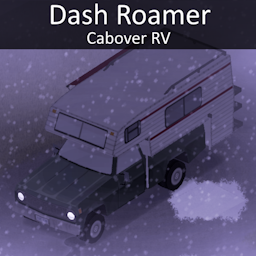
Dash Roamer
76561198346993015 द्वारा
Love your Dash Bulldriver but those lousy seats are not meant for sleeping? Or perhaps you dont have the budget for a motorhome and have a perfectly good Bulldriver sitting around? Or you simply want 2 extra seats but dont want to take it back to be made into an extended cab? Well if either of these above cases fit your situation in the slightest, our new 'Roamer' model is the RV for you! Budget, rugged and able to fit plenty on it's rear cargo rack, its just the vehicle you need for those long trips you keep getting invited on. Fits the vanilla game fairly well, during modelling i mostly kept to the style a lot of vanilla vehicles use to make sure it fits in well alongside both vanilla and modded vehicles Comes with an optional patch that gives it an RV interior, RV interior mod itself can be found here https://steamcommunity.com/sharedfiles/filedetails/?id=2822286426 compatible with Standardized Vehicle Upgrades 2 as well (has base support for this mod) Workshop ID: 3011430652 Mod ID: DashRoamer Mod ID: DashRoamerRVInterior
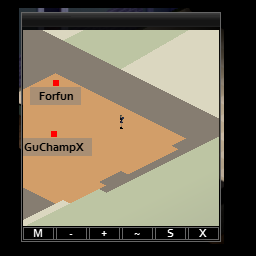
Another Players on Minimap
76561198030999511 द्वारा
This mod is made for the needs of KWRR Server KWRR Server is an South East Asia heavily modded server Server IP is 104.234.167.83:16261 Info In 41.73, the game added remote players visibility on world map. Oddly enough, that isn't added to the minimap which basically just a mini world map. This mod simply add that visibility to the minimap with just 2 additional lines of code. As this simply make use of the feature already available on the world map, there is no performance impact as compared to old minimap mods. It is also the primary reason I look into the codes because old minimap mods are needlessly computing expensive and even network demanding to use in the big servers. Incompatibility This mod override ISMiniMap.InitPlayer(playerNum) thus is incompatible with any mod that override that. It is also highly recommended to load this mod at the top load order so it will be compatible to mods decorating the said function. Donations Please rate the mod if you like the mod. If you want to support me or help me, do consider donating! All proceeds will be used to keep KWRR server alive! Others Check out my other mods here Workshop ID: 3117340325 Mod ID: AnotherPlayersOnMinimap
![Reduced Plank and Log Weight [No longer being updated I lack the time to get back into the game right now]](https://images.steamusercontent.com/ugc/1680394725375457966/4D23197D4338C6FE003F6E3A617EFF65966BBBDD/)
Reduced Plank and Log Weight [No longer being updated I lack the time to get back into the game right now]
76561197990378842 द्वारा
Updated to version 41 Works on MP servers as well. Are you tired of the weight of planks and logs? This simple mod cuts the weight of the planks and logs in half to make things a little easier but not enough to make it so you're running around with 30 planks on you at full speed. Changes from Vanilla (default) Plank weight 3.0 -> 1.5 Spiked Plank 3.1 -> 1.6 Log weight 9.0 -> 4.5 2x Log stack 6.0 -> 3.0 3x Log stack 9.0 -> 4.5 4x Log stack 12.0 -> 6.0 Tree Branch 1.0 -> .5 I had a bunch of neat info below all this but I failed to remember to copy it all and when I updated the mod it deleted the original description. Lesson learned. That said my apologies to the many requests to update this mod to build 41 I was busy with life stuff and did not want to have to update a mod for a game I had not touched in ages. I was waiting for build 41 to go to the stable branch but it has yet to so I decided it was time to update it as I started playing and streaming the game as of late. Check out my other mod! it removes the heartbeat/panic sound. No Panic Sound <----Clicky! Workshop ID: 1484339564 Mod ID: ReducedPlank
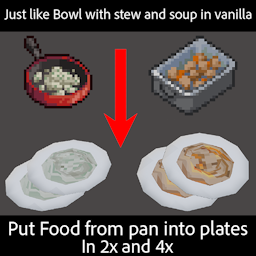
Serving Plates: Make your plates useful
76561198977867533 द्वारा
For Build 42 : https://steamcommunity.com/sharedfiles/filedetails/?id=3399320470 Allow the player to put content from Stir fry Pan/Roasting Pan/Gridle Pan on plates just like stew, soup, rice and pasta in bowls Make sure you have 2 or more plates in your inventory for the craft recipe to appear. Also add a crafting recipe to convert Fancy/Orange/Blue plates to the one use in the mod Can be added into an ongoing save I think this should be compatible with every other mod since there is very few code This recipe will ONLY work when food(modded or vanilla) are in those three VANILLA food container : - frying Pan - Roasting Pan - Griddle Pan if not then the recipe will not show Also work with Omelette This recipe will NOT work with any modded container For exemple: The mod is compatible with sapph's cooking but you will be only able to put content from the 3 vanilla Pan into the plates. The 2nd mod is optional. It will change how the food is divided through plates. The base mod uses a simple x/2 for 2 plates or x/4 for 4 plates. When using the optional Bonus Stats mod, serving the food on a plate gives a +33% bonus to nutrients. I have no idea why this was not made before nor why its not in the base game Workshop ID: 2963511042 Mod ID: ServingPlates Mod ID: ServingPlatesBS
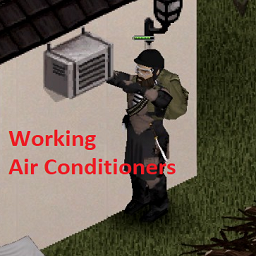
Working Air Conditioners
76561198012435478 द्वारा
Overview This mod won't let you freeze your butts off during zombie apocalypse. Activate air conditioners and stay hot during winters. Cooling is also possible but works only in single player games. If you like my work: How does this work Obtaining Air Conditioners AC units cannot be crafted, but you can find them in game already installed on some building walls. They are usually located on industrial buildings, warehouses, but also there is one in Muldraugh bakery. You will need to simply pick them and take them home to your base. Placing Air Conditioner To activate the air conditioner you do not need to learn any skills nor tools. Place the air conditioner outside your base on a wall behind which you want heat to be generated. Right click the air conditioner, and select "Attach". This needs to be done only once after placing the unit on a wall. Operating Air Conditioner Air conditioners will naturally work only when power is available. Vanilla generators, but also solar panels will work. Right click air conditioner, and simply select "Turn on". Turning off is similar. Click "Settings" to access a panel to change temperature and fan speed. Temperature is self-explanatory; the fan speed controls the radius of heat propagation. This mod uses in-game algorithm for heat propagation which is not perfect. You may notice that sometimes heat is blocked for no reason. I cannot fix this but you may experiment with different A/C placements or using more than one unit. AC units can also be controlled remotely. To do so, you will need to use a TV remote. Click "Settings" on the remote in your inventory list. The remote will control nearby unit as long as it is not too far. If there are multiple units in range, you will control the one that is closer to the player. The player will face in the direction where the AC unit is, this way you will know that unit is being controlled. You can control units only on the same floor. Other Air conditioner will consume a constant amount of fuel. Air conditioner does not not to be repaired. Air conditioners do not generate any toxic gas. It is safe to add the mod in the middle of the game. It is also safe to remove it which is not recommended ;) Please let me know of your ideas in the comments. I will try to implement them. Also please let me know if you find any bugs. id=3071370537 ModID: AirCond
![[B42] Simple Flashlight on Belt!](https://images.steamusercontent.com/ugc/27682271825167668/161E00364606231923688E056BD64E97C9EC6DDE/)
[B42] Simple Flashlight on Belt!
76561198293533791 द्वारा
Very simple mod to put flashlights on your belt. Two-handed weapon players rejoice!! THIS MOD IS CURRENTLY INCOMPATIBLE WITH AUTHETICZ. I'LL LOOK INTO IT WHEN I CAN, THANK YOU :3 Flashlights can be turned on and off with the "F" key or by pressing their corresponding belt hotkey. The new Angled Flashlights can be mounted in vanilla with netting, this mod overrides that to allow them to be equipped to your belt. If you desire the vanilla behavior, disable this mod. This mod is only for Build 42, it will not work on Build 41. Download "Better Flashlights Fixed" if you need similar behavior for B41! Workshop ID: 3394588830 Mod ID: LightOnBelt
![OldPark [Waiting for official B42 Tools]](https://images.steamusercontent.com/ugc/1856055846938511481/A74F5E031130AE6FCB473E9736B2F03EAD111DF4/)
OldPark [Waiting for official B42 Tools]
76561198146214498 द्वारा
I am still slowly working on an update. Waiting for updated tools. Thank you for all of the support! :spiffo: This works with all popular map mods. Use Map Mod Manager to check conflicts. Originally created to be extra parking for Ed's Auto Salvage on a private server. After some suggestions and the help of the community it has grown into a respectable small town. Most buildings used were included in the map editor and all credits go to those creators. However, some buildings I did create, like the hunting lodge. There are plenty of spots with loot & building potential. Please leave feedback and report issues/bugs. If you find this useful give it a like! Fun Fact: I tried my best to model the gunstore after the Kiba gun store in Escape from Tarkov. Cells 29 x 29 - 30 x 29 ⛔ Permissions: Redistribution of this mod without explicit permission from the original creator is prohibited under any circumstances. This includes, but not limited to, uploading this mod to the Steam Workshop or any other site, distribution of modified versions. © 2023 @Ammo Pack Workshop ID: 2671414643 Mod ID: ParkingLot Map Folder: ParkingLot

Better helicopter
76561198211669377 द्वारा
Fixed and updated helicopter mod! Thanks for inspiration and help with rotating bladed to my codeveloper ???? I full rewrite mod, Add hard math magic (quaternions a crazy thing...). So now you can rotate heli in any direction! Also: - Added Main and secondary blades rotation. (Rotates when you outside of heli too!) - Fixed sound - Better control - Improved spawn - Need read magazine to know how to fly - Better shadow Controls: E = Enter/exit the helicopter W = Ascend S = Descend A = Yaw to the left (turn left) D = Yaw to the right (turn right) Arrow Left = Roll to the left (moves the helicopter to the left) Arrow Down = Pitch backward (moves the helicopter backward) Arrow Right = Roll to the right (moves the helicopter to the right) Arrow Up = Pitch forward (moves the helicopter forward) Spawn points: x = 5593, y = 12465 x = 7746, y = 11802 x = 12850, y = 6427 Enjoy and write bug reports! Known bugs, that i can't fix: - Landing on roofs - Collision with zombies when fly Patreon Ko-fi Discord Enjoy! --------------------------------------------------- Update: - Fixed and improved sound - Improved blade rotation and sound volume when outside - Decreased fuel consume - Increased Heli speed - Other small improvements --- --- --- --- --- --- --- --- --- --- --- --- Workshop ID: 2434548740 Mod ID: Helicopter
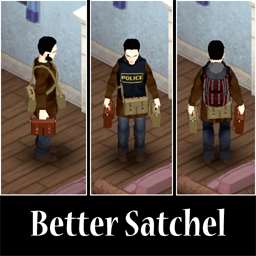
Better Satchel
76561198003945067 द्वारा
>>>This mod may or may not be updated for current version, DO NOT USE for current build 42, apparently it can break your game after the last patches.<<< >>>If anyone, wants to update mod for Build 42 and ahead to keep it for ppl, do inform me and go ahead, just don't forget to add some info about original source.<<< Replaces and adds new models and textures for the Satchel to use in the same way as a Fanny pack. In other words, this mod provides you with the ability to wear Satchels with backpacks, you can wear them on the front or&and back of your character. Moreover, all appropriate zombie spawns wear satchels in a new way too. Satchels were re-balanced to be in tune with vanilla bags&backpacks. However, even though Satchels were re-balanced, you can adjust stats as you want through Sandbox options. There is also a version without sandbox option and with vanilla satchels characteristics. Better satchels mod reworks&adds some satchels icons. Also, this mod implements Tactical satchels, which you can find for better stats and run speed modifier. Tactical satchels will rarely spawn on Hazmat wearing zombies. Save files Adding this mod will not ruin your current playthrough, but there will not be any changes till you start a new game. Compatibility Will not work with any mod that changes satchels in any way. Also, it may have issues with mods adding&changing outfits with satchels or vanilla hazmat wearing outfits. However, some load-order tweaking may or may not help with compatibility issues. Built-in Compatibility - They Knew - Susceptible Trait - Airborne Infection If you are using "They Knew" or "Susceptible Trait" mods, you will need to load "Better Satchel" mod after them. It is essential because this mod replaces satchels within "They Knew" mod. Also, appropriate changes to the "Susceptible Trait" mod's new zombie outfits (the once wearing satchels) were made. Be aware, this mod changes "They Knew" mod's zombie outfits and hazmats. Zombies from "They knew" mod will sometimes wear vanilla hazmats and some clothes under their hazmats. Textures and icons of "They Knew" mod's hazmat were changed to be in tune with vanilla and Satchels brought by "Better Satchel" mod. Also, you can wear those with vests and jackets. Known issues - New crafted satchels (Build 42) can be weared only at the back, same as Fanny Pack. - New 3D model needs to be changed. - Textures of new crafted satchels will have issues, whenever you wear those with special clothes (for examle bulletproof vest). - Same problem, will fix this issue in the next updates. P.S. Redistribution of this mod without explicit permission from the original author is strictly prohibited under any circumstances. Workshop ID: 2965943353 Mod ID: BetterSatchel

Container Tooltips
76561198048687384 द्वारा
This mod is outdated. Use Smarter Storage instead. Container Tooltips is a simple quality of life mod that displays the name of nearby containers when you hover over them in the inventory. Pair this with the Rename Containers mod and sorting your loot just got WAY easier. Compatibility Existing Saves: This mod can be added and removed from your saves with no issues. Multiplayer: Not tested. Should work fine. Let me know if you try it. Other Mods: This mod is fully compatible with: - Rename Containers - Nested Containers - Everything Has a Name Workshop ID: 3129327862 Mod ID: ContainerTooltips
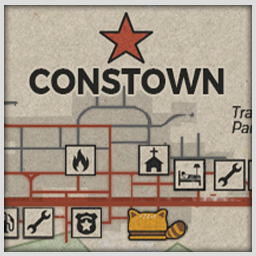
Constown (B42)
76561198163646760 द्वारा
Constown, KY This mod adds the town of Constown to the standard map. This is a small town in Knox County, the center of which is pierced by a four-lane highway, which is the main source of income for local residents. Any traveler passing through the town can stay at our wonderful "Summer tree" motel. And if your car suddenly breaks down, there are two auto repair shops along the highway where you can inexpensively repair your vehicle. Unfortunately, time makes its own adjustments and small businesses are unable to compete with large entrepreneurs. Therefore, in Constown you can find restaurants and shops that have recently been the pearls of the city, closed forever. But despite the fact that now is not the most favorable period, Constown is a town where you want to stay. The town is divided into 4 areas: - Commercial area along the highway. - Residences divided into new houses of the same type and the old private sector. - Trailer park. - Farms. Town Location: Constown is located west of Rosewood on the main highway. Description: When I created this map, my goal was to make a town that would not stray from the style of vanilla towns. Each building was created by me personally, but with an eye on existing buildings in the game, so that the feeling of the integrity of the map is not lost. Some shops and restaurants have already been found in the game, while others were invented by me and this is my special pride. In Constown you will find unique elements of furniture, interior decor and simply elements of everyday life that you will not find in any other town in Knox County! And also on the walls you will find paintings by local artist Konstantin Ananas. The map uses cells: (19x42);(20x42);(21x42);(22x42);(23x42);(24x42) (19x43);(20x43);(21x43);(22x43);(23x43);(24x43) (19x44);(20x44);(21x44);(22x44);(23x44);(24x44) Compatibility: Constown is fully compatible with the Grapeseed map Special thanks to user 十叁 for fixing the infinite error counter. Workshop ID: 3480990544 Mod ID: Constown42 Map Folder: Constown, KY

Video Meister
76561199151439614 द्वारा
Overview : Add the skill information in the "Training Materials" list, and Item's Tooltip. Confirmed to work with Build 41/42. Features : - Some VHS allow you to gain EXP and learn recipes by watching them. For those VHS, skill information will be displayed in the "Training Materials" list and tooltip. - Icons - Agility - Sprinting - Lightfooted - Nimble - Sneaking - Combat - Axe - Long Blunt - Short Blunt - Long Blade - Short Blade - Spear - Crafting - Carpentry - Cooking - Farming - FirstAid - Electrical - Metalworking - Mechanics - Tailoring - Firearm - Aiming - Reloading - Survivalist - Fishing - Trapping - Foraging - Recipes - Gain Recipes Options : These options are available with Mod Options in B41. - Show skill information by text : Select the check box if you want to show skill information by text. - Show skill information by icon : Select the check box if you want to show skill information by icon. - Show skill information in Tooltip : Select the check box if you want to show skill information in Tooltip. Known Issues : - The skill information that has been displayed in tooltip will continue to appear even if setting or MOD is disabled. This issue is currently by design in order to ensure processing performance. Future plans : - Bug fix (if exists) Remarks : - You may add it to your mod pack without confirmation and credit. However, please use at your own risk, as I have not been able to verify that it works with SP. Release Notes : - v1.8 - Added support for new VHS in Build 42.17. - v1.7 - Hotfix for Build 42.15. - v1.6 - Compatible with Build 42. - v1.5 - Supported skills that was not supported yet. - v1.4 - Added Translation (Korean (KO)). Please refer to "Change Notes" for the older history. If you enjoy this mod and would like to support its development, you can do so through the services below. Your support helps cover the cost of renting a dedicated server for multiplayer testing, as well as AI service subscriptions used for development - expenses I personally pay for every month, totaling over $50. Thanks to your support, I can continue improving, maintaining, and expanding this mod for everyone. Workshop ID: 2744797858 Mod ID: P4VideoMeister
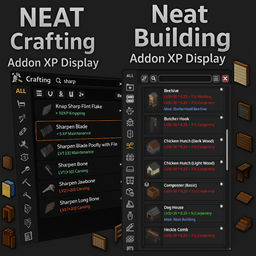
Neat Crafting & Neat Building – XP & Mod Display
76561199133259679 द्वारा
Build Support: B42.12.0 to B42.19.x — Build 42 only Neat Crafting & Neat Building – XP & Mod Display is a lightweight companion Workshop item for Neat Crafting and Neat Building. It adds clear, optional XP gain and source mod information directly to recipe lists, with multiple XP display modes, useful filters, text scaling, and clean auto-sizing entries designed to keep the UI readable. 📦 What this Workshop item includes This Workshop item contains two separate addons. Enable only the ones you actually use. - Neat Crafting — XP & Mod Display - Requires: NeatUI Framework - Requires: Neat Crafting - Must be loaded AFTER Neat Crafting - Neat Building — XP & Mod Display - Requires: NeatUI Framework - Requires: Neat Building - Must be loaded AFTER Neat Building 📌 Recommended Load Order - NeatUI Framework - Neat Crafting - Neat Building - Neat Crafting — XP & Mod Display - Neat Building — XP & Mod Display You do not need to enable both addons unless you use both base mods. ✨ Core Features - XP per recipe: shows how much XP a recipe gives and which skill receives it - Multiple XP display modes: Base XP, Final XP, Multiplier, or Full Breakdown - Accurate multiplier breakdowns: includes starting skill bonuses, books, traits, sandbox XP, and global XP multipliers where applicable - Optional Mod line: shows which mod a recipe comes from - XP-only and Mod-only filters: quickly find recipes that grant XP or come from mods - Auto-resize and text scaling: recipe entries grow cleanly to avoid clipped text 🧰 Addon Details Neat Crafting — XP & Mod Display - Adds XP and optional source mod lines to the Neat Crafting recipe list - Supports all XP display formats through Mod Options - Supports optional XP only and Mod only filters - Automatically resizes recipe entries for longer XP and mod text - Correctly handles recent Build 42 recipe XP behavior, including electricity recipes Neat Building — XP & Mod Display - Adds XP and optional source mod lines to the Neat Building recipe list - Supports optional XP only and Mod only filters - Scales and positions extra lines cleanly inside taller recipe entries - Supports vanilla building recipes and Neat Building recipes - Correctly handles recent Build 42 recipe XP behavior, including newer workstation/building recipe XP changes 🔧 Recent fixes - Fixed XP multiplier breakdowns for recipes using internal perk IDs such as Electricity - Electricity recipes now correctly show the expected XP breakdown in all XP display modes - Fixed missing XP display for Butter Chum / ChurnBucket in recent B42.18 builds - Avoided debug-only Java reflection paths in recent builds for better MP Host compatibility ⚙️ Mod Options XP display can be configured through Mod Options. Available XP formats include: - Base XP - Final XP - Multiplier - Full Breakdown The source mod line and filters can also be enabled or disabled depending on how much information you want in the recipe list. 🌍 Translations - CH, CN, DA, DE, EN, ES, FR, HU, IT, JP, KO, NL, PL, PT, PTBR, RU, TH, TR, UA ⚠️ Multiplayer / Saves Note In Build 42 multiplayer, some mods may register WorldDictionary keys. If a world was saved with certain mods enabled and they are later removed, that save may fail to load. Rule of thumb: - If a world has used Neat Crafting or Neat Building, avoid removing them from that save or server - Always make a full backup before changing mod lists on MP 🔄 How to force a Workshop update - Close Project Zomboid completely - Unsubscribe from this Workshop item - Wait until Steam finishes removing it - Subscribe again and wait for the download to finish - Launch the game Credits - Neat Crafting & Neat Building — base mods by Rocco - Starlit Library — reflection logic by albion - Crafting XP Display — inspiration by N0wh3re More mods & feedback You can find my other Project Zomboid mods here If you find this Workshop item useful, please consider leaving a thumbs up and adding it to your favorites — it helps other players discover it. Feedback, bug reports, and suggestions are always welcome. Workshop ID: 3540503606 Mod ID: Neat_Building_AddonXP Mod ID: Neat_Crafting_AddonXP
![The Walking Dead Project - Pack [Build 41.60]](https://images.steamusercontent.com/ugc/862851664212023383/F4CAE811FBBC5842370E98F2C226984943B2283B/)
The Walking Dead Project - Pack [Build 41.60]
76561198033598643 द्वारा
The Walking Dead Project-Pack is the result of years of hard work. Using the scenes from the famous TV show, I faithfully recreated the various locations, even paying attention to the details in the rooms, as you can see from the pictures above. This pack contains several maps added in grassy areas of the vanilla map, so in order to reach them, you'll have to cross West Point and Muldraugh. I thank all the 40,000 subscribers for supporting the mod and I wish you as much fun as possible in the fantastic world of The Walking Dead! If you want to support me click here Use the mod GPS to find every location! Have fun! -Harrison Memorial Hospital and CDC 12700/8800 -Hershel's farm 10733/7360 -Woodbury 8000/9100 Woodbury is linked to Drayton -Prison 9850/9500 -Terminus 11800/9500 -Alexandria 13400/5900 -Sanctuary (Negan's Base) 11200/11100 -Hilltop 13290/66980 -Oceanside 13440/6840 -The Kingdom 9700/10240 If you want to support me, offer me a coffee! Thank you! https://ko-fi.com/woldren93 Workshop ID: 860982195 Mod ID: The Walking Dead Project-Pack Map Folder: The Walking Dead Project-Pack

Legendary Backpacks
76561198046092631 द्वारा
🔥 I'm back with a brand new mod from the Legendary series! If this type of mod is well received, I might add even more to the collection. 🔍 Find Legendary Backpacks! This mod lets you discover 10 Backpacks in the world, all upgraded to legendary quality. 🛠️ Craft Your Own You can craft them yourself after finding the recipe in magazines, or unlock it automatically by leveling up your tailoring skill. 💪 Become Unstoppable! With these legendary Backpacks, survival has never been easier. Gear up and dominate the apocalypse! Love this mod? 🙏 Smash that 👍 and add to ❤️ favorites! Thanks a lot! ⭐Features ✅Capacity The maximum allowed by the base game 49. ✅Weight Reduction The highest possible. ✅Running Speed Reduction The lowest possible. ✅5 attachment slots: Small Belt Left & Right, Webbing Left & Right, and Bedroll Bottom ✅Hydro Backpack: 1.5L reservoir ✅10 Colors (Grey, Green, Brown, Black, Pink, Orange, Purple, Blue, Red and White) ✅Not satisfied? You can tweak all values via the Sandbox options. ⚙️ Customization via Sandbox 🔸You can configure capacity, weight reduction, and running speed reduction. 🔸You can also customize the drop chances of all items included in the mod. 🛠️Recipes and Crafting 🔸There's a chance to find a magazine that teaches you how to craft the backpack. 🔸NEW Unlock the recipe by leveling your tailoring skill. 🌐Supported Languages 🔹English (EN) 🔹Spanish (ES) 🔹German (DE) 🔹French (FR) 🔹Russian (RU) 🔹Korean (KO) 🔹Thai (TH) 🔹Chinese (Simplified) 🔹Brazilian Portuguese (PTBR) 🔹Turkish (TR) 🔄Updates 🔹 Fixed bug where setting sandbox probability to 0.00 was not respected. 🔹 From now on, to unify the sandbox list, mods will appear with their English names, the rest of the options will be in each language, the recipes will be in a new category called Legendaries, and Turkish has been added to the supported languages. 🔹 Fixed translation to 42.15 codification. 🔹 Fixed sandbox crash bug 🔹 Fixed minor bug 🔹 new loot system optimized for multiplayer. 🔹 Beta test new code for backpack drops on the map. 🔹 Beta test new backpack drops on the map 🔹 The magazine already shows the recipes 🔹 Updated to version 42.13 🔹 Cofification UTF-16 BE to korean translations 🔹 The backpack spawn weight has been reduced by 4, but to compensate I have set the default to 0.04 instead of 0.01. I hope that whoever wants it to spawn less will set it to 0.01. 🔹 Adds 5 new colors (Orange, Purple, Blue, Red and White) 🔹 Reworked loot distribution logic for modular control and expanded container support. Adjusted spawn weights and corrected item references for consistency. 🔹 Fixed bug in sandbox translation. 🔹 The minimum sandbox drop values have been changed from 0.1 to 0 and the default value has been changed from 0.2 to 0.1. 🔹 Fixed bug that made the gray backpack disappear 🔹 Adds 4 new colors (Green, Brown, Black and Pink) 🔹 Initial Release Workshop ID: 3538353228 Mod ID: LBB42
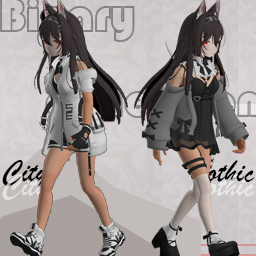
【41】BinaryDimension
76561198284119648 द्वारा
Notice of Suspension: Due to the release of version 42, the binary dimension of version 41 will be permanently suspended. The original update plan has been cancelled, and the binary dimension of version 42 will be released at some point in the future. Please be patient and wait. Workshop ID: 2968800219 Mod ID: BinaryDimension
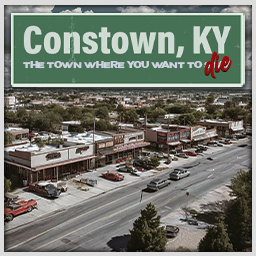
Constown
76561198163646760 द्वारा
Constown, KY This mod adds the town of Constown to the standard map. This is a small town in Knox County, the center of which is pierced by a four-lane highway, which is the main source of income for local residents. Any traveler passing through the town can stay at our wonderful "Summer tree" motel. And if your car suddenly breaks down, there are two auto repair shops along the highway where you can inexpensively repair your vehicle. Unfortunately, time makes its own adjustments and small businesses are unable to compete with large entrepreneurs. Therefore, in Constown you can find restaurants and shops that have recently been the pearls of the city, closed forever. But despite the fact that now is not the most favorable period, Constown is a town where you want to stay. The town is divided into 4 areas: - Commercial area along the highway. - Residences divided into new houses of the same type and the old private sector. - Trailer park. - Farms. Town Location: Constown is located west of Rosewood on the main highway. Description: When I created this map, my goal was to make a city that would not stray from the style of vanilla cities. Each building was created by me personally, but with an eye on existing buildings in the game, so that the feeling of the integrity of the map is not lost. Some shops and restaurants have already been found in the game, while others were invented by me and this is my special pride. In Constown you will find unique elements of furniture, interior decor and simply elements of everyday life that you will not find in any other town in Knox County! And also on the walls you will find paintings by local artist Konstantin Ananas. The map uses cells: (17x36);(18x36);(19x36);(20x36) (17x37);(18x37);(19x37);(20x37) The mod does not conflict with the "Raven Creek" and "Fort Redstone, KY" mods. But to correctly connect these cards, you need to do these steps STRICTLY IN THIS ORDER: - Disable mods "Raven Creek" and "Fort Redstone, KY" (if enabled). - Enable the "Constown" mod with the option you need. Select only one option. - Enable "Raven Creek" and/or "Fort Redstone, KY" mod This is necessary for the correct priority of these mods. Otherwise, the maps will not be connected correctly. If you don't play with these two mods, then enable only the "Constown" option. P.S.: Problems with textures and signs: If you have installed a mod for the town of Pineville, then you need to update it so that all the textures used in Constown. Both mods use the same texture pack. Only in Constown it is supplemented. But if you do not have Pineville installed, then there will be no problems. Workshop ID: 3347096716 Mod ID: constown Mod ID: constownwithRC Map Folder: Constown Map Folder: Constown
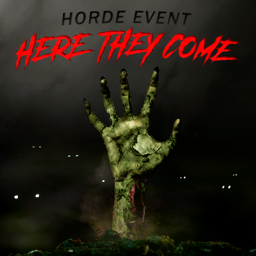
Here They Come!
76561197982265445 द्वारा
Here They Come (beta): An immersive horde event experience! What does it do? This mod introduces horde events to Zomboid! These events are meant to remain immersive, and highly configurable. Configuration range from their spread, size, variation, and trigger time frame. Over time, zombies get restless and excited by your scent. After a certain threshold is reached, a horde of zombies will come hunting you down. The event will also trigger an invisible sound pulse that will draw both existing and horde zombies towards the player (this behavior can be adjusted and turned off). How do I customize my experience? There are many sandbox variables that can help you tailor the experience to your liking: - Cooldown: Cooldown between two hordes in game minutes - Min Starting Hour: Min hour of day at which the Horde may happen - Max Starting Hour: Max hour of day at which the Horde may happend - Minimum hourly progress: Minimum amount of agitation per hour - Maximum hourly progress: Maximum amount of agitation per hour - Trigger threshold: Horde agitation trigger threshold - First day: First day at which a horde may appear - Number of waves: Number of zombie waves per horde - Minimum zombies: Minimum amount of zombies per wave - Maximum zombies: Maximum amount of zombies per wave - Additional Zombies per horde: Additional number of maximum zombies for each horde - Time between waves: Number of minutes between waves - Minimum spawn distance: Minimum wave spawn distance - Maximum horde spawn distance: Maximum wave spawn distance - Horde Angle Spread: Max angle at which the wave origin may be focused - Zombies per spawn batch: Number of zombies per spawn batch - Spawn Rate: Delay in ticks between spawn batches - Horde progress indicator: Whether to display the horde agitation icon or not - Heads-up text: Displays a warning text when horde starts/progresses - Heads-up time: Number of minutes after the event before the first wave starts - Noise pulse on player: Silently pulse and draw zombies to player during Horde - Pulse Range: Range of the pulse pulling zombies to players - Noise Pulse Frequency: How many minutes between noise pulses Will it work on multiplayer? This mod was designed with MP in mind, so: YES! Where and how will the zombies spawn? They currently spawn outside only, in adjustable batches, and in several waves. Each player in an area will increase the amount of spawned zombies. Their direction is random, but will be consistent across players. The spread can be adjusted so they may also come from every direction. What kind of zombies will spawn? Zombies will have their outfits adequately adjusted according to their spawn biome. Is it safe to add to an existing save? Yes. Mod by SpoutNick, code available on github: https://github.com/spoutnickgp/zomboid-mod-here-they-come CHANGELOG: 222-05-28 - v0.3.1 - Tweaked zombie diversity to reduce army presence in some vegetation biomes - Switch to new logo by M1NH4U - Add documentation by M1NH4U 2022-04-01 - v0.3.0 - Fix wave spacing not waiting for wave to finish spawning - Fix north/south inversion - Reduce defaults spawn range 2022-03-28 - v0.2.1 - Wake sleeping players on horde start - Improve sound effects on wave start - Fix ambient sounds not triggering properly - Fix errors on UI image sequence missload 2022-03-27 - v0.2.0 - New display icon for horde status - Fix horde size increment calculation - Adjust default time frame - Increase nav biome zombies diversity 2022-03-26 - v0.1.0 - Initial beta releaseMod by SpoutNick, code available on github: https://github.com/spoutnickgp/zomboid-mod-here-they-come Logo and documentation by M1NH4U Workshop ID: 2779839289 Mod ID: HereTheyCome
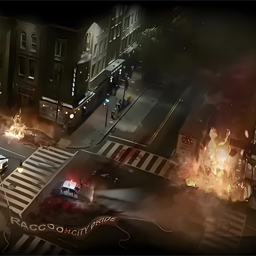
RaccoonCityB42
76561198416175633 द्वारा
Map Description: - Intro: Second Map Creation. - Location: West of Muldraugh - Size: 2x2 - Cells: Special Items: - dabaojian - ResidentEvil BackPack: Customizable capacity and weight reduction - ResidentEvil Suspenders: Customizable capacity and weight reduction - ApocalypseMagazine - Metal: Unlocks metal fence construction - ApocalypseMagazine - Wood: Unlocks wood fence construction - Biochemical Vaccines: Cures the Knox Infection - benelli m4 super90 Shotgun - qibaowangshengdadi Shotgun - SamuraiEdge - SamuraiEdge - Adapter - Biohazard Pickup Truck Gameplay Features: - Added a garage unlockable with a password (The password book is hidden somewhere in Raccoon City) - Added three badge puzzle mechanics to the Police Station (Unlocks a secret passage) - Added a jigsaw puzzle in the Police Station (Unlocks a hidden armory) Please report any bugs you find, and I will fix them as soon as possible. Workshop ID: 3388468313 Mod ID: RaccoonCityB42 Map Folder: RaccoonCity
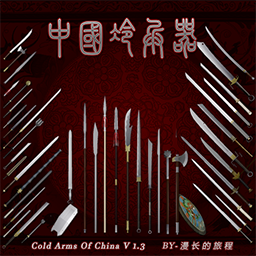
中国冷兵器V1.35更新/ColdArmsOfChina v1.35
76561199200227341 द्वारा
CN_中国冷兵器v1.35 BY:漫长的旅程2025/01/15 CN_这次的更新内容说明较多,请查看右侧的"改动说明" CN:更新介绍视频 www.bilibili.com/video/BV1smi1YNEqW/ 1.30更新内容为:原始武器系列,包括石矛、石制大锤、单手石斧、原始弓和箭,制造的方法请观看上面的介绍视频链接。 原始弓箭容易损坏,需要多备用一些零件,这些都可能在野外通过“采集”得到。(因为我个人不太懂Lua所以没有做出箭的弹道,以及可能会有一些问题,所以它并不完美,如果您懂Lua脚本语言,可以联系我来完善它,谢谢大家的支持)特别鸣谢:百度AI助力的鼎力帮助,它帮我修改了大量的MOD脚本。 EN_Cold Arms Of China v1.35 EN_This update has a lot of content, please check the "Change Log" on the right. EN_Cold Arms Of China v1.30 EN:Video Introduction www.bilibili.com/video/BV1smi1YNEqW/ The update content for 1.30 is: The original weapon series, including stone spears, stone hammers, one-handed stone, primitive bows, and arrows. Please watch the introduction video link above for the manufacturing methods. Primitive bows and arrows are prone to damage, so you need to extra parts on hand, all of which can be obtained in the wild through "gathering". (Because I personally don't know much about Lua, I haven made the arrow's trajectory, and there might be some issues, so it's not perfect. If you know Lua script language, you can contact me to improve. Thank you all for your support.) Special thanks: The great help of Baidu AI, which helped me modify a large amount of MOD script. ####################################################### CN_更新介绍 : 修改冷兵器模型(更接近历史原型),增加三款新武器, 加长金属管、加重金属管、名剑白雪 修改了书籍底层刷新代码(在住宅书架、图书馆书架及邮筒出现几率)。 汽油喷灯底层刷新代码(住宅车库、仓库、五金店出现几率)。 EN_UPDATE INTRODUCTION: Modify the cold weapon model (closer to the historical prototype) and add three new weapons: extended metal tubes, heavier metal tubes, and famous sword Bai Xue Modified the bottom refresh code for books (probability of appearing on residential bookshelves, library bookshelves, and mailbox). The bottom refresh code of the gasoline spray lamp (probability of occurrence in residential garages, warehouses, and hardware stores). ####################################################### CN_中国冷兵器v1.25 BY:漫长的旅程2024/04/4 CN_新增加战术风格武器包-战术武器包可以单独运行,请在模组管理器中选择“ColdArmsOfChina - TAC”来使用它。 CN:更新介绍视频 www.bilibili.com/video/BV1D8411b7b1/?spm_id_from=333.999.0.0 EN:Video Introduction www.bilibili.com/video/BV1D8411b7b1/?spm_id_from=333.999.0.0 New Tactical Style Weapon Pack - Tactical Weapon Pack can run separately. Please select "ColdArmsOfChina - TAC" in the Module Manager to use it. 该模组提供了一部分中国古代与近代的冷兵器样式模型,因中国冷兵器样式众多就只加入了少量的兵器模型,目前还在不断完善中,希望你能喜欢。 不合理的部分: 长矛类武器制作的较短(实际基本长矛的长度在3-4米左右)因为游戏设定人物背着武器有长度限制。 苗刀攻击为刺、砍,但是游戏里刀刃类武器都没有双手刺击这个动作,所以只能改成长矛类武器。 EN_Cold Arms Of China v1.25 EN_New Tactical Style Weapon Pack - Tactical Weapon Pack can run separately. Please select "ColdArmsOfChina - TAC" in the Module Manager to use it. This mod provides some ancient and modern Chinese cold weapon style models. Due to the large number of Chinese cold weapon styles, only a small number of weapon models have been added. Currently, it is still being improved. I hope you like it. Unreasonable part: The spear weapons are made shorter (the actual length of the basic spear is about 3-4 meters) because the game sets the character to carry the weapon with a length limit. The attacks of Miao Dao, Mo Dao, and a class of weapons are stabbing and slashing, but blade-type weapons in the game do not have the action of stabbing with both hands, so these weapons can only be changed to spear-type weapons. ####################################################### CN_更新介绍 : 修改冷兵器模型(更接近历史原型),增加三款新武器, 加长金属管、加重金属管、名剑白雪 修改了书籍底层刷新代码(在住宅书架、图书馆书架及邮筒出现几率)。 汽油喷灯底层刷新代码(住宅车库、仓库、五金店出现几率)。 EN_UPDATE INTRODUCTION: Modify the cold weapon model (closer to the historical prototype) and add three new weapons: extended metal tubes, heavier metal tubes, and famous sword Bai Xue Modified the bottom refresh code for books (probability of appearing on residential bookshelves, library bookshelves, and mailbox). The bottom refresh code of the gasoline spray lamp (probability of occurrence in residential garages, warehouses, and hardware stores). ####################################################### Refresh probability【Whetstone】 GarageMechanics 2% CrateMechanics 3% LoggingFactoryTools 3% MechanicShelfMisc 2% Refresh probability【Tactical Weapon Pack】 ArmySurplusTools 2-5% Hunter 2-5% LockerArmyBedroom 2-5% MeleeWeapons 2-5% PawnShopKnives 2-5% SurvivalGear 2-5% Trapper 2-5% ClosetShelfGeneric 0.001-0.005% CrateTools 0.01-0.5% ToolStoreTools 0.01-0.4% Hobbies 0.01-0.02% CN_FAQ: 问:我需要用什么来制作这个模组里的武器? 答:需要在住宅里找到相关制作武器的书籍! 问:这个模组的基础工具有哪些? 答:羊角锤、手锯、丙烷喷灯、焊工面罩、汽油喷灯(汽油喷灯为模组物品需要在容器中搜索获得) 问:一袋泥土怎么获得? 答:你需要有1个麻袋,铲土用的园艺铲或铁锹,对着有草地的地点右键取土! 问:怎么才可以用熔炉制造生铁块? 答:你需要将4个金属棒/4个金属管/6个废金属/60金属废料,点击右键打包后放入熔炉(熔炉需要燃料并点燃)! 问:高级武器怎样制造? 答:学习相关制造书籍后,在金工合成配方栏中查看所需要的材料! EN_FAQ: FAQ: Q: What do I need to use to make the weapons in this module? Answer: You need to find books on making weapons in the residence! Q: What are the basic tools for this module? Answer: Sheep horn hammer, hand saw, propane spray lamp, welder mask, gasoline spray lamp (gasoline spray lamp is a modular item that needs to be searched and obtained in the container) Q: How can I obtain a bag of soil? Answer: You need a sack, a garden shovel or a shovel to shovel soil. Right click on a place with grassland to get soil! Q: How can we use a furnace to make pig iron blocks? Answer: You need to pack 4 metal rods/4 metal tubes/6 scrap metal/60 metal waste, right-click and put them into the furnace (the furnace needs fuel and ignites it)! Q: How are advanced weapons manufactured? Answer: After studying relevant manufacturing books, check the required materials in the metalworking synthesis formula column! Workshop ID: 2645618806 Mod ID: ColdArmsOfChina Mod ID: ColdArmsOfChina - TAC
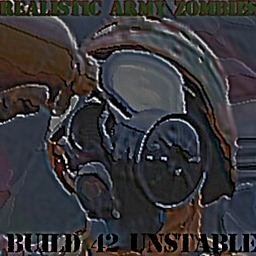
Realistic Army Zombies
76561198095436013 द्वारा
The infection is widespread in the Zone, and how it spreads is unknown. We have seen soldiers in HazMat suits, however. The US Army is taking absolutely no chances. -Unnamed Host of NNR Military zombies have better and more "realistic" looking gear along with correct grooming standards. This mod has most zombified soldiers being in some elements of MOPP (mission oriented protective posture), as well as making helmets and other protective gear standard, as opposed to them being somewhat uncommon or absent in vanilla. Equipment is based off of PZ's lore and equipment from the 90s and early 2000s. Included are a few new variants of zombies and a unique face texture for zombified troops - as they'd likely try to remove said elements of MOPP as a zombie and end up removing their face in the process. Weapons, canteens, and radios are now ubiquitous among zombified soldiers as of B42. The majority of soldiers deployed in and around the Exclusion Zone, especially those operating with a risk of contact with infected, would likely be in MOPP 3/4. Several radio transcripts also explicitly point to the usage of camouflage hazard suits by the military. Most zombified soldiers are depicted in the 'Mask Only' protective posture. All military zombies have a small chance of spawning with normal zombies after 2 weeks into the game otherwise they can be found on military installations. Some of the new items added by this mod also spawns in containers, especially so in military bases. This should not conflict with any clothing mods unless they adjust the army zombies themselves, and even then it is unlikely to cause game-breaking issues. New variants: Urban Camo Zombie: spawns with Woodland PPE and Urban pattern uniforms. Uncommon spawn, but spawns more inside bases than checkpoints. Spawns with pistols, M16s and M14s. Military Police Zombie (in Olive Drab): spawns with Police Vest or Olive Drab Vest. Has batons, pistols and shotguns. Somewhat uncommon spawn, spawns in all military locations Zombified Paratroopers: Zombified soldiers with airborne berets of various IRL PIRs. Similar equipment to the "Army Instructor" Zombie. Rotational QRF from Fort Bragg would likely be some of the first troops to come help secure Fort Knox and try to lock down the Exclusion Zone. Can be found more often inside bases rather than checkpoints/outposts. Military Survivor Zombie: Troops who survived the of the infection, but got infected later. Can spawn with any of the camouflages in-game, as well as mix-and matched camos. Wears military limb armor, helmets, green shemaghs, shell/bullet straps, SCBAs (sometimes just the tank, sometimes the full SCBA), vests, filterless gas masks, balaclavas (to keep infected blood from entering orifices), and even more stuff. A variant that spawns with good melee weapons (wood axe, spear with metal head, scrap swords, machetes, etc.) and one that has normal military firearms are possible. Overhauled Variants: Green Camo Zombie: Complete equipment and uniform overhaul to resemble what most soldiers would have looked like in and around the exclusion zone; male spawns only, often has M16s, pistols, and webbing gear. Most common spawn of them all. Desert Camo Zombie: Complete equipment and uniform overhaul; male spawns only. Probably guys that were overseas straight off the C-130 getting pulled back to help handle the Knox infection. Pretty rare spawn in outpost/checkpoint areas. Often has M16s, pistols, and webbing gear. Army 'Instructor' Zombie: Complete equipment overhaul to resemble garrison uniforms; some of the first infected or soldiers and officers in sterile environments. Male spawns only. In vanilla they would spawn in with DCU pants and white tank-tops. Can be found more often inside bases rather than checkpoints/outposts. Sometimes has pistols and webbing gear. Ghillie Suit Zombies: Wears gas masks under their hood, may spawn with ghillie pants or tucked woodland or tigerstripe pants. Spawns not limited anymore (was limited to 2 per military zone in vanilla), quite rarely found in checkpoint/outpost locations. Usually spawns with a gun case on their back with a bolt-action rifle. New Items: Military Balaclava: Based off of USGI Cold Weather RIF/CIF issued balaclavas from mid-90s to early 2000s. Because of the harsh nature of dealing with civilians during the Outbreak, identities of troops may need to be hidden, and it may not always be appropriate to be in MOPP. Spawns sometimes on MPs and Urban Zombies. Can be lowered or raised in 3 positions. Black and green variants. Military Gloves: Flyer/Nomex Gloves, comes in black and green variants, spawns on most zombies Jungle Boots: Lighter variant of the in-game military boot, rare spawn on all military zombies Underwear and socks: Olive/FG tinted undergarments, spawns all the time on all military zombies Military Gas Mask: currently just a re-texture of the in-game gas mask in vain of the IRL M40 and M17 (See: XM40) promasks. Much less debuffs on vision and comfortability, normal gas mask filters can be attached or detached. Spawns often on most zombies. Can't fall off the face. Removing the filter increases vision (harder to make the lenses fog up with airflow) and makes it more comfortable to wear. Comes in 3 variants: Green, Black, and Green with anti-sun lenses. Defensive stats same as vanilla. Accuracy with firearms also much better as opposed to the vanilla mask. Military Helmets: All PASGT helmets have better stats, no vision debuff, and can't fall off the head. Has 90% scratch and bite resistance and 15% bullet resistance - as most rifle caliber bullets will blow straight through a PASGT, but pistol caliber bullets are usually stopped, so this is the balance in lieu of no penetration system. Military Ponchos: Woodland textured ponchos with slightly better defensive stats than the vanilla poncho. Spawns in containers and military survivor zombies Tuckable Pants: Pants spawn in tucked into the boots on military zombies and can be tucked/untucked. Compatibility: Lillie's Militaria: If you use Realistic Army Zombies, some of the zombies I added will spawn in with stuff from Lillie's Militaria, particularly patrol caps, hot weather jackets and field jackets. If you don't use it - everything still spawns in as it would without Lillie's Militaria, with no stack errors occurring or items missing, and the items from my clothing table will load in instead. No resources were taken from the mod, and no alternate version is needed, but I recommend you use Realistic Army Zombies in conjunction with Lillie's Militaria for the best quality. KNOWN ISSUES: Do >--!NOT!--< use the vanilla filter removal context button when removing a filter from the military gas mask. It will give you the filter but delete the mask. Use the context button with the gas mask icon, not the filter icon. Working on finding a solution to this. Pants unequip themselves when you tuck them in or out of the boots. Same with modifying wear of the balaclava. Also working on a fix for this. There are a few items in the game that are a WIP and get uploaded with the mod anyways. They do not spawn in but you can access them with "All Clothing Available" in the sandbox settings or in debug mode. They very likely have issues. Workshop ID: 1902435140 Mod ID: realisticarmyzombiesb42

Server Tweaker
76561198204465365 द्वारा
Server Tweaker contains careful edits that do not affect significant game mechanics and fixes some annoying bugs. First of all, the mod will be interesting for the owners of their servers, since all the changes are intended to improve the quality of life in multiplayer mode. Server Tweaker is developed for the need of Last Day server. Features - Store the selection of checkboxes in the "Client" menu. - Added caching of some "heavy" frequently requested data. It should have a positive effect on FPS. At the moment, caching is used only by the Server Tweaker mod itself, but in the future it is planned to switch to cache and original vanilla mechanics. - The utilities located in the shared directory are designed in such a way that they can be easily used in other mods. There is no need to copy pieces of code, just call the functions themselves from shared libraries. - Fixed some game bugs. - Many interface improvements that increase the convenience of the gameplay and administration. - Redistribution of the role model: allowing GMs and Moderators to use some features previously available only to Administrators. - All improvements can be turned off in the sandbox settings. Don't require a server restart, and most of them don't require a client restart either. Configuration For details see GitHub repository. In the sandbox settings there is a "Server Tweaker" tab where you can change the following settings: Enabled by default - SaveClientOptions - AddClientCache - AllowAdminToolsForGM - ContextMenuClickedPlayersInvisibleFix - FixDestroyCursorInSafehouse - VehicleMechanicsTweaks - ScreenBlackoutOnDeath - HighlightSafehouse - DisplayCharacterCoordinates - AddSatelliteViewToMap - DisplaySafehouseAreaSize - CustomSafezoneAdminTweaks - TweakOverlayText - PinOverlayServerInfoText - HideServerOptionsFromPlayers - HideTicketsFromPlayers - AdminsFreeAddToSafehouse - TakeSafehouseLimitations - CheckSafehouseIntersections - EnableSuicideCommand - FixOptionShowYourUsername Disabled by default - DisableAimOutline - ContextMenuClickedPlayersSelection - DisableTradeWithPlayers - ProtectSafehouseExtraLines - ProtectVehicleInSafehouse - TweakFirearmsSoundRadius - SetGeneralChatStreamAsDefault - DisallowSpawnItemsForObservers - SaveAdminPower - AddSafehouseToSpawnLocations Compatibility Game version: Build 41.78+ (Multiplayer) There is practically no rough patching in the mod with a complete replacement of the vanilla functions code, so good compatibility with all mods from the workshop is assumed. Also, the mod is compatible with existing saves and safe for remove. Translations This mod has full translations to following languages: - English (EN) - Russian (RU) - Thai (TH) - Thanks to rikoprushka - Brazilian Portuguese (PTBR) - Thanks to Xim If you'd like to translate this mod, post your translations to translations topic and I will add it with credits in-place. Warning If you think you have found a bug, write about it in bug reporting topic the Steam workshop or create issue in GitHub repository Server Tweaker is under development and can be updated frequently. Thanks Thanks to everyone for the help and interest in this mod. You make this mod better. - @Di-Crash - For helping with coding - Last Day server moderators and GMs - For helping with testing Workshop ID: 2951816996 Mod ID: ServerTweaker
Project Zomboid Guides
मॉड सपोर्ट के साथ Project Zomboid सर्वर
डैशबोर्ड से सभी मॉड्स एक क्लिक में सीधे इंस्टॉल करें।
Project Zomboid सर्वर किराए पर लें