Project Zomboid stores world rules in SandboxVars.lua. The game-serverhosting CustomUI turns its nested Lua values into understandable controls for zombie population, respawn, senses, loot, vehicles, time and survival rules. The curated catalog covers 62 settings across Build 41 and Build 42.
The hosting overview is available under Project Zomboid server hosting. Back up both the world and its server profile before changing Sandbox settings.
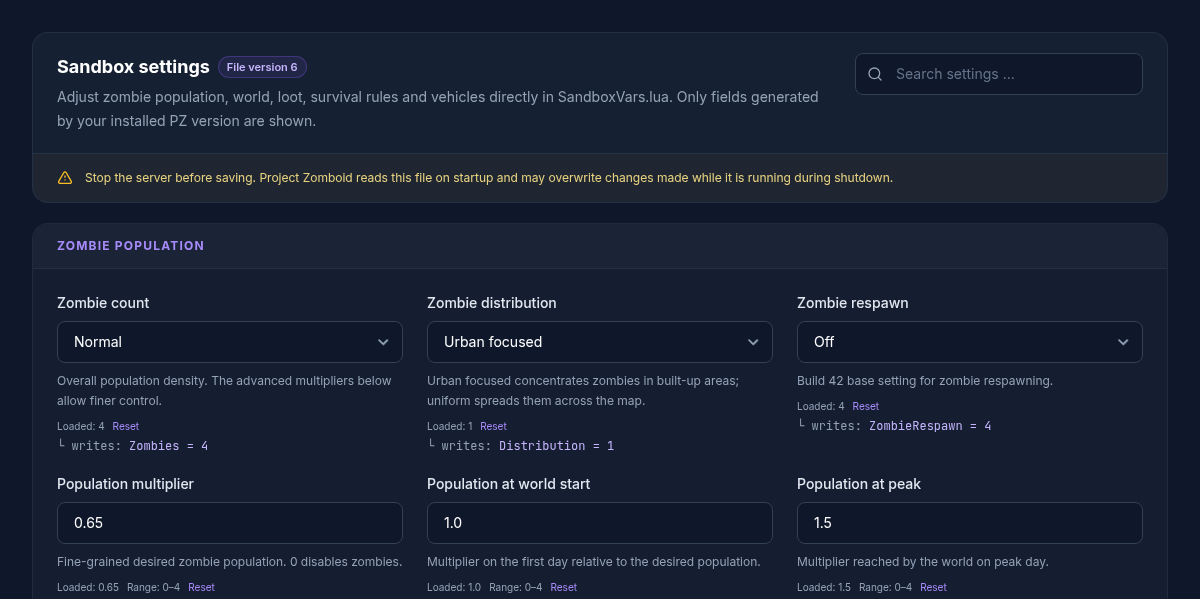
Why the visible fields depend on the build
The editor reads the server's actual SandboxVars.lua and displays only keys present in that file. It therefore does not write a Build 42 key blindly into a Build 41 file. Option labels and available difficulty presets are also read from the installed game version. The full table below is a combined reference; your server may show fewer fields.
Stop the server before saving
Stop the server before applying changes. A running Project Zomboid process can write its loaded settings back during shutdown and overwrite an edit. The active file path ends in {SERVER_NAME}_SandboxVars.lua.
Configure zombie population as one system
The broad zombies setting combines with the detailed multipliers. population_multiplier describes the desired population, population_start_multiplier its initial level and population_peak_multiplier the later peak. population_peak_day controls when that peak is reached.
Respawn is governed by respawn_hours, respawn_unseen_hours and respawn_multiplier. Setting respawn_hours=0 disables regular respawn passes. Change these values as a group and observe several in-game days before adjusting them again.
Difficulty, senses and day length
Zombie speed, strength, toughness, memory, sight and hearing can shape encounters more strongly than a single population value. Random options intentionally create mixed zombies. day_length controls the real duration of a full in-game day, which indirectly changes progression, resource consumption and the pace of timed events.
Existing worlds may react differently from newly generated worlds. Test a backed-up copy or change only a few connected settings at a time. Mods can add their own Sandbox blocks; the editor may discover additional vanilla or mod values from the active file.
All 62 curated settings
The reference is collapsed by default. Each row gives the path in SandboxVars.lua, valid options or numeric ranges and the setting's effect. A dash in the default column means the editor keeps the value from the current file rather than imposing a universal default.
All 62 curated Sandbox settings
- File:
.cache/Server/{SERVER_NAME}_SandboxVars.lua
| Key | Panel label | Type and accepted values | Default | Effect / note | UI restart status |
|---|---|---|---|---|---|
zombies |
Zombie count | Selection · 1 = Insane, 2 = Very high, 3 = High, 4 = Normal, 5 = Low, 6 = None | — |
Overall population density. The advanced multipliers below allow finer control. File path by build: Zombies. |
restart required |
distribution |
Zombie distribution | Selection · 1 = Urban focused, 2 = Uniform | — |
Urban focused concentrates zombies in built-up areas; uniform spreads them across the map. File path by build: Distribution. |
restart required |
zombie_respawn_mode |
Zombie respawn | Selection · 1 = High, 2 = Normal, 3 = Low, 4 = Off | — |
Build 42 base setting for zombie respawning. File path by build: ZombieRespawn. |
restart required |
population_multiplier |
Population multiplier | Number · 0 to 4 · step 0.05 | — |
Fine-grained desired zombie population. 0 disables zombies. File path by build: ZombieConfig.PopulationMultiplier. |
restart required |
population_start_multiplier |
Population at world start | Number · 0 to 4 · step 0.05 | — |
Multiplier on the first day relative to the desired population. File path by build: ZombieConfig.PopulationStartMultiplier. |
restart required |
population_peak_multiplier |
Population at peak | Number · 0 to 4 · step 0.05 | — |
Multiplier reached by the world on peak day. File path by build: ZombieConfig.PopulationPeakMultiplier. |
restart required |
population_peak_day |
Population peak day | Integer · 1 to 365 | — |
In-game day on which peak population is reached. File path by build: ZombieConfig.PopulationPeakDay. |
restart required |
respawn_hours |
Respawn interval (hours) | Number · 0 to 8760 · step 1 | — |
0 disables respawn. Otherwise the time between respawn passes. File path by build: ZombieConfig.RespawnHours. |
restart required |
respawn_unseen_hours |
Unseen before respawn (hours) | Number · 0 to 8760 · step 1 | — |
A region must remain unseen for this long before zombies respawn there. File path by build: ZombieConfig.RespawnUnseenHours. |
restart required |
respawn_multiplier |
Respawn fraction | Number · 0 to 1 · step 0.01 | — |
Fraction of desired population per respawn pass, e.g. 0.1 = 10%. File path by build: ZombieConfig.RespawnMultiplier. |
restart required |
redistribute_hours |
Redistribution (hours) | Number · 0 to 8760 · step 1 | — |
Time before zombies move into empty parts of the same cell. 0 disables redistribution. File path by build: ZombieConfig.RedistributeHours. |
restart required |
rally_group_size |
Rally group size | Integer · 0 to 1000 | — |
0 prevents idle zombies from forming groups. File path by build: ZombieConfig.RallyGroupSize. |
restart required |
zombie_speed |
Speed | Selection · 1 = Sprinters, 2 = Fast shamblers, 3 = Shamblers, 4 = Random | — |
Zombie movement speed. File path by build: ZombieLore.Speed. |
restart required |
zombie_strength |
Strength | Selection · 1 = Superhuman, 2 = Normal, 3 = Weak, 4 = Random | — |
Damage inflicted by each zombie attack. File path by build: ZombieLore.Strength. |
restart required |
zombie_toughness |
Toughness | Selection · 1 = Tough, 2 = Normal, 3 = Fragile, 4 = Random | — |
How difficult zombies are to kill. File path by build: ZombieLore.Toughness. |
restart required |
transmission |
Virus transmission | Selection · 1 = Blood + saliva, 2 = Saliva only, 3 = Everyone's infected, 4 = None | — |
How the Knox virus spreads. File path by build: ZombieLore.Transmission. |
restart required |
mortality |
Infection mortality | Selection · 1 = Instant, 2 = 0–30 seconds, 3 = 0–1 minute, 4 = 0–12 hours, 5 = 2–3 days, 6 = 1–2 weeks, 7 = Never | — |
How quickly an infection becomes fatal. File path by build: ZombieLore.Mortality. |
restart required |
cognition |
Cognition | Selection · 1 = Navigate + use doors, 2 = Navigate, 3 = Basic navigation, 4 = Random | — |
Zombie navigation and door abilities. File path by build: ZombieLore.Cognition. |
restart required |
memory |
Memory | Selection · 1 = Long, 2 = Normal, 3 = Short, 4 = None, 5 = Random, 6 = Random: normal to none | — |
How long zombies remember players after seeing or hearing them. File path by build: ZombieLore.Memory. |
restart required |
sight |
Sight | Selection · 1 = Eagle, 2 = Normal, 3 = Poor, 4 = Random, 5 = Random: normal to poor | — |
Zombie vision radius. File path by build: ZombieLore.Sight. |
restart required |
hearing |
Hearing | Selection · 1 = Pinpoint, 2 = Normal, 3 = Poor, 4 = Random, 5 = Random: normal to poor | — |
Zombie hearing radius. File path by build: ZombieLore.Hearing. |
restart required |
active_only |
Active time | Selection · 1 = Day and night, 2 = Night, 3 = Day | — |
Inactive zombies are slower and less likely to give chase. File path by build: ZombieLore.ActiveOnly. |
restart required |
thump_on_construction |
Attack player constructions | Toggle (true/false) | — |
Zombies may destroy player-built defences. File path by build: ZombieLore.ThumpOnConstruction. |
restart required |
drag_down |
Drag down | Toggle (true/false) | — |
Multiple zombies can drag a player to the ground. File path by build: ZombieLore.ZombiesDragDown. |
restart required |
fence_lunge |
Fence lunge | Toggle (true/false) | — |
Zombies may lunge at nearby players after crossing a fence or window. File path by build: ZombieLore.ZombiesFenceLunge. |
restart required |
day_length |
Day length | Selection · 1 = 15 minutes, 2 = 30 minutes, 3 = 1 hour, 4 = 1.5 hours, 5 = 2 hours, 6 = 3 hours, 7 = 4 hours, 8 = 5 hours, 9 = 6 hours, 10 = 7 hours, 11 = 8 hours, 12 = 9 hours, 13 = 10 hours, 14 = 11 hours, 15 = 12 hours, 16 = 13 hours, 17 = 14 hours, 18 = 15 hours, 19 = 16 hours, 20 = 17 hours, 21 = 18 hours, 22 = 19 hours, 23 = 20 hours, 24 = 21 hours, 25 = 22 hours, 26 = 23 hours, 27 = Real-time | — |
Real-time duration of a full in-game day. File path by build: DayLength. |
restart required |
water_shut |
Water shutoff | Selection · 1 = Instant, 2 = 0–30 days, 3 = 0–2 months, 4 = 0–6 months, 5 = 0–1 year, 6 = 0–5 years, 7 = 2–6 months, 8 = 6–12 months, 9 = Disabled | — |
Window after which plumbing water shuts off. File path by build: WaterShut. |
restart required |
electricity_shut |
Electricity shutoff | Selection · 1 = Instant, 2 = 0–30 days, 3 = 0–2 months, 4 = 0–6 months, 5 = 0–1 year, 6 = 0–5 years, 7 = 2–6 months, 8 = 6–12 months, 9 = Disabled | — |
Window after which grid electricity shuts off. File path by build: ElecShut. |
restart required |
temperature |
Temperature | Selection · 1 = Very low, 2 = Low, 3 = Normal, 4 = High, 5 = Very high | — |
Global world temperature. File path by build: Temperature. |
restart required |
rain |
Rain | Selection · 1 = Very dry, 2 = Dry, 3 = Normal, 4 = Rainy, 5 = Very rainy | — |
How frequently it rains. File path by build: Rain. |
restart required |
erosion_speed |
Erosion speed | Selection · 1 = Very fast, 2 = Fast, 3 = Normal, 4 = Slow, 5 = Very slow | — |
How quickly grass, vines and new trees reclaim the world. File path by build: ErosionSpeed. |
restart required |
nature_abundance |
Nature's abundance | Selection · 1 = Very low, 2 = Low, 3 = Normal, 4 = High, 5 = Very high | — |
Abundance of fish and forage resources. File path by build: NatureAbundance. |
restart required |
food_rot_speed |
Food spoilage | Selection · 1 = Very fast, 2 = Fast, 3 = Normal, 4 = Slow, 5 = Very slow | — |
How quickly food spoils. File path by build: FoodRotSpeed. |
restart required |
fridge_factor |
Refrigeration effectiveness | Selection · 1 = Very low, 2 = Low, 3 = Normal, 4 = High, 5 = Very high, 6 = No decay | — |
How effectively refrigeration slows spoilage. File path by build: FridgeFactor. |
restart required |
helicopter |
Helicopter event | Selection · 1 = Never, 2 = Once, 3 = Sometimes, 4 = Often | — |
How regularly the helicopter attracts zombies. File path by build: Helicopter. |
restart required |
meta_event |
Meta events | Selection · 1 = Never, 2 = Sometimes, 3 = Often | — |
Frequency of distant gunshots and other zombie-attracting sounds. File path by build: MetaEvent. |
restart required |
food_loot |
Perishable food | FoodLootNew: Number · 0 to 4 · step 0.1 · FoodLoot: Selection · 1 = Extremely rare, 2 = Rare, 3 = Normal, 4 = Common |
— |
Abundance of perishable food. File path by build: FoodLootNew or FoodLoot. |
restart required |
medical_loot |
Medical | MedicalLootNew: Number · 0 to 4 · step 0.1 · MedicalLoot: Selection · 1 = Extremely rare, 2 = Rare, 3 = Normal, 4 = Common |
— |
Abundance of medicine and first-aid supplies. File path by build: MedicalLootNew or MedicalLoot. |
restart required |
survival_loot |
Survival gear | SurvivalGearsLootNew: Number · 0 to 4 · step 0.1 · SurvivalGearsLoot: Selection · 1 = Extremely rare, 2 = Rare, 3 = Normal, 4 = Common |
— |
Abundance of tools, tents, fishing rods and similar gear. File path by build: SurvivalGearsLootNew or SurvivalGearsLoot. |
restart required |
weapon_loot |
Melee weapons | WeaponLootNew: Number · 0 to 4 · step 0.1 · WeaponLoot: Selection · 1 = Extremely rare, 2 = Rare, 3 = Normal, 4 = Common |
— |
Abundance of melee weapons. File path by build: WeaponLootNew or WeaponLoot. |
restart required |
ranged_weapon_loot |
Ranged weapons | RangedWeaponLootNew: Number · 0 to 4 · step 0.1 · RangedWeaponLoot: Selection · 1 = Extremely rare, 2 = Rare, 3 = Normal, 4 = Common |
— |
Abundance of firearms and attachments. File path by build: RangedWeaponLootNew or RangedWeaponLoot. |
restart required |
ammo_loot |
Ammunition | AmmoLootNew: Number · 0 to 4 · step 0.1 · AmmoLoot: Selection · 1 = Extremely rare, 2 = Rare, 3 = Normal, 4 = Common |
— |
Abundance of loose ammunition, magazines and ammo boxes. File path by build: AmmoLootNew or AmmoLoot. |
restart required |
xp_multiplier |
Global XP multiplier | MultiplierConfig.Global: Number · 0 to 1000 · step 0.1 · XpMultiplier: Number · 0 to 1000 · step 0.1 |
— |
Multiplier for experience gain. Build 42 stores this in MultiplierConfig.Global. File path by build: MultiplierConfig.Global or XpMultiplier. |
restart required |
loot_respawn |
Loot respawn | HoursForLootRespawn: Integer · 0 to 2147483647 · LootRespawn: Selection · 1 = Never, 2 = Every day, 3 = Every week, 4 = Every month, 5 = Every 2 months |
— |
Build 42 uses hours; 0 disables loot respawn. File path by build: HoursForLootRespawn or LootRespawn. |
restart required |
construction_prevents_loot_respawn |
No loot respawn in player buildings | Toggle (true/false) | — |
Prevents new loot in barricaded or player-built buildings. File path by build: ConstructionPreventsLootRespawn. |
restart required |
starter_kit |
Starter kit | Toggle (true/false) | — |
New characters start with basic supplies. File path by build: StarterKit. |
restart required |
character_free_points |
Free character points | Integer · -100 to 100 | — |
Extra points during character creation. File path by build: CharacterFreePoints. |
restart required |
nutrition |
Nutrition system | Toggle (true/false) | — |
Nutrition affects character weight and condition. File path by build: Nutrition. |
restart required |
multi_hit |
Weapon multi-hit | Toggle (true/false) | — |
Eligible melee weapons may hit several zombies in one swing. File path by build: MultiHitZombies. |
restart required |
rear_vulnerability |
Rear vulnerability | Selection · 1 = Low, 2 = Medium, 3 = High | — |
Bite risk when attacked from behind. File path by build: RearVulnerability. |
restart required |
injury_severity |
Injury severity | Selection · 1 = Low, 2 = Normal, 3 = High | — |
Impact and healing time of injuries. File path by build: InjurySeverity. |
restart required |
bone_fracture |
Bone fractures | Toggle (true/false) | — |
Falls, crashes and zombie attacks may break limbs. File path by build: BoneFracture. |
restart required |
fire_spread |
Fire spread | Toggle (true/false) | — |
Started fires may spread to adjacent areas. File path by build: FireSpread. |
restart required |
generator_fuel_consumption |
Generator fuel per hour | Number · 0 to 100 · step 0.05 | — |
Fuel consumed by a generator per in-game hour. File path by build: GeneratorFuelConsumption. |
restart required |
allow_exterior_generator |
Exterior generators | Toggle (true/false) | — |
Allows generators outdoors, for example to power fuel pumps. File path by build: AllowExteriorGenerator. |
restart required |
enable_vehicles |
Enable vehicles | Toggle (true/false) | — |
Vehicles may spawn in the world. File path by build: EnableVehicles. |
restart required |
car_spawn_rate |
Vehicle spawn rate | Selection · 1 = Very low, 2 = Low, 3 = Normal, 4 = High, 5 = Very high | — |
How frequently vehicles are found. File path by build: CarSpawnRate. |
restart required |
vehicle_easy_use |
Easy vehicle use | Toggle (true/false) | — |
Vehicles do not require keys and are easier to use. File path by build: VehicleEasyUse. |
restart required |
initial_gas |
Initial vehicle fuel | Selection · 1 = Very low, 2 = Low, 3 = Normal, 4 = High, 5 = Very high, 6 = Full | — |
How full the tanks of discovered vehicles tend to be. File path by build: InitialGas. |
restart required |
allow_mini_map |
Allow mini-map | Toggle (true/false) | — |
Players may use the mini-map. File path by build: Map.AllowMiniMap. |
restart required |
allow_world_map |
Allow world map | Toggle (true/false) | — |
Players may open the full world map. File path by build: Map.AllowWorldMap. |
restart required |
map_all_known |
Reveal full map | Toggle (true/false) | — |
The world map starts fully revealed for new characters. File path by build: Map.MapAllKnown. |
restart required |
Verify after the restart
Check the server log for Lua or parsing errors first. Join with the same game build and test the changed area. Population and loot changes may not be visible in one location immediately, so record the previous value and judge the result over a suitable period.
FAQ
Why do I not see all 62 settings?
The catalog combines Build 41 and Build 42. The panel shows only paths that exist in your active file.
Can I disable zombie respawn completely?
Yes. In the detailed respawn configuration, respawn_hours=0 disables regular respawn passes. Also review the broad Build 42 respawn setting when it is available.
Which value creates more zombies?
population_multiplier is the main fine-grained value. The start and peak multipliers plus peak day control how the population changes over time. The broad zombie-count setting also remains part of the result.
Must the server really be stopped?
Yes. Saving requires a reliably stopped server so the running game process cannot overwrite the file.
Sources and review date
Reviewed: 8 September 2026. Fields come from the current panel schema and are matched to the active server file at runtime. English game labels are derived from The Indie Stone's official translation repository: