Project Zomboid Mods & Plugins
Auto Sewing B41
76561198329871201 作
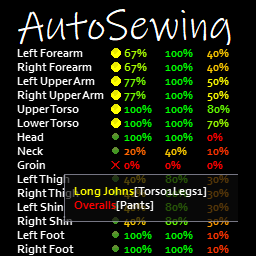
Automatic Tailoring Training. Easy hole reparation and patch. Hole detection and missing patch detection. So you are here ? Ah.. you probably wanna protect yourself but tailoring would destroy your fingers and brain. You've come to the right place. [h1]Automatic Tailoring Training[/h1] Click the Train Tailoring button ! [list] [*]You only have to click one button.(*) [*]Inventory management is done automatically, tailoring ressources can be in equipped bags. [*]Real time speed if optimized to the minimum (solo player only for speed increase). [*]Once ressources are depleted, game is frozen (solo player only). [*]You still have to spend the genuine in-game time (vanilla friendly). [/list] [h1]Easy hole detection, reparation and patch[/h1] Click the red cross to repair ! [list] [*]All is accessible from the Character Protection Page. [*]Tooltip tells you where the hole is. [*]Tooltip tells you where the patch is missing. [*]Upper red cross allows to repair all in one click.(*) [*]Red crosses make it easy to see where the holes are and allow selective repair. [*]Yellow bubbles make it easy to see where the patches are missing are and allow selective patching (leather only). [*]Adds bullet protection. [*]Real time speed is optimized to the minimum (solo player only for speed increase). [*]You still have to spend the genuine in-game time (vanilla friendly). [*]If you use [url=https://steamcommunity.com/sharedfiles/filedetails/?id=2859296947]MoodleFramework[/url], you have a temporary moodle (15s) that helps you track holes. [/list] (*)You still have to loot the tailoring ressources: a needle, lots of threads, infinite amounts or ripped sheets. Quality of life mod ! Compatible B41.60+ including multiplayer [quote] [url=http://theindiestone.com/forums/index.php/topic/2530-mod-permissions/?p=36478]Ask for permission[/url] This mod can only be added to and extended with the express permission from the original creator. Having received permission, credit must be given to the original creator, both within the files of the mod and wherever the mod roams online. If no permission is received you may not alter the mod. [/quote] You wanna support? A nice word is always welcome. Constructive feedback too. Else you can [url=https://ko-fi.com/tchernobill] [img]https://i.imgur.com/1xL45if.png[/img] [/url] Workshop ID: 2584991527 Mod ID: AutoSewing

Agrotsar Farming Company
76561198082682625 作
[url=patreon.com/_tsar][img]https://steamuserimages-a.akamaihd.net/ugc/2047488292130357038/307A1EFBD98F7B63C736466AACD5CF58235FB88A/[/img][/url] Are you running out of provisions in your settlement? Are the nearby stores empty of shelves? No time to farm? Our company is ready to help you! Our goal is a comprehensive provision of large settlements and private farms with new and used agricultural equipment. In the catalog of our company the following is presented: [olist] [*][u][b]Oleg Deere 48342[/b][/u] is a 500 hp* tractor with a comfortable cab, designed for intensive work. Panoramic windows will provide a perfect view on the field. Built-in heater and air conditioning ensure the best working conditions for the operator. A six-cylinder water-cooled gasoline engine, German two-stage clutch, air compressor and reverse gearbox - all these features speak in favor of choosing this model of agricultural machinery. [*][u][b]Agrotsar Plough-69[/b][/u] is the chevisel plow of our own production. It is designed for deep no-tillage with deepening of arable horizon. Breaking over-consolidated layer, the plough improves penetration of water and nutrients into soil, increases soil fertility and crop yield, and activates biological processes. Shoeless tillage with a chevisel plough prevents the development of wind and water erosion of soils. [*][u][b]Agrotsar Seeder-2000[/b][/u] is the seeder of our own production. Designed for sowing of broccoli, cabbage, potatoes, strawberries, carrots, radishes, tomatoes. It is perfect for beets, cauliflower, corn, wheat and other seeds. Two lines of seeding. Features uniform seeding and high efficiency. Seed spacing is stable. [/olist] The main advantage of all our equipment is the possibility of replacing the original spare parts with their analogues from cars. And also the possibility of independent production of unique elements from improvised means, all the necessary drawings you will find in the issues of our magazines "Мachinery in agriculture". [i]* - power is given in hippopotamuspower.[/i] Mod produced by TMC as a result of a vote in the Tsar's Discord Community. [img]https://steamuserimages-a.akamaihd.net/ugc/1660101375273576639/0C12E325C464F5DC166E5FF2AB70A43581BED64F/[/img] [url=boosty.to/_tsar][img]https://steamuserimages-a.akamaihd.net/ugc/5071647734847773052/9BE2EEBC53FDD151A5B6DF9290E46BEADC060DDA/[/img] [/url][url=pz.ibrrus.ru/mods/][img]https://steamuserimages-a.akamaihd.net/ugc/5071647734847775404/33396705B3590231ED4B47752B428995037DA72C/[/img][/url] [url=discord.gg/xkCEcwGZMW][img]https://steamuserimages-a.akamaihd.net/ugc/1783982255480129217/A3B05641944B7BE1D25604929C4B7C49663617C5/[/img][/url] [quote] You can freely use this mod on your server. We publish information about mod update times on Discord in advance: https://discord.gg/PHhsuQxDue Mod permission according to TIS policy: [url=http://theindiestone.com/forums/index.php/topic/2530-mod-permissions/?p=36478]Ask for permission[/url] Redistribution of this mod without explicit permission from the original creator is prohibited under any circumstances. This includes, but not limited to, uploading this mod to the Steam Workshop or any other site, distribution as part of another mod or modpack, distribution of modified versions. The product can be published on Steam only through an account with the name iBrRus. © iBrRus [/quote] [url=steamcommunity.com/sharedfiles/filedetails/?id=2937821982][img]https://steamuserimages-a.akamaihd.net/ugc/2047488292130535928/9877FC0C26815A76FBB15EA3AB9C1C8DEF04574E/[/img][/url] Version:1.01 Workshop ID: 2728257015 Mod ID: agrotsar
STALKER Armor Pack
76561198042129945 作
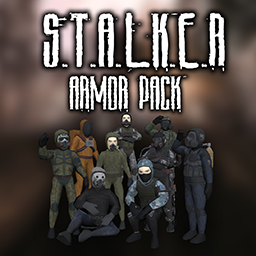
[h1][b]This mod will NOT BE UPDATED to B42 until Indie Stone gives us the STABLE BUILD. The reason for this is that I'm not going to go through all the assets to update them, for the devs to then make the work useless next update, which is literally what happened and why it doesn't work. Given how B42 works, I'd not be surprised it happens since they changed how 3d skinned meshes work. Stop asking. I am not going to update it until then. And when the time comes, you will have the update, adjustements AND new content.[/b][/h1] Please, check the discussions and the pinned messages. [h1]Features[/h1] - Adds about 100 outfits and 70 head pieces to the game, based on the S.T.A.L.K.E.R. universe, including the three vanilla games and outfits from the Anomaly mod. Beginning from simple Rookie outfits, to the basic outfits, Berril, NBC outfits, SEVA, Skat-9, Exosuits and Exoskeletons. - All items are distributed across the map on containers. [b]NEW:[/b] Options for distribution. Need feedback on this. Last patch heavily nerfed spawn rates, and added extra mods for increasing the spawn rates if anybody wants them. - All items are balanced to not be overpowered, although some are better than others, specially the exoskeleton, which is better than vanilla outfits in terms of stats. - Each outfit (with the exception of the Rookie Jackets), has three items: Jacket, Vest and Trousers. Although some include Shoes and Gloves (such as the Exosuit). In most of the outfits (Berril, Skat-9 and Exosuits being the exceptions), you can wear the hood up or down. - You can mix all outfits as you want for more interesting cosmetic looks. All factions have similar colours in between their own outfits, which allows for easy combinations. - Features all 9 vanilla S.T.A.L.K.E.R. factions: Loners, Duty, Freedom, Mercenaries, Ecologists, Monolith, Military, Bandits and Clear Sky. [b]NEW:[/b] Lastest patch added UNISG, Renegades and Sin factions. - Back attachments: some outfits only are complete when using the back attachments, these are the Exoskeleton Power Supply, SEVA Breathing System, the SSP-99M Breathing System and the Oxygen Tank. None of these have any utilities in the game, they do not power anything nor help you breathe anywhere, they are mere cosmetics, and you can even still wear a backpack while wearing them. - Gas Mask Filter System: The pack includes 9 different type of Gas Masks. It also includes one new item named "Gas Mask Filter". By having one in your inventory and right clicking any of the new Gas Masks (without a filter), you can insert the Gas Mask Filter into the Gas Mask. By right clicking the Gas Mask (with a filter), you can remove the Gas Mask Filter. This is done through the recipe system. At this moment, it also has no utility, other than pure cosmetics and immersion. - S.T.A.L.K.E.R. Exoskeletons: While wearing an Exosuit, the player may decide to also wear an Exoskeleton frame, these, along with their power supply, complete the exoskeleton in terms of cosmetics. The Exoskeleton, along with the Back Attachments, use a new outfit slot and do not overwrite any other clothes. This means that you can wear the exoskeleton over other outfits, this is not intended, but there is no fix. - Patch System: Based on StalkerZ Roleplay DayZ server's system, this patch system allows players to wear patches of their faction. Beginning by wearing an Armband, which is a new outfit slot. Then you can equip any patch you wish to display your faction. This also allows for, in PvP, players kill others and take their patches as rewards. - [b]NEW:[/b] Artefact Containers: Lastest patch adds artefact containers to the game. The four from Anomaly. These act as fanny packs, and you can put things inside. This mod does not add artefacts, but this is an extra help for servers who wish to use artefact containers. [b]DISCLAIMER:[/b] I am a 3D artist. I am not a coder. While I had ideas for the Exoskeleton Power Supply to power the Exoskeleton itself, and act like batteries for it, I can't really code something like that. While we do not have any radiation system, outside of mods such as Toxic Air or Toxic Fog, making the Gas Mask Filter System usable, for the filters to actually be useful for something and be spent overtime, I also do not know how to make this usable. I recommend you use mods that include this, there are a bunch in the Workshop! [b]Patches and mods of this mod:[/b] - STALKER Zombies Addon ( https://steamcommunity.com/sharedfiles/filedetails/?id=2836082843 by Arcalane): makes it so that some zombies wear STALKER outfits from this mod. - Functional Exoskeletons ( https://steamcommunity.com/sharedfiles/filedetails/?id=2882963187 by GSQ): Changes how the exoskeletons work along with the power supplies. - STALKER Functional Exoskeletons REFORGED: https://steamcommunity.com/sharedfiles/filedetails/?id=2924374398 by Nasovic - Spanish Translation: https://steamcommunity.com/sharedfiles/filedetails/?id=2846079400 by Siowar [h3]Credits and thanks[/h3] - Kyne's Peace/ZunaSW: All the mod, code, 3D models, textures. - Oren and Z-Life team: Commissioning some of the 3d models. - GSC Game World: For the S.T.A.L.K.E.R. universe. - Thanks to the S.T.A.L.K.E.R. Anomaly team, for huge inspiration, outfit ideas, and easy references. - Thanks to StalkerZ DayZ Server for huge inspiration, including the Patch System. - Russian translators: https://steamcommunity.com/profiles/76561199048350046 and https://steamcommunity.com/id/se7enpitt - Portuguese Brazilian translator: https://steamcommunity.com/id/bolomole - Ukranian translator: https://steamcommunity.com/profiles/76561198802002408 [b]Bug reports are welcomed. Feedback is welcomed, specially about balance and distribution.[/b] [code]Please do not redistribute this mod without permission. This means do not post it anywhere, on Steam, or off Steam. However, feel free to make patches for it. If you put it in a modpack for your server, ask first, and then put me as author in the credits. Feel free to indeed add it to your own servers.[/code] [h3]Support me on Ko-Fi:[/h3] https://ko-fi.com/zunasw Workshop ID: 2831715402 Mod ID: StalkerArmorPack Mod ID: StalkerArmorPackExtraSpawns01 Mod ID: StalkerArmorPackExtraSpawns02
Obvious Collecting
76561198261072538 作
[h1]Collecting![/h1] From the creator of [url=https://steamcommunity.com/sharedfiles/filedetails/?id=2875848298]common sense[/url], comes obvious collecting! The mod that lets you pick up stones, twigs, garbage bags and other stuff that is literally right in front of you! [h1]How does it work?[/h1] Have you ever been in need of a stone or garbage bag and saw one just standing there but you can't interact with it? Then this mod is for you! Simply right click obvious resources lying on the ground and pick them up! [h1]Customization[/h1] This mod features Sandbox Options, which allows you to tweak everything to make sure the mod fits YOUR needs. [h1][b]FAQ[/b][/h1] [h1]Does it work in multiplayer?[/h1] Of course! [h1]Does it work on existing saves?[/h1] Absolutely! [h1]Is the mod compatible with [...]?[/h1] This mod shouldn't have any incompatibility with other mods. You can [url=https://steamcommunity.com/workshop/filedetails/discussion/3056538624/3882724699534850404/]click here[/url] to check which mods are known to cause problems. [h1][b]Credits[/b][/h1] Powered by [b]BitBraven[/b]. And of course, thank [b]you[/b] for supporting me! [img]https://media1.giphy.com/media/wRhSi68hscY8xNOlXS/giphy.gif[/img] [h1]Did you like my mods?[/h1] Join me on Discord and maybe Youtube if you want! I also accept Ko-Fi donations. All money is used to develop mods. [img]https://i.ibb.co/fD7qHWV/Idle-128.gif[/img] [url=https://ko-fi.com/N4N3EUJUZ] [img]https://i.postimg.cc/kMp1HZ3w/Banner-Ko-Fi-Steam.png[/img] [/url] [url=https://discord.gg/GmndN8qjrr] [img]https://i.postimg.cc/7P3nkYRB/Banner-Discord-Steam.png[/img] [/url] [url=https://www.youtube.com/channel/UCvAh20mgjJfT8RdBq4CDsBA] [img]https://i.postimg.cc/GhT7nQbR/Banner-Youtube-Steam.png[/img] [/url] [code]This product is protected under © copyright law. You are free to use it for personal purposes. Redistribution, for commercial purposes or not, is strictly prohibited without prior permission. Please note that the English version of this disclaimer takes precedence over translations, as they may be outdated. For more information, please [url=https://pdfhost.io/v/mUAohjA2S_End_User_License_Agreement]Click Here[/url] to read the full End User License Agreement. Enjoy! 💖 [/code] Workshop ID: 3056538624 Mod ID: BB_Foraging
Trelai_4x4 Riverside Expansion
76561198042352363 作
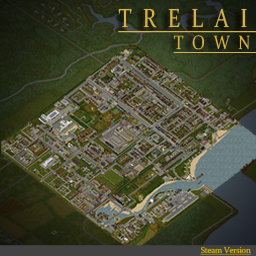
A New 4x4 Town Riverside Expansion. ( LEGACY ) -- Expands the South of Riverside into a new hustling bustling town called Trelai. -- (Tree-Lie) -- Close Quarters. Custom and Community Built, Unique Places of Interest. -- ____________________ Features & Info ____________________ ▪︎ Trelai_4x4_Steam V0.72 - 22,22 Starting Cell. (16 Cells) - Various Spawns - 1033+ Buildings, RCI Areas - Lootable Map & Annotated Maps - Radio and TV Broadcast - Static Climbable Ladders - Custom Items & Content Custom Tiles -Trelai Tiles Community Tiles From -IncludingBuiltIn: DirkPalooza, Throttle, Azas Posters, Dylan, Apoc, Hydro, Atox, Others+ Update Message: ____________________ Version History ● Trelai V.72 (Build 41.78.16) (LEGACY) ____________________ ____________________ ____________________ (( Please find me on Discord if encounter any and all bugs. Feedback highly appreciated )) (( If you'd like to get involved in improving this map, may it be bug hunting or more, then get in touch. )) (( Special thanks to PZ Official Discord and all the good people there. )) (( Extra Special Thank You...to Everyone who has played the map since its been uploaded and has Rated, Favorited and added it to your collections, this is greatly appreciated. (Discord Server Link ) = Closed For The Forseeable Future Workshop ID: 2800337234 Mod ID: Trelai_4x4_Steam Map Folder: Trelai_4x4 Map Folder: Trelai_spawns Map Folder: Trelai_storyspawn
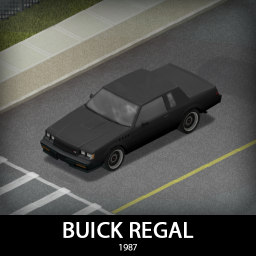
'87 Buick Regal
76561198089039119 作
GNX is here, together with Turbo T and a very stealthy variant! They are fast, roomy and good looking, just make sure you have your affairs in order before you go testing the top speed. They have some unique features and stats but share all the parts, everything is craftable and repairable so have fun! [b]Main features:[/b] [list] [*]3 variants (Turbo T, Turbo T FBI and GNX) [*]3 Front bumpers and a rear bumper with 2 tiered protection [*]Fully animated hood, trunk, doors and windows [*]Visible interior and character (with improved exit/enter/aim animations) [*]All parts have 3d objects you can remove and place in the world [*]Extra parts to craft and find in the world to make the vehicle truly yours (bumpers, bullbars, window armor, roofracks, front lips, spoilers etc) [*]Multiple texture variations [*]Armor protection for windows, doors, engine, headlights etc [*]4 seats [/list] [b][list] [*]You can use it in your current save game, just enable the mod in the load menu [*]It can tow and be towed [*]Not recolorable [/list][/b] [b]Things to come:[/b] [list] [*]Sunroof variant, T top, stock chrome variants without the blackout parts and more parts [/list] If you can't wait to find this mod in your game and want to test it right away, use [url=https://steamcommunity.com/sharedfiles/filedetails/?id=2634426926]bikinitools[/url] to spawn it, hide the items that your character holds while in vehicle, or for all other good stuff that mod has, go get it! [b]If you like my mods, please consider supporting me with a coffee[/b], so I don't fall asleep while making new mods and supporting old ones :) [url=https://ko-fi.com/ki5mods][img]https://i.imgur.com/2uTskWl.png[/img][/url] Check out my vehicle mods: [url=https://steamcommunity.com/sharedfiles/filedetails/?id=2490220997][img]https://i.imgur.com/1C4iQ6U.png[/img][/url] [b]Credits:[/b] [list] [*]This mod is commission work by request of Beornvig [*]Thanks to The Indie Stone for making this awesome game and all this possible. [*]Special thanks to bikinihorst for the huge help with code, optimization, and taking care of the multiplayer and part code.[/list] [quote=KI5] Ask for permission This mod can only be added to and extended with the express permission from the original creator. If no permission is received you may not alter the mod, and it must be treated as a mod that is 'On Lockdown'. You are not allowed to repack this mod under any circumstances, ever. [/quote] [b]Compatibility:[/b] ✅ B41 (b41.78.16) Single Player / Multiplayer fully supported ✅ B42 (b42.12) Single Player fully supported ✅ B42 (b42.13+) Single Player / Multiplayer fully supported Vehicle IDs: 87buickRegalTurboT, 87buickRegalTurboTfbi, 87buickRegalGNX Workshop ID: 3226885926 Mod ID: 87buickRegal
Horde Night
76561198067671721 作
[h1]2024/12/22 UPDATE:[/h1] [list] [*]Fixed a bug linked to b42's new zombie spawning code. [*]Added Russian language translation. [/list] [h1]2024/12/19 UPDATE:[/h1] [list] [*]Added Support for b42 unstable branch. [*]Added German and Thai language translation. [/list] [h1]2022/2/1 UPDATE:[/h1] [list] [*]Fixing an issue where the horde night may not start if the horde night hour is set to 0. [*]Greatly turned down the horde night warning sound volume. [*]Stopped zombies spawning on multiplayer safe house areas. [/list] [h1]2022/1/22 UPDATE:[/h1] [list] [*]Removed the server log outputs that shows if the SendClientCommand function is called. [*]Added sandbox setting "HordeNight Indicator", when on, there will be an icon on the top right of the screen when it's currently the horde night day. Note, random Horde Night will not be indicated by this way. [/list] [h1]2022/1/15 UPDATE:[/h1] [list] [*]Fixing an issue where HordeNight start spawning when someone in MP join the game. [*]Fixing the Cezch translation encoding problem. [*]Added Tradition Chinese translation. [/list] [h1]2022/1/14 UPDATE:[/h1] [list] [*]Fixing an origin unknown issue of sometime in MP, getSpecificPlayer() will fail and cause the whole mod to break. Changed the code to hopefully avoid this issue. [*]Fixing an issue where the sandbox setting "Months Since The Apocalypse" would mess up the Horde Night day calculation. [*]Added Cezch translation (credit to BeatlJoe). [*]Balanced some zombies spawn amounts for random horde night. [/list] [h1]2022/1/13 UPDATE:[/h1] [list] [*]Fixing an issue where in multiplayer if there is a player with no admin access, the zombies won't spawn. [*]Fixing an issue where in dedicated server, the Horde Night day calculation get all messed up. [*]Changed the max values for First HordeNight Day and Frequency, for people want longer experience. [/list] [h1]2022/1/12 UPDATE:[/h1] [list] [*]Fixing the Multiplayer issue where the game will delete all the Horde Night zombies. This is done by giving zombies dresses... yes, very true. [*]Adding an new Sandbox Option "HordeNight Spawn Distance", for players who have trouble spawning zombies in Horde Night. [/list] [h1]2022/1/11 UPDATE:[/h1] [list] [*]Fixing an issue where in multiplayer Client side players can't see the Horde Night zombies. [*]Expanded the Horde Night zombies spawning distance, now they will spawn at farther range. [*]Adding an new Sandbox Option "Random HordeNight Chance", for players want an unpredictable Horde Night experience. [/list] [h1]End-game challenge is here, can you survive this non-stop horde nights challenge?[/h1] [h1]What's a Horde Night?[/h1] If you have played games like 7 days to die, you will know what's coming. Someday in the night, a big horde will appear around you, and track you down. Present you a big challenge to overcome. [h1]What will happen?[/h1] At the right date and time, you will get a warnning that a Horde Night is coming, not long after, every players will get a big swarm approaching from all sides. Be prepared. [h1]Can we custom the Horde Night?[/h1] Yes, there are 9 sandbox options for Horde Night customizations under "Advanced Zombie Options". [list] [*][u]HordeNight Starting Hour[/u]: At which hour would the HordeNight start. [*][u]First HordeNight Day[/u]: At which day would the first HordeNight start. 0 means the spawn day, 1 means the day after the spawn day. [*][u]HordeNight Frequency[/u]: How many days would a HordeNight start after one another. 1 means HordeNight every day. [*][u]HordeNight Starting Zombie Counts[/u]: How many zombies would spawn at the first HordeNight. [*][u]HordeNight Zombie Increments[/u]: How many more zombies would spawn in the next HordeNight after you survived one. [*][u]HordeNight Zombie Limits[/u]: The maximal amount of zombies could spawn in a HordeNight. [*][u]Random HordeNight Chance[/u]: The random chance to start a HordeNight, outside of the regular frequency. It will only happen after the first HordeNight and not the day where the regular HordeNight would happens. 0.0 means no random HordeNight, 1.0 means HordeNight everyday.[b] Note: In MP, everyone get their own random horde night, someone could get a horde at a random night and others could just be in peace at that same night.[/b] [*][u]HordeNight Spawn Distance[/u]: The maximal distance for a HordeNight zombie to spawn around players. Turn down the value if you don't see zombies spawning in the HordeNight. [*][u]HordeNight Indicator[/u]: When it's on, there will be an icon on the top right of the screen when it's currently the horde night day. Note, random Horde Night will not be indicated by this way. [/list] [h1]Can it run on multiplayer?[/h1] It should work on MP, but currently, the game has a hardcoded optimization system that removes newly spawn zombies when an area has too many zombies already. So although this mod work with MP, there is still some possibility that some Horde Night zombies will be removed by the game itself, so the Horde Night zombies number may not be what you set to be in MP, by just a small amount. [h1]Will the zombies spawn in my house?[/h1] They will never spawn on tiles that considered "inside" , and they will never spawn in your viewing range. So as long as your base is closed in or near by, no zombies will spawn in your base. [h1]Why do I not see the mod sandbox options when editing server setting?[/h1] Be sure to enable the mod on the main menu first. [h1]How many zombies would totally spawn in a multiplayer game?[/h1] Let's say you set to spawn 100 zombies, and there is 4 players in the server. Every player will get their own horde of 100 zombies. Which means it would a total of 400 zombies spawn, even if they are in the same area. More people more challenges. [h1]Can I add this to an existing SP save or MP world?[/h1] Yes. [h1]Why does It spawn way more zombies than I set it to be?[/h1] Zombies that coming to you won't just be zombies that spawn in the horde night, those pre-existing zombies will also got alerted to you. They are not deaf, they will follow this big swarm event. Workshop ID: 2714850307 Mod ID: HordeNight01 Mod thumbnail modified from "They are billion" trailer Workshop ID: 2714850307 Mod ID: HordeNight01 Mod ID: HordeNight01 Workshop ID: 2714850307 Mod ID: HordeNight01
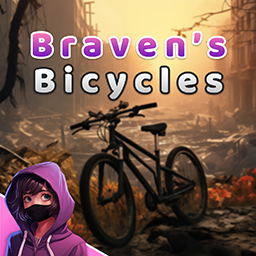
Braven's Bicycles Redux
76561198261072538 作
[h1]The Bicycle Revolution Returns![/h1] I always found it a bit odd that PZ didn't have any working bicycles, so I decided to do it myself. Goodbye pollution. Goodbye beaten up cars without gas or keys. Hello freedom! This mod introduces bicycles to the game. Bicycles are somewhat difficult to find though, so watch out for it! [b]Obs:[/b] This mod is returning after a long time. I no longer have access to the old bug reports or feedback. Please post any issues you encounter or suggestions you might have! [h1]Advantages:[/h1] [list] [*]Doesn't require gas or power, you are the engine! [*]Makes very little noise, ideal for stealth! [*]Highly customizable! [*]Since it's a bicycle you don't need keys, just hop in! [/list] [h1]Disadvantages:[/h1] [list] [*]The more you pedal the more tired you get! [*]You are very vulnerable to attacks! [*]Low storage capacity! [*]Relatively low top speed! [/list] [h1]How does it work?[/h1] The bicycle is a vehicle that can offer immense advantages, with some costs, of course. The bicycle works just like in real life. Pedalling tires you but also gives you fitness exp. Don't pedal to full exhaustion or you will fall off! The faster you go, the faster you tire. Pedalling also warms you up if you are cold, and you can pick up the bicycle and transport it. There are various types of bicycle, and they each have their own exclusive differentials. [h1][b]F.A.Q[/b][/h1] [h1]Does it work in Multiplayer?[/h1] Of course it does! [h1]Does it work on existing saves?[/h1] Yes! But bicycles won't spawn on already explored areas. [h1]What does this mod offer?[/h1] Please click [url=https://steamcommunity.com/workshop/filedetails/discussion/2988491347/3812906855259848876/]here[/url] to check it out. [h1]Is the mod compatible with [...]?[/h1] Please click [url=https://steamcommunity.com/workshop/filedetails/discussion/2988491347/3812906855259854190/]here[/url] for a list of known incompatible mods. Everything else should work perfectly. [h1]How do I transport the bicycle?[/h1] To pick up a bicycle, right click it or use the Vehicle radial menu. To place a bicycle, simply drop its frame on the ground. [h1][b]Credits[/b][/h1] Powered by [b]BitBraven[/b]. Model adjustments and animations by [b]MonkeyShark[/b]. And of course, thank [b]you[/b] for supporting me! [img]https://media1.giphy.com/media/wRhSi68hscY8xNOlXS/giphy.gif[/img] [h1]Like my mods?[/h1] Join me on Discord and maybe on Patreon if you feel like it! I also accept Ko-Fi donations. All money is used on mod development. [img]https://i.ibb.co/fD7qHWV/Idle-128.gif[/img] [url=https://ko-fi.com/N4N3EUJUZ] [img]https://i.postimg.cc/kMp1HZ3w/Banner-Ko-Fi-Steam.png[/img] [/url] [url=https://discord.gg/GmndN8qjrr] [img]https://i.postimg.cc/7P3nkYRB/Banner-Discord-Steam.png[/img] [/url] [url=https://www.youtube.com/channel/UCvAh20mgjJfT8RdBq4CDsBA] [img]https://i.postimg.cc/GhT7nQbR/Banner-Youtube-Steam.png[/img] [/url] [b]3D models used[/b] "Yellow Bicycle" model by Tatyana Volk (https://skfb.ly/6XGBB) "Mountain bike" model by Niilo Poutanen (https://skfb.ly/o6NM6) The models above are licensed under [url=http://creativecommons.org/licenses/by/4.0/]Creative Commons Attribution 4.0[/url] [code]This product is protected under © copyright law. You are free to use it for personal purposes. Redistribution, for commercial purposes or not, is strictly prohibited without prior permission. Please note that the English version of this disclaimer takes precedence over translations, as they may be outdated. For more information, please [url=https://pdfhost.io/v/mUAohjA2S_End_User_License_Agreement]Click Here[/url] to read the full End User License Agreement. Enjoy! 💖 [/code] Workshop ID: 2988491347 Mod ID: BB_Bicycles Vehicle IDs: Base.BicycleRegular, Base.BicycleRegularScrap, Base.BicycleMTB, Base.BicycleMTBScrap
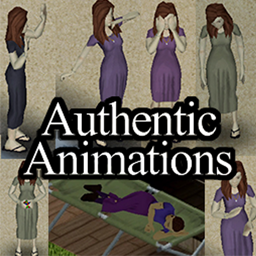
Authentic Animations
76561198039691860 作
Edits Emote Radial Menu to Do Animations - Hold "Q" to start! No further installation required. hit subscribe, enable, and play! ALL ANIMATION ASSETS ARE CREATED BY THE GREAT MARTIN OF TIS Credit also goes to ibRus some code fixes. [h1] Yes this mod works with both Build 41 and 42! [/h1] Workshop ID: 2207282444 Mod ID: AuthenticAnimations
![[B41] The Only Cure](https://images.steamusercontent.com/ugc/17567883669755684376/1631D0B08902D9652DC2C53AE567935114921B5C/)
[B41] The Only Cure
76561198042039674 作
[img]https://raw.githubusercontent.com/ZioPao/The-Only-Cure/551125bb50cb65608ad89ca81ef0daccb3b02c4c/dev_stuff/logos/title.png[/img] [h1]You're bitten. You have two choices.[/h1] Wait until you succumb to the virus or take matters into your hands. Cut off that infected part and live to die another day. [h1]Setup[/h1] [strike]Use it with the following mods for the intended experience: [list] [*] [url=https://steamcommunity.com/sharedfiles/filedetails/?id=2904920097]Fancy Handwork[/url] [*] [url=https://steamcommunity.com/sharedfiles/filedetails/?id=2934621024]Brutal Handwork[/url] [/list] Place them [b]BEFORE[/b] The Only Cure in your mod list![/strike] [b]At the moment, the mods listed here aren't compatible with B42.[/b] [hr][/hr] [h1]Quick guide[/h1] [h2]Amputation[/h2] Get a [i]Saw[/i]/[i]Garden Saw[/i], right click on it, and choose which limb to amputate. You can also drag n' drop your Saw item directly into the afflicted area to start cutting it off. If you have some [i]bandages[/i] and\or [i]stitches[/i] in your inventory you will automatically use them, multiplying the chances of your survival. If you have a [i]tourniquet[/i], place it on the correct side to dampen the amount of damage you will take after you're done amputating the limb. Keep in mind that if you amputate your [b]upper arm[/b], you won't be able to equip any prosthesis. After you've amputated a limb, you will gain [b]skill points[/b] for the amputated side, making timed actions faster in due time. [h2]Cicatrization[/h2] You can check the cicatrization status of an amputated limb from your [b]Health Panel[/b] From time to time, you should clean your wounds with a bandage to help the cicatrization process. If your limb isn't completely cicatrized, you can still equip prosthetic limbs, but that can trigger random bleedings from that area. [h2]Prosthetics[/h2] If you're missing a hand, you won't be able to do a lot of things, such as equipping two-handed weapons. With prosthetics limbs, you can fix that. There are two prosthesis type that can be crafted\found in medical areas: [list] [*] Hook Prosthesis [*] Arm Prosthesis [/list] The main difference between the twos is that your actions will take longer with the Hook Prosthesis. When you equip a prosthetic limb, you will slowly gain skill points in the [b]Prosthesis Familiarity[/b] perk, making actions more speedy in due time. [h2]Admin tools[/h2] If something strange happened, an admin can reset TOC mechanics on any player by right clicking on them and select [i]"Reset Amputations"[/i]. They could also do the opposite by clicking on [i]"Force Amputation"[/i] for each amputable limb. [hr][/hr] [h1]Issues and bugs?[/h1] Got any issues or found some pesky bugs? Report them on GitHub! [url=https://github.com/ZioPao/The-Only-Cure][img]https://img.shields.io/badge/GitHub-100000?style=for-the-badge&logo=github&logoColor=white[/img][/url] [h1]Credits[/h1] [table] [tr] [th]Pao[/th] [th]Developer[/th] [/tr] [tr] [th]Mr. Bounty[/th] [th]Original Developer[/th] [/tr] [tr] [th]Chuckleberry Finn[/th] [th]Logo and Icon[/th] [/tr] [tr] [th]dhert[/th] [th]Compatibility API[/th] [/tr] [tr] [th]JCloudJalix, Rinary1, pllq, ttaeo, pgmbru[/th] [th]Translation[/th] [/tr] [/table] [hr][/hr] [h1]Want to support me?[/h1] [url=https://ko-fi.com/M4M7IERNW][img]https://storage.ko-fi.com/cdn/kofi3.png[/img][/url] [hr][/hr] Workshop ID: 3236152598 Mod ID: TheOnlyCure

Starlit Library
76561198042464272 作
[h2]Starlit Library is a dependency for other mods to use, it doesn't do anything on its own. As an end user, you don't have any reason to install this unless a mod you use requires it.[/h2] Developers: see the [url=https://demiurgequantified.github.io/StarlitLibrary/]docs[/url] for more information. [code]Anyone can use Starlit Library as a dependency, but do NOT copy the files into your mod. You cannot redistribute any part of the library without express permission.[/code] [url=https://github.com/demiurgeQuantified/StarlitLibrary]View on GitHub[/url] Workshop ID: 3378285185 Mod ID: StarlitLibrary
![Rosewood VHS & Gun Stores [B41]](https://images.steamusercontent.com/ugc/2023839223633297764/C580142251EA04C8D02245E76CB87D3BA73E104A/)
Rosewood VHS & Gun Stores [B41]
76561198041411600 作
[u][url=https://steamcommunity.com/sharedfiles/filedetails/?id=3756111134]B42 version here[/url][/u] [hr][/hr] Since Rosewood is missing a VHS store and a guns store, this mod adds one of each, south of Rosewood. The VHS store is right next to the southern gas station, with an appartment on the second floor. The gun store is quite isolated in the woods, and to get inside, you'll need a sledgehammer. There is no spawn point to directly spawn there. Just spawn in Rosewood and head south. Zombie density is slightly increased compared to vanilla. The cell used is 27x40. [hr][/hr] [h1]Compatibility[/h1] I haven't found an other map that uses this cell. If you do, share it in the comments. Compatible with: [list] [*]Rosewood Expansion [*]Rosewood Cabins [*]Rosewood Military Hospital [*]Westwood [*]Save Your Station! [*]Access Road (Research Facility) [*]...And many more [/list] NOT Compatible with: [list] [*]10 Years Later (it changes the entire map) [*] SecretZ's Rosewood Fossoil Blockade. [/list] [hr][/hr] [b]Do you like this? Try my other map : [/b] [list] [*] [u][url=https://steamcommunity.com/sharedfiles/filedetails/?id=2721653030]West Point Trailer Park & VHS Store[/url][/u] : It adds a VHS store south of West Point since it's missing one. [*][u][url=https://steamcommunity.com/sharedfiles/filedetails/?id=3025055056]West Point Gated Community[/url][/u] : It adds a rich gated community North of West Point. [/list] [hr][/hr] [h1]"We want to use this map in a mod pack, do we have permission ?"[/h1] Yes, as long as it's a private mod pack. [hr][/hr] [h1]"Can I add this midgame ?"[/h1] If you haven't visited Rosewood in your saved game, yes. [hr][/hr] [h1]"How do I get in the gunstore?"[/h1] Sledgehammer your way in. [hr][/hr] [h1]For Multiplayer: instructions given by a comment below :[/h1] How to get the mod to work: 1. Go to the "Map" section of sandbox settings. 2. Choose the map ("Rosewood VHS Store") from the dropdown menu under "Add an available map to the list". 3. Click on "Muldraugh, KY" in the "Maps used by this server" box and click "Move down" until it's at the bottom of the list. [hr][/hr] Workshop ID: 2922087098 Mod ID: RosewoodVHSGunStores Map Folder: Rosewood VHS Store
![Dynamic Traits and Expanded Moodles [B41 & B42]](https://images.steamusercontent.com/ugc/9672878333671723/E82659C34461C0F74F1ED450D84E1BE727377363/)
Dynamic Traits and Expanded Moodles [B41 & B42]
76561198856518799 作
[h1][b] Features [/b][/h1] [list] [*] The player will be able to gain or lose both positive and negative traits during the game based on different conditions. [*] New traits, some dynamic, some statics. [*] Vanilla traits cost rebalance. [*] New moodles and new effects for vanilla moodles such as: fractures by being overloaded or possibility to pass out if too tired for too much time, etc. [*] Vanilla professions rebalance. [*] Some new funtionalities such as overdose. [/list] [h3] WIP Documentation - Outdated, this is B41. For B42 there's nothing yet. [/h3] [b] [url=https://docs.google.com/spreadsheets/d/14dMghH3nbw58-DEIbczaYq9zOdWX0JF4EYOqn7tvjV8/edit?usp=sharing] High level guide of Dynamic Traits (Still a work in progress but already with a lot of details) [/url][/b] [h3] Other Traits mods Compatibilities [/h3] [list] [*] [b] [url=https://steamcommunity.com/sharedfiles/filedetails/?id=2914075159] Evolving Traits World [/url][/b] --> Incompatible [*] [b] [url=https://steamcommunity.com/sharedfiles/filedetails/?id=2840805724] Simple Overhaul: Traits and Occupations [/url][/b] --> Incompatible [*] [b] [url=https://steamcommunity.com/sharedfiles/filedetails/?id=2792245343] More Simple Traits [/url][/b] --> Compatible (I think? not really sure in B42) [*] [b] [url=https://steamcommunity.com/sharedfiles/filedetails/?id=1299328280] More Traits [/url][/b] --> Should be compatible (I think? not really sure in B42) [*] [b] [url=https://steamcommunity.com/sharedfiles/filedetails/?id=2701370059] Dynamic Traits - Sauce Edition [/url][/b] --> Incompatible [/list] [h3] Other Compatibilities [/h3] [list] [*] [b] [url=https://steamcommunity.com/sharedfiles/filedetails/?id=2719327441] Snake's Modpack [/url][/b] --> Full compatibility in B41. B42 still not released. [*] [b] [url=https://steamcommunity.com/sharedfiles/filedetails/?id=2940354599] Fitness & Workout Overhaul [/url][/b] --> Full compatibility both B41 and B42. [/list] [h3] My mods :) [/h3] [list] [*] [b] [url=https://steamcommunity.com/sharedfiles/filedetails/?id=2459400130] Dynamic Traits and Expanded Moodles [/url][/b] [*] [b] [url=https://steamcommunity.com/sharedfiles/filedetails/?id=2951270166] Trees Have Loot [/url][/b] [*] [b] [url=https://steamcommunity.com/sharedfiles/filedetails/?id=2971021306] Surviving the storm [/url][/b] [*] [b] [url=https://steamcommunity.com/sharedfiles/filedetails/?id=3428146910] Wash Or Rot [/url][/b] [/list] [b] If you wish to support the development of my mods you can do it through Paypal: [/b] [url=https://www.paypal.com/paypalme/alexaltez95] [img]https://i.imgur.com/vbQYHwB.png[/img][/url] Copyright 2022 [PepperCat]. This mod doesn't have authorization to be published in Steam, except under the account name PepperCat. Thanks to [b] [url=https://steamcommunity.com/profiles/76561198008997374/] Aurora [/url][/b] for the poster imagen <3 Workshop ID: 2459400130 Mod ID: DynamicTraits
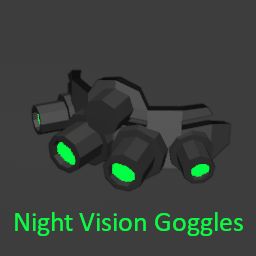
Night Vision Goggles
76561199065348206 作
[h1] !!!! NOT BEING SUPPORTED !!!! [/h1] I'm not sure about the state of this mod, but I'm no longer supporting it. Thank you for the interest [h1]Dependency[/h1] this mod now depends on [url=https://steamcommunity.com/workshop/filedetails/?id=2776633989]NVAPI[/url]. Make sure to install it before [h1]Introduction[/h1] This mod adds a new item called FMA_GP_NVG_18. [h1]Compatibility[/h1] You may use this mod to enable Night Vision API on [url=https://steamcommunity.com/sharedfiles/filedetails/?id=2460154811]Brita's Armor Pack[/url] or any other mod whose Item Display Name contains "Night Vision". [h1]Why use this mod?[/h1] * it works and produces no error * it not only adds an overlay in the screen, but also adds a visibility cone * there is no FPS loss while it is activated * there is no item deleting bug * there is no glitch wearing/unwearing it * the night vision visibility cone matches the character's visibility arc and range * the overlay intensity is now a function of the game's overall light (see images above) * you can now choose different overlay filters (see images above) * item uses battery and it is rechargable * item can be broken if it falls. However, it can be repaired [h1]Visibility[/h1] * upon activation, there's gonna be an overlay in the screen. The brightness will depend on the intensity of available light in the game world. The character's visibility cone is improved to allow you to "realisticly" see through the dark (see video above); * other players can't see the activated visibility cone because it doesn't emit light. A real stealthy thing I must say; [h1]Usage[/h1] * While wearing it, toggle [N] to activate/deactivate the vision; [h1]Keymaps[/h1] You may change the activation key from the Mod Keymap Tab located in the character info panel (see images above) [h1]Spawn Points[/h1] Where will you find it? * 1% chance in the GunStore Display Cases * 2% chance in the Pawn Shop Cases * 0,5% chance in Army Storage [h1]Wanna see more mods of mine?[/h1] * [url=https://steamcommunity.com/sharedfiles/filedetails/?id=2761781294]Skills4Ever[/url] * [url=https://steamcommunity.com/sharedfiles/filedetails/?id=2763403731]ExoSkeleton[/url] Workshop ID: 2769995104 Mod ID: NVG Workshop ID: 2769995104 Mod ID: NVG
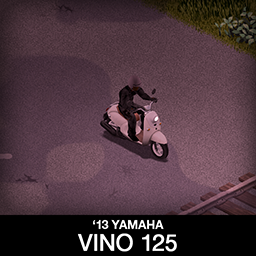
'13 Yamaha Vino 125 + PizzaBoy
76561198089039119 作
Small, light and silent! Vino may have a newer year of production but the classic look will help it fit in with the older models. It has 3 variants, stock one, rare one with back storage bags already on it and a PizzaBoy tribute variant, everyone that played GTA probably remembers. [b]Main features:[/b] [list] [*]Detachable storage bags on the back [*]3 variants [*]All parts have 3d objects you can remove and place in the world [*]Many color variations for scooter and bags [*]Very manoeuvrable [/list] [b][list][*]B41.78+ Single Player / Multiplayer Compatible [*]You can use it in your current save game, just enable the mod in the load menu [*]Not recolorable [*]You will need Tsar's Common Library and Autotsar Motorclub [*]You will NOT need Aquatsar Yacht Club or Cherbourg [/list][/b] If you can't wait to find this mod in your game and want to test it right away, use [url=https://steamcommunity.com/sharedfiles/filedetails/?id=2634426926]bikinitools[/url] to spawn it, hide the items that your character holds in hands while in vehicle, or for all other good stuff that mod has, go get it! [b]If you like my mods, please consider supporting me with a coffee[/b], so I don't fall asleep while making new mods and supporting old ones :) [url=https://ko-fi.com/ki5mods][img]https://i.imgur.com/2uTskWl.png[/img][/url] Check out my other bike mods: [url=https://steamcommunity.com/sharedfiles/filedetails/?id=2922441474][img]https://i.imgur.com/4bSnfVm.jpg[/img][/url] [url=https://steamcommunity.com/sharedfiles/filedetails/?id=2913634132][img]https://i.imgur.com/mau4i36.jpg[/img][/url] [url=https://steamcommunity.com/sharedfiles/filedetails/?id=2878374713][img]https://i.imgur.com/kRJkT25.jpg[/img][/url] [url=https://steamcommunity.com/sharedfiles/filedetails/?id=2818847163][img]https://i.imgur.com/z8TZrAH.jpg[/img][/url] [url=https://steamcommunity.com/sharedfiles/filedetails/?id=2778576730][img]https://i.imgur.com/8BS3LSO.jpg[/img][/url] [i]Side note: This mod has a low poly 3d model and high detail textures, and is highly optimized, so it should not affect the game performance. All models, textures and animations were made by me.[/i] Credits: This mod is commission work by request of Cosmic Pizza Boy variant is commission work by request of Greb Thanks to The Indie Stone for making the game and all this possible and to bikinihorst for the huge help with code and optimization. Special thanks to iBrRus for his selfless work on character animations and all the code in our collaboration mod which was the foundation for this mod. [quote=KI5] Ask for permission This mod can only be added to and extended with the express permission from the original creator. If no permission is received you may not alter the mod, and it must be treated as a mod that is 'On Lockdown'. You are not allowed to repack this mod under any circumstances, ever. [/quote] Vehicle IDs: vino125, vino125b, vino125pizza Workshop ID: 2878374713 Mod ID: vino125
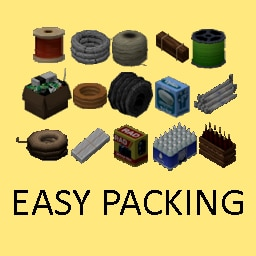
Easy Packing + Organized Storage
76561198028518023 作
[h1] EasyPacking (by GoldBar) [/h1] [i](Maintained by the team: GoldBar, Diakon, and Mr. Nekuromu)[/i] [h1] IMPORTANT [/h1] [list] [*] Favorite any item ([i]right-click → “favorite”[/i]) if you don’t want it to be packed! [/list] [h2] What Does EasyPacking Do? [/h2] [list] [*] This mod lets you bundle multiple copies of the same item (often in 5s or 10s), saving 30–50% weight. [*] Works with [b]vanilla[/b] items by default; also supports a select few other mods as well via Addons. [*] For more details (including item lists, translations, and FAQ), see the discussions below! [/list] [h2] Quick Tips [/h2] [list] [*] Just enable [b]EasyPacking[/b] to pack vanilla items. [*] If you see an error about “requires firearmmod” or any other mod, you’ve accidentally enabled an [b]EasyPacking Addon[/b] without having that mod installed. Disable that Addon or install the matching mod. [/list] [h2] Team & Credits [/h2] [list] [*] Originally created by [b]GoldBar[/b]. [*] [b]Diakon[/b]: Technical improvements & code. [*] [b]Mr. Nekuromu[/b]: 3D modeling, item textures, plus additional development. [*] Special thanks to the [i]community translators[/i] (see pinned post) and [b]Gid[/b] for [b]Gid’s Organized Storage[/b]. [/list] [h2] Translator [/h2] [list] [*]Korean (KO): Me (GoldBar) [*]Russian (RU): https://steamcommunity.com/id/infernum13494 [*]Portuguese-BR (PTBR): https://steamcommunity.com/id/BryanXim [*]Portuguese-BR (PTBR): https://steamcommunity.com/id/theleoamaral [*]French (FR): https://steamcommunity.com/profiles/76561197981623248 [*]English (EN): https://steamcommunity.com/id/theleoamaral [*]Italian (IT): https://steamcommunity.com/profiles/76561198035263491 [*]Chinese (CH): https://steamcommunity.com/id/retsniemle [*]Turkish (TR): https://steamcommunity.com/profiles/76561198197425922 [*]Spanish (ES): https://steamcommunity.com/id/shakiereagle [/list] [h1] Click 'View All (#)' and check for the 'Addons Info & FAQ' post just below! [/h1] Workshop ID: 2438225189 Mod ID: EasyPacking Mod ID: EasyPackingFirearmsB41 Mod ID: EasyPackingGunFighter2
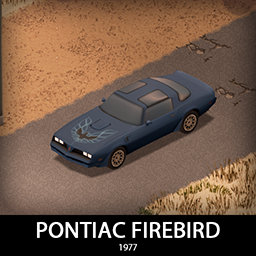
'77 Pontiac Firebird
76561198089039119 作
Only right way to finish the firebird collection is with the '77, so here we go! all four flavours with some unique details and all parts shared. Base version, Esprit, Formula and Trans Am with the Smokey and the Bandit livery of course. Good luck finding it and have fun! [b]Main features:[/b] [list] [*]4 variants [*]3 Front bumpers and a rear bumper with 2 tiered protection [*]Fully animated hood, trunk, doors and windows [*]Visible interior and character (with improved exit/enter/aim animations) [*]All parts have 3d objects you can remove and place in the world [*]Extra parts to craft and find in the world to make the vehicle truly yours (bumpers, bullbars, window armor etc) [*]Multiple texture variations [*]Armor protection for windows, doors, engine, headlights etc [*]4 seats [/list] [b][list] [*]You can use it in your current save game, just enable the mod in the load menu [*]It can tow and be towed [*]Not recolorable [/list][/b] If you can't wait to find this mod in your game and want to test it right away, use [url=https://steamcommunity.com/sharedfiles/filedetails/?id=2634426926]bikinitools[/url] to spawn it, hide the items that your character holds while in vehicle, or for all other good stuff that mod has, go get it! [b]If you like my mods, please consider supporting me with a coffee[/b], so I don't fall asleep while making new mods and supporting old ones :) [url=https://ko-fi.com/ki5mods][img]https://i.imgur.com/2uTskWl.png[/img][/url] Check out my vehicle mods: [url=https://steamcommunity.com/sharedfiles/filedetails/?id=2490220997][img]https://i.imgur.com/1C4iQ6U.png[/img][/url] [b]Credits:[/b] [list] [*]This mod is commission work by request of Caedus [*]Thanks to The Indie Stone for making this awesome game and all this possible. [*]Special thanks to bikinihorst for the huge help with code, optimization, and taking care of the multiplayer and part code. [*]Awesome map in previews: [url=https://steamcommunity.com/sharedfiles/filedetails/?id=3154148103]Copper State, AZ REMASTERED[/url][/list] [quote=KI5] Ask for permission This mod can only be added to and extended with the express permission from the original creator. If no permission is received you may not alter the mod, and it must be treated as a mod that is 'On Lockdown'. You are not allowed to repack this mod under any circumstances, ever. [/quote] [b]Compatibility:[/b] ✅ B41 (b41.78.16) Single Player / Multiplayer fully supported ✅ B42 (b42.12) Single Player fully supported ✅ B42 (b42.13+) Single Player / Multiplayer fully supported Vehicle IDs: 77firebird, 77firebirdES, 77firebirdFR, 77firebirdTA Workshop ID: 3346905070 Mod ID: 77firebird

Kept you waiting, huh?
76561198440928318 作
[h1] Website: www.emhadax.com Discord: https://discord.gg/xmqtev9KqG [/h1] Hey hey everybodiah. I'm still alive if you're curious. Waiting for Build 42 stable to come out. After stable comes out I'll be making mods once more from this account https://steamcommunity.com/profiles/76561199813782304/. Take it easy :p -Madax WorkshopID: 2492565135 ModID: Max
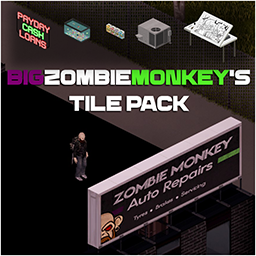
BigZombieMonkeys Tile Pack
76561198008882034 作
My tilepack was originally designed to add tiles for my map mod Monmouth County, however, I am now started to add tiles for other map modders. As of today I have added: 01/07/21: 1 Set of Bedroom furniture in 10 different colours You can find the tilesheets in this modin the file location: bigzombiemonkeys_tiles_pack>media>Tilesheets (for Map Modders) I will continue to add tiles to this pack for other map modders to use, all I ask is please give credit where it is due. If you have any requests please leave them in the comments and I will see what I can do, just please keep in mind that I make tiles when inspiration hits me so if I choose not to make something it is nothing personal. Thank you for all of the support. Workshop ID: 2804428637 Mod ID: BigZombieMonkeys_tile_pack
![[DEPRECATED, CHECK THE DESCRIPTION] The Only Cure](https://images.steamusercontent.com/ugc/2056494760641628659/F9AE3C161C1912D046D05100AF7F8AA9C428151C/)
[DEPRECATED, CHECK THE DESCRIPTION] The Only Cure
76561198117640434 作
[h1][b]SUPERSEDED BY [url=https://steamcommunity.com/sharedfiles/filedetails/?id=3236152598]The Only Cure - Rebuilt[/url]. THIS VERSION IS NO LONGER SUPPORTED[/b][/h1]
![NeatUI Framework [B42]](https://images.steamusercontent.com/ugc/10778131726246828238/97BFC6401E4E1C4B3AADCEE17D4D86C8FD2713CA/)
NeatUI Framework [B42]
76561199485575276 作
[h2]Build Support: B42.0.2 to B42.19.x — Build 42 only[/h2] [b]NeatUI Framework[/b] is a lightweight shared UI framework for Project Zomboid Build 42 mods. You usually do [b]not[/b] use this mod directly. Install and enable it when another mod lists [b]NeatUI Framework[/b] as a requirement. [b]Important:[/b] if another mod depends on NeatUI Framework, load [b]NeatUI Framework BEFORE that mod[/b]. [hr] [h2]What This Mod Does[/h2] NeatUI Framework provides shared UI tools used by other Project Zomboid mods. It helps dependent mods keep their interfaces cleaner, more consistent, and easier to maintain across different Build 42 versions. [list] [*] Shared UI framework / library for Build 42 mods [*] Reusable UI helpers, widgets, layout tools, rendering utilities, and styling support [*] Compatibility helpers for UI changes across different B42 builds [*] Cleaner and more consistent interfaces for supported mods [*] Less duplicated UI code between related mods [/list] [h2]Who Needs This Mod?[/h2] You need this mod [b]only if another mod requires it[/b]. If none of your enabled mods depend on NeatUI Framework, you can leave it disabled. This framework does not add gameplay features by itself. Its visible effects depend on the mods that use it. [h2]Mods That Use NeatUI Framework[/h2] NeatUI Framework is used by several UI-focused mods originally created by [b]Rocco[/b] and maintained / updated for newer Build 42 versions by [b]Afyrmo[/b], including: [list] [*] [url=https://steamcommunity.com/sharedfiles/filedetails/?id=3437629766]CleanUI[/url] [*] [url=https://steamcommunity.com/sharedfiles/filedetails/?id=3451167732]Modern Status[/url] [*] [url=https://steamcommunity.com/sharedfiles/filedetails/?id=3470659758]The Shortcut[/url] [*] [url=https://steamcommunity.com/workshop/filedetails/?id=3502080466]Neat Crafting[/url] [*] [url=https://steamcommunity.com/workshop/filedetails/?id=3536052310]Neat Building[/url] [*] [url=https://steamcommunity.com/sharedfiles/filedetails/?id=3490188370]Project Cook[/url] [/list] It is also used by: [list] [*] [url=https://steamcommunity.com/sharedfiles/filedetails/?id=3540503606]Neat Crafting & Neat Building – XP & Mod Display[/url] — created by Afyrmo [*] [url=https://steamcommunity.com/sharedfiles/filedetails/?id=3723726293]Neat Rocco's UI[/url] — created by ArtNod [*] [url=https://steamcommunity.com/sharedfiles/filedetails/?id=3760534563]NeatUI Hairstyler[/url] — created by Gimmi [*] [url=https://steamcommunity.com/sharedfiles/filedetails/?id=3760545452]NeatUI XPDrop[/url] — created by Gimmi [/list] You may also like [url=https://steamcommunity.com/sharedfiles/filedetails/?id=3461263912]Clean HotBar[/url], which follows a similar clean UI approach. [h2]How to Enable It[/h2] [h3]Single Player[/h3] Enable [b]NeatUI Framework[/b] in your mod list and place it [b]before[/b] any mod that depends on it. [h3]Multiplayer / Host / Dedicated Server[/h3] For multiplayer, NeatUI Framework must be added to [b]both[/b] server lists: [list] [*] [b]Mods[/b]: [code]NeatUI_Framework[/code] [*] [b]Steam Workshop[/b]: [code]3508537032[/code] [/list] You can check this in your server config: [code]Zomboid\Server<YourServer>.ini[/code] It should include: [code]Mods=NeatUI_Framework;...[/code] [code]WorkshopItems=3508537032;...[/code] NeatUI Framework must be loaded [b]before[/b] any mod that depends on it. If a dependent mod works in Single Player but not when hosting a server, this is one of the first things to check. [h2]Compatibility[/h2] [list] [*] [b]Build 42 only[/b] [*] Supports Build [b]42.0.2 to 42.19.x[/b] [*] Intended for SP / MP Host / Dedicated Server setups [*] Includes compatibility maintenance for UI changes introduced across newer Build 42 versions [*] This framework is a library; visible behavior depends on the mods that use it [/list] [h2]Linux Dedicated Servers / Lua Checksum[/h2] Recent versions include cleanup intended to improve compatibility with [b]Linux dedicated servers[/b] using: [code]DoLuaChecksum=true[/code] Lua file paths and line endings have been normalized to help avoid checksum issues on case-sensitive servers. If you previously used this workaround: [code]DoLuaChecksum=false[/code] you may be able to re-enable Lua checksum validation after updating. [b]Recommended:[/b] update NeatUI Framework and all dependent mods, then test your server with: [code]DoLuaChecksum=true[/code] Linux dedicated server testing is especially welcome. Please use the [b]Linux Server Checksum Feedback[/b] discussion if you can test NeatUI Framework or any dependent mod on Linux with [code]DoLuaChecksum=true[/code] Useful reports include: [list] [*] Server OS / distro [*] Project Zomboid version [*] Enabled NeatUI-dependent mods [*] Whether clients can join successfully [*] Exact checksum or “file does not exist” error, if any [*] Relevant server config lines: [list] [*] [code]Mods=...[/code] [*] [code]WorkshopItems=...[/code] [*] [code]DoLuaChecksum=true[/code] [/list] [/list] [h2]Troubleshooting[/h2] If a mod that depends on NeatUI Framework does not work: [list] [*] Make sure NeatUI Framework is enabled [*] Make sure it is loaded before dependent mods [*] In MP, make sure both [b]Mods[/b] and [b]WorkshopItems[/b] include it [*] Make sure the host/server and clients have the same updated Workshop files [*] Try a clean Workshop redownload if files appear mismatched between host and client [/list] For a clean redownload: [list] [*] Close Project Zomboid completely [*] Unsubscribe from NeatUI Framework [*] Delete the Workshop folder if it still exists: [code]...\Steam\steamapps\workshop\content\108600\3508537032[/code] [*] Subscribe again [*] Let Steam finish downloading the mod before starting Project Zomboid [/list] [h2]Bug Reports[/h2] If you find an issue, please use the [url=https://steamcommunity.com/workshop/filedetails/discussion/3508537032/844005195821116835/]Bug Reports[/url] discussion and include: [list] [*] Project Zomboid version [*] SP / MP Host / Dedicated Server [*] Operating system for client and server [*] Mod list and load order [*] Relevant part of [b]console.txt[/b] / [b]coop-console.txt[/b] / server console [*] Exact red error message, if any [*] Screenshot if possible, especially if the issue is visual [/list] For Linux dedicated server checksum testing, please use the separate [url=https://steamcommunity.com/workshop/filedetails/discussion/3508537032/844005195821120294/]Linux Server Checksum Feedback[/url] discussion. [h2]Credits[/h2] [list] [*] Original mod by [b]Rocco[/b]: [url=https://steamcommunity.com/profiles/76561199485575276/myworkshopfiles/?appid=108600]PZ Workshop Items[/url] [*] Maintenance, compatibility updates, and newer Build 42 support by [b]Afyrmo[/b]: [url=https://steamcommunity.com/profiles/76561199133259679/myworkshopfiles/?appid=108600]PZ Workshop Items[/url] [/list] Workshop ID: 3508537032 Mod ID: NeatUI_Framework

Auto Cook B41
76561198329871201 作
So you are here ? Ah.. you're bored of spending your life preparing your next meal. You've come to the right place. [h1]How to initiate the food preparation ?[/h1] [list] [*]You need an empty Bowl, Frying Pan or Griddle Pan. [*]You need accessible food. [*]See your Character Info Panel 'Cook' tab for more options. [*]Right click on the Bowl / Pan in your inventory and left click on "Auto Cook XXX" [/list] [h1]Limitations[/h1] [list] [*]Works only on evolved recipes, not on simple recipes. [*]Requires empty container (cannot continue from manually started preparation). [/list] [h1]Credits[/h1] [list] [*]Version 1.7-1.8 Community propositions implemented by [url=https://steamcommunity.com/profiles/76561197963717804/myworkshopfiles/]MassCraxx[/url]. [/list] That's it. Why are you still here ? What ? You have a better algorithm for food selection ? I guess if you explicit this in [url=https://steamcommunity.com/workshop/filedetails/discussion/2640569820/3159831641984998705/]the dedicated discussion[/url], I could have a look at it and either implement it.. or make fun of you. [quote]A mismatch between client and server with B41 Multiplayer? [url=https://theindiestone.com/forums/index.php?/topic/42925-how-to-fix-updated-mods-in-build-41-multiplayer/]Follow the steps here[/url][/quote] [quote] [url=http://theindiestone.com/forums/index.php/topic/2530-mod-permissions/?p=36478]Ask for permission[/url] This mod can only be added to and extended with the express permission from the original creator. Having received permission, credit must be given to the original creator, both within the files of the mod and wherever the mod roams online. If no permission is received you may not alter the mod. [/quote] You wanna support? [url=https://ko-fi.com/tchernobill] [img]https://i.imgur.com/1xL45if.png[/img] [/url] Workshop ID: 2640569820 Mod ID: AutoCook
More Zombie Death Animations (B41)
76561198125411956 作
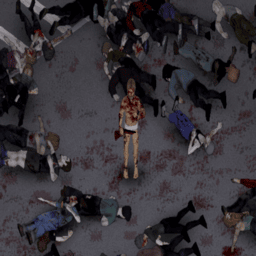
Have you ever felt like cutting down a horde of zombies felt a little underwhelming? Perhaps seeing the same death animation repeat over and over again took away some of the fun and enjoyment that you would have otherwise gotten. Thanks to this mod, cutting down hordes of zombies will be as exciting as ever, featuring both quick and dramatic death animations to enhance your zombie slaying experience. Features: -Changes and adds various zombie death animations utilizing unused developer assets. (five in total) -The animations are tied to a zombie's walk animation, allowing for more animation variety than in vanilla. -Works with melee, ranged, and even throwable weapons -Works with zombies who die to fire and explosives -Compatible with popular animation mods such as Authentic Animations, True Actions, and Fancy Handwork -Should be fully compatible with any mod that doesn't make changes to the zombie death animations or the zombie falldown and walktoward folders [b]Important[/b]: This mod works best when zombie speed is set to fast shamblers (default) or sprinters. Zombies set to shambler speed will only have three out of the five death animations. Works with multiplayer. Server-sided. Safe to add or remove from an existing save game. [b]Information Regarding Build 42[/b]: Hello everyone, First of all, I just wanted to thank all of you for the support and kind words in the comment section. I'm glad my mod was able to bring enjoyment to your various Zomboid playthroughs. As I have stated previously, I was originally planning to update this mod to build 42 as long as the developers didn't make any major changes to the animation system. However, during my brief testing of build 42's unstable build, it seems that the developers have completely overhauled the part of the animation system that I made modifications to. Their new system seems to take both the weapon type and swing direction into account when a zombie is killed, making my mod inferior to their new system. Additionally, the animation rework that the developers introduced in build 42 was actually my original goal when making this mod. It is for these reasons that I have decided to not update this mod to build 42. It will stay on the Steam page for those of you who prefer to play on build 41, but it will not receive any further updates. Thanks again for the support, and have fun in build 42! Workshop ID: 3147442677 Mod ID: More_Zombie_Death_Animations
![[B41/42] Simple Overhaul: Character Retextures (male and female + makeup)](https://images.steamusercontent.com/ugc/1817778245773337349/1F8D5F4C580779DDB53DE32EE99F06C996ED0DAE/)
[B41/42] Simple Overhaul: Character Retextures (male and female + makeup)
76561199005857620 作
For [B41/B42] Working in Singleplayer and Multiplayer. Mod should be installed for both: server and client. I made a retexture for male and female characters because I do not like weird blurry faces with a greenish skin tones which incompatible with some underwear that can be found in the game. [List][*]Only textures without changing 3D model. [*]Realistic texture and tones of the skin with natural faces without giant anime or soapy faces. Particular attention to dark tones. [*]Underwear, nude and Barbie/Ken (censored) versions. All underwear compatible. [*]HD textures: 512x512. [*]Male: every tone have haired version + new texture for stubble. [*]Female: tones 1 and 5 have pubic hair for nude version. [*]Makeup: retextured, can be activated as additional mod. Unisex. [*]Compatible with fingers mod. [/List] [b]How to make mod work correctly: 1. Subscribe to the mod outside of the game 2. Start the game and turn on the mod (one id for female, one id for male, optional id makeup) 3. Restart the game 4. Add the mod to your current game or server (one id for female, one id for male, optional id makeup) / start a new game. 5. Enjoy the mod and yourself! ? If it does not work then try the same with using "Mod Manager" mod.[/b] [b]You need to choose only one ID for: Female: SimpleRetexturesFemaleBarbie - censored SimpleRetexturesFemaleNude - nude SimpleRetexturesFemaleUnderware - underwear Male: SimpleRetexturesMaleKen - censored SimpleRetexturesMaleNude - nude SimpleRetexturesMaleUnderwear - underwear Optional: SimpleRetexturesMakeup - makeup After activating the mod, it is necessary to restart the game to take effect![/b] Please rate the mod for promotion. Thank you <3 Hairstyles mod at screenshots: Yaki's Hair Salon Recommended mods: - [url=https://steamcommunity.com/sharedfiles/filedetails/?id=2761200458]Yaki's Hair Salon[/url] - [url=https://steamcommunity.com/sharedfiles/filedetails/?id=2810471370]Yaki's BarberShop[/url] - [url=https://steamcommunity.com/sharedfiles/filedetails/?id=2463184726]Spongie's Hair[/url] - [url=https://steamcommunity.com/sharedfiles/filedetails/?id=2732662310]Improved Hair Menu[/url] [img]https://i.imgur.com/cKVBRWw.gif[/img] You can check out my other works: [url=https://steamcommunity.com/sharedfiles/filedetails/?id=3246515001][img]https://i.imgur.com/BL5YjXo.png[/img][/url] [code]This mod can only be modified with the express permission from the original creator. When obtaining permission, you must credit the original creator in the files and in the description. If no permission is received you may not alter the mod, and it must be treated as a mod that is 'On Lockdown'. You can add this mod to your mod pack without the permission of the original author in its original form, provided that the mod is properly updated when new versions are released. © Hea 2022-2025[/code] Workshop ID: 2803364788 Mod ID: SimpleRetexturesMakeup Mod ID: SimpleRetexturesFemaleBarbie Mod ID: SimpleRetexturesFemaleNude Mod ID: SimpleRetexturesFemaleUnderware Mod ID: SimpleRetexturesMaleKen Mod ID: SimpleRetexturesMaleNude Mod ID: SimpleRetexturesMaleUnderwear