Mody i pluginy do Don't Starve Together
Ten katalog zawiera 24 000+ projektów Don't Starve Together ze źródła Steam Workshop. Wpisy mogą być serwerowe, klienckie lub wymagane po obu stronach, a także obejmować mapy i inne treści użytkowników. Przed instalacją sprawdź podlinkowaną stronę źródłową, wersję gry i zależności.
Combined Status
przez 76561198025931302
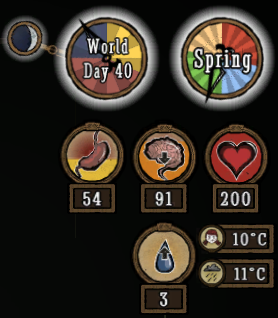
Supports all versions of Don't Starve (Vanilla, Reign of Giants, Shipwrecked, Hamlet, Don't Starve Together). You can also download from GitHub, although that won't auto-update for you. (code contributions also welcome via GitHub) This mod enhances the HUD to better show the player's stats and various information about the world, such as temperature, season, and moon phase. This is a client-only mod, so whoever has enabled it will see the changes, and whoever doesn't won't, regardless of what server you're on and whether the server has the mod or not. Note that unlike Kiopho's Always On Status, I use the game's temperature units directly here, so player temperature can safely vary from 0-70, with freezing/overheating warnings occurring at 5 and 65. (you can change it to C, which works like Kiopho's version, or F if you want) Credits to Kiopho (Always On Status), Soilworker (Season Clock), and hotmatrixx (Better Moon) for making the original mods. I completely rewrote all of the code to be more compatible, aesthetic, and easily maintained going forward. Configuration Options OptionDescription TemperatureWhether to show the temperature of the player. Defaults to Show. Show World TempWhether to show the temperature of the world. Defaults to Hide. Show Temp BadgesWhether to show small images to indicate which temperature is which. Badges only get shown if this is set to Show and both player and world temperatures are enabled. Defaults to Show. Temperature UnitWhether to use the game's internal units (default), or approximations of Fahrenheit or Celsius. - In Game Units, the player freezes at 0 and overheats at 70, with warning occurring 5 away. - In Celsius, the player freezes at 0 and overheats at 35, with warning occurring 2.5 degrees away. - In Fahrenheit, the player freezes at 32 and overheats at 95, with warning occurring 4.5 degrees away. Show WaningWhether to show if the moon is waxing or waning by adding new icons. Defaults to Show. (The game normally only shows icons for one direction). In Don't Starve Together, this is now a feature of the main game, so the option doesn't do anything. Show MoonWhether to show the moon only at Night (the game's default), during night and dusk (Dusk, the mod's default), or Always. Predict Full MoonWhether to predict the day of the next full moon, shown when hovering over the moon icon. Defaults to Yes. Flip MoonWhether to flip the moon phase icon to show it like it is in the Southern Hemisphere, instead of the default Northern Hemisphere. Defaults to No. Season ClockClock, the default, shows a full clock of the seasons. Compact shows a smaller badge with the season and day count, while Micro shows an even smaller badge. No disables the season clock entirely. NaughtinessWhether to show the naughtiness of the player. Doesn't work in Don't Starve Together (unless Insight is installed), as naughtiness is not available to clients. Defaults to Show. Log MeterWhether to show the log meter for Woodie when he is human. Only relevant to singleplayer, as Don't Starve Together always shows the log meter already. Defaults to Always. Cave ClockWhether to always show the clock in the caves. Only relevant to singleplayer Reign of Giants, as the data is not available in vanilla and the clock shows in Don't Starve Together. Defaults to Show. Stat NumbersWhether to show the sanity, hunger, and health numbers without having to mouse over the badges. Defaults to Always. Show Max TextWhether to show the "Max:" text when hovering over the sanity, hunger, and health badges to see their maximum values. Defaults to Show. Show Clock TextWhether to show text on the Clock and Season Clock. Defaults to Show. If set to Hide, text will only be shown when mousing over or opening the Controller Inventory. HUD ScaleLets you adjust the size of the badges and clocks independently of the game's HUD scale. Defaults to 1.

Global Positions
przez 76561198025931302
Map sharing works again! You don't even need to be in the A New Reign beta anymore! Code contributions are welcome: https://github.com/rezecib/Global-Positions Features - Show other players on the map (and hover over them to see who they are). - Show player indicators (the bubble things on the side of the screen) when they're far away. - Light signal fires that show up as indicators and on the map. - Ping the map by alt+clicking, creating markers that show other players points of interest. Note that muting a player hides their pings. Controller users can ping by clicking in the right stick. - Opt-out of sharing your location with a button on the scoreboard. - Share your map discovery with other players automatically Wilderness Mode By default, if you play in Wilderness Mode, it will ignore most of the config options. If you want to override that, set the Wilderness Mode Override to Enabled. Otherwise, it will hide player positions, but always show campfires. Configuration Options On the mods screen, with this mod selected, you can change a lot of the settings with the "Configure" button. Player Indicators - Always makes it so player indicators always show. - Scoreboard (default) only shows them when you bring up the scoreboard. - Disabled removes both the indicators and the map icons. Player Icons - Show (default) will show player's map icons on the map. - Hide will hide them. Show Fires - Always means they always produce smoke signals when they're lit, so show up globally regardless of fuel used. - Charcoal (default) means you have to fuel them with charcoal to produce smoke signals. - Disabled turns off smoke signals entirely. Fire Icons - Show (default) shows fire icons on the map when they are smoking. - Hide doesn't show them even if they're smoking Share Map - Enabled (default) makes it so that as other players explore the world, your map will update too. Note that this will only work if players or icons are set to be shown. Wilderness Override - Disabled (default) makes it so that in Wilderness Mode, Show Fires is set to Always, and Player Icons and Player Indicators are Disabled. This adds some risk of discovery to making fires, so cook with caution! - Enabled makes it use whatever settings you have set yourself, rather than that Wilderness preset. Pings - Enabled (default) allows players to alt+click the map to ping areas for others to see. - Disabled doesn't allow pings at all. Most options are only used by the host; if you're joining, the only option that gets read is whether to show the player indicators at all times or only on the scoreboard. A huge thanks to Sarcen for figuring out his very clever system for getting player icons to show on the map globally for clients!
Minimap HUD
przez 76561197960431333
Adds a minimap to the HUD - The minimap is fully functional; it can be zoomed using the zoom map binds (defaulted to the mousewheel) and can be panned by clicking and dragging. - The minimap can be collapsed by hovering over it and clicking the "Close Minimap" button - The zoom levels of the minimap and the map screen are both saved and are independent of eachother FAQ Q: Is it possible to change the shape of the minimap? A: As far as I know, no, it is not possible. Q: Is this mod compatible with X mod? A: Yes, it should be compatible. External Resources - Source code on Github
Geometric Placement
przez 76561198025931302
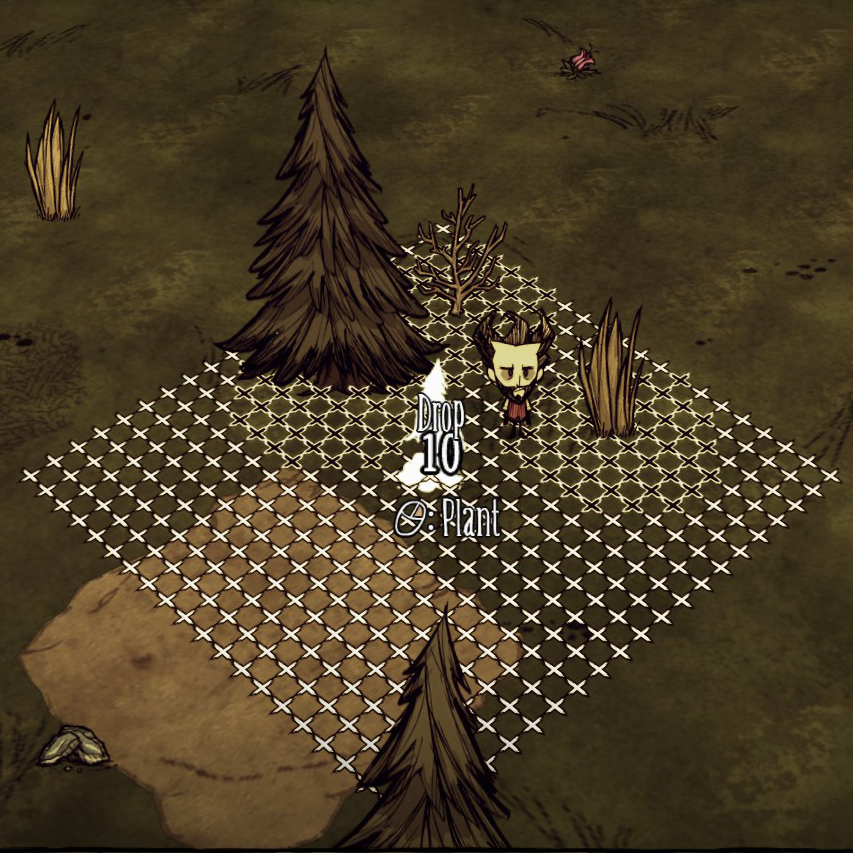
Compatible with all versions of the game (Vanilla, Reign of Giants, Shipwrecked, Don't Starve Together-- separately listed on the Single-player workshop). You can also find it on the Klei Forums Snaps objects to a grid when placing and displays a build grid around it (unless you hold ctrl). Credits to zkm2erjfdb and Levorto for writing the original single-player versions (Architectural Geometry and Assisted Geometry). This mod is a replacement for those mods; if you have one of them enabled as well, unpredictable things will happen. Configuration Options On the mods screen, with this mod selected, you can change a lot of the settings with the "Configure" button. CTRL Turns Grid: - On; the grid is normally off, but holding CTRL shows it - Off; (default) the grid is normally on, but holding CTRL hides it Options ButtonA key to open an in-game menu for the mod's options. The default button is B on the keyboard. On controllers, using left stick click while on the scoreboard will open it (you can rebind Menu Misc 3 to change it). Toggle ButtonA key to toggle between the most recently used geometries (it will guess if it doesn't know, which should only happen if you just transferred between the caves and the surface or joined the game). The default button is V on the keyboard. There is no binding for controllers. Snap Grid ButtonA key to make the grid move to have a point at the object under the cursor, or at key points of a tile (center, edge, corner; technically a 5x5 grid of points within a tile). The default button is unbound on the keyboard, no binding for controllers. In-Game Menu - On (default) the options button will bring up the menu. - Off it will just toggle the mod on and off (like it did before the menu). Show Build Grid - On (default) allows the build grid to be shown - Off never show the build grid Grid Geometry - Square (default) is the normal grid, aligned with the game's X-Z coordinate system. Hexagonal geometries allow you to do the tightest possible plots. Refresh Rate - How much of the available time to use for refreshing the grid. Higher settings will make the grid update faster, but may cause lag. Hide Cursor Item - Hide All when placing things, hide the object so it doesn't cover up the grid - Show Number hide the object, but keep showing how many you have. - Show All (default) show the object like usual. Smart Spacing - On when placing things, the grid spacing adapts to the item being placed; the closest free grid point should always be the closest possible distance. - Off (default) keep the same spacing for everything. Fine Grid SizeHow many points in each direction the grid should go when placing things that can be tightly packed. Defaults to 10. Walls Grid SizeHow many points in each direction the grid should go when placing walls. Defaults to 6. Sandbag Grid SizeHow many points in each direction the grid should go when placing sandbags. Defaults to 5. Turf Grid SizeHow many tiles in each direction the grid should go when placing turf. Defaults to 2. Grid Colors - Red/Green red for "can't place", green for "can place" - Red/Blue same as red/green, but with blue for "can place" - Black/White black for "can't place", white for "can place". A bit easier to see at night - Outlined (default) similar to black/white, but uses black-with-white-outline and white-with-black-outline for the best visibility. Tighter Chests - Yes allows you to place chests a little bit closer together, like you can with the Architectural or Assisted Geometry mods. Technically the game doesn't normally let you place them quite that close together, but the difference is small. This doesn't work reliably in DST. - No uses the true spacing for chests. Controller Offset - On uses the normal offset, which rotates with the player. - Off (default) keeps the object at the player's feet, making it easier to place it right where you want to.
![Craft Pot [DS, ROG, SW, DST] – Don't Starve Together Mod](https://images.steamusercontent.com/ugc/272849658870936457/C7490C6B9425AA6E380D4DB46F7110FB765E548F/)
Craft Pot [DS, ROG, SW, DST]
przez 76561197981642997
Client mod that adds intuitive cook assisting interface to crock pot. Doesn't matter what server you join, modded crock pots, modded recipes, this mod serves them all on a plate and helps you cook whatever your heart desires by displaying the exact recipe. What's in this mod: - 1. All cooking recipes (INCLUDING MODDED) are listed in a slider next to crock pot; - 2. Hovering over recipe shows ingredient requirements for it as well as food status of the dish; - 3. Filling crock pot with ingredients will gradually predict dishes you want to cook; - 4. Recipe turns green if you put all the required ingredients, just fill crockpot with fillers and it's done; - 5. Recipe disappears from the list, if you put a bad ingredient; - 6. Once crockpot is full, the resulting recipe will get painted teal. If you see more than one teal recipe, this means result is unpredictable, cooking will result in one of the highlighted dishes; - 7. Mod works with any pot that takes 4 ingredients (including warly's portable pot and any modded crockpot) - 8. You do not need to restart game to make the mod work. - 9. Full CONTROLLER support Currently mode has following options: - 1. lock uncooked, enabled by default. This option adds a 'recipe lock' simillar to the one in crafting menu, once you cooked an item, the lock disappears and hovering over the dish in the list will show it's hunger/health/sanity values. You may disable and enable it at any time, the progress of cooking will be saved - 2. Invert controller - by default craftpot scrollbar works with left wiggle (right wiggle used to move items around), checking invert controller makes it work with right wiggle (left wiggle used to move items around). - 3. Ingredient Popup - by default it is shown, but you can hide it, so that there is only a slider with dishes, no popup with name or stats. For modders: Craftpot exposes the following mod APIs: 1. An API to add images and names for food ingredient tags: - global 'AddFoodTag' function and a matching FOODTAGDEFINITIONS global dict; 2. An API to registed modded cookpots, for now they do not take extra arguments, but in future they might allow passing custom fields, such as slot number: - global 'AddCookingPot' function and a matching COOKINGPOTS global dictionary; It is preferred that during modding you use the provided functions, as they already contain all the safety precautions. But if for some reason the functions are not available during your mod initialization, you can use the dictionaries straight away, but make sure you do not erase the object, that could be prefilled by another mod before you. DS, ROG, SW version: http://steamcommunity.com/sharedfiles/filedetails/?id=662872357 For people off steam, here's a secret link 中文翻译简介@WendyPan: https://github.com/IMalyugin/craftpot/wiki/chinese Enjoy :)
Simple Health Bar DST
przez 76561198098319132
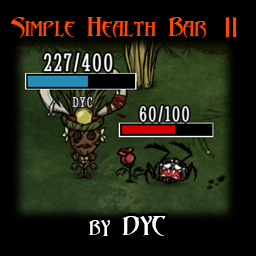
Click for DS Version Click for OLD Version if the new one crashed A simple health bar! It will be displayed in the combat status automatically. (It will not be displayed when the game is just loaded !!!!!!!!!!!! don't tell me the mod no longer works because of that!!!!!!!) Click the icon to open setting window! The icon and the window is DRAGGABLE! If they overlap other UI, just hold mouse left button and drag it to somewhere else! The position of it will be saved automatically! You can also press H to toggle the window! The hotkey can be changed! If you disabled the icon by mistake, enter 'shb.reset()' in console to reset settings! You can choose the healthbar style you like: - Standard: - Simple: - Shadow: - Claw: - Heart:♥♥♥♡♡ - circle:●●●○○ - square:■■■□□ - diamond:◆◆◆◇◇ - star:★★★☆☆ - Or it can be hidden. Health value can be hidden too. Position: - Bottom: under the bottom of character - Overhead: over head of character - Overhead2: health value is inside the healthbar Color: - Dynamic: change with health percentage. - Dynamic_dark: darkened version to make it a little bit lore-friendly. - Dynamic2: change with mob hostility. - And other solid colors Click for Change Log Credits: Thanks tinywolf for Korean translation. If you like this mod, don't forget to hit the button. THX! This is a server-side mod. I want to make a client version, but it seems that there is no way to make it a client-side mod for now. So don't ask me to make a client version. Ask KLEI to sync health for clients first. Since it is a server-side mod, this mod does not work in the Forge or the Gorge. If you see "???" instead of the healthbar symbols, disable small textures! Post the crash log if you run into crashes! The log is usually in Documents\Klei\DoNotStarveTogether\ folder. Search "server_log.txt" or "client_log.txt". Or you can just post the crash screenshot.
Health Info
przez 76561198025486794
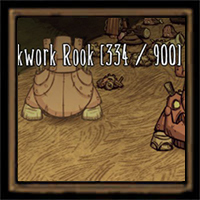
v2.2.04 - Added new prefabs to white list as of March 2025. Shows exact health of creatures on mouse-over or controller auto-target. This mod is inspired by Tell Me About Health (DS) which was po
Extra Equip Slots
przez 76561198025486794
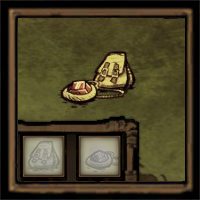
I stopped supporting this mod! I don't and wont update this mod anymore. I stopped playing this game a long time ago. It will break your game. ------------------------------------------------------ Adds a backpack and amulet slot to the game. Patch List v1.0 - Alpha Release v1.1 - Patched to support Hotfix 123591 v1.2 - Fixed the Interface not properly 'rebuild' when loading to a previously saved game. v1.3 - Patched to support Hotfix 124021 v1.4 - Rewrite the structure of the mod to run without using full files. Also, new preview icon :D v1.5 - Fix a bug where the client's backpack items are not counted/checked when building something. v1.5.1 - Fixed a crashing bug. v1.5.2 - Updated image/tex file (possible cause for some people crashing). v1.6 - Compatibility patch (thanks to star) v1.7 - Fixed inteface overlapping with "inspect self" button (unknown hotfix/update number). v1.8 - Fix incompatibility due to EQUIPSLOT_IDS table creation moving from components/playerinspectable.lua to constants.lua (by Muche see here) Credits Fontonkonbonmon (original) tehMugwump Afro1967 (RoG) Darklokey276 Vanguard Prime I am Zero One outseeker (au) Marco Snowy kukaryambik Muche Source Backpack and Amulet Slots Other Version Extra Equip Slots Steam API version - by MystPhysX Other Notes If you are having problems with the background of the inventory doesn't scale properly, you might have compatibilitiy issues regarding this mod with other mods. One way to solve this is to report what mod you are using in the comments OR you can use this mod.
Display Food Values
przez 76561198049829886
Currently mod is not getting updates. If you want to continue develop the mod, feel free to use all files in my mod. NOTE: This mod can slow you game or make it laggy, for more information see: https://forums.kleientertainment.com/forums/topic/88740-why-your-server-becomes-slow-or-laggy-overtime/ IMPORTANT: Now there is the client-server version of this mod. Thanks to @gregdwilson. Here is the link to his mod: http://steamcommunity.com/sharedfiles/filedetails/?id=458940297 This mod is updated too. Some changes see in the "Controls information". --------------------------------- This mod displays what food and healing items have what hunger, health, sanity values (including rotting). It will work for items in inventory, backpack or in containers. --------------------------------- Controls information: For mouse and keyboard: CTRL button - spoil info ALT button - values for cooked item CTRL + ALT button - spoil info for cooked item For controller: D-pad left button - spoil info D-pad right button - values for cooked item D-pad up button- spoil info for cooked item --------------------------------- In mods menu you can press 'Configure mod' button and choose the language and enable/disable minimal mode. Minimal mode will work only if you'll replace the fonts: - close the game - open mod folder (all mods are in \Steam\steamapps\common\Don't Starve Together Beta\mods\); - copy two zip archives from folder new_fonts to folder \Steam\steamapps\common\Don't Starve Together Beta\data\fonts with replace - run the game - in mods menu press 'Configure mod' button and enable minimal mode. After each update of the game you'll need to replace the fonts.
![Wormhole Marks [DST] – Don't Starve Together Mod](https://images.steamusercontent.com/ugc/686026610310398805/2B5C66398208A5976415CA0A308110E3731B2CC5/)
Wormhole Marks [DST]
przez 76561198027077262
Changes wormholes icons on mini map to colored icons. Every pair of worlmholes get its color icons after you use one of the wormhole. Can support up to 22 pairs of wormholes. If colors of the icons are not visible enough you can enable Draw over FoW in mod configuration option. This will draw icons over fog of war on minimap, but will also make them visible for everyone on the server, even for people that didn't explore that area of the map. Try other mods
Epic Healthbar
przez 76561198269382494
Spice up your combat experience with this stylized health bar! Epic Healthbar is a new widget which provides information about the current boss: - Displays combat phases, elemental damage and damage resistance - Each boss has their own color theme - Optional combat camera and more!
Show Me (Origin)
przez 76561198023676128
It's Tell Me mod but it shows hint ON MOUSE OVER. And this is server mod. Recommended ShowMe (this mod) + Health Info I have to enable only 2 mods? Yes. Actually you can disable all other interface mods and enable only Show Me. But it's better to enable Health Info. This mod won't provide info about health if Health Info mod is detected. What is better? - Compared to Item Tooltips mod my mod provides GREAT network traffic economy: it send info over network ONLY for item under mouse. - But Helath Info mod works faster at the cost of traffic. Health Info is good optimized too but with emphasis on fast delivery of information. So it sends and updates info about health of all creatures around. My mod, on the contrary, saves data traffic, even for the current object. Details - There is a little time offset (~100ms) because the mod send info only on mouse over. No waste data traffic. - It will update info not more often than 1 time per 1 second. (For example, Items Tooltips spams RPCs 30 times per second). - Ofc it won't update info if it's not changed. No waste network traffic again. :) - Incompatible with Item Tooltips, Display Food Values and other unknown interface mods. - Compatible with Combined Status whose settings will affect temperature units. - Finder mod is included. Sources - 70% of code is taken from TellMe mod. - 20% of code is taken from Kindling Fire mod (it has similar hint feature about tinder and striker values). Languages - English (default) - Russian - Chinese (Simplified and Traditional) - Brazilian Portuguese - Polish - Korean - Spanish FAQ Q: Is it possible to make a normal Don't Starve version? A: There is a mod Detailed Tooltips. Controller is not supported by that mod. Q: Is it possible to make client version mod? A: No, it's not possible. There must be server part of the mod to send information available only on server. Q: I changed settings but it didn't changed. A: Client settings are stronger than server settings. Go to Play->Mods->Server mods->Show Me, and change all values to default. Q: I got a crash related to game files (like componentactions.lua). A: ANOTHER mod has a bug with net variables, probably related to containers (e.g. Smarter Crock Pot).

Increased Stack size
przez 76561197982211173
Changes the maximum size of item stacks. This applies to all stackable items. It changes the maximum size to the configured amount.
Don't Drop Everything
przez 76561198247062468
If You like this, give a thumbs up! Hint: When a player dies, The player must have amulets, A will drop. Players into a state of the soul after death, not drop all the items.
Chinese Language Pack
przez 76561198129477988
Simplified Chinese and traditional Chinese language pack. Please close the "Small Textures" option!!! By L.M.U~
Show Me(New)
przez 76561199020997345
This mod is an update based on Show Me (Origin) v0.58. https://steamcommunity.com/sharedfiles/filedetails/?id=666155465 v0.61 Update 1.add English 2.add show naughtiness 本模组的更新日志请在这里查看
Quick Pick
przez 76561198204009267
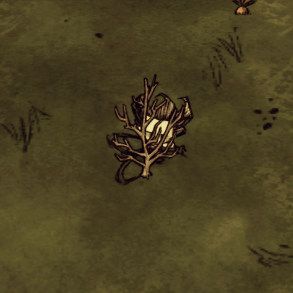
The mod removes the animation of harvest grass, sapling, berrybush and other things, which makes them picked like a carrot. It makes almost everything pick quickly. Changelog - Version 1.3.0 -Quick cooking foods on firepit. - Version 1.2.0 -Added Wormwood Crop quickly pickable. - Version 1.1.1 -Added Carrat and Moon Sapling quickly pickable. - Version 1.0.6 -Added Oasis Cactus and Bull Kelp quickly pickable. - Version 1.0.5 -Quick harvest from pots, dryers and farms configurable. - Version 1.0.4 -Added the meat rack and bee box quickly pickable. - Version 1.0.3 -Added the Coffee Bush quickly pickable. - Version 1.0.2 -Added the stone fruit bush quickly pickable. - Version 1.0.1 -Added the cave flower quickly pickable. Source code This project is under the GNU GENERAL PUBLIC LICENSE Source code is available at GitHub: https://github.com/jupitersh/dst-mod-quick-pick
Gesture Wheel
przez 76561198025931302
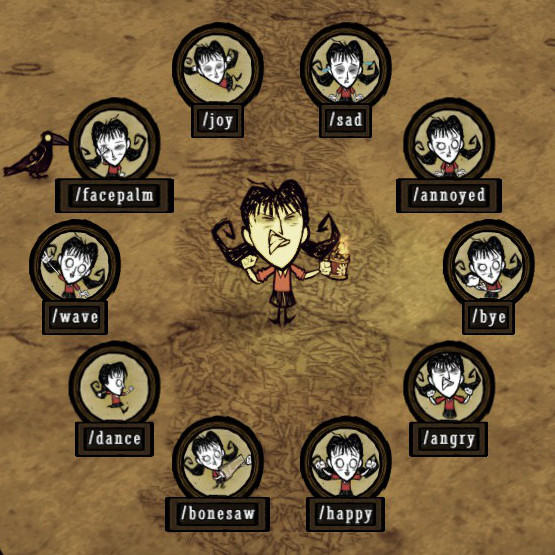
Adds a wheel selection interface for emotes, making it easier to emote. By default, the hotkey is set to G (but you can configure it in the mod config options). Holding G will bring up the gesture wheel, then moving your mouse in a particular direction will select a gesture. When you release G, your character will do the gesture. On controllers, pressing in the left analog activates the wheel, and selection is done by moving the left analog while it's still pressed in (then releasing to make the selection). It's technically bound to Menu Misc 3, which I believe you can rebind in the Controls menu. I included several options that you might want to change: OptionDescription Toggle buttonDefaults to G, but you can set it to any letter key. Hopefully when mods get proper controls options, this will be nicer to work with :) Wheel SizeSets the size of the wheel. Defaults to 1, and can be set from 0.1 to 2. Show picture or textYou can have it show just the picture, just the text, or both. Center wheelDetermines whether the wheel comes up around your mouse or the center of the screen. Restore cursor positionIf Center Wheel is disabled, this setting doesn't do anything, unless set to Absolute. Otherwise: - Relative, the default setting, moves it back where it was before, adding the extra movement you did for the gesture. - Absolute sets it back where it was before without adding the extra movement. - Center sets the mouse to the middle of the wheel when bringing it up, but doesn't move it afterwards. - Off doesn't move the mouse ever. Controller StickLeft (the default) uses the left analog stick to select emotes, and Right uses the right stick. If you want to rebind which stick needs to be clicked in, rebind menu_misc_3 in the game's controller controls menu (you'll most likely want to swap it with the scoreboard button). Limit to 8Off (the default) uses all the emotes, but the wheel is getting pretty crowded (current at 12 emotes), so On limits the wheel to 8 emotes, which are chosen with the remaining options (Right Emote, Down-Left Emote, and so on). Things I'd like to add to it: * Maybe a nice wheel background to make it less floating-in-space-y * Suggestions? Thanks to PrzemoLSZ for fixing controller support!
Smarter Crock Pot
przez 76561198025317013
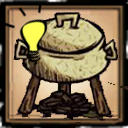
WARNING: Mod has not been updated a long time. Read the comment section. Do you find yourself confused over the many recipes the crock pot offers? Do you need to check online before cooking? This mod alters to Crock Pot to show you what you're going to cook, without cooking it, saving you the time and from unfortunate mistakes. See upfront even the expected spoilage. in the game, when multiple recipes with the same priority are available, the cooking product is chosen at random- now you can see every option before gambling. Compatible with DisplayFoodValues,DetailedToolTips,AdvancedToolTips So you can see the values of your cooking. Even add the chances of cooking your product into the tooltip. Compatible with Waiter101 and any other food mods, shows all mod recipes. Works For EVERY ONE, the mod is Client only. False Prediction may arise from difference between the Client's cookbook and the Server's cookbook. USING A CONTROLLER? For a long time it wasn't supported, but now it is! Just go to the mod config and ACTIVATE IT. To predict using Controller, all you have to do is to put 4 items in the cookpot and then nav to the fifth empy item. Nav to it again (I recommend Nav-ing Right) to predict again for the other possible products. Test with the mod only to see bug came from a different mod. Found a Bug? Want a feature? You can conribute here: https://github.com/SmarterCrockPot/SmarterCrockPot
Russification Pack for DST
przez 76561198137380697
This mod translates the game into Russian. The best Russian localization at the moment. Source code was taken from the Russian Language Pack. Special thanks to Some1 and Alevastor! Version: 3.7
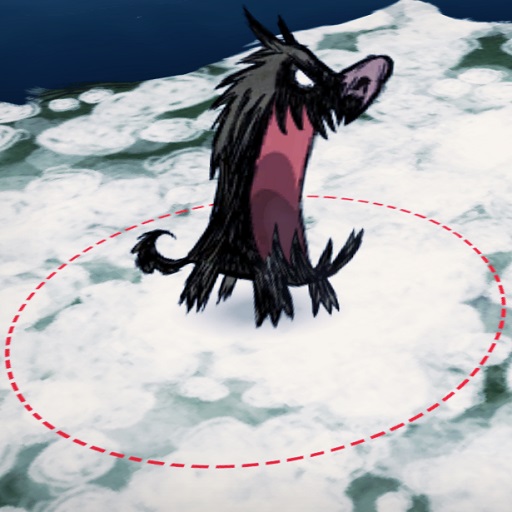
Display Attack Range
przez 76561198119787855
Shows the attack range of mobs when they are targeting a player. The display will change color when they attack. Configuration options: Red, Green, Blue: Adjust the RGB color that shown for attack. Range appearance: Select range appearing while targeting player or during attack phase. Type of Range: Select range type to be attack range, hit range, or switch between both. Display Projectile Range: Select to display the range of projectile.
Boss Indicators
przez 76561198074442304
Tired of chasing after bosses or want to know if they're near? Then look no further. What this mod does This mod adds a player-like indicator to bosses to know if they're lurking around, so that you can go and smack them in their face - or run away from them before they get too close. This indicator can display bosses up to 3 - 4 screens away, their distance being related to the size of their icon (larger icon = closer). Currently the following bosses are tracked: - Deerclops - Dragonfly - Bearger - Moose/goose - Antlion - Ancient Guardian - Toadstool (both cap and actual boss) - Klaus - Loot Stash If you find a bug, have a suggestion or just like this mod, feel free to leave a comment.
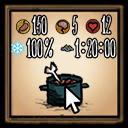
Item Info
przez 76561198074442304
This is a CLIENT mod. Can be used on any server! Inspired by the popular mods Display Food Values & Detailed Tooltips, I bring you Item Info. What this mod does It displays items' values when hovering over them (hunger, sanity, health, spoilage, insulation , light remaining time, waterproof %, sanity gain/min, uses left, damage and armor including planar) via little icons and a value. Additionally, it can display your equipped items on a panel on the right (configurable), so that you always know your spear's uses, your armor's hp left, or when your torch is going to run out of fuel. Configuration Options The default config is just fine, but if you wanna tweak it, here it is: Info scale: Sets the tooltip's info scale. Time format: Change between hours:minutes:seconds and in-game days. Perish info: Set if you only want to see spoilage time, stale time and then spoilage time, or both. Show info hands/body/head: If you want to see your equipped items' info. Equipped Scale: Set the equipped item's scale, if you think they're too big or too small. Show prefab name: If you want to know your items' debug spawn name. Show background: If you wanna see a huge, interface-blocking background behind your equipped items. Margin bottom/right: To position the equipped item info. How to install Just subscribe to the mod. That's it. This mod displays info in a different way to all others, so no need to replace fonts nor anything like that. Notes Like other mods, this mod calculates values based on the item's current percent and the base item max values, so the following values might not be 100% exact: perish time, stale time, fuel time, clothes remaining time, uses left, hambat damage. Controller is supported as of version 0.2 Current issues There's a bug related to modcomponentactions which only happens on modded servers triggered by the way this mod spawns a base item to check its stats. It has been fixed for a while but if you run into this let me know. New characters after Wortox aren't fully supported yet (foods they won't eat, food bonuses, damage bonuses, etc). I might make some internal changes to add support for them & modded ones someday™ Latest changes Fixed crash when hovering over merm tools and upgraded merm tools. Updated info to show planar damage/armor. Updated spoilage calc to support Polar Bearger Bin. Updated Wolfgang damage to support his mighty meter. If you find a bug, have a suggestion or just like this mod, feel free to leave a comment. If the mod ever breaks please add me as a friend and nag me every day till I fix it.
ActionQueue Reborn
przez 76561198032277590
This version of Action Queue has been completely rewritten with a focus on fixing all the underlying issues with the previous versions, optimizing and minimizing any performance impact, along with adding several new features. Action Queue DST ported by xiaoXzzz has been a great addition to my collection of mods, and it was only after using it for more than a year, that I decided I wanted to undertake fixing the few issues it had. The original Action Queue for Don't Starve by simplex, which was created in 2014, is an amazing mod that still sees much use in its various versions. Usage - Shift + click on entities as you normally would to add them to the action queue - Shift + double-click on an entity to select all entities of the same prefab in a configurable range - Shift + drag-click a rectangle to select entities within a selection box - Shift + drag-rightclick with a deployable item in your cursor to place it within the bounded area - Shift + drag-rightclick with a tool equipped to focus the actions performed by that tool - Shift + rightclick with a mini-sign in your cursor to place it directly on a chest - Shift + click on a crafting recipe to continuously craft that item - Press C to craft the last completed recipe (includes structures) - Shift + C to continuously craft the last crafted item (doesn't include structures) - Press any movement, primary, secondary, attack, or action key to cancel (or pause) the queue - Press F3 to display a turf grid that may help you with aligning your placements - Press F4 to toggle auto-collect which is triggered by certain actions - Press F5 to toggle endless deploy mode, ignores selection height to deploy all available items Config Options - ActionQueue key with an extensive keylist - Always clear queue (if false, use action key(spacebar) to clear selected targets) - Selection color with 10 colors to choose from - Selection opacity - Double click speed - Double click range - Turf grid toggle key - Turf grid radius - Turf grid color - Option to always deploy on the wall / turf grid - Auto-collect toggle key - Enable auto-collect by default - Endless deploy toggle key - Enable endless deploy by default - Craft last recipe key - Tooth-trap spacing New Features - Ability to add entities to the selection queue during a deployment action - Auto-collect can be toggled in game as needed - Configurable deploy spacing for tooth traps - Caches your last completed recipe to be re-called with a single key press (default C) - Craft last recipe repeatedly with ActionQueue key + last recipe key (shift + C) - Draw added to the action list - Deploy now goes up and down rows instead of always returning to the horizontal start position - Deployment of items by dropping them on the wall grid - Eat added to the action list - Feedplayer added to the action list - Grabs the next stack of items of the same type from your inventory for active item actions - Heal player added to the action list - Minisigns are now easily placeable on chests - Pick action will never target evil flowers - Pickup action will never target any active trap - Pitchfork actions, digging and placing turf - Repeat crafting is faster (timer based) - Tool filtering, which was a feature of the original mod - Unwrap added to the action list - Waits for a broken tool to re-equip without canceling the queue Fixes - ActionQueue should never be canceled by using chat, map, or alt-tabbing anymore - ActionQueue now cancels properly if you are moving when you release a mouse button during a selection - Fixed incompatibility with Woodie beaver mode - Deployment is only triggered if the selection queue is empty - Give action now works properly with mushroom planters - Selection will not begin if your first click is on a HUD entity - Significantly improved how actions are applied to their targets - Switched to using control handlers for leftclick and rightclick, which means the mod follows rebinds in the games settings menu for primary and secondary keys Don't Starve version ActionQueue Reborn by myxal Translations 此版本的 Action Queue 是完全重寫,著重在修復前版本所有的潛在問題,優化並最小化對於性能的影響,並添加幾個新功能。 xiaoXzzz 移轉 DST 版的 Action Queue 作為我的模組收藏,而在使用超過一年後,我決定要解決他的一些問題。 2014 年,DST 上原始版本的 Action Queue 是 simplex 所寫,經過非常多的改版仍歷久不衰,是一個令人驚艷的模組。 完整敘述翻譯 (繁體中文) cheewind Big thanks to co.op for his help testing and suggesting new features
Strona 1 z 1059 (25,405 wyników)
Don't Starve Together Guides
Instalacja modów Don't Starve Together – serwer i klient
Zainstaluj mody Don't Starve Together przez Workshop-ID, aktywuj je dla każdego Sharda i napraw typowe błędy na serwerze.
Wynajem serwera Don't Starve Together – poradnik kooperacji
Skonfiguruj serwer Don't Starve Together: token klastra, Caves, mody, opcje świata, testy i troubleshooting dla swojej kooperacji.
Serwer Don't Starve Together z obsługą modów
Instaluj zgodne i obsługiwane mody z panelu serwera.
Wynajmij serwer Don't Starve Together