Mods & Plugins für Project Zomboid
Dieser Katalog listet 52.000+ Project Zomboid-Projekte von Steam Workshop. Einträge können serverseitig, clientseitig oder auf beiden Seiten erforderlich sein und auch Karten oder andere nutzergenerierte Inhalte umfassen. Prüfe vor der Installation die verlinkte Quellseite, Spielversion und Abhängigkeiten.
![[b42]MoreEndurance – Project Zomboid Mod](https://images.steamusercontent.com/ugc/25439356640607844/5622889849F948BF5054F69EA615BF1BB2770FC5/)
[b42]MoreEndurance
von 76561199426194605
增加了50点体力,让你像b41一样去战斗,感谢更多特性模组提供的idea Increased your stamina by 50, allowing you to fight like a B41. Thanks to the ideas provided by More Traits mods. Workshop ID: 3387065293 Mod ID: MoreEndurance
![[B42/B41] UsefulWardrobe – Project Zomboid Mod](https://images.steamusercontent.com/ugc/32185871433670101/E9139D28DBBB9716C3E6D36B9DEA56747BC9FD6B/)
[B42/B41] UsefulWardrobe
von 76561199193863491
What did this module do? It allows all containers to have the function of a wardrobe You can set presets here Faster one click installation How to use Right click on a container to use it as a wardrobe Right click again to open If you delete the wardrobe, the stored data will be lost Create Template When creating, the clothes on your body will be used as a template, and container type clothes will not be added Workshop ID: 3389960993 Mod ID: UsefulWardrobe
![[B42] Fruits in jars_CN – Project Zomboid Mod](https://images.steamusercontent.com/ugc/37820913379750416/2AA85B92F9D10A1068CC15288E356E6C615C4D34/)
[B42] Fruits in jars_CN
von 76561198314947920
Fruits in jar 的中文化 主要方便合集自用 ------------------------------------------------------ 种田养老玩家有福了~ 你现在可以制作多种水果罐头,让辛勤劳作收获的甜菜和水果变成长期保存的水果罐头陪伴你吧! 不同水果制作罐头需要的分量不一样,比如浆果和西瓜 ------------------------------------------------------ 制作:刀(厨房刀、黄油刀、餐刀都行,只要能切水果)、水(1L)、罐子和罐盖子各一个、水果、糖(方糖、大小份糖都行) 然后手搓 成品未开保持一年,开了需要速食。 ------------------------------------------------------ For non-Chinese users, you don't need this. Workshop ID: 3432689421 Mod ID: B42Makefruitinjar_CN
![Never-Ending TV and Radio Broadcast [B42] – Project Zomboid Mod](https://images.steamusercontent.com/ugc/46822570240027806/29AA0557D34A8A640D3E58F64ED93AE4DB9765FE/)
Never-Ending TV and Radio Broadcast [B42]
von 76561198410133704
If you find this mod no longer works due to recent vanilla updates or conflicts with newer radio/TV broadcasting mods uploaded after mine, please install my latest version, which forcibly loops all channels endlessly: https://steamcommunity.com/sharedfiles/filedetails/?id=3459256755 This mod makes TV and radio broadcasts loop endlessly after the broadcast end date (e.g., day 9 for skill TV), allowing you to enjoy them for as long as you want. By removing the skill gain cap for TV in the sandbox settings, you can continue leveling up your skills after the cap. This mod has no impact on performance. Guide on How to Add to an Existing Save This mod works as long as you use it in single-player mode. However, if you add this mod to an existing save after the broadcast end date, your TV or radio may not work as intended. Below is a step-by-step guide to restore TV/radio functionality: Locate Your Save File: Navigate to the following folder: C:\Users\\Zomboid\Saves\\202*-**-**_**-**-**\radio\data Please double-check that the file you are editing is indeed the correct one. Ensure that the file's date is the most recent, or matches the save you are trying to modify. Open the RADIO_SAVE.txt File: Open the RADIO_SAVE.txt file using Notepad or any other text editor. DaysSinceStart = 20 LvObfuscation = false 93200,1,1000,none,-1,none,-1 98000,1,1000,none,-1,none,-1 101200,1,1000,none,-1,none,-1 89400,1,1000,none,-1,none,-1 200,1,1000,none,-1,none,-1 201,1,1000,none,-1,none,-1 203,1,1000,none,-1,none,-1 204,1,100,none,-1,none,-1 205,1,1000,none,-1,none,-1 91200,1,1000,none,-1,none,-1 107600,1,1000,none,-1,none,-1 95000,1,1000,none,-1,none,-1 206,1,1000,none,-1,none,-1 207,1,1000,none,-1,none,-1 208,1,1000,none,-1,none,-1 209,1,1000,none,-1,none,-1 210,1,1000,none,-1,none,-1 94200,1,1000,none,-1,none,-1 100600,1,1,none,-1,none,-1 After the second line, each subsequent line contains the data for a channel in the following order: ,,,,,, Make the Following Edits: 1. Set DaysSinceStart to 0: DaysSinceStart = 0 2. For Each Channel: Change the to "main" from "none". Change the to 0. The edited result should look similar to the example below. (If you have subscribed to other radio mods, you may see additional channels. In that case, do not edit the lines for these new channels.): DaysSinceStart = 0 LvObfuscation = false 93200,0,1000,main,0,none,-1 98000,0,1000,main,0,none,-1 101200,0,1000,main,0,none,-1 89400,0,1000,main,0,none,-1 200,0,1000,main,0,none,-1 201,0,1000,main,0,none,-1 203,0,1000,main,0,none,-1 204,0,1000,main,0,none,-1 205,0,1000,main,0,none,-1 91200,0,1000,main,0,none,-1 107600,0,1000,main,0,none,-1 95000,0,1000,main,0,none,-1 206,0,1000,main,0,none,-1 207,0,1000,main,0,none,-1 208,0,1000,main,0,none,-1 209,0,1000,main,0,none,-1 210,0,1000,main,0,none,-1 94200,0,1000,main,0,none,-1 100600,0,1000,none,0,none,-1 If you mess up the edit, just delete the file, start the game, and then exit. The game will automatically create a new file for you, which you can then edit. Alternatively, you can copy the example above and paste it directly into your RADIO_SAVE.txt file (as long as you don’t have any other radio mods). The other modifications I made above are optional, but they won’t cause any harm if applied. Note: how to use this mod together with Voiced Radio and TVs mod: https://steamcommunity.com/sharedfiles/filedetails/?id=2950750587&searchtext=voiced Place this mod below Voiced Radio and TVs mod in Mod Order, so this mod overrides the other. You can now hear voices from the TV and Radio, although not all channels are supported yet by Voiced Radio and TVs mod. Workshop ID: 3394858726 Mod ID: Never-Ending TV and Radio Broadcast
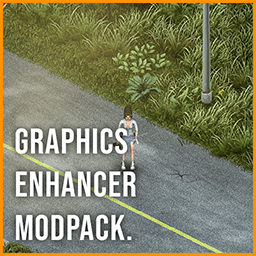
Graphics Enhancement Pack
von 76561198041225361
It is a modpack of several other mods (too many to list). made for the server beyond the doorz Workshop ID: 3362131737 Mod ID: GraphicsEnhancement
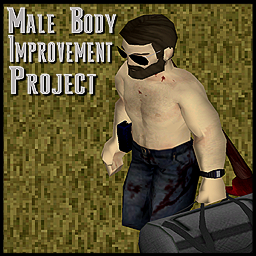
Male Body Improvement Project
von 76561198068788655
ASH 2025: The Male Body Improvement Project Improve All 3D Aspects of the Vanilla 3D Male Body Model Overall Muscle, & Defintion Have been Reworked, Reworked Jawline, Collarbone, Calves, Leg's Etc More Defined as well As always, Body Mod Replacements Mean Potential Clipping with Vanilla items. These can be Patched for, or fixed by others etc as well PERMISSIONS. ASK FOR ALL MOD INQUIRIES RELATED TO PERMISSIONS: IE: do not re-upload this Mod under ANY circumstances. Not On the Workshop, or Anywhere. Support the Official Release. Workshop ID: 3425233971 Mod ID: MaleBodyImprovementProject

Organized Storage
von 76561197963814148
Allows the creation of multipacks for commonly looted canned and bottled goods, saving a bit of space. Current package options, updated October 7th, 2017: Medical: - Boxes of 9 clean, dirty, or sterlie bandages - Bottles of any pills, 50ct - good for combining partially used pills quickly - 12 pack boxes for adhesive bandages and dry cotton balls - 30 pack of alcohol wipes - 4 pack of full bottles of disinfectant Food: -4 packs of Sardines - 6 packs of all inedible vanilla canned goods* - 8 packs of canned Tuna - 8 pack boxes for empty - 8 pack boxes for empty Wine bottles (both types, no mix) - 24 packs for Water Bottles - A recipe to fill an empty 24 pack of Water Bottles, for saving some time Crafting Supplies: - 4 Pack of Duct Tape In many cases, you might seem to have enough of an item to package into a multipack, but this is not as likely to be true for freshly looted items. Since stuff can spawn partially drained, it might require finding more than the items you'd expect in order to pack. This mod serves as a way to quickly combine lots of partially used items instead of using "Pour Into" a million times. For example, if you've got 9 boxes of painkillers, crafting them into a bottle might consume 8 of them , and uncrafting the new bottle will always only return 5 boxes. All it means is it required using up 8 partial boxes worth in order to get 50 total uses to craft with. Nothing was lost. Please note that these packaging recipes give a tiny amount of Cooking XP - this is given automatically to anything that produces a Food category item, and is not intentional. *Closed cans that can't be eaten. If it has an immediate nutrition value, it won't work for this sort of mod. Oats, for example, can't be multipacked.
![Bloodlust Trait [B41] – Project Zomboid Mod](https://images.steamusercontent.com/ugc/2057635966707051723/335E9CC807376A456C0B1A54CF5A498204B31A8E/)
Bloodlust Trait [B41]
von 76561198413220985
With Bloodlust trait you have to kill to stay happy. Bloodiness of your body, clothing and weapon affects your desire to kill. Earn the trait by killing hundreds of zombies without rest while being covered in blood. 🔥 Build 42 remake available 🔥 Bloodlust Overwhelming Kill now. Suffer later. Crave again. Features - You can't live without a daily afternoon kill! Gain boredom, stress, and unhappiness if hasn't killed for a while. - Body, clothing, and weapon bloodiness affects your killing mood. The bloodier you are - the more often you want to kill. - Killing is satisfying. Reduce boredom, stress, and unhappiness on kill. (Stress reduction includes stress from not smoking) - It's so much easier to kill while bathing in blood! Sharp* weapons deal more damage based on how bloody you are. * Axe, Spear, Long Blade & Small Blade. Also Fists because why not. - Bloodlust state moodle. Know when you're getting depressed because you haven't killed for a while. First level warns that you're close, second indicates bloodlust state. - You won't panic in bloodlust state. - Get that relief after a long no-killing break! Your first hit in bloodlust state will instantly kill the zombie. - Everything is customizable with sandbox options. Compatible with Change Sandbox Options (by Star) for changing sandbox options at any point in the game. - Bloodlust Trigger Addon Addon by Glytch3r & Wattson - allows to manually trigger the bloodlust state, adds additional knife damage and makes the player's eyes red during bloodlust. ⚠️ Does not work in Multiplayer ⚠️ Earning The Trait You must be bloody enough. With default settings, for example, your whole body must be 100% bloody + a little more blood on the clothing or held weapon. Killing in such bloody state will add bloody kills. You have to achieve 300 bloody kills by default. If you washed off the blood - you will lose 1 bloody kill every 10 minutes. This includes time in your sleep, so 8 hours of sleep will subtract 48 bloody kills. Adding Trait when Creating a Character The trait can only be earned by default. But you can make it pickable by activating one of the BloodlustTrait*Points submods with desired cost. Current options are: +4 and +2 (Negative), 4, 6, and 8 points (Positive). Compatibility with Other Bloodlust Traits Bloodlust Trait should be compatible with any mod that adds bloodlust trait. These mods are confirmed to be compatible: - Dynamic Traits - Evolving Traits World (ETW) - Expanded Traits Let me know if there are any other mods that add bloodlust trait. If you have any of these mods, you should enable BloodlustTraitCompatibility submod. This will remove other mod's versions of bloodlust from character creation, and will convert their traits to my mod's version. You might also want to disable the ability to earn bloodlust in other mods, so that there is only my way of earning it. If you want to remove BloodlustTrait mod and convert my trait to other mod's bloodlust trait, you need to enable BloodlustTraitToOtherMods, enter the save and wait a bit. You should see a message indicating that the conversion is done (or just wait a minute), then you can safely remove my mod. Dynamic Traits Inspired by bloodlust trait from Dynamic Traits mod. The trait and moodle icon is theirs. Workshop ID: 3027121498 Mod ID: BloodlustTrait Mod ID: BloodlustTraitCompatibility Mod ID: BloodlustTraitToOtherMods Mod ID: BloodlustTraitN2Points Mod ID: BloodlustTraitN4Points Mod ID: BloodlustTrait4Points Mod ID: BloodlustTrait6Points Mod ID: BloodlustTrait8Points
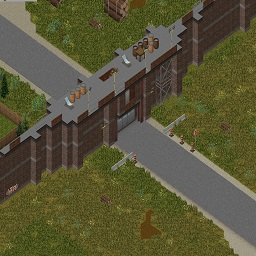
Troiford_ekron
von 76561198798075005
Survivors village in Ecron Поселение выживших находящееся на востоке Экрона Карта подходит для рп проектов в качестве поселения построенного после апокалипсиса. В поселении присутствует все необходимое для рп: Полицейский участок. Больница. Церковь. Ферма. Склады. Жилые дома. Магазины которые можно переоборудовать. И самое главное это непреступная стена вокруг поселения Версия карты находящаяся возле Роузвуда https://steamcommunity.com/sharedfiles/filedetails/?id=2880986071 Workshop ID: 2880943797 Mod ID: troiford_ekron Map Folder: Troiford_ekron
![Resident Evil Voices [B42] – Project Zomboid Mod](https://images.steamusercontent.com/ugc/25431756321897494/A760FC83B07A7CE65852173497F6452E148A1B28/)
Resident Evil Voices [B42]
von 76561198042060301
Adds characters from the Resident Evil PS1 trilogy as new voice types Includes: -Classic Chris RE1 -Classic Jill RE1 -Classic Leon RE2 -Classic Claire RE2 -Classic Jill RE3 I might add Ada and Carlos if I get around to it at some point. I wanted to add Barry but he has no gameplay sounds to use rip Recommended with the schizophrenia mod Guide on how to create custom voices Workshop ID: 3402236914 Mod ID: VoiceResidentEvilPS1

Quick Reload
von 76561199178116693
Description - ESC > Option > Mod Option - you can Set Reload Speed - you can Set Bullets Loaded at Once - If the "Ignore Reloading Skill" option is checked, - It follows the value set in "Bullets Loaded at Once" - If the "Ignore Reloading Skill" option is unchecked and - Assuming "Bullets Loaded at Once" is set to 5 Bullets, - For Reloading Skill levels 1-4, it loads 2 bullets at a time, - For Reloading Skill levels 5-7, it loads 3 bullets at a time, - For Reloading Skill levels 8-9, it loads 4 bullets at a time, - For Reloading Skill level 10, it loads 5 bullets at a time. - You can turn it on and off by pressing the toggle key. - You can also change the toggle key. Workshop ID: 3403052445 Mod ID: QuickReload

KS_RECYCLING
von 76561198060805740
KS_RECYCLING Workshop ID: 2900952521 Mod ID: KS_RECYCLING

Bandits 中文汉化 B42
von 76561199020860145
Bandits 中文汉化 B42 包含 Bandits NPC、 Day One (Bandits)、 Week One NPC中文汉化 Workshop ID: 3406868397 Mod ID: BanditsCN
![Remove Inventory Limits [JAVA][B42.16.0][DEPRECATED] – Project Zomboid Mod](https://images.steamusercontent.com/ugc/15269534909499333972/0F0D26BA7F6431F3B7490DE96522E993D4FF8087/)
Remove Inventory Limits [JAVA][B42.16.0][DEPRECATED]
von 76561197990716172
Mod updated @ https://steamcommunity.com/sharedfiles/filedetails/?id=3711508756 Rewrote the approach into a ZombieBuddy java patch mod. This is one now deprecated. This is a *JAVA* mod, removing the hardcoded capacity limits. (The Max Capacity is set 30000 now) 1. Find the file ProjectZomboid64.json in the game directory and open it with your favorite text editor e.g. Notepad. To go to the game directory, in Steam, right-click on the Project Zomboid game and select "Manage"->"Browse local files". 2. Close to the top, there is a field called "classpath". Right below that, it says: ".", It should look roughly like this: { "mainClass": "zombie/gameStates/MainScreenState", "classpath": [ ".", "projectzomboid.jar" ... // More below that is not relevant 3. Above the "." line mentioned above, add the following: "<workshop directory>/<game version>/RemoveInventoryLimits.jar", No backslashes are allowed. For all WIndows users, this means that you need to manually change the backslashes \ into forward slashes /. Also, make sure to keep the same indentation as the other lines. Finally, be sure to put the path within quotes " and end the line with a comma , The top of the json file should now look something like this: { "mainClass": "zombie/gameStates/MainScreenState", "classpath": [ "C:/Program Files (x86)/Steam/steamapps/workshop/content/108600/3625921385/mods/RemoveInventoryLimits/42.16.0/RemoveInventoryLimits.jar", ".", "projectzomboid.jar" ... // More below that is not relevant 4. Save the file. 5. Start the game using the default launch method, not alternate. (See the screenshot otherwise) (Linux path will be something like: "/home/<username>/.local/share/Steam/steamapps/workshop/content/108600/3625921385/mods/RemoveInventoryLimits/42.16.0/RemoveInventoryLimits.jar" NOTE: Only works on newly generated objects, e.a. a new save, or new area's load. Or have ANOTHER mod that plays around with setting weights on containers. ex. Dynamic backpack upgrades. I can recommend these 2 to get bigger capacities in inventories: https://steamcommunity.com/sharedfiles/filedetails/?id=2996978365&searchtext=dynamic+backpack https://steamcommunity.com/sharedfiles/filedetails/?id=3636241120&searchtext=upgrade+storage For Server Admins: 1 Open your dedicated server folder (the one containing java, jre64, natives, etc.). Go into the java folder. You should see projectzomboid.jar. 2 Find "<workshop directory>/<game version>/RemoveInventoryLimits.jar" and the zombie folder in the same location. Copy both into the server’s java folder. It should now contain RemoveInventoryLimits.jar, projectzomboid.jar, the zombie folder, and other existing files. 3 Open your server startup script (e.g., the Windows .bat file). Locate: SET PZ_CLASSPATH=java/;java/projectzomboid.jar Change it to (Windows uses semicolons): SET PZ_CLASSPATH=java/RemoveInventoryLimits.jar;java/;java/projectzomboid.jar 4 Done. Clients must install the mod as well. 5 When the mod updates, overwrite the files accordingly. Workshop ID: 3625921385 Mod ID: RemoveInventoryLimits

Game Night: Go
von 76561197960328944
Add-On for GameNight. Play the ancient game of Go in Project Zomboid! Copyright 2026 Oppolla. This item is not authorized for posting on Steam, except under the Steam account(s) named Oppolla. Workshop ID: 3281209194 Mod ID: gamenight_go
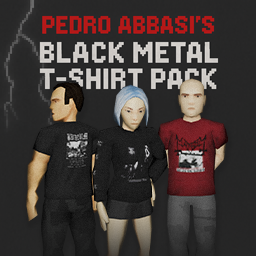
PEDRO ABBASI's Black Metal T-shirt Pack
von 76561198147014677
Now w/ hoodies! Tested on B42.20+ SP/MP. A collection of classic black metal t-shirts. They are supposed to be very rare (as would be a black metal t-shirt in the 90s) but they can be found in wardrobes. Not all albums are time-accurate but I try to keep it as vanilla-friendly as possible. It's a simple mod with the vanilla t-shirt and hoodie models, so I don't expect any conflict with other mods. Feedbacks are welcome. Current pieces Band Album/Description Absurd Logo Bathory Bathory Bathory Blood Fire Death (hoodie) Blod Besvimelse Tales from the Pitifulness Burzum Filosofem Celtic Frost Morbid Tales (longsleeve) Darkthrone Transilvanian Hunger (longsleeve) Emperor Wrath of The Tyrant Goatmoon Son of the Northwind Grausamkeit Pink Green 666 Immortal Pure Holocaust Mayhem Deathcrush Mayhem Dawn of The Black Hearts Morbid December Moon Mutiilation Vampires of Black Imperial Blood Mutiilation Destroy Your Life for Satan Nargaroth Black Metal ist Krieg Peste Noire La Sanie des Siècles Peste Noire Kommando Peste Noire (hoodie) Sarcófago Baphomet (Dead's t-shirt) Satanic Warmaster Opferblut Velho Vida Longa ao Primitivo Xasthur Nocturnal Poisoning (longsleeve) I try to update when I have time. I post some previews on my ko-fi. Workshop ID: 3594126787 Mod ID: PEDROABBASI'SBlackMetalT-shirtPack
![Ergonomic UI [B42.20] – Project Zomboid Mod](https://images.steamusercontent.com/ugc/15866321403116741618/31476C6CB9A13E8B85040FC6012D8EAD10C920C8/)
Ergonomic UI [B42.20]
von 76561198313514743
ErgonomicUI A functional panel for managing your inventory, equipment, and interaction with surrounding items. The mod stays true to the Project Zomboid atmosphere and contains no cheat features. It is safe to enable or disable at any point during the game. Key Features - Three windows: Inventory, Equipment, and External Containers - Interactive hands section - Full Drag-and-Drop between all zones - Item display as classic list or icons - Drag Select - select multiple items at once (while holding Shift or Ctrl) - "Drop on floor" / "Place on floor" options - Automatic panel resizing based on container contents - Optional Heal and Craft modules for quick healing and crafting Flexible Customization A wide range of settings: - Color and transparency - Show/hide triggers - Panel sizes - Additional functions The mod’s architecture allows you to configure the panel to match your preferred playstyle. Compatibility - Designed for experienced players Build: 42.19 – 42.20 Workshop ID: 3762749124 Mod ID: ErgonomicUI Multiplayer support: yes Controller support: in development The mod is actively developed and maintained by the author. To access new features, periodically update the mod to the latest version. Feel free to share your experience and leave feedback in the comments.

Thai Translation
von 76561198047485926
โปรเจกต์ซอมบอยด์ ภาษาไทย Thai Translation for Project Zomboid T9N Workshop ID: 2828333382 Mod ID: ThaiB42
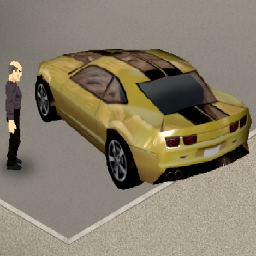
Driving Cars Mod - MP & 3D Models
von 76561198156009884
A Multiplayer Compatible version of the Driving cars Mod that also uses 3D Models when driving. Functionality wise, everything works. Of course post here if you discover something that doesnt. Vehicles can have Passengers. Passengers must enter the vehicle after the driver starts driving. Walk close to the vehicle and the right click on the ground for the option to enter the vehicle. Vehicles have passenger limits based on the size of the Vehicle. If you collide with another player while driving it will insta kill him. Vehicle spawn rate is effected by the Loot rarity (Other) sandbox setting New Stuff: Headlights have been improved and turn on by default when you start a car. New steering system. With a more realistic Forward, reverse and steer machanics. *use ARROW KEYS to drive* Now you can right click on the ground for a drive car option when near a vehicle. Things to Note: The persepctive of the cars does not look great because the car model must be attached the the players model and the players model is not 90 degrees to the ground like you would think, but it is angled differently to make them look better. I have not prepared 3D models for all cars yet. In fact only have 1 small cartoony jeep made at this time. So when in driving mode thats the only model you will see for now. More models to come. Currently due to a game engine limitation on 3D Models, the models cannot be any bigger than 256x256 pixels. Which is very small for a car. Pray that sometime soon TIS can increase this area size or we can find some other way to work around that. To Do: Imrove driving sound effects Make More 3D car models Workshop ID: 815736766 Mod ID: DriveCarsMP

Giga Chad Skin Retexture (now with non grayscale!)
von 76561198055749891
This mod is just a skin retexture so your character can be a giga chad. To use this skin choose the 3rd skin option in character creation. There are three versions grinning, straight faced and non gray scale Begin your sigma male grindset today. UPDATE 06/05/2023: Non gray scale option now available in mod menu. Workshop ID: 2777990226 Mod ID: ChadSkin Mod ID: GigaChadSkinRetexture Mod ID: GigaChadSkinRetextureNoStubble
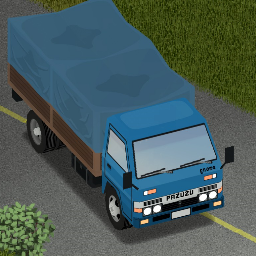
Filibuster Rhymes' Used Cars Addon
von 76561198055893037
THIS MOD IS INCOMPLETE I upload it just to test with my friend. !EXPERIMENTAL! Workshop ID: 2750964276 Mod ID: FRADDON
![[STABLE B42 + MP] Fire Rebalance Mod – Project Zomboid Mod](https://images.steamusercontent.com/ugc/2912473887168148/85F17E7908EC9BDBC2C29CBB7A3D7A6C9A645A39/)
[STABLE B42 + MP] Fire Rebalance Mod
von 76561198360420729
WORKS FOR B42 STABLE BRANCH + MULTIPLAYER This mod adjusts fire damage mechanics to make fire 4x more effective against zombies and 4x less damaging to players. Workshop ID: 3398838250 Mod ID: FireRebalance
![[B42/NOT COMPATIBLE WITH 42.12.x] Methyl capacity pack – Project Zomboid Mod](https://images.steamusercontent.com/ugc/19803979015795123/665A17B9E460ADECFDB3E72726B548C499972AC7/)
[B42/NOT COMPATIBLE WITH 42.12.x] Methyl capacity pack
von 76561197990150424
DOES NOT WORK ON VERSION 42.12.x OR NEWER VERSION Methyl capacity pack updated for b42. Original made by: MethylEniMine IMPORTANT NOTICE: This mod requires the Capacity Limit Bypass B42 due to devs implementing hardcoded weight limit of 100 for containers. To use this mod as intended you need this mod and refer to it's instructions how to install it. Workshop link to Capacity Bypass B42: Capacity Bypass B42 Workshop ID: 3412908276 Mod ID: Methylpack_b42
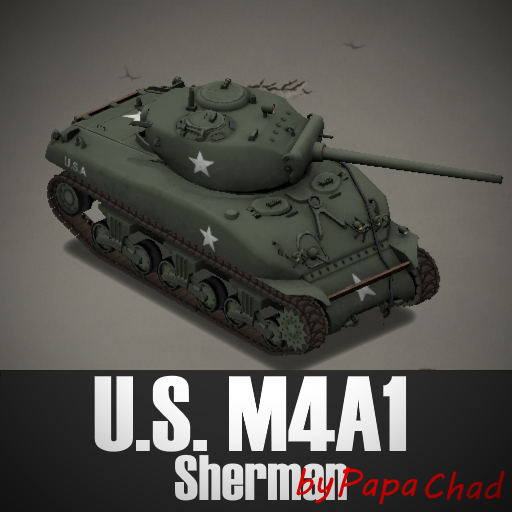
U.S. M4A1 Sherman by Papa_Chad
von 76561199053466149
This mod adds the M4A1 Sherman with enhanced visuals and performance, bringing more realism and impact to the game. Drive and Shoot The mod features a variation that allows the driver to operate the turret and coaxial catch. The reload functions are also adjusted for this. To activate this, simply enable the mod "U.S. M4A1 Sherman Drive and Shoot by Papa_Chad". It is not recommended to have the standard variation active at the same time. Features - Animated Tracks - Animated Hatches and Doors - Heavily Armored Hull - Fully Animated Turret - Functional Main Cannon and Coaxial Machine Gun - Authentic WWII Military Skin Mod for B42 SP and MP. *✅B42.20 Compatible with existing saves. Compatible with KI5 vehicles and other mods. Weapons - 76mm M1 Cannon Uses 76mm APFSDS (Armor Piercing) and 76mm HE (High Explosive) rounds. Armor Piercing rounds can penetrate walls, vehicles, and multiple entities, losing energy with each penetration. High Explosive rounds detonate on impact, causing significant area damage—handle with care. - .30 Cal M1919 Coaxial Machine Gun Uses 7.62x63mm ammunition. - All weapons grant XP when killing zombies and do not use infinite ammunition. Ammo loot is proportional to the game's vanilla ammunition system. Enhanced Aiming System When aiming, a circle indicates the mouse position, while a triangle shows where the cannon is actually pointing. You may fire at any time, but the projectile will follow the turret's orientation—not the cursor—unless both are aligned. It is necessary to have the Military Tool Kit installed. If you want me to keep updating my mods, please consider supporting me :) I'm open to commissions. Contact me via my Ko-Fi or add me as a friend on Steam. On Lockdown This mod cannot be modified by anyone else, for anything else, at all, ever. Even if the user disappears, they would much rather you didn't touch the fruits of their hard labour. Workshop ID: 3783055980 Mod ID: U.S. M4A1 Sherman by Papa_Chad Mod ID: U.S. M4A1 Sherman Drive and Shoot by Papa_Chad
Project Zomboid Guides
Project Zomboid Mods installieren - Workshop Guide
Installiere Project-Zomboid-Mods sauber per Steam Workshop: IDs eintragen, Reihenfolge prüfen, Server neu starten und typische Fehler beheben.
Project Zomboid Build 42 auf dem eigenen Server: Umstieg, Spielstände und Mods
Build 42 ist Stable: Spielstände aus Build 41 sind nicht kompatibel. Umstieg, legacy41-Zweig, neue Serveroptionen, Anti-Cheat und der Hotfix 42.20.1 gegen Serverlag.
Project Zomboid Server mieten – Multiplayer Guide
Project Zomboid Server einrichten: RAM, Sandbox-Einstellungen, Workshop-Mods, Admin-Rechte und typische Fehler sauber prüfen.
Project Zomboid Server mit Mod-Support
Kompatible, unterstützte Mods über das Server-Dashboard installieren.
Project Zomboid Server mieten