Mods & Plugins für Project Zomboid
Dieser Katalog listet 52.000+ Project Zomboid-Projekte von Steam Workshop. Einträge können serverseitig, clientseitig oder auf beiden Seiten erforderlich sein und auch Karten oder andere nutzergenerierte Inhalte umfassen. Prüfe vor der Installation die verlinkte Quellseite, Spielversion und Abhängigkeiten.

SWMisc
von 76561198044148998
A collection of QoL modules for Sunday Drivers server "SWMisc_Patches" module info - Allows walk/nimble while reading - Reduces the time required for most Timed Actions including item transfer in half when in vehicle or in safehouse (can be adjusted Sandbox Options) - Reduces the time required to open Mechanics UI (can be adjusted Sandbox Options) - Reduces the weight of some wood, metal, rags and packed items in half - Changes CombatSpeedModifier and RunSpeedModifier of all protected ProtectiveGear to 0.99 and rest of clothing to 1.0 - Adds recipes: Make Spare Engine Parts, Pick Thread (Full) - Adds Repair option to vanilla brakes, mufflers, suspension and tires - Removes "Take Engine Parts" option if engine condition is above 50% (can be adjusted Sandbox Options) - Removes Fitness debuff from Slow/Fast Metabolism, renames Keen Hearing to Keen Perception and allows to take it with Hard of Hearing or Deaf (accessibility) - Removes confirmation prompt from "Delete All" button (meant to be used together with Remove All Items mod) "SWMisc_Fixes" module info - Fixes the server side error caused by item consolidation - Fixes ALICE Belt and Chest Rig not appearing on top of some items "SWMisc_Resting" module info - Shows green exclamation mark above the character when fully rested (can be turned off in mod options) "SWMisc_Slots" module info - Adds "Back Alt" slot when backpack is equipped which mirrors vanilla Back slot "SWMisc_Items" module info - Adds vanilla friendly craftable items: "Spiffo Bag" and "Spiffo Duffel Bag" Modpacking or reuploading is not allowed as long as the original version is present. Workshop ID: 3621968227 Mod ID: SWMisc_Fixes Mod ID: SWMisc_Items Mod ID: SWMisc_Patches Mod ID: SWMisc_Resting Mod ID: SWMisc_Slots

More Clothing Options
von 76561198027399020
Adds more clothing options to the character creation screen. Things like underwear, backpack, hoodies, jewerly, etc. No high end gear is available, its only stuff you'd find on normal zombie corpses. Workshop ID: 2971431949 Mod ID: ZUGMoreClothing
Cat Ears and Tail
von 76561198800866700
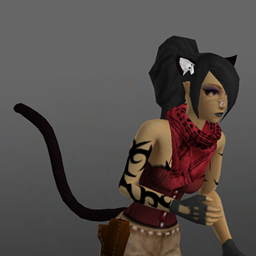
Cat Ears and Tail The tail sways around while walking/running. The ears can express different emotions (via right-click menu). The two items spawn randomly in the world and come in 12 colour variations matching various vanilla hair colours. The ears use the earring-top slot and the tail uses the tail slot. All items can be cut into leather strips. Contains additional mods for leopard, cheetah and tiger parts. These don't spawn in the world, use debug item menu or pick at character creation (with "All Clothing Unlocked" option in Sandbox) Conditional Clothing Framework (OPTIONAL) The cat/leopard ears optionally support the Conditional Clothing Framework and will switch automatically between the variants depending on the player's moodles (panic, stress, unhapiness, none of the other). Credits (for the mod poster) - Hair: "Empress Tail" from the mod Spongie's Hair - Body: Tomb's Player Body Overhaul + Spongie's Character Customisation - Clothes: just vanilla (b42) items (Corset, Pants - Leather, Fingerless Gloves, Shemagh) - Nose ring: PALSJ's Piercings & Jewelry - Tattoos: Ellie's Tattoo Parlor V4 - Cat ears and tail: this mod Special thanks to @cast heal, for finding an issue, that may prevent the mod from showing up in PZ on Linux ("common" folder needs to be lower case). Related mods - Wolf Ears and Tail - Faun Parts and Skin - Fox Ears and Tail - Fantasy Bodyparts - Harpy Parts Workshop ID: 3581217034 Mod ID: RabenRabo_CatCheetahParts Mod ID: RabenRabo_CatEarsTail Mod ID: RabenRabo_CatLeopardParts Mod ID: RabenRabo_CatLeopardPartsLegs Mod ID: RabenRabo_CatTigerParts
![[COS] Division Hunter 2 – Project Zomboid Mod](https://images.steamusercontent.com/ugc/5109928331643547583/772F63234DABA1E5728F3D8C293259225BDBAAD8/)
[COS] Division Hunter 2
von 76561199178116693
How Do I Use It? - You can go to the link below to see how to use it. - Link Recommended mode - Fashionoid - Gear Transmog - Hide All Attached Items - Clipping animation Fix How to use COS mode in build 42. - Navigate to the path where the mod is installed. - Create a 42.0 folder. - Create a common folder. - Paste the media folder / mod.info / preview.png into the 42.0 folder. The recipe code writing method has been changed in 42Build. Since COS (Costume) mode has approximately over 200 modes, converting to 42Build's recipe code is an extremely laborious task. In 42Build, you cannot create costumes in (42 build) the crafting tab. There are two methods: Spawn items in cheat mode. Select items in the clothing selection screen when creating a character. Like My Mode? - Join Our Discord If You Want Commission

Fitness VHS Gains
von 76561197992711692
With this, you can gain a skill XP multiplier of up to 8x in Fitness and Strength by watching all five Simon's Fitness Club VHS tapes. Tested in hosted and dedicated servers. In future, it may add weapon skill multipliers onto action movies. There are two mods inside here; one is ERMC/Extra Recorded Media Codes, which allows for skill multipliers to be added by recorded media. The second is FitnessVHS, which adds the new codes onto the existing VHS tapes for you. You can install this workshop item and use ERMC yourself if you want, just leave FitnessVHS disabled; you can peruse its source to see the new codes. 17th May 2022: This mod has been updated for 41.69's new recorded media system. Previous versions will continue to work as before, while in 41.69+ lines will only be affected on first listen as appropriate. Workshop ID: 2710407461 Mod ID: FitnessVHS Mod ID: ERMC
Livestock zones expanded
von 76561198025442400
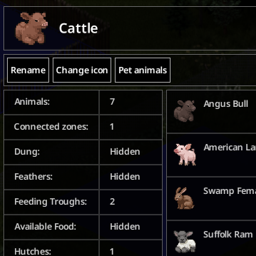
Designation animal zones UI, actions, animals info and more. Build 42 only. This mod is wip, expect some bugs. It's safe to add and remove from existing games. The mod stores zone icons in moddata, so it is advisable to remove the changed zones before uninstalling the mod, but this is not required. Features: - new interface for designating animal zones - new animals interface - easy access animal actions, pet animals from interface window - more stats details Planned: - better tooltips - more actions - animal info window rework - animal moodle - animal world icons Know issues: - new desination zone double clicks or click after zone placed (vanila bug) - no vanilla racoon icon texture - no data auto refresh yet - no mp features Notes: Please report issues to the Github issues page if possible, so that they don't get lost. You are welcome to contribute on Github. To disscuss welcome to PZ Modding community Discord https://discord.gg/TM44Ump6. Special thanks to: - @yayie for testing and error reporting Workshop ID: 3434810293 Mod ID: WeeezLivestockZonesExpanded

We are experiencing Dawn time!
von 76561198057538053
Adds 2 mods - a new plushie and a new radio station that is always on Dawn time! Dawn Plushie - The baby! - Very round bird - A borb if you will - 100% satisfaction guaranteed - Can be found in toy stores and daycares Tiny Desk Dawn - Wearable! - Very tiny and adorable - Very rare to find in the same locations - Can be crafted back and forth between Plushie and Wearable 91.6MHz Dawntown Radio (Broken) - Plays the same song forever - Listening on repeat helps de-stress Known Radio Issues: - Devs are updating radios and making constant changes to them, I'll fix the radio once they finish all their tweaks - Sometimes it takes a cycle (30m) for the station to start playing music, be patient - The song resets it's volume on repeat, not sure if it's cosmetic or impacting the game - Radio seems to work only half the time in Multiplayer - Incompatible with my other mod Down Time * I am unfortunately not skilled enough to fix the radio issues, I'll gladly take solutions and fixes Workshop ID: 2714571285 Mod ID: DawnTime Mod ID: DawnTimeRadio
Urban Armor
von 76561198202265970
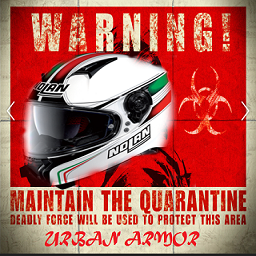
This is my version personal reskin of Armor Mods This mods allows you to wear armor and clothing found on zombies dead bodies Depending on the armor they can protect you from bites or scratches but will not repair you from certain death. Let's say that in this moments of opportunity everything can become armor. From a bike helmet to an old antigas mask to a garbage cover!, the choice is wide but you will be able to prepare for the imminent urban catastrophe !? To play this mods in multiplayer servers all you have to do and copy the entire mods folder to the C: User / zomboid / mods folder and load it into the server management menu from mods and not from workshops. *Special Credits* Thanks go to the true author of this mods that thanks to his efforts made this game a better place to die. Thanks Nolan Enjoy The Urban Armor! Workshop ID: 931624980 Mod ID: UrbanMod
![[B42] OG Cooking Expanded – Project Zomboid Mod](https://images.steamusercontent.com/ugc/15217395468458275236/D387FBC4B7EB754D0CD8114D6BE9E4C18227A8B5/)
[B42] OG Cooking Expanded
von 76561197997006432
OG Cooking Expanded adds a variety of vanilla-style cooking, baking, and ingredient-processing recipes to Project Zomboid Build 42. Expand your kitchen with practical recipes that make food production deeper, more useful, and more rewarding for long-term survival. Current Recipes: • Grind Beef • Make Hamburger Buns • Make Hotdog Buns • Make Taco Shells • Make Hotdogs • Process Sugar • Make Tomato Paste • Make Scrambled Eggs • Make French Fries Features: ✓ Balanced around vanilla gameplay ✓ Expanded baking, and pantry crafting ✓ Works with Build 42 crafting systems ✓ Multiplayer compatible ✓ Dedicated server compatible ✓ Lightweight and lore-friendly Perfect for cooks, farmers, butchers, homesteaders, roleplayers, and long-term survival playthroughs. More recipes. More flavor. More survival. Working in 42.20 Workshop ID: 3727395976 Mod ID: OGCookingExpanded
Anthro Superb Survivors!
von 76561198833978028
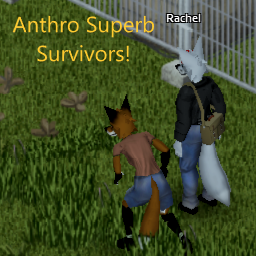
Literally just SuperbSurvivors support for the AnthroSurvivors mod. Currently implemented: * All Base Superb outfits for all the Base AnthroSurvivors species. * Presets are untouched. * Human NPCs can still spawn, albiet more rare now. Now with support for the Scaly addon! Currently implemented: * The "ears without hair" model, all Scaly mod colors. * The rest might come someday. Though if I do add the other models, it might drown out the base FurryMod species'.... Now with support for the Ungulates addon! Currently implemented: * All models added at the time of this update. Will improve description later. Workshop ID: 2920082573 Mod ID: FurrySuperbHoovedSurvivors Mod ID: FurrySuperbScalieSurvivors Mod ID: FurrySuperbSurvivors
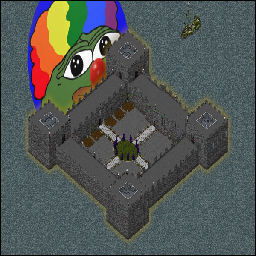
Comfy Citadel
von 76561198029232657
test test test Workshop ID: 3112672360 Mod ID: FCCC Map Folder: CC

Auto Eat (Old)
von 76561198012326036
Automatically eat (favorited) food. This mod is no longer supported. Thank you. To automatically eat the food, it must be in your main inventory, favorited, and edible as is*. *Cans will have to be opened manually beforehand. Workshop ID: 2365757229 Mod ID: AUTOEATING
KS_ADD_VFE
von 76561198060805740
KS_ADD_VFE Workshop ID: 3094718808 Mod ID: KS_ADD_VFE
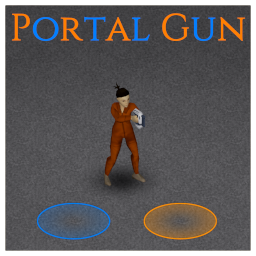
Portal Gun
von 76561198329871201
Adds a portal gun to project zomboid. Realism level: 0%. Balance level: 0%. Fun level: 99%. Lore .. zzzt ..bout those things. We just call them prototypes. We had five of them, but one got wrecked when we escaped. Yoo-Joon took two when he tried to flee the country. He was gonna stop at his hotel in Louisville. Lily took one with her. She said many times "It looks like a big stapler".. For sure she hid it in a store at the Mall. I still got one with me but not for long.. .. One of those thing bit me.. I'll put it south of the pond. Sh*t! We were so close to something great.. .. Anyway, if you recover one, there are things you must know: If it stops working, just wzztt.. don't ..skrkrr.. It will stabilise by ..izzzzf.. but it will take time. Very i..tzzatt thing: dzzzt .li.......b...om.. And tzz..zzt important: don't p....ze..o....ver Caution: Teleport messes with normal Cell Loading system - Teleport is partially bypassing the Cell loading system. - Consequence: LoadGridSquare may not be called on arrival cell squares. - Consequence: Trapping item may not be filled as expected if you reach their square with a closeby teleport. - Consequence: Loot refill may not be filled as expected if you reach their square with a closeby teleport. FAQ - Why can't I see my portal ? The markers used to display portals are only visible on the same level. - Why can't I place a portal when I shoot ? You need to have the target square in the visual. It cannot be in the air. - Can be added / removed from existing game. - Works in solo and multiplayer. - Is this overpowered ? yes. - Does it teleport items and furnitures and cars ? no. - Does it teleport Zombies ? If you activate the sandbox option (at your own perils), yes. Back Up Your Save! - Where are the new items? Read the lore above. - Where are the new items? I want to spoil my own fun! Military got some. - Where are ALL the new items? Don't ask, search. Requests will be ignored/removed. Ask for permission This mod can only be added to and extended with the express permission from the original creator. Having received permission, credit must be given to the original creator, both within the files of the mod and wherever the mod roams online. If no permission is received you may not alter the mod. If you wanna support kind words are very welcome. If you don't have any, you can still or use donate on paypal. The cake is a lie! Workshop ID: 2986715593 Mod ID: PortalGun
Remove Item Tool Upgrade Tiles Remover
von 76561198014072304
This mod enhances the vanilla "Remove Item Tool" by expanding its functionality to allow the removal of tiles from selected areas. Whether you're looking to clear out debris, unwanted objects, or simply tidy up your environment, this tool provides a more comprehensive cleaning experience. With this improvement, you can easily manage and maintain your space with greater precision and efficiency. Perfect for those who appreciate a well-organized and clutter-free environment! Workshop ID: 3319434817 Mod ID: removetilestool

WarThunderAmrorPack
von 76561199193863491
WarThunderAmrorPack Workshop ID: 3161627435 Mod ID: WarThunderAmrorPack
Hydrocraft白夜Hy
von 76561198227102696
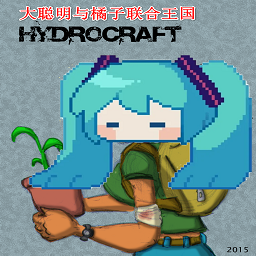
大聪明与橘子联合王国服务器自用 缩短了工作时间 增加了独轮车动画 内置了汉化 修改了不合理的刷新率 修复了夹钳配方 增加了更多的子弹制作以适配枪械MOD 将部分超模道具的制作配方绑定在Hy的科技树上 将研磨机适配FuelAPI里的大型油桶 删除了没有模型的鸡肋武器 增加了所有锚定建筑的取消锚定 右键的building ranching修改代码汉化成中文 增加了化学防护服的制作 增加了用电工具的使用次数 修改Hy金属板合成4铝锭→3钢锭1铝锭 汉化注释加上“所有炉子需要穿工作手套<防火服防止烧伤” 钢管制作修改为鼓风炉/工业炉 回形针/钉子制作针 合并Hy建筑,修改为背包有铁锤才会显示建造菜单 优化代码,减少卡顿 增加无限原木桩并修复无限刷原木的BUG,无限原木桩可减少50%的原木重量(泪随樱花落制作) 删除其他原木桩 Workshop ID: 2961414381 Mod ID: HydrocraftByakuya
Ducklings Posters
von 76561198055272054
Posters and Posters! This mod is a collection of various posters I decided to make in an attempt to learn tile making. Removed the Extra Content! I have moved the dakimakura included in this mod to my dakimakura mod to remove the dependency and to keep everything more organized. These posters consist of but are not limited to - Demon Slayer - Overlord - Ghost in the Shell - Berserk - Chainsaw Man Workshop ID: 2865381948 Mod ID: DuckPosters
![Pocket Kittens (B42) [42.13] – Project Zomboid Mod](https://images.steamusercontent.com/ugc/9535001344425258709/5F35B0A6A6123E501E164590B9CF3797333B1489/)
Pocket Kittens (B42) [42.13]
von 76561198106717531
Original mod by Orc, all credits go to them! You can find the original mod here. -Personal Notice- Help my Father fight Stage 4 Cancer! My father was diagnosed with Stage 4 Cancer and we need funds to support him and buy him everything he needs, he is currently recovering from a back surgery where a tumor was removed from his spinal cord and will be undergoing chemo soon so if you can spare a dollar please donate to my Ko-Fi by clicking on the anime girl below, we deeply appreciate it even if it's a dollar, anything helps! IMPORTANT NOTE: I finally updated to 42.13 but due to some screwups i made there's some bugs in the new version that i need to fix. Oops. Either way the mod 99% functional and i thought it was time to update it for now. Wake up, scavage for food, kill your neighbors, go to bed, cry. Wake up, scavage for food, kill your family, go to bed, cry. Wake up... day after day after day. It's mundane, it's depressing and it's every so lonely until one day.... a little furball shows up on your door. He's hungry, he's desperate, he NEEDS YOU. Life has a purpose, Mr Mittens needs you, he needs your food, your love and your attention. Things don't seem quite as gloomy anymore. Pocket Kittens adds several different breeds of kitties for you to trap and give a "furever home" to. They roam mostly in cities and trailer parks but can sometimes be found in the forest. Set up traps with the appropriate bait and wait. Eventually you'll find yourself a new friend. Once you do, take them home for cuddles or maybe put some effort into making a safe pocket for them to join you on your travels. Having a companion with you can help reduce your boredom and unhappiness in this gloomy world with death creeping around every corner. What's New for B42? - New Sound Feedback: Kittens now purr when you pet them, you can hear them chew when they eat, and more! - Expanded & More Logical Diets: Kittens can now be baited and be fed with a wider variety of foods, including Dead Rats, Bacon, and various Cooked Meats! - Added trap timer fix as a "Requirement" however it's not actually required to run this mod. Bait & Trapping Guide To find a stray kitten, use a Cage Trap or Trap Box in residential areas like towns and trailer parks. Tier 1 Baits - Open Tin of Tuna (100% Effectiveness) - Open Tin of Sardines (90% Effectiveness) - Dead Mouse (80% Effectiveness) - Dead Rat (80% Effectiveness) - Dead Bird (70% Effectiveness) - Fish Fillet (70% Effectiveness) Tier 2 Baits - Open Canned Milk (60% Effectiveness) - Bacon (50% Effectiveness) - Small Bait Fish (50% Effectiveness) - Chicken (40% Effectiveness) Tier 3 Baits - Pork Chop (30% Effectiveness) - Steak (30% Effectiveness) Psycho Recipes Submod Psycho Recipes is NOT required, it is completely optional to enable it's meant for killing kittens, for the evil people who like doing that for some reason (something is with wrong with ya'll). (Although you can already eat stray kittens normally even without this module, but remember, Friends not Food) Translations Translations are supported for: Chinese, Espanol, Japanese, Korean, Brazilian Portuguese, Russian and Thai! Bug Reports & Feedback I will be maintaining this version of Pocket Kittens! Got bugs or errors? Send them in the comments below! Provide the full error stack using the ErrorMagnifier mod. For bugs, please detail exactly how you got the bug (what your character was doing or what action you were doing before the bug occurred). Consider donating and buy me a coffee! (Click on the image below to donate!) Workshop ID: 3568029240 Mod ID: PocketKittensB42 Mod ID: PocketKittensPsychoB42 Workshop ID: 3568029240 Mod ID: PocketKittensB42 Mod ID: PocketKittensPsychoB42 Mod ID: PocketKittensPsychoB42
infinite durability generators
von 76561198039105905
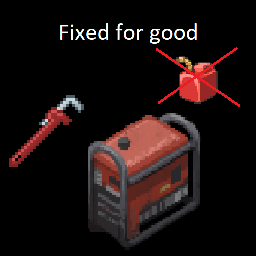
make your generator have infinit durability like buffy's infinite generators but dosn't give infinit fuel /!\ it does set the fuel to 0 so think about removing the fuel first if your in mid game /!\ all I did was editing a value from the original mod credit goes to buffyuwu with the original mod buffy's infinite generators this mod is just an edid, I do not plan to fix the useless and brocken shit nor the nonsence left from the original text, if you want a clean work. ask buffyuwu. the original mod https://steamcommunity.com/sharedfiles/filedetails/?id=2910450034 Workshop ID: 2973237001 Mod ID: infdurgen
Blue Screwdriver Icon
von 76561198008445717
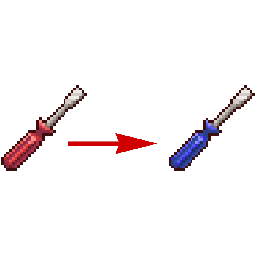
Requires Item Tweaker API, Multiplayer compatible Changes the Screwdriver UI Icon to match the 3D model. It's bugged me for a while that the Screwdriver's Icon in the inventory was red when it's new 3D model is blue. I went and made this to change the Icon to match the 3D model. Workshop ID: 2694078545 Mod ID: BlueScrewdriver
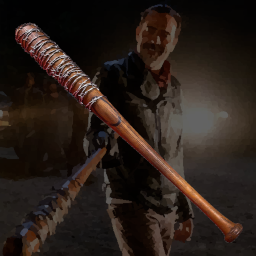
Negan's Bat (Lucille)
von 76561197993908696
Negan's Bat (Lucille) Features - Critical chance and damage is significantly increased - Hard to break - It can be fixed using barbed wires, tapes, or glues How to make Negan's Bat (Lucille) - You will need Woodwork Level 1 and Maintenance Level 1 - Find a plier (only B42) - Find materials; 1 Baseball Bat, 2 Barbed Wires - Open crafting menu to craft Workshop ID: 3443544711 Mod ID: NegansBat
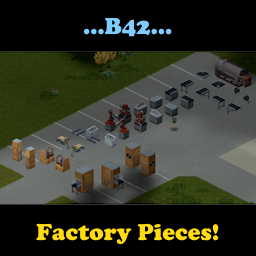
Factory Pieces
von 76561198092535367
It adds new pieces to build in the game around the factory design. Most of them are containers with unique container icons and can spawn basic materials on the belts (in their containers). There are 4 magazines needed to get all the recipes to build them. Factory Life Magazine Volume 1: Go Conveyourself! Factory Life Magazine Volume 2: CNC & Me! Factory Life Magazine Volume 3: I SAW it all! Factory Life Magazine Volume 4: Sorting out your life! Green Oven Silo Generator Design Manual This is the base mod that will be needed to run another mod in development called Industrial Revolution, can be used to build the silo generators for the Functional Appliances 2 mod, and terminals for the TrueMusic Radio mod as well. Added an update for garage lifts, to be used in spawning vehicles in Industrial Revolution's Vehicle Parts Add-on. Added industrial conveyor ovens for Industrial Revolution and fixed a misalignment issue with the robotic claw east facing. Building the terminals and having admin activated allows users of TMRadio to set them up to control 94 and 94.2FM. Added fluid containers to orange, dark green, and light green barrels. It is done with the free build recipe under the Factory Pieces tab. Pick up one of the barrels and use that as the only item needed to create one. Once created you can use them to store fluid. Added new robotic arms, including the auto butcher and caution taped floor tile overlays. ** Known bug, if the fluid is not water in the barrels, only use the transfer fluid option to fill and empty because there is a bug with the vanilla system that turns all the fluids into water as they are used. ** ** Known bug, when placing new garage lifts, they will block walking under them until you pick up the middle parts (both floor and overhead) and place them back down. No idea why, it's just an odd bug. Put them back down and they work as normal. ** Industrial Revolution is a new mod that will allow players to build factories and sort materials automatically placed on conveyor belts. Out now! All New in B42! Industrial Revolution!!! https://steamcommunity.com/sharedfiles/filedetails/?id=3400131934 TrueMusic Radio in B42 - Multiplayer synced radios using True Music add-on music! https://steamcommunity.com/sharedfiles/filedetails/?id=3100475013 FunctionalAppliances2 in B42 https://steamcommunity.com/sharedfiles/filedetails/?id=3042138819 TrueMusic Jukebox in B42 https://steamcommunity.com/sharedfiles/filedetails/?id=3398874593 Discord: https://discord.gg/dXFKS5NrbT Workshop ID: 3399263137 Mod ID: FactoryPieces
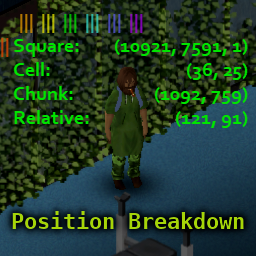
Position Breakdown
von 76561198276941338
I am on an indefinite hiatus from Project Zomboid. Feel free to use my code for future mods, and feel free to update my mods for B42. Please do not reuse their exact names or mod id's to avoid confusion and bugs for B41 players. I can only guarantee my mods worked when used alone before B42 dropped. I will no longer be retesting them when people have conflicts. Thanks for the support over the years. This mod is a major reimagining of PositionXY by Mamka. Adds a useful overlay that includes info on your player's position. The overlay has unique behavior when the world map is open! Mouse around (or move around with the gamepad) to see the breakdown of position information for any square on the map! Press X (while your world map is open) to copy the location under your mouse to your clipboard! Position Breakdown is extremely customizable. Change the overlay's position, font size, font color, and opacity. Even choose one of five display modes: Neat: Rectangular overlay in which lefthand and righthand elements are independently aligned. Compact: Concise overlay in which each coordinate pair is presented on one line succinctly. Abbreviated: Another compact overlay; abbreviates labels and drops parentheses to save space. Verbose: A more vertically arranged overlay in which each coordinate is independently labeled. Simplified: Also vertically oriented, but with simplified output and dropped parentheses. Options can be activated using keyboard shortcuts, clickable buttons, and gamepad buttons. Keyboard and gamepad shortcuts can easily be turned on or off to minimize the need for rebinding. Please see below. (Fully compatible with Dawn of the Zed, my mod for hiding your UI.) A Note On Colors: By default, buttons will have a rainbow theme for ease of telling them apart, and the overlay turns black for increased visibility whenever the world map is open. For those who strongly prefer to see one color all the time (on the buttons, in the map, et cetera), there are options in the config for accomplishing this. Please see the end of this description for info about the config file. Toggling Option Shortcuts: In order to reduce the odds of conflict with all other mods, I have included both keyboard and gamepad bindings for quickly disabling and enabling the mod's responses to either source of input. On gamepad, you must triple-tap R1 (or Right Bumper), hold it, and then tap L1 (or Left Bumper). This complexity is to reduce the likelihood of accidentally enabling the action listeners for this mod on gamepad. On keyboard, you must hold the right Ctrl key (not the left), hold F10, and strike F9. Key and gamepad button combinations are used as shortcuts in this mod to reduce the keys needed for performing a wide range of useful functions. Please refer to the shortcuts below. Additionally, you may move the overlay by clicking and dragging the sunset red button that appears when you are mousing near the overlay's origin point (which is near the top-left by default, or the top-right if you have moved the overlay to the right side of your screen and allowed it to automatically realign itself). Clickable Buttons: Color-coded buttons can be used to navigate many features of this mod (though not all). By default, these buttons are color-coded as follows: Sunset Red: Click and Drag: Move Overlay Double-Click: Collapse or Expand Overlay Orange: Click: Cycle Through Levels of Detail Yellow: Click: Cycle Through Opacity Options Green: Click: Cycle Through Style Options (affects Font Size, Spacing, and Face) Turquoise: Click: Cycle Through Color Options Blue: Click: Cycle Through Display Modes Violet: Click: Toggle Automatic Alignment of the Overlay White: Click: Copy Location to Clipboard Keyboard and Mouse Controls: Note: Keyboard inputs are DISABLED by default in order to minimize interruptions for people adding this mod to existing servers. Turn them on by holding the right CTRL key, holding F10, and striking F9. Key: RC: Right Control RA: Right Alt Summary of Functions: F9: Cycle Opacities F10: Cycle Sizes F9 (Hold) + F10: Toggle Visibility RC: Cycle Modes RC (Hold) + F9: Cycle Details RC (Hold) + F10: Cycle Colors RC (Hold) + RA: Toggle Automatic Alignment RC (Hold) + F9 (Hold) + F10: Randomize Everything Except Position RA + Move Mouse: Move Overlay Summary of Keys: Control: Display Mode and Alternate Action Access F9: Opacity, Detail, and Alternate Action Access F10: Size, Color, Toggle, Randomization Right Alt: Overlay Movement and Automatic Alignment Gamepad Inputs: Note: Gamepad inputs are DISABLED by default in order to minimize interruptions for people adding this mod to existing servers. Turn them on by pressing R1 three times, holding it, and tapping L1 once. Summary of Functions: A: Cycle Opacities B: Cycle Sizes L1: Cycle Modes L1 (Hold) + A: Cycle Details L1 (Hold) + B: Cycle Colors R1 (Hold) + A: Toggle Visibility R1 (Hold) + B: Toggle Automatic Alignment L1 (Hold) + R1 (Hold) + A: Randomize Everything Except Position R1 (Hold) + L1: Cycle Overlay Movement Precision R1 (Hold) + D-Pad: Move Overlay R1 + R1 + R1 (Hold) + L1: Toggle Gamepad Shortcuts Summary of Buttons: L1 / Left Bumper: Alternate Action Access, Display Mode, Shortcut Toggling, and Overlay Movement Precision R1 / Right Bumper: Alternate Action Access, and Overlay Movement Activation A Button: Opacity, Detail, and Randomization Button B Button: Size, Color, and Alignment Button D-Pad: Overlay Movement Using Config File: The first time you load this mod, it will create a config file called PositionBreakdown.ini in the Zomboid/Lua, which is located in your user directory on Windows. (Please do not confused the Zomboid directory with the ProjectZomboid directory. They are different.) You may manually edit this config file if you so desire. There are a few options that are only available by editing this config, such as hiding buttons entirely, changing line labels, and changing the custom color. IMPORTANT: If you accidentally edit your config file in a way that causes a misread of the file (e.g., by adding extra lines to the file, or misspelling a boolean, or adding a space to a boolean or numerical value), the file will automatically be overwritten with mod defaults. I have included a README in this mod's main folder explaining how to edit PositionBreakdown.ini. All lines of the config file are described in detail. You can find it in Steam/steamapps/workshop/content/108600/2888465592 (for the uninitiated, this last number, the Workshop ID, is also in your URL right now). Workshop ID: 2888465592 Mod ID: PositionBreakdown
Project Zomboid Guides
Project Zomboid Mods installieren - Workshop Guide
Installiere Project-Zomboid-Mods sauber per Steam Workshop: IDs eintragen, Reihenfolge prüfen, Server neu starten und typische Fehler beheben.
Project Zomboid Build 42 auf dem eigenen Server: Umstieg, Spielstände und Mods
Build 42 ist Stable: Spielstände aus Build 41 sind nicht kompatibel. Umstieg, legacy41-Zweig, neue Serveroptionen, Anti-Cheat und der Hotfix 42.20.1 gegen Serverlag.
Project Zomboid Server mieten – Multiplayer Guide
Project Zomboid Server einrichten: RAM, Sandbox-Einstellungen, Workshop-Mods, Admin-Rechte und typische Fehler sauber prüfen.
Project Zomboid Server mit Mod-Support
Kompatible, unterstützte Mods über das Server-Dashboard installieren.
Project Zomboid Server mieten