Project Zomboid Mods & Plugins
Este catálogo incluye 52.000+ proyectos de Project Zomboid procedentes de Steam Workshop. Las entradas pueden ser para servidor, cliente o ambos, e incluir mapas u otro contenido generado por usuarios. Antes de instalar, comprueba la página de origen enlazada, la versión del juego y las dependencias.
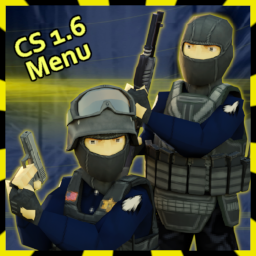
CS 1.6 Main Menu Background
por 76561198039783201
Knox Event: Global Infection Just a simple mod that replaces the main menu background with my custom artwork. Based on main menu from counter strike 1.6. Now with Music. Enable in mod menu then restart the game. Conflicts with other mods that change the main menu background Works on existing saves. Multiplayer compatible. Tutorial on how to make main menu replacing Mods: HERE GitHub for the Menu music Lua: HERE Known Issue If you enable this mod and then load a game that didn't have it active while you saved it, it will break the menus music and it will continue playing indefinitely. ---- To fix this, go to "Load" then click on your save file. In bottom right corner click on "More.." then "Chose Mods.." and here enable this mod. Disable any other mods that change menu/music. After that go back and load your game normally. tags: counter strike cs valve global offensive custom music Workshop ID: 3124189338 Mod ID: Cs_bg_Menu
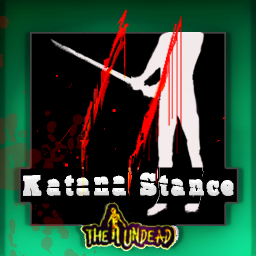
KatanaStance2
por 76561199042257388
Katana Stance II Update: fixed sandbox options bug COMPATIBLE WITH ANY SWORD added sandbox option for you to input what sword you want to enable stance ADDED Animation Only Sandbox option turn this on to disable the latest update features added QuickDraw Shove Animation mod is now less OP stances are now restricted unless long blade skills meets the required level (sandbox option for all 3 modes) penalties: all modes (except default) endurance lost per strike (customizeable via sandbox option for all 3 modes) chance based penalties mode 1: lose twice endurance and adds random pain to right forearm and upper arm mode 2: adds random panic and force character to shout mode 3: disarm and get slight injury percent of chance follows the formula 10 - long bladeskill so if you have level 10 then thats 0 percent chance for penalties to occur (except for the endurance loss) chance based positive effects mode 1: instantly remove stress mode 2: can now knock down zeds mode 3: can instant kill the percent is based on long blade skill level if you have max level then thats 10 percent Replaces katana animation Press R to Switch Style (Can be changed via settings) Various Katana Stance / Style Adds Various Versions: Aim Animation Attack Floor Attack Idle Animation Walk Animation Sneak Animation Run Animation Replaces Shove Animation MP compatible Can be installed mid save This mod is a OP Do not Install this with original Katana Stance Mod (they are not compatible) Future updates may include limiter to nerf the mod It doesn't do anything to the stats but its fast as F* for now ----------------------- --------------------------- Compatibility with various mods Workshop ID: 2836541309 Mod ID: SlayerArsenal Workshop ID: 1322043445 Mod ID: megaviblades Workshop ID: 2879159332 Mod ID: BastardSword Workshop ID: 2324223029 Mod ID: Tactical Weapons Workshop ID: 2492565135 Mod ID: Max Workshop ID: 2884915728 Mod ID: DEV410 Workshop ID: 2893019151 Mod ID: nph_Swords Workshop ID: 2842424482 Mod ID: MichonnesKatana Workshop ID: 2736602002 Mod ID: RUNE-SCIM Workshop ID: 2839025395 Mod ID: TKS Workshop ID: 2939119136 Mod ID: MedievalArmory For modders, to use the stance with your weapon. isSword=true, just add to your item scripts ----------------------- --------------------------- Mod by Glytch3r Originally Commissioned by Sn4ke Commission Update by Kuma need custom mods? please do contact Glytch3r discord: glytch3r https://ko-fi.com/glytch3r Workshop ID: 3308966632 Mod ID: KatanaStance2 Workshop ID: 3308966632 Mod ID: KatanaStance2
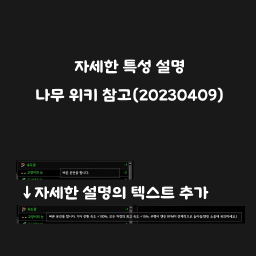
자세한 특성 설명(나무위키 참고)
por 76561197972665281
나무위키를 참고하여 만든 특성을 자세하게 설명하는 모드입니다. 케릭터 생성창에서 마우스 커서를 선택하고자 하는 특성 가져다놓으면 자세한 설명이 나옵니다. 정보의 출처는 나무위키이며 약간의 제 생각도 넣었습니다. 2023년 6월 9일 금요일 업데이트를 하였습니다. 오늘 날짜로 나무위키를 확인하여 내용을 수정하였고 기존의 바닐라 텍스트는 삭제하였습니다. 좀 더 쉽게 볼 수 있도록 정확한 효과의 설명만 남겼습니다. 추가로 추가했으면 하는 내용이 있으시다면 댓글 남기면 추가해드리겠습니다. Workshop ID: 2959719339 Mod ID: 특성한글설명
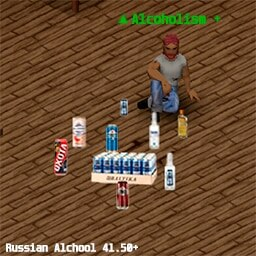
Russian Alcohol 41+
por 76561198360266055
🍻 RUSSIAN ALCOHOL MOD 🍾 In a world ruled by apocalypse, even in the darkest days you can find comfort in familiar tastes! Our mod adds a rich collection of Russian alcoholic beverages to Project Zomboid that will brighten your survival. 🎯 🎯 WHAT YOU'LL FIND: 🍾 STRONG DRINKS • Vodka "Talka" — classic Russian vodka • Vodka "365 Days" — premium quality • Vodka "Khlebnaya" — with recognizable grain taste 🍺 BEER AND CIDER • Beer "Boyarin" — light lager • Beer "Ohota Strong" — strong with rich flavor • Full "Baltika" lineup — 0, 3, 7, 9 • Cider "Mister Fox" — refreshing apple cider 🦊 ⚗️ SPECIAL DRINKS • "Krotovukha" — dangerous moonshine with dual purpose ☠️ ⭐ MOD FEATURES: • ✅ Realistic alcohol effects • ✅ Multi-use system • ✅ Balanced world spawn • ✅ Packaging in cases of 6 • ✅ Dual functionality (drinking + disinfection) • ✅ Full Russian localization + English translations 🎮 EFFECTS BALANCE: • 🔥 Vodkas — Strong intoxication + thirst • 🍺 Beer — Weak intoxication + thirst quenching • 🦊 Cider — Medium effect + refreshment • ☠️ Moonshine — Dangerous but effective 📍 WHERE TO FIND: • 🏪 Supermarkets — beer and cider • 🍻 Bars — all types of alcohol • ❄️ Refrigerators — chilled drinks • 🔧 Garages — moonshine "Krotovukha" 💫 In the apocalypse, it's important not just to survive, but to live! ⚠️ WARNING: Excessive alcohol consumption is harmful to your health and attracts zombies! 🎯 The mod is fully compatible with the latest version of Project Zomboid and other popular mods.
Trap Manager
por 76561199133259679
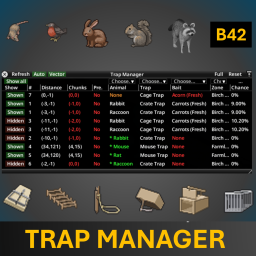
Compatibility: Build 42.12.3 to Build 42.20.1+ Trap Manager is a clean and practical interface for monitoring, comparing, and understanding your traps in Project Zomboid Build 42. It gathers your traps into one clear window, shows their current status in a sortable table, explains key values with helpful tooltips, and includes a built-in simulator to preview vanilla catch chances by animal, trap, bait, zone, and Trapping skill. Trap Manager does not change vanilla trap mechanics. It only reads, organizes, and explains trap information. Sidebar shortcut: hover the Zone icon on the left sidebar to reveal the matching Trap button, then click it to open or close Trap Manager. What Trap Manager Does - Shows all your traps in one window instead of checking them one by one. - Displays trap data in a clear, sortable table. - Adds tooltips that explain what each value means. - Includes a built-in catch chance simulator. - Helps compare traps, bait, zones, and skill levels more easily. - Keeps vanilla gameplay untouched: no changes to capture logic, items, recipes, animals, loot, or odds. Trap List Window - View all your traps in one place. - Sort rows by clicking column headers. - Resize columns by dragging separators. - Hide or show columns from the header context menu. - Use per-row visibility toggles to temporarily hide rows from the list. - Check practical details such as bait, freshness, distance, catch chance, hours alive, trap status, and more. Built-in Catch Chance Simulator The simulator lets you preview vanilla trapping chances by combining: - Animal - Trap - Bait - Zone - Trapping Skill Selecting an animal can automatically populate other fields with valid values, and tooltips help explain how each factor affects the result. Note: displayed chances are based on vanilla trapping logic. They are best understood as base vanilla candidate/catch chances. Mods that change trapping rules, cold modifiers, nearby-player behavior, bait logic, or trap processing may affect the real result in-game. Window Controls - Refresh — updates the trap list immediately. - Auto — enables hourly in-game auto-refresh while the window is open. - Vector — draws a line from your character to the trap currently hovered in the table. - Reset — restores your default column layout. - Full — shows every column and resizes the window to fit them. - Show all — temporarily shows rows you previously hid. Mod Options - Choose the hotkey used to open or close the window. - Enable or disable hourly auto-refresh. - Enable or disable longer explanatory tooltips. - Choose which columns should be shown after pressing Reset. - Restore factory defaults for the reset layout at any time. How to Open Trap Manager - Left sidebar: hover Zone, then click the slide-out Trap button. - Hotkey: use the key configured in ModOptions. Compatibility - Compatible with Project Zomboid Build 42.12.3 to 42.20.1+. - Designed specifically for Build 42. - Works in Singleplayer and Multiplayer. - Safe to add or remove from existing saves, since it is UI-focused. - Does not alter vanilla trap mechanics. - Generally compatible with other UI mods. - Mods that heavily change vanilla trapping internals may affect simulator accuracy or trap data display. Languages Includes translations for: AR, CA, CH, CN, DA, DE, EN, ES, FI, FR, HU, ID, IT, JP, KO, NL, PH, PL, PTBR, RU, TR, UA If your language is not available, the mod falls back to English. Translation suggestions and corrections are welcome. FAQ Does Trap Manager change catch chances or trap mechanics? No. It only reads, organizes, and explains trap information. Are the simulator chances exact? They are based on vanilla trapping logic and are intended as practical guidance. If several animals are valid candidates at the same time, vanilla may choose between candidates, so the displayed value should be read as a base chance estimate rather than a guaranteed final outcome. What is the difference between “Shown columns” and “Default columns”? Shown columns are the columns visible right now. Default columns are the columns restored when you press Reset. What does “Apply factory defaults” do? It restores the original default column setup used by Reset. What does “Vector” do? It draws a line from your character to the last trap you hovered in the table, helping you orient yourself more easily. Is the mod performance-heavy? No. It is lightweight, and auto-refresh only runs once per in-game hour while the window is open. Feature Summary - One clean window for all your traps. - Sortable, resizable, and hideable columns. - Helpful tooltips across the interface. - Built-in catch chance simulator. - Sidebar shortcut and hotkey support. - Native Build 42 ModOptions. - Save-safe and gameplay-safe. - Multilingual support. Install it, open the panel, and understand your traps at a glance. Feedback & Bug Reports Feedback, bug reports, balance suggestions, compatibility reports, and translation improvements are always welcome. Useful reports include: - Project Zomboid build. - Trap Manager version. - Singleplayer, MP Host, or Dedicated Server. - Relevant mod list and load order. - Whether another mod changes trapping behavior. - Steps to reproduce the issue. - Console errors or logs, if available. More Mods & Feedback You can find my other Project Zomboid mods here If you find Trap Manager useful, please consider leaving a thumbs up and adding it to your favorites — it helps other players discover the mod. Workshop ID: 3566766862 Mod ID: TrapManager
AutoPlanter
por 76561198145796765
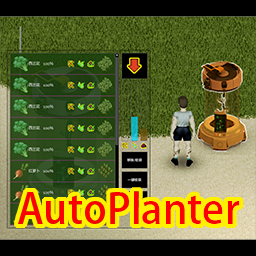
AutoPlanter This machine allows you to easily and quickly obtain various crops. 1. The use of metal plates, metal rods, and other items to craft AutoPlanter machines. 2. You can place the machine on the ground and right-click the machine to open the operation UI. 3. Drag the seeds into the arrow on the operation UI to cultivate plants. 4. Plant growth requires electricity, water, and fertilizers. -----Electric energy can increase the growth rate of plants by 90%, and is automatically replenished when there is a generator around or in the electrified area. -----Water is a necessary condition for plant growth. Place water storage containers (such as buckets/bottles) into the built-in container(counter) of the machine to replenish water. -----Fertilizer can increase the growth rate of plants by 30%, and there is a probability of obtaining products and product seeds when harvesting plants. Placing the fertilizer in the built-in container of the machine can be supplemented. 5. Removing immature plants will not yield anything. 6. Please place the machine in a safe place, otherwise zombies will damage it. 7. Don't move it!Unless you want to lose your plants. 8. Not fully tested in online mode, use with caution! Workshop ID: 3041971589 Mod ID: Catball_Autoplanter
StalkerZ: Radiation and Artifacts
por 76561199251778452
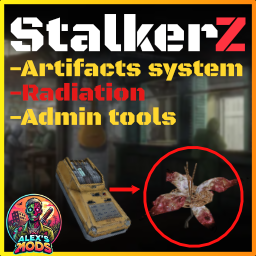
Radiation & Artifacts Expansion Mod 🌍 Explore a post-apocalyptic world with new dangers, mechanics, and powerful artifacts! This mod introduces radiation and 16 unique artifacts inspired by the S.T.A.L.K.E.R. series, each with distinct effects and trade-offs that will force you to strategize carefully. Will you survive the radiation zones and wield the power of artifacts, or succumb to the wasteland? Project Pripyat ⚛️ Key Features ⚠️ Persistent Radiation Mechanics Radiation Stays with You: Enter radiation zones, and the effects will linger even after you leave. Radiation fades over time, but the more you absorb, the stronger the visual noise overlay becomes, increasing tension as you play. 🔧 Server-Only Mod Note: This mod is currently designed for servers, as radiation zones can only be spawned through admin tools. Antirad pills are also admin-spawned, so using a shop mod is recommended to provide access to these items for players. IMPORTANT: ANTIRAD PILLS SET YOUR RADIATION LEVEL TO 0, THE PILLS SHOULD BE EXPENSIVE AND RARE 🧪 Dynamic Artifact Spawning Artifacts spawn randomly in radiation zones every X hours, remaining hidden until discovered. You can either wander the zone hoping to stumble upon an artifact or use the Echo Detector to locate them more efficiently. When equipped in your secondary hand, the Echo Detector will emit sound as you approach an artifact, making it an essential tool for artifact hunters. 🛡️ Gas Mask and PBF Protection You gain protection from radiation when wearing any gas mask with "Gas" or "PBF" in its name, ensuring compatibility with a wide variety of gas masks, including those from the S.T.A.L.K.E.R. Armor mod. This makes the mod flexible and compatible with various mask mods that include those terms. --- 🔮 16 Unique Artifacts Equip these artifacts on your belt for game-changing effects, but beware—many have dangerous side effects! Master these artifacts to gain an advantage, or risk paying the price. Artifact Name Positive Effects Negative Effects Heart Heals wounds None Mama's Beads Grants Thick Skin (removes trait from character creation) None Seraphim Reduces unhappiness None Sun Slows radiation absorption None Snowflake Makes you less thirsty None Cell Boosts Adrenaline Junkie (removes trait from character creation) Slowly makes you tired Chain Grants Nimble XP boost Slow radiation damage Crystal Thorn Grants Aiming XP boost Slow radiation damage Eye Grants Eagle Eye (removes trait from character creation) Heavy Fountain Reduces radiation intake Weak stomach (removes trait from character creation) Pellicle Heals wounds slowly Increases hunger Phantom Star Slows hunger Radiation damage Soul Grants Desensitized (veteran occupation trait) Heavy Sourpuss Grants Maintenance XP boost Radiation damage Urchin Grants Short & Long Blade XP boost Radiation damage Wrenched Grants Mechanics XP boost None --- 🛠 New Tools and Items - Echo Detector: The Echo Detector can be crafted using the following recipe: - 4x Electronics Scrap - 4x Electric Wire - 1x Motion Sensor - 1x Green Lightbulb - 1x Red Lightbulb - 1x Screwdriver (kept) Crafting Time: 80 seconds Category: Electrical - Antirad Pills: These pills can only be spawned by admins and are not found in the world. It's recommended to use a shop mod to allow players to access them. --- Survive in a world where radiation is a constant threat, and artifacts hold the key to unimaginable power. Can you master their abilities and navigate the dangers of the apocalypse? PLEASE: No re-uploads and mod packing Changelog for V2 -- - Sandbox options added to most values - Antirad now reduces radiation level instead of setting it to 0, you will need few pills to set your radiation level back to 0 - Motion Sensor removed from echo detector recipe - Now you need to equip the echo detector in secondary hand instead of primary hand - Lots of bug fixes in the code - Some fixes in ui - Localization files added for future translations -- For next Updates - Adding the mod to singleplayer Join our Discord: Click here! Workshop ID: 3345475469 Mod ID: StalkerZ
Monster Energy Drink
por 76561197989461826
Adds Monster Energy drinks to the game world. Many different flavours with different effects. Each drink does something different! Monster Original Mango Loco Pipeline Punch The Doctor Ultra Blue Ultra Red Ultra Khaotic Ripper Paradise Monarch Ultra Fiesta Workshop ID: 2815186008 Mod ID: MonsterEnergy
![[COS] Lady Hunk – Project Zomboid Mod](https://images.steamusercontent.com/ugc/2070009996130341819/0573D46B88E40F583E332339F532DF410B5D3984/)
[COS] Lady Hunk
por 76561199178116693
How Do I Use It? - You can go to the link below to see how to use it. - Link Recommended mode - Fashionoid - Gear Transmog - Hide All Attached Items - Clipping animation Fix Like My Mode? - Join Our Discord If You Want Commission Workshop ID: 2966549131 Mod ID: Lady_Hunk
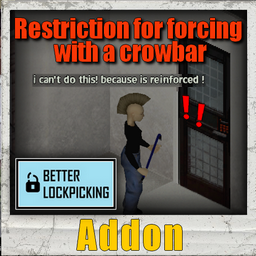
Restriction for Forcing the reinforced doors with crowbar
por 76561198073717195
Reinforced doors Restriction With this, you can't force doors with crowbar if is reinforced (for the moment : 2 models added: "prison doors" and "keypad doors" like pictures). Lockpincking or Sledgehammer needed You need: Better Lockpicking My others mods related Can repair doors : https://steamcommunity.com/sharedfiles/filedetails/?id=2905027525 Indestructible Doors : https://steamcommunity.com/sharedfiles/filedetails/?id=2902458630&tscn=1671207268 Restriction for disassemble locked doors : https://steamcommunity.com/sharedfiles/filedetails/?id=2856298125 Sledgehammer mod : https://steamcommunity.com/sharedfiles/filedetails/?id=2854012382 Reinforced doors Restriction (better lockpicking needed): https://steamcommunity.com/sharedfiles/filedetails/?id=2856350810 -More Lock STANDALONE Version : https://steamcommunity.com/sharedfiles/filedetails/?id=2874279665 -More Lock Better lockPicking Version : https://steamcommunity.com/sharedfiles/filedetails/?id=2738370718 -Interior Lock : houses’ doors will now be locked and lockable from inside buildings. Ideal for privatizing a room in RP Multiplayer : https://steamcommunity.com/sharedfiles/filedetails/?id=2811440552 If you think it would be interesting for the whole community Workshop ID: 2856350810 Mod ID: NoForcingReinforcedDoorsWithCrowbar
Better Names for Tsar's Mods
por 76561198079959669
This mod changes many of Tsar's mods to have better names, inspired by other vehicle modpacks. This will give you less obvious or cheesy lore-friendly names, give you real names, and also fix typos & standardize different strings in the translation files from Tsar's Common Library. Versions There are two versions: "Lore-Friendly Names" and "Real Names". They both have the string fixes. Requires Tsar's Common Library and at least one of the supported mods below to work. Supported Mods - Autotsar Trailers - generic trailer names - Aquatsar Yacht Club - generic trailer name - typo & grammar fixes - Autotsar Tuning Atelier - Bus - Soarer B700 / Blue Bird CV200 - Autotsar Tuning Atelier - Jaap Wrungel - Lark Rancher / Jeep Wrangler - Autotsar Tuning Atelier - Fjord Mustard - Franklin Caballo R210 / Ford Mustang S197 - Agrotsar Farming Company - Joseph Moline 4060 / John Deere 6400 - generic trailer names - Autotsar Tuning Atelier - Dadge Steals RT Twin Turbo '91 - Dash Covert / Dodge Stealth - Autotsar Motorclub - Wittelsbach R797 / BMW R80/7 - Hammer-Dennis Sportsman / Harley-Davidson Sportster - Pazuzu Quadtrekker / Isuzu Quadrunner - Hamamatsu JetRusher / Yamaha WaveRunner - generic trailer names - Autotsar Tuning Atelier - Petyarbuilt 379 - Pierstough 793 / Peterbilt 379 - generic trailer name - Autotsar Tuning Atelier - MolksAgen Luton Van - Krichten Krafthansa / Volkswagen Transporter LT - Autotsar Tuning Atelier - DeRumba Van - Franklin Valuline DeRumba / Ford Econoline DeRumba - Autotsar Tuning Atelier - Chevalier Samara - Chevalier Samara / Chevrolet Camaro - Autotsar Tuning Atelier - Bumer 36E - Wittelsbach S50 / BMW E36 - Autotsar Tuning Atelier - DMG DoLorean - DAL Delaney / DMC DeLorean - grammar fixes - Autotsar Tuning Atelier - Fjord Mustard '66 - Franklin Caballo S6 / Ford Mustang T5 - Autotsar Tuning Atelier - Dadsun 240Z '69 - Losan 30X / Datsun 240Z - True Actions. Act 1 & 2 - Sitting & Lying - grammar fixes - True Music - ValuTech Cassette Boombox / Sony CFS-200 - Premium Tech. Record Player / Columbia Model 909 - ValuTech Cassette Player / Sony Walkman Compatibility - Compatible with every mod - Multiplayer compatible & save-game compatible - If some text is missing the new names, mention it down below, along with what mod and what text. Languages If you would like to have your language included, please create your own translations and provide them to me below. Thank you! This currently supports only English (EN). Permission As I do not own these mods, this mod is subject to either be integrated into the mods listed above or removed from the Workshop at the discretion of iBrRus. Contact Info You can find me under @Panopticon in the Project Zomboid Discord server. Credits iBrRus - for the awesome vehicle mods. They have a distinct personality, separate from the rest, that makes them fun and interesting. Recommended Mods KI5's Vehicles - Lore-Friendly Names - gives lore-friendly names to KI5's vehicles. Workshop ID: 2945062151 Mod ID: TsarNamesLF Mod ID: TsarNamesReal
Power Window Controls
por 76561198106652105
Version 1.2.1 - the b42 version has had its localization files converted to the new .json format. This should fix missing strings in the UI on 42.20. This is a simple lua script that enables the player in the first (driver) seat of a vehicle to control all openable windows with additional buttons on the vehicle radial menu, much like in any modern car. I'm told power window controls were commonspread enough in the early nineties, so hopefully seeing them on every car won't feel too anachronistic, but regardless of that, this was made primarily as a workaround for a technical limitation in vanilla Zomboid. By default, to see if you should be given control over a window, the game checks what seat you're in, then checks if that seat has a door on the same spot and, if it does, checks if that door has an openable (and unbroken) window on the same spot. So let's say you're Filibuster Rhymes, placing whole 4 openable windows into your RV that... only has one door. What you end up with is 3 factually unusable windows. The method this mod employs eliminates the middleman in the door and, when you are in the driver seat, directly scans for window parts with the following IDs: WindowFrontLeft WindowFrontRight WindowMiddleLeft WindowMiddleRight WindowRearLeft WindowRearRight and adds the options to open/close them to the radial menu if they are present, not broken and can be opened/closed. (if you make a vehicle with openable windows with different IDs, hit me up) The front left (driver's) window will show up with the normal "Open/Close Window" segment, while others will display a custom prompt and a modified icon to indicate which window it is. The text prompts are currently provided for the EN, DE, RU, CN and PTBR languages. The mod is entirely client side on b41. The b42 version now has some code shared between client and server (since the base game has moved some functions the mod duplicates there). For this reason, I'm not sure if it will work properly in multiplayer - as I can't test it myself, I'll wait for reports: if you're planning on trying this in b42 MP, please let me know how it goes. Do note that you don't get "power windows" without power - a flat or missing battery will prevent the options to control distant windows from being given to you. This is only a check though - operating windows does not consume any battery power. With the 1.1 update the UI icons have been updated to be more dynamic - the square grid will try to match the layout of your car, showing a 2x2 for four door sedans, a single row of two for coupes and the original 2x3 grid for six door cars. Although I use "door" loosely here - the mod still looks only for windows with open/close functionality. Oh, and the "close" icons will now highlight the square in red instead of green. The mod now supports cars with exceptional treatment: currently AutoTsar's Jeep Wranglers have been added, such that their tent windows are ignored. But further entries can be added easily - see the special thread for suggestions. With the 1.2 update the driver now has an option to open all closed or close all open windows simultaneously with one button. The buttons will only appear when more than one window would be affected. Credit goes to: Aiteron and their Better Towing, where I spied a method to inject my code into the radial menu. Filibuster Rhymes and their Used Cars, or more specifically, their Fleetwood Bounder RV which basically inspired this mod. My friend Peach for helping with the localization. Steam user Bazooka for the Simplified Chinese translation. Steam user Não é o Gui for the previously separately uploaded PTBR localization. Tags:B41,B42,Cars,Vehicles,Interface,Tweak,QoL Workshop ID: 2511087277 Mod ID: WolfWindowControls Workshop ID: 2511087277 Mod ID: WolfWindowControls
![Vanilla Refill Propane [B42.13.2 SP+MP] – Project Zomboid Mod](https://images.steamusercontent.com/ugc/17966150402366117577/D1574508F661423C2CC73B45F2B4E07437BAC7D8/)
Vanilla Refill Propane [B42.13.2 SP+MP]
por 76561199437833453
A vanilla way to refill Propane Tanks! Unstable 42.13.2 SP+MP Working (I tested on my modded host server) I made this mod because I don't want the other mods that just pumps propane straight from the gas station. Should be on the Metalworking Category in Crafting Menu Refill Propane Tank recipe : - Metalworking Level 2 - 3L of water - Rubber Hose - 12 Wood Charcoal - Empty Propane Tank Workshop ID: 3634065654 Mod ID: CraftPropane
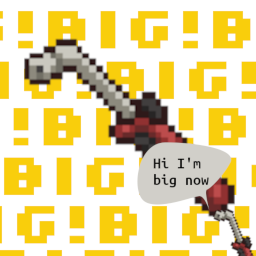
Big Propane Torches
por 76561197969920234
NOTE: NO PLANS TO UPDATE FOR BUILD 42 Makes propane torches have not 10 (boo), not 100, but 1000 units per torch! Workshop ID: 2896068190 Mod ID: BigPropaneTorches
![[B42] AEBS Water Shutoff Warning – Project Zomboid Mod](https://images.steamusercontent.com/ugc/63711068825106507/C9B0C84CB12ED3DA01405590C8FECEC06E945EE0/)
[B42] AEBS Water Shutoff Warning
por 76561198029054391
*DISCLAIMER* THIS MOD DOES NOT WORK WITH THE CURRENT STABLE BUILD 42.20.2, WILL FIX IN FUTURE SORRY! USE UNSTABLE 42.19 or strangely enough stable 42.20 Hate waking up to no water? This mod adds warnings prior to the water shutoff on the Automated Emergency Broadcast System. Similar to the pre-existing power shutoff warnings, there will be warnings sent a couple days prior to the water shutoff. The warnings will continue after the water finally shuts off. Currently the warnings appear after the usual Broadcast like the helicopter event. Will try to make them appear after the power grid warnings in the future (no luck so far). Versions in English, Spanish, French, German, Italian, Turkish, Chinese, Polish, Portuguese, Russian, and Thai. Credit to RUN 90s for Thai Translation Workshop ID: 3390432598 Mod ID: AEBS_WaterShutoff
![Paraglider [B41] – Project Zomboid Mod](https://images.steamusercontent.com/ugc/2022713958809441691/2649F3B3256F48DABE48EDB951CBCDAA499F38CA/)
Paraglider [B41]
por 76561199079709559
Where to find it? Gun store display case, 75% chance to spawn How to use it? Carry it on your back, don't put it in your inventory or hand Will this mod update in the future? Of course, I will try to fix the glitches and add new things Workshop ID: 2923724376 Mod ID: Paraglider
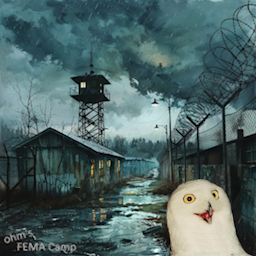
ohm's FEMA camp
por 76561198062166700
A camp that was constructed just before the initial outbreak. It's almost as if they knew.. Cell 38x28 Coords 11625x8500 Workshop ID: 3216242207 Mod ID: FemaCamp Map Folder: ohmsFemaCamp
![[MT] Female Masks [ Abandoned ] – Project Zomboid Mod](https://images.steamusercontent.com/ugc/10779771686664497013/C30AEA8ED14B8B558C607D1EBCF7AF46DC724F39/)
[MT] Female Masks [ Abandoned ]
por 76561198037262200
𝖒𝖚𝖙𝖎𝖑𝖆𝖙𝖊𝖉 Вы хотели base я дал вам фуру Pack with: 21 - Masks All of this u can craft in game. Before u can check in character menu what u need. Its only visual clothes - i dont need change ingame balance etc. Use transmog to hide original cloth with stats. --------------------------------------------------------- Набор содержит: 21 - Масок Всё можно скрафтить в игре. Перед этим можете посмотреть в меню создания персонажа. Это только визуальная одежда, я не собираюсь ломать баланс игры. Используйте трансмог, чтобы скрыть оригинальную одежду со статами. ✅ RU ✅ ENG ✅ 42.13 Build ( dont know about 42.20 - u can use prah\bloodparty - full colection ) ✅ Can use transmog ✅ Work ONLY with my Female Framework https://steamcommunity.com/sharedfiles/filedetails/?id=3472993929 🙏 INSTALL 🙏 1 - Subscription 2 - Enable mod in game @mod@ menu 3 - Re-launch game Use transmog - its only one way to change Color Type if u craft item in game --------------------------------------------------------- Используйте любой трансмог мод - это единственный способ изменить текстуру и цвет одежды, если вы ее скрафтили в игре If u use Inv.Tetris&EquipUI and icons rage you - use fix in my workshop ( he force 32x32 icons ) --------------------------------------------------------- Если используете Inventory Tetris и EquipUI и вас раздражаются гиганские иконки в UI - используйте фикс в моей мастерской, он заменит иконки на дефолтные 32х32 ( пострадает качество, но иконки придут в норму ) Subscribe n Like make this my work faster ❤️ --------------------------------------------------------- Подпишитесь и поставьте лайк, это делает мою работу капельку наполненным смыслом ❤️ U can support me: https://boosty.to/oppsy Workshop ID: 3483664852 Mod ID: Female Masks
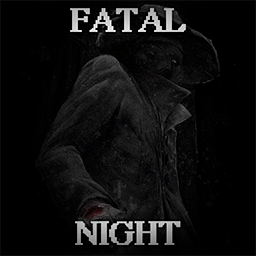
Fatal Night
por 76561198117275696
What if there is something lurking in the darkness that wants to kill you? If you are without light at night, first you will feel a frightening darkness around you, then a warning that something is wandering nearby, and soon you will be killed. What could be the source of light? Anything that visually looks like sufficient light in the darkness! ● Any lighted and turned on item in your hand like a flashlight or lighter ● Any natural light such as a campfire or any fire ● Any external lighting from electrical devices like lampposts, bright TVs (not dim), etc ● Your car if you are standing in headlight illumination or sitting inside with the car lights on ● This should work with mod sources such as a kerosene lamp attached to your belt (if it emits visible light) ● And anything else that gives off any kind of light except the cold moon over your head Sounds and phrases There are a few sounds for long periods of darkness. There are over 80 phrases some of which appear at certain events depending on your light source! Which means after being warned of imminent death and saved with a lighter the appropriate phrase would be different if you stood under a lamppost. Tips Keep in mind that there is no need to "flick" your flashlight in hopes of conserving the battery and living longer. It doesn't work and will likely kill you. Use the light as long as you can. If the mod is too hardcore for you there are sandbox settings, where you can also disable sounds and other things. Also note that for the immersiveness of the mod and your fear there is no "indicator" here of how close the darkness has gotten to you. Go by your premonition in the form of your character's sensations. ...And maybe then... You'll survive the Fatal Night. For servers and admins: Immunity to darkness if you are in a god mod or invisibility. If you want to give darkness immunity to one of the players use the item spawner. Tab "Fatal Night" there are admins book (don't spawn in the world) that disable or enable darkness immunity. Right mouse button on the book in inventory: read about darkness This mod does not affect the graphics. -- Special thanks to atributist for creating the promo. --- Please rate the mod if you like it. For everyone who enjoys my mods and wants to support any amount (USD too): --- Workshop ID: 3095527318 Mod ID: FatalNight
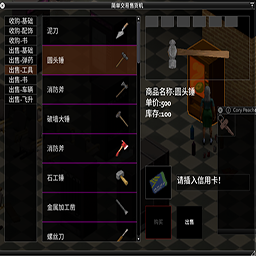
Vending machine API
por 76561198145796765
vending machine API Workshop ID: 3424121697 Mod ID: jiandanjiaoyi42

Community Modding Projects
por 76561199220019224
Copyright 2026 ZomboidModders. This item is not authorized for posting on Steam, except under the Steam account named ZomboidModders. Workshop ID: 2909488957 Mod ID: CommunityModdingDebugTools Mod ID: CommunityModdingFrameworks Mod ID: CommunityModdingPatch

Tyler1 Death Screams
por 76561198833205619
Changes the default male death screams with 6 new Tyler1 screams! Now you can die like the true autist you are. Workshop ID: 3036638984 Mod ID: T1screams
![[B42]More Katana – Project Zomboid Mod](https://images.steamusercontent.com/ugc/24304572078980258/6084A5449565F22E91631AAB2E2F986FCB471FA5/)
[B42]More Katana
por 76561198099786892
Losing is fun? Sometimes it's been too much. Time to Power Up ! This is basically an over powered mod, simply added some recipes to make OP version of vanilla items, and added some rare stuff to certain locations. --- Items Spawn --- 1. Police station evidence storage: katana, machete; 2. Police lockers: military bags, fanny bags, balaclavas, angle headed flash lights; 3. Fire depts: military bag(desert), wood axe, angle headed flash lights; --- Sturdy Melee Weapons --- Sturdy version weapons are more powerful, with wider hit ranges, and almost in-destructible. You can make them (skills required) from or reset them to vanilla items, or sharpen (remake) them with a rag and some water. Here are the weapons that have sturdy version: 1. Katana 2. Machete 3. Axe 4. Wood Axe 5. Hand Axe 6. Meat Cleaver 7. Hunting Knife 8. Nightstick --- Sharp Guns --- Sharp version guns are more powerful, more accurate, more durable, and faster in reloading. You can make them from or reset them to vanilla guns. And clean them really carefully with a rag. Here are the guns that have a sharp version: 1. Patrol revolver 2. SN38 revolver 3. Magnum revolver 4. M16 5. Double barrel shotgun 6. Sawn-off Double barrel shotgun *** WARNING: Upgrades will be destroyed when you clean your guns ! Remove them first. *** --- Other Stuff--- 1. You can Carefully Clean vanilla M9, M1A(M14), MSR788/700 rifles with a rag, but don't forget to remove upgrades first; 2. Meditate on a Silver Cross necklace and see what happens. --- Compatiblity --- 1. Should be safe to add/remove to/from a save. All the items can be crafted from vanilla ones; 2. New item distribution will take effect only in UNEXPLORED areas; Workshop ID: 3388321771 Mod ID: MoreKatanaB42
![[B42] Louisville Airport Spawn – Project Zomboid Mod](https://images.steamusercontent.com/ugc/40075427751324385/BC40DB6B51FC6390DA07F5BE9ABAB19F8DEBBC66/)
[B42] Louisville Airport Spawn
por 76561198035953738
Spawn in Louisville Airport. Adds 38 unique spawn points, implemented for the following professions: - Unemployed: 6 spawn points - Burglar: 2 spawn points - Chef: 6 spawn points - Construction Worker: 2 spawn points - Doctor: 1 spawn points - Fire Officer: 2 spawn points - Nurse: 1 spawn points - Police Officer: 3 spawn points - Repairman: 2 spawn points - Security Guard: 4 spawn points - Veteran: 1 spawn points - Burger Flipper: 6 spawn points - Electrician: 2 spawn points - Engineer: 5 spawn points - Metal Worker: 2 spawn points - Mechanics: 6 spawn points Some of the spawn points are shared between professions. For example, a doctor will spawn at the same place as a nurse. You can select Louiville Airport Spawn Outside for a hardcore experience. It adds spawn points on roofs which makes up for a challenging start. When selecting the spawn option, the spawn point preview on the map does not point to the correct place. I don't know why. The spawn points are still working so you can ignore it. Please upvote the mod if you like it and check out my other mods! - Throw your bag across - Adds an option to throw your bag across windows for efficient looting. - Hand Bag Window Climb - Keep you bag in your hands when climbing through windows instead of dropping them. - Attach Bags To Sheet Rope - Attach up to three bags to a sheet rope, climb up and lift your bags from up there. - Close The Trunk - Close your trunk of stuff might fall from it. - Rope Towing - Requires a rope to tow vehicles - Give Item - A quick way to give items to players around you without dropping them on the ground. - Cignition - Handling gas and smoking might not be the best idea after all. Workshop ID: 3451533094 Mod ID: louisville-airport-spawn Mod ID: louisville-airport-spawn Map Folder: Louisville_Airport Map Folder: Louisville_Airport_Spawn_Outside
Project Zomboid Detalles →
Project Zomboid Guides
Instalar mods de Project Zomboid - guía del Workshop
Instala mods de Project Zomboid de forma limpia mediante Steam Workshop: introducir IDs, comprobar el orden, reiniciar el servidor y solucionar errores típicos.
Alquilar un servidor de Project Zomboid – guía multijugador
Configura un servidor de Project Zomboid: RAM, ajustes sandbox, mods de Workshop, permisos de admin y errores típicos bien revisados.
Servidor Project Zomboid con soporte de mods
Instala mods compatibles y admitidos desde el panel del servidor.
Alquilar un servidor Project Zomboid