Mods y plugins para Project Zomboid
Este catálogo incluye 52.000+ proyectos de Project Zomboid procedentes de Steam Workshop. Las entradas pueden ser para servidor, cliente o ambos, e incluir mapas u otro contenido generado por usuarios. Antes de instalar, comprueba la página de origen enlazada, la versión del juego y las dependencias.
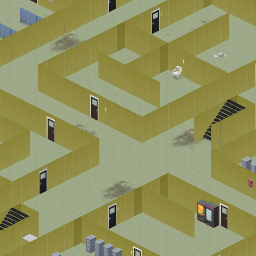
Backrooms
por 76561198039490063
Backrooms. Version 2. There is now a way out. Good luck. Workshop ID: 2396257043 Mod ID: Backrooms Map Folder: Backrooms
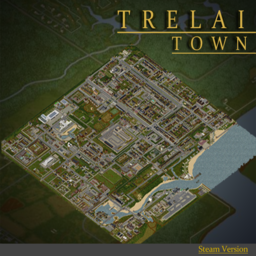
Trelai B42
por 76561198394820414
Trelai Map 4x4 - Unofficial B42 Port Presented by: Hypothetic I am not the original author of this map. This is an unofficial port. If the original author wants this unofficial port removed, please leave a message or comment and I will remove it. This map was reverse engineered directly from the binaries to make it compatible from B41 to B42. It is provided as-is, with no support of any kind. The map works mostly fine, but this remains an unofficial port while the original has not been ported yet. Source Code and Contributions GitHub repository: https://github.com/rbm4/Trelai-B42-Unoficial-port If you want to help improve this mod, you are welcome to contribute through pull requests. How to contribute: 1. Fork the repository. 2. Create a branch for your changes. 3. Make and test your updates. 4. Open a pull request with a clear description of what you changed. You can also use GitHub Issues to report bugs, broken tiles, loot/spawn issues, or B42 compatibility problems. Workshop ID: 3711569431 Mod ID: Trelai_B42 Map Folder: Trelai_4x4 Map Folder: Trelai_spawns Map Folder: Trelai_storyspawn
![Rushed Transfer - Instant Transfer Items with Consequences! [b41/b42] – Project Zomboid Mod](https://images.steamusercontent.com/ugc/1830148925297826623/3A09FC10AB2CD2196EAAD9E8C79F17DC78284C48/)
Rushed Transfer - Instant Transfer Items with Consequences! [b41/b42]
por 76561198072923012
Features Allows your character to force transfer an item and deal with the consequences. Very useful if you are in a hurry! Or simply if you want to build your base faster. This mechanism is inspired by a similar one available in State of Decay. How does it work, what does it do? - Default key binding is (configurable in options) - Automatically sends the item to the desired inventory/bag/floor - Generate noise and endurance loss depending on item weight - Potential risk to damage the item or yourself in the process (depends of item) - Works for transferring and grabbing items timed actions - Currently only works for single item transfer (not bulk transfer yet) Consequences! Noise: Rushing transfers will cause quite the rackuss! The heavier the item is, the louder it gets. Generated sound will always be at a minimum radius of 5 squares and can carry up 20. Examples: - Pen > 5 squares - Shirt > 5 squares - Baseball Bat > Sound radius 6 squares - Plank > Sound radius 9 squares - DumbBell > Sound radius 15 squares - Propane Tank > Sound radius 20 squares - Antique Oven > Sound radius 20 squares Fatigue: Moving items in a hurry is no walk in a park. Stamina is also reduced depending on the item's weight. This is mitigated by the character’s Fitness level. For instance, instantly moving a Propane tank will cost you: - 2.5% of stamina for a Standard Character (Fitness 5) - 1.25% of stamina for a Fit Fitness Instructor (Fitness 10) - 6.25% of stamina for a Unfit Standard Character (Fitness 1) For balancing reasons: - Fitness is always considered to be between 2 and 10 - Weight taken into account does not exceed 10 Condition Degradation: Shoving items with force from one place to another is the best way to break your stuff! Rushing transfer of an item carries a chance to degrade it. Base chance to damage the item is 60% but Maintenance reduces risk of damaging the item by 10% per level in skill. Meaning a 30% chance of damaging item for character at Maintenance 3 (Starting skill of a Handy Repairman) Items that can be affected: - Weapon-typed items may lose a tenth of their durability - Containers (bags) may lose 1 point of carrying capacity - Canned goods may break open Heavy Lifting Injuries: No time to think about lifting with your legs and not your back? I feel sorry for your spine! Just like sleeping on a bad bed, rushing a transfer of heavy items may cause you back pain. Base chance for damaging your back is Item_Weight*10% with a maximum of 100%. Each Strength level reduces risk by 10% per level. Inflicted Pain and Damages also depend on the item’s weight. Example of a standard Strength 5 Character: - Shirt > 0% chance of hurting back - Plank > 0% chance of hurting back - Barbell > 10% chance of hurting back - Logs > 40% chance of hurting back - Propane Tank > 50% chance of hurting back This Means 40% chance of hurting yourself with logs at (default character) Sharps Injuries: If you don't know how to handle them, you should stay careful when manipulating blades. Rushing a transfer of a sharp weapon could lacerate your hand! Base chance for cutting yourself is 60%. Blade-related skill (Short Blade/Long blade/Axe) reduces the risk by 15% per level in each. Meaning 0% chance of damaging hands with blade for a character at Axe 3 (Starting skill of a Brawler Lumberjack) Upcoming Plans I plan to expand the system when I get more time for modding. Here are the ideas that I have not yet implemented. - More randomness on wounds location - Loaded guns and chance to shoot yourself - Fracture chances with very heavy weapons - Make the code work for bulk items transfer - More degradation to items (food, clothes, etc.) - Traits integration to odds (Lucky/Unlucky/Dextrous/AllThumbs) - Eventually fixes and balancing Extra Many thanks to those who have assisted me when I hit bumps on the road developing this. To co` for explaining that player actions are java.util.Stack objects and how to manipulate those.To Fenris_Wolf for his direct support and insights related to scopes and vanilla functions overriding, as well as for his modding guide that you can find here. Workshop ID: 2691346300 Mod ID: rushedtransfer More Mods by Onkeen:
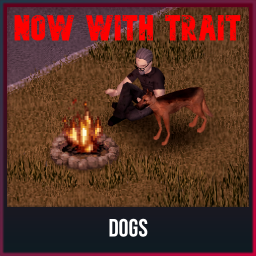
Dog Owner
por 76561198441197216
A simple mod that adds a dog owner trait for Dogs mod. How it works? You take the "Dog Owner" trait, when you start the game you will appear with a dog. Default name "Bobik", but you can change it in the sandbox menu or in the game. Так же прикрутил перевод на русский. Workshop ID: 3273039850 Mod ID: DogOwner
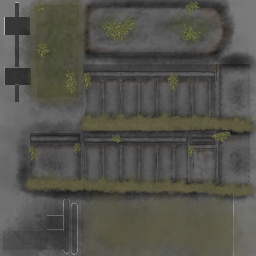
Burnt out rusty trailers and 10 Years Later trailers
por 76561199185963669
Mod adds burnt out rusty trailers and 10 Years Later trailers textures This mod was created as an addition to my mod "Burnt Cars Everywhere" Don't judge me harshly, I've never worked with textures before and it's been a long time since I painted at all. Why do trailers have tires and why does the trailer have fabric on it? - Because that's all I can do. It will probably affect wheels and fancy cars, if so, then you can remove the wheel texture. Workshop ID: 3436303450 Mod ID: BurntRustyTrailers Mod ID: BurntTrailers10YearsLater
![Pee In A Bottle + new trait [MP] – Project Zomboid Mod](https://images.steamusercontent.com/ugc/1817766658931300495/5F5EB8326BF5E95188E571CBD413AD4972B2117E/)
Pee In A Bottle + new trait [MP]
por 76561198106790506
Dry mouth, empty water bottle and desperate? Wait no more, pee in a bottle and feel that urge go away! This mod is perfect for people who wants that extra "realistic" touch to their gameplay. When water runs out, and you no longer can find drinks, you'll only have one option, especially when you're alone, dehydrated and desperate, just grab that one empty water bottle you found earlier and pee in it, and drink it. For best effect, you should filter it before consumption. Obviously drinking pee isn't the best solution to your problem, but it might just get you just a little bit further. FUTURE PLANS: - Intervals/Timer between your last pee. (I am pretty sure people can't pee infinitly at a time... Right?) - Potential cooking usage?? No, thats disgusting... Or is it? - Custom Pee Bottle model when dropped on the floor. (Currently it's a soda can) USAGE: 1. Find a empty water bottle. 2. Right click the empty water bottle in your inventory. 3. Pee In Water Bottle. 4. You know need to filter your "Unfiltered Pee In a bottle" using a Pee Filter. (20% spawn chance when killing zombies) 5. Filter the pee using the "Pee Filter". 6. Enjoy your filtered drink. YOU CAN ALSO DRINK IT UNFILTERED, BUT YOU GAIN LESS HYDRATION AND MORE UNHAPPINESS. WITH THE "HAPPY PEE DRINKER" TRAIT YOU CAN FILTER IT WITHOUT THE PEE FILTER. Unfiltered Pee In a bottle Filtered Pee in a bottle Pee Filter FAQ Do I need to wipe my server or does it work on a existing save? - It works fine on both new and existing saves! Does it work for multiplayer? - Yes it works great on multiplayer. Why? - Imagine this... You're driving your car on the highway, low on fuel and BOOM, your car runs out of fuel in the middle of the highway, miles away from closest civilization. You then realise that you're dying from dehydration, you quickly check your backpack for water or a soda, ANYTHING, but only find a empty water bottle... Knowing well that you will not make the rest of the trip on foot... So you do the only thing you can think about... Pee in the bottle, and you do, and you drink it, managing to make that last little bit on foot.. ALIVE. (That's why) DISCLAIMER: NO OTHER MODS REQUIRED! Make sure to comment if you got any questions or suggestions, thanks for downloading the mod! Do not copy & publish this mod without permission. Thanks MrAtomicDuck for show casing my mod in your video! Check the video out HERE! Workshop ID: 2724917045 Mod ID: peeinabottle

Onii-chan Jumpscare
por 76561198047485926
Onii-chan!! instead of jumpscare sound Workshop ID: 2826463844 Mod ID: ONII-CHAN-JUMPSCARE

CangSang's music
por 76561198364655653
1 Workshop ID: 2917310408 Mod ID: cangsang's music
Pack Mule
por 76561197989461826
New trait that gives you a special backpack with 100% weight reduction and increased capacity. Workshop ID: 2557094346 Mod ID: PackMule
![[COS] ZOE_CLASH – Project Zomboid Mod](https://images.steamusercontent.com/ugc/2204009206496159864/C9A6C15E646F825787F0D71C51568AE87DCBCC7E/)
[COS] ZOE_CLASH
por 76561199178116693
How Do I Use It? - You can go to the link below to see how to use it. - Link Recommended mode - Fashionoid - Gear Transmog - Hide All Attached Items - Clipping animation Fix How to use COS mode in build 42. - Navigate to the path where the mod is installed. - Create a 42.0 folder. - Create a common folder. - Paste the media folder / mod.info / preview.png into the 42.0 folder. The recipe code writing method has been changed in 42Build. Since COS (Costume) mode has approximately over 200 modes, converting to 42Build's recipe code is an extremely laborious task. In 42Build, you cannot create costumes in (42 build) the crafting tab. There are two methods: Spawn items in cheat mode. Select items in the clothing selection screen when creating a character. Like My Mode? - Join Our Discord If You Want Commission
NSZL
por 76561197980050664
Load UI for use on NSZ Servers. Workshop ID: 2758904796 Mod ID: NSZL
![[41] add Vehicle central Locking Hotkey – Project Zomboid Mod](https://images.steamusercontent.com/ugc/1861687449956031881/ED9851C849CB7E0918AE577B541684DE902AF7EC/)
[41] add Vehicle central Locking Hotkey
por 76561198073717195
new mod : https://steamcommunity.com/sharedfiles/filedetails/?id=3786522019 HOTKEY B41 Central locking from outside the vehicle with the shortcut key Shift + X, all doors and car trunk are lockable/unlockable at once. If you think this mod would be interesting for the community Workshop ID: 2811440105 Mod ID: addCentralLockingHotkey
TEH Big Car Trunks (Vanilla, KI5, and Filibuster Rhymes)
por 76561198026598168
Big trunks (all vanilla and all KI5 cars and trailers up to Toyota AE92, and Filibuster Rhymes) + removed damage modifier. Only suitable for build 42. Reference values: small cars mostly unchanged, normal cars at about 75 capacity, SUV 120, SW 150, Pickups 200, 2-Seater vans 300, Step vans and trucks 400+. Trailers up to 1000. Capacities may vary depending on car, trim and manufacturer. Still rookie numbers? Check out DOUBLE sized version! Please read following important notes carefully: - This mod should be manually sorted to the bottom of the mod list (thru MOD ORDER button) to be loaded after car mods. - if added to existing save, already existing cars will be stuck with old max capacities. Only newly spawned cars will work! - Maximum load of 1000 (1300 if "Organized") is limited by the game, not this mod. - Vanilla trailers are broken (100 cap, can't change) Other notes: - Each car family is enabled by own submod. - This mod overrides several car templates. If you use other mods doing the same, consider changing mod order accordingly. - Wheel suspension may fail at about 2000 combined weight (car + cargo). In that case, unload it below the limit and drive backwards or push with some other car, or use as a stationary storage. - Please report errors or missing vehicles! Happy hauling! Update details, support and ongoing development in Discord search terms: storage, K15, кузов, багажник, КИ5, К15, maletero, baul Workshop ID: 3502122415 Mod ID: tehbigtrunk42 Mod ID: tehbigtrunk42fr Mod ID: tehbigtrunk42ki5
MJ KOR PATCH
por 76561198125196482
// 이 모드는 업데이트를 중지합니다. 컴퓨터 포맷으로 인해 파일을 전부 날려서 새로 만들어서 새로 업로드한 모드를 사용해주세요. 새로운 한글 번역 모드 바로가기 물론, 이 모드도 작동은 하니 삭제는 안하겠습니다. 감사합니다. ------------------------------------------------------------------------------------------------------------------ 내가 사용하는 모드 간단하게 한글 패치 >> 한글 패치 목록 - True Actions. Act 2 - Lying - True Actions. Act 3 - Dancing - True Music - ZuperCart - Carts & Trolleys - Skill Recovery Journal - Vanilla Crafting Expanded - Weapon Condition Indicator - The Nutritionist - Containers - Vehicle Recycling - Thread and Twine - Craftable Dairy Foods - Autotsar Trailers - FuelAPI - Gas Barrels - Fuel API Version - Moar Can Openers (샌드박스 설정 번역) - Insect Recipes - Extra Map Symbols - ExtraSauce Instant Consolidation >> 추가 모드 SmartStack (한글 + 개조버전) - UI 위치가 불편하게 되어있어 수정했습니다. - 원래 이 모드를 사용했다면 해당 모드를 빼시고 이 모드를 활성화 하시면 됩니다. Dynamic Traits (한글패치) - 따로 사용을 안하는 경우가 있어 분리해놨습니다. Eris Food Expiry (한글 + 개조버전) - UI 위치 문제 수정 - 피트니스 직업으로 할 경우 영양사 특성을 가지고 있음에도 불구하고 작동이 안되는 문제 수정 - 원래 이 모드를 사용했다면 해당 모드를 빼시고 이 모드를 활성화 하시면 됩니다. Workshop ID: 2731530165 Mod ID: MJ KOREAN PATCH (41 ~) Mod ID: MJ KOREAN PATCH (41 ~) - Dynamic Traits Mod ID: MJ KOREAN PATCH (41 ~) - Eris Food Expiry Mod ID: MJ KOREAN PATCH (41 ~) - Smart Stack
M998 HMMWV skin-Bro_HS
por 76561198442173176
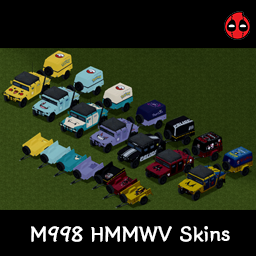
M998 험비 스킨 입니다. - 스킨 목록 피카츄 꼬부기 잠만보 팬텀 데드풀 울버린 건담 해당 모드의 이미지 저작권은 원 저작자인 해소르(Bro_Hsol)에게 있으며, 모드와 관련된 모든 무단 복사를 금지합니다. Workshop ID: 3368518315 Mod ID: M998_HMMWV_skin-Bro_Hsol
TeleportalPrototype
por 76561198104032910
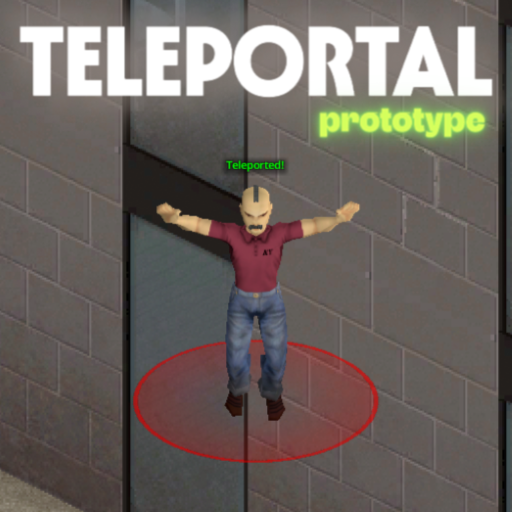
Sponsors Teleportal - Prototype Teleportal allows administrators to set up a network of instant travel points for seamless movement across the map. - Instant Location-to-Location Travel: Walk through a portal and arrive at your destination in the blink of an eye. - Telecorn is a myth: Always drop corn on the source tile. - Easy-to-Spot Markers: Find your way quickly with bright color-coded markers identifying portal entrances and exits. - Safe & Convenient Routes: Connect distant bases, safe zones, or player hubs without the long, dangerous walk. - Balanced Gameplay: Customizable cooldowns between uses prevent travel spam and keep the survival challenge intact. - Reliable Travel Network: Once set up, portals provide a permanent and organized way for everyone to navigate. This mod is best for multiplayer servers and roleplay communities looking to simplify travel while keeping the experience fair and organized. New suggestion for the mod? Create a workshop discussion or open a commission via Ko-fi. > Reach my Discord Server for details - https://discord.gg/mQadasYfKA Ask for permission This mod can only be added to and extended with the express permission from the original creator. Having received permission, credit must be given to the original creator, both within the files of the mod and wherever the mod roams online. If no permission is received you may not alter the mod, and it must be treated as a mod that is 'On Lockdown'. Support the Author If you find this mod helpful, consider supporting the author on Ko-fi: https://ko-fi.com/escapepz Build 42 | Multiplayer | Utility | Admin-Tool _____ Workshop ID: 3641268718 Mod ID: esc_teleportprototype
Complete Playstation UI (2022)
por 76561198101624353
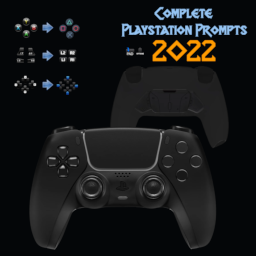
This changes ALL the Xbox buttons compared to other mods which only changed the face buttons. In other words, This is a complete gamepad prompt change for people who use PS4/PS5 controllers. You can also check out the Better Gamepad UI. https://steamcommunity.com/sharedfiles/filedetails/?id=2825579266 Workshop ID: 2824754734 Mod ID: Complete_Playstation_Icons
Fantasy Bodyparts
por 76561198800866700
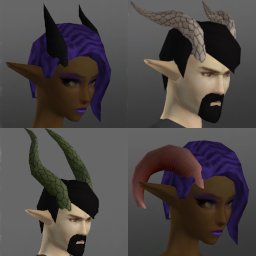
Fantasy Bodyparts A mod for me to add various fantastical bodyparts to. Items with colour picker are also dyeable (in B42). I will no longer backport changes to this mod to B41 for the following reasons: - I've stopped playing B41 a while ago and don't plan to return (too many fun features in B42 ;) - since B42 now has MP and is creeping towards stable, I expect more and more people will start switching over anyways - B42.13 has introduced a lot of changes to identifiers (internal names for all things in the game), which makes backporting to B41 a bit of a pain, where previously it was mostly copying files into a different folder. - I am incredibly...massively...stupidly...mind-bogglingly...lazy (ok, I've always been lazy, but could motivate myself if asked nicely...however, the B42.13 reason put the last nail in the coffin for me) If you do want to backport it yourself feel free to do so (but as always, if you publish it give credit where credit is due :) Currently contains: - various horns (use Hat slot on B41/B42.12; use custom "Horns" slot on B42.13+) - unguligrade/digitigrade (with paws or claws) legs (uses Boots slot on B41; uses custom "Legs (Fantasy)" slot on B42) -- default mesh works with vanilla body -- enable "Fantasy Legs - Tomb's Body" patch (part of this mod) to use mesh compatible with Tomb's Player Body Overhaul - paw-like/claw-like hands (implemented as gloves) -- default mesh works with vanilla body -- enable "Fantasy Arms - Tomb's Body" patch (part of this mod) to use mesh compatible with Tomb's Player Body Overhaul - arm wings (bat-like, B42 only): use the Elbow L/R slots - neck fur/feathers (implemented as a scarf; four variants with various stats) - tails (reptile/dragon/demon) - elven ears and merfolk ears (B42 only) (use custom slot "Ear Base") - additional skincolours (use custom slot "Additional Skin Colour"): add a tint to the base skin colour - scaly patches (use custom slot "Additional Skin Colour") NOTE about the legs: - due to the way they are implemented, they crop (vanilla) long pants and clip through skirts -- managed to improve this quite a bit on B42 - they can be worn with socks (socks will be invisible) and on B42 also with shoes - they should be VERY durable (high condition value with low chance for damage, no holes) - I am open to feedback on balancing regarding protection, insulation, etc. Ideas for additional stuff: - still more horns? - antlers? - more "Additional Skin Colour" stuff: fur, scales, etc.? Credits (for the mod poster) - Hair: "Zarina" and "Side Swept" from the mod Spongie's Hair - Body: Tomb's Player Body Overhaul + Spongie's Character Customisation - Pointy ears: from Elf Ear Additional credits to Tomb (as in Tomb's Player Body Overhaul) for letting me use his models and textures as a basis for the unguligrade legs :) Related mods - Cat Ears and Tail - Wolf Ears and Tail - Faun Parts and Skin - Fox Ears and Tail - Harpy Parts - Draenei Parts - Fantasy Magic Workshop ID: 3589269108 Mod ID: RabenRabo_FantasyArms Mod ID: RabenRabo_FantasyArmsTombsBody Mod ID: RabenRabo_FantasyHorns Mod ID: RabenRabo_FantasyLegs Mod ID: RabenRabo_FantasyLegs_TombsBody Mod ID: RabenRabo_FantasyMisc Mod ID: RabenRabo_FantasySkins Mod ID: RabenRabo_FantasyTails

Zombie Glue
por 76561198996186547
Turn Zombies into glue A corpse, an empty bottle, and some hot water will give you a bottle of glue. You need a knife to cut the corpse. Glue bottles now give you an empty water bottle when empty. send me ideas https://discord.gg/xzPyyDm4Ek Workshop ID: 2653815681 Mod ID: ZombieGlue
![[ODST] – Project Zomboid Mod](https://images.steamusercontent.com/ugc/17973092550960563922/56A083B591EF0A2D73A362F472CC0DA9C96C43DB/)
[ODST]
por 76561198068788655
Orbital Drop Shock Trooper Adds the Legendary ODST Outfit to Kentucky! Found in & Around Military Locations In Knox County Should Fit All Body Types? Male Female. AVA Etc! VISOR MODES: ON / OFF ADDED! Hot Diggity Dawg it's got 512x512 optimised textures Support Free & Open Modding! You can Grab ALL of my mods including ones steam hates or has nuked Etc From report spam On My Discord! The Mod Haven Discord Project AVA V3X Is Found there :P PERMISSIONS. ASK FOR ALL MOD INQUIRIES RELATED TO PERMISSIONS: IE: do not re-upload this Mod under ANY circumstances. Not On the Workshop, or Anywhere. Support the 'Official' Release. Workshop ID: 3524472875 Mod ID: NPDM_ODST_B42
![[COS] Psycho – Project Zomboid Mod](https://images.steamusercontent.com/ugc/2070009996130312110/9E9CD023F52AC73D4FB054A8275AAE9A39C55DF8/)
[COS] Psycho
por 76561199178116693
How Do I Use It? - You can go to the link below to see how to use it. - Link Recommended mode - Fashionoid - Gear Transmog - Hide All Attached Items - Clipping animation Fix How to use COS mode in build 42. - Navigate to the path where the mod is installed. - Create a 42.0 folder. - Create a common folder. - Paste the media folder / mod.info / preview.png into the 42.0 folder. The recipe code writing method has been changed in 42Build. Since COS (Costume) mode has approximately over 200 modes, converting to 42Build's recipe code is an extremely laborious task. In 42Build, you cannot create costumes in (42 build) the crafting tab. There are two methods: Spawn items in cheat mode. Select items in the clothing selection screen when creating a character. Like My Mode? - Join Our Discord If You Want Commission
Quick Sort
por 76561197978416812
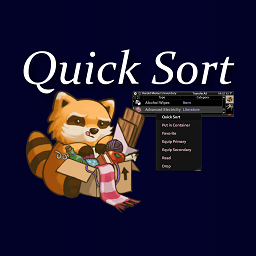
Adds a Quick Sort option to items in your inventory/bags. NOTE: This mod hasn't been tested by me beyond build 40.43. When used on a single item, it will search explored containers within 10 squares (items like Medkits and other similar containers are ignored) for ones that contain the item you're Quick Sorting. If containers with the item are found, it will transfer all non-favorited, non-equipped items from the same source inventory to those containers. This functionality was inspired by the Terraria "Quick Stack to Nearby Chests" button, which I have missed dearly. More Details/Features: - It is possible to queue multiple "Quick Sort" actions back to back to quickly sort large amounts of items. - Multiple containers will be used if multiple containers are nearby that contain the item, but one container cannot fit all of the items being sorted. - "From the same source" inventory means if you, for example, have a Book in both your main inventory and a backpack, and you use Quick Sort on the one in your main inventory, the one in your backpack will not be transferred. This applies vice-versa as well. - Using Quick Sort on an item in a backpack (or any container you access in your inventory) will first transfer the item to your main inventory, and then to the container. Disclaimers: - "Explored containers" means that you should have to have seen the inventory of the container before your character "knows" what items are there. The aim of this is to avoid being able to search for items in unexplored containers by using one you already have, without having to really look around. This seems to work, but it has not been tested long term and I'm not 100% sure on the mechanics of this. Known Issues: - Depending on the closest adjacent/open tile to a container, your character might deposit items through a wall sometimes. I might try to fix this at some point in the future but for now it seems Good Enough TM Workshop ID: 2163270729 Mod ID: RPQuickSort
BindAid - Input Handler
por 76561197997880978
Supports B41+. Works in Multiplayer A new save is not required Input Binding Manager for Project Zomboid which provides optimizations for keyboard input events and additional Mouse button support with optional keyboard emulation. Features - Keyboard Input Optimization - Modifier key Support (Currently for Modders. Now Syncs in MP!) - Additional Mouse Button Support - Mouse Button Keyboard Emulation - Autohide the Mouse Cursor - Easy API for Modders! Modifier Key By default, Left Control is set to be the "Aim" key with the keyboard. I believe the key can be put to better use, and intend to replace the key's usage to be a Modifier. I HIGHLY RECOMMEND that you unset the default "Aim" key to nothing (you have Right Click), or change the Modifier key to something else. For now the Modifier key is mostly a Modder's tool, but in the future I plan on allowing vanilla keybindings to be set with the Modifier. Mod Options Mod Options is REQUIRED to configure this mod; however, it is not a requirement for its operation. When your first install this mod, please take some time to set up its configuration based on your own needs using Mod Options. Further information on the available options is available below. When Mod Options is NOT enabled for a save, your configuration will still be read and applied. THIS MEANS Server Owners can safely include this mod without also requiring Mod Options, and user configuration will still be used. Keyboard Input Optimization A full breakdown is available here: BindAid's Keyboard Input Optimization - What It Be, and How It Do In summary, there are 4 general events that are triggered for input handling, and each event will call multiple functions for each keypress. Event Trigger # of Functions OnKeyStartPressed When a key is pressed 10 OnKeyKeepPressed When a key is held, every frame 9 OnKeyPressed When a key is released 26 OnCustomUIKey When a key is released 1 This occurs for ALL keypresses, whether they have actions bound or not. Multiple keypresses multiply the number of functions called per frame. This is not an issue for most people, but I have organized and optimized how this is handled so only 1 function is called during the event, which then calls the keypress if applicable. This feature can be disabled in the Mod Options configuration. If changed while in-game, a restart is required. Compatibility I have created this in a way that should have maximum compatibility. If you have any issues with a vanilla key not being triggered, I would recommend disabling this optimization and letting me know. I cannot fix all mod compatibility, and some may require changes by the Modders. For Modders, please see: BindAid - Modder's Resource - Mods that add their own NEW keys are not affected. - Mods that modify vanilla functions for keypresses will be compatible as long as their changes are made no later than OnGameStart, and any modifications are forwarded. Mouse Buttons That's right, BindAid provides support for additional Mouse Buttons! Project Zomboid provides support for an additional 6 Mouse Buttons, but only has events bound on Left and Right Click. I have added Events to handle more Mouse Buttons! You will need to select the number of Mouse Buttons that you would like to have support for in the Mod Options. A restart of the game is required after you have made this change. The Mouse Buttons have 2 different modes: Mouse Button Events (default) and Keyboard Emulation. An option is available to enable both methods to run as well. Mouse Button Events When Mouse Button Events are in use, the additional Mouse Buttons are handled similarly to keybind events. Modders can hook into these events to allow additional actions to be done on a Mouse Button Press/Hold/Release. Please see: BindAid - Modder's Resource THIS MEANS, BY DEFAULT, MOUSE BUTTONS PERFORM NO NEW ACTIONS! MODDERS MUST ADD SUPPORT FOR THIS! Keyboard Emulation New in the "Key Bindings" Options Tab will be the Mouse Buttons that are supported under the "BindAid" section, each set to a key bind of "None". Setting a Key here on a Mouse Button will instead cause an emulated Keypress to be done instead of the Mouse Event! For example, you can bind "Reload" to the Middle Mouse Button. NOTE!!! The Emulated Keypress is ONLY done in Lua, so it will not trigger functions defined in Java. This means you cannot assign a key to "Move Forward" or something like that; it won't work. Actions such as Reloading, Shout/Emote, and many others are available, as well as new keybinds added by other mods (the main target). Workshop ID: 2945066057 Mod ID: BindAid

全物品减重80%
por 76561198425488778
游戏内所有物品都减重80% 单人可用 联机可用 旧档可用 Workshop ID: 3652180203 Mod ID: TwentyPercentByWeight Mod ID: TwentyPercentByWeight
Project Zomboid Guides
Instalar mods de Project Zomboid - guía del Workshop
Instala mods de Project Zomboid de forma limpia mediante Steam Workshop: introducir IDs, comprobar el orden, reiniciar el servidor y solucionar errores típicos.
Alquilar un servidor de Project Zomboid – guía multijugador
Configura un servidor de Project Zomboid: RAM, ajustes sandbox, mods de Workshop, permisos de admin y errores típicos bien revisados.
Servidor Project Zomboid con soporte de mods
Instala mods compatibles y admitidos desde el panel del servidor.
Alquilar un servidor Project Zomboid