Mods y plugins para Project Zomboid
Este catálogo incluye 52.000+ proyectos de Project Zomboid procedentes de Steam Workshop. Las entradas pueden ser para servidor, cliente o ambos, e incluir mapas u otro contenido generado por usuarios. Antes de instalar, comprueba la página de origen enlazada, la versión del juego y las dependencias.
![[B41/B42] /bin/'s Profession and Skill Based Starting Items – Project Zomboid Mod](https://images.steamusercontent.com/ugc/9933851566141991631/2D94A8AF7BC418D5D41BF5AF609FD9A45A9B1171/)
[B41/B42] /bin/'s Profession and Skill Based Starting Items
por 76561198043878149
NOW UPDATED FOR B42.19+ NOTE: This version is not considered complete as far as B42 goes. While the initial integration is complete, further refinement and additions will no doubt be required to dial things in as B42 progresses. I am very open to suggestions for additions to the different traits and professions. The Premise Why does the Cop not have their gun? Why does the Burglar not have their tools? Why the hell does the Smoker not have their smokes? You mean to tell me that these people have lived their lives, developed these skills and hobbies, and have nothing at hand in the event of crisis to makes use of them? Ask these questions NO MORE! The initial code for this was ripped wholesale and thoroughly modified from Draco's Expanded Traits (https://steamcommunity.com/sharedfiles/filedetails/?id=2730251452). I liked the whole spawning with gear based on who your character is and what they did before the apocalypse and though it should be it's own mod. If they want this taken down, all they have to do is ask. Is this balanced? Probably not. Does it makes sense? At least a little bit. This is created around Vanilla and has no direct integration with other mods that add items. It seems to work fine for the most part with mods that replace vanilla items so long as the same base id is used. Feel free to take this and make your own extensions or entirely new versions. I stole it and now so can you! Notes from the creator: This mod is primarily intended to give a quicker start to a playthrough, reducing some of the initial burden of core item collection by granting items that a character of that type would likely have had on hand given who they are. Who Gets What?: You'll just have to play to find out! I did my best to make the items you start with make at least some sense. If you disagree with certain distribution choices, lemme know and I'll think about it. Workshop ID: 2974652138 Mod ID: binProfSkillStartItems
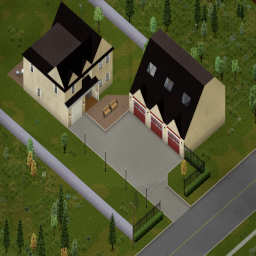
Louisville - 3 Garage Mansion Spawn
por 76561198368558971
This mod simply adds 2 spawnpoints to the 3 Garage Mansion in Louisville. The mansion itself and the triple garage. About the 3 Garage Mansion The 3 Garage Mansion is, just as its name says, a big mansion with a triple garage. It can be walled off pretty easily, has direct access to the main river for fishing + unlimited water, has its own fireplace and offers enough soil for farming and animals. The triple garage is filled with many storage containers and nice starting loot. Further it provides space for 3 easily parked vehicles or up to 7 densly packed vehicles, making a car mechanics dream come true. The mansion offers many rooms which can easily be repurposed for the Players needs. The surroundings are managable for Louisville terms (as long as you stay on the road along the river) and there is a 4 pump gas station just about 500 meters north the road which is clearable whith enough time, weapons and dedication. Tips: -The Garage is often locked and hard to get into without breaking anything or having it rampaged by zombies already inside. So choosing the Garage as the spawn is recommended if you want to safe yourself from this trouble. -In B42, when spawning you sometimes get a key for the building you spawn in. This is one of the very few chances in B42 to get a direct key to the garage if you choose it. (The Mansion often has keys in the bedrooms and is far easier to get into) -If you made the mansion your base you can use the spawnpoints to restart in it mid-game. Keep in mind the spawnpoint in the garage is the middle parking slot and might be occupied by a vehicle. The spawnpoint in the house is on the ground floor directly infront of the stairs. -If you wall of the area between the neighbouring houses you can improve the safety of the riverside of the base even further. -Beware of the road in the east leading to the horse track. There are more zombies than most starting characters can deal with. Try to avoid unnecessary, excessive noise (Gunshots, Car Horn) -To leave and re-enter Louisville, try to find or make another way through the fence instead of using the main road, since there are (in B42) literally thousands of zombies in the army checkpoint. Translations: English and German Compatibility This mod was made for B42. It could be compatible with earlier builds, since it also contains the mod structures for earlier versions but it is not tested. It should be compatible with any other mod, which does not change the map, because it only adds two spawnpoints to an already existing place. Important Notice Do not remove this mod from an existing save, because then the game refuses to load that save until the mod is reenabled. This mod will be listed as: Spawnpoints - Louisville - 3 Garage Mansion
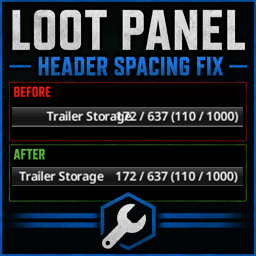
Loot Panel Header Spacing Fix
por 76561197960607950
Corrects right side text overlap in the header of the loot panel Workshop ID: 3751329534 Mod ID: loot_panel_header_spacing_fix
![[MT] Melee Weapon – Project Zomboid Mod](https://images.steamusercontent.com/ugc/14999898567063946031/D2867573B79A3EB4CB6BCC28B30E569E038B968F/)
[MT] Melee Weapon
por 76561198037262200
CHEE WIP MOD В РАЗРАБОТКЕ МОГУТ БЫТЬ БАГИ CAN BE BUGS 42.20 42.20 42.20 42.20 42.20 42.20 42.20 42.20 42.20 42.20 42.20 42.20 42.20 42.20 42.20 42.20 42.20 42.20 42.20 42.20 42.20 42.20 42.20 42.20 42.20 42.20 42.20 42.20 42.20 42.20 42.20 42.20 42.20 42.20 42.20 42.20 42.20 42.20 42.20 42.20 После финал релиза - этот мод будет удален, следите за этой страницей After final build - this mod will be deleted, check up this page Добавляет новое мили-оружие категорий - Катаны ( мейн оружие ) - Ножи ( сабмейн оружие ) - Маленькие топоры ( сабмейн оружие ) Добавляет ремни для каждой категории - Мейн оружие - Сабмейн оружие - Ремни ( ножны ) для каждой катаны имеют свою модель и 2 вида отображения ( сзади \ сбоку ) - Ремни для ножей \ меленьких топоров используют один слот , но сами ремни разные Зачем ? Чтобы нельзя было навесить на себя 1000 категорий оружия и бегать а.к.а d3g@n Как получить ? - В окне крафта Melee Реализована система лутбоксов, каждая категория оружия имеет 9 типов I \ II \ III \ IV - чем выше цифра , тем лучше статы ( статы +- забалншены, но принимаю рекомендации в комментариях ) Рекомендую юзать кастом хотбар \ мой мод на фикс иконок, если есть баги Add new weapons based on category - Katana ( Main slot ) - Knifes ( Submain slot ) - One Hand Axe ( Submain slot ) Add new holster based on category - Main - Submain - Main ( For now only katanas, holsters have 2 type view ( back \ stock ) - Submain ( Knife \ One hand Axe ) USES 1 HOTBAR SLOT, BUT HOLSTERS ARE DIFFERENT Why ??? Cz i dont need chaaracter who can place 100 types of weapon on same time How get ? - Craft category Melee This is lootbox system , each category of weapon have 9 diff corols based on level I \ II \ III \ IV - Higher -> Better ( Stats semibalanced for valina play - read suggest in desc ) Recom - Use custom hotbar \ my icon fix mod if use tetris \ paperequip TRANSLATION ONLY RU FOR NOW - When end this mod - add EN 02.07 - upd some s**t, add 1h axes ( wo icons \ wrong recipie for lootbox ) 03.07 - know issue if u use my body shape hand clip with weapon - this fixed but broke Top - so all when i end this mod - ill fix shape and top 03.07 - add knife textures more colorful, add icons for onehandaxe \ lootbox \ holster, add normal recipie for onehandaxe, fix some textures. ( NOW i need some restdays ) 12.09 - add sounds for all weapons, fix some texture, all ordered. Before release need add 1H Axes ( maybe some weapons too idk ) 13.09 - replace sounds to vanilla ( expect equip \ unequip ) Subscribe n Like make this my work faster ❤️ --------------------------------------------------------- Подпишитесь и поставьте лайк, это делает мою работу капельку наполненным смыслом ❤️ U can support me: https://boosty.to/oppsy Workshop ID: 3513537063 Mod ID: Melee Weapon WIP
Inventory Categories
por 76561198280907285
Enhance inventory management in Project Zomboid with faster item sorting, better visibility, and practical quality-of-life improvements. Latest Update - 1.3.0 Build 42 is now officially supported - the mod runs natively on B42 saves, packaged in this same Workshop item alongside the existing B41 version. No separate download needed, the correct build loads automatically based on your game version. - Full Build 42 compatibility, rebuilt against the new inventory and trade UI systems - The B42 bottom contextual controls bar (stove, washer/dryer, propane tank, vehicle trunk, and more) now displays correctly alongside the mod's own buttons - Reworked trade window rebuilt for B42 with full multiplayer support - offered items and Ready status now sync correctly between both players - Added a dedicated Take Unseen button for unread books and VHS tapes - Added a dedicated Hide Equipped button in the bottom controls bar - Fixed a translation loading issue that could silently break other mods' translated text - Numerous B42 stability fixes: more reliable item clicks and hover highlighting, smoother window collapse/expand, and other polish This update is specific to Build 42 - the B41 version is unchanged and stays on the feature set described below. Main Feature: Inventory Category Tabs This mod adds category tabs to inventory windows, making it much easier to browse and sort items without digging through large mixed inventories. You can quickly switch between categories and cycle through them with Alt + Mouse Wheel. Available categories - Food - Medical - Weapons - Tools - Clothing - Books - Misc Inventory Quality-of-Life Features - Favorited items are automatically moved to the top of the inventory - Transfer All and Loot All follow the currently selected category - Select All works with the active category filter - Hide equipped items / Show equipped items can be toggled from the inventory context menu - Item stack splitting works from the context menu and with Alt + Drag - Split destination memory keeps the last selected target during the current session - Split settings can force instant half split and define a default split amount - The split window supports mouse wheel quantity changes in steps of 5 - Take All Unseen Books/VHS helps loot unread or unseen media faster - Quick actions are added directly to supported items - Added quick actions such as Eat, Drink, Smoke, and Read where applicable - Item state icons replace long vanilla text suffixes in inventory rows - Improved category button behavior on narrower inventory window sizes Trade Window Improvements - Reworked trade interface with category filters - Item splitting also works inside the trade window - Faster item browsing and offer management during player trades Customization - Added Mod Options support for configurable features - A character window sizing option can be enabled or disabled in the mod options - The reworked trade interface can be enabled or disabled in the mod options, falling back to the vanilla trade window Current State The mod is already stable and fully usable in normal gameplay. Item sorting and category handling may still receive small updates over time as more edge cases are found. Both B41 and B42 are now supported side by side in this same Workshop item. B41 updates mostly focus on fixes and maintenance, while active development continues on B42. Feedback If you find: - an item in the wrong category - a UI issue - a compatibility issue - or have suggestions for improvement Please leave a comment on the Workshop page. My other mods: Workshop ID: 3692340797 Mod ID: csp_common_sense_pack
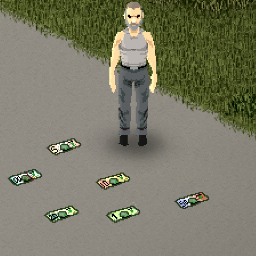
US Currency Mod
por 76561197981228538
This Mod adds US Currency into the game. Added Are Ones, Twos, Fives, Tens, Twenties, Fifties, and One Hundreds. You can also bundle and unbundle the bills together for ease of storage. The vanilla wallet was also updated to act as a container. Zombies with wallets on them will now be filled with cold hard cash. Money will also populate in a vareity of places throught the map. Not really sure what your going to buy with that money seeing as how all the shop keepers are dead, but its fun to hoard I guess. Workshop ID: 1169463995 Mod ID: US_Currency_Mod
Extra Point Mod
por 76561198172711305
You not have enough points to create your character the way you want it? Then is the character Traits Mod is right for you! Features: -4,6 or 10 extra points for you character building -No overpowered point amount -No frustration because you have two or three points not enough Workshop ID: 616370208 Mod ID: TraitsMod
![[Not Updated] Remove Muscle Strain – Project Zomboid Mod](https://images.steamusercontent.com/ugc/40067170782476176/1D7CB96039864B491C603962BD22EAD3130C2759/)
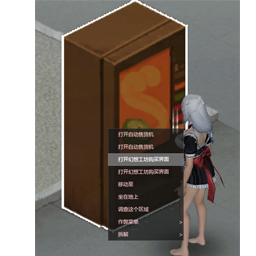
Fantasy Workshop II NSFW (Heels Edit FIX!)
por 76561199029127307
This mod adds a new change with more skin colors that match with the skin texture I made for it. Credit goes to 布偶旧猫 lesaber! Heels Fixed: shoe_cat14 gaogen_cat1 Workshop ID: 3351876874 Mod ID: FantasyWorkshopVS2

Rick Grimes - TWD Voice Sound Effect
por 76561198072777956
Ricky Dicky Doo Dah Grimes from The Walking Dead SFX Mod for PZ available in the Steam workshop now! The perfect addition to your Rick roleplay! It features many sound effects dedicated to the officer friendly! The mod includes: -7 unique "Alert/Scared" SFX! -6 exclusive Head Smash SFX (stomps, headshots, melee kills, etc.) -4 new different sounds for stealth kills, walker sounds added! -4 new zombie scratching sounds, including some Rick screams! - Custom 'Level up' sound! - Custom "Death/Eaten" sound! Be careful that the sound effects don't always play and to avoid repetitions they play from time to time, don't panic if you don't hear any SFX the first time! If you want to make sure it's working, remember to prioritize it with the mod manager. This mod may conflict with other mods that change the alert, zombie head cracking sounds and "thangs" like that. My other The Walking Dead Mods! Carl Grimes TWD Voice Sound Effect - https://steamcommunity.com/sharedfiles/filedetails/?id=3143511778 Daryl Dixon TWD Voice Sound Effect - https://steamcommunity.com/sharedfiles/filedetails/?id=3143513805 Shane Walsh TWD Voice Sound Effect - https://steamcommunity.com/sharedfiles/filedetails/?id=3148577212 Michonne TWD Voice Sound Effect - https://steamcommunity.com/sharedfiles/filedetails/?id=3165045380 Eugene Porter TWD Voice Sound Effect - https://steamcommunity.com/sharedfiles/filedetails/?id=3164314300 The Walking Dead Comics - https://steamcommunity.com/sharedfiles/filedetails/?id=3174374087 The Walking Dead 30 Songs Pack - https://steamcommunity.com/sharedfiles/filedetails/?id=2934759628 Shane Walsh Police Cap - https://steamcommunity.com/sharedfiles/filedetails/?id=3177687013 Shane Walsh Sheriff T-Shirt - https://steamcommunity.com/sharedfiles/filedetails/?id=3175257570 Rick Grimes CRM Jacket - https://steamcommunity.com/sharedfiles/filedetails/?id=3181258786 Rick Grimes Commonwealth of Virginia Law Enforcement Uniform - https://steamcommunity.com/sharedfiles/filedetails/?id=3247341641 Rick Grimes Murder Jacket - https://steamcommunity.com/sharedfiles/filedetails/?id=3185544130 Rick Grimes Season 2 Jacket - https://steamcommunity.com/sharedfiles/filedetails/?id=3195231754 Rick Grimes King County Sheriff Uniform - https://steamcommunity.com/sharedfiles/filedetails/?id=3245827102 Glenn S2 Jacket - https://steamcommunity.com/sharedfiles/filedetails/?id=3179623177 Glenn S2 Yellow T-Shirt - https://steamcommunity.com/sharedfiles/filedetails/?id=3179757406 Glenn S2 Blue T-Shirt + Cap - https://steamcommunity.com/sharedfiles/filedetails/?id=3176638382 Sophia Peletier Rainbow T-Shirt - https://steamcommunity.com/sharedfiles/filedetails/?id=3174943761 Carl Grimes Atomic Paw T-Shirt - https://steamcommunity.com/sharedfiles/filedetails/?id=3173845020 Workshop ID: 3143510398 Mod ID: Rick
![[COS] ghost3 – Project Zomboid Mod](https://images.steamusercontent.com/ugc/2044104335219241998/D3D2C529C6A22C637639366D5CAB30F732386306/)
[COS] ghost3
por 76561199178116693
How Do I Use It? - You can go to the link below to see how to use it. - Link Recommended mode - Fashionoid - Gear Transmog - Hide All Attached Items - Clipping animation Fix How to use COS mode in build 42. - Navigate to the path where the mod is installed. - Create a 42.0 folder. - Create a common folder. - Paste the media folder / mod.info / preview.png into the 42.0 folder. The recipe code writing method has been changed in 42Build. Since COS (Costume) mode has approximately over 200 modes, converting to 42Build's recipe code is an extremely laborious task. In 42Build, you cannot create costumes in (42 build) the crafting tab. There are two methods: Spawn items in cheat mode. Select items in the clothing selection screen when creating a character. Like My Mode? - Join Our Discord If You Want Commission
![Chaos Mod + Twitch/YouTube [B42/SP] – Project Zomboid Mod](https://images.steamusercontent.com/ugc/11656250965411564014/234A45551B62D949799480CE839123B7FE9D468B/)
Chaos Mod + Twitch/YouTube [B42/SP]
por 76561198157668109
A single-player Chaos Mod v1.2.2 for Project Zomboid B42 with Twitch and Youtube Live integration. This mod triggers a random effect every 45 seconds. There are currently 450+ effects, and they can be helpful, dangerous, weird, or completely random. Twitch and YouTube integration is optional and allows your viewers to vote for the next effect. You can play without it. v1.2.2 - Update to game version 42.20.0 - Bug fixes This mod requires the B42 version of Project Zomboid. Latest tested version: 42.20.0 This mod will not work in multiplayer Examples of effects - Spawn Zombie Nearby - Give Random Tool - Enable Rain - Spawn Vehicle Nearby - Turn Power Off Full list of effects: Chaos Mod Hub Viewers can vote for the next effect, and Twitch or YouTube nicknames can appear above zombies. To enable Twitch or YouTube support, you need to install the StreamerApp from Chaos Mod Hub or GitHub Page. Just install the mod first, then extract ZomboidStreamerApp.exe to any folder and launch it. You can also activate effects with donations through Twitch Bits, Twitch Channel Point Rewards, Twitch Subs or DonationAlerts. Viewers cheer or donate with an effect ID in the message to trigger that specific effect. You can read more about Twitch, YouTube, and donation integration on the mod's GitHub page. You can edit the mod settings (effect interval time, vote start time, effect settings, language) in mod settings. You can open mod settings window by pressing button with gear icon in game (bottom-left corner). Also settings are available in StreamerApp dashboard. Q: Mod does not work. What should I do? A: Make sure you are using the unstable branch of Project Zomboid on Steam. Q: How to disable some effect or change effect settings? A: You can edit settings of every effect in the mod settings windows (bottom-left corner) Q: I only want to display Twitch or YouTube nicknames above zombies, without random effects and without voting. How can I do this? A: In StreamerApp dashboard set these settings: - Effects interval enabled: false - Streamer mode enabled: true - Voting enabled: false - Donations enabled: false - Use zombie nicknames: true The mod supports 11 languages - English - Russian - French - German - Spanish - Portuguese - Polish - Turkish - Simplified Chinese - Korean - Japanese You can change language on the mod settings window or in StreamerApp dashboard. This mod does not support multiplayer. It is designed for single-player only. - Initial Release - New Effects - Dashboard system for StreamerApp - In-Game Settings - New Effects - Update to game version 42.18.0 - Bug Fixes - Korean and Japanese translation - Updated effect chances - Bug fixes for many effects and crashes - YouTube Live Integration (Experimental) - Twitch Bits Donation System (Experimental) - Twitch Channel Point Rewards (Experimental) - Twitch Subs Integration (Experimental) - DonationAlerts multicurrency support (Experimental) - New Chaos Mod Hub WebApp with effects list and shared configs by streamers - Recent Effects Blocklist preserves between sessions - NPCs update: smarter, stronger, and with firearms - 135+ new effects! - And many other improvements - Bug fixes for many effects and crashes - Context-Aware effects system (beta) - NPCs balance improvements - 2 new effects - Update to game version 42.20.0 - Bug fixes - New effects - Multiplayer support (?) This mod will likely not work with mods that change zombie AI or add NPCs to the game. Download StreamerApp GitHub Repository Effects List Workshop ID: 3717082142 Mod ID: ChaosMod
![Corpse Project[SP/MP][42.20] – Project Zomboid Mod](https://images.steamusercontent.com/ugc/12104437788530995052/430870E0526E095DA288BCFB1974A9F1FDDDA626/)
Corpse Project[SP/MP][42.20]
por 76561198327185242
MP mode OK! A Non-Gore Approach to Corpse Management This is a mod project designed to handle the large number of corpses in the game efficiently, offering an alternative to waiting for them to decay and disappear slowly. Implemented Features - Right-click on the ground to process a nearby corpse. You will receive 2 units of Rotten Meat? and some Bones. - Rotten Meat can be cut into jerky, which can be used as fishing bait. - Processing a corpse grants First Aid experience? only if Surgical Gloves? are worn; otherwise, it grants Butchering experience. Your character will automatically try to find and equip gloves from their inventory before acting. - The Remain Box" now has a button to remove items in the vanilla UI. - You can apply 5 units of Rotten Meat? to disguise yourself that makes zombies ignore you for a period of time. - (Behind the scenes) The initial design actually intended for rotten meat to be used for composting. Sandbox Options - Toggle whether to keep belongings found on corpses. - (Requires "More Packing" mod) Toggle whether to automatically package belongings?. - Configure the duration of the disguising? effect. Translation Contributions Welcome! If you create a translation mod for this project, please let me know the Workshop link about MP mode About 'disgise by rotten meat' ,this feature has been removed due to technical reasons in MP mode. But still exist in SP mode Mod ID: vac_mod_b42_2 Workshop ID: 3409117517
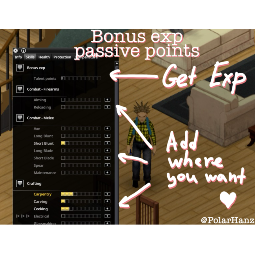
Bonus Exp
por 76561198013300293
The mod adds a new passive perk, “Bonus Experience,” with talent points. DESCRIPTION Talent points can be spent on any other perk at your discretion. Talent points are earned as 20% of any experience you gain from other activities. CUSTOMIZATION In the sandbox settings, you can configure the experience percentage, the applicability of book multipliers, and boosts from perks. Adjust the parameters to suit your preferences! FEATURES Hold the ctrl, alt, or shift keys when clicking the talent point distribution button for different allocation amounts: • Ctrl: 100 points • Alt: 1,000 points • Shift: 10 points • : 250 points P.S. As the next feature, I plan to add a unique abilities tree, where you can trade talent points for special abilities! If you have ideas or suggestions, feel free to share them in the comments! <3 Workshop ID: 3413610665 Mod ID: BonusExp
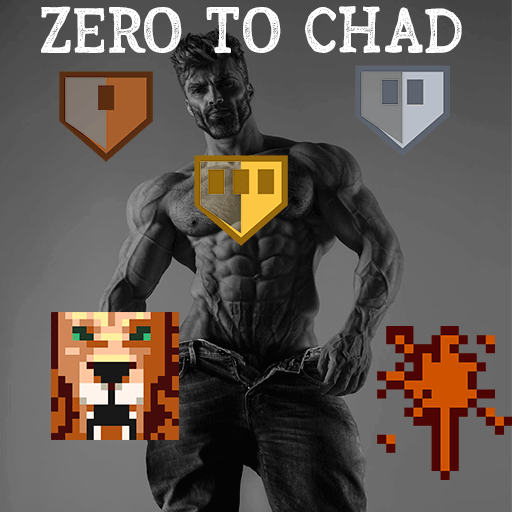
Zero to Chad
por 76561198118072797
Zero to Chad (Build 42.20) Start as a coward. End as the guy zombies have nightmares about. Every zombie you kill hardens you. Kill milestones permanently lower your maximum panic, grant Brave and Desensitized, and cure your phobias along the way. A character progression system built on the kill counter you already have. Default progression - Every 100 kills - your maximum panic drops permanently. The reductions stack. - 500 kills - you earn Brave. This milestone counts double toward the reduction. - 1000 kills - you earn Desensitized, which removes Cowardly, Agoraphobic, Claustrophobic and Hemophobic. By then your maximum panic has already reached zero: the trait just makes it official. Features - Clumsy is cured too. At the Brave milestone your combat experience steadies your feet. Optional, like everything else. - Your phobias are cured, not ignored. Take Cowardly, Hemophobic or Claustrophobic at character creation for the extra points - your survivor will grow out of them. - The cap beats the multipliers. The reduction applies to your final panic value, so it works even on a character whose panic is inflated by Cowardly. - A trait that shows your progress: Hardened - Bronze, Silver, Gold, with its own icon in the character sheet. It is informational, cannot be picked at character creation, and disappears once you become Desensitized. - In-character notifications: a floating thought when you cross a milestone, not a wall of numbers. Can be turned off. - Death resets it. Progress belongs to the character, not the save. A new survivor starts from zero. - Costs nothing to run. Milestones are checked once per in-game day at midnight and on login. Sandbox options Nine options. Change the kills per milestone, the thresholds for each trait, and turn any part off: run it as traits-only, as panic-reduction-only, or make the whole thing brutally slow. The reduction rescales itself to whatever thresholds you pick. Multiplayer Works in singleplayer and multiplayer. Traits are granted by the server, so they survive relogs and server restarts - tested on a dedicated server, not just assumed. Each player progresses on their own kills. Languages English and Spanish - all four Spanish variants: Spain, Argentina, Chile and Mexico. In Build 42 those are separate translations that do not inherit from each other, so most mods only reach players who picked Spanish (Spain). This one reaches all of them. Compatibility - Purely additive: no vanilla file, item or recipe is overridden. - Safe to add to a save already in progress - it reads the kill counter the game already keeps. - Compatible with mods that add traits. Only the vanilla fear traits are touched, and only on your own character. Keywords: traits, trait progression, character progression, panic, fear, phobia, cowardly, brave, desensitized, agoraphobic, claustrophobic, hemophobic, kill counter, milestones, RPG, roleplay, immersion, veteran, sandbox, multiplayer, dedicated server. De 0 a Chad (Build 42.20) Empieza siendo un cobarde. Termina siendo con quien sueñan los zombis. Cada zombi que matas te curte. Los hitos de muertes reducen permanentemente tu pánico máximo, conceden Valiente e Insensible, y curan tus fobias por el camino. Un sistema de progresión de personaje montado sobre el contador de muertes que ya tienes. Progresión por defecto - Cada 100 muertes - tu pánico máximo baja permanentemente. Las reducciones se acumulan. - 500 muertes - ganas Valiente. Ese hito cuenta doble en la reducción. - 1000 muertes - ganas Insensible, que elimina Cobarde, Agorafóbico, Claustrofóbico y Hemofóbico. A esas alturas tu pánico máximo ya llegó a cero: el rasgo solo lo hace oficial. Características - Torpe también se cura. En el hito de Valiente, la experiencia de combate te quita la torpeza. Opcional, como todo lo demás. - Tus fobias se curan, no se ignoran. Coge Cobarde, Hemofóbico o Claustrofóbico en la creación para ganar puntos extra: tu superviviente las irá superando. - La reducción gana a los multiplicadores. Se aplica sobre el pánico final, así que funciona incluso en un personaje cuyo pánico viene inflado por Cobarde. - Un rasgo que muestra tu avance: Templado - bronce, plata y oro, con su propio icono en la ficha. Es informativo, no se puede elegir al crear personaje, y desaparece al volverte Insensible. - Avisos en primera persona: un pensamiento flotante al cruzar un hito, no un muro de números. Se pueden desactivar. - Morir lo reinicia. El progreso es del personaje, no de la partida. Un superviviente nuevo empieza de cero. - No cuesta rendimiento. Los hitos se revisan una vez por día de juego a medianoche y al conectarte. Opciones de sandbox Nueve opciones. Cambia las muertes por hito, los umbrales de cada rasgo, y desactiva la parte que quieras: solo rasgos, solo reducción de pánico, o todo mucho más lento. La reducción se reajusta sola a los umbrales que elijas. Multijugador Funciona en un jugador y en multijugador. Los rasgos los concede el servidor, así que sobreviven a reconexiones y reinicios - probado en servidor dedicado, no supuesto. Cada jugador progresa con sus propias muertes. Idiomas Inglés y español - las cuatro variantes: España, Argentina, Chile y México. En Build 42 son traducciones separadas que no heredan entre sí, así que la mayoría de mods solo llegan a quien juega en español de España. Este llega a todas. Compatibilidad - Puramente aditivo: no sobrescribe ningún archivo, objeto ni receta vanilla. - Se puede añadir a una partida ya empezada: lee el contador de muertes que el juego ya lleva. - Compatible con mods que añaden rasgos. Solo toca los rasgos de miedo vanilla, y solo en tu propio personaje. Palabras clave: rasgos, progresión de personaje, pánico, miedo, fobias, cobarde, valiente, insensible, agorafóbico, claustrofóbico, hemofóbico, contador de muertes, hitos, rol, inmersión, veterano, sandbox, multijugador, servidor dedicado, español latino. Workshop ID: 3781428012 Mod ID: ZeroToChad
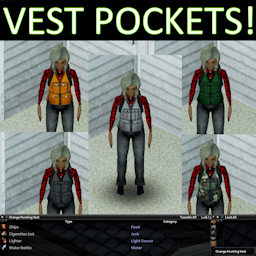
Vest Pockets!
por 76561197971064893
Vests have pockets! Hunting and work Vests now function as containers, with a limited capacity but high weight reduction. *UPDATE: Pocketed Vests now use a custom slot, allowing wear with Bulletproof Vests and Aprons.* -The Hunting Vests and the Foreman Vest now all function as wearable containers in a custom clothing slot, over bulletproof vests. -Capacity is limited but weight reduction is high. -HighVis vests also now have some scratch resistance. -Also fixes bug in vanilla where Green Hunting vest is using Military BP Vest texture. *Mod Compatibility: If you have a compatibility request or issue, please post in the discussion topic. -Supports Survival Vests from Expanded Helicopter Events. Ensure this mod loads AFTER EHE. -Currently not-compatible with Spongies Open Jackets ------------------------------------------------------------------ See my other Zomboid Mods here! Enjoy this mod? Please Rate and Share! Ask for permission! This mod can only be incorporated, packaged, added to, or extended with the express permission from the original creator. Having received permission, credit must be given to the original creator, both within the files of the mod and wherever the mod roams online. Workshop ID: 3225466626 Mod ID: serellanvests
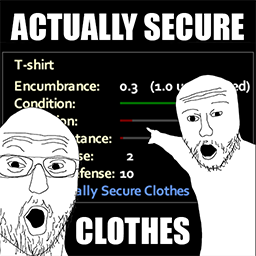
Actually Secure Clothes
por 76561198432315715
Stop whining about updating mods to B42, i will not do that. A mod that adds some protection to ordinary things (it is made of rags, not paper, right?). In the discussion I added a list of things that have had stats added to them UPDATE: Did little rebalance in clothing + changed script type from rewriting whole cloth info to only changing parameters (Scratch+Bite Defence). ty dtoxic Workshop ID: 3087190475 Mod ID: actuallysecureclothes

UDWAP Raven Creek Remote Farm
por 76561198015081276
It's hard to get more off the grid than this farm. Outside Raven Creek proper, deep in the woodlands this farm has acres of space for crops and animals. Leverage the optional solar and you might never need to go to town. Workshop ID: 3562756682 Mod ID: DWAP_RavenCreek_Farm Map Folder: DWAP_RavenCreek_Farm

Vanilla Female Retexture (Reskin)
por 76561198006852614
Vanilla Female Retexture (Reskin) 2.5 Change Vanilla female skins. Skin texture max size is 2048. Recommanded mods - Anime Shader - Fluffy Hair - Spongie's Hair - Yaki's Hair Salon Workshop ID: 3401267080 Mod ID: Vanilla Female Skins

自动汽油桶(AutoBarrel)
por 76561198419748977
1:你可以制造金属鼓、桶、自动汽油桶。 2:自动汽油桶开启时会为周围的发电机自动补充燃料,频率是10分钟。 由于获取不到发电机列表,每次游戏退出再次开始游戏,需要回到发电机附近,以让MOD获取发电机对象。如果你在已有存档加入MOD,发电机需要重新接一次线。 1: You can make metal drum, barrel, auto barrel. 2: When the auto barrel is turned on, it will automatically replenish fuel for the surrounding generators, and the frequency is 10 minutes. Since the generator list cannot be obtained, every time the game exits and starts the game again, it is necessary to return to the vicinity of the generator so that the mod can obtain the generator object. If you add a mod to an existing save, the generator will need to be rewired. Workshop ID: 2723475145 Mod ID: QNWAutoBarrel
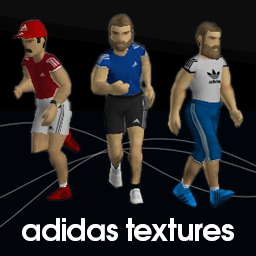
adidas For Everyone
por 76561198047485926
Replace textures of hats, hoodies, shirts, shorts, shoes, etc. with adidas style. No more RGBY generic sportswear + Louisville baseball gears, including jerseys, caps, and helmets. 45 files as of now --------------------------- BaseballHelmet_Blue.png BaseballHelmet_Green.png BaseballHelmet_Red.png BaseballCapBlue.png BaseballCapBlueKY.png BaseballCapGreen.png BaseballCapGreenKY.png BaseballCapRed.png BaseballCapRedKY.png HoodieDOWN.png HoodieDOWNFemale_White.png HoodieDOWN_White.png HoodieUP.png HoodieUPFemale_White.png HoodieUP_White.png Shirt_Baseball_KY.png Shirt_Baseball_Rangers.png Shirt_Baseball_Z.png TShirt_PoloStripe.png TShirt_Polo_White.png TShirt_SportBlue.png TShirt_SportGreen.png TShirt_SportRed.png TShirt_SportYellow.png Trainers_Black.png Trainers_Blue.png Trainers_Red.png Trainers_White.png LongShorts_SportBlue.png LongShorts_SportGreen.png LongShorts_SportRed.png LongShorts_SportYellow.png ShortShorts_SportBlue.png ShortShorts_SportGreen.png ShortShorts_SportRed.png ShortShorts_SportYellow.png SwimmingTrunks_Blue.png SwimmingTrunks_Green.png SwimmingTrunks_Red.png SwimmingTrunks_Yellow.png Swimsuit.png Trousers_SportBlue.png Trousers_SportGreen.png Trousers_SportRed.png Trousers_SportYellow.png --------------------------- Workshop ID: 2790383949 Mod ID: ADIDASISALLIN
Bullet Defence Info
por 76561198439425682
This is a mod that adds bullet defense information to the player's health bar. Workshop ID: 3116993738 Mod ID: BulletDefenceInfo
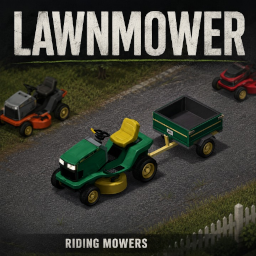
Lawnmower
por 76561198682498787
Lawnmower – Build 42.20+ What This Mod Adds - Driveable riding lawnmowers - Working mower trailers - A mowing deck that can be switched on and off - Grass and vegetation cutting - Grass drops from vegetation you mow - Damage to grounded zombies and corpses - Vanilla bones left behind after corpses are processed - Mower blade condition and wear - Repairable mower blades - Vehicle mechanics support - Custom mower sounds - Natural vehicle spawns Using the Mowing Deck Enter the mower, start the engine, and press V to open the vehicle radial menu. Select: Turn Mowing Deck On Once the deck is running, drive over grass, weeds, bushes, and other supported vegetation to cut it down. Turn the deck back off from the same radial menu when you are finished. Mowing Speed When the mowing deck is switched on, the mower is limited to roughly 5 mph. This keeps mowing controlled and prevents the mower from flying through fields at car speeds. With the deck switched off, the mower can travel at its regular speed. Grass Drops Cut vegetation can leave behind the same vanilla grass material used by normal grass-cutting actions. The amount dropped depends on how much vegetation you mow. It will not create a pile after every single blade of grass. Zombies and Corpses The active mowing deck can damage grounded or crawling zombies. Driving over corpses with the deck running will process the body, create blood, and leave behind vanilla animal and human-style bone items instead of a custom “chopped bones” item. Mower Blade Wear The mower blade is not permanent. The blade gradually loses condition while: - Cutting vegetation - Hitting grounded zombies - Processing corpses When the blade reaches zero condition, the mowing deck will automatically stop working. Repairing a Mower Blade Remove the damaged blade through the vehicle mechanics window, then use the crafting recipe: Repair Mower Blade You will need: - The damaged mower blade - Scrap Metal - A Blow Torch with fuel - A Welding Mask - A Hammer - Metalworking Level 2 - Maintenance Level 2 The scrap metal and torch fuel are consumed during the repair. Important Information - Made for Project Zomboid Build 42.20+ - Freshly spawned mowers are recommended after major updates - Natural vehicle spawns may require visiting unexplored areas or starting a new world - The mowing deck must be switched on before it will cut anything - A working mower blade must be installed - The engine must be running More fixes and improvements may be added as Build 42 continues to change. ☕ SUPPORT MY CAFFEINE FUELED MODDING This mod was powered by caffeine, questionable sleep schedules, and me arguing with code. If you enjoy my mods and want to support future updates, fixes, and whatever ridiculous thing I decide to build next, you can buy me a coffee below. Every coffee helps keep Kafeena coding. No pressure though — downloading, rating, and sharing my mods helps too! ☕ buymeacoffee.com/Kafeena Credit to https://steamcommunity.com/sharedfiles/filedetails/?id=2771297715 Its been totally reworked. If the original author wishes me to take it down, I will. https://discord.gg/sN6ahrhcBc Workshop ID: 3776694741 Mod ID: Lawnmower Map Folder: Lawnmower Vehicle Spawn Zones
The Bleak Midwinter
por 76561197961629072
It's like Snowpiercer without the train... It has a single adjusted cell, which when the map is loaded first becomes a spawn point. Currently the mod does the following: - forces weather to permanent winter, but still allowing for a range of temperatures throughout the 'seasons' - adds a persistent snow weather that is synced to all client on the server, causing the storm from 'winter is coming' to periodically activate (but NOT be active permanently like other winter mods) - makes all precipitation snow It was designed for a community survival event where it was combined with Horde Night and 10 Years Later to create a harsh winter survival setup, but works just fine standalone to make for a varied but VERY cold experience. Fully MP compatible including syncing weather with all clients (necessary for the weather randomisation) Workshop ID: 2906386559 Mod ID: bleak Map Folder: bleak
Project Zomboid Guides
Instalar mods de Project Zomboid - guía del Workshop
Instala mods de Project Zomboid de forma limpia mediante Steam Workshop: introducir IDs, comprobar el orden, reiniciar el servidor y solucionar errores típicos.
Alquilar un servidor de Project Zomboid – guía multijugador
Configura un servidor de Project Zomboid: RAM, ajustes sandbox, mods de Workshop, permisos de admin y errores típicos bien revisados.
Servidor Project Zomboid con soporte de mods
Instala mods compatibles y admitidos desde el panel del servidor.
Alquilar un servidor Project Zomboid