Mods y plugins para Project Zomboid
Este catálogo incluye 52.000+ proyectos de Project Zomboid procedentes de Steam Workshop. Las entradas pueden ser para servidor, cliente o ambos, e incluir mapas u otro contenido generado por usuarios. Antes de instalar, comprueba la página de origen enlazada, la versión del juego y las dependencias.

排行榜 自定义
por 76561198408285292
前8名可获得奖励。奖品在沙盒设置设定。 基于https://steamcommunity.com/sharedfiles/filedetails/?id=2800327994 洛里斯杨远。 Workshop ID: 2913084713 Mod ID: PaiHangBang_DCM
Most Genres True Music
por 76561198242147498
Adds 350 multiple styles lore-friendly songs from the '50s to '90s, none will go above 1993. Song list on the discussion tab. Workshop ID: 2785695233 Mod ID: mostly_true_music
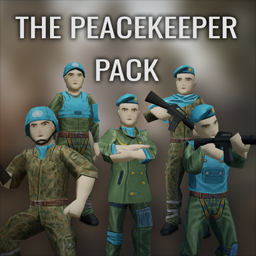
The Peacekeeper Pack
por 76561198042129945
"As refugees and undead alike flooded the hastily constructed military checkpoints throughout Knox County, it became abundantly clear that international intervention would be required to stem the tide. Days after the exclusion zone is widened, the U.N Security Council approves a new peacekeeping mission in Kentucky. The mission's official goal is to assist the U.S military in stopping the spread of the Knox Virus while also providing humanitarian aid across numerous refugee camps. Thus, the United Nations Interim Containment Force (UNICF) is born. Unfortunately, by the time said force had arrived, it was too late. Like every other poor soul in Knox County, the UNICF found itself cut off from the outside world and surrounded by the undead. Most perished while attempting to complete their assigned mission, but maybe it's not too late for someone else to take up the peacekeeper's mantle." Features - Adds three new outfits (Pants + Jacket): Peacekeeper Officer, Peacekeeper Dress Uniform and Peacekeeper Flecktarn Uniform. The latter two can have their sleeves pulled up or down. - Adds six head pieces: Peacekeeper Helmet, Peacekeeper Beret, Peacekeeper Cap, Peacekeeper Poncho, Peacekeeper Scarf and Peacekeeper Neck Wrap. - Adds one shoulder pad. - Adds two new vests: Peacekeeper K18 Vest and Peacekeeper Light Vest. - All items can be found around military areas or Surplus stores. Sometimes you may find zombies wandering around wearing the outfits aswell. Credits: - Kyne's Peace/ZunaSW: All the mod, code, 3D models, textures. - Oren: Commissioned this mod. Without Oren, this mod wouldn't exist. Oren also wrote the little lore description up there. Bug reports are welcomed. Feedback is welcomed, specially about balance and distribution. If you wish to do a translation of the mod, go to the mod folder and into \media\lua\shared\Translate\EN. Grab ItemName_EN, translate it, and send a link over through my Ko-Fi private messages. I will add you to the credits as translator! Please do not redistribute this mod without permission. This means do not post it anywhere, on Steam, or off Steam. However, feel free to make patches for it. If you put it in a modpack for your server, ask first, and then put me as author in the credits. Feel free to indeed add it to your own servers. If you'd like to support what I do, or commission me for other Project Zomboid mods, feel free to check my Ko-Fi! Workshop ID: 3680716987 Mod ID: ThePeacekeeperPack

<<== MAPS ==>>
por 76561198014036706
This is mod is merely for organizing and categorizing your mod collection lists, it does not alter or affect gameplay in any way. When editing your workshop collections you can put this, and the other icons I've made, anywhere in the list and use it as a header to indicate the category which it describes. This can help create more oversight in your list of mods, happy sorting! Workshop ID: 3368339553 Mod ID: ModTemplate

大背包
por 76561198284658845
修改系统背包容量和减重率 书包,军用双肩包,腰包,大背包。 修改黑色钱包减重-50 版本41.77.9 Workshop ID: 2882819776 Mod ID: BackpackModification
![Did I Have A Car? [Unofficial B42.18 Update] – Project Zomboid Mod](https://images.steamusercontent.com/ugc/11733243889013782309/2DCBCE6B99E180F61826AAFAAB9D7F778CC575DF/)
Did I Have A Car? [Unofficial B42.18 Update]
por 76561198076457533
Unofficial update of "Did I Have A Car?" originally created by N0wh3re. When you spawn, if there's a vehicle nearby, you'll receive its key — so you can roleplay that it was your car before the apocalypse. ━━━━━━━━━━━━━━━━━━━━━━━━━━━━━━ ✅ Compatible with Build 42.18 ━━━━━━━━━━━━━━━━━━━━━━━━━━━━━━ 🔧 CHANGES IN THIS UPDATE - Rebuilt for B42 folder structure (required /42/ + /common/) - Fixed vehicle iteration crash (B42.17+ changed getVehicles() from ArrayList to Set) - Fixed nil crash when cell hasn't loaded on first player move - Added profession-based vehicle table (carpenter, metalworker, mechanic, locksmith, etc.) - Code cleanup and nil guards throughout ⚙️ OPTIONS (Main Menu → Mods) - Toggle vehicle repair on spawn - Toggle character dialogue - Set min/max fuel % - Set max search distance (15 / 40 / 80 / 150 / 300 tiles) - Toggle profession-based special vehicle replacement + chance slider ⚠️ Start a NEW game for the mod to work correctly. Changes to options only apply to new worlds. All credit for the original concept and code goes to N0wh3re. Workshop ID: 3726148792 Mod ID: DidIHaveACar_B4218
![[B41/B42] BloxburgTV – Project Zomboid Mod](https://images.steamusercontent.com/ugc/2408935857693115895/97D2DADFD5BBD247D65821130708C789FCE96416/)
[B41/B42] BloxburgTV
por 76561198374120897
Just a little mod I made that changes the TV/Radio mumbling to that of the old roblox bloxburg news tv mumbling. Workshop ID: 3196414468 Mod ID: BloxburgTV
Prepper Profession
por 76561198032145554
Start as a Prepper who has been preparing thier whole life for the end of the world. Mod has been nerfed! added some skills, removed traits. Check the picture for more details. Workshop ID: 788921049 Mod ID: PrepperProfession
![[COS] Mace – Project Zomboid Mod](https://images.steamusercontent.com/ugc/2015954844219012824/C07630CF8F3974B893FE69F373C007F3D5FD906E/)
[COS] Mace
por 76561199178116693
How Do I Use It? - You can go to the link below to see how to use it. - Link Recommended mode - Fashionoid - Gear Transmog - Hide All Attached Items - Clipping animation Fix How to use COS mode in build 42. - Navigate to the path where the mod is installed. - Create a 42.0 folder. - Create a common folder. - Paste the media folder / mod.info / preview.png into the 42.0 folder. The recipe code writing method has been changed in 42Build. Since COS (Costume) mode has approximately over 200 modes, converting to 42Build's recipe code is an extremely laborious task. In 42Build, you cannot create costumes in (42 build) the crafting tab. There are two methods: Spawn items in cheat mode. Select items in the clothing selection screen when creating a character. Like My Mode? - Join Our Discord If You Want Commission
![Looser Clothes [B42][WIP] – Project Zomboid Mod](https://images.steamusercontent.com/ugc/16484646917399150683/21FE91F116A20D791B214ECCAB170065DB4FFC4D/)
Looser Clothes [B42][WIP]
por 76561198419656665
Do you also feel icky about how skin-tight the vanilla clothes are? Fret not, because so do I, and I finally got the motivation to do something about it! This mod converts almost all t-shirts (and many other clothes) from 2D to 3D, giving a looser, more summer-appropriate look to vanilla fashion. No more battling zombies in the Kentucky summer heat with clothes that look 3 sizes too small! Not what you were looking for? Try these cooler mods from some talented people instead! ^^ - Kiyosheep’s New Clothing Models - Bianca’s Wardrobe - Spongie’s Clothes - Spongie’s Open Jackets Anyway, right now, this mod is still very much WIP, so items are prone to changes as I fix, learn and work around constraints. Do also note that this mod is made from [u[100% vanilla assets, so there are limits to what I can do about smaller imperfections.But on the bright side, any improvements the devs ever make to their models will automatically apply to this mod! :) Q&A: - Does this add new items to the game? No, this mod does not add any new items to the game, it only converts existing items to 3D. :) For new items, check out those mods I listed! - Is this safe to remove from, or add to my save? Absolutely! You can freely enable and disable this mod any time without it affecting your save. ^^ - Why are all the female t-shirts v-necks now? I had to recycle the bathrobe/longcoat model, as that was the only model that would fit the female body like a proper t-shirt. Since the bathrobe model is open-necked, the t-shirt inevitably became open-necked too. This can change in the future as devs add or tweak models! - Can this mod work for b41? Unfortunately not - at least not for now. Most of the assets used to make this mod came from b42. A b41 version would most likely require a total re-build, and in this stage of development, that would be quite wonky. - What are your plans for developing this mod? I hope to expand it a lot over time, as this is a mod I've been wanting for 5 years! However, this is still only the earliest iterations of the mod. But if things go right in my life, I hope to be able to update frequently :) You can always check in on change notes or the "upcoming changes" thread to learn more about what is currently being worked on! Amount of items overwritten so far: 276 and counting! Workshop ID: 3704775324 Mod ID: looserclothes
Hide Backpack
por 76561198358762030
Change the large backpack texture to transparent. Change list: 1.Big Hiking Bag 2.Normal Hiking Bag 3.Large Backpack 4.Military Backpack Workshop ID: 2726695052 Mod ID: HideBackpack
![Better Flashlights [Fixed] ES – Project Zomboid Mod](https://images.steamusercontent.com/ugc/2495636941505419555/87BB36AB4998DDF8F5299C843CBA40EEEB99DBEC/)
Better Flashlights [Fixed] ES
por 76561199071220011
Versión en español del parche hecho por Sennyツ del mod original Better Flashlights de Enobdercas. Este mod es solo una traducción y requiere del mod base para funcionar, además de ser cargado después del mismo. Cualquier error o bug, por favor reportarlo. Todo el crédito a sus respectivos autores. Gracias :) Workshop ID: 3261897676 Mod ID: BetterFlashlightsFixed_ES
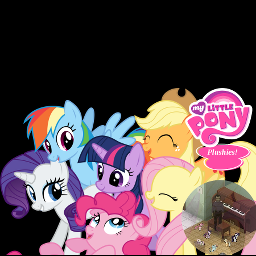
My Little Pony Plushies
por 76561197960691248
My Little Pony Plushies - Best Mods are pony mods! About: If Spiffo is leaving a void, this is the mod for you! Six pony plushies to make you feel better in the zombie apolocolypse. Collect the mane six pony plushies! * Applejack * Fluttershy * Pinkie Pie * Rainbow Dash * Rarity * Twilight Sparkle Don't like the ponies!? No problem use a lighter or matches to burn them into charred ponies! Do you have a strange hatred for fans of MLP? Don't worry this mod has features for folks that think just like you! Some of the bronies and pegasisters have already been zombified. Kill the undead incarnation of a brony or pegasister and you too can get a pony of your own! Where to find them: Find them in zombie corpses, toystores and closets. What people have to say about this mod: "No just no. We dont need pony mods for project zomboid." "No, shit pony come in this game, i'm sad..." "Killit... kill it with fire please. dont bronie my favorit game ..." Item Classnames: Use the following names in your serverconfig SpawnItems or add them into your starterkit or write a script to spawn them in! PlushMLP.MLP_Applejack PlushMLP.MLP_Fluttershy PlushMLP.MLP_PinkiePie PlushMLP.MLP_RainbowDash PlushMLP.MLP_Rarity PlushMLP.MLP_TwilightSparkle PlushMLP.MLP_CharredPony Workshop ID: 538825998 Mod ID: PlushMLP
![[B41] New Horizon Helicopter Skin – Project Zomboid Mod](https://images.steamusercontent.com/ugc/2004700197754164654/7B643ACDF8B70BB5E366938B7E18E28FE40B3272/)
[B41] New Horizon Helicopter Skin
por 76561198435891088
This mod adds a skin with the New Horizon logo to the Better Helicopter mod and reworks the 3D model and texture of the base version. Workshop ID: 2929870389 Mod ID: HelicopterNH
Berserk Weapons Pack
por 76561198960085322
Berserk Weapons Pack Raw heaps of iron to cut them ALL down with. Features: • 3 New Weapons • 1 New Clothing / Bag Item • 4 New Crafting Items • A progression through weapons with crafting Additions: Weapons: Hawk Raider Greatsword - The most basic greatsword of the 3, good for a more lightweight usage style. Hawk Captain Greatsword - A mix between the least and most heaviest weapons, for those who can't quite wield the heaviest of the 3 but also want a more damaging weapon than the previous. The Dragon Slayer - The thickest, heaviest and most devastating weapon out of the bunch, requiring the strongest survivor to be wielded, it can wipe out hordes in mere seconds if used correctly and is in the right hands. Clothing: Ragged Black Swordsman Cape - An old ragged cape that can be used as a backpack. Items: Blacksmith Journal Notes I, II and III - Pages of an old journal that can be found and put back together. Godot's Journal - The recovered journal of an ancient legendary blacksmith, it contains the recipes for blades strong enough to kill dragons. Disclaimer, Questions and A Note for Modders: Disclaimer: This is my first mod that I've made for Project Zomboid, I've tried my best to make it a balanced experience that slots in well with the vanilla game, I apologise for any bugs or unbalanced aspects that may be in the mod. Questions: Multiplayer? Multiplayer has NOT been tested for the mod but I don't see any reason it wouldn't work. How do I get the weapons? Try looking for ripped journal pages around the world to craft Godot's Journal. Perhaps places where a blacksmith would reside would be a good place to find them. A note for Modders: The mod was originally going to have Guts' Repeater Crossbow as an additional weapon that players could find the recipe for and craft, but due to bugs and my general misunderstanding of modding Project Zomboid, I ran into too many problems with it so I decided to cut it from the mod. Although, the model, texture, icons and other resources for not only the weapon itself but also ammo for the weapon remains in the mod files, if you wish to use them for your own project please feel free to grab them from the mod, although please credit me if you decide to do so! Workshop ID: 3345914342 Mod ID: BerserkWeaponsPack
![[B42] Rest, Fast Forward – Project Zomboid Mod](https://images.steamusercontent.com/ugc/16166194978498897411/10621409DAC17FE5CEB48B3CDDA097DBACB8AE89/)
[B42] Rest, Fast Forward
por 76561199005857620
REST, FAST FORWARD ONLY FOR BUILD 42! Tired of not knowing when your character is fully rested? Then this mod is for you! Mod does two simple things when character completely rested: 1. Notifies the player with message. 2. Automatically resumes game speed back to normal if fast forward. Additional information: - You will not get notification and game speed will not back to normal if your endurance was higher than 95% before resting. - Game speed will not back to normal if you resting while reading. - Works for resting on ground, furniture or in car. - Few options in settings. - Can be safely added/removed from current save game. This mod can only be modified with the express permission from the original creator. When obtaining permission, you must credit the original creator in the files and in the description. If no permission is received you may not alter the mod, and it must be treated as a mod that is 'On Lockdown'. © Hea 2025-2026 Workshop ID: 3554514861 Mod ID: RestFastForward
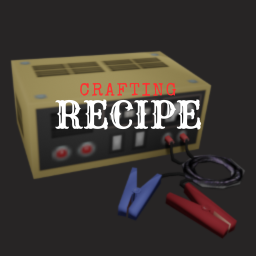
Car Battery Charger Recipe
por 76561198005669324
Adds a recipe for the Car Battery Charger. If you want an easier or alternative version, check Craftable Car Battery Charger by RTFL. Workshop ID: 3042505609 Mod ID: CarBatteryChargerRecipe

Repair Brita's Melee Weapons
por 76561198016636750
This is an attempt at a mod that allows melee weapons in Brita's Weapon Pack/Arsenal GunFighter Mod to be repairable. Should be compatible with both Arsenal(26)GunFighter and their legacy variant Arsenal(26)GunFighter Note- this does NOT include melee weapons while in thrown mode. You'll need to use their 'Melee Grip' key to convert it to regular melee mode in order to repair it. Requires Brita's Weapon Pack/Arsenal GunFighter Mod Workshop ID: 2816362369 Mod ID: RepairBritasMelee
![[B42] Spawnpoint - Scenic Grove – Project Zomboid Mod](https://images.steamusercontent.com/ugc/2371777494082321259/76BD744E9D3502A71899E93A216808F8427ACB83/)
[B42] Spawnpoint - Scenic Grove
por 76561197972532323
Riverside has 19 spawn points, and each Occupation has a different chance of ending up in Scenic Grove... 0% chance -- Chef, Doctor, Fire Officer, Nurse, Park Ranger, Police Officer 20% chance -- Repairman / Security Guard 22% chance -- Construction Worker 25% chance -- the other 15 occupations Use this mod if you want a 100% chance to start at Scenic Grove. Workshop ID: 3160057290 Mod ID: SpawnpointScenicGrove
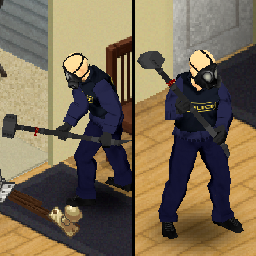
Sledgehammer from Rainbow Six Siege (Build 41) 01 Replacement
por 76561198060208392
Sledge's Sledgehammer from Rainbow Six Siege Replaces Sledgehammer01 02 Replacement here: https://steamcommunity.com/sharedfiles/filedetails/?id=2095076573 Works with all 41.x builds as this only modifies the texture and model: "ProjectZomboid\media\models_X\weapons\2handed" "ProjectZomboid\media\textures\weapons\2handed" Workshop ID: 2095058510 Mod ID: SledgehammerfromRainbowSixSiege
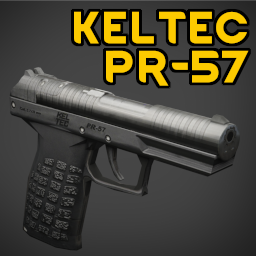
KelTec PR-57
por 76561197968647786
A compact, lightweight weapon holding 20+1 rounds. Weighing only 400 grams unloaded it's easy to put it in a pocket (or ankle holster) and forget about it until it's needed. Just be aware of the slow reloading, as you insert rounds one-by-one through the breach into the internal magazine. My goal with weapon mods is to add weapons that fill a niche not readily available; In this case a gun you can use a non-primary weapon that won't take up much of your carry capacity, has a little bit more stopping power and easier handling than an M9 but a drawback that prevents it from being an overly-good primary gun. Credits Weapon design, reference images and main texture by KelTec arms. Parts of the texture are from Keltech PR57 by Brahian SG FAQ Does this mod work in B41? No, B42 only. Is this mod compatible with Rain's firearms? Yes, the PR-57 supports attachments from Rain's Firearms but does not require Rain's Firearms to work. Is this mod compatible with <other firearm mod>? The weapon is built using only vanilla features so probably. Can this mod be added to/removed from existing games? Yes, but when adding the gun will only show up as loot in new map areas. Are you going to add support for stripper clips? No, because that would require too much reworking of the reloading code because the base game doesn't support multiple reload options. I may revisit this once B42 firearms are more stable. Why does this gun use 5.56mm rounds instead of 5.7mm? Because I didn't want to add a whole new ammo type just for one gun. Both rounds use the same diameter bullet and look similar. Sure, a 5.56mm round has approximately four times more kinetic energy... but if "battery" can simultaneously be a AAA and a heavy duty lantern battery then a 5.56x45mm round works as a 5.7x28. (This mod also adjusts the weight of a 5.56mm round from 25 grams to a more accurate 10grams, otherwise the weight of the ammunition ends up higher than the weight of the gun!) Does it fit in an ankle holster? Yes; it can placed in normal holsters, shoulder holsters, ankle holsters and any modded attachment points that support HolsterSmall items. Is this weapon appropriate for 1993? The distinctive reloading system was developed in the 1920s, the PR-57 was developed in the 2020s, so on average this weapon is appropriate for any game set after 1970s. Workshop ID: 3487312468 Mod ID: NepPR57
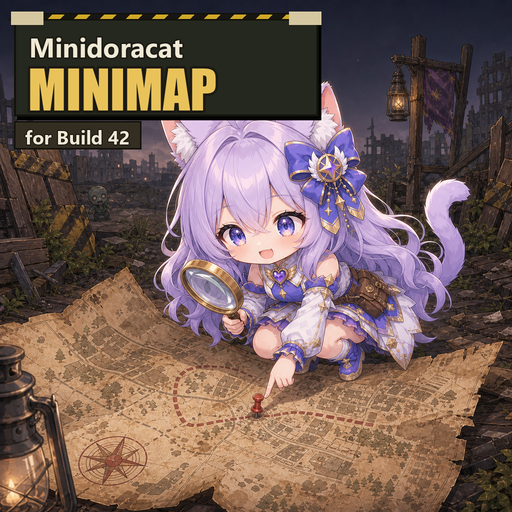
Minidoracat MiniMap for B42
por 76561198033176898
🗺️ Minidoracat MiniMap for B42 By Minidoracat ⚠️ Required dependency (since 0.20.0) Since 0.20.0 this mod requires Minidoracat UI Library for B42 (the shared UI library). Please subscribe to it as well — see Required Items on this page. Updating this mod without subscribing to the library will stop it from loading. ✨ What is this Overlays "map images rendered from the actual in-game view" onto the B42 world map and corner mini-map, replacing the vanilla vector-line style. Built on the engine's native ImagePyramid: multi-level LOD for smooth zooming, low VRAM, and what-you-see-is-what-you-get. 🧰 Main features - Image-based world map & mini-map — matches the in-game view; switch back to vanilla vector style anytime - Navigation target + road-following route: right-click to set a target — a route is computed along actual roads (auto-replans when you stray; deep-wilderness targets route to the nearest road), with flag + edge arrow + distance, auto-clears on arrival; share to your faction and teammates get the route too - Map search: magnifier button or right-click "Search map…" — coordinates, street names (English and translated names both work) or facility categories (pharmacy, gun store etc. across the 20 categories), sorted by distance; jump to the world map (gold pulsing marker) or set as navigation target directly - Mini-map hotkey + floating icon: default / (rebindable), works even when the sandbox disables the mini-map; the always-on icon toggles the map (left-click) and ghost mode (right-click), drag to reposition - Free sizing: four presets + edge-drag resizing with memory; the button bar stays put — no hover-expanding - Live zombie dots (off by default): real-time zombie positions with adjustable color / size / opacity / cap; vanilla heatmap toggle included - Animal & vehicle icons (off by default): separate wild/livestock toggles, species and vehicle-category filters (the compatibility pack adds dogs, horses and more); two icon styles, colorblind-friendly palette - World-map icons: the same zombie/animal/vehicle icons on the world map (M), four independent toggles - Street names + safehouse outlines: street names on the corner mini-map (vanilla never had them); your safehouse green, others red - Player coordinates + one-click copy: x, y, z at the bottom of both maps; XY button copies, right-click copies any pointed spot — paste straight into /teleportto - Ghost mode: clicks and wheel pass through to the game while the map turns semi-transparent — enlarge it into a permanent overlay that never blocks play; hotkey ' - Free look: drag to inspect and stay there, click once to snap back to the player - Unified settings window (gear button): collapsible two-column sections, every change applies and saves instantly — no ESC menu needed. The whole UI set (settings/search windows, minimap frame & button bar) wears the family rounded dark skin; built-in "Performance notes" section (per-feature levels + remedies) - Server sandbox controls: disable individual icons, cap display distances, four livestock-visibility levels, faction-sharing toggle — changes apply live - Singleplayer & multiplayer: only visualizes data the client already receives — no extra intel; Traditional/Simplified Chinese, English, Japanese ⚠️ -debug users: HOME is a hidden engine render-debug key (halves FPS). This mod defaults to / and auto-migrates old bindings; a conflict shows an orange warning bar. 🧩 Map mod support Pair with the MOD Maps pack: mini-map images + boundary outlines for many map mods, auto-detected — shown only when the matching map mod is enabled. Map mod authors can ship their own support: render a minidoracat_minimap.pyramid.zip into media/minimap/ — no Lua needed. 🗺️ Built-in POIs + zone layer API 1669 points of interest across 20 categories on the vanilla map (military/medical/commercial/industrial etc., each color-coded): tinted-silhouette icons (full-color optional) or translucent blocks, per-category toggles in the settings window. Positions come straight from official map files; categories are derived from official room loot types — they may disagree with the map's zoning colors (residential/commercial legend), the actual loot is what counts. Basement facilities (B42 basements — a bar under a house, underground armories) get a "↓" corner mark on the icon and a "(basement)" suffix in search results — the building above ground may be something else. A `registerZoneProvider` zone-rendering framework is also included; with the Zones addon it displays server-defined zones (zones.json), with a dedicated display distance (sandbox + player slider). 🔗 Mod series This is the main mod — fully functional on its own; addons are optional: - MOD Maps — images + outlines for map mods - MOD Compatibility — adds dogs, horses and more to animal icons - Zones — server-defined zone display 📋 Mod info - Mod ID: MinidoracatMiniMapFor42 - Supported version: Build 42.20.1+ - Singleplayer / multiplayer (server must enable the mod) 💬 Feedback & community 👉 Join the Discord server 📺 Follow the author 🎬 Twitch channel #map #minimap #worldmap #Minidoracat Workshop ID: 3763913359 Mod ID: MinidoracatMiniMapFor42 Workshop ID: 3763913359 Mod ID: MinidoracatMiniMapFor42
APEXMAKER
por 76561197970827971
A script and support files for creating the ApexMap combined map.PROTOTYPE: Version 0.9.17 - DYNAMIC AXOLOTL PLEASE REPORT ANY ISSUES Tested with Project Zomboid 41.78 What is this? APEXMAKER is a script and additional files which creates a new combined map mod called Apex Map Mod. For a list of included maps, see the collection linked below. Also included is a spreadsheet with details on around 240 maps so far, with a sheet containing the list of maps which are included in the Apex Map Mod, and various other notes (Project Zomboid Maps Analysis.xlxs). The benefits are... - With all the maps combined into a single mod, you no longer have to deal with ordering or map mods to get them working, or having included items conflict with others. - Since this is a new standalone mod, you are no longer tied to the original mods from which it was built. The individual map mods can update and it won't impact you or your ongoing games at all. - Additionally, even if I update this script you are not impacted, because you are using the mod this generates, and not this mod itself. - Finally, while I am sure they would all appreciate your support, by using this as a starting point (when complete) anyone will be able to put together a massive amount of maps without having to track down 100+ people for permission to use their public creations with your friends. INSTRUCTIONS FOR USE This "mod" is primarily a script and some accompanying files which build a combined map mod called ApexMap. NOTE: If your Steam library is elsewhere but C:, manually edit the base path at the top of the script. WARNING: This script is from an unknown person on the internet (me) who you don't know and shouldn't just trust. Open the script in a text editor, have a look for yourself, confirm it isn't doing anything nefarious. Once you've done that and are good to go, proceed. REQUIREMENTS: You must be able to see the hidden file extensions: https://helpx.adobe.com/x-productkb/global/show-hidden-files-folders-extensions.html You will need to be able to get to the command window: https://www.windowscentral.com/add-open-command-window-here-back-context-menu-windows-10 You must be subscribed to everything in this collection: https://steamcommunity.com/sharedfiles/filedetails/?id=2801935760 You must be on Windows 10 or 11 - May work with earlier versions, untested To create the ApexMap Mod - Go to the location of APEXMAKER in your Steam Workshop folder using Windows Explorer. Default: C:\Program Files (x86)\Steam\steamapps\workshop\content\108600\2802508333\mods\APEXMAKER - Rename (or copy) PROCESS_MAPS_0.9.17.txt to PROCESS_MAPS.bat (This will fail if you have hidden extensions turned on) - Open a Command Window to that folder. - Type PROCESS_MAPS.bat at the command line, follow prompts. - Wait a minute or two until it completes. - After the script completes, the resulting mod can be found in your %USERPROFILE%\Zomboid\mods folder. To TEST the Apex Map Mod - Start Project Zomboid - At the main menu, go to Mods - Enable the "Apex Map Mod" mod - and no other mods. - Enjoy the big map. RECOMMENDATION: Once you have generated your custom ApexMap mod, I would zip it up, and back it up somewhere. Why? If you have to re-generate the mod using this version of the script in the future, the authors of the original maps may have made changes to their mods, which may then cause issues when regenerating the ApexMap mod (there was already one instance of a map author renaming the folder their mod was in, causing missing files). If you have backup of your generated mod, you can use it forever. FEEDBACK Please test and provide any feedback you may have. We can only make this better. Many Thanks to the fine artists whose creations are included in the Apex Map Pack: I used to have a nice list of the artists here, thanks to character length limits you must instead check the Attributions.txt included in the mod folder. No dictator, no invader, can hold an imprisoned population by the force of arms forever. There is no greater power in the universe than the need for freedom. Against that power governments, and tyrants, and armies can not stand. I Stand with Ukraine. Workshop ID: 2802508333 Mod ID: APEXMAKER

Yumi's Animals Everywhere: A Hunter's Dream
por 76561199089009325
🌸 My Discord Server Is Now Open! 🌸 YumiNekoGirl’s Modding Den is a brand-new 18+ community for mod support, questions, and development updates. You’re also welcome to join simply to chat, make friends, or play Project Zomboid together! ❤️ You can follow me to support my work and stay updated. I’ll also be creating an optional donation link soon for anyone who wants to support the time and effort I put into my mods. Join YumiNekoGirl’s Modding Den — Yumi <3 Animals Everywhere — A Hunter’s Dream (ノ◕ヮ◕)ノ*:・゚✧ Let’s be real for a second. You survive the apocalypse, deal with zombies every day, go out hunting… and find what? A couple cows. Maybe a few sheep. And if you’re lucky, a deer or two. That’s it. Yeah… not anymore. (ง •̀_•́)ง This mod flips that completely. Humanity’s gone, and nature kind of just took over. Animals aren’t rare anymore — they’re everywhere. Instead of being locked to a few boring zones, animals now spawn across a much wider range of areas. The world actually feels alive again. Hunting isn’t something you do once in a while — it’s constant, a little chaotic, and honestly just more fun. Grab your rifle, take a walk, and enjoy it. It’s a hunter’s dream. (。•̀ᴗ-)✧ Compatibility (っ◔◡◔)っ - Compatible with Build 42.20 - Multiplayer compatible Want to Customize Animal Spawn Rates? (づ。◕‿‿◕。)づ You can fully customize animal spawn rates directly in-game through Sandbox Settings. - Adjust animal spawns from 1–100 - Separate controls for male, female, and baby animals - Tune the experience to be realistic, balanced, or completely chaotic - No need to edit files anymore Example: Pigs now have separate controls for: - Sows - Boars - Piglets Cows now have separate controls for: - Cows - Bulls - Calves This makes it easier to control lag. Spawn Scaling Info The sandbox numbers now scale more clearly: Setting Effective Multiplier Large Female Range 20 x10 30–80 50 x25 75–200 75 x37.5 113–300 100 x50 150–350 Important: Very high values can impact performance or cause lag, especially if male, female, and baby animals are all set high at the same time. If you are experiencing FPS drops, lower baby and male animal spawns first. (。•́︿•̀。) Chicken Warning: Do not set chicken numbers too high. Chickens spawn in groups and can multiply extremely fast once you get near them, especially around chicken farms. I do not recommend putting chickens higher than 10 unless you are intentionally stress-testing your game. Performance Warning At the end of the day, performance depends on your computer. No matter how many updates I do, if you set animal numbers very high, your computer needs to be able to handle it. If you have a low-end or mid-tier computer and you turn the animal settings way up, you will probably get lag. High numbers are meant for stronger systems or chaotic gameplay. Use them carefully. Recommended Mods / Setup Info (´。• ᵕ •。`) These are NOT required, but they are highly recommended for a smoother and more enjoyable experience: - Animals Do Not Attack Buildings Helps prevent animals from damaging structures or turning into constant threats. With large herds, animals can sometimes attack each other or the player, and even wipe themselves out over time. This mod keeps things stable so you can actually enjoy the increased animal population. - Optional add-ons: - Animals Do Not Attack Other Males - Animals Do Not Attack Players Final Notes I’m a mom to a two-year-old, I work full-time, I run a household, and I have a life that exists well beyond this game. So updates won’t always be instant—I fit this in when I can, and I appreciate your patience. If you run into a glitch or bug, please let me know with as much detail as possible (what happened, any error messages, steps to reproduce). That genuinely helps me fix things faster. And about the images: yes, I use AI to make them. I don’t draw, I’m not paying someone to create art for a hobby project, and I’ve got far bigger things to deal with than pixel-perfect illustrations. I like the images I generate—they bring my OC to life in a way that makes me happy. That’s the point. So if you’re here to drop “AI slop” comments, save it. I don’t care. Move on. I’m here to have fun, share something I love, and build a little community around it. If that’s not your vibe, the door’s right there. ✌️ — Yumi <3 Check Out My Other Mods! Feel free to check out my other Project Zomboid mods! Thank you so much for the support. <3 - Yumi's Fridge Expansion Deluxe w/ Storage Boost Add-On - Yumi's Moonlight Mayhem - Yumi's Superior Stews Reheated - Tactical Sling Reborn - Yumi's Faster Tree Chopping: A Lumberjack’s Dream - Eat Anything For Animals <3 - Animals Everywhere: A Hunter's Dream - Yumi's Endless Harvest-Regrowth Farming Overhaul - Advanced Trapping Overhaul - Yumi's Zombies Drop Ammo Boxes - Yumi's Fishing Expansion - Yumi's Meat Expansion - Run Faster, Die Later WARNING Any hateful or disrespectful comments towards me or my family will be deleted and reported. I don't care if you disagree with me using AI to make my images, that's my choice, and that does not mean you should harass me for it. Workshop ID: 3704899345 Mod ID: AnimalsEverywhereAHunersDream ❤️ Taking a Mental Break from Modding ❤️ I’ve decided to take a little break from modding so I can rest, enjoy other games, and spend more time with my family without completely burning myself out. Unless an issue is genuinely game-breaking, updates and fixes may take some time. Thank you all for your patience, understanding, and continued support. This isn’t goodbye—I simply need some time to relax and enjoy the things that matter most. ❤️ — Yumi <3
Project Zomboid Guides
Instalar mods de Project Zomboid - guía del Workshop
Instala mods de Project Zomboid de forma limpia mediante Steam Workshop: introducir IDs, comprobar el orden, reiniciar el servidor y solucionar errores típicos.
Alquilar un servidor de Project Zomboid – guía multijugador
Configura un servidor de Project Zomboid: RAM, ajustes sandbox, mods de Workshop, permisos de admin y errores típicos bien revisados.
Servidor Project Zomboid con soporte de mods
Instala mods compatibles y admitidos desde el panel del servidor.
Alquilar un servidor Project Zomboid