Mods y plugins para Project Zomboid
Este catálogo incluye 60.000+ proyectos de Project Zomboid procedentes de Steam Workshop. Las entradas pueden ser para servidor, cliente o ambos, e incluir mapas u otro contenido generado por usuarios. Antes de instalar, comprueba la página de origen enlazada, la versión del juego y las dependencias.
gunrack
por 76561199042257388
adds metal and wooden gun racks They function like any regular table with container you have to place the items correctly. Commissioned by Papa Hax Contact me for custom mod commission: Glytch3r#7331 / glytch3r Support Me: https://ko-fi.com/glytch3r Workshop ID: 2992690035 Mod ID: gunrack
![Mass Matters: Roadkill Physics [B42.20] – Project Zomboid Mod](https://images.steamusercontent.com/ugc/16578004289712768657/C6C8F101290A2B72BE3BA5479D3331BBD4203F44/)
Mass Matters: Roadkill Physics [B42.20]
por 76561197993586842
Mass Matters: Roadkill Physics - Release 1.0.0 Compatibility: tested only on Project Zomboid Build 42.20 stable. Why this mod exists Build 42.20 can give tiny animals and bodies a wildly disproportionate effect on vehicles. A live mouse, rat, or rabbit can heavily slow a normal car, while driving over a corpse can pitch or launch even a heavy vehicle. Mass Matters makes those reactions respect the thing being hit instead of treating vehicle mass as the deciding force. What it changes - Live animals: replaces the oversized vehicle reaction with a mass-aware response. This applies to regular cars as well as heavy vehicles. - Zombie and animal corpses: replaces disproportionate wheel lift and torque with a mass-aware response. - Live zombies: adds a separate setting for the initial horizontal slowdown when a vehicle hits a standing zombie. Keep vanilla slowdown, reduce it, or remove that horizontal impulse. Sandbox options - Live animal vehicle reaction - 0.0 to 2.0; default 1.0 is the intended mass-aware result. - Corpse vehicle reaction - 0.0 to 2.0; default 1.0 is the intended mass-aware result. - Live zombie forward slowdown - 1.0 keeps vanilla slowdown, 0.5 keeps half, and 0.0 removes the targeted horizontal impulse. Animal and corpse reactions are capped so the mod cannot make them stronger than Build 42.20 vanilla. Multiplayer administrators can apply tuning changes while the server is running; connected clients receive them without reconnecting. Important live-zombie limitation The zombie setting controls the initial horizontal pedestrian impulse. Once a living zombie is prone beneath the wheels, Build 42.20 uses separate private per-wheel lift and torque state that a release-safe Lua mod cannot read or scale. That prone living-zombie reaction remains vanilla and can still affect handling in a crowd. Corpse wheel reactions use a different accessible path and are adjusted by this mod. Multiplayer and existing saves Supports single-player, listen servers, and dedicated multiplayer servers through Project Zomboid's normal Workshop flow. Deliberately unchanged Target damage and death, vehicle-part and wheel damage, hit sounds, traction, drivetrain behavior, wall and tree impacts, and vehicle-to-vehicle collisions remain vanilla. Internal Mod ID: DoomedRoadkillPhysics Workshop ID: 3776615501 Mod ID: DoomedRoadkillPhysics
![[B42] Dynamic Challenges & Leaderboard [SP/MP] – Project Zomboid Mod](https://images.steamusercontent.com/ugc/13947269107939159760/417C864C4101C2069E9AB708685C1448B77192B5/)
[B42] Dynamic Challenges & Leaderboard [SP/MP]
por 76561198704029394
"Because surviving the Zombie Apocalypse wasn't already enough of a Challenge..." Dynamic Challenges & Leaderboard gives your Project Zomboid playthrough a brand-new progression system that incentivizes regular log-ins. At a configurable set 'Rotation' time, 7 new Challenges become available. Complete them to earn Tokens and exchange those Tokens for Items at the 'Token Vendor'. Challenges are divided into 7 Categories: - Kills/Weapon: Slay Zombies with anything from a Broom to an M16. Generic kill-count Challenges plus weapon-specific ones covering nearly every melee, firearm, and improvised weapon. (318 Challenges) - Quest/Deliver: Find the required item(s), travel to the location and deposit them into the designated Safe. (93 Items across 1,193 Locations = 110,949 unique Challenge combinations) - Find the Gnome: David's cousin, Barney the Gnome has landed in Knox Country. Head to the location and find Barney to complete the Challenge. (1,193 Locations) - Eat/Drink: Cook and eat specific meals, consume non-perishables, or forage/farm fresh produce. (168 Challenges) - Fish/Hunt/Forage/Farm: Reel in a specific fish, hunt a wild animal, forage for materials in the wilderness or tend to a Farm plot. (52 Challenges) - Craft/Build: Craft tools, weapons and clothes, or build walls, fences, doors, crates and other structures. (223 Challenges) - Miscellaneous: Travel set distances on foot or by Vehicle, read books/magazines, change hairstyle/makeup, install/remove vehicle parts and more. (122 Challenges) Additional Features: - Streak & Rewards: Complete 1 Challenge per Rotation to maintain a Streak, pushing you through 4 Streak Levels. The first Level pays 1 Token per Challenge, the final Level pays 4 per Challenge. Finish all 7 Challenges before Rotation for bonus Tokens, and holding a Streak through Level 4 nets a 25-token milestone before the cycle resets. - Token Vendor Shop: Exchange Tokens for Items. Each Vendor shows a rotating selection (~18 items, balanced across categories) instead of the full catalogue. Stock and selection are randomized with Rotation, and Admins can adjust the randomness range via "Limit Shop Items" in DCS Settings. Two random Vendor locations (1x East + 1x West) spawn each Rotation, carrying different items. Admins can configure how many Challenges need to be completed to unlock their locations. - Leaderboard: Compete with other Players (or your previous Characters in Singleplayer) for Most Challenges Completed, Longest Streak, Fastest Completion time and more. Singleplayer's personal Hall of Fame tracks Most Completed, Longest Streak, and Fastest 7. - Admin Tools: Full Admin Panel with Settings, Data Backup + Restore, Shop stock editing, Leaderboard Reset, and Tools to manage server-wide and per-user statistics. - Also Included: Custom Tiles, Icons, Sounds & Notifications. Sounds can be disabled via Options > Mods. Preview Today's Dynamic Challenges By default, all 7 Challenges refresh together at Midnight UTC. Every Player on the Server sees the same Challenges each Rotation, drawn from a pool of over 100,000 definitions spanning Build 42's gameplay. In Multiplayer, Tokens/Streaks/Leaderboard data are tied to your username; in Singleplayer, to your save and character. Progress saves automatically and persists through restarts. Whether your Token Balance survives character death is controlled by "Tokens persist through Death" in DCS Settings (Enabled by default). Streaks and Challenge Progress carry across deaths in Multiplayer but reset with a new character in Singleplayer. An in-game backup system lets Admins export/restore all Mod data to file, covering server wipes and player migrations (found in Zomboid/Lua/DailyChallengeSystem). So, how do I get started? Clients & Singleplayer: Hold M for the Radial Menu, click the Sidebar Icon, or assign a hotkey in Options > Mods. Any of these opens the Dynamic Challenges Panel Admins: Open the Admin Panel by right-clicking any tile, or via the Sidebar Admin icon > 'DCS Admin Panel'. In Singleplayer, launch the game in Debug mode to access the Admin tools. Both Singleplayer and Multiplayer ship with a default set of 777 Shop Items (with Prices & Stock). Edit or disable these via Admin Panel > Edit Shop Items. - Build 42.15+ - Supports both Singleplayer and Multiplayer (Hosted & Dedicated servers). - Server authoritative validation to prevent client-side exploits. - Compatible with most other Mods. Items from other Mods can be added to the Token Vendor via the Vendor Editor. May visually conflict with Mods that add a sidebar icon or a button to the Vanilla PZ Admin Menu. Modded weapons don't yet count towards kill challenges. - Supports all Font Size Settings. - Translations for all Supported PZ Languages - Adding new B42.20 Challenge Locations - More Challenge Types (Medical, PvP etc.) and extra Challenge variety. - Controller support - More Admin Settings - Translation Improvements (Item Names, Locations, Build/Craft Recipes + more) - V2 System: Admin config panel for reward modes, currency options, Vendor settings, rolling leaderboard history + more Special thanks to iDestin for Commissioning this Mod. Be sure to check out his hardcore realistic PvPvE Server 'Zombie Land' Mod Testers: iDestin & Anthea Translations: ifrit_47 (RU & ES) & itsbringr (CN). All other Languages were auto-translated. If you're interested in assisting with Translations, please contact me via my Discord Server. ** This Mod is actively maintained and updated. If you would like to Report a Bug or share Feedback or Suggestions, please do so via one of the image links below** Want to Support my work? Rating, Liking, Favouriting or Subscribing is more than enough. If you want to go further, you can buy me a Bottle of Bleach or become a Ko-Fi Subscriber via the image below. ♡ I greatly appreciate any and all support for my Work ♡ Workshop ID: 3752111970 Mod ID: DailyChallengeSystem

True Music Addon: Spongebob's Classics
por 76561198128916600
Classic Spongebob music we all know and love Workshop ID: 2868186115 Mod ID: duly
![[COS] Zani – Project Zomboid Mod](https://images.steamusercontent.com/ugc/43455482447418981/11DDC636D601E127935E8BE8151028380243F27C/)
[COS] Zani
por 76561199178116693
How Do I Use It? - You can go to the link below to see how to use it. - Link Like My Mode? - Join Our Discord If You Want Commission Workshop ID: 3466652278 Mod ID: Zani
True Music Addon: Classical Music
por 76561199008699192
A True Music Addon for a Classical taste, because who doesn't want to kill zombies to soothing piano? Music List: Antonio Vivaldi - Op. 8 No. 4 'Winter' (1720) Beethoven - Symphony No. 5 In C-minor (1808) Camille Saint-Saens - Carnival of the Animals No. 7 'Aquarium' (1886) Camille Saint-Saens - Op. 40 'Danse Macabre' (1875) Carl Orff - O Fortuna (1936) Chopin - Etude Op. 25 No.11 'Winter Wind' (1836) Chopin - Nocturne in E-flat major Op. 9 No. 2 (1832) Chopin - Op. 66 'Fantaisie Impromptu' (1834) Claude Debussy - Clair De Lune (1890) Dmitri Shostakovich - Waltz No. 2 (1938) Dvorak - Symphony No. 9 Mvmt. 4 (1893) Edvard Greig - Peer Gynt Suite Op. 46 No. 1 'Morning Mood' (1875) Erik Satie - Gymnopedie No.1 (1888) Finnish Folk Song - Säkkijärven polkka (1940) Franz Liszt - Grandes etudes de Paganini No. 3 'La Campanella' (1851) Franz Liszt - No. 3 in A-Flat Major 'Liebestraume' (1850) Franz Liszt - Three Concert Etudes No. 3 'Un Sospiro' (1849) Franz Schubert - Op. 1 'Erlkonig' (1815) Franz Schubert - Standchen (1826) Gershwin - Rhapsody In Blue (1924) Giuseppe Verdi - Dies Irae (1874) Giuseppe Verdi - Il Trovatore Act 2 Scene 1 'Anvil Chorus' (1853) Gustav Holst - The Planets No. 4 'Jupiter' (1917) Haendel - Keyboard suite in D minor No. 4 'Sarabande' (1706) Johann Sebastian Bach - Orchestral Suite No. 3 'Air on G String' (1871) Johann Sebastian Bach - Prelude in C Major (1722) Johann Sebastian Bach - Toccata in D Minor a(1704) Johann Strauss II - The Blue Danube Waltz (1866) John Philip Sousa - The Washington Post March (1889) Julius Fucik - Op. 68 'Entry of the Gladiators' (1897) Luigi Boccherini - String Quintet in E Major Op. 11 No. 5 III. Minuetto (1771) Maurice Ravel - Bolero (1928) Maurice Ravel - No. 3 Une Barque sur L'Ocean (1905) Mozart - Symphony #40 1. Molto Allegro (1788) Mozart - Piano Sonata No. 11 in A major 'Rondo Alla Turca' (1784) Mozart - Requiem in D minor 'Lacrimosa' (1791) Mussorgsky - Night on Bald Mountain (1867) Paul Abraham Dukas - Sorcerers Apprentice (1897) Peer Gynt Suite Op. 46 No. 1 'Morning Mood' (1875) Prokofiev - Romeo and Juliet Op. 64 Act 1 No.13 'Dance Of The Knights' (1935) Puccini - La Bohème Act 2, Scene 2 'Musettas Waltz' (1895) Richard Wagner - Die Walküre Act 3, Scene 1 'Ride of The Valkyries' (1856) Rimsky Korsakov - The Tale of Tsar Saltan Act 3 Scene 1 'Flight of the Bumblebee' (1899) Rossini - William Tell Overture (1829) Sergei Rachmaninoff - Prelude Op. 3 No. 2 in C# Minor (1892) Tchaikovsky - Op. 71 'Waltz of The Flowers' (1892) Tchaikovsky - Op.51 No. 6 'Valse Sentimentale' (1882) Vivaldi - Sonata Op. 1 No. 12 'La Follia' (1705) Workshop ID: 3220742700 Mod ID: TrueMusicClassicalMusic
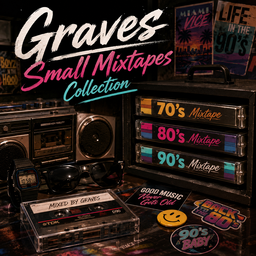
New Music - Graves Small Mixtapes Collection
por 76561199111946290
New Music - Graves Small Mixtapes Collection Smaller Collection dont use at the same time with the 70's to 90's Mixtapes. Workshop ID: 3774675963 Mod ID: NewMusicSmallGravesMixtapes
![[COS] Smasher – Project Zomboid Mod](https://images.steamusercontent.com/ugc/2068882907916798908/FBC049DDED706B813FEB21D5A7CB5BD16204E6E3/)
[COS] Smasher
por 76561199178116693
How Do I Use It? - You can go to the link below to see how to use it. - Link Recommended mode - Fashionoid - Gear Transmog - Hide All Attached Items - Clipping animation Fix How to use COS mode in build 42. - Navigate to the path where the mod is installed. - Create a 42.0 folder. - Create a common folder. - Paste the media folder / mod.info / preview.png into the 42.0 folder. The recipe code writing method has been changed in 42Build. Since COS (Costume) mode has approximately over 200 modes, converting to 42Build's recipe code is an extremely laborious task. In 42Build, you cannot create costumes in (42 build) the crafting tab. There are two methods: Spawn items in cheat mode. Select items in the clothing selection screen when creating a character. Like My Mode? - Join Our Discord If You Want Commission
![Spawn Map-Objects [b41] – Project Zomboid Mod](https://images.steamusercontent.com/ugc/832454553858554811/F0B39E8EB4ABDD783D40A3ED4B801A2C085EFB5F/)
Spawn Map-Objects [b41]
por 76561198072923012
Modder's note: I lack the time to update this mod and I have not done mapping for a long time now, I cannot provide support but you can give a look and take the code from this and adapt it to your need if you can make it useful! Spawn Map-Objects Utility - Enhance maps What is this mod ? While I was working with the map editor, I got frustrated some items could not be placed using it. For instance, barricades and campfires. So we decided with a friend to solve this problem... Once done we decided to make this mod and make it as generic as possible ! This should allow any mapper to use our object-spawning system to make better maps and any modder to upgrade it with ease. I'm a player, what do I need to know or do ? Nothing. This mod should be a dependency mod for any map that uses the Spawn Map-Objects Utility. One you have this mod installed, it should work without needing you to do anything. I'm a mapper, what is this mod doing precisely and how does it works ? Tell me more about it ! This mod will allow you to place items events within the map editor like campfire, tents, wall frames, zombies... Those placeholders will be converted into their working version inside the map once loaded. This means you will be able to place pick-up-able tents, light-able campfires, thumpables wooden and metal structures, break windows, spawn zombies at precise places and even more ! Interesting... So how do I use it ? The installation is very simple, once you have subscribed and download this mod, locate it's installation folder : \Steam_Installation_Folder\steamapps\workshop\content\108600\974718243\mods\SpawnMapObjectsUtil Once inside the mod folder, you should see a Tiles folder. Open it, and then open the 2x folder. You should see all the placeholders images you will need. Copy all these .png files to the 2x folder of your Tilezed. Now, you should be able to use the placeholders via the tilset list. I usually place those on the Furniture layer but it should work on other layers too. If you want to test the features, check out the building we are using for internal testing : https://rbfi.io/dl.php?key=/0Sol/testmap.tbx Once your map is finished and you are ready to publish it to the workshop make sure to add this mod to the dependencies of your map. So that it will be prompted to the players to install it with your map. Great, but before I install it, can you showcase some features ? Of course, here is the list of what you can do with the current version of Spawn Map-Objects Utility. - Place thumpable walls of all possible quality with adjusted durability (Logs, wood, metal). - Place fences adjusted durability too (Sandbags, wood, metal plates or bars). - Place thumpables and working-properly barricades on windows (1,2,3 or four planks, metal sheet, metal bars) - Place upgradable by player walls frames. - Place weapons, literature, trash and food items on the floor. - Place properly-interactable camping materials (tents, campfires and compost) - Zombies-spawner at specific places (Horde inside a tower away from the city or a lone zombie in a specific room...) - Add water collecting barrels already full of water - Place fishing-nets on your lake or generators in a specific room - Break specific windows on the map (with them still barricadable and full of dangerous shards). - Break and remove glass from windows and keep it barricadeable - Place sheetropes on windows. We also plan to add more to this list with upcoming updates, things like traps, sound events and such. What are those red tiles on your placeholders images ? As said earlier, we are planning to add more tiles to the placeholders. You can use the blue ones, but if you try to place a red one, it won't work. The red tiles are the not-implemented-yet features. But we kept it so that it will be easier to update once done. Please do not use the red placeholder tiles. I'm a modder, you said I could expand your utility ? Even more ! We made functions for you to easily add your own placeholders or remove the default placeholders shipped with the mod. Let me explain. Create your custom placeholder Once you have created the png of your custom new placeholder, you will need to code the replacement function in lua. To do it, you can write your lua file using this template : require "WorldManager/SpawnFromPlaceholder"; MyPlaceholder = {}; MyPlaceholder.replace = function(square, tileObject) -- Your code goes here -- indicate that the method has worked properly -- and the placeholder tile can be removed return true; end -- register and identify the placeholder in the system SpawnFromPlaceholder.Add({ name = "MyPlaceholder" }); Here are the explanations : First, you need to implement the method MyPlaceholder.replace(square, tileObject) which will be called for each object found in each square loaded. This method need to return a Boolean (true or false) to indicate if the method has worked. If the method return true the program will automatically delete the tile placeholder else it does nothing. Be careful of the optimisation of this method because it will be called a large number of times and may produce lag. To avoid bad performances, you should not log messages inside the console (do not forget to remove them after use if you do). Also, make sure tile you are currently checking matches your placeholder name unsing the startString method before doing anything complex. The second step is to register your placeholder in the system with the method SpawnFromPlaceholder.Add(placeholderInfoObj). The parameter expect one important property : - name : the name of your object which contains at least the method replace() Remove default placeholders This mod allow you to remove unused shipped placeholders to save resources and gain performance. To remove the placeholders, you can use this snippet : require "WorldManager/SpawnFromPlaceholder"; SpawnFromPlaceholder.Remove({ "WallsPlaceholder", "ZombiePlaceholder", "..." }); The method will remove the placeholders listed in the array when the event OnGameStart is fired. Shipped placeholders list - BarricadePlaceholder - CampingCompostPlaceholder (campfire, tent and compost) - CarpentryAndConstructedPlaceholder (sandbag, barrel, rain collector, lamp) - DroppedFoodItemsPlaceholder - DroppedTrashItemsPlaceholder - DroppedWeaponsItemsPlaceholder - GeneratorPlaceholder - TrapsPlaceholder - WallsPlaceholder - WindowStuffPlaceholder (smash clean window, sheet rope) - ZombiePlaceholder Workshop ID: 974718243 Mod ID: SpawnMapObjectsUtil

Wolf Extraction Quest PTBR
por 76561199131666750
Tradução para PTBR o Mod Wolf Extraction Quest. (Este mod é precisa do mod original para funcionar). Deixando bem claro que não tenho nenhuma intensão de roubar os créditos do criador original é apenas uma forma que encontrei para trazer para nosso idioma ou seja todos os direitos vai para os criador original do mod: @WolfShine Workshop ID: 2988518642 Mod ID: WolfExtractionQuestPTBR
![Salvage Works [B42 SP/MP] – Project Zomboid Mod](https://images.steamusercontent.com/ugc/14783306805373352350/93D8C27F22EEB46A01F0236DF0E2A2CA9E0EDB14/)
Salvage Works [B42 SP/MP]
por 76561198029886463
⚒️ Nothing should be useless. Transform broken, forgotten, or useless items into new resources. 100 recipes naturally complement Project Zomboid with a complete system of salvaging, recycling, forging, repairing, and transforming, prioritizing existing vanilla mechanics rather than creating unnecessary parallel recipes. 🔎 Simply search for SNS in the crafting menu. ━━━━━━━━━━━━━━━━━━━━━━━━━━ ♻️ SALVAGE • RECYCLE • REUSE ━━━━━━━━━━━━━━━━━━━━━━━━━━ SNS recycling makes use of the properties and tags already present in the game whenever possible: 🔩 Metal ⚙️ Iron 🔧 Steel 🪵 Wood Recover materials from many compatible items and put them back into your crafting chain. Recycling yield may vary depending on the material, the item, its condition, and the multiplier defined in the Sandbox options. ━━━━━━━━━━━━━━━━━━━━━━━━━━ 🔥 FORGING & TRANSFORMATION ━━━━━━━━━━━━━━━━━━━━━━━━━━ Give recovered materials new value through the Primitive Forge, Forge, and Blacksmithing systems. Craft and transform, among other things: 🔩 Screws 🔧 Bars and pipes 📦 Boxes of nails and screws 🔥 Welding rods 🔒 Padlocks 🔐 Combination padlocks 🛠️ Crowbar 🔨 Sledgehammer Recovered iron, steel, and metal resources can thus truly return to your crafting chain. ━━━━━━━━━━━━━━━━━━━━━━━━━━ 🧰 REPAIR & RESTORATION ━━━━━━━━━━━━━━━━━━━━━━━━━━ You no longer necessarily have to throw away your best equipment when it is almost destroyed. ⚔️ Katana 🔪 Machete 🪓 Axe 🪓 Hand Axe 🪓 Wood Axe ⛏️ Pickaxe 🛠️ Crowbar 🔨 Sledgehammer Repair or restore your weapons and tools in exchange for materials and, when the option is enabled, the required skills. ━━━━━━━━━━━━━━━━━━━━━━━━━━ 🧵 MORE RESOURCES, MORE POSSIBILITIES ━━━━━━━━━━━━━━━━━━━━━━━━━━ 👕 Recover fabric, denim, and leather from many compatible items 📻 Recover and dismantle certain electronic components 🔌 Transform electronic components, electrical wiring, and metal wire 🪟 Transform molten glass and craft new jars 🛍️ Reuse garbage bags, tarps, fabric, and leather 🧱 Transform clay, gravel, sand, and plaster 🥫 Open canned food with different suitable tools 🎨 Craft and mix paints and colored light bulbs 🪡 Use different knives, scissors, needles, glues, hammers, and compatible tools ━━━━━━━━━━━━━━━━━━━━━━━━━━ 🧩 NATIVE COMPATIBILITY ━━━━━━━━━━━━━━━━━━━━━━━━━━ The system makes use of existing vanilla tags whenever possible without modifying game items. SNS does not replace or redefine any vanilla item. For metal, iron, steel, and wood, items from other mods can also be automatically recognized when they use the same standards and tags as Project Zomboid. Certain specific items are also explicitly recognized when necessary. No unreliable detection based solely on item names. ━━━━━━━━━━━━━━━━━━━━━━━━━━ ⚙️ SANDBOX ━━━━━━━━━━━━━━━━━━━━━━━━━━ ♻️ Recycling Yield Adjust the amount of materials recovered during recycling. 🎓 Skill Requirements Choose whether skill levels are required to use the affected recipes. When the option is enabled, the required skills are displayed and enforced normally. When the option is disabled, the affected recipes can be used without a minimum skill level. ⚠️ After changing the “Skill Requirements” option in the Sandbox settings, restart the game or server for the change to take effect. ━━━━━━━━━━━━━━━━━━━━━━━━━━ 🌍 LANGUAGES ━━━━━━━━━━━━━━━━━━━━━━━━━━ FR • EN • DE • ES • IT • PT • RU • JP • CH ━━━━━━━━━━━━━━━━━━━━━━━━━━ 🔒 RIGHTS & DISTRIBUTION ━━━━━━━━━━━━━━━━━━━━━━━━━━ 🏴 The Dead Walk the Earth - 51.38.43.107:16261 🏴 👉 Available as an open mod. ❌ Any reproduction, modification, reupload or redistribution without permission is strictly prohibited. For any request, please contact me. ⬇️ Discord Contact ━━━━━━━━━━━━━━━━━━━━━━━━━━ 💖 SUPPORT ━━━━━━━━━━━━━━━━━━━━━━━━━━ Thanks to everyone who supports Scrap & Survival ❤️ If you enjoy the mod, leave a thumbs up 👍 And if you'd like, you can also buy me a coffee ☕ Workshop ID : 3732507384 Mod ID : ScrapAndSurvival
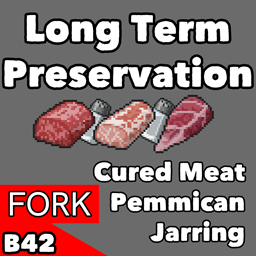
Long Term Preservation - Fork
por 76561197974851044
This is a fork of the original Long Term Preservation mod by Skittles. It adds all the preservation methods of the original but fixes up the bugs introduced by the recent update. At the moment large chunks of meat will be directly salted/cured but will lose about 20% of their calories while retaining their original nutritional count. I've also added compatibility with BLUmountain's Big Size Spice: Bigger Salt & Pepper mod so that larger salt packs can be used. Workshop ID: 3593776737 Mod ID: delayed_fork_LongTermPreservation

B42 mod manager + mod tag
por 76561198403722981
B42 mod manager + mod tag. Double-click the modto modify the mod‘s tag name, click Sort by Name to sort by mod's tag name. Use this mod to organize all your mods into categories! Now tags are added for 500+ commonly used mods. 双击模组修改模组标签名,点击按照名称排序后根据模组标签进行排序。 使用此模组对你的所有模组进行分类整理。 现已为500+常用mod添加标签。 Workshop ID: 3593098361 Mod ID: B42ModManagerTag
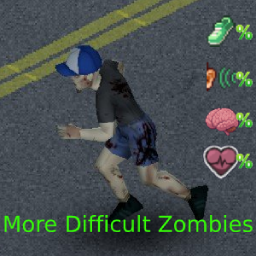
More Difficult Zombies (B41/B42)
por 76561198069682455
Customizable Zombies Core Mod This Mod Requires More Difficult Zones This mod will allow users to define the zombie sprinter %, hearing %, cognition %, and health value of zombies based on zone area. This mod requires More Difficult Zones and is integrated with the core mod. This mod is compatible with existing saves and has been tested in both singleplayer and multiplayer. This mod is based Belette's Random Zombies Mod and is modified to apply zombie settings based on zones. This mod is published with permission from Belette and the original idea, methods, and research through the java documentation was done by Belette. This mod is originally created for use on the Sunday Drivers server. Come experience one of the best PvE Zomboid servers out there! https://discord.gg/sunday-drivers Also shout out to the lovely folks at Project Apocalypse! Hop on to PARP for all of your Zomboid Role Playing needs! https://discord.gg/projectapocalypse If you have any questions you can find me on the Sunday Drivers discord! Workshop ID: 3443422680 Mod ID: MoreDifficultZombies
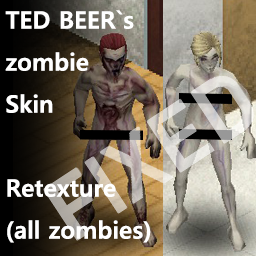
TED BEER's Zombie Skin Retexture Fix
por 76561198172090795
This mod is a fix for TED BEER's Zombie Skin Retexture mod! No more transparent holes in the skins All credit for the original mod goes to TED BEER! Workshop ID: 3035713034 Mod ID: TED BEER`s Zombie Skin Retexture FIX
![Rick's MLC GunLight Patch [B42] – Project Zomboid Mod](https://images.steamusercontent.com/ugc/17718281184170120189/24B1358EA010A039942EB89CC5A10A718091C540/)
Rick's MLC GunLight Patch [B42]
por 76561197980074567
Patch for the inserting and removing of batteries from the vanilla GunLight. Languages supported:English and (possibly badly translated): Spanish, Korean, Portuguese Workshop ID: 3595628283 Mod ID: RicksMLC_GunLightPatch
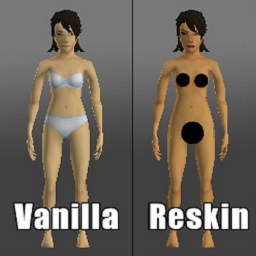
New Realistic Retexture Female Player Skins
por 76561198345111326
This modification removes the underwear from the female character. Does this work with multiplayer? this is how the modification works with multiplayer mode Why I created this? I created this modification for the needs of a friend who creates various fiction stories. ATTENTION! I am not the author of the character textures! All textures used in the modification come from older modifications that are no longer supported! if the textures used in the modification belong to you, please contact me to solve any problem Workshop ID: 3136965178 Mod ID: NewRealisticFemalePlayerSkinsRetexture
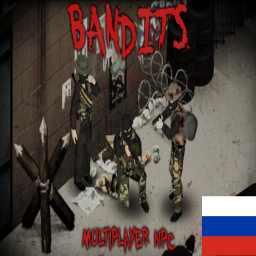
Bandits RUS
por 76561198755244465
Русификатор мода Bandits NPC. Для работы нужен оригинальный мод Workshop ID: 3737413419 Mod ID: BanditsRUS
Toggle Mode hotkey fixes
por 76561198006016899
Various fixes to the 'Toggle Mode' hotkey. No mouse needed anymore! -Press 'Toggle Mode' hotkey to enter 'pickup' mode -Press the 'Toggle Mode' hotkey again to cycle through the various modes -Holding Left Shift while pressing the 'Toggle Mode' hotkey cycles in reverse -Hold the 'Toggle Mode' hotkey to exit all modes Workshop ID: 3624538606 Mod ID: toggle_mode_fixes
![Vertical Ladders - [SP/MP B42] – Project Zomboid Mod](https://images.steamusercontent.com/ugc/10424871631181213619/5914C60134B4FB36C47646C1B40E08C656239339/)
Vertical Ladders - [SP/MP B42]
por 76561198290754847
Vertical Ladders - Adds functional vertical wall ladders climbing to Project Zomboid! Features: - Right-click any vertical wall ladder to climb up to roofs or climb down to the ground; - Safe roof landing algorithm to prevent falling off edges; - Zero fall damage & smooth climbing animations; - Compatible with Build 42; - Works in Singleplayer and Multiplayer. If you're enjoying it, please leave a like! If you run into any issues, record a video or send a screenshot, and I'll fix it as soon as possible. Never forget to make backup your game. Enjoy <3 ====================================================== Workshop ID: 3783431286 Mod ID: VerticalLadders
Metal Music V2 for Lifestyles mod
por 76561198042086499
Plays the whole song not just the instrument like the original mod. Slightly more heavier songs in this list. Ressurect with a Vengeance - Hatesphere A Great Mistake - Black Crown Initiate Hologram - Abstracts Morphogenesis - Scar Symmetry Raise Your Horns - Amon Amarth Stranded - Gojira The Unknowing - Omnium Gatherum Untied - Chiefland Hail The Apocalypse - Avatar Workshop ID: 3111479374 Mod ID: Metal music v2 for lifestyles mod
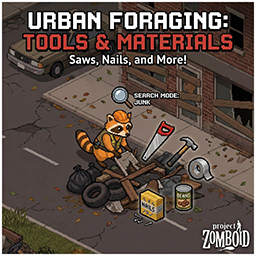
Urban Foraging
por 76561198897560566
In a zombie apocalypse, a simple box of nails or a roll of duct tape can save your life. If you want tools and materials, search the streets! What does this mod do? It adds a wide variety of essential survival items to the "Junk" category when foraging in Town Zones and Trailer Parks. What can you find? Survival Essentials: Matches, Lighters, Canned Food. Construction: Nails, Screws, Planks, Sheet Metal. Fixing & Crafting: Duct Tape, Glue, Wood Glue. Tools: Hammers, Saws, Wrenches, Crowbars. The Jackpot: A very slim chance to find a Sledgehammer at high levels. Balance: Loot is gated by your Foraging skill level. Don't expect to find a pristine Crowbar on day one. Keep your eyes peeled, survivor! FAQ: Works on existing saves? YES. Multiplayer compatible? YES. Works with other mods? YES. Game Version: 41.78+ Like the mod? Please click the Thumbs Up button! It helps others find it. Workshop ID: 3639849578 Mod ID: Urban Foraging
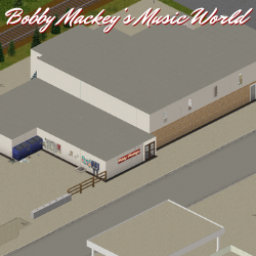
Bobby Mackeys Music World
por 76561198164688868
Bobby Mackey's Music World- The worlds most Haunted Nightclub...now in Knox County!! Tucked off the beaten track, the rundown bar holds many secrets but the ghost of its past are not the only thing you'll have to worry about if you swing by this famous watering hole looking for a drink. --- This map uses cells 39,37 and is not compatible with St. Bernard Hill. Created as an entry for the January 2024 Map Jam competition! Uses custom tiles from the mapping community, including custom tiles of my own! Big thanks to everyone who helped me troubleshoot issues and all the amazing tile makers for their fantastic tiles used in this map! Workshop ID: 3236831200 Mod ID: BobbyMackeys Map Folder: Bobby Mackeys
ATA_mustang_KS
por 76561199479036264
Automotive Tuning Atelier on iBrRus - Fjord Mustard Mode with added vehicle color. This is a skin for the KS server's factional use. #0 Finally Added Mustang Vehicle Skin from KS Server! This mod was built with permission from the original author iBrRus, and all rights to this mod are in iBrRus. https://postimg.cc/q6w0k6Vh Modified the MOD with the help of iBrRus. You need the original MOD and follow the update of the original mode, so you can use it with confidence. Mode permissions according to TIS policy: Request permissions Redistributing this mode without the explicit permission of the original author is prohibited in any case. This includes uploading this mod to a Steam workshop or other site, deploying it as part of another mod or mod pack, and deploying a modified version. This product can only be posted to Steam through an account named iBrRus. ? ? 2022-2023 iBrRus ORIGINAL MOD : https://steamcommunity.com/sharedfiles/filedetails/?id=2681635926&searchtext=2681635926 version : 5.0 Workshop ID: 2989144823 Mod ID: ATA_mustang_KS
Project Zomboid Guides
Instalar mods de Project Zomboid - guía del Workshop
Instala mods de Project Zomboid de forma limpia mediante Steam Workshop: introducir IDs, comprobar el orden, reiniciar el servidor y solucionar errores típicos.
Alquilar un servidor de Project Zomboid – guía multijugador
Configura un servidor de Project Zomboid: RAM, ajustes sandbox, mods de Workshop, permisos de admin y errores típicos bien revisados.
Servidor Project Zomboid con soporte de mods
Instala mods compatibles y admitidos desde el panel del servidor.
Alquilar un servidor Project Zomboid