Conan Exiles Mods & Plugins
![Lands of Tel'Navar [Map Extension 1.6.3][Discontinued]](https://images.steamusercontent.com/ugc/2296339440162284361/1226CFEA8DB5BF1EE64E046E468AD1E2785E1B59/)
Lands of Tel'Navar [Map Extension 1.6.3][Discontinued]
par 76561198004635495
This mod was originally conceived and implemented for the server "Vergessene Tiefen". Since this server unfortunately no longer exists, I have decided to remove the specific changes regarding the UI, loading screens and other references to the server and provide only as a map extension. (I don't plan to do any major work on the mod in the near future, but I will continue to keep it up to date so that it can be used beyond a server's lifetime.) You can teleport to the Pit of Souls and Soul Collector under the Castle Ruins of the Capital City. [h1]BE AWARE: There is no gurantee from my side that the areas which are not finished or on the player map will NOT be changed. There is always a chance that I change the territory that is not marked on the visible map. [/h1] If you want to built there its on your own risk! Please visit my BC Discord for questions, but Steam can be used for this as well. https://discord.gg/pQwNhp3 Contents - Faces - Capital city for role play - Many POIs and hidden places - Other places that can only be reached by teleport - Cursed Wall has been removed Download the mod at the end of your modlist to benefit from the removal of the Cursed Wall and full mod functionality.
![[Legacy] SH - Armory (1.9.9)](https://images.steamusercontent.com/ugc/1030707589162912853/E03054E1E9086197648BAFADADD037D512FB18A9/)
[Legacy] SH - Armory (1.9.9)
par 76561197977026223
[b][Legacy][/b] [u]This mod works only with the legacy version of the game![/u] Weapons and armor mod for the RP server "Schattenhain" (pure german speaking server) This mod aims to provide more realistic weapons. The focus is primarily on ancient weapons. Huge iron blocks with a handle will not be found in this mod. Item IDs can be looked up under discussions/Item list. Mod ID: 2095390749 Discord: https://discord.gg/vdPpvBU A source reference to the artists of the assets can be found under "Discussions". Legal: This mod contains assets (art, music, code, items, systems and/or designs) that are the intellectual property of Funcom Oslo AS or their licensors All other assets (art, music, code, items, systems and/or designs) contained within this mod are the intellectual property of Tyrvalkin and/or licensed to.
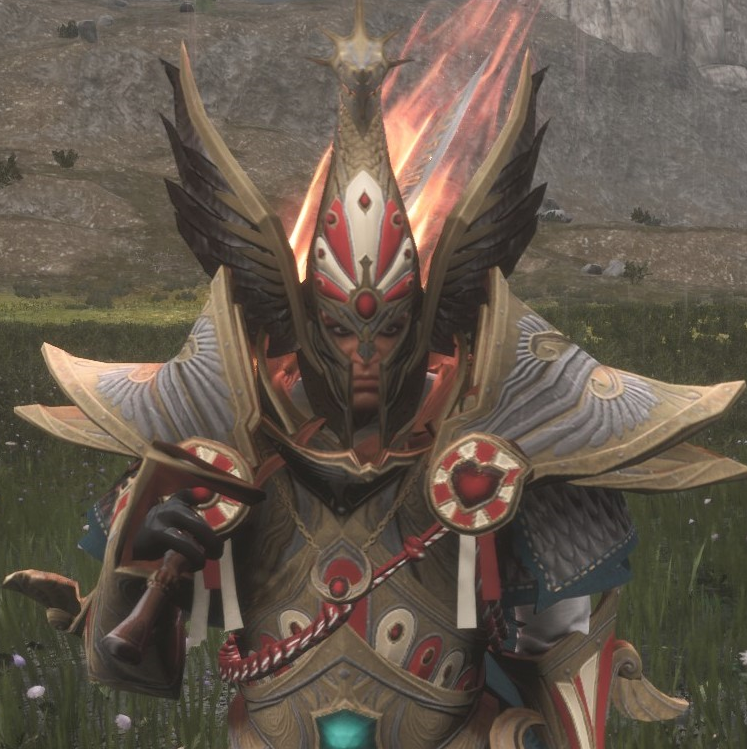
Warhammer Legendary Arsenal
par 76561198009163289
This brings in a variety of armor sets and weapons all from Games Workshop Warhammer, As this is a new project there is still a lot of work to be done, as of right now I am working on implementing 5-6 total races, at least to start, which is limited to how long each race will take as well as there is a size limit to mods limiting overly massive mods. I would like to include every race in one way or another but time will tell. Balancing right now it a bit eyeballed as I am currently working on the official VAM servers for proper testing as balance will be based around that progression. I have yet to officially decide what factions will all be in, if I see a lot of praise for a particular faction then I'll probably consider it more. Currently we are in the first phase of production with the mod which prioritizes on bringing in a solid foundation of armor and weapons for the various races and implementing a proper progression system and balance based around the VAM mod. Keep in mind that I will likely be adding in more armor and weapons as time goes on. In terms of long term development I plan to add various types of PvE content in as well as create a magic system. As a side note to the magic I will be avoiding magic like armor until I actually start working on magic as they don't really have a place right now in terms of stats. This all will just take time. Some important information until I get a proper guide made, admins need to spawn in faction token (Other tab in cheat menu) for the various races as well as add some items required for crafting, enchanted gems and warpstone, Only one faction may be chosen. Currently this mod does not affect levels, this is because I will be importing the leveling system from the VAM mod but it is currently being reworked at the moment, Sarp will send me the files when he is done. Once that is complete this will be a completey standalone mod though for the time being still highly recomended to play with mods like VAM, AOC, EEWA and custom dungeons/raids via PIPPI until PvE content is added. Only the sets affected by leveling have been rebalanced all the higher level stuff has yet to be reworked. Requires Admin Spawn Mod Guide: (IN PROGRESS) Current Races Empire Chaos High Elf Dark Elf Kislev Undecided

Reduce Rain
par 76561197963820270
In this mod the rain in the north and in the jungle is reduced. In the north there is a 10% chance of rain, 5% of which is thunderstorm and 5% is rain only. In the jungle the probability is 20%. There the probability is 13% rain and 7% thunderstorm. Standard in the north is 50% and in the jungle 70% for rain. The next thing to do is to make it adjustable.

Grim Map
par 76561198053783528
A Map extending the Exiled Lands with an expansion to the North East (as seen in the pictures). KURAK DUNGEON EVENT - The teleporter doesnt work on maps that modify the Exiled Lands. LIU FEI has been added IMPORTANT: The Grim Map source files are now available on the Discord. Adds new biomes such as Redwoods, new Snow area, Islands, and more. Adds new Caves, a new dungeon and a built in Underdark like area The Sorcery cave has been given a locked door for those who wish to restrict access. The admin spawn item "Kuraks key" can be spawned in to open this. Some base game areas have been changed, such as a new Steppe in the west and making the southern desert most habitable with resources albiet dangerous to explore. All bugs reported directly to me on Discord. https://discord.gg/e6TbuwGdSW Admin Skyboxes: 486494 23613 -3520 485706 60024 -3520 Coastal area - TeleportPlayer 368679 261682 -19922 Flat grassy area - TeleportPlayer 137964 -273614 -5069 Wylds Admin area - TeleportPlayer 234765 -199927 44986 If you wish to edit the ingame map to suit your needs, you can download a copy for your mod below: https://drive.google.com/file/d/1lipES5M8bRx3s3wZnZfcCiWyeHmmvtaT/view?usp=drivesdk https://discord.gg/e6TbuwGdSW Compatibility with other Map related mods is not tested, you will need to test this yourself Mod ID: 2872104059 This mod contains assets (art, music, code, items, systems and/or designs that are the intellectual property of Funcom Oslo AS or their licensors.
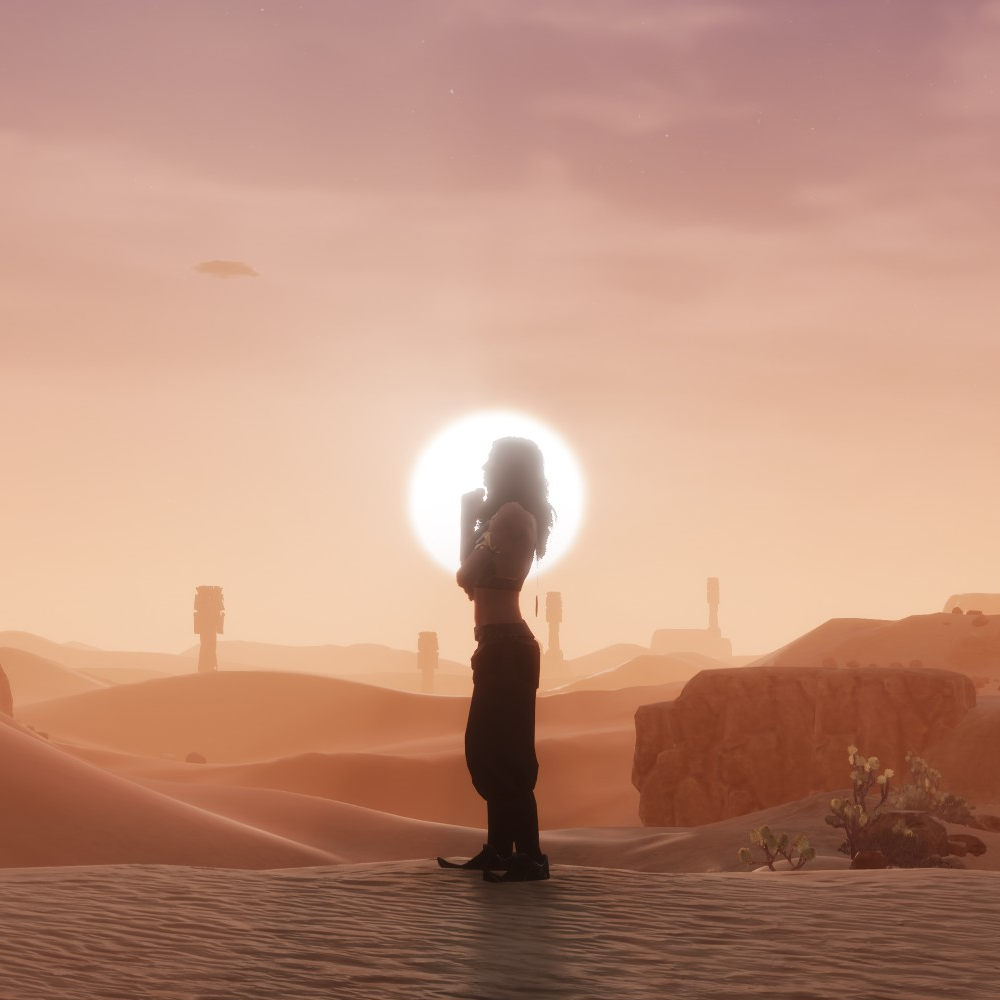
Heritage ENHANCED
par 76561198101478957
Hello everyone, With this mod, I have [b]adjusted the appearances of most human characters in the game[/b], doing so in the following ways: * Redesigned the randomized customization values for both sexes of all major races in the game (used mostly by regular NPCs). * Removed randomization from existing 'special' NPC appearance presets, redesigning some as necessary. * Created distinct, static appearance presets for [b]162[/b] select named NPCs, spread out across every race and most factions. * Adjusted nearly all of the character creation race presets. [h3]The Goal[/h3] My goal for this project is to improve the aesthetic quality of NPCs and thralls generally, contrasting with that of the base game, which creates some rather... interesting looks. I took inspiration from the descriptions of the various races in Robert E. Howard's stories (as well as their real-world analogues) to try and be as faithful to the source material as I could. However, as the customization in CE is rather limited, the NPCs may at times be a bit 'same-y', but I thought this preferable to the alternative. I have listed out some of the changes made, characters affected, and other statistics in the [url=https://steamcommunity.com/sharedfiles/filedetails/?id=3423204951]Heritage of the Hyborian Age[/url] documentation guide. (Needs to be revised for the latest update.) Some other changes include: * The Zamorian and Zingaran races were completely rebuilt, contrasting greatly with the Darfari / Kushites they previously resembled. * Hyperborean and Lemurian race templates have been created for use with some NPCs. * Blonde hair may now appear on Nordheimers across the Exiled Lands and the among the Heirs of the North, reflecting the heritage of the Aesir. However, the Aesir and Vanir Loysing factions of Siptah will be wholly blonde or red-haired, respectively. * Female bust sizes have been balanced so that they no longer fall outside the slider maximum (they'll still be decently-endowed on average, this is Conan after all). * Eye and lip makeup selections have been expanded for the ladies of most races, and nearly all male characters had their guyliner taken away. [spoiler]NEVER PART A STYGIAN FROM HIS EYELINER.[/spoiler] * Males are on average taller than their female counterparts within-race, and certain races are on average taller or shorter than others. * Conan's height has been increased. [h3]Compatibility[/h3] The mod's functions are performed via conventional table mergers and control table mergers, so it should be compatible with a wide range of mods and resistant to future updates. However, mods that assign new race templates to NPCs, or those which affect the weighting of male vs female spawns, are likely to cause issues with this. If issues do occur, I'd recommend placing this mod lower in the load order. [b]ENHANCED:[/b] Since this is a direct port of the original mod with minimal adjustments so far, there may be oddities here and there with the new hair / skin colors. A lot of the intermediate skin colors are now much lighter, so races like Zamorians and Stygians will be lighter than intended as a result, for example. The new grey hair color in the middle of the browns may also be a problem, but I've swapped the color for most of the uniques which previously used it for the time being. [b]The mod can be added / removed mid-playthrough without issue.[/b] [h3]Question & Answer[/h3] * [i][b]Will this mod affect my existing thralls?[/b][/i] Your existing thralls (either placed, in inventory, or on the wheel) will be unaffected. Only newly-spawned NPCs will use these new values. * [i][b]What happens if I disable / remove the mod?[/b][/i] Newly-spawned NPCs will return to using the base game presets, however any thralls you acquired while using the mod will retain their looks. * [i][b]Do you plan on creating distinct appearances for every named thrall?[/b][/i] There's quite a lot of named thralls (and limited customization options), so that won't be feasible, however I may add more over time. Suggestions are welcome, though I won't guarantee acting on them. * [i][b]Would you consider incorporating customization options added by other mods?[/b][/i] Not in this mod, no, as I want it to remain standalone. However, I'd be willing to create separate plug-ins for, as I have for expanding hair color selections with [url=https://steamcommunity.com/sharedfiles/filedetails/?id=3543675504] Heritage True Hair Addon[/url] for use with either True (Hair) Colors mods. * [i][b]Would you add beards for random NPCs?[/b][/i] Beards have been added only to randomized Shemites so far. Hair color and facial hair color are selected independently, so implementing beards for races with more than one color is a problem. * [i][b]Will you warp the mod to satisfy my fetishes?[/b][/i] No. [h3]Conclusion[/h3] Feedback, suggestions, criticism, veiled threats, and other assorted commentary are welcome. I hope you all enjoy, Dread Swoop Mod ID: 3726392245 [b]This version of the mod is for Conan Exiles Enhanced. If you are looking for the Legacy version, you can find it [url=https://steamcommunity.com/sharedfiles/filedetails/?id=3423068671]here[/url].[/b] Images mostly taken at 4K, 'High' Settings. Copious use of sunshine. Some skin colors in sunshine may appear lighter than normal.
PackRat Helper
par 76561198043846305
The main function of this mod is move any stackables in player's inventory to nearby chests, crafting stations and any other containers with a hotkey ([b]Shift+L[/b] by default). All you need to do is to put some items in containers you want them to be in. Mod Steam Id [code]2596031352[/code] [h2]Default hotkeys summary:[/h2] [h3]Shift+L[/h3] move items out of backpack to containers; if mouse hovered over recipe/damaged item (tooltip shown) - pull ingredients into backpack/crafting station; if in build mode - pull ingrediens required to build one selected piece into backpack. [h3]Ctrl+L[/h3] if mouse hovered over recipe (tooltip shown) - amount dialog appears, on "Ok" - pull ingredients for that many crafts into backpack/crafting station; if in build mode - pull ingrediens required to build entered amount of selected piece into backpack. [h3]Shift+=[/h3] open "Retrieve dialog" - pull selected ingredients into backpack/crafting station [h2]Detailed description:[/h2] When you press hotkey, any item which is in player's inventory will be moved into nearby container/station which has the same item. If several containers have such item - first found will be used (usually it will be the nearest to player). If there is no space in container- next one will be used and so on. If there is no container with such item - item will be left in player's inventory. By default, mod will move [b]ANY[/b] stackable items from player's inventory (including ammo, food and medicine), but you can create a "Keep List" of items you wish to keep in you inventory. If such list exists an you have less item count, than specified in list, then mod wil try to resupply player's inventory to specified amount. Another function - gather ingredients, needed for crafting a recipe/repairing damaged item/build a piece, from nearby containers. All you need to do is to hover over recipe/item and, while tooltip is shown, press hotkey - all needed ingredients will be put in player's inventory, if you hovered over recipe in "Character Inventory" screen, or directly in crafting station inventory. Ingridients for repairing a damaged item will be put in inventory/container where item currently is. If item is equipped - ingridients will be put in owners backpack. If you want to get ingrediens for a build item (wall, foundation, e.t.c.) you need to be in building mode and item you want to build must be selected for placing. [b]Shift+L[/b] hotkey will move ingredients for one craft, [b]Ctrl+L[/b] will let you choose for how many crafts you request ingredients. Holding shift, while pressing Ok in amount dialog, will retrieve items, ignoring existing amounts in destination container. You can pull any items from nearby containers by calling "Retrieve dialog" ([b]Shift+=[/b], by default). Items will be put into player's backpack or to container/workstation, player currently interacting with. [b]NOTE[/b] - amount entered is [b]NOT[/b] retrieve amount, but a final amount in destination conatiner/inventory. For example, if there were 10 iron bars in player's inventory and you entered 100 - you will end up with 100 iron bars in player's inventory, not 110. If you wish to retrieve enered amount, regardless how many such items in destination container - press Shift while clicking on 'Get'. To display mod's settings menu, type in console [code]DataCmd PRMenu[/code] If you have [url=https://steamcommunity.com/sharedfiles/filedetails/?id=1823412793]ModControlPanel[/url] installed, mod's settings menu will be available under "PackRat" section. To add an item to "Keep" list, just drag it (or shift+click/doubleclick on it) from "Available items" section to "Keep/Ressuply" section. To remove item from "Keep" list - click on [x] buton on item's icon in "Keep/Resupply" list. Don't forget to click "Save" button. Resupply and ingredients collect functions will leave at least one unit of resource in container, for further autosorting operations. If you want a container/workstation be ignored when unloading your backpack - add *noput* marker to the name of container/workstation. If you don't want items to be pulled from a container/workstation - add *nopull* marker to the name. If you add both - container/workstation will be completely ignored. Note asteriscs in markers. All hotkeys are configurable via Settings menu. If you like my mods and wish to support me, use this [code][url=https://www.paypal.com/donate/?token=lI2znDp3SetkJuXd8ezf_ikdAloxNMOYTaabLOoLNh4dEN47tMraTMcYyfWR6iQD5FZkdth3FwjlYeJz&locale.x=US][img]https://i.imgur.com/sYr61dY.gif[/img][/url][/code] No asset was changed. Should be compatible with anything. This mod was inspired by [url=https://www.nexusmods.com/conanexiles/mods/53?tab=description]Put Them Away[/url] mod. But since it was not updated long ago and author could not be contacted, I desided to create my own with extended features I wanted. Check my other mods: [url=https://steamcommunity.com/sharedfiles/filedetails/?id=2589566272]Rhino WarMount[/url] [url=https://steamcommunity.com/sharedfiles/filedetails/?id=2591174199]Spare Named[/url] [url=https://steamcommunity.com/sharedfiles/filedetails/?id=2598028953]Backpack Fridge[/url] [url=https://steamcommunity.com/sharedfiles/filedetails/?id=2604131595]Pull To Surface[/url] [url=https://steamcommunity.com/sharedfiles/filedetails/?id=2606315241]Catch and Carry[/url]

Pause on Escape
par 76561198037934434
Pause the game while the "Escape" menu is up. For single player only.
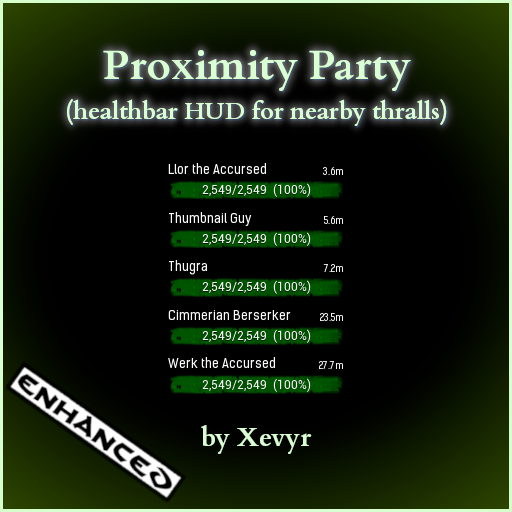
Proximity Party (by Xevyr) - v5.0.7
par 76561198373515276
Dynamic proximiy based "party" interface to show healthbars of nearby thralls [img]https://img.xevyr.eu/images/likeandfav.gif[/img] [h1]Features:[/h1] [list] [*] Displays a healthbar for nearby guild members / thralls [*] Prioritizes players over thralls [*] To open settings use the console command: [b]dc proxyparty[/b] [*] Settings: Enable / Disable mod, adjustable UI scale, detection range and maximum number of displayed healthbars (1-15) [*] [b]Hold F1 to use mouse and move window anywhere on screen[/b] [/list] [h1]Workshop ID[/h1] [code] 3718878457 [/code] [h1]Compatibility:[/h1] [quote] Compatible with everything. The only potential issue would be a hotkey conflict in case you have the F1 key bound to something else or used by another mod (it's still compatible with CE Helper's shift+F1) [/quote] [h1]Discord:[/h1] [quote] Join discord for troubleshooting help, guides, news etc. [url=https://discord.gg/KgpWNN7js5] [img]https://img.xevyr.eu/images/discord.png[/img] [/url] [/quote] [h1]Tips & Donations:[/h1] [quote] Should you wish to support me with a one-time tip, [url=https://buy.stripe.com/4gw6r2dmj62Y8mY000]click here[/url] Otherwise consider supporting me via Patreon [url=https://www.patreon.com/Xevyr][img]https://img.xevyr.eu/images/patreon.png[/img] [/url] [/quote] [h1]Some of my other mods:[/h1] [list] [*] [b]Simple Minimap[/b] - Standalone lightweight minimap mod that shows POI markers and allows you to add additional custom markers beyond the vanilla limit [*] [b]The Purge Mod[/b] - Experience the old-style purge in this custom remake. Fully customize attacking forces etc. for your server [*] [b]Twin-Bar[/b] - Doubles the capacity of your shortcut bar by allowing you to place 2 items in each and individually swap between them with hotkeys [*] [b]The Damage Meter[/b] - Measure yours and your followers / other players damage done / taken and dps [*] [b]Music Barrel[/b] - A fully featured jukebox that can play music for your tavern, with several additional music packs and ambient noises to create that real tavern atmosphere. [*] [b]Follower Remote[/b] - This mod allows you to remotely change the combat behavior of your thralls by holding hotkeys as well as force them to equip a truncheon [*] [b]Proximity Party[/b] - Displays a list of healthbars on your HUD for nearby followers / clan members so you always know when they're low on health. [*] [h3][b][url=https://steamcommunity.com/id/Xevyr/myworkshopfiles?browsefilter=myfiles&sortmethod=creationorder§ion=items&appid=440900&requiredtags%5B%5D=Enhanced]Click to check out all of my Conan Exiles Enhanced mods[/url][/b][/h3] [/list] [h1]Update Policy[/h1] [quote] [list] [*] My mods are built to remain compatible and almost never need updates when the game itself is updated. "Outdated" warnings from hosts (like gportal) can be ignored - they only compare version numbers between the game and the devkit, which don?t matter unless basegame files are altered. [*] Updates happen at my discretion. If I need to update a mod, I will. Please avoid telling me when I should or should not update my mods. If that is a problem, you are free not to use the mod. [*] Mod mismatch errors are not caused by the mods themselves. It?s simply the game telling you that the mod version you have is not the same as the one on the server. For more info, or to get the previous version of the mod, visit the Discord. [/list] [/quote]

Exiled Aesthetics
par 76561198119501775
[h1]About[/h1] Exiled Aesthetics is a mod which seeks to enhance the Conan Exiles setting by adding new customisation options via Tot ! Custom, including scars, warpaint, makeup, and accessories. I strive to ensure that all additions are immersive and fit the setting of the game. [hr][/hr] [h1]Features[/h1] - Generic and custom scar sets - Makeup - Warpaint - Wrinkles - Hairstyles - Accessories N.B.: Any scars with non-generic names (e.g., "Sabah") are created for specifically for characters and are subject to change. If you want a permanent version of a personal scar made, please head over to the Discord and make a suggestion! Leave a like or a comment if you're enjoying the mod. Means a lot! [hr][/hr] [h1]Requirements[/h1] [b]Exiled Aesthetics depends on Tot ! Custom and Tot ! Sudo. It will crash your game without them. [/b] The load order should be as follows: Exiled Armoury Tot ! Sudo Tot ! Custom You can put EA anywhere in your modlist as long as it is above Sudo and Custom in the load order. [hr][/hr] [h1]Join The Discord[/h1] https://discord.gg/mT9wKvexSu Submit screenshots to be featured on the mod page, make requests, and report bugs. [hr][/hr] [h1]Contributors[/h1][list][*]Eldubya [*] Io_Espa [*] Ragazzo (475031/476303 - Louhi Devotee warpaint) [*]Fhearlander (475032/476031 - Tears of Anguish warpaint) [*] Dea (Eyelashes A and B accessories) [/list] [hr][h1]Buy Me A Coffee (If You Want)[/h1][/hr]https://ko-fi.com/eldubya I want more tools to make more stuff for you! [hr][/hr] [h1]Visit My Workshop[/h1] https://steamcommunity.com/profiles/76561198119501775/myworkshopfiles/?appid=440900 [h3]Mod Data Table ID Range:[/h3] 475000 - 476999 [h3]Mod ID:[/h3] 3721485540
Emotes for Thralls v2.7.6
par 76561197971635581
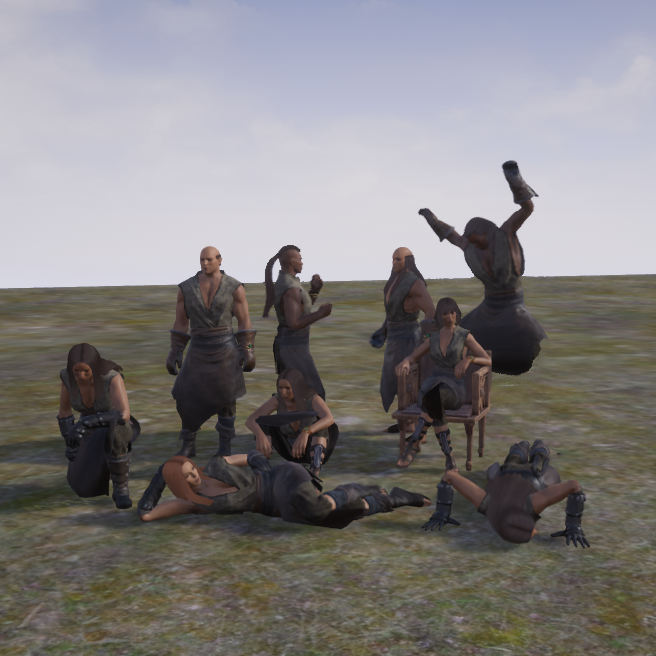
Emotes for Crafter and Placeable Thralls v2.7.6 ID: 2018425805 New: Thralls will now use potions and wraps to heal themselves. There is a 30 second cool down between uses. They also receive a bigger boost from healing arrows. Also New: Placeable Thralls like Fighter or Dancers can now be assigned to walking routes. Put out the way points on the ground and hand the thralls the according Route Map Item. There is an exclusivity sphere of 24 foundations of distance between checkpoint items of the same kind regardless of the owner. Emote Routes work similar, however, you can put an emote token into a checkpoint's inventory, which the thrall will perform upon reaching said checkpoint. If you assign more than one it will just remember the last token added. If you add Pause Tokens, they will add to the Pause Items a thrall carries. It will also force a stop if thralls carry the Pause Diable Token. If you don't add tokens they work just like other routes. Placing Checkpoints to close to other thralls affects pathfinding negatively for the patroller, so keep them at 1-2 foundations distance. Checkpoints turn invisible after 10 seconds and can be made visible using the burning broomstick, a placeable torch [h1]Note: Due to Emote Changes by funcom: The official wheel emote commands will override token commands from this mod. You need to clear the emote from the wheel first in order to have your thralls respond to tokens again if you used the wheel emotes prior.[/h1] Emotes for Pets (Unfortunately not all pets, cos the game only has emotes for some of them) This mod adds a crafting station that will reward recipes to create "loiter places" for crafter thralls. Make your house look more alive with conversing thralls, sitting, sleeping, dancing or working out. Addtionally this station creates "Placeable Thrall" or "Pet" items which will make placable thralls or placed pets perform emotes. Crafter Emotes are based on the Artisan table and thus shows the recipes. Any thrall which can be placed in an artisan table, can be placed in aan emote. This counts for custom professions as well. Due to crafter thralls not being actual NPC actors, all emotes are silent. But perhaps that isn't too bad, we all remember the moaning army as fidget emotes were introduced for thralls, right? Note: Doesn't work with Priests. The Items can also be placed into Placeable Thrall (Fighter/Dancer or Animal etc.) Inventories to make them perform a specific emote. This also works while they follow you. If you don't give them a specific emote to perform while following, they will perfom some idle emote. Pets do not perform idle emotes while following, but they do when they are guarding. Placeable Thralls now use chairs, so the no collision items were removed All items work with Placeable Thralls, but not with Crafter Thralls. Items that are usable with Crafters are named "Thrall Worker". Pet Items work only on pets. And only on those of similar physqiue, like, Rocknose-Kings and Shalebacks are Ape-classes, but Ape emotes won't work on hooved NPCs like Deers or Rocknoses. Some Pets do not have any coded emotes I could use here. Console command for admins: DataCmd Thrall_FollowerEmote (This is a toggle and disables follower emoting without a proper item in Follower Mode, on by default) DataCmd Thrall_NoGuardIdle (This is a toggle and disables follower emoting without a proper item while in Guard Mode, off by default) DataCmd Thrall_Visibility (Toggles whether Waypoints hide by default, reversing the broomstick function) DataCmd Thrall_Performer (Toggles Performers to legacy functionality. If this is on, Performers will not use Emote Tokens) DataCmd Thrall_Response (Toggles whether Thralls respond to emoting people close to them if they are not emoting already, off by default) DataCmd Thrall_Watchdog - turns off vanilla emote watchdog, should help with DD Commands for self healing (also admin only): DataCmd Thrall_CanHeal (This is a toggle) Turns self healing on and off (default on) DataCmd Thrall_HealCD <x> (Range 15-120) Sets coold down between healing (default 30) DataCmd Thrall_LowHealth <x> (Range 10-90) Sets threshold of Hitpoints for the use of self healing in %. (default 66%) Modifies the Profession Data Table and replaces Alchemists, Cooks and Taskmasters to be usable at the loiter places. This mod is otherwisely not intrusive and should cause no incompatibility issues. Item/Recipe range: 801700-801799 plus 801930-801999 It is appalling to me that a tutorialless survival game apparently requires a how-to manual for this small mod to be used. Generally I'd say, eh, it is survival game, play like your life depends on figuring this out, but I am really sick of comments from players whining to me they can't find the recipe in their inventory screen, when there is even a search function to filter for it. So here goes: [h1]The "crafting bench" is an orange jug icon which can be found on the right side of your inventory screen (after you bought the Feat from the Decoration Feat Window) where all the handcrafted recipes are shown. It is called "social thrall jug" and must be placed on the ground from your hotbar. There you can open it and craft "Tokens" which are then either placed on the ground from your hot bar , or are directly placed into the inventory of placable Thralls, like fighters. If you placed it on the ground, open it on the small black dot and insert a crafter thrall into the thrall slot. [/h1]
Navigator
par 76561198025696892
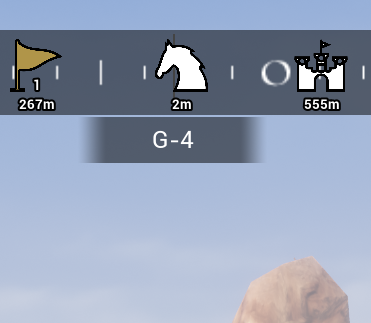
MOD ID: 2869834350 This mod improves navigation and path finding in the world of Conan Exiles: - The HUD is extended with a compass-bar, which shows the direction the player is facing - In addition, the grid the player is currently in is displayed (e.g. F-2) - Double-clicking on the ingame map adds a waypoint - Waypoints are shown on the map - Waypoints are shown on the compass-bar in the HUD, including the distance to them - Waypoints can be pinned. If not pinned, they get automatically removed when the player gets closer than 5m - To pin a waypoint, right-click it on the ingame-map - Two special types of waypoints can be added: - Horse location - Base location - The horse location will be added automatically when the player dismounts - The horse location will be removed automatically when the player mounts their horse - The horse location can be updated/removed by using the radial menu of the horse - The base location can be added/removed by using the radial menu of any spawn-point placeable (bed, bedroll) There will be a small button in the player inventory in the lower right corner, which will open mod settings. The player can add any number of waypoints using the ingame map. The horse and base location waypoints are single waypoints though. The mod has been tested on Sipta & Exiled Lands. Custom maps will have the grid info hidden, but should/may otherwise work.
PvE Plus Ambush - v2.0.5
par 76561197999564180
[img]https://i.imgur.com/1z8wvbf.gif[/img] [h1][b][u]Mod Updating Guidelines[/u][/b][/h1] If you are having trouble updating the mod, we have documentation on our discord to help assist you with common troubleshooting steps. If you are using a Xbox Game Pass or Epic Games version of Conan Exiles and wish to download mods from Steam, visit this forum link with directions on how you can do that. If this is too challenging for you, please join our discord and we will provide you with a Google Drive download link for all Multigun mods. [url=https://forums.funcom.com/t/egs-dedi-windows-downloading-mods-from-steam/183083][u]How to Download Mods From Steam[/u][/url] [h1][b][u]Important Info[/u][/b][/h1] [code][b]Mod id:[/b] 2582718886[/code] [quote=] [b]Communication[/b] Please direct questions, comments, concerns, feedback, and bug reports to our Discord. All documentation is also only found on Discord. The Discord is also home to a dedicated group of veteran volunteer builders who love to help others (The Build Guild). We also have a building tips channel containing dozens of tips, show and tell, and finally a channel specifically for showcasing your finished builds! If you want a place to talk about building and decorating with other passionate players, or a place to get help with your designs, the Better Builders Bureau is the place to be! Hit the button below to join. [url=https://discord.gg/gbAjAgS][img]https://i.imgur.com/bPcwSl5.png[/img][/url] [/quote] [b][u]Lore[/u][/b] The Exiled Lands are a dangerous place. Strong prey on the weak, and the next ambush is lurking around the corner. [b][u]General Description[/u][/b] At regular intervals, all players level 9 and up will be targeted for ambush by a set of NPC's. Each player has their own individual timer (set by admins, see below). The ambush checks for various conditions to consider the player eligible. If any of those conditions are true, they will not be ambushed. The ambush will regularly check though, and continue to hunt the player. Once they have cleared all conditions to be eligible, the ambush will surround and attack the player. The type of enemies that spawn are based on the players level, and will scale up in difficulty as the player climbs up in levels. The mod also offers options for players who use leveling mods. Any leveling mod will work, however KPL:R is highly recommended for use with this mod if the player intends to use a leveling mod. [h1][b][u]Admin Menu Access[/u][/b][/h1] This mod has several admin settings available. [b][u]Important[/u][/b] Any change made will NOT apply until the next rotation starts. This means that if you change the cool down time between ambushes, the time won't apply until after you receive your next ambush in the queue. To access the admin menu, use the following two options: [olist] [*]With admin enabled, access the console (~ or insert) and type DataCMD PvEAmbushConfig [*]With admin enabled, use [url=https://steamcommunity.com/sharedfiles/filedetails/?id=1823412793][u]ModControlPanel[/u][/url] by hades and press Shift + End to access the admin menu. [/olist] [h1][b][u]Admin Settings Description[/u][/b][/h1] [h2]Time Settings[/h2] [u]Minimum Time Between Ambushes[/u] This represents the minimum amount of time between ambushes. Enter in seconds. (ex. 1200 = 20 mins (1200/60)) [u]Maximum Extra Time Between Ambushes:[/u] This represent the additional amount of random time between ambushes. This allows you to randomize the ambush clock. Enter in seconds. (ex. 600 = 10 mins(600/60)) [u]Ambush Warning Time:[/u] This represents the amount of time between the ambush horn and NPCs spawning in. Enter in seconds. [h2]Distance Settings[/h2] [u]Minimum Spawn Distance:[/u] This is a base minimum number for spawn closeness. The spawner will choose a random distance between the max and min. Choose a slider point, the lower the number the closer the spawn. Note: Setting this number below 20 may result in NPCs spawning right on top of you, pinning you in a position where you cannot move. [u]Max Spawn Distance:[/u] This is a base maximum for spawn distance. The spawner will choose a random distance between the max and min. Choose a slider point, the lower the number the closer the spawn. [h2]Enemy Number and Type Settings[/h2] [u]Minimum Number of Enemies:[/u] The least amount of enemies that can spawn during a single ambush spawn. [u]Maximum Number of Enemies:[/u] The maximum amount of enemies that can spawn during a single ambush spawn. [u]Enable Ambush Despawner:[/u] Despawns ambush spawned enemies after a period of time. [u]Ambush NPC Despawn Time:[/u] Will despawn enemies after the time has expired. Time is in seconds. [u]Enable 'Exile Lands' Enemies:[/u] Enabling this toggle will allow enemies unique to the 'Exile Lands' map to spawn. For example, Frost Giants, Yetis, and Sandbeasts. [u]Enable 'Isle of Siptah' Specific Enemies:[/u] Enabling this toggle will allow enemies unique to the 'Isle of Siptah' map to spawn. For example, Devolved monsters, Bigfoot, and Fiends. [u]Enable 'Maelstorm' Specific Monsters Found on 'Isle of Siptah':[/u] Enabling this toggle will allow monsters unique to the 'Maelstorm' event found on the 'Isle of Siptah' map to spawn. For example, Doels, Ghouls, and Blood Defilers. [h2]Difficulty Adjustments[/h2] [u]Enable Enemy Multiplier Curve Above Level 60:[/u] Use this toggle to increase the number of enemies that will spawn the higher the player gets above level 60. This protects lower level players from being overwhelmed while offering increasing challenge the higher the level the player gets. [quote][h1][b][u]Update Policy[/u][/b][/h1] [list] [*] I will update my mods on my terms and my terms alone. If you don't like my update schedule, don't use the mods. [*] Mismatch errors are not the fault of mod creators. If you need help understanding this concept, visit the discord.[/quote] [b][url=https://steamcommunity.com/id/multigun/myworkshopfiles/?appid=440900]Multi's Other Mod's Can be Found by Clicking Here![/url][/b]
Akihabara Design "Salon"
par 76561198359556826
[img]https://steamuserimages-a.akamaihd.net/ugc/819002974403344349/DD18664314A26EA83C62E9B0127FFCB35092B53A/[/img] [url=https://discord.gg/yyEHTPYrJt][img]https://i.ibb.co/7rWYVwy/124125.png[/img][/url] [h2]Station:[/h2] [list][*]Podium [*]ID 525321550 [/list] [b][i]It is a single station for all mods of the project. When connecting a new mod, just rebuild the station and it will automatically connect everything.[/i][/b] [b][i]The mod is a continuation of the Akihabara design in the direction of hairstyles.[/i][/b] [h2]Hairstyle:[/h2] [list][*]Raiden Shogun fem [*]Shenhe fem [*]Ganyu fem [*]Eula fem [*]End more [/list] [h2]Item ID range:[/h2] [list][*]325310000 - 325380000 [*]525310000 - 525380000 [/list] [img]https://i.ibb.co/L8FF3qm/124128.png[/img] [h2]More mods from the Akihabara Project: [/h2] [url=https://steamcommunity.com/sharedfiles/filedetails/?id=2914309509]Akihabara Design[/url] [url=https://steamcommunity.com/sharedfiles/filedetails/?id=3309160280]Akihabara Design "Sora"[/url] [url=https://steamcommunity.com/sharedfiles/filedetails/?id=3312410695]Akihabara Design "Tatoo"[/url] [url=https://steamcommunity.com/sharedfiles/filedetails/?id=3323874476]Akihabara Design "Oscar"[/url] [url=https://steamcommunity.com/sharedfiles/filedetails/?id=3310298622]Akihabara Design "Boutique"[/url] [url=https://steamcommunity.com/sharedfiles/filedetails/?id=3318793069]Akihabara Design "Silmarillion"[/url] [url=https://steamcommunity.com/sharedfiles/filedetails/?id=3324113365]Akihabara Design "Open Craft"[/url] [url=https://steamcommunity.com/sharedfiles/filedetails/?id=3039363313]Akihabara Flight "Omikami System"[/url] [url=https://steamcommunity.com/sharedfiles/filedetails/?id=3377325522]Akihabara Eclipse[/url]
![[Discontinued] More Fighting](https://images.steamusercontent.com/ugc/797617069030019205/53E6F18700C363ADA2E516F79A7C6BAE199F62B4/)
[Discontinued] More Fighting
par 76561198274579039
Ever notice if you have multiple thralls guarding at your base that some of them will just stand there doing nothing? With this mod installed more thralls and pets can attack at a time. Normally only 3 of your pets or thralls can attack an enemy at once. This mod lets you change the number of slots to whatever you want(YOU MUST BE ADMIN) . I've added commands that let admin change the number of NPC that can attack other npc(Creatures/Wildlife, Humanoids, Playerowned Thralls) and the Player as well, eatch of those categories with their own number of slots. Commands are done in the console window that you open by pressing the tilde key (~) are as follows: ke * SetMaxW [integer] Sets Max attackers against Wildlife and Non Human creatures. Example: ke * SetMaxW 26 will make up to 26 NPC attack an animal or creature at a time. ke * SetMaxH [integer] Sets Max attackers against Human NPCs. Example: ke * SetMaxH 5 ke * SetMaxP [integer] Sets Max attackers against the players. Example: ke * SetMaxP 20 ke * SetMaxT [integer] Sets Max attackers against Thralls owned by players. Example: ke * SetMaxT 13 ke * SetMaxAll [integer] Sets Max attackers against all 4 categories at once with the same number of slots. Example: ke * SetMaxAll 25 ke * SetMaxAllWHPT [integer] [integer] [integer] [integer] Sets Max attackers against all 4 categories at once but each with their own number of slots. Example: ke * SetMaxAllSeperately 20 10 2 6 will make 20 attack wildlife, 10 attack Humans, 2 attack players and 6 attach Tralls owned by players. ke * NoFighting will change all slots ofr all categories 0 so nothing will fight. This is the same as making each one 0 one by one or typing SetMaxAll 0 or SetMaxAllWHPT 0 0 0 0. You can still attack when all are 0. You can get some chaotic battles going if you use this mod together with Testerle's Better Thralls (Pickup & more followers) mod especially if you set the max followers to 10 with his mod. Always back up your server's database before adding any new mod just in case. mod id is 1794741816 A big thank you goes out to Void, Testerle, EZee_AP, ArsGothica RobTheSwede for all their help. Upcoming Features: In a future update I will add widgets for use with the "Mod Control Panel" mod to make it easier to change settings I may possibly add more commands based on feedback and suggestions. Warnings and notices: I have not yet added a limit to the numbers of slots so there may be some values too high for the game to handle resulting in crashes of the client or server. Once I test out different numbers and get feedback I may set a limit to how many slots can be set. The default slots will be 15 for wildlife, 15 for human NPCs, 4 for players and 15 for thralls owned by players. This may also change once I do some testing and get feedback. This mod does not fix aspects of the base game's AI that feel broken so things like thralls punching instead of using their weapon and archers shooting at rocks instead of their opponents are not fixed by this mod. Aslo, this mod is more geared toward setting the slots and then leaving them like a server setting rather than changing them many times on the fly. You CAN do that but there may be some side effects for example if archers are already shooting at you they may continue shooting even if their slots are set to zero.

ThrallRadius
par 76561198032575430
This mod aims to make placeable thralls acceptance radius closer.

Increased Item Stacks (Including HomeBrew+ stacking)
par 76561197971093608
Mod ID: 925656972 v.1.1.3 [b]If you like this mod, please give a thumbs up[/b] This mod is just a part of [url=http://steamcommunity.com/sharedfiles/filedetails/?id=888203209]ExilesPub[/url] which also fixes/adds missing recipes and character levels to the game. This mod does not require or include HomeBrew+ +Resource stacks to 1000 +Most others to 100 +Non-stackable items now stack to 10 +Includes stacking of HomeBrew+ items/resources -Does not stack weapons or armor Thanks to bTo for [url=http://steamcommunity.com/sharedfiles/filedetails/?id=873905655]HomeBrew+[/url] Mod ID: 925656972
MoreWomenSpawns
par 76561198107581124
Mod ID: 2404214549 This mod increases the spawn ratio of female NPCs. The percentage increase was kept reasonable (based on my personal preference), and varying depending on the type of NPC and it's faction/profession. Entertainers are adjusted to be ~98% female. Only the SpawnDataTable for the NPCs has been modified. ============= This is a quick mod I did for myself while waiting for i.am.Sober to update his "75% more Women" mod, and since I've noticed many people are waiting for him to update it, I decided to share it, "as is". You can consider it as a temporary mod while we wait for the "75% more Women" mod to be updated. As of right now, I don't plan on supporting it further down the line, because I do not play Conan Exiles regularly. Enjoy! ============= - - - - NEWS - - - - 2024.04.03 - Mod updated for the latest game version (Age of War: Chapter 4); 2023.06.22 - Mod updated for the latest game version (Age of War: Chapter 1); 2023.03.14 - Mod updated for the latest game version (Age of Sorcery: Chapter 3); 2022.11.26 - Mod updated for the latest game version (Age of Sorcery: Chapter 2); 2022.09.01 - Mod updated for UPDATE Age of Sorcery; 2021.11.17 - Mod updated for UPDATE 2.7; 2021.10.22 - Mod updated for UPDATE 2.6; 2021.08.22 - Mod updated for UPDATE 2.5; 2021.04.23 - Mod updated for UPDATE 2.4; 2021.03.18 - Table has been thoroughly compared and adjusted to the latest one that came with UPDATE 2.3 of the game. For some reason, the Black Corsairs have been made all to be darfari race. Not sure why Funcom did like this (it will destroy the NPC variety), but all Black Corsairs have been renamed and races changed as they came with the update. Changes like some bosses being made "nonockdown" - able also have been properly adjusted, as well as some new AI packages. Basically, compared to the official latest spawn table that came with the 2.3 Update, ONLY the spawn ratios between male/female NPCs are edited. To be honest, not a fan of this situation, because apparently we will have to go though this every time a patch/update that changes the table is released, especially since now I am editing the tables outside the editor. Anyway, it should all work now. ;-] ============= [03.04.2024] Latest table edit (v.1.3.24040313) in CSV format Plus the latest Vanilla table for comparison). > bit. ly/3vueLEe ============= CURRENT VERSION: v.1.3.24040313
![[Enhanced] Player Ignores Follower Collision](https://images.steamusercontent.com/ugc/17337242088373642740/78E4C3205956AD7BE85BE193A78792B9186D61F8/)
[Enhanced] Player Ignores Follower Collision
par 76561198146000888
This mod allows players to move freely through their active followers by disabling collision between the player and their thralls. It prevents followers from blocking the player's path during exploration, combat, or base management. Ideal for improving gameplay flow and reducing frustration. The mod is still in testing. Please report any bugs you encounter. Mod ID: 3720753923

Ships Of The Exiled
par 76561198022081250
[b]Arrr matey! 'Tis time to avast and set sail![/b] This mod allows you to build and customize ships, and sail across rivers and seas, alone or with a crew. Check the docs for a full overview of features this mod offers. Please use the discord for any questions, or to report any issues you run into. [h1]Documentation[/h1] https://thraxerrrr.github.io/ShipsOfTheExiled [h1]Discord[/h1] https://discord.gg/FtWrKAZ

Amunets Weather Changes - v2.0.19
par 76561197960376750
Mod-ID: 1719601104 Change weather thresholds. Defaults to 'less rain'. Temperate (North): - Clear below 75 (was 50) - Rain from 75 to 90 (was 50 to 80) - Thunderstorm above 90 (was 80) Swamp: - Clear below 60 (was 30) - Rain 60-90 (was 30 to 80) - Thunderstorm above 90 Console commands: - Everybody: 'DataCmd WeatherCheck' to check current weather settings - Admin: 'DataCmd WeatherConfig <TempRain> <TempStorm> <ColdSnow> <SwampRain> <SwampStorm>' to set weather thresholds. Examples: 'DataCmd WeatherConfig 50 80 30 30 80' for "conan default". 'DataCmd WeatherConfig 75 90 30 60 90' for "less rain". 'DataCmd WeatherConfig 101 101 30 101 101' for "no rain" Discord @ https://discord.gg/a8hGAKW Patreon @ https://www.patreon.com/sailorsat For MS-Store users - read [url=https://forums.funcom.com/t/for-ms-store-how-to-get-mods-off-the-steam-workshop-without-a-steam-account/174325]this[/url].
WR-Critters: Horses & More v4.0.2
par 76561198073768473
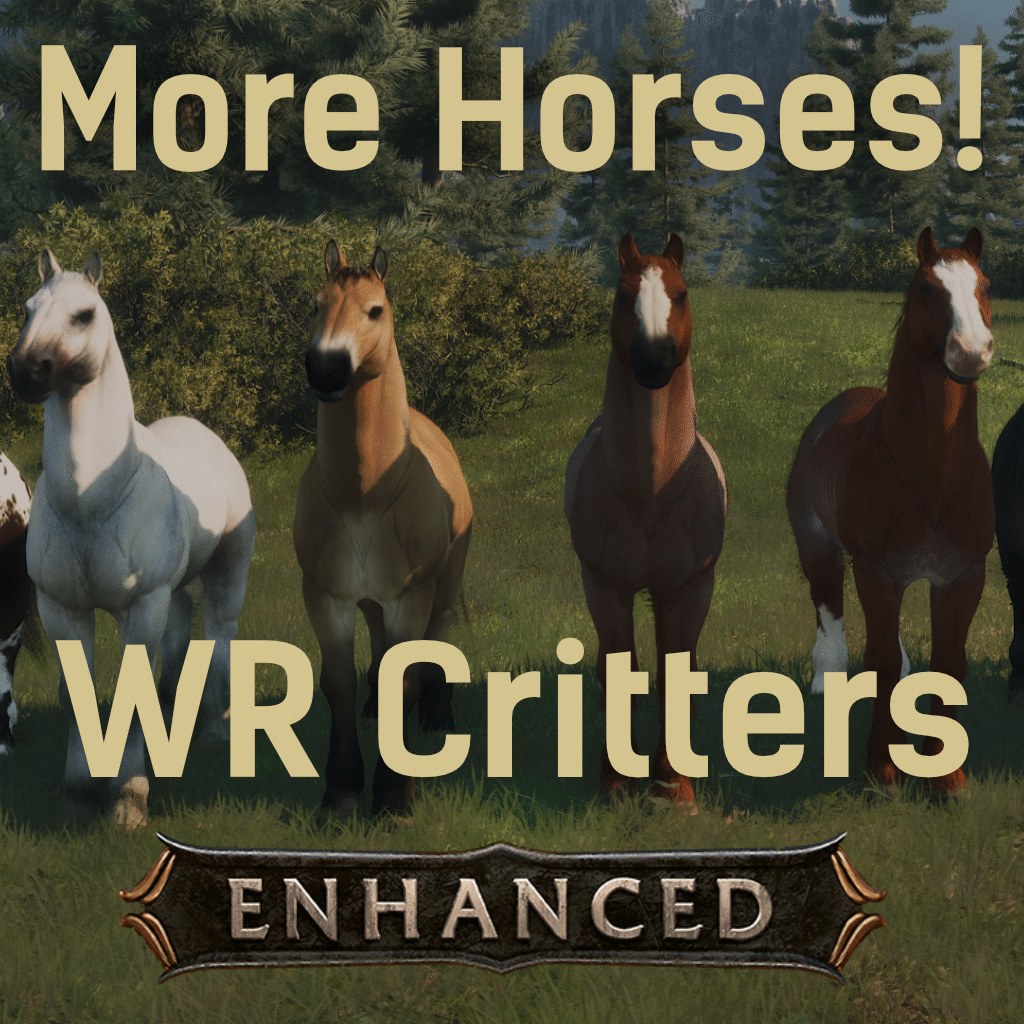
[h1]WR-Critters: Horses & More[/h1] [h3]UE5 / Conan Exiles Enhanced Edition[/h3] This is the Unreal Engine 5 version of WR-Critters. ➡️ Using legacy Conan Exiles? Get the legacy version here: [url=https://steamcommunity.com/sharedfiles/filedetails/?id=3718067758]WR Critters: UE4 Legacy v3.5.0[/url] [h1]About The Mod[/h1] WR-Critters originally began as a collection of custom creatures and cosmetics created for a private server community. The mod currently focuses on expanding the variety of horses available in Conan Exiles, with additional creatures, cosmetics, weapons, and building pieces planned for future updates. [h1]Included Horses[/h1] * Appaloosa * Clydesdale * Fjord * Boreal Grey * Red Rabicano * Rocky Mountain (Blonde Mane) * Rocky Mountain (Black Mane) * Strawberry Roan The Boreal Grey and Black Mane Rocky Mountain were originally added so players could have access to white and black horses without requiring the black-and-white horse DLC. [h1]Crafting & Raising Horses[/h1] The custom horses are raised through the Stable system using special foal variants and Enriched Fodder. [b]Regal Foals:[/b] * Rocky Mountain (Black Mane) * Rocky Mountain (Blonde Mane) * Boreal Grey * Red Rabicano [b]Hardy Foals:[/b] * Fjord * Strawberry Roan * Appaloosa * Clydesdale Enriched Fodder can be crafted at any Alchemist's Bench. The recipes for Enriched Fodder and the custom foal types are unlocked through the "Stablemaster" feat. [h3]Mod Maintenance Note[/h3] WR-Critters has been part of the core modlist for a Conan Exiles server community running since 2018. Although I retired from the broader Conan Exiles modding community in 2024 to focus on other projects and hobbies, [b]I do not currently plan to abandon this mod.[/b] Enjoy, fellow Exiles. [b]Live Game Mod ID[/b]: 2859352199 [b]Item Range[/b]: 98006xxx - 98010xxx [h3]Compatibility[/h3] This mod does not overwrite any vanilla game files. *This mod contains assets (art, music, code, items, systems and/or designs) that are the intellectual property of Funcom Oslo AS or their licensors. **No one has permission to re-upload, unpack, re-pack, or redistribute any custom content included in this mod.
PermPaint (URE4 - Legacy)
par 76561198078220012
This mod simply changes the variable for warpaint perish rate from 1 to 0. This turns off warpaint decay. Hence permapaint; permanent warpaint. That's all it does. Simple and effective. File ID: 1437712973
Golden Female Statues 3.3.6
par 76561199253140979
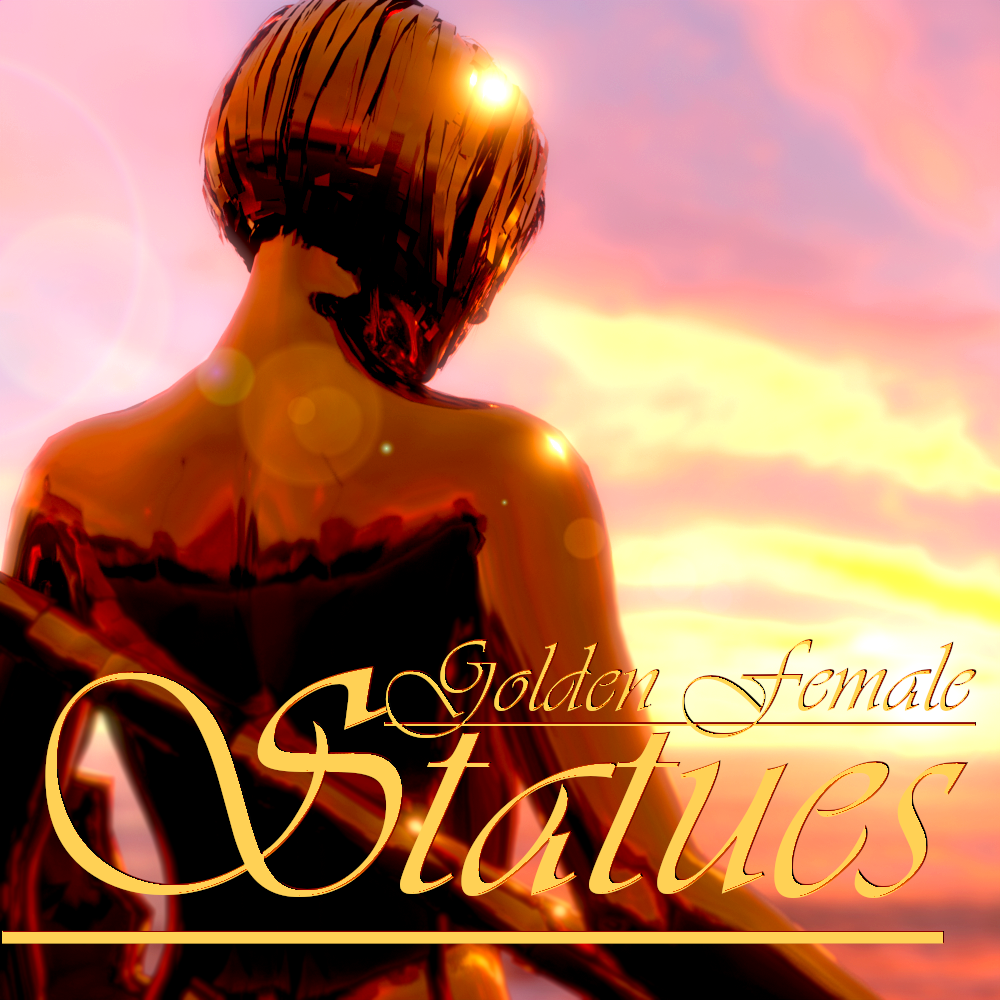
"What do you want, Bronn? Gold? Women? ....Golden women?" 87 New Golden Female Statues added to the game! (738 Variations) (And many more to come! ;) ) YOU CAN NOW USE THE STATUES FROM THE CONSTRUCTION HAMMER STATUES NOW HAVE THEIR OWN CATEGORIES WITHIN THE CONSTRUCTION HAMMER You can now use the Casting Table to convert 2 Silver bars to 1 gold bar, or one Gold Bar to 2 Silver bars! Now with the option to use 1 Gold dust to get 1 Gold Bar, or 1 Gold bar to 50 Gold dust, same with silver! Furniture update! You can now decorate the interior of your base properly with these furniture statues! New Fountain Statues! Give your base some life with some Golden (And Silver) Fountains! Light up your base with these new Light Statues! The Gold Statues have the color (and fire for 3) of regular torches, whereas the Silver Statues have blue lights (and fire for 3) All Statues now have Complex collision! So you won't have any issues with running into an invisible wall when trying to run under or climb the statue. SILVER STATUES! I have now added Silver versions of all existing and new statues, so those of you who want to add these "golden" Female Statues to your silver themed base, can now go wild! Now added x5 and x10 size versions of the statues for those who like them BIG ;) Also just added .5 .2 version for those who want the small figurines! Gold Shaper feat now requires lvl 1 and 1 feat points You can make all of the statues at the casting table STATUE COSTS: GOLD: (Normal) = 50 Gold Bars, 25 Silver Bars (x5) = 55 Gold Bars, 30 Silver Bars (x10) = 60 Gold Bars, 35 Silver Bars (.5) = 30 Gold Bars, 10 Silver Bars (.2) = 5 Gold Bars, 1 Silver Bar (Decoration) = 60 Gold Bars, 60 Silver Bars SILVER: (Normal) = 5 Gold Bars, 50 Silver Bars (x5) = 10 Gold Bars, 55 Silver Bars (x10) = 15 Gold Bars, 60 Silver Bars (.5) = 2 Gold Bars, 5 Silver Bars (.2) = 1 Gold Bar, 2 Silver Bars (Decoration) = 60 Gold Bars, 60 Silver Bars (Fixed the white box issue!) Enjoy!
Serveur Conan Exiles avec support des mods
Installez tous les mods directement depuis le tableau de bord en un clic.
Louer un serveur Conan Exiles