Project Zomboid Mods & Plugins
Ce catalogue répertorie 52 000+ projets Project Zomboid provenant de Steam Workshop. Les entrées peuvent être côté serveur, côté client ou requises des deux côtés, et inclure des cartes ou d’autres contenus créés par les utilisateurs. Avant l’installation, vérifiez la page source liée, la version du jeu et les dépendances.
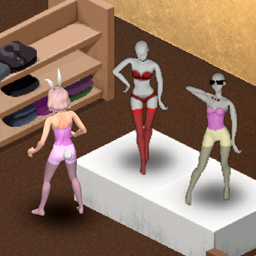
Garment Optimization
par 76561199071075349
Partial protective properties have been assigned to some intimate clothing (underwear).Added protective properties to the decorative item "collar". Optimized the visual effects of some pantyhose and stockings, and assigned some attributes.Support adjusting the refresh rate of Rabbit Girl NPC. --1.3 Added a hairstyle. - Added a "women's short hair" hairstyle (Based on shapeshifting 3). - Optional during character creation, or modified in the game. - Added a shoulder bag recipe. --1.2 Sandbox setting optimization - Sandbox setting optimization. --1.1 Modified sandbox bug - Fix the bug where sandbox settings cannot be applied to in-game settings. - The sandbox distinguishes between the NPC of pantyhose and the system default NPC of Bunny Girl. --1.0 Optimized the texture of pantyhose - Support sandbox adjustment of NPC generation probability for pantyhose. - Solve the bug of gaps in the internal testing of the legs of pantyhose If you like this mod, please click like and bookmark. Virtual rating is both simple and free, but it will make me very happy! My other mods Status prompt Optimizing Books Copyright © 2024 by 酒心小可. All rights reserved. Unauthorized duplication or distribution is prohibited. Workshop ID: 3258621587 Mod ID: garment_optimization
![[COS] RE:3 Remake Jill – Project Zomboid Mod](https://images.steamusercontent.com/ugc/2070009996130282663/1C574EA17482D1378C356DD44A41272BE209C42E/)
[COS] RE:3 Remake Jill
par 76561199178116693
How Do I Use It? - You can go to the link below to see how to use it. - Link Recommended mode - Fashionoid - Gear Transmog - Hide All Attached Items - Clipping animation Fix How to use COS mode in build 42. - Navigate to the path where the mod is installed. - Create a 42.0 folder. - Create a common folder. - Paste the media folder / mod.info / preview.png into the 42.0 folder. The recipe code writing method has been changed in 42Build. Since COS (Costume) mode has approximately over 200 modes, converting to 42Build's recipe code is an extremely laborious task. In 42Build, you cannot create costumes in (42 build) the crafting tab. There are two methods: Spawn items in cheat mode. Select items in the clothing selection screen when creating a character. Like My Mode? - Join Our Discord If You Want Commission
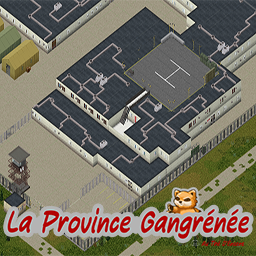
Rosewood Military Hospital
par 76561198110269363
Here's a rework of the "Rosewood Military Hospital" mod. The original is here : https://steamcommunity.com/sharedfiles/filedetails/?id=2847283719&searchtext=2847283719 The mod creator - killeurnoobs - has given me permission to revise his map. The spawn area has changed from the original. The map was located on the 25x38 cell and is now located on the 24x41 cell, southwest of the town of Rosewood. Some visual additions are planned - without giving a specific date - but I hope you can enjoy this map in the meantime. Thanks to those who use it, and I hope you have a great time playing it. Workshop ID: 3480152032 Mod ID: Rosewood Military Hospital Map Folder: Rosewood Military Hospital

Infections Are Real
par 76561199105347227
Works in SOLO and MP. Can be added in a save game. And removed with no issues. There is chance that scratches, lacerations, infections or dirty bandages can escalate into serious health problems ... Not fatal, but the player will suffer, a lot. Workshop ID: 2875104005 Mod ID: InfectionsAreReal

GDI Commando
par 76561198120479073
This Mod add GDI Commando (TW3) Armor & Firearm in to the Game -Commando Armor -Commando Helmet -Vervack Commando Elite Pistol -11 mm Ramjet Magazine -11 mm Ramjet Rounds -Prototype High Rate-of-Fire Assault Railgun, -3 mm Slug Magazine -3 mm Slug with custom Sound for Weapons Shot & Reload Workshop ID: 2722449250 Mod ID: po_pattara
![Echoes of the Dead [B41] – Project Zomboid Mod](https://images.steamusercontent.com/ugc/2001340971486703229/55DA4DF05E80444779F365595D882C3CF3D61EB7/)
Echoes of the Dead [B41]
par 76561198093830923
Echoes of the Dead (EotD) B41 Only. B42 Update Soon! For showcasing purposes the % chance on the YouTube video was set to 80%. Amidst the chaos and silence of the post-apocalyptic world, the dead have a haunting way of making their presence felt. With the Echoes of the Dead mod, every time a zombie meets its end, there's a chance you'll hear their chilling final screams. - The mod has four static versions: Common (8%), Uncommon (5%), Rare (3%), and Very Rare (1%). - The sandbox version allows you to fully customize the scream % chance from 0 - 100. - With every zombie you kill, there's a chance (X:100 ratio) they will emit a scream. For example, if you picked the common version, it will be 8 percent with a ratio of 8:100. - The scream can attract zombies within a randomized range of 70-250 tiles. - The mod merely triggers a sound event. It doesn't interact with the game's zombie spawning mechanics or the zombie's memory settings. Thus, it won't create any extra zombies in the world. It will, however, attract already spawned zombies closer to the scream's source. Whether you want these eerie sounds to be a regular part of your experience or a rare haunting reminder, I've got you covered. Choose from different versions based on how frequently you want the echoes to pierce the silence. October 13th, 2024 Update: - Sandbox Version Added: Players can now freely customize the zombie scream chance with the new Sandbox Settings! - You can now set the scream chance from 0% to 100% to match your desired gameplay experience. The default is set to 5%. - 4 additional screams added to all versions! Compatibility: Mods: Incompatible with other similar mods. Yes, it is compatible with mods like Random Zombies, Definitive Zombies and horde related mods. Game version: Build 41.78+ Modes: Works in both MP/SP. This will only work in MP if the server has this mod installed. Otherwise, it will not work if you have it installed as an individual for multiplayer. Make sure the server host, dedicated host owner, or whomever is hosting has this mod installed on their end so all players can download it. It should function as it should afterwards. A Note on My Mod's Authenticity: All mods that I publish stem from original ideas, often inspired by browsing the PZ workshop. On the rare occasion that a mod isn't entirely my own concept, I ensure to obtain explicit permission from the original creator before proceeding. If their workshop page allows open contributions or modifications, I honor those terms. I'm proud of the progress I've made as a self-taught novice programmer, having invested time and effort into understanding the complexities of modding for Project Zomboid. Every modder starts somewhere, and I began with basic mods, just like many others. I encourage a supportive and constructive modding community. Let's celebrate creativity, encourage growth, and refrain from baseless allegations. We're all here to contribute and enjoy the world of PZ modding. ❤️ Enjoying my mod? I'll be grateful with only two clicks from you to like and favorite my mod. Thank you! Feel free to buy a bread crumb for me. Any donation will help me not starve and continue modding. Modpacks? Yes, you may freely use my mod for your own personal, community, server, pack, mod, or any other use as long as you properly credit me wherever it roams. Workshop ID: 3025595058 Description Mod ID's Every 8 out of 100 zombies will let out their deathly echo. EotD_Common The unsettling sounds will ring out for every 5 out of 100 fallen zombies. EotD_Uncommon 3 out of 100 zombies will remind you of the horror you're living in. EotD_Rare For those who want an occasional eerie reminder, only 1 out of 100 zombies will scream out. EotD_VRare Sandbox Settings: For those wanting to customize their chances at hearing the echoes of the dead. EotD_Sandbox
![[B41] Spongie's Character Customisation – Project Zomboid Mod](https://images.steamusercontent.com/ugc/9615975809248775107/59AF10204452485085D17900227EFE6C039678EB/)
[B41] Spongie's Character Customisation
par 76561198042060301
B41 legacy version Up to date version here Workshop ID: 3626418462 Mod ID: SpnCharCustom Mod ID: SpnCharCustomDetails Mod ID: SpnCharCustomDetailsHD Mod ID: SpnCharCustomFaces
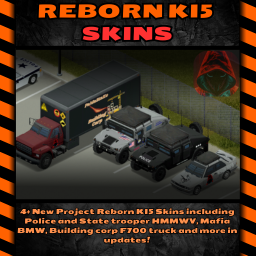
Reborn Ki5 Skins
par 76561198131908302
I Love Cars from Ki5 Mods so i create Reskin <3 My Custom Skin for Cars Ki5 please like and add to favorite The modification adds skins to the vehicles 87fordF700box, 90bmwE30m3 and M998 Humvee. I have carefully modified all of them, I hope you will like the truck, I modified it to be for a construction company on my Project Reborn server, to which I also invite you Join to the Reborn Server with NPC System https://discord.gg/FEmUXRnK Check my other Mods! https://steamcommunity.com/sharedfiles/filedetails/?id=3342862332 Support me :) https://ko-fi.com/fran3k Workshop ID: 3356820934 Mod ID: RebornKi5Skin Workshop ID: 3356820934 Mod ID: RebornKi5Skin
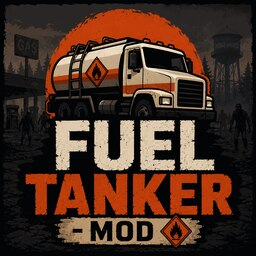
Fuel Tanker Mod
par 76561198140407033
Functional Fuel Tankers Adds working fuel-transfer functionality to any vehicle in Project Zomboid Build 42. Designate any vehicle as a fuel tanker through the in-game admin panel, fill it from gas station pumps, store fuel, refuel nearby vehicles, fill gas cans, and more. Update - June 16, 2026 - Added sandbox options to configure tanker capacity, transfer speed, transfer distance, hose requirements, and menu visibility - Added in-game admin panel to designate any loaded vehicle as a fuel tanker without editing any files - The '78 AM General M35 Series Trucks mod is no longer required. Any vehicle can be used as a fuel tanker - Added language support. All mod text is now stored in translation files. Language packs coming soon - Improved and cleaned up core logic for better stability in both singleplayer and multiplayer Features - Designate any loaded vehicle as a fuel tanker through the in-game admin panel - Fill the tanker from gas station pumps - Fill gas cans from the tanker - Pour gas cans into the tanker - Refuel nearby vehicles from the tanker - Siphon fuel from nearby vehicles into the tanker - Check the tanker's current fuel level - Right-click menu and radial menu support - Multiplayer support with live sync across all players - Partial transfer support for cancelled actions - Configurable sandbox options How to Use Stand near any designated fuel tanker and use the right-click menu or the vehicle radial menu. Available options depend on what you are holding, what vehicles are nearby, and whether the tanker, pump, gas can, or target vehicle has fuel or available space. Filling the tanker from a pump Park the tanker next to a powered gas station pump, stand near both, and select the fill option. If the option does not appear, reposition the tanker closer to the pump. Filling or emptying a gas can Hold an empty or partial gas can to fill it from the tanker. Hold a gas can with fuel in it to pour it into the tanker. Refueling or siphoning vehicles Park the target vehicle close to the tanker and stand near both. By default a hose is required for vehicle-to-vehicle transfers. This can be turned off in sandbox options. Managing Tanker Vehicles Any vehicle can be designated as a fuel tanker without editing any files. This option is available to server admins, moderators, overseers, GMs, and in singleplayer. - Open the right-click menu and select Fuel Tanker then Fuel Tanker Admin - Use the search box to find any vehicle by name or script ID - Select a vehicle from the list and press Add - To remove a vehicle, select it from the selected list and press Remove Selected - Press Save to apply changes Changes take effect immediately for all online players and persist through server restarts. Default Tanker Vehicles The following vehicles are set as tankers by default. These can be removed or replaced at any time through the admin panel. - Base.78amgeneralM49A2C - Base.78amgeneralM49A2CFuelTanker - Base.78amgeneralM50A3 - Base.78amgeneralM50A3FuelTanker Sandbox Options - Tanker fuel capacity - Fuel transfer speed - Maximum transfer distance - Whether hoses are required for vehicle-to-vehicle transfers - Enable or disable right-click menu support - Enable or disable radial menu support Multiplayer Fuel transfers are handled server-side so tanker, vehicle, and gas can levels stay in sync between all players. The tanker vehicle list is pushed to every player on join and updated live when an admin makes changes. No reconnect required. Make sure the mod is enabled on the server and installed by every player. Troubleshooting If an option is missing from the menu, check the following: - You are close enough to the tanker - The vehicle is designated as a tanker in the admin panel - The gas pump has power and fuel remaining - The tanker is parked close enough to the pump - You are holding a gas can when using gas can options - The gas can has room when filling from the tanker - The gas can has fuel when pouring into the tanker - You have a hose in your inventory for vehicle transfers, unless the hose requirement is disabled in sandbox options - The target vehicle has room for fuel - The source vehicle has fuel to give Notes - Removing a vehicle from the tanker list does not delete the fuel stored in it - No required mods. The '78 AM General M35 Series Trucks mod is optional if you want the default tanker vehicles Visual Guide ============================== 1. Fill a Gas Can from the Tanker ============================== Hold an empty or partial gas can, stand near the tanker, and select the fill option. Radial Menu Right-Click Menu ============================== 2. Pour a Gas Can into the Tanker ============================== Hold a gas can with fuel in it, stand near the tanker, and select the pour option. Radial Menu Right-Click Menu ============================== 3. Fill the Tanker from a Gas Pump ============================== Park the tanker close to the pump, preferably with the fuel fill side facing the pump. Radial Menu Right-Click Menu ============================== 4. Refuel a Vehicle from the Tanker ============================== Park the target vehicle next to the tanker. A hose is required by default. Radial Menu Right-Click Menu ============================== 5. Siphon Fuel from a Vehicle into the Tanker ============================== Park the source vehicle next to the tanker. A hose is required by default. Radial Menu Right-Click Menu Workshop Info Workshop ID: 3741877969 Mod ID: FuelTankerMod

Lifestyle 中文汉化
par 76561199020860145
Lifestyle 中文汉化 Workshop ID: 3293223963 Mod ID: Lifestyle_XYCN
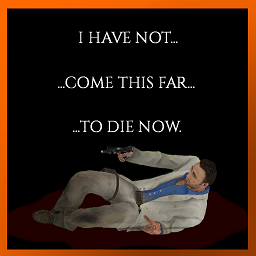
Left 4 Dead 2 Loading Scene Preface
par 76561198205919189
I HAVE NOT... COME THIS FAR... TO DIE NOW. Only works if your language is set to ENGLISH Also feel free to use this mod as a framework for your own loading screen text replacement mods. The text file can found here in your PZ workshop folder --> "Steam/steamapps/workshop/content/108600/3035474154/L4D Parish Intro Loading Scene/Contents/mods/L4D Parish Intro/media/lua/shared/Translate/EN/UI_EN.txt" Workshop ID: 3035474154 Mod ID: L4DnickLoadingIntro

重量平衡
par 76561198317979792
物品重量平衡,将钞票重量设为了0,避免超重。 所有对讲机重量修改。 Workshop ID: 2851039596 Mod ID: Balance

Laconia Connection OTR
par 76561198053401543
Road to connect Laconia Exspansion and Over The River In-game map (((((NO foraging zone))))) Workshop ID: 2841590045 Mod ID: LaconiaConnection Map Folder: LaconiaConnection
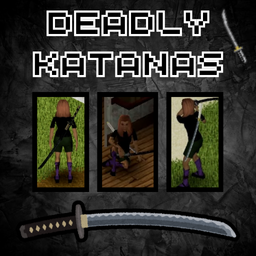
Deadly Katanas
par 76561198131908302
MY NEW BIG SKIN PACK MILITARY CARS FROM KI5 US.ARMY CHECK LINK https://steamcommunity.com/sharedfiles/filedetails/?id=3360591354 I accidentally deleted this mod, sorry, please support my mod, it had a large reach ``` Modyfikacja dodane 3 nowe Katany Samurai Katana Bloodstorm Katana Legendary Katana Update 1.0 Scientology Katana - 4 w modzie Którę są dużo lepsze od podstawowej katany nie da sie ich naprawić, są też bardzo rzadkie dlatego że respią się z małym procentem szans. Wszystkie te katany mają większe durablity i wyglądają świetnie dodatkowo możecie je położyć na ziemi i obracać prezentują się na prawde dobrze. Mam nadzieję że moja modyfikacja spodoba się wam bardzo długo nad nią pracowałem dziękuje za wszelkie łapki w górę dodanie do ulubionych i subskrypcje Pamiętaj możesz używać modyfikacji na Single Player i na Multiplayer również miłej zabawy :) ``` ENG ``` Modification added 3 new Katanas Samurai Katana Bloodstorm Katana Legendary Katana Update 1.0 Scientology Katana - 4 in mod Which are much better than the basic katana, they can't be repaired, they are also very rare because they spawn with a small percentage of chance. All these katanas have larger durablites and look great, additionally you can put them on the ground and rotate them, they look really good. I hope you like my modification, I worked on it for a long time, thank you for all the thumbs up, adding to favorites and subscriptions Remember you can use the modification on Single Player and Multiplayer, have fun :) ``` Credits Script Mod - Franek Logo Graphic - xKonservq Workshop ID: 3357740849 Mod ID: DeadlyKatanasbyFranek

Asledgehammer Utilities
par 76561198017173991
(Will update description when possible) This is a utility-commons library for other mods to use as libraries and tools to do things in Lua. Libraries: * ZedUtils - A collection of small function-utilities for general-purpose use. * Bite - A bitwise operations library emulated over strings in the absense of proper integer support in Lua 5.1. * AES - AES Encryption library. * ZedCrypt - A fast, weak key-based encryption library. * Primitives - int and uint library. * Class - A port of a class solution for Lua 5.1. * JSON - A port and optimization of a JSON library for the Project Zomboid environment. * MD5 - A retrofitted md5 library for Project Zomboid. * Readonly - A utility that turns Lua tables to read-only mode. * PlayerListener - A server-side event utility that fires when players join and leave the server. * Packet - A framework on-top of LuaNet for PZ that handles sending packets back and forth with passive encryption support using coroutines. Workshop ID: 3360195806 Mod ID: asledgehammer_utilities

ZedColonies - Dynamic Trading Addon
par 76561198137190995
ZedColonies (Dynamic Trading Expansion) This is a massive expansion for Dynamic Trading that basically turns your game into a survival colony sim. Instead of just surviving alone, you can now start your own faction, build a base, and recruit a living, breathing community. What does it add? - Build Your Faction: Claim a spot, build up your base, and recruit NPCs to join your community roster. - Real NPC Needs: Your recruits aren't just robots. They actually have their own HP, hunger, thirst, and ammo systems. They will feel these needs and actively use the appropriate food, drinks, or medical items to take care of themselves. - Companions: Tired of looting alone? Assign an NPC the Companion job and they will follow you out into the Knox Event, watch your back, and fight alongside you. - Colony Jobs: You can put your people to work so they pull their own weight. Assign them jobs like Scavenger, Farmer, Fisher, Builder, or Doctor to keep the base running. (Many more jobs are planned for future updates!) Requirements Both V1 and V2 works but V2 has more features V2 has more featurest Like companion system where they can accompany you in the world. This is purely driven by UI for now. Workshop ID: YOUR_WORKSHOP_ID_HERE Mod ID: YOUR_MOD_ID_HERE Workshop ID: 3695670830 Mod ID: DynamicColonies
Craftable Iron Pipe
par 76561198933186321
So you're stuck in a loop - You have TONS of metalworking stuff, a forge, all the tools and plenty of charcoal.. you want to upgrade your useless wooden fences, gates, and walls into something better to fend off the Zs? Or maybe, you are a fan of KI5's cars and want to pimp your ride??? But you need Iron Pipes, and you CAN'T CRAFT THEM?! Not anymore. Enjoy. Workshop ID: 3495736119 Mod ID: IronPipeCraftingMod
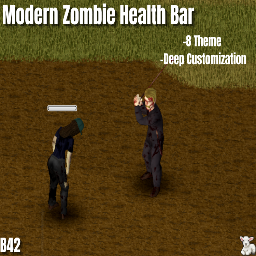
Modern Zombie Health Bar
par 76561198968993381
Modern Zombie Health Bar Enhance your combat experience with a highly polished, customizable, and performance-friendly health bar system for your zombie encounters. Whether you want a tactical HUD, a dark gothic aesthetic, or a retro arcade vibe, this mod has it all. Key Features • Dynamic Visibility: Bars appear only when you hit a zombie, when they are within your specified range, or when you hover over them. Configure them to your liking in the mod settings. • 7+ Unique Visual Themes: Choose from crafted presets or build your own. • Combat Indicators: Floating damage numbers, critical hit texts (POW! BAM!), and XP gain indicators. You can disable specific ones in the options. • Smart Memory System: Bars don't stay forever. Set a "Damage Memory" timeout to let bars fade away after a few in-game minutes. • Inspect Mode: Hold Right Mouse Button (RMB) and hover over a zombie to see their health instantly. Visual Themes • Modern (Default): Clean, rounded, and professional. • Minimalist: An ultra-thin, non-intrusive line for the purists. • Gothic: A dark theme fitting for the Gothic aesthetic. • Military (Drone HUD): Tactical targeting brackets with a digital scanline effect. • Biohazard (Toxic): Radioactive green bars with animated rising bubbles. • Retro (8-Bit): Classic arcade style with chunky pixelated segments and drop shadows. • Retro Vague: It's the same as the retro one, just with 4 boxes. • Comic (Sketch): Bold hand-drawn lines with "BAM!" and "POW!" pop-ups. • Custom (DIY): Total freedom. Design your own bar! Deep Customization • Color Freedom: Customize the color of the bars, numbers, and texts. • Scaling: Adjust Width and Height separately to fit your UI perfectly. • Tri-Color Gradient: Set different colors for High, Mid, and Low health states. • Custom XP & Damage Colors: Match the floating text colors to your personal preference. • Distance Settings: Configure exactly how many tiles away you want to see the bars. Performance & Compatibility • Optimized Code: No FPS issues were found during my tests. Various settings are available in the mod options for low-end PCs or those seeking maximum performance. • Build 42: Fully compatible with the latest Project Zomboid versions. • MP Support: Works seamlessly in Singleplayer. If you try it in Multiplayer, please share your experiences in the comments! Upcoming Mods My Other Mods: https://steamcommunity.com/sharedfiles/filedetails/?id=2795331647 Workshop ID: 3712058499 Mod ID: ModernZombieHealthBar
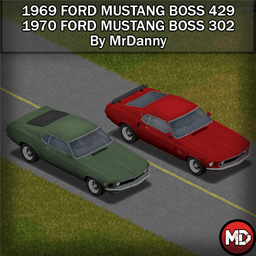
'69~'70 Ford Mustang Boss 429/302
par 76561198386727404
This mod adds the legendary 1969 Ford Mustang Boss 429 and the equally legendary 1970 Ford Mustang Boss 302 to your game, which is quite generous of me to have these two beauties at once, isn't it? Features - - Fully animated model - High-quality textures - 3 types of guard bumpers to suit your taste - 2 Bumpers for install/uninstall - A roof rack to keep your inner hamster calm - Transparent windows You can see exclusive renders and chat with me on Discord VehicleID: 302fordmustangboss;429fordmustangboss Workshop ID: 3705042712 Mod ID: FordMustang429302
![1000 points trait - John Zomboid Trait [B42] *DISCONTINUED* – Project Zomboid Mod](https://images.steamusercontent.com/ugc/51330444021388345/C17B35FC82A66BA23375DF539CB6B3DAE2EF1C40/)
1000 points trait - John Zomboid Trait [B42] *DISCONTINUED*
par 76561198997617276
This mod add a trait on charecter creation, the "1000 points". It just add 1000 points to spend to, if you want, all the positive traits and any profession. !!!!!!!!!!!!!!!! ATTENTION !!!!!!!!!!!!!!!! Almost 100% of this mod was made with the "+300 Points Trait" mod files. All the credits to the "+300 Points Trait" creator ( https://steamcommunity.com/sharedfiles/filedetails/?id=899287010 ) ------------------------------------------------- That is my first mod to any game that "I made" in my life. So sorry if there is any bug. :) ------------------------------------------------- Workshop ID: 3421129594 Mod ID: 1000PointsTrait
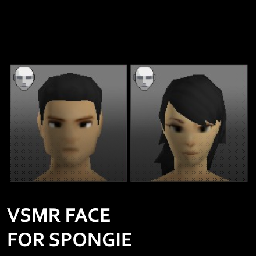
VSMR Face for Spongie's Character Customisation
par 76561198064240215
Adds a VSMR male and female face option for Spongie's Character Customisation. - The original Vanilla Skin Modified Retexture mod can be found here. Workshop ID: 3415572170 Mod ID: VSMRSpongie
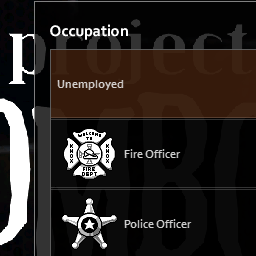
Occupational Items On Spawn (PZ Classic B40)
par 76561198066794171
It does what it says on the box, gives you a starting set of items based on what your profession is, as well as a few determined by your traits. Based on the now unavailable mod called "The Professionals" by @Vinyl. I was surprised that there wasn't a modern incarnation of the mod, so I made one. Was good practice for learning to walk through the LUA environment. Forum: https://theindiestone.com/forums/index.php?/topic/25784-occupational-items-on-spawn/ Workshop ID: 1861868892 Mod ID: oka_oios

Better Zombie Loot
par 76561197988994132
This is an updated version of the mod Sustainable Zombie Loot from Sego. All credits to him. I decreased the spawn rate considerably. Workshop ID: 2826894792 Mod ID: BetterZombieLoot
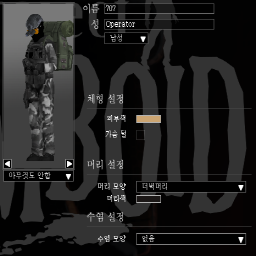
Republic of Korea Army mod
par 76561198320107452
# RATE THE MOD. EITHER POSITIVE OR NEGATIVE DOES NOT MATTER. FEEDBACKS ARE WELCOME. Adds ROKA soldiers professions to game. currently there are 5 professions 707th Special Mission Group Operator - SCAR-L(with suppressor, laser, sight) UDT/SEAL Sniper - K14 Sniper Rifle(with scope, suppressor) Teukgongdae(similar to commando or ranger) - K1 Carbine(with suppressor) ROKA soldier - K2 Rifle ROKA Yebigun(Reserve Soldier) - M16A1 Rifle ROKA Squad Automatic Weapon Soldier - K3 SAW(60 ammo drum magazine) ROKA Marksman - K2C1 Rifle(with scope) Maengho Veteran(Vietnam War Veteran) - M1 Garand: Koreans used obsolete M1s in the Vietnam War. Black Beret - K7 Suppressed SMG(with laser, sight) KNP Special Force Operator - HK416 Rifle(with suppressor, laser, sight) ROKAF Pilot - K5 Handgun You can use ROKA digital camo instead of vanilla woodland camo by using ROKA retexture mod. Textures for some clothes will not chang because ROK Yebigun use woodland camo. Before you play this mod, go to C:\Program Files (x86)\Steam\steamapps\workshop\content\108600\2469333439\mods\ROKA\media and copy 'saved outfits.txt' file and than paste it in C:\Users\username\Zomboid\Lua ant then you will be able to use fashions in the photos above. Modify it as you like. ROKA Survivors: modified version of 'Superb Survivors' for Korea, WIP ROKA Vehicles: adjust vehicles from other mod for Korean Army Workshop ID: 2469333439 Mod ID: ROKA Mod ID: ROKA. Retexture Mod ID: ROKASurvivors Mod ID: ROKAVehicle Map Folder: Hilltop Survivor Camp Map Folder: Military Blockade Map Folder: Prison Escape Map Folder: Woobury
Project Zomboid Guides
Installer des mods Project Zomboid - Guide Workshop
Installe proprement des mods Project Zomboid via le Steam Workshop : saisir les IDs, vérifier l’ordre, redémarrer le serveur et corriger les erreurs typiques.
Louer un serveur Project Zomboid – guide multijoueur
Configurer un serveur Project Zomboid : RAM, paramètres sandbox, mods Workshop, droits admin et vérification propre des erreurs typiques.
Serveur Project Zomboid avec support des mods
Installez les mods compatibles et pris en charge depuis le tableau de bord.
Louer un serveur Project Zomboid