Mods et extensions pour Project Zomboid
Ce catalogue répertorie 52 000+ projets Project Zomboid provenant de Steam Workshop. Les entrées peuvent être côté serveur, côté client ou requises des deux côtés, et inclure des cartes ou d’autres contenus créés par les utilisateurs. Avant l’installation, vérifiez la page source liée, la version du jeu et les dépendances.
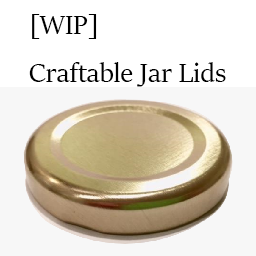
Crafty's Craftable Jar Lids
par 76561198013086962
Craft jar lids with metalworking. A mod I made for a private server. I haven't updated this in a while but it appears to be working, also yes to those asking feel free to use this in any modpack you want! Workshop ID: 2874464961 Mod ID: CraftyJarLids
![[B41] Uh - it's just tomatoes, officer! [Obsolete, see description] – Project Zomboid Mod](https://images.steamusercontent.com/ugc/1834662172556539088/4E645E5F263829ADCD75C5DE5664743ADF486970/)
[B41] Uh - it's just tomatoes, officer! [Obsolete, see description]
par 76561198155883347
This mod is now obsolete I do not recommend using this mod anymore. The same fixes to issues and more can be achieved by enabling BTSE_Farming even without any crops added. OLD DESCRIPTION FOR THE ISSUE Picture this: You have a farming mod installed, in this case it was a weed mod. It worked well and after a while another farming mod got installed, but it broke the weed mod because it overwrote files in the farming system. After removing the weed mod temporarily the seeded plots still remembered the seed and could not process how to grow them, so all the farming on the server was frozen in time because the grow function threw errors. Do not copy, modify, redistribute, or repackage this mod without explicit permission from the creator. This includes on or off of steam, within another mod or modpack, or a different modified version. This item can be published on Steam only through an account with the name bikinihorst. If no permission is received you may not alter the mod, and it must be treated as a mod that is 'On Lockdown'. © 2022+ bikinihorst ------------------------------------------- Workshop ID: 2790783967 Mod ID: JustTomatoes
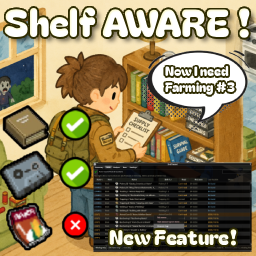
Shelf Aware!
par 76561198056972882
Tracks which skill books, recipe magazines and tapes you actually own, and where they are. I made this because I kept looting books I already had. I was keeping notes on a literal sheet of loot paper every save, and I still ended up with two copies of Farming Vol 5 in my bag. So I finally wrote a mod to do the bookkeeping for me. Demo video: youtube.com/watch?v=OW-KBpi1hTo (also up in the carousel) The main idea: when a container gets scanned near you, any book, magazine or tape inside is marked as seen, with the time and place. You don't have to pick anything up. Later, when you actually need Carpentry 4, the list shows where you left it. A bookcase at your base, or some house across town, with coordinates. Since 1.6 you can jump straight there: right click the row to see the spot on the world map, or pin it with a pen. Scanning runs about once per second while containers are around, and corpse piles are skipped by default (you can change that). The Summary tab is the overview. Skill books by volume, magazine progress, and per-skill VHS/CD counts. Skills tab: every volume with its level range and read state. Books you can't read yet because your level is too low are marked as well, so you know what to shelve for later. Right click a bookcase or crate to register it as base storage. You can register as many containers as you want, they all pool into one base. Anything inside counts as BASE, anything in your bags as HAND. That's the anti-duplicate part. Since 1.4 that check follows you into the field: books you already own get a small dot on their inventory icon (green means at base, blue means on you), and the tooltip tells you where your copy is. Plays fine alongside other book mods, the badge keeps to its own corner. And when you drag-select a pile of books, right click has "Grab only what's needed": it skips what you already own and takes one copy per book. I can't carry everything either, my overflow lives in a car trunk, and the tracker used to just lose it there. Since 1.4.2 you can right click a vehicle and register the whole car as base storage: trunk, glove box, seats, everything in it counts as BASE wherever the car ends up. Recipe magazines and schematics work the same way, with the recipe count per magazine. Settings: hover icon (drag it anywhere, or turn it off and use the hotkey - Numpad * by default, rebindable in Key Bindings), scan scope, corpse exclusion, and an optional Collector tab for non-skill tapes and music CDs. That one is off by default. It exists because I am that kind of person. Some notes: - Build 42 only, tested on 42.20. Safe to add to an existing save, data is stored per character. Since 1.5 your next character inherits it when you die (sandbox option to turn off). - Skill tapes show their base XP values. - English, Korean, Simplified Chinese and Russian, follows your game language. - Works at 4K and large font sizes, the window scales with your font size setting. - You can lock a row as owned or ignored, and write a memo on any item. - Multiplayer: personal tracking should work, but I had nobody to test with, so treat it as half-tested. Death inheritance covers respawning in the same session, rejoining later starts fresh. Shared base view is planned. If something breaks or you have an idea, leave a comment. Thanks bella (filter memory), Ritar (stacked crate reports), Nephiro (show-on-map idea), and everyone leaving feedback in the comments. Changelog - 1.6.1 - MP fix: records now survive other mods overwriting character data (auto restore + faster server backup). Reworded the confusing "v2 read-only" line in Settings (thanks ل and Danasaur). - 1.6 - Show on map: right click a tracked book to jump to its last seen spot on the world map, pen pins included (thanks Nephiro). The Base tab got a Map button too. - 1.5 - Records survive death: your next character inherits them (sandbox option to disable). - 1.4.9 - Cleaned up the harmless translation warnings 42.20.2 started printing to the console log. - 1.4.8 - Preventive safety guards for the B42.20.1 hotfix. - 1.4.7 - The window hotkey can now be rebound in game options (default Numpad *). Minor list rendering optimization. - 1.4.6 - Fixed books in a vehicle base randomly dropping back to OUT (thanks Blayyke). - 1.4.5 - Fixed long names overflowing into neighboring columns. - 1.4.4 - Grab only what's needed now respects the Collector option: entertainment tapes and music CDs are only picked up if you actually collect them. - 1.4.3 - Hotfix for 1.4.2: a crash when scanning vehicles (B42 changed an engine type under the hood) and some console error spam. - 1.4.2 - Vehicles can be registered as base storage: right click a car, everything in it counts as BASE and follows the car around. - 1.4.1 - Plugged a trap: registering a car trunk used to silently register the ground under the car instead. - 1.4 - Ownership badges and tooltip line while looting, right click "Grab only what's needed". Both toggleable in Settings. - 1.3 - Russian locale, 4K / big font scaling, book skill names now follow your game language. - 1.2.1 - Filter and sort choices survive reopening the window (thanks bella). - 1.2 - Simplified Chinese. - 1.1.1 - Removed the 1.1 stacked-crate option, one registration already covers the whole stack. - 1.1 - Sorting-mod compatibility, clearer corpse option wording (thanks Ritar). - 1.0.1 - Performance pass, description cleanup. - 1.0 - First release (2026-08-01). Workshop ID: 3775396697 Mod ID: PinyosShelfAware
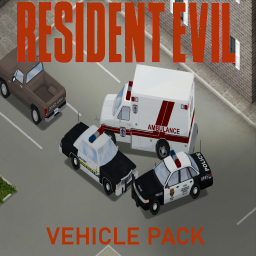
(B41) Raccoon City Vehicle Pack - 4.0
par 76561198969079348
September 1998...I'll never forget it... Update 3: Addded RC Link to Buses, Missouri State Highway Patrol and DNR, Arklay County Office of Emergency Management, Latham Township Police, Raccoon Dam Security, Raccoon State University Campus Police, Arklay County Police and updated RFD, RPD and ACDOC In the next major update i'm planning to add clothing to ATLEAST some of the agencies in the addon, still need to learn up a bit regarding clothing scripting for now At last its here long overdue, Remake of my very first addon Hope it was worth the wait Contains: - Raccoon Police Department - Raccoon Fire Department - Arklay County Sheriff - Arklay County Fire & EMS - Stoneville Township Police, EMS & FD - Raccoon City Public Works Departments - Spencer Memorial Hospital EMS - Raccoon Postal - Kendo Gunshop - Raccoon Taxi Companies - Raccoon City Transit Authority + RC Link - Latham Township Police - Arklay County Police - Missouri State Highway Patrol - Missouri DNR - Arklay County Office of Emergency Management - Raccoon State University Campus Police - Raccoon Dam Facilities Security And many more + more to come If you like it why don't you give it a like and drop comment to voice your suggestions, bug reports etc RNN, RC 77.7 and RC Link logo made by GalacticDissonanta Arklay County Seal made by u/Tsunamix0147 Arklay County Park Rangers logo to whoever made it, lost credits sadly Workshop ID: 2808653536 Mod ID: RCVPack
![[B42/41] No Menu & Loading Screen Music – Project Zomboid Mod](https://images.steamusercontent.com/ugc/16153776229315352825/0206AAB5A73F56EA386EA9C9F3A110F43C167613/)
[B42/41] No Menu & Loading Screen Music
par 76561198217926783
A small quality of life mod that disables the music from the loading screen and main menu. You will no longer be bothered by the screechingly loud music each time you start the game. Your ears will thank you. Normal music functionality resumes when your character loads into the world. If you prefer, you can also set the volume to whatever you want, separate from the vanilla music setting, via the mod options. On B41, use star's Mod Options (Build 41) Unlike other music mods, this one doesn't require any manual installation. Mod limitations: - Sometimes music will take a couple of seconds to mute when loading into a game. Workshop ID: 3702228788 Mod ID: NoMenuMusic

Kingsmouth B42
par 76561198049848725
Project Zomboid vanilla challenge map Kingsmouth in KY for B42 Versión to be used on KY, challenge mode in research (many bugs) Alternative north location: Ocuppied cells: (25,62),(26,65),(28,63),(29,66) (25,63),(26,66),(28,64),(30,62) (25,64),(27,62),(28,65),(30,63) (25,65),(27,63),(28,66),(30,64) (25,66),(27,64),(29,62),(30,65) (26,62),(27,65),(29,63),(30,66) (26,63),(27,66),(29,64) (26,64),(28,62),(29,65) How to add map to a existing save To delete chunks of an already visited area use this: You should only do it if you already have a saved game; it's not necessary to delete the chunks for a new game Workshop ID: 3498269494 Mod ID: KingsmouthB42 Map Folder: Kingsmouth B42 If you enjoy my work, feel free to toss me a coin.
![[B42] 360º Vision – Project Zomboid Mod](https://images.steamusercontent.com/ugc/63719325784219806/7700704FE70F217BBD251F9DBD1D2EBF48556454/)
[B42] 360º Vision
par 76561198094407063
Do you suffer from Tasty Stiff Neck Syndrome? - Do you feel anxious while performing long timed activities in unfamiliar places? - Do you compulsively spin your character every 30 seconds? - Have you ever jumped out of your chair when a zombie you never noticed crept up and gave you a loving hug from behind while tearing your precious little neck apart? If you answered yes to all any one of the options above, this mod was made for you: a cowardly 🐔 cautious player like me, who believes human evolution should have included decent peripheral vision before the apocalypse! What does this mod do? In less dramatic terms, 360º Vision removes the game's angular vision cone and grants full 360º vision, simply by intercepting at runtime the return value of the method responsible for calculating the field of view. How to install ⚠️ This mod does NOT require manual installation anymore! Just install it like any other mod! ⚠️ Previously, on top of maintaining a set of modified jar files for every game version, totalling over 300 MB, installing this mod required a tiresome web of manual steps involving replacing files inside the main jar package, and it all had to be redone after every game update. That was because PZ natively offers no framework for mods to alter its base methods. Fortunately, this mod has now been updated to be injected through ZombieBuddy, a framework built exactly for this purpose, removing the need for any manual work on the player's part. This change also removes the need for constant mod updates, since it no longer depends on editing and recompiling classes with every patch. In theory, this mod will only stop working if ZombieBuddy breaks, or if the method responsible for calculating the field of view changes. With that in mind, the new installation process for 360º Vision is simply: 1. Subscribe to ZombieBuddy and run its additional setup. 2. Subscribe to 360º Vision. 3. While the game is loading, enable 360º Vision in the ZombieBuddy mod list. What does it change? To determine the size of the player's vision cone, the game uses the return value of the method calculateVisionCone(zombie.characters.IsoGameCharacter) inside the class zombie.iso.LightingJNI 360º Vision merely intercepts this method's return value at runtime and replaces it with the (presumed) maximum value 1.0F, effectively widening the cone angle to 360º. FAQ - Does this mod work on build 41? Probably not, the module and class structure changed between builds 41 and 42. - How do I uninstall the mod? Just unsubscribe. However, if the last time you installed it was through the old method, with manual file replacement, the game's jar will still be edited and 360º vision will remain active. In that case, verify your game files through Steam (Properties → Installed Files → Verify integrity of game files) to restore the original jar. - Is it safe to add and remove this mod on existing saves? Yes, completely safe. - Will zombies get 360º vision too? No. This method only affects what gets rendered on your screen, not the zombies' AI. - Does this mod work on multiplayer servers? Partially. You will be able to see zombies, but not other players outside the normal field of view. - Since this mod runs outside the Lua sandbox, injecting Java code directly into the game, is it going to quietly run a Bitcoin mining bot and steal my data? maybe 👹 No, you can check the source code used to build it Patch_LightingJNI.java inside the mod folder at ..\360Vision\common\media\java\src\vision360\patch - Zombies keep disappearing behind trees, bushes and walls! Yes, zombies can still be hidden behind objects, as you would expect. You have 360º vision, not X-ray vision. - This mod hasn't been updated in N days, does it still work on the latest version? Probably yes. PZ hasn't changed the method responsible for calculating the field of view in over a year. - I followed every installation step but the mod doesn't work! 😭 Check whether: 1. ZombieBuddy is up to date and properly installed. 2. 360º Vision is enabled in the ZombieBuddy mod list. 3. You haven't run "Verify integrity of game files" on Steam after installing ZombieBuddy. If you have, the ZombieBuddy installer needs to be run again. If it still doesn't work, let me know in the comments and, depending on the nature of the problem, I'll try to fix it within 15 minutes to 7 days.
![Federal Ranger's [Chimera] – Project Zomboid Mod](https://images.steamusercontent.com/ugc/14020518786706123631/E1C582790A8B2D81CB4CE10056B074AB511A1A11/)
Federal Ranger's [Chimera]
par 76561198068788655
Federal Ranger's B42 A Completed Redux of Federal Rangers For Tomb / Desire Body Types probably the largest military clothes pack ever. this is several years of clothing. Enjoy Designed for BOTH Female & Male! There are 850+ textures in the mod. This is the final version. Mod Haven: Discord Workshop ID: 3766693411 Mod ID: Federal_Rangers_Chimera
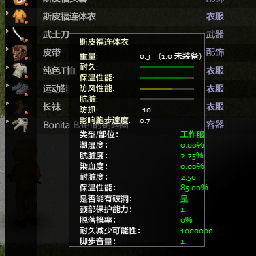
更多属性显示枪械plus
par 76561198148675287
修改了一部分该mod枪械部分描述模糊的部分,增加了更多的详细数据 Workshop ID: 2965021850 Mod ID: Itemsstatsplus
![[COS] 2b_SoulCalibur – Project Zomboid Mod](https://images.steamusercontent.com/ugc/2049738093669450638/0812D0B82E2B183D747253379DA2EAF75E8EA88D/)
[COS] 2b_SoulCalibur
par 76561199178116693
How Do I Use It? - You can go to the link below to see how to use it. - Link Recommended mode - Fashionoid - Gear Transmog - Hide All Attached Items - Clipping animation Fix How to use COS mode in build 42. - Navigate to the path where the mod is installed. - Create a 42.0 folder. - Create a common folder. - Paste the media folder / mod.info / preview.png into the 42.0 folder. The recipe code writing method has been changed in 42Build. Since COS (Costume) mode has approximately over 200 modes, converting to 42Build's recipe code is an extremely laborious task. In 42Build, you cannot create costumes in (42 build) the crafting tab. There are two methods: Spawn items in cheat mode. Select items in the clothing selection screen when creating a character. Like My Mode? - Join Our Discord If You Want Commission
![[B42/41] Cigarette Case – Project Zomboid Mod](https://images.steamusercontent.com/ugc/2414565089335238415/7B5902B3541624F9FF13F147AEAD798CF4F17C0A/)
[B42/41] Cigarette Case
par 76561198993860470
Works correctly in both single-player and multiplayer on 42.20 and 41.78.19 A cigarette case mod. It allows you to craft a cigarette case, store cigarettes in it, and smoke them instantly without taking them out. The cigarette case can be crafted from the crafting menu, and each case can hold up to 200 cigarettes. Its weight is half that of 200 individual cigarettes. Once you have cigarettes and a lighter, you can smoke directly without taking them out. It also supports a hotkey for smoking (default key: 0). You can change it in: Settings → Key Bindings → Custom Key → “Smoke”. It is compatible with the Cigarette Carton MOD for Build 41 and the Smoking Sounds Overhaul mod. In the sandbox settings, you can choose: Smoking duration No sickness from cigarettes when not a Smoker Gain Smoker effects even when not a Smoker For Build 42: Updated to match 42.15 vanilla behavior. If a vehicle has a battery and you are seated in the front seat, or if there is a lit oven, BBQ, or campfire on nearby tiles, you can smoke without a lighter. All lighter types available in 42.15 vanilla are supported. The case can store the following: Cigarette (Base.CigaretteSingle) Rolled Cigarette (Base.CigaretteRolled) Cigarette Pack (Base.CigarettePack) Insertion priority is: Cigarette > Rolled Cigarette > Cigarette Pack. When taking cigarettes out, they will always be returned as Cigarette (Base.CigaretteSingle). Workshop ID: 3191030396 Mod ID: CigaretteCase

Applebran
par 76561198120238432
Modern residential area north of Muldraugh 35x27 https://map.projectzomboid.com/?#10566x8135x940 Workshop ID: 2790929023 Mod ID: applebran Map Folder: Applebran
Survivor Leaderboard by Gus Puffy
par 76561197984809068
Survivor Leaderboard A live, server-wide leaderboard for multiplayer Project Zomboid. It ranks every survivor by days alive, PvP kills, and zombie kills — with built-in anti-grief penalties that quietly punish team-killing and victim-farming. Requires the Storm mod loader on the server. The scoring, database, and web API all run server-side; the in-game board is pure Lua, so connecting players just need the mod. Built for dedicated / multiplayer servers. Sponsors After The Fall — The #1 multiplayer server in the world The Board - Open it from the leaderboard button on your equipped-item HUD panel (multiplayer only) — the icon lights up while it's open. - Three rankings side by side: Days, Kills, and Zombies, each showing Place, Player, and score. - Updates live — the board is pushed to every connected client the moment something changes, so a fresh kill or penalty shows up without reopening it. - Every character is scored on its own, so alts on the same Steam account never share scores, and a new character only appears once it has something to rank. How Scores Work - Days — in-game days your current character has survived. - Zombies — that character's total zombie kills. - Kills — confirmed PvP kills, credited to the real attacker when a player dies. - Dying resets a positive kill score back to zero and clears your kill history — a new life starts clean — but any negative score from a penalty is kept. Anti-Grief Penalties Team-killers and spawn-campers don't get away clean: - Ally-kill penalty — your first kill of a teammate (same faction, or same safehouse) within an hour is free; every ally kill after that quietly costs you -8 kills. - Repeat-victim penalty — hunting the same player over and over? The third and every further kill of the same victim within an hour costs another -8. The victim is tracked by Steam account, so respawning or changing character name won't reset the count. - The two penalties stack — a single grief kill can trip both at once. Penalties land on a delay — a sweep that runs every in-game hour — so a griefer can never tell which kill dropped their score. Kill counts can go negative and stay there until honest kills earn them back. Bans & Cleanup - Ban a Steam ID and all of its characters — board entries and kill log alike — are removed immediately. - On every server start the board is swept against the ban list, so anyone banned while the server was down is cleared too. Admin & HTTP API - Stored in SQLite inside your save, so the board survives server restarts. - Optional HTTP/JSON API (via Storm) exposing the top survivors, killers, zombie-killers, and the full PvP kill log — each filterable by player and result limit. Ideal for web overlays, Discord bots, or stream dashboards. - Admin endpoints to set a player's kill score outright or run raw queries against the board. Server Options - Update Frequency — how often each client reports its days-survived and zombie-kill totals, from 1 to 43200 in-game minutes (default 60). PvP kills, penalties, and bans always update the board immediately, regardless of this setting. Tested and compatible with 42.20.0 5/29/2026 - Added a Zombies-killed board and a repeat-victim anti-farm penalty. Workshop ID: 3686333544 Mod ID: survivor-leaderboard-b42
![[B42] CounterStrike 2 Firearms – Project Zomboid Mod](https://images.steamusercontent.com/ugc/13335194543380044841/32FC3DF9510EEE767334D550FBF4313829126FB1/)
[B42] CounterStrike 2 Firearms
par 76561198142403070
Adds Counter-Strike 2 firearms, with the addition of some attachments. You can enable or disable vanilla firearms in sandbox options(mod attachments work on vanilla firearms). Firearms added (34 in total): AWP, G3SG1, SCAR-20, SSG 08 AK-47, AUG, FAMAS, Galil AR, M4A1-S, M4A4, SG 553 MAC-10, MP5-SD, MP7, MP9, P90, PP-Bizon, UMP-45 M249, Negev, MAG-7, Nova, Sawed-Off, XM1014 CZ75-Auto, Desert Eagle, Beretta, Five-SeveN, Glock-18, P2000, P250, R8 Revolver, Tec-9, USP-S Attachments added (15 in total): Scopes: ACOG 4x EOTECH 2x S&B 2-8x Razor 1x Micro 2x Vortex 8x Grips: Tactical Grip Angular Grip Bipod Lasers and Lights AN/PEQ 15 Laser AN/PEQ 2 Laser Sunfire Tactical Light Supressors: Supressor Bulk Supressor Slim Supressor Osprey Notice : this mod might increase the chances of finding firearms/attachments as the same containers that contain vanilla firearms/attachments will now also have the mod firearms/attachments. Credits All firearms are the same used in CS2 owned by Valve with slight changes such as texture, the attachments are made by D_U from Sketchfab Feel free to adapt the content of this mod for your own work, as long as you provide credit in the description. By using this content, you agree to keep your mod under these same rules—allowing others to use your work as long as they also credit the original sources. Workshop ID: 3686402161 Mod ID: CS2Firearms
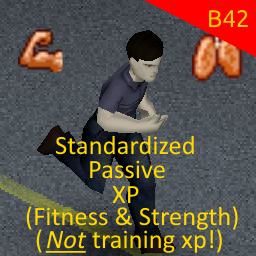
Standardized Fitness & Strength XP
par 76561198216563933
Standardized Fitness & Strength XP for build 42 should be compatible with versions <42.13 This is an update to the great mod by ConquerorKoala How it works Original description: This mod allows the player to alter the XP rates of passive skills Fitness and Strength. This does not alter XP gained from training (excercise), as there is a lot of mods which do that already. This alters only the passively gained XP for them, such as Fitness XP gained from sprinting, or Strength XP gained from hitting trees and enemies or carrying a heavy load. This allows you to set XP rates and the XP gain chance (it uses a one in X chance to give player XP in some cases) for Fitness and Strength separately. Also allows for what I call "minecraft" mode, in which the player can disable needing a weapon to gain Strength XP from hitting trees; consequently, you can bare-handed shove trees to obtain Strength XP (be sure you are hearing a hit sound and hit from a good angle/distance) and pretend to be Steve himself. Settings The mod settings are in the "Settings" -> "Mods" tab. Supported languages: EN ??, RU ?? Workshop ID: 3414404184 Mod ID: STFITNESS_B42 Workshop ID: 3414404184 Mod ID: STFITNESS_B42

FasterActions
par 76561198859966056
add new brita compatility Workshop ID: 2902379220 Mod ID: FasterActions Mod ID: FasterActions_RipCloth
![Warm Up [B42.20 Port & Fixes] – Project Zomboid Mod](https://images.steamusercontent.com/ugc/15977471836514032225/DE0E59969204CA2E8F89666440CFB76E8C8D2F21/)
Warm Up [B42.20 Port & Fixes]
par 76561199184631548
Acción simple que puedes realizar cuando tienes frío. Características - Fácil de usar. Simplemente haz clic en Warm Up en el menú contextual (esta opción aparece cuando tienes Hipotermia, tu temperatura corporal es baja o estás perdiendo calor). - Se puede realizar mientras caminas, vas en sigilo, estás sentado, en el vehículo, etc. - Bastante equilibrado. No podrás entrar en calor tan bien como al correr/hacer ejercicio, pero no te agotarás tanto. Sin mencionar las fuentes de calor. - Utiliza animaciones de los recursos del juego, por lo que encaja perfectamente. ¿Funciona en partidas guardadas existentes? Sí. Es seguro activarlo o desactivarlo en cualquier momento. Si el mod no funciona - Asegúrate de que esté activado en el menú principal de MODS. - Asegúrate de que también esté añadido a tu partida guardada. Haz clic en el botón Cargar >> Selecciona la partida >> Haz clic en Más... >> Presiona Elegir mods... - (Si alojas un servidor), asegúrate de que esté activado en las pestañas de Steam Workshop y Mods en los ajustes del servidor. Siempre puedes comprobar qué mods se están usando mientras juegas haciendo clic en el botón Mods en el menú de Pausa. ━━━━━━━━━━━━━━━━━━━━ English A simple action you can perform when you are cold. Features - Easy to use. Simply right-click and select Warm Up from the context menu (this option appears when you have Hypothermia, your core temperature is low, or you are losing heat). - Can be performed while walking, sneaking, sitting, in a vehicle, etc. - Fairly balanced. You won't warm up as well as running/exercising, but you won't get as tired either. Not to mention heat sources. - Uses in-game stock animations, so it fits in perfectly. Does it work on existing saves? Yes. Safe to enable/disable at any time. If the mod doesn't work - Make sure it's enabled in the MODS menu. - Make sure it's also added to an existing save. Click the Load button >> Select the save >> Click More... >> Press Choose mods... - (If you host a server), make sure it's enabled in the Steam Workshop and Mods tabs in server settings. You can always check which mods are being used while playing by clicking the Mods button in the Pause menu. ✅ COMPATIBLE WITH BUILD 42.20 STABLE The mod has been completely refactored to comply with the new Lua APIs and folder structure of Build 42. Supported languages: EN, ES, AR, CH, CN, CS, PL, PTBR, RU, TH, TR, UA (All converted to the new JSON format). All credits for the original concept and sound files go to the original author: 👉 Original Mod "Warm Up" (Build 41) Workshop ID: 3770091088 Mod ID: BION_WarmUp
![[B41/B42.18] Injectors [Distribution Update] – Project Zomboid Mod](https://images.steamusercontent.com/ugc/11606934642493258343/96599601346A215F59E40CF993F4227BE829CD53/)
[B41/B42.18] Injectors [Distribution Update]
par 76561199001960996
THIS IS A VERY EARLY B42.17 RELEASE! REPORT ANY BUGS AND ISSUES! Wiki on Google Sheets This mod is now Released, but still report(!) any issues. Huge thanks to the 3.5k subscribers who tried out the mod early! Suggest your ideas in Discussions below! Injectors is a project that introduces dozens of new injectors with positive and harmful effects, mainly inspired by EFT. Expect plenty of buffs to assist you on your journey - or prematurely end it if used incorrectly. :) Features: - A total of 23 injectors with special buffs and drawbacks. - Made with effort to closely replicate those found in EFT. - Fully world modeled and textured. - Sandbox configurable item distribution (rooms, spawns & chances). - Multiplayer ready (?). Injectors: - Adrenaline - AHF1-M Stimulant - 2A2-(b-TG) Stimulant - 3-(b-TG) Stimulant - eTG-Change Regenerative Stimulant - Meldonin - Morphine - M.U.L.E. Stimulant - L1 (Norepinephrine) - Obdolbos Cocktail - Obdolbos 2 Cocktail - P22 (Product 22) Stimulant - Perfotoran (Blue Blood) Stimulant - PNB (Product 16) Stimulant - Propital Regenerative Stimulant - SJ1 TGLabs Combat Stimulant - SJ6 TGLabs Combat Stimulant - SJ9 TGLabs Combat Stimulant - SJ12 TGLabs Combat Stimulant - Trimadol Stimulant - xTG-12 Antidote - Zagustin Hemostatic Known Issues: - To prevent level 10 players from losing their skills, perks use no level-up cap. However, this behavior causes most skills to break (e.g., Level 11 Strength behaves like Level 0 or even worse). The skills return to normal once the effects wear off. (fixed babyyy) Future Updates: - Build 42. (done) - Custom content. - Server-side rework. - PvP rebalance (?). - Injector recipes (?). - Framework improvements. (full rework) Update Logs: - B42.18 update. Reworked item distribution. - B42.17 test update. Fixed locales. Updated stat mutation. Updated item types. - B41 tooltip newline hotfix. - QoL: Injector effect descriptions with in-game tooltips. - B42 port. Minor infliction patch. Wiki update. - Full release & total overhaul. Bug fixes and improvements. Config-driven support. - Turkish prompt translation. Injectors are now handled using vanilla food logic. Injector stat fix. Hotfix Fixed missing item icons. - Alpha release. My Mods: - Present Wrapping - Pukeko Loading - Morale Patches - Injectors - Project CardZ - Read your Manga - Chonker - Weapon Cases Support My Projects - Commission Mods - Public Development Blog: Consider any membership (free or paid) on my Patreon! I'll appreciate it a lot! :³ GitHub source code. Workshop ID: 3437429771 Mod ID: Injectors
Zone Marker by Gus Puffy
par 76561197984809068
Allows server admins to define and manage colored zone overlays on the world map. Sponsors After The Fall — The #1 multiplayer server in the world Zones are organized into categories with custom colors and can be added, removed, and toggled at runtime. Each category appears as a filter toggle on the map options panel. All zone management is done through an in-game UI in the zone editor panel: - Create and remove zone categories with custom RGBA colors - Draw zones directly on the map by clicking and dragging - View, select, and remove zones from a scrollable list Zone data is stored server-side in a SQLite database and synced to clients automatically. Requires Storm mod loader. Tested and compatible with 42.20.0 Workshop ID: 3686768770 Mod ID: zone-marker-b42
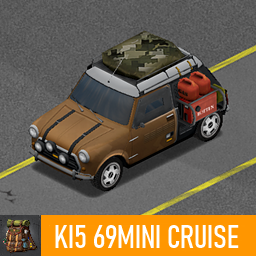
KI5 69Mini Cruise
par 76561198259271956
这是ki5车,69迷你 幸存者陆地巡游 This is the Ki5 vehicle, the 69 Mini Survivor Land cruise. ----------------------- 可以装备3个汽油桶和1个发电机,我修改了车内手套箱的容量为25. Three gasoline tanks and one generator can be equipped. I have increased the capacity of the glove compartment inside the vehicle to 25. ----------------------- 车辆性能要略微强于原版,必须安装KI5的相关前置MOD The vehicle performance should be slightly better than the original version. A relevant front MOD related to KI5 must be installed. ----------------------- 这辆车不容易出现,去居民区碰碰运气吧 This car is not easy to come across. Let's try driving around in the residential area. ----------------------- 所有功劳和权力归KI5原作者所有 All the credit and power belong to KI5 originally. Workshop ID: 3667389218 Mod ID: Rottten_69Min

True Music Addon: Brasileiras
par 76561198049103507
Addon para True Music, com mais 768 músicas brasileiras para deixar seu jogo mais divertido e abrasileirado. Nada melhor do entrar em um carro, abrir o porta-luvas e se deparar com clássicos do Legião Urbana, Raça Negra, Calypso ou até Leno Braga não é mesmo? Quais músicas? A ideia desse addon é trazer, na esmagadora maioria, exclusivamente músicas nacionais em português ou, em alguns casos, que não estão em português mas que são de brasileiros. Parte dessas 768 músicas são mais clássicas, com memes, rock nacionais clássicos, funks antigos, pagodes..., etc, e músicas que fizeram sucesso no passado. Apesar disso, músicas mais recentes também estão incluídas. Lista com todas as músicas do addon: https://pastes.io/y5ugrludgx Quer sugerir músicas? Maravilha! Mande ela aqui nos comentários e eu tentarei colocá-la em uma próxima versão do mod. Quanto mais músicas, melhor ;) Aproveita, dá um like no mod aí pra ajudar a outros BRs conhecerem as músicas! :) Veja também: Quer mais um pouco de músicas BRs e internacionais? Então conheça esse outro grande addon brasileiro, feito pelo Moura, com ainda mais músicas. E o melhor, os dois addons também funcionam juntos! Tenha o dobro de músicas pela singela bagatela de 2 cliques. Workshop ID: 2973474633 Mod ID: null_tm_musicasbrasileiras
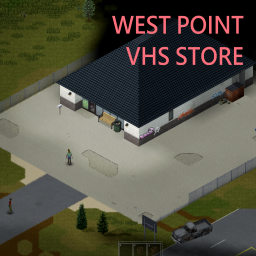
West Point VHS Store
par 76561198041411600
Version 2 of this mod is available HERE! Version 2 has another store, a trailer park and two farms. I leave this version up for the servers that are already using it, but it will not get updated in the future. I won't reply to comments here either. Workshop ID: 2714931247 Mod ID: VhsStoreNearWestPoint Map Folder: WestPointVhsStore
zRe HOME COOKING MOD by kERHUS
par 76561198034347328
!!! PZ v41.78+ (compatible with multiplayer) !!! !!! ADDED 54+ RECIPES AND 52+ ITEMS !!! Adds two books that teach how to cook home-made stews and wine! Non-renewable resources too: salt, vinegar, yeast, soap, charcoal! I highly recommend using it with the mod "Herbalist" and "Mo' crops"! Specification with mods: - Clean Ashes: - Sandbox option to take ashes and bones from burnt corpses! They are needed for crafting soap and glue! You can support me: 2202 2055 0691 1756 SBER (MIR) https://boosty.to/kerhus/single-payment/donation/493985 Workshop ID: 3243080607 Mod ID: zReHomeCookingMod
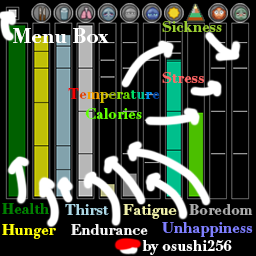
Minimal Display Bars - Build 42.20 (Standalone)
par 76561198376997934
Minimal Display Bars - Build 42.20 (Standalone) A standalone Build 42.20+ version of Minimal Display Bars for Project Zomboid. Features Configuration Right-click the Menu bar or any display bar to change its settings. Your configuration is saved only in your personal Zomboid/Lua .cfg file; the mod's packaged default files are never modified. Important: Standalone Version Mod ID: MinimalDisplayBarsB4220 Do not use this together with the original Minimal Display Bars (Workshop ID: 2004998206), or duplicate bars may appear. Server Setup WorkshopItems=3775659041 Mods=MinimalDisplayBarsB4220 Install the same Workshop item on both the dedicated server and every client. Credits and License Original mod by ATPHHe. This Build 42.20 compatibility version adapts and reuses the original code under the MIT License: https://github.com/ATPHHe/Minimal-Display-Bars Workshop ID: 3775659041 Mod ID: MinimalDisplayBarsB4220
Project Zomboid Guides
Installer des mods Project Zomboid - Guide Workshop
Installe proprement des mods Project Zomboid via le Steam Workshop : saisir les IDs, vérifier l’ordre, redémarrer le serveur et corriger les erreurs typiques.
Louer un serveur Project Zomboid – guide multijoueur
Configurer un serveur Project Zomboid : RAM, paramètres sandbox, mods Workshop, droits admin et vérification propre des erreurs typiques.
Serveur Project Zomboid avec support des mods
Installez les mods compatibles et pris en charge depuis le tableau de bord.
Louer un serveur Project Zomboid