Mods et plugins pour Project Zomboid
Ce catalogue répertorie 52 000+ projets Project Zomboid provenant de Steam Workshop. Les entrées peuvent être côté serveur, côté client ou requises des deux côtés, et inclure des cartes ou d’autres contenus créés par les utilisateurs. Avant l’installation, vérifiez la page source liée, la version du jeu et les dépendances.
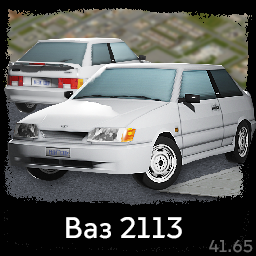
Lada Vaz 2113
par 76561198063653205
мод добавляет (не заменяет) в игру новый автомобиль - Лада Ваз 2113 модель стилизована под стиль PZ, имеет 6 цветов, 2 стадии разрушения, ржавчину, корректно работают фары mod adds (does not replace) a new car to the game - Lada Vaz model 2113 coupe model is stylized to the PZ style, has 6 colors, 2 stages of destruction, rust, lights work just fine Workshop ID: 2750812855 Mod ID: vaz2113

True Music: Metal & Hard Rock (Period Accurate)
par 76561198247176536
As of now (6/12/2023), all development on this mod will be on hold, indefinitely. Most songs work, but some don't. There are over 400 songs, and I do not have the hours of time to redownload all 434 songs. Sadly, I cannot just redownload the songs that aren't working, I must download and categorize every song in the mod to get it 100% working again. Please, if no songs are working, make sure you have downloaded both True Music and Tsar's Common Library 2.0 alongside this mod. Without those two mods, this mod is non-functional. If any songs aren't working after that, simply dispose of the tape as it won't be working again anytime soon. Forgive me for the inconvenience, but I am far too busy to be spending several hours on updating this mod. Thank you for installing it and using it anyway. Old Description: This mod adds OVER 400 period accurate metal and hard rock songs that you may listen to in your world in Project Zomboid! This mod is an add-on for the True Music mod. This mod will not function if you do not have both of the base mods. If you are not already subscribed to the True Music mod or Tsar's Common Library 2.0, please subscribe to both. There are currently over 430 tracks to listen to! These include songs by bands like Black Sabbath, Def Leppard, KISS, Led Zeppelin, Metallica, Motley Crue, Van Halen and many more! See the full list of songs here. Please do not put this into your modpacks or reupload this mod to the Steam Workshop. It has taken me hours to put together the list of songs and download each one. Instead, feel free to put them in your Mod Collections, which I do appreciate seeing. Thank you! Workshop ID: 2954246773 Mod ID: tm_metalandhardrock
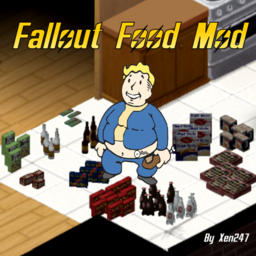
Fallout Food Mod B42
par 76561199078868260
This mod is a port of the Fallout Food mod to B42. This mod adds in pre-war food from the Fallout universe When you open a Nuka Cola you will receive a bottle cap, which could be useful for trading purposes. Items can be found both in shops and houses. This mod is a port of the Fallout Food mod to B42. And adds other food-related content from Fallout. This mod adds pre-war food from the Fallout universe When you open a Nuka Cola, you will receive a bottle cap, which could be useful for trading. Items can be found both in stores and in houses. Items include: Drinks: - Nuka Cola - Sunset Sarsaparilla Food: - SugarBombs - Cram - InstaMash - PorknBeans - Fancy Lads Snack Cakes - BlamCo Mac & Cheese - Big Pops Bubblegum - Dandy Boy Apples - Yum Yum Deviled Eggs - Cotton Candy Bites New! Added other types of Nuka-Cola: - Nuka Quantum - Nuka Cherry - Nuka Cranberry - Nuka Twist - Nuka Dark - Nuka Grape - Nuka Orange - Nuka Quartz - Nuka Victory - Nuka Wild New! Added Nuka-Cola Recipes and Nuka Mix: To be able to craft the Nuka Mix, you first need to find the Nuka-Cola Recipes and read it to unlock the crafts. The recipes implemented in this mod are based on the crafting from Fallout 4's Nuka-World DLC. - Nuka-Cola Recipes - Nuka Cide - Nuka Cooler - Nuka Love - Nuka Punch - Nuka Ray - Nuka Rush - Nuka Void - Nuka Xtreme - Newka Cola - Nuka Berry - Nuka Bombdrop - Nuka Buzz - Nuka Fancy - Nuka Free - Nuka Frutti - Nuka Hearty - Nuka Lixir - Nuka Power - Nuka Sunrise - Nuka Twin Available Languages: - DE: German - EN: English - ES: Spanish - FR: French - IT: Italian - RU: Russian - TR : Turkish Workshop ID: 3426711866 Mod ID: FOCM42
![Feed me now! [B42]
– Project Zomboid Mod](https://images.steamusercontent.com/ugc/17556699318902494/C598E0625B9F7C197D00192DD0223EE8E8E30594/)
Feed me now! [B42]
par 76561198017486374
This mod adds a bit of realism in a funny way, it makes your stomach growl/rumble when you're really hungry. Although this is meant to be humorous, beware when sneaking around on an empty stomach zombies will be able to hear your stomach growling from a short distance! if you play with zombies with pinpoint hearing enabled.. for the love of god... please don't starve yourself.... How it works?? - The more starving you are, the higher the chance of growling! - Zombies actually hear the growls so don't go starving in the middle of a stealth mission! ? Caution: Side Effects Include - Sudden zombie attacks when you're too hungry and too loud. - Your friends judging you for getting caught by zombies... because you forgot to eat. - New fear unlocked: "Stomach-induced permadeath." Notes: We haven't fully tested this on a large player base server.. so.. it might be too annoying for some when everyone's stomach noises is....uh.. noisy... this is built for a few friends for a little bit of RP. Safe to add and removed from mid-play-through. We might not update this. so.. if anyone wants to pick this up and improve.. go for it.. <3 Workshop ID: 3443400869 Mod ID: feedmenow
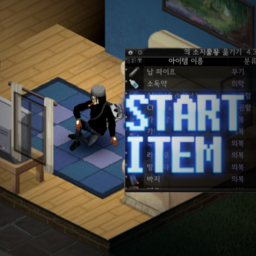
Start Item
par 76561198174819823
샌드박스 - 캐릭터설정 옵션 하단에 시작아이템 설정이 추가되었습니다. 아이템의 BaseId를 입력하면 캐릭터 생성 때 아이템을 얻습니다. 여러 아이템을 입력할 때 구분자는 세미콜론(;)입니다. (=숫자)를 뒤에 붙이면 그 수만큼 여러개 가져옵니다. 예시) Base.Spoon=3;Base.Fork=4;Base.ButterKnife Sandbox -Starting item settings have been added at the bottom of the character setting option. Enter the BaseId of the item to get the item when creating a character. When entering multiple items, the separator is semicolon(;). If you put (=number) after BaseId, you'll get as many as that number. ex) Base.Spoon=3;Base.Fork=4;Base.ButterKnife Workshop ID: 2764359109 Mod ID: MNStartItem
Make Workable Iron for Blacksmith B41
par 76561198077892561
Originally a private mod for making workable iron out of scrap metal since Blacksmith's furnace is broken in MP. Intended to be used with Blacksmith mod. Update Oct.19, 2023: Renamed recipes, added new crafting components to the recipes, and adjusted the conversion ratio according to metal value. (it's a buff!) Now you can not only craft workable iron from scrap metal, the recipe now also accepts other items such as pop cans. There are new recipes that allow you to use metal components (pipes, bars, and sheets) to craft workable iron. Update Sept.14, 2023 Repaired a bug due to a duplicate file name resulting in the loss of a few Blacksmith recipes, including ammo. This should work fine now. --Credits to @Es Juan for his original "Workable Metal" mod that inspired my mod, I made some small adjustments. --Link to original mod: https://steamcommunity.com/sharedfiles/filedetails/?id=2880402413 Workshop ID: 2909845522 Mod ID: makeworkableiron
Berserk: The Destiny Of ManKind
par 76561198068788655
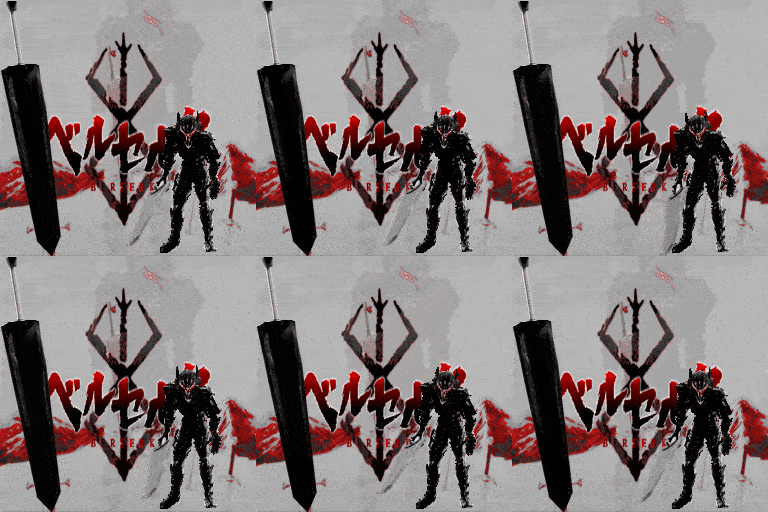
~Ash: ~Nalmac 2024: Berserk: The Destiny Of ManKind In this world... Is the destiny of mankind controlled by some... transcendental entity. or law? Is it like the hand of God hovering above? At least it is true, that man has no control —even over his own will.. Become The Newest Struggler, By Finding What Remains, and Putting Him Down, As an Alternate Reality Variant of Guts succumbed to the Knox Infection And is No More. Guts Will Appear After 60 days Ingame with Very Rare Chance Wield the Mighty Black Blade: The DragonSlayer Berserk: The Destiny Of ManKind: - Two Dragonslayer Variants: 1 To Have Custom Animations: The Other Based On A Customised Sledgehammer: Its Heavy & it Will Hurt. - Stats, Length, Damage, Sounds, All Customised & Set, This Weapon & Armor Are Very Powerful. - The Original Sounds For the Dragonslayer Are Present ~ ! - Custom ANimations will play when equipping this Armorset. These are intended as experimental & due to be replaced Via Motion Capture Soon - Gut's Hair & Makeup Maintained From Nalmac's Previous Armor Mod - The Berserker Armor is Segmented, To Allow Amputation: Gauntlets, Boots, Torso, Helmet, Cape, - Helmet Up / Down Swapouts - Custom Animations, And Code Have Been Left inside the Mod For Some extra Features Coming Soon Credit's For the Original Model Used as Baseline: Extra Credit's To the PS2 Version of berserk For the Cape Which has been Repaired & Upgraded for the Mod PERMISSIONS. ASK FOR ALL MOD INQUIRIES RELATED TO PERMISSIONS: IE: do not re-upload this Mod under ANY circumstances. Not On the Workshop, or Anywhere. Support the Official Release. Workshop ID: 3346747342 Mod ID: BerserkDestinyOfManKind
TiRekS' Propane Station & The Workshop Compatibility
par 76561198013848514
This modlet updates a single file to allow for refilling the Industrial Propane Tank from The Workshop Mod. That's it, it just works. If for some reason you are carrying both a regular propane tank and an industrial one to refill, two refill propane tank options will show up. One for each type (even though they are worded the same). Be sure to load this AFTER the other two mods that are required. Workshop ID: 2748628874 Mod ID: PropStationWorkshop
Last Stand Together
par 76561198012326036
A multiplayer adaption of Project Zomboid’s Last Stand mode. WARNING: This mod is an overhaul to how Zomboid functions, it wipes the entire world of zombies and all players are subject to play in the Last Stand Zone. Key features would simply not work in a modular-event-zone format. As such, NO this mod is not suggested for adding and removing from a server. This mod lets you set up a Last Stand survival zone in multiplayer (or singleplayer). You and your friends pick a building, and waves of zombies will attack. The goal is simple: survive as long as you can. Also features an "automatic" mode which selects a building FROM the entire map at random when everyone is dead. Zombies wave population, intervals, and more can all be configured in the panel or in sandbox options. Instructions: In Singplayer or in MP as admin/host (or debug mode) hit escape and view the Setup Panel. Stand inside of your building of choice and get ready to defend your base of operations. Full (and automatic) integration with Shops and Traders (see: required items). Shops arranged using Shops and Traders will automatically fill the building's most container-heavy room. Comes with a standard array of shops. Commissioned by Djackz Further sponsored by BowlOfOodaLoops Copyright 2026 Chuckleberry Finn. This item is not authorized for posting on Steam, except under the Steam account named Chuckleberry Finn. Workshop ID: 3534542229 Mod ID: LastStandTogether
Happy's Anime Songs
par 76561198119704536
A addon For Lifestyle Adds: 7 songs Electric guitar Songs: FariyTail op1 (level 3) Fireforceop1 (level 5) BlackCloverop5 (level 3) BlackCloverop1 (level 4) Acoustic guitar Songs: Chainsaw man op (level 3) Your Lie in April Op (level3) Keytar Songs: Insanity (level5) Workshop ID: 3157835724 Mod ID: HappyAnime
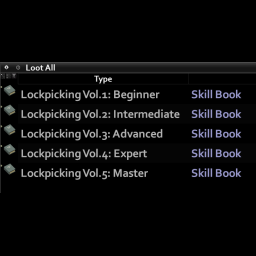
Lockpicking Skill Books
par 76561197995448717
This mod adds the skillbooks for lockpicking! Should work with any Lockpick mod if they use "Lockpicking" as Skill. Choose the lockpick mod you want: Better Lockpicking (reupload) zRe Better Lockpicking or choose any others Lockpicking mods. Workshop ID: 2967113987 Mod ID: E0bLockpickingSkillbooks
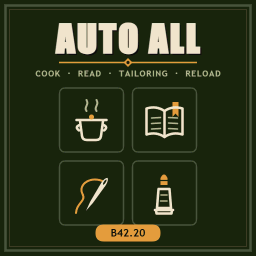
AutoAll 42.20
par 76561198142615838
GUYS THE ORIGINAL AUTHOR OF THIS MOD RELEASED BETA !!!! AutoAll by Robson Foster THIS MOD WILL BE DISCONTINUED, JUST AN ARCHIVE!!!!! Enhanced quality of life mod with nine powerful automations for Build42.20. 🍳 Auto Cook: Right-click any pot, bowl or pan to automatically fill meals with optimal ingredients. Smart food distribution prevents unhappiness. Configure dish types, ingredient ratios, and meal goals (calories, hunger balance, or weight loss) through an intuitive interface. 📚 Auto Read: Right-click any book to automatically read all skill books and recipe magazines within reach. Intelligently skips materials above or below ns each item to its original location. Enhanced quality of life mod with nine powerf.20. 🍳 Auto Cook: Right-click any pot, bowl or pan to automatically fill meals with optimal ingredients. Smart food distribution prevents unhappiness. Configure dish types, ingredient ratios, and meal goals (calories, hunger balance, or weight loss) through an intuitive interface. 📚 Auto Read: Right-click any book to automats and recipe magazines within reach.Intelligently skips materials above or below your skill level and returns each item to its original location. 🧼 Auto Clean: Single-click washing solution for any water source (sink, toilet, bath, rain collector, barrel, or well). Cleans you, your clothes, gear, and di - with or without cleaning products.Automatically wrings clothes and re-equips them. 💉 Auto Sterilize: One-click sterilization for all bandages and rags in your inventory or containers, using available alcohol or boiled water. ✂️ Auto Rip: Batch-convert looted clothing into ripped sheets, denim strips, and leather strips. Protects worn, held, and favorite items. Returns materials to original containers. 🔧 Auto Dismantle: Right-click electronics (watches, clocks, radios, walkie-talkies, CD players, headphones, torches, remotes) to dismantle all at once for Electrical XP. Efficient single screwdriver use. 🪡 Auto Repair: Automatically find and repairle clothing, including worn items.Intelligently selects materials for full restoration. 👔 Train Tailoring: Dedicated training mode t unpicks all body parts until materials run out or you stop it manually. 🚗 Auto Mechanics: Two powerful vehicle optioarts or install all carried partsautomatically. Skips uncertain operations to prevent gambling with parts. 🔫 Train Reload: Right-click magazines or firactions until movement or ESC press. Perfectfor skill training. ✨ All automations use vanilla timed action b gain, animations, sounds, and multiplayersynchronization. Fast-forward compatible in single player. ⚙️ This mod is compatible with Tchernobill's Auto Cook, Auto Tailoring, and Auto Reload - running them together simply provides duplicate menu entries. Workshop ID: 3781561040 Mod ID: AutoAllDxrty
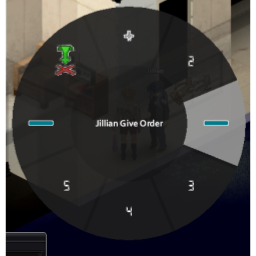
RadialMenu addon SuperbSurvivors v2.0
par 76561197987727467
adds RadialMenu, to be an alternative to context menu to interact with survivors default key: hold X (requires survivor nearby), can be change in keybind menu free html game that i made in lua for play on any wait time (without use phone storage) SOLONE Charles (111%) is gone. SOLONE is the soul revival — infinite enemies, brutal powerups. How long can you SOLONE? Tags Arcade, Bullet Hell, Endless, Fast-Paced, lone-survivor, Minimalist, Retro, Roguelike, Top down shooter Help us achieve a 5-star rating! Our content has about 1k subscribers, but it's currently under-rated. Please support a 👍 on it. Your support makes a difference! Thank you ( 171 ratings = 5-star rating ) artists on current version: Ellis,Toad update 02/23: now you can use controller joystick to effective play with npc players, credits to SalamanderAnder's suggestion I suggest you use with that mod (FPS Increase): Superb Survivor Spawn Limiter addon controller: hold Map Menu D-pad and tap (not hold) D-pad up to confirm option looking for artists to radial menu icons, post arts on discussion, that i include + credits for modders feel free to use the tool that i create to debug this controller compatibility using a virtual joystick: https://github.com/rslgp/virtual-controller-opensource Fire Trail pour while walking gas on ground and ignite it vhs in cars watch tv,vhs,cd, on moving vehicles true music compatible Wheelbarrow craftable wheelbarrow to move items Superb Survivors Spawn Limiter +FPS by limiting spawn npc Recommend Mods in-game Discover and Share mods in-game with others Legolas addon shoot while having arrow Dragon Radar help search looking for items pix,paypal,cardReifel Join our passionate collaborative community discord and sometimes contribute in mods! Your valuable opinions and contributions will help us create flawless mods. From participating in polls,A/B tests, brainstorming ideas, requesting/suggesting cool features, play tests, multiplayer compatibility tests, translations, and controller support discussions, there are plenty of ways to get involved, and you don't need coding skills to do it. We're a passionate community that thrives on collaboration, and we can't wait to welcome you aboard! Don't wait any longer - join us today and help shape the future of modding! Workshop ID: 2927368291 Mod ID: RadialMenu_SS_addon
![RE2 Zombies Sounds [41.71] – Project Zomboid Mod](https://images.steamusercontent.com/ugc/1860548222790984964/69D2E966F562EBBD0718C4F385D1ED840F7173EE/)
RE2 Zombies Sounds [41.71]
par 76561198048940067
BEFORE INSTALLING THE FILES OF THIS MOD, BACKUP OF YOUR FILES BEFORE First step go to this place C:\ProgramFiles(x86)\Steam\steamapps\workshop\content\108600\2693691556\mods\RE2 Zombies Sounds\media\sound\banks\Desktop , copy the ZomboidSound.bank file... Second step After you copy the ZomboidSound.bank file, go to this folder C:\ProgramFiles (x86)\Steam\steamapps\common\ProjectZomboid\media\sound\banks\Desktop is placed in the Desktop folder, remember to backup this file first If you've done all of the above, just open the game and enjoy Some changes I made to this mod RE2 crows sound RE2 sound of some doors RE2 ambient sound RE2 menu effects sound RE2 Zombie Sound I'm still working on the RE2 music mod for pz, to get more involved playing with this mod If you have any sound suggestions or something like that, you can leave them in the comments below so I can improve or add new sounds to this mod. MY OTHER MOD THAT MAKES THE GAME A LITTLE DARKER FITS WELL WITH THIS MOD https://steamcommunity.com/sharedfiles/filedetails/?id=2617374908 Thank you, enjoy Workshop ID: 2693691556 Mod ID: re2zombiessounds
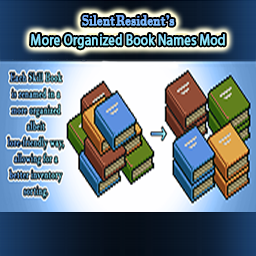
SR's More Organized Book Names Mod
par 76561198010345591
MOD INFO: A tiny mod which changes the skill books' names, allowing for a better inventory organization and sorting. HISTORY: All the skill books in the game, are renamed in a lore-friendly way without deviating from the original keywords used by the developers for their naming, while at same time this enables them to be better organized in your inventory. NEW OR EXISTING SAVES: It doesn't matter if your save is new or existing. The mod works regardless of game save. Upon subscribing/enabling the mod in your save file, you will find all the skill books automatically reorganized in your inventory, reflecting their new names. UNINSTALL: My mod can freely be uninstalled/unsubscribed anytime, safely, and without problems. However, if the mod is uninstalled/unsubscribed, the skill book will revert back to their default names. COMPATIBILITY: This is a very simple mod which changes the skill book's names. It should be compatible with every mod out there, including ones that adjust book reading speeds or whatever. So far, no compatibility issues may be found, but if there are any, let me know. RECOMMENDED MODS: My mod pairs well with my other book mod, which fixes the lack of unique icon for the Tailoring Skill Books: https://steamcommunity.com/sharedfiles/filedetails/?id=2454864804 - - - - - - - - - - - - - - - - - - - Workshop ID: 2455083701 Mod ID: SRMoreOrganizedBookNamesMod

Unlimited Trait Points
par 76561197992897288
Made by Zeeb. Workshop ID: 2103741794 Mod ID: unlimitedTraitPoints

Jumpscare Ban by Gus Puffy
par 76561197984809068
Plays the Withered Foxy jumpscare full-screen on a player's client the instant they get banned. Sponsors After The Fall — The #1 multiplayer server in the world Once the banned player is gone, the server gives them a send-off for everyone still online: it announces 'Kachow' in chat with a Lightning McQueen sound, then a few seconds later announces 'THUNDER' with a matching thunderclap. Also adds three extra admin debug commands: - /kachow - Lightning McQueen's 'Ka-chow!' - /fart - exactly what it sounds like - /cry - waaaah If you don't specify a username, everyone on the server will hear the sound effect. Specify a username to play a 3D positional sound at that player's location and float a random text bubble over their head. Players who'd rather not hear those can turn them off under Options > Mods > Jumpscare Ban. The ban jumpscare and its send-off always play. Inspired by Nipeng's '1/10000 Chance for Withered Foxy Jumpscare Every Second' mod. Requires Storm mod loader. Tested and compatible with 42.20.0 Workshop ID: 3716129274 Mod ID: jumpscare-ban-b42
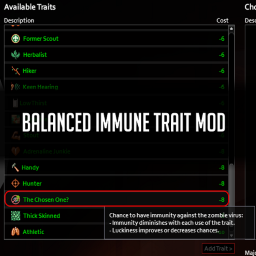
Balanced Immunity Trait
par 76561198054989316
Description: Have you ever wanted a mod that introduces a form of zombie virus immunity without it being too game breaking or taking the fear away from being bitten by a zombie? Well this is the perfect mod for you. Introducing the Balanced immunity trait mod. Features: - Trait does not have a 100% chance of granting immunity to the virus - Even while having immunity to the virus or while under the effects of immunity, the side effects of the zombie virus are still simulated, meaning you will never truly know you are in the home run. - Catching the virus causes a diminishing effect on your immunity, meaning next time you might not be so lucky. - Lucky and unlucky trait effect the chances on having a immunity against the virus and effect the diminishing effects of the trait - Provides a balanced feeling to a trait which would otherwise be seen as overpowered and possibly grant your survivor a second chance. - Has a nice little custom graphic for the trait icon that suits the games art style :) Questions And Answers: Q1: Will this work for multiplayer? A1: I've tested this in a hosted world between me and a friend and it would seem that it works for multiplayer. please report any issues if I am incorrect. Q2: Can I install this mod and save an already infected survivor? A2: No. Q3: What are the chances on gaining immunity? A3:I'll leave a spoiler discussions, I recommend you use this mod without knowing however if you truly wish to know the values, they will be in discussions. don't tell anyone ;) Q4: Would this work for Build 40? A4: More then likely, however I have not tested this mod in build 40 so I can not confirm. Workshop ID and Mod ID: Workshop ID: 2709400212 Mod ID: BalancedImmunityTrait

Ford Fiesta Titanium Mk 7.5
par 76561198148098007
This is an example mod with two worlds. You can use this as a template for your own map mods. update 13-3-22 Better Vehicle bodywork Texture improved Better rim texture City spawn Improved lights texture , vehicle model and car physics script Trailer Capable mod creation 6-3-22 Adds Ford Fiesta Titanium Mk 7.5 (2013-2017) Cheat Menu Spawn Car Compatible Workshop ID: 2774770948 Mod ID: FordFiestaTT
Project Zomboid Respawn Redux
par 76561197970531419
Death doesn't have to be the end. Save your character with one click - on death, a new character with the same name is restored right where you saved: skills, stats, position, and (optionally) equipment. How it works - Hit Save Player whenever you like. Only that snapshot counts - die, and any new character with the same first and last name is restored from it. - No need to remember the name: saving adds a "PZR <name>" entry to the character creation Saved Presets dropdown that fills in the name and appearance for you. - Each character on an account gets its own save slot, so multiple survivors (and multiple players on a server) can all use the mod side by side. - Respawning has a price: each skill has a chance to drop a level (fully configurable, see below). - Death destroys nothing any more: whatever the respawn doesn't hand back drops on the ground where you died instead of being deleted, and your corpse (or the zombie it becomes) is emptied the moment you die - in multiplayer too, handled server-side, so nothing sits lootable and nothing wanders off with your gear. - Died and logged out before respawning? The restore now picks up automatically the next time you log in - even across a server restart. Previously this left you with a blank character. Per-character options - Keep Clothes - the old Keep Equipped, renamed (your existing setting carries over). Respawn wearing what you saved in: your outfit and your bags, but the bags come back empty. Everything you were carrying drops on the ground where you died, so nothing is destroyed and you have a pack to haul it home in. The corpse and any zombie it becomes are emptied, so nothing is duplicated and nothing wanders off with your loot. - Keep Pack Contents - your bags also come back holding what they held when you saved. Only what you added to a bag since then drops where you died. Requires Keep Clothes, and is off by default - existing characters must tick it and re-save. Note this is the looser setting: the restore is a snapshot, so gear stashed somewhere safe before dying comes back as a second copy. Server admins can lock it off. - No Skill Penalty - disable the skill loss roll. - Cure Infection - the restored character has the zombie infection removed. Get bitten, save, respawn clean. - Heal Injuries - respawn with wounds and pain fully healed. - Respawn At - choose between your save point and the world's normal spawn (the server's spawn region, your start town, or a safehouse). Pick Default Spawn to keep your skills, stats and gear without keeping your location. Options are stored with your save - set them, then hit Save Player again to apply them. Keys always survive death, riding along on your own key ring. Sandbox options (server admins) A "Respawn Redux" sandbox page lets you tune the skill loss chance (default 15%) and the minimum skill levels for passive and regular skills. New in v2.1: every per-character option has a pair of settings - its value, and whether players may change it. - Players can change: on - your value is just the starting point for new characters. Players set it themselves from there. - Players can change: off - the control is greyed out and pinned to your value. This works in both directions: lock Heal Injuries on so every respawn is fully healed, or lock Keep Clothes off so nobody keeps their gear through death. Locks are enforced on the server, not merely hidden in the interface, so an out-of-date or modified client cannot tick past them - and they apply to characters who already saved with a different setting. Every option defaults to changeable, so existing worlds behave exactly as they did before. UI The mod docks as an icon at the bottom of the left sidebar, stacking below the game's own icons and those of other mods. Click it (or press SHIFT-U) to open and close the window, which appears beside the sidebar and never opens on its own. Hover the "?" for full in-game instructions. The log area reports every save, restore, and penalty roll, and keeps its messages while the window is closed. Build 42, singleplayer and multiplayer. All credit goes to the original author. This Redux is a continuation of his work. Original Work: https://steamcommunity.com/sharedfiles/filedetails/?id=1511399643 Workshop ID: 2685600088 Mod ID: PZRespawnRedux
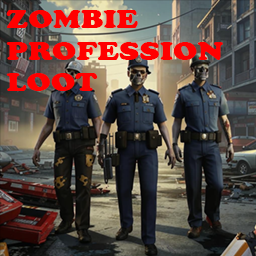
Zombie Professions Loot Mod
par 76561198400654961
Zombie Professions Loot Mod Description: Are you bored with the monotony of zombie loot? Our mod adds a new loot generation system that makes zombies even more realistic and interesting! Each zombie can now carry items corresponding to their previous professions. Key Features: - Professional Loot: Each zombie will have loot corresponding to its previous profession. Police zombies can carry weapons and ammunition, medics can carry medical supplies, and builders can carry tools and materials. - Variety of Items: Hundreds of new items that can be found on zombies. This makes the search for loot more exciting and varied. - Balance: Loot is adjusted in such a way as not to upset the balance of the game. Rare and valuable items remain rare, while less valuable items become more common. - Atmospheric: The mod enhances the atmosphere of the apocalypse, adding realism to the game world. Contacts and feedback: If you have suggestions, questions or find bugs, please contact me via Steam or leave a comment on the mod page. GitHUB: You can see the code on github. My other mods: - Farming mod (More vegetables and trees): Thanks: Thanks to everyone who supported me in creating this mod. Special thanks to the Project Zomboid community for their inspiration and support. If you like my mods, please consider supporting me with a coffee, so I don't fall asleep while supporting old mods or making new ones? Last update description: v.1.04a 2024-06-05 Changed the mod icon. Added spawn of firearms in simple zombies but with an extremely low chance of spawning. Fixed excessive spawning of chair legs. Instead, the chance of spawning knives and other weapons has been increased readily available weapons at the beginning of the apocalypse. Reduced the spawn chance of toothpaste, razor and toothbrush in zombies by 40%. Added spawning of educational books in school backpacks. The chance of spawning melee weapons has been redefined; for zombie women, the chance of spawning kitchen weapons (knives, etc.) has been increased. Zombie men have an extremely tiny chance of spawning a sledgehammer, a reduced chance of spawning a walker for bread, butter, etc. increased chance of spawning a screwdriver, baseball bat, kitchen knife p.s. The Q button automatically makes the character invulnerable, but it works when there are more than 50 zombies nearby?. Workshop ID: 3248602631 Mod ID: UAZL

Stone Stacker
par 76561198138494366
DEPRECATION WARNING! This mod has been deprecated, replaced in favor of a unified mod with sub-mods, in a single package. Further updates and bugfixes to this mod will not happen. If you want to retain functionality of this mod, suggest edits, report bugs, etc... please subscribe to the following mod instead: Unified Adjustments This mod will be hidden soon, and removed from the Workshop entirely a little while later. Re-uploads will not be authorized. Workshop ID: 2932188191 Mod ID: StoneStacker
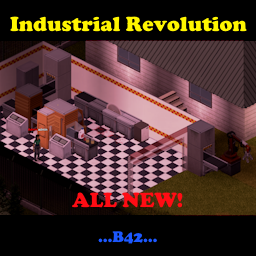
Industrial Revolution B42
par 76561198092535367
Does not work yet in 42.13.1 MP, it will require a complete recode because all item movement is server side now Welcome to the Industrial Revolution B42! Added new functionality for Industrial Revolution Vehicle Parts to spawn vehicles. Use factory pieces to build an auto-sorting lair, machines that build and repair items, or saw everything down to dust... This release version uses Factory Pieces add on to run. In order to build the machines you need to find the 5 magazines from Factory Pieces first: Factory Life Magazine Volume 1: Go Conveyourself! Factory Life Magazine Volume 2: CNC & Me! Factory Life Magazine Volume 3: I SAW it all! Factory Life Magazine Volume 4: Sorting out your life! Green Oven Silo Generator Design Manual With these mods combined, you can build factory pieces from scratch and use them to activate existing factories or make a new fresh factory of your own. The launch version has a limited recipe list with the idea for growth, please drop your ideas for recipes on the discord, discussions or in the comments below. https://discord.gg/W5zapqD9JD New Exhaust Fans in B42! Build them in a square where you place your generator to extract the fumes from it out of the building. All automatically, but the fans will not start until power is there and will not extract unless a running generator is under the fans in the same square. Conveyors These will push items from place to place and in factories these will come pre loaded with items based on the factory type. Added the ability to push items to the vehicles through the conveyor belts. These now add items to multiple containers in a square. Conveyor Lifters These will push items from floor to floor. (You will need to read the magazine if you haven't since the update to get the lifters) Track Lifters These will take items from place to place up high and will also fill multiple containers in a square. They can filter by item type. Example: They can pull wood planks only or a list of items. Robotic Claws These will take items from vehicles and containers. They can sort into a separate direction items based on conditions and move the rest a different direction. They will also attack zombies in the target pick up square, strip the bodies of items, place the items into the deliver to square, and dispose of the body. Should one wander in... UPM - Universal Production Machines These will sort items based on display categories and is compatible with Better Sorting. There is also a consolidation mode that will hold back partial items until a full item can be created. During the process it also kicks forward any empty containers with version 1.13. These machines can now change direction as well, the other outputs and filters switch to match as it turns. Saws These can be used to cut logs to planks, planks to sticks, sticks to scrap wood. They can also cut metal sheets to small metal sheets, small metal sheets into scrap metal, and scrap metal into unusable metal. With Authentic Z loaded, you can throw corpses onto the belt and the saws will turn them into tainted meat chunks. Control terminals These can be configured to control 3 milling machines at once. Drum and Tower Hoppers These are used to hold secondary materials that can be used in automated production. Milling machines These can have recipes added into them to repair some basic items as well as create new items. The drum and tower hoppers need to be placed alongside the mill for it to find them as seen in the photos. Mills will show the materials needed for the items to be made. The primary item needed should enter via the conveyors and the secondary materials should be in the hoppers or on the conveyor input. The repair process can now repair items with less than max condition so you don't need to wait for something to break. Recipes can now include fluid input, with a placeholder item in the recipe and a container of the right fluid in the hoppers. Industrial Conveyor Ovens Used to thaw or cook foods with a trip through the machine, one for each step in the process. From frozen to thawed and then room temp to cooked. No chance of burning. Auto Butcher Used to attack zombies and animals that wander too close, cutting them up, taking their items and depositing them inside it's storage compartment. Blood from the butchering can be stored in fluid containers placed on the west side of the butcher for collection under the fluid output. It can be configured to push items in a direction of choice which will fill stacked boxes, conveyors, or load into vehicles. Any sprite based containers will do. See video for more information. https://youtu.be/MhHh-kHEwkw Volume Slider: All New! A volume slider for the machines has been added to the mod options screen. Saws are terrible at perfect component extraction, so a deconstruction option was added to milling machines. Example: the baseball factory by default can convert logs into baseball bats, add nails into a drum or tower hopper and switch the recipe to spiked baseball bats and it will create them from baseball bats. Set direction and power on any of the devices. Right clicking on the objects will bring up basic menus to configure them. One of my favorite parts is coming home and dropping all my loot on a conveyor, the conveyor brings them through the sorters and dumps the materials by category into the boxes or on more conveyors. For instance, you can put a freezer next to the UPM in sorting mode and set food to be pushed into them. You can also configure the directions for the filters to send multiple categories into the same box with one sorter. Recipe Add-Ons Now Possible! This new version in v1.17 now unlocks the hard coding between this mod and the recipes it uses. It also pulls in lists using event triggers (Thank you, Elyon!). In the coming days I will explain how to make the add-on mods to pull outside recipes into this mod. Add-ons already created by other modders: Industrial Revolution Craftable Projectiles Add-on https://steamcommunity.com/sharedfiles/filedetails/?id=3364732874 Industrial Revolution Brita Add-on https://steamcommunity.com/sharedfiles/filedetails/?id=3364732562 Now compatible with Organized Categories. https://steamcommunity.com/sharedfiles/filedetails/?id=3370707195 **Added an update with a sandbox option to force add-on mod categories to float to the top of the filtered category lists.** This has been tested in multiplayer and can be added to an existing game. Make sure you have the prerequisites! Workshop ID: 3400131934 Mod ID: IndustrialRevolution

Josh Hutcherson Level up Sound B42/B41
par 76561198851921519
The mod was made at the request of @October01 Made for fun, enjoy it! It works on 41/42 check out my other mods: Workshop ID: 3137002438 Mod ID: whistlelevelup
Project Zomboid Guides
Installer des mods Project Zomboid - Guide Workshop
Installe proprement des mods Project Zomboid via le Steam Workshop : saisir les IDs, vérifier l’ordre, redémarrer le serveur et corriger les erreurs typiques.
Louer un serveur Project Zomboid – guide multijoueur
Configurer un serveur Project Zomboid : RAM, paramètres sandbox, mods Workshop, droits admin et vérification propre des erreurs typiques.
Serveur Project Zomboid avec support des mods
Installez les mods compatibles et pris en charge depuis le tableau de bord.
Louer un serveur Project Zomboid