Mods et plugins pour Project Zomboid
Ce catalogue répertorie 52 000+ projets Project Zomboid provenant de Steam Workshop. Les entrées peuvent être côté serveur, côté client ou requises des deux côtés, et inclure des cartes ou d’autres contenus créés par les utilisateurs. Avant l’installation, vérifiez la page source liée, la version du jeu et les dépendances.
Custom Container Capacity
par 76561199106999378
Custom Container Capacity This mod was created for personal use, but maybe someone else will find it useful. Tested on: B42 (legacy_42_12) ⚠️ Known Limitations - Multiplayer B42.13+: Capacity bypass does NOT work in MP. The game has a hardcoded server-side limit (~100) that cannot be bypassed via Lua mods. This is a game limitation, not a mod bug. - Singleplayer: Works fully on B42.12.3 and B42.13.1 Description Allows you to change the capacity of individual containers via right-click menu. Each container can have its own custom capacity. How to use - Right-click on any container (cabinet, shelf, fridge, crate, etc.) - Select "Set Capacity" - Enter a custom value Options - Original - resets to default capacity - Custom - enter any value (1-10000) What it affects - ✔ Furniture (cabinets, shelves, fridges, crates, etc.) - ✔ Containers with multiple compartments (fridge + freezer) - ✘ Bags and backpacks - ✘ Floor/ground items - ✘ Vehicles - ✘ Corpses Features - Per-container customization - No limits (vanilla caps at 100, this mod bypasses it) - Works with modded furniture Compatibility - Safe to add mid-game - Safe to remove (containers revert to default on next load) Support If you'd like to support my work: ko-fi.com/bonkmods Workshop ID: 3632815544 Mod ID: CustomContainerCapacity
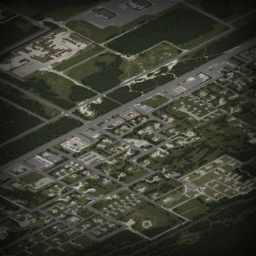
Just Louisville
par 76561198049973575
FROM THE MAKER OF JUST MULDRAUGH COMES.... JUST LOUISVILLE! Do you hate the past. Do you want to forget that the rest of Knox Country exists? Do you think Muldraugh is icky and old? Do you think West Point is boring? Do you wish you could never leave Louisville? Well, introducing... by popular demand, Just Louisville! Features: - Removes all parts of the in map that existed before Decemeber 2021. Gotta keep with the times ya know. - Louisville - Louisville - Louisville - And Nothing Else I already burnt my Hotel California jokes when I made Just Muldraugh. Sorry nothing witty is here. Workshop ID: 2720857060 Mod ID: justlouisville Map Folder: JustLouisville
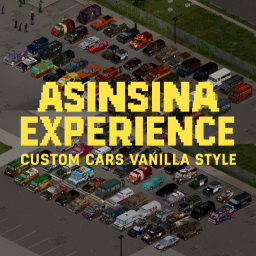
Custom Vanilla Cars
par 76561198387867714
Asinsina Cars – Vehículos Apocalípticos Este mod añade **más de 100 vehículos únicos** con una estética inspirada en el **apocalipsis zombie**. La colección está basada principalmente en vehículos de los **años 80 y 90**, incluyendo **coches, camiones, furgonetas y vehículos policiales**. Los modelos combinan estilos **militares, policiales y civiles** de distintos países, creando una flota variada que encaja perfectamente con la ambientación del juego. Características - Más de **100 vehículos únicos** - Inspirados en vehículos de los **años 80 y 90** - Coches, camiones, furgonetas y patrullas - Estilos **militares, policiales y civiles** - Texturas con desgaste y suciedad para un look postapocalíptico - Estética **vanilla-friendly** - Posibilidad de **blindar vehículos** con mejoras de ingeniería - Compatible con mods que añaden **interiores de RV** Todos los vehículos han sido diseñados para mantener la **inmersión y coherencia visual** con el juego, mostrando señales de uso, modificaciones de supervivencia y detalles propios de un mundo devastado. Este pack está pensado para mejorar cualquier partida, tanto en **singleplayer como en multijugador**, ofreciendo una flota amplia, útil y atmosférica para recorrer el mundo del juego. ---
![[Tactician] – Project Zomboid Mod](https://images.steamusercontent.com/ugc/17078773429593348234/871081C614312FED85B45C3B025DE1AFE5404D61/)
[Tactician]
par 76561198068788655
Handgun Animations Replacer Ever Notice Your Guns Kinda...Lower? with My Older custom anims for handguns? Not Anymore! Adds a Full replacement suite of Handgun Animations! And a Cute Idle That Doesnt Get in the way ! Animations Made for AVA. her hand size and firearm location. Might work on default? IDK Support Free & Open Modding! You can Grab ALL of my mods including ones steam hates or has nuked Etc From report spam On My Discord! The Mod Haven Discord Project AVA V3X Is Found there :P PERMISSIONS. ASK FOR ALL MOD INQUIRIES RELATED TO PERMISSIONS: IE: do not re-upload this Mod under ANY circumstances. Not On the Workshop, or Anywhere. Support the 'Kentucky Firearm Safety 101' Release. Workshop ID: 3563103042 Mod ID: NPDM_Tactician
![[Join/Leave] Player Message – Project Zomboid Mod](https://images.steamusercontent.com/ugc/17041929043822892611/C2F660EBC537A0B3ECBF934D36174300BDD56FF8/)
[Join/Leave] Player Message
par 76561198029886463
📢 Adds automatic chat messages when a player joins or leaves the server. ✔ Automatic messages in the general chat ✔ Fully customizable join and leave messages through Sandbox options ✔ Join/leave relay to Project Zomboid’s vanilla Discord integration ✔ Sandbox option to hide join/leave messages for Admins, Moderators, and GMs ✔ Optional server console logs for administrators ✔ Sandbox options to enable/disable each feature separately Features: • Automatic message when a player joins the server • Automatic message when a player leaves the server • Full customization of join and leave messages through Sandbox settings • Messages displayed directly in Project Zomboid’s vanilla chat • Optional join and leave logging in the server console • Optional Join/Leave message relay to Discord • Ability to completely hide Join/Leave messages for Admins, Moderators, and GMs • Compatible with server monitoring and log analysis tools ━━━━━━━━━━━━━━━━━━━━━━━━━━ 💬 DISCORD INTEGRATION ━━━━━━━━━━━━━━━━━━━━━━━━━━ JoinLeaveMessage directly uses Project Zomboid’s vanilla Discord system. No additional bot or webhook is required by the mod. To use it, first configure your server’s Discord relay in the server .ini file: DiscordEnable=true DiscordToken=YOUR_TOKEN DiscordChatChannel=YOUR_CHAT_CHANNEL DiscordLogChannel=YOUR_LOG_CHANNEL DiscordCommandChannel=YOUR_COMMAND_CHANNEL JoinLeaveMessage join and leave messages are sent to the channel defined in: DiscordLogChannel= Then simply enable the JoinLeaveMessage Discord option in the Sandbox settings. If the vanilla Discord relay is not configured, or if the Discord Sandbox option is disabled, the mod will continue to work normally in-game. ━━━━━━━━━━━━━━━━━━━━━━━━━━ 👑 ADMINISTRATION ━━━━━━━━━━━━━━━━━━━━━━━━━━ A Sandbox option allows you to hide join and leave announcements for: • Admins • Moderators • GMs When this option is enabled, their Join/Leave messages are not displayed in the general chat, JoinLeaveMessage server console logs, or Discord. If the option is disabled, they are announced normally like other players. Workshop ID: 3722357516 Mod ID: JoinLeaveMessage
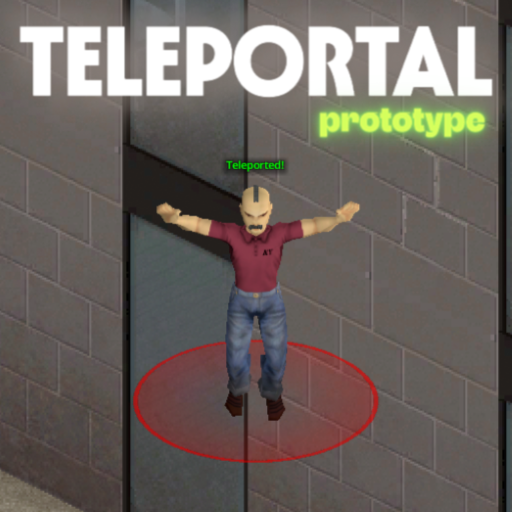
TeleportalPrototype
par 76561198104032910
Sponsors Teleportal - Prototype Teleportal allows administrators to set up a network of instant travel points for seamless movement across the map. - Instant Location-to-Location Travel: Walk through a portal and arrive at your destination in the blink of an eye. - Telecorn is a myth: Always drop corn on the source tile. - Easy-to-Spot Markers: Find your way quickly with bright color-coded markers identifying portal entrances and exits. - Safe & Convenient Routes: Connect distant bases, safe zones, or player hubs without the long, dangerous walk. - Balanced Gameplay: Customizable cooldowns between uses prevent travel spam and keep the survival challenge intact. - Reliable Travel Network: Once set up, portals provide a permanent and organized way for everyone to navigate. This mod is best for multiplayer servers and roleplay communities looking to simplify travel while keeping the experience fair and organized. New suggestion for the mod? Create a workshop discussion or open a commission via Ko-fi. > Reach my Discord Server for details - https://discord.gg/mQadasYfKA Ask for permission This mod can only be added to and extended with the express permission from the original creator. Having received permission, credit must be given to the original creator, both within the files of the mod and wherever the mod roams online. If no permission is received you may not alter the mod, and it must be treated as a mod that is 'On Lockdown'. Support the Author If you find this mod helpful, consider supporting the author on Ko-fi: https://ko-fi.com/escapepz Build 42 | Multiplayer | Utility | Admin-Tool _____ Workshop ID: 3641268718 Mod ID: esc_teleportprototype
Essential Crafting + Simple Overhaul: Melee Weapons Compatibility Patch
par 76561198063561940
Do you like how the Essential Crafting can repair Vanilla Melee Weapons but want to apply it as well to Simple Overhaul: Melee Weapons (SOMW)? This mod extracts the additional Repair options from Essential Crafting and added it to SOMW Melee Weapons as well! You can now repair weapons from Simple Overhaul: Melee Weapons mod using: - Leather Strips and Tailoring Skill - Wire and Carpentry Skill - Scrap Metal, Metal Sheel, or Small Metal Sheet and Metalworking Skill Requires: Simple Overhaul: Melee Weapons (SOMW) Mod and Essential Crafting Mod NOTE: Add this compatibility patch AFTER the Simple Overhaul: Melee Weapons Mod and Essential Craftings Mod in the Mod Load Order. Example: Simple Overhaul: Melee Weapons Essential Crafting Essential Crafting + Simple Overhaul: Melee Weapons Compatibility Patch (First time modding let me know if i missed something) Workshop ID: 3370170905 Mod ID: Essential_Crafting_PLUS_SOMW_Compatibility_Patch

全物品减重80%
par 76561198425488778
游戏内所有物品都减重80% 单人可用 联机可用 旧档可用 Workshop ID: 3652180203 Mod ID: TwentyPercentByWeight Mod ID: TwentyPercentByWeight
Black Multicam Bandits Integration
par 76561198096995823
Jusblazm's Black Multicam Bandits This mod provides Bandits wearing modded clothing from Black Multicam Uniform. Updates I plan to release a new update on the 2nd of each month. This update will replace the current batch of bandits with a brand new batch. This will not harm your saves, nor will it affect currently spawned bandits. Freshly spawned bandits will be wearing gear according to the new list. This will provide some, hopefully noticeable change to extended saves. Compatibility Absolutely no mod conflicts with two caveats: - someone uses my naming convention for their own integration. - A unique ID generates a dupe (Wikipedia: the probability to find a duplicate within 103 trillion version-4 UUIDs is one in a billion) Known Issues - Errors appear when opening the clan in Bandits Creator. These errors are harmless, it happens because the bandits are wearing clothing that cannot be displayed in Creator, like custom locations. Do not edit them or you will delete the clothing not being displayed. GitHub Archive I will be keeping an archive of each update's bandits.txt and clans.txt files, so that if there is a set you really like, you can continue to use them even after the mod updates and moves away from them. GitHub Archive Permissions I created a simple extension for Bandits NPC that allows bandits to wear the custom equipment slots provided by Black Multicam Uniform. The item IDs belong to Jordanal's Black Multicam Uniform, the BodyLocations belong to Jordanal's Black Multicam Uniform and KATTAJ1's Clothes Core, and Slayer's Bandits NPC reads the text files. Both Black Multicam Uniform and Bandits NPC have the default permissions of Credit where it's due, so I am extending their permissions. Be sure to credit them for their hard work. Credits The Indie Stone for Project Zomboid Slayer for Bandits NPC and Bandits Creator Jordanal for Black Multicam Uniform Workshop ID: 3486049878 Mod ID: JusBanditsJGBlackRANDOM
More Brews!中文汉化
par 76561199020860145
More Brews!中文汉化 Workshop ID: 3347946491 Mod ID: MoreBrewsCN
Wasteland's RP Chat
par 76561197972633241
Completely overhauls the PZ Chat system with many RP focused elements, typing indication, ooc and emoting, dice rolling, and much much more. Wasteland's RP Chat Written for and maintained by Wasteland RP, this mod overhauls and adds many new features to the in-game chat system to improve the RP experience. - Multiple levels of speaking volumes: whisper, quiet, normal, yell, shout - Variety of types of chat: Speaking, Emoting, Environmental - Addon Chats: Radio, OOC, Staff, Private - In game indication of typing and automatic action emotes - In game indication of speaking/emoting out of Range - Customize name, colors, and many other aspects of the RP experience - Tape Recorders - Dice rolling - Multiple RP languages - Quick action menu (Trade, grow hair, injure self, etc) - Special admin hammer for staff - And much more! How to use? Everything available in Wasteland's RP Chat is available in the chat window. Click the Gear in the chat window to see many of the settings then type /help and /howto into the chat window to see available commands. How to install? For players, just join a server which is using this mod. For server owners, subscribe to the mod and add it to your server's workshop collection. Due to an unfixable implementation detail, there is an optional server-side only java-mod which can be installed into your server which disabled the radio's static due to distance. Download ZomboidRadio.class and replace the file with the same name at "Project Zomboid Dedicated Server\java\zombie\radio" in your dedicated servers directory. License This mod is not authorized to be distributed by anyone other than Wasteland RP. If you would like to modpack this mod, you must reach out to Gravy on the Wasteland RP Discord and ask for permission. Workshop ID: 3229798360 Mod ID: WastelandsRpChat
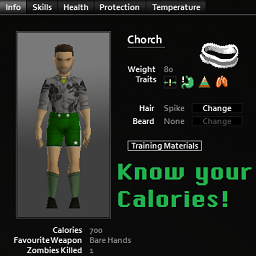
Know Your Calories!
par 76561198092221873
Shows your Character's Calories on the Info Tab How it works: After obtaining cooking level 5 or the nutritionist trait, your player's calories will now show up in the Info Tab. (Both the level needed and the trait interaction can be changed or disabled in the sandbox options) - 🔧 Sandbox Options 🔧 - + Whether the nutrients will be displayed as progress bars or as pure numbers. + If the nutrients amount will also be shown in numerical form when using progress bars or not. + How exact are the values shown. + If having the Nutritionist trait means you will always know your calories (and other nutrients). + At which cooking level you can know your calories (and other nutrients). - 💡 Frequent Questions 💡 - - Works on Singleplayer - Works on Multiplayer - Works in B41, B42.x, and B42.20 - Can be safely added to existing saves - Can be safely removed from existing saves - Should work with any mods that alter the Info Tab Future objectives > A quick and simple guide on what nutrients do and how to treat them for your own gain (optional) > Add an option that shows your calories as a display bar. > Fix issues with other mods that add information to the character screen. > Add an option to only show the character's calories after reaching a configurable level of cooking. > Add an option to only show the character's calories if you have the Nutritionist Trait > Correct text alignment when using higher font sizes. If you like this mod please consider dropping a rating and a favorite! Do not copy or reupload this mod. If you wish to add it to a modpack, use the Steam Collection feature. Workshop ID: 3257953004 Mod ID: KnowYourCalories
RE2 Classic Zombie Sounds In PZ = Build 41.53
par 76561198048940067
THIS VERSION IS NO LONGER COMPATIBLE WITH 41.65 STABLE ATTENTION THIS MOD IS BROKEN AT THE MOMENT, DUE TO THE SOUND CHANGE I HAD IN 41.54, I AM WORKING ON A NEW MOD RELATED TO THIS his mod changes some sounds from Project Zomboid to sounds from Resident Evil 2 Classic ATTENTION: backup the .bank files, so you can return to the original whenever you want .... if you like the zombie sounds of the old classic resident evil 2, this is for you.... List of what sounds I made changes -zombie sound -sound of guns -doors and windows -player steps -level up -ambient sound, such as crows and zombies in the distance -impact sound, not all -etc... if you think that some audio is bad or have suggestions for new sounds, speak below in the comments that I will always be updating the mod ... thanks Installation: after you sign up for the mod, you will have to go to the Steam\steamapps\workshop\content\108600/2358773107 folder.. mods\RE2 Classic Zombie Sounds In PZ = Build41\media\sound\banks\Desktop , copy all .bank files Locate the Steam\steamapps\common\ProjectZomboid\media\sound\banks\Desktop folder and paste the .bank files if you think that some sound is too loud, lower the volume by accessing the options, the audio is advanced, so you can manually reduce it. see also my other mod that changes the music of pz by the songs of the classic RE2 .. it is perfect with this mod :D https://steamcommunity.com/sharedfiles/filedetails/?id=2290504564 =========================================================================== CREDITS TO THE GREAT MAN: Raven who discovered how to edit .bank files ,he is a god really =========================================================================== Workshop ID: 2358773107 Mod ID: RE2ClassicZombieSoundsInPZ

Cryzer's Drugs (Alternative Medicine)
par 76561198133981819
Grow your own plant to make your alternative medicine to reduce stress and unhappiness. Keep care of the negative effects! ##### What can you find in the world? ##### - Grinder - Cannabis Seed - Cannabis seed bag - Joint ##### How it works? ##### 1. Plant a Cannabis seed 2. take care of the plant 3. harvest it 4. let the plant dry (round about 6 days) 5. get the dope from the dry cannabis plant 6. grind the dope with the grinder 7. make a joint 8. enjoy! (smoker benefits) ##### How to let dry the cannabis? ##### Just place the harvested plants inside your base or somewhere else where it can't get wet. Then it will dry after 6 - 7 days. If it get wet while drying then the process will begin from start again. So be sure to place it somewhere where its dry :P ##### What are the benefits of a joint? ##### StressChange = -25 UnhappyChange = -10 PainReduction = 17 What are the disadvantages of a joint? HungerChange = 15 ThirstChange = 15 FatigueChange = 20 Workshop ID: 3165926535 Mod ID: CryzersDrugs

Disable Admin Powers On Login
par 76561199001184205
This mod is made for server admins. It disables God Mod, Ghost Mode and Invisibility admin powers on login in order to keep all the moodles and body damage from last session. Workshop ID: 3147465913 Mod ID: DisableAdminPowersOnLogin
Drive OST : True Music Addon FIXED
par 76561198144589995
Is there something inside you? Tracklist: Kavinsky - Nightcall Electric Youth & College - A Real Hero Desire - Under Your Spell Workshop ID: 2801517755 Mod ID: Drive_er_mod
![Resurrect Character [B42] – Project Zomboid Mod](https://images.steamusercontent.com/ugc/46828112636925105/A810E60A8947595769905A81E4B7603740602F8E/)
Resurrect Character [B42]
par 76561198410133704
The updated version for B42.7 has been released. Please unsubscribe then resubscribe, enable the mod and copy-paste the zombie folder, as usual. This mod can bring your dead character back to life. The fact Project Zomboid characters face permanent death kept us all in a constant state of paranoia. That's why this mod solves the problem, letting you try all kinds of crazy stuff and take on the hardest mods ever with your year-old character! With this mod, you can resurrect your character anytime by sacrificing some amount(RNG) of your Strength XP, which can be adjusted from 0% to 100% in the vanila Sandbox Options or using a (Change) Sandbox Options mod in game. This mod can be safely added to your existing save files, and does not directly conflict with other mods. This mod modifies a vanilla Java file, so it requires both a subscription and manual installation. Follow the installation instructions below carefully to manually install the mod. Uninstallation can be done by verifying the integrity of game files through Steam (However, be aware that this process removes ALL mods that modify Java code, "the Java mods", so you’ll need to copy and paste them again afterward for any you want to keep.) HOW TO RESURRECT: * After installing this mod, any save files of a dead character on the list in the LOAD menu will no longer have the skull icon. This means, loading such a save will not take you to the new character creation screen; instead, you can continue playing it as a normal save with an alive character. * When the character respawns, everything except the health remains exactly as it was before death, including in-game time, traits, skill levels, acquired knowledge, and the number of zombies killed, etc. Actually, it revives the original character's own database, unlike other mods that save character data and overwrite onto the database of another character who's newly spawned in a different place. * When the character resurrects, all items, including the bags, will remain on the previous corpse beneath the feet of the resurrected character who will respawn naked. You will need to retrieve them. * In case you die while surrounded by a horde of zombies or get dragged down, you’ll need to run to a safe area quickly immediately after resurrecting unless you want to keep losing Strength XP. Alternatively, and perhaps the better approach is, before exiting to resurrect, just to stay on the death screen for as long as needed until the surrounding zombies go away. Depending on their numbers, this may take a several minutes. You can fast-forward this using the hotkeys: F4 (5x), F5 (20x), and F6 (40x). Once they’re all gone, exit and restart the game. This will give you a better chance to recover your items from your corpse and escape safely after respawning. * This mod provides two safe start features: - Grace Time: During this time period any damages you take will be fully healed automatically. Its duration can be adjusted in the vanila Sandbox Options or using a (Change) Sandbox Options mod in game. - Safe Zone: Safe start feature that removes all the zombies within 20 tiles of the player upon resurrection. By default, this feature is disabled, but you can activate it using either the Vanilla Sandbox options or the (Change) Sandbox Options mod. * For saves with a skull icon, games where you died before installing this mod, you'll need to manually remove the skull icon. To do this, open the players.db file in your save folder using a database editor like SQLite, go to Browse Data under the View menu, and change the value of the isDead column from 1 to 0. (However, be sure to back up your save first, as any mistake with this database file can make your save unusable.) Unlike saves created after installing this mod, if you load this manually edited save into a game, your character will die instantly. To bring the character back to life, you'll need to exit and restart the game again. How to Install 1. Subscribe to the Mod - First, make sure your game version is B42, not B41, and that the game is fully closed. - Then, subscribe to Resurrect Character on the Steam Workshop. 2. Locate the Mod Folder In File Explorer, navigate to your Steam Workshop directory, which by default is: C:\Program Files (x86)\Steam\steamapps\workshop\content\108600\3433579563\mods\ResurrectCharacter\42 (You may copy and paste the above path into the Windows search bar or File Explorer to quickly open it.) 3. Copy the “zombie” Folder Within the 42 folder, locate a folder named “zombie.” Right-click this folder and select “Copy.” 4. Find the Project Zomboid Installation Directory Open a File Explorer window and navigate to your Project Zomboid installation folder. Typically, this can be found here: C:\Program Files (x86)\Steam\steamapps\common\ProjectZomboid Make sure you see an existing “zombie” folder in this directory. 5. Paste and Replace Files Paste the “zombie” folder from Step 3 into your main Project Zomboid folder. When prompted with a warning message indicating that 5 files already exist, choose “Replace the files in the destination.” This will overwrite the necessary files. You have successfully installed Resurrect Character . Now your fearless journey begins! No matter how we die, we will resurrect! NOTE: There is dependency between this mod and the Slow-Mo Fast-Mo: Limitless Game Speed Change mod. Therefore, when installing both mods, you must first copy and paste the 'zombie' folder from this mod and then copy and paste the Slow-Mo Fast-Mo mod afterward. Workshop ID: 3433579563 Mod ID: ResurrectCharacter Mod ID: ResurrectCharacter
![Reward Night Combat [B42] – Project Zomboid Mod](https://images.steamusercontent.com/ugc/14071260668140339111/0B8E3BA02BCB1848227089D6B1D103384091EE4D/)
Reward Night Combat [B42]
par 76561198106717531
Original mod by Nihilist Penguin, all credits go to them! You can find the original mod here. Do you frequently find yourself wanting to venture out during the night but struggle with motivation? If so, this mod is for you. With it, you will have the opportunity to gain significantly more experience points for your combat skills during nighttime. Simply put, Rewarding Night Combat gives you additional XP Boosts at Night for Combat related actions. Updated to 42.12.0, fixes the sound not playing when toggled on as well. Defaults By default, bonus XP will be applied to combat skills between the hours of 11 PM and 6 AM as follows: Skill Multiplier XP Bonus Axe 1.5x 50% Long Blunt 1.5x 50% Short Blunt 1.75x 75% Long Blade 1.5x 50% Short Blade 1.75x 75% Spear 1.5x 50% Aiming 1.5x 50% Customization Within Rewarding Night Combat, you have the flexibility to customize various details according to your preferences using the sandbox settings. These customization options are categorized as follows: Core Sandbox Settings • Specify starting and ending hours for each season (Summer, Autumn, Winter, Spring) • Adjust bonus multipliers for all combat skills. • Set the probability of triggering at the starting hour (default: 100%, equivalent to every day). • Define the number of days before the mod begins (default: 0, meaning it starts immediately on the first day). Optional Sandbox Settings • Enable a suspenseful sound effect that plays when bonus XP is activated. • Activate an indicator icon that displays information about currently applied bonuses through its tooltip. • Make the indicator icon draggable; you can move it by clicking with the left mouse button, release it, or reset its position using the Backspace key (the new position will be saved). • Choose from among six different color options for the indicator icon. (As shown below) ? Rewarding Night Combat can be safely added/removed mid-save! ATTENTION! Rewarding Night Combat Server Options template has NOT been updated YET, i will update it's format when B42 Multiplayer officially releases. Do NOT use the Build 41 version it is not compatible with the new B42 file structure and will not work with this mod. Bug Reports & Feedback I will be maintaining this version of Rewarding Night Combat! Got bugs or errors? Send them in the comments below! Provide the full error stack using the ErrorMagnifier mod. For bugs, please detail exactly how you got the bug (what your character was doing or what action you were doing before the bug occurred). Consider donating and buy me a coffee! (Click on the image below to donate) Workshop ID: 3573119313 Mod ID: RewardingNightCombatB42 Workshop ID: 3573119313 Mod ID: RewardingNightCombatB42
![[MSW]Better Horns – Project Zomboid Mod](https://images.steamusercontent.com/ugc/2467488268106082999/13F88CEF823BB2F1903CD779AB685A0BE8BEA0A5/)
[MSW]Better Horns
par 76561198116731544
This mod adds better horns for the vehicles showed in the image 67 Commando 81 DeLorean 82 Oshkosh 83 M923 87 Ford Bus 92 M998 Vehicles by KI5 Make sure to load this mod after the vehicles mod, or sounds won't work Some sounds were made by me with FL Studio, other just downloaded from YT under Creative Commons SP/MP Compatible Tested on 41.78+ Version Works in current saves It is safe to add and remove anytime Workshop ID: 3254641617 Mod ID: BetterHorns
![[Ashlands] Module: [5] [FootWear] [B42.14+] – Project Zomboid Mod](https://images.steamusercontent.com/ugc/9230534631158751105/6C714107630233EC92A7E8C1A0A8E67E0DDED3D9/)
[Ashlands] Module: [5] [FootWear] [B42.14+]
par 76561198068788655
Module: Ashland, Brutal Survival, For Kentucky Aesthetic & Visuals Based on the premice of brutality, Pain, grim survival, from the theme of Obscurem Pandemic, & Fallout Dust Ashland Modules Replace a specific section of zomboid. MODULE 5: FOOTWEAR Death, Pain. Boredom & Starvation. This is your kentucky. there is no happy ending for you here. Only suffering. You'll Need Better Shoes. Won't You. Replace ALL Vanilla FoorWear Outright! New 3D models and Textures Into my Survival Style All features are intact, no stat adjustments! Fits Male & Female! Vanilla, Tombs Body ETC! Also Fits Project AVA! Disclaimer: May Summon Feet enjoyers If Used :3 Disclaimer: Cute Feet Model Is Ava Hot Diggity Dawg it's got 512x512 optimised textures Support Free & Open Modding! You can Grab ALL of my mods including ones steam hates or has nuked Etc From report spam On My Discord! The Mod Haven Discord Project AVA V3X Is Found there :P PERMISSIONS. ASK FOR ALL MOD INQUIRIES RELATED TO PERMISSIONS: IE: do not re-upload this Mod under ANY circumstances. Not On the Workshop, or Anywhere. Support the ' Grippy Toes Related Official' Release. Workshop ID: 3539948114 Mod ID: Ashlands_FootWear_B42
![Skully's Faster Attack Speed [B42.20+] – Project Zomboid Mod](https://images.steamusercontent.com/ugc/17193588153188317391/807E4490E5612FDE9449C0DAF3269C3550BF1A3F/)
Skully's Faster Attack Speed [B42.20+]
par 76561197961658983
A mod with 2 types of modules which should speed up combat. Improves melee combat responsiveness without changing weapon identity or damage. This mod is split into two optional modules. You can use either one or both together. Modules are enabled separately as mods in your mods list. No sandbox options Module 1 – Faster Attack Recovery Reduces the delay between attacks after each swing, making combat feel smoother and more responsive. - Shorter recovery time between attacks - Faster chaining of swings - No changes to damage EXAMPLES WITHOUT FASTER SWING MODULE Module 2 – Faster Swing Speed Increases the actual speed of weapon swing animations. - Faster attack animations - More aggressive combat pacing - Weapons feel more responsive overall - Fully compatible with weapon mods - Requires restart to enable/disable modules after loading a save - Likely functions in multiplayer Feedback is welcome. Shoutout to this mod for fixing an issue for all this time that i didn't update: Fix mod My mods: Workshop ID: 3702483515 Mod ID: SkullysFasterAttackSpeed Mod ID: SkullysFasterSwingSpeed
zRe vaccine 2.0 한국어 번역
par 76561199527548544
zRe vaccine 2.0 모드를 번역해주는 간단한 번역 모드입니다. 모든 권리는 원작자에게 있습니다. Workshop ID: 3301881173 Mod ID: zReModVaccin20byk_KO
Super Girl Clothes
par 76561198853792665
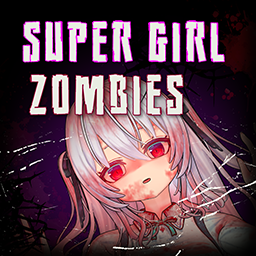
I really like the look of Super Girl Zombie, but I don't want zombies to have the same appearance. Having too many Super Girl Zombies on screen at once can also impact performance. - Crafted using Ripped Sheets - The same outfit comes in summer and winter versions. The summer version has an insulation value of 0.2, and the winter version has an insulation value of 0.8 - Bite and scratch defense: 30%. Provides decent protection without being overpowered - It is recommended to set to 1024 for the best experience Original Mod: https://steamcommunity.com/sharedfiles/filedetails/?id=3402496217 Recommended Mod: Better Dressed - Transmog Lets you hide or transmog worn clothing and containers. https://steamcommunity.com/sharedfiles/filedetails/?id=3599514194 Workshop ID: 3720366546 Mod ID: SuperGirlClothes

Broken World Starter Kits
par 76561197976250572
Adds four starting kits as traits to choose from. 1: Barely Prepared (1pt): Start with a Baseball Bat, Satchel, Food, and Water Bottle. 2. Scrounger (4pts): Start with a Crowbar, Hand Axe, School Backpack, Water Bottle, Food, Two Bandages, Matches, Can Opener, Army Boots, Leather Gloves, and Hand Torch. 3. Survivor (6pts): Start with a Spiked Baseball Bat, Hammer, Duffelbag, Water Bottle, Food, Two Bandages, Alcohol Wipes, Disinfectant, Matches, Can Opener, Hardhat, Leather Jacket, and Hand Torch. 4. Prepper (8pts): Start with an Axe, Nightstick, Hiking Backpack, Water Bottle, Food, Three Bandages, Alcohol Wipes, Disinfectant, Painkillers, Antibiotics, Matches, One Molotov, Can Opener, Riot Helmet, Police Vest, and Hand Torch. Customized for personal server use from Banjo's Item Kit Traits Improved: https://steamcommunity.com/sharedfiles/filedetails/?id=2689282871 Workshop ID: 2716243370 Mod ID: BrokenWorldKits
Project Zomboid Guides
Installer des mods Project Zomboid - Guide Workshop
Installe proprement des mods Project Zomboid via le Steam Workshop : saisir les IDs, vérifier l’ordre, redémarrer le serveur et corriger les erreurs typiques.
Louer un serveur Project Zomboid – guide multijoueur
Configurer un serveur Project Zomboid : RAM, paramètres sandbox, mods Workshop, droits admin et vérification propre des erreurs typiques.
Serveur Project Zomboid avec support des mods
Installez les mods compatibles et pris en charge depuis le tableau de bord.
Louer un serveur Project Zomboid