Mods et plugins pour Project Zomboid
Ce catalogue répertorie 52 000+ projets Project Zomboid provenant de Steam Workshop. Les entrées peuvent être côté serveur, côté client ou requises des deux côtés, et inclure des cartes ou d’autres contenus créés par les utilisateurs. Avant l’installation, vérifiez la page source liée, la version du jeu et les dépendances.

<<== INTERFACE and UI ==>>
par 76561198014036706
This is mod is merely for organizing and categorizing your mod collection lists, it does not alter or affect gameplay in any way. When editing your workshop collections you can put this, and the other icons I've made, anywhere in the list and use it as a header to indicate the category which it describes. This can help create more oversight in your list of mods, happy sorting! Workshop ID: 3368335284 Mod ID: ModTemplate
![[B42] K-Foods Cooking Complete – Project Zomboid Mod](https://images.steamusercontent.com/ugc/15850179129252055228/455FDE0A293655029CB274F7C50B31C5342C937C/)
[B42] K-Foods Cooking Complete
par 76561198192124854
Thank you for your interest about this mod. This mod is for cooking Korean Foods. You can find magazines about various recipes. Magazine 1. Korean Bibimbap, Dumplings (original, meats, shrimps, Kimchi), Dumpling Soup Magazine 2. Korean Bunsik (Rice Cake, Fish Cake, Tteokbokki, Tteokkkochi, Fish Cake Soup) Magazine 3. Kimchi Cuisine (Nappa Kimchi, Chonggak Kimchi, Pork and Kimchi Stew, Kimchi Fried Rice, Kimchi Budaejjigae) Magazine 4. Korean Pancakes (Gamjajeon, Kimchijeon, Pajeon, Haemul Pajeon, Aehobakjeon) Magazine 5. Korean Soup (Fish Soup, GamjaTang, SogogiMuguk, Gyeongsangdo Style SogogiMuguk, DakBokkeumTang) Magazine 6. Korean Soup (Korean Seaweed Soup, Korean Beef Seaweed Soup, Korean Chicken Seaweed Soup) In addition, you can find a Korean liquor called "Soju" and some snacks. With my other mode, , you can get cooking ingredients by growing rice, napa cabbages, and peppers. Most recipes require boiling water. Copyright 2022-2025 Sunshine This item is not authorized for posting on Steam, except under the Steam account named Sunshine �� ���� 2022� ���۵� 41����� ��带 �������, 2025�� 42���� ȣȯ ������Ʈ �����Դϴ�. ��� ���۱��� Sunshine���� �ֽ��ϴ�. �� �������� Steam ���� �̸� Sunshine�� ������ Ÿ���� Steam�� �ø��� ���� ������� �ʾҽ��ϴ�. My other mods Please support through ko-fi to help develop the mod ����Ϸ� Ŭ�� (PC �Ұ�) �Ǵ� QR�ڵ� ��ĵ, �Ŀ����� ��� ���߿� ������ �ּ��� Workshop ID: 3565089766 Mod ID: SunshineKSeries_KFoodsB42 Workshop ID: 3565089766 Mod ID: SunshineKSeries_KFoodsB42
![[COS] SOAP – Project Zomboid Mod](https://images.steamusercontent.com/ugc/2146586663082537715/B2BB211ACA200BC8424F5D5493D971B629825247/)
[COS] SOAP
par 76561199178116693
How Do I Use It? - You can go to the link below to see how to use it. - Link Recommended mode - Fashionoid - Gear Transmog - Hide All Attached Items - Clipping animation Fix How to use COS mode in build 42. - Navigate to the path where the mod is installed. - Create a 42.0 folder. - Create a common folder. - Paste the media folder / mod.info / preview.png into the 42.0 folder. The recipe code writing method has been changed in 42Build. Since COS (Costume) mode has approximately over 200 modes, converting to 42Build's recipe code is an extremely laborious task. In 42Build, you cannot create costumes in (42 build) the crafting tab. There are two methods: Spawn items in cheat mode. Select items in the clothing selection screen when creating a character. Like My Mode? - Join Our Discord If You Want Commission
![More Packing[SP/MP][42.20] – Project Zomboid Mod](https://images.steamusercontent.com/ugc/12316456965394069372/60239DE8E14D74310231F0761D5656A9DE6DBF08/)
More Packing[SP/MP][42.20]
par 76561198327185242
You don't need to worry about packing in dozen of 12 or box of 100. You can start packing items from 2 items and more. Unpacking doesn't return everything either. You can customize how many to take out, and the remaining items stay inside the parcel The parcel weight reduction rate can be adjusted in the Sandbox settings. Using this mod can significantly save a large amount of memory (reducing memory usage by 50%–80%, depending on the complexity of the item data) and cut down item lookup time. The more items are packed, the more noticeable the improvement. Feature: Pack items that share the same Script ID into a parcel. (The parcel appears as a sealed carton box in-game). Unpack a parcel to retrieve all the original items. Alternatively, you can withdraw items directly from a parcel in quantities of 1, 5, or 10. Multiple parcels containing the same script ID of items can be merged into a single, larger parcel. Notice: Each parcel weighs 90% less than its contents, with a maximum weight of 30 kg. This allows you to bundle items weighing up to 300 kg. (can be modified in sanbox) Backpacks expanded using modded tools might not be packable or may lose their expanded capacity after being unpacked. Packing water container items is currently bugged; a fix will be attempted later. About the "extension" mod: 6.1This is an optional add-on module that requires the main Parcel Packing Mod. When enabled, you can find mystery parcels containing random loot. These parcels can spawn in the world or be dropped by corpses. 6.2 Acquire a packing cardboard Put anything inside and packing items inside this cardboard MP mode OK! Special Notes When using this mod to pack items from other mods, please note: [] If you uninstall other mods midway, the corresponding parcel will not disappear, but may exhibit unknown anomalies. [] Please regularly check the update logs of other mods. If the corresponding items are removed in updates, the aforementioned situation may also occur. Mod ID: vac_mod_b42_6.2 Mod ID: vac_mod_b42_6.1 Mod ID: vac_mod_b42_6 Workshop ID: 3478922403
![[B42.20] Zomboid Forge – Project Zomboid Mod](https://images.steamusercontent.com/ugc/10549258015039047090/1AE9912CBE7E2A46CB2CB683B5F26E49AF63B3E0/)
[B42.20] Zomboid Forge
par 76561199585565564
Unofficial 42.20 compatibility patch of "Zomboid Forge" from SirDoggyJvla by mehdiboss. What does this mod do? Zomboid Forge is a framework that allows modders to easily add custom zombies that are compatible with each other while maintaining organized and optimized code. On its own, this mod doesn't perform any specific function, but it provides modders with the necessary tools to ensure they can incorporate synchronized and persistent custom zombies into the game without these zombies being altered or reset upon reloading, which can happen when IsoZombie is redistributed. REQUIRED DEPENDENCIES (must also be enabled): - StarlitLibrary CREDITS: Original mod and framework by SirDoggyJvla. 42.20 compatibility patch by Mehdiboss. This project would have never been possible without the help of many individuals from the Modding Discord. This mod was worked on alongside The Last of Us Infected, and many helped on both projects or only one of those, but all had a huge impact on the development. Help on the coding: Chuck, Albion, Shurutsue, Nurver, Burryaga, Hugo Qwerty, Tchernobill, Poltergeist, Alree, TheDecentTech, lect, Jab, Slayer. Help on the animations/Blender (for TLOU Infected): Alphoxis, CrystalChris, Mystery, GlyTch3r. Help on other random stuff: Herr Jordel, Nerm, Pale Jack, grewsome. This is an unofficial community patch, not an original creation. All credit for the original framework and code goes to SirDoggyJvla. Support the original author: https://ko-fi.com/sirdoggyjvla If you run into a bug, please leave a comment with your debug.txt file (Documents/Zomboid/Logs/). Workshop ID: 3776274080 Mod ID: ZomboidForge
![[B42/41] Learning Lifestyle Songs – Project Zomboid Mod](https://images.steamusercontent.com/ugc/62583101359281948/C9F70324E78FFCFD860419993ECEFE8BDFE54893/)
[B42/41] Learning Lifestyle Songs
par 76561198993860470
Works correctly in both single-player and multiplayer on 42.20 and 41.78.19 Added sandbox options: Adjust song learning speed Adjust unopened sheet music spawn rate Added a feature that shows a tooltip when hovering over “Learn Song” after right-clicking sheet music, indicating whether the sheet music has already been learned or not. This only tracks whether it has been read after the update, so it is not an absolute reference. If Lifestyle is updated after this mod (e.g., new songs are added or addons are installed), the book may still appear as already read, but it will need to be read again. This mod allows you to learn Lifestyle instrument songs through books. Each instrument has 5 volumes: Beginner / Intermediate / Advanced / Expert / Professional There are sheet music books for a total of 11 instruments: Banjo / Electric Guitar / Electric Bass / Acoustic Guitar / Flute / Trumpet / Keytar / Saxophone / Harmonica / Piano / Violin While searching schools or containers where instruments normally spawn in vanilla, you may find an item called “Unopened Sheet Music.” Right-click and select “Open Unopened Sheet Music” A random sheet music book will be obtained. Right-click the obtained book to learn songs: Volume 1: Requires Lifestyle Music Level 1+ Volume 2: Requires Lifestyle Music Level 3+ Volume 3: Requires Lifestyle Music Level 5+ Volume 4: Requires Lifestyle Music Level 7+ Volume 5: Requires Lifestyle Music Level 10+ Before reading After reading Volume 1 Workshop ID: 3377701148 Mod ID: LearningLifestyleSongs

葱橘主菜单界面
par 76561198408285292
AI重跑绘图修改主菜单与弹窗界面。 Workshop ID: 2935244733 Mod ID: SpaceTitleScreen_TLY
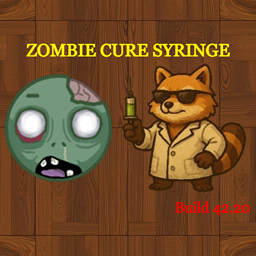
ZombieCureSyringe (Build 42.20)
par 76561198390677673
💉 Zombie Cure Syringe Hunt down rare infected Doctor zombies to retrieve the cure syringe and cure the Knox Virus infection! ✨ Features & Compatibility - Game Version: Updated & tested for Build 42.20 (B42.20+) - Game Modes: Works fully in Singleplayer, Co-Op Host, and Dedicated Servers - Save Compatibility: 100% safe to add mid-game to existing save files! 🔬 How It Works 👨⚕️ Doctor Zombies - Zombies have a rare default chance (0.1% / 1 in 1,000) to spawn dressed in a Doctor outfit carrying the cure. 💉 Cure Syringe - Cures Knox Zombie Virus: Instantly neutralizes the active zombie virus in your blood, stopping you from turning into a zombie. - Clears Viral Fever: Clears the lethal fever and sickness moodlet caused by the virus. - Physical Wounds Remain: Physical bites, scratches, cuts, and bleeding stay on your body—you must still bandage, disinfect, and care for your physical injuries to survive! ❓ Frequently Asked Questions (FAQ) Does this grant permanent immunity or act as a vaccine? - NO. The syringe is a cure for your active infection only. If you get bitten or scratched by a zombie again in the future, you WILL get infected again and will need another Cure Syringe! Does it cure food poisoning, bleach, or dirty wound infections? - NO. The syringe strictly targets the Knox Zombie Virus. It does not cure food poisoning, bleach/poison, or normal bacterial wound infections caused by dirty bandages. ⚙️ Sandbox Options - Doctor Spawn Chance: Fully customizable (0% - 100%, default 0.1%). - Syringe Drop Chance: Fully customizable (0% - 100%, default 100%). ⚙️ Technical Details - Workshop ID: 3777949201 - Mod ID: ZombieCureSyringe 💬 Support & Feedback If you run into any issues or have questions, feel free to reach out to me directly on Discord! Discord: Kaaskiller007 If you enjoy the mod, please leave a thumbs up! 👍

Based Lootable Propane Tiles
par 76561198005261007
Boy I tell you h-waut. Dang ol propane tiles mang. Yeah so you know those really annoying map tiles that look like propane tanks but aren't actually interactable? This mod fixes that, and makes them loot-able. Relevant on Raven Creek for example, and parts of LV. It functions almost identically to looting propane from BBQ tiles. Right clicking propane bottle map tiles allows the user to unbolt the propane from the floor, turning it into a world item and removing the old tile. Works in multiplayer and single player. Made for the friends over at https://www.battlemetrics.com/servers/zomboid/22219945 Workshop ID: 3327756106 Mod ID: BasedLootablePropaneTiles

<<== GAME MECHANICS ==>>
par 76561198014036706
This is mod is merely for organizing and categorizing your mod collection lists, it does not alter or affect gameplay in any way. When editing your workshop collections you can put this, and the other icons I've made, anywhere in the list and use it as a header to indicate the category which it describes. This can help create more oversight in your list of mods, happy sorting! Workshop ID: 3368335185 Mod ID: ModTemplate

UFP - Sprout's Farm and Garden Patch
par 76561198131954636
Adds general compatibility between Sprout's Farm and Garden and Ultimate Farming Patch . Notable Changes: - Fixed an issue where mushrooms could always be poisonous on harvest. - Fixed several missing medicinal crop translations. Workshop ID: 3222585411 Mod ID: UFPSG

<<== ITEMS ==>>
par 76561198014036706
This is mod is merely for organizing and categorizing your mod collection lists, it does not alter or affect gameplay in any way. When editing your workshop collections you can put this, and the other icons I've made, anywhere in the list and use it as a header to indicate the category which it describes. This can help create more oversight in your list of mods, happy sorting! Workshop ID: 3368338327 Mod ID: ModTemplate
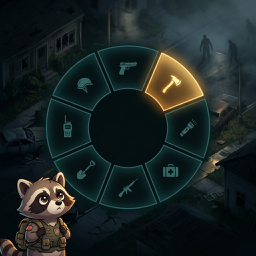
QuickWheel
par 76561198929132706
QuickWheel 武器轮盘 / QuickWheel Weapon Wheel "按一下Tab,武器就在手。" "Press Tab, weapon in hand." 适配 Build 42 | 纯客户端 | 轻量流畅 | 中英文支持 Build 42 | Client-side only | Lightweight & Smooth | CN/EN supported 核心玩法 / Core Gameplay 快速呼出武器轮盘,一键装备任意位置的武器。不需要在背包里翻找,不需要记忆快捷键——拖拽即可自由配置。 Quickly summon weapon wheel and equip weapons from anywhere. No rummaging through inventory, no memorizing hotkeys—configure by dragging. - Tab呼出轮盘 / Press Tab for Wheel:轻按Tab显示轮盘,再次按Tab关闭或点击扇区立即装备 / Press Tab once to open wheel, again to close or click sector to equip immediately - 拖拽绑定 / Drag to Bind:从背包直接拖动物品到扇区即可绑定,支持所有位置(主背包、书包、挎包等)/ Drag items from backpack directly to sectors to bind, supports all locations (main pack, bags, shoulder bags, etc.) - 拖出解绑 / Drag Out to Unbind:拖动扇区图标到轮盘圆圈外松手解除绑定 / Drag sector icon out of wheel and release to unbind - 扇区互换 / Swap Sectors:拖动一个扇区到另一个扇区可快速交换位置 / Drag one sector to another to swap instantly - 点击装备 / Click to Equip:点击任意扇区立即装备武器并关闭轮盘 / Click any sector to equip weapon immediately and close wheel 灵活配置 / Flexible Configuration - 槽位数量 / Slot Count:支持 4/6/8/10/12 槽位,轮盘下方一键调节 / Supports 4/6/8/10/12 slots, adjust with one click at bottom of wheel - 任意背包 / Any Inventory:支持所有容器,无论武器在哪个包都能找到并切换 / Supports all containers, find and switch weapons regardless of which bag they're in 兼容性 / Compatibility - 支持 Project Zomboid Build 42 - 纯客户端运行,服务器性能无影响 - 不修改任何原版文件,与其他模组兼容 - Supports Project Zomboid Build 42 - Client-side only, no server performance impact - No vanilla file modifications, good compatibility with other mods Workshop ID: 3704466989 Mod ID: QuickWheel

Tsar's Common Library B42 完全汉化
par 76561199323620875
基于2025/1/30的Tsar's Common Library B42的完全汉化模组 Workshop ID: 3416986729 Mod ID: Tsar's Common Library B42 Completely Chinese 因个人原因,近期暂无更新计划。在此过程中,我决定将目前已完成的汉化成果全部公开,希望能为其他汉化工作者提供一些参考与支持。 同时,我也衷心希望,这些内容在被使用时,能被视作一个可优化的基础,而非被直接或机械地套用。汉化是充满匠心的工作,期待大家能共同创造出更优质的版本。 感谢一直以来的支持。
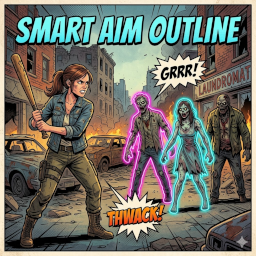
Smart Aim Outlines (SAO) | highly customizable
par 76561197976493763
🇬🇧 English | 🇩🇪 Deutsch | 🇪🇸 Español | 🇨🇳 简体中文 🇬🇧 Smart Aim Outlines (SAO) | highly customizable Smart Aim Outlines (SAO) is the ultimate quality-of-life upgrade for your combat system, giving you full control over your visual feedback! Key Features: - Ultimate Customization: Choose your own custom colors and transparency (Alpha) for targets in and out of range via the mod options. - See through Structures: Never get surprised again! Outlines remain visible even when zombies are hidden behind buildings, walls, or thick trees. - Performance: Extremely lightweight code that only runs when you are actively aiming. SETUP: Set "Melee Target Outline" to "NONE" in the game options! Developed for Build 42 | MP Compatible | Savegame Safe 🇩🇪 Smart Aim Outlines (SAO) | ultimative Anpassbarkeit Smart Aim Outlines (SAO) ist das ultimative "Quality of Life"-Upgrade für dein Kampfsystem und gibt dir die volle Kontrolle über dein visuelles Feedback zurück! Highlights: - Volle Anpassbarkeit: Wähle im Menü völlig frei deine eigenen Wunschfarben und die Transparenz (Alpha) für Ziele in und außerhalb deiner Reichweite. - Röntgenblick: Keine bösen Überraschungen mehr! Die Outlines sind auch dann deutlich sichtbar, wenn sich Zombies hinter Gebäuden, Mauern oder dichten Bäumen befinden. - Performance: Schlanker Code, der nur berechnet wird, wenn du auch wirklich zielst. SETUP: Stelle "Nahkampf-Zielumriss" (Melee Target Outline) in den Spieloptionen auf "KEINE"! Entwickelt für Build 42 | MP Kompatibel | Savegame Safe 🇪🇸 Smart Aim Outlines (SAO) | altamente personalizable Smart Aim Outlines (SAO) es la mejora definitiva de "calidad de vida" para tu sistema de combate, ¡dándote control total sobre tu retroalimentación visual! Características principales: - Personalización total: Elige tus propios colores y niveles de transparencia (Alpha) para objetivos dentro y fuera de alcance. - Visibilidad total: ¡Que no te pillen por sorpresa! Los contornos son visibles incluso cuando los zombis están detrás de edificios, muros o árboles densos. - Rendimiento: Código extremadamente ligero que solo funciona mientras apuntas. CONFIGURACIÓN: ¡Ajusta "Contorno de objetivo cuerpo a cuerpo" (Melee Target Outline) a "NINGUNO" en las opciones! Para Build 42 | Compatible con MP | Seguro para partidas guardadas 🇨🇳 Smart Aim Outlines (SAO) | 高度自定义 Smart Aim Outlines (SAO) 是您战斗系统的终极质量优化插件,让您完全掌控视觉反馈! 核心功能: - 极致自定义: 可通过模组选项自由选择范围内外目标的颜色及透明度(Alpha)。 - 结构穿透可见: 告别埋伏!即使僵尸隐藏在建筑物、墙壁或茂密的树木后,轮廓依然清晰可见。 - 高性能: 极简代码编写,仅在您主动瞄准时运行,不影响帧率。 设置:请在游戏选项中将“近战目标轮廓” (Melee Target Outline) 设置为“无”! 专为 Build 42 开发 | 支持多人联机 | 存档安全 Feedback & Support If you like this mod, please consider leaving a rating! Your feedback and thumbs up keep the motivation high and help other survivors find this mod! 🧟♂️ "have fun - don´t get bitten" 🧟♂️ Workshop ID: 3701823831 Mod ID: SmartAimOutlines
![[B41/B42] [MP/SP] Door Knock
– Project Zomboid Mod](https://images.steamusercontent.com/ugc/16615621082757102753/494AE5AEF3EDF05E5147C1C3DC06B5AD6DADF9DB/)
[B41/B42] [MP/SP] Door Knock
par 76561198357537955
Door Knock About the mod: "Door Knock" adds the ability to knock on doors and windows! Works great in both multiplayer and singleplayer modes. Zombies can also hear your knocking (this can be configured in the sandbox settings). What the mod does: "Door Knock" adds a submenu to the context menu when you click on any unbroken door or window. The player can choose which knocking option they want to use. The mod works in multiplayer. The knocking sound will also attract zombies, but this can be disabled in the sandbox settings. You can also adjust the distance at which the knocking can be heard in the sandbox settings. Translation into other languages: If you want to add an additional translation into your language, feel free to contact me in the discussions about this mod. Also, if you decide to add a translation by creating a separate item in the Steam workshop, please leave a link to the original mod (this one). From the author: Don't forget to leave likes/dislikes and comments, I read all your comments. Workshop ID: 3562596955 Mod ID: DoorKnock
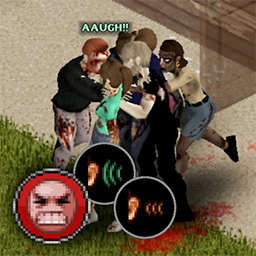
Screams Of Pain(anime version)
par 76561198166753892
This mod is a fork that use anime voices replace the former female voices Aware of inappropriate female anime sound,better try with earphones first original mod: https://steamcommunity.com/sharedfiles/filedetails/?id=2902192016 Workshop ID: 3297918170 Mod ID: voiceinjuryanimated

Bean's Dawn of the Dead Monroeville Mall
par 76561197970554934
This is a simple mod that gives players the ability to spawn in the Louisville Mall. Perfect for players looking to recreate Dawn of the Dead. Spawn in one of 2 malls within the Louisville Mall AKA Monroeville Mall. Works well with Sego’s Occupational Items Improved mod. If you like my work: If you want to support my work consider donating me a tin of beans. ⚠️Permissions ⚠️ Redistribution of this mod without explicit permission from the creator is not required. Basically copy it as you wish. Workshop ID: 2708136292 Mod ID: MonroevilleMallSpawn Map Folder: Monroeville Mall Spawn
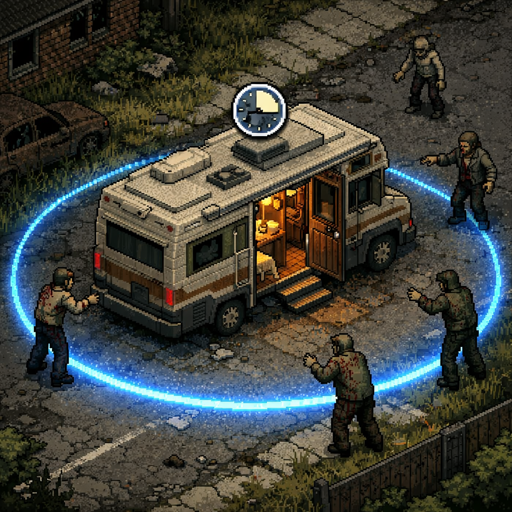
RV Interior Addon - Anti-Spam & Safety
par 76561198263280176
Addon for PROJECT RV Interior mod. Features - Enter/Exit Cooldown - Configurable timer between entering and exiting the RV interior. Prevents teleport spam that causes chunk loading lag on servers. - Zombie Proximity Check - Can't enter the RV interior if zombies are within a configurable radius around you. - Sledgehammer Block - Prevents using the sledgehammer inside the vehicle interior. Admins and vehicle owners can bypass this. - Vehicle Claim Integration - Compatible with AVCS and Mysterious Vehicle Claim Key (MVCK). Only the vehicle owner and players with permissions can enter the RV interior. Faction and safehouse members are also supported. - Admin Immunity - Admins, moderators, and GMs can bypass all restrictions. Each bypass is individually configurable. - RV Dashboard - Right-click inside the RV to open a clean UI panel showing generator status (fuel, condition, on/off) and water barrel levels. You can toggle the generator on/off and refuel it from your inventory directly from the panel. Sandbox Options All settings are fully configurable in Sandbox Options: - Cooldown duration (0-300 seconds, default: 5) - Zombie check radius (0-100 tiles, default: 15) - Sledgehammer block (on/off) - Vehicle claim integration (on/off) - Admin bypass: cooldown (on/off) - Admin bypass: zombie check (on/off) - Admin bypass: sledgehammer (on/off) - Vehicle owner bypass: sledgehammer (on/off) - RV Dashboard (on/off, default: on) Compatibility - Required: PROJECT RV Interior - Optional: AVCS - Another Vehicle Claim System (auto-detected) - Optional: MVCK - Mysterious Vehicle Claim Key (auto-detected) Works in both Singleplayer and Multiplayer. Server-side validation prevents exploits. Workshop ID: 3683545014 Mod ID: RVInteriorAddon

Guitar Riff Jumpscare Mod (louder)
par 76561198418388782
This mod replaces the jumpscare sound with the guitar Riff from Bad To The Bone this version is 30%louder quieter version: https://steamcommunity.com/sharedfiles/filedetails/?id=2929779569 sound: https://www.youtube.com/watch?v=hkiNGPSLlrQ Check out my other jumpscare sound mods too! Any Suggestions for other funny sounds? Comment Below Workshop ID: 2930261912 Mod ID: GuitarScareplus

CORAL (Carl) Shout
par 76561198973826637
Adds The Walking Dead's (TWD's) Rick Grimes' CORAL shout. With custom text and audio. And also uses Lori saying coral if you are playing female. Credit to: Hunter_LINKUP's "Custom Shouts" mod for the custom shout text framework Deon ☣'s "Shout sound" mod for the shout audio framework If anyone can help me add variations to the sound, i would credit you and it would be very much appreciated. Workshop ID: 3189413548 Mod ID: coralMod

HarvestZ Patches
par 76561197999306949
Unofficial mod for server recipe and item tweaks for balancing. Workshop ID: 3464604433 Mod ID: HZServerPatches
![Build Ladders[B42] – Project Zomboid Mod](https://images.steamusercontent.com/ugc/10102877488705538640/A98AF68E57AA110C2569DC69891EE11EDE294990/)
Build Ladders[B42]
par 76561198425396477
Adds a buildable wooden ladder to the Carpentry build menu. Build it again on the same tile and the new section stacks on top of the old one, so you can reach the roof of a two- or three-storey building without ever being up there. Companion to Climb Ladders, which is what lets you actually climb it. The gap it fills Build 42 lets you build staircases - wooden, log and welded - but no ladders. The sprites have been in the game all along, in the carpentry tileset, with their ladder properties already set, and nothing uses them: they only ever appear placed by hand on the map. This mod gives them the recipe they were missing. No new art, no new tiles. The recipe - Carpentry, level 3. - 4 planks, 8 nails, and a hammer you don't use up. - Four orientations, rotated with the build cursor. They are four different sprites, not one mirrored: two are drawn with a bit of wall behind them and sit well against a building, two are bare and sit well on their own. Cheaper and lower level than the base game's staircases on purpose. A ladder is the cheap way up, and in exchange the dead can't follow you. Two and three storey buildings One section reaches the level above. A three-storey building needs three sections, and you build all three from the ground, aiming at the same tile every time: - Build on the ground tile against the wall. Section goes to level 0. - Build again, same tile. Section appears at level 1. - Build again, same tile. Section appears at level 2. You never have to be up there, which matters, because the build cursor only reaches the level you are standing on. One section, one payment - no discount for height. You need a climbing mod In Build 42 these sprites carry the ladder properties but not the climbSheet flag the engine checks, so without a mod that does the movement itself, a ladder you build is decoration. This mod no longer forces which one. It used to list Climb Ladders as a hard requirement, which meant it silently refused to load for anyone who preferred a different climbing mod. That was the wrong call and it's gone: use whichever you like. Mine is Climb Ladders, and version 2.4 or newer also fixes a related bug: a ladder that stopped short of the roof used to drop you inside the building, through the wall. Taking them down Destroy or dismantle the bottom section and the whole column comes down with it, refunding the materials for every section. This is because the build and destroy cursors only work at the level you are standing on, so stacked sections can't be selected from the ground - and to get up there you would need the very ladder you are trying to remove. Before, that left ladders you could only delete through debug mode. Details - Adds no items and no tiles. One build recipe, using sprites already in the game. - Doesn't require a wall behind it. Plenty of player-built bases are loose floors and platforms with nothing to lean on. - English and Spanish. Requires Build 42.20 or newer. Support If this saved you a trip around the building looking for a way up, you can buy me a coffee on Ko-fi. Completely optional - the mod is free and stays free. Workshop ID: 3778411996 Mod ID: ConstruirEscaleras
![[COS] Aaron_Keener – Project Zomboid Mod](https://images.steamusercontent.com/ugc/2068882429934784294/F6BFE55331DA09AC100F6E1955C4B28C5F7F69AC/)
[COS] Aaron_Keener
par 76561199178116693
How Do I Use It? - You can go to the link below to see how to use it. - Link Recommended mode - Fashionoid - Gear Transmog - Hide All Attached Items - Clipping animation Fix How to use COS mode in build 42. - Navigate to the path where the mod is installed. - Create a 42.0 folder. - Create a common folder. - Paste the media folder / mod.info / preview.png into the 42.0 folder. The recipe code writing method has been changed in 42Build. Since COS (Costume) mode has approximately over 200 modes, converting to 42Build's recipe code is an extremely laborious task. In 42Build, you cannot create costumes in (42 build) the crafting tab. There are two methods: Spawn items in cheat mode. Select items in the clothing selection screen when creating a character. Like My Mode? - Join Our Discord If You Want Commission
Project Zomboid Guides
Installer des mods Project Zomboid - Guide Workshop
Installe proprement des mods Project Zomboid via le Steam Workshop : saisir les IDs, vérifier l’ordre, redémarrer le serveur et corriger les erreurs typiques.
Louer un serveur Project Zomboid – guide multijoueur
Configurer un serveur Project Zomboid : RAM, paramètres sandbox, mods Workshop, droits admin et vérification propre des erreurs typiques.
Serveur Project Zomboid avec support des mods
Installez les mods compatibles et pris en charge depuis le tableau de bord.
Louer un serveur Project Zomboid