Mods et plugins pour Project Zomboid
Ce catalogue répertorie 52 000+ projets Project Zomboid provenant de Steam Workshop. Les entrées peuvent être côté serveur, côté client ou requises des deux côtés, et inclure des cartes ou d’autres contenus créés par les utilisateurs. Avant l’installation, vérifiez la page source liée, la version du jeu et les dépendances.
![[UNOFFICIAL / Discontinued] Shops B42 – Project Zomboid Mod](https://images.steamusercontent.com/ugc/16133428377658773720/7891C34851B5CC130FBE1BFDA20C1AEB5CFE48B3/)
[UNOFFICIAL / Discontinued] Shops B42
par 76561198104032910
Shops B42 (B42.13 Multiplayer) Unofficial B42.13 port of the official Shops mod (originally for B41) This is an enhanced version of the popular Shops mod, updated and optimized for PZ Build 42.13.1 Multiplayer. It retains all core features from the original while adding new functionality and improvements for B42.13 MP stability. New in B42.13 (This Port) Search & Discovery - Real-time item search with case-insensitive filtering across all tabs Container Viewer (Bagception) - View and purchase items nested inside bags/containers displayed in shop UIs Dynamic Pricing - Drainable items adjust price based on remaining units Offline Mailbox Transfer System When you transfer money to a player who is offline: - The transfer is stored in a "BalanceMailbox" (server-side ModData) - The recipient's account is marked with hasMailbox = true - When the recipient logs in, a "Claim Offline Mailbox" option appears in their wallet context menu - Right-click wallet → "Claim Offline Mailbox" to receive all pending transfers at once - The system shows a notification with total coins received and number of transfers - Support for both normal and special currency types - Each transfer is timestamped and tracked by actionId Security Enhancements - Transaction Registry prevents duplication/replay attacks - Proximity validation (2-tile purchase range on server) - Rate limiting (3 transfers per 10 seconds) - Comprehensive audit logging of all transactions (WIP) B42.13 MP Compatibility Notes ✅ Server-authoritative validation - All transactions validated server-side ✅ Anti-dupe protection - Replay attack prevention built-in ✅ Proper MP synchronization - ModData transmit calls for inventory consistency ⬜ Admin tools - Admins can manage shops and transactions (WIP) ✅ Tested & verified - Full multiplayer stability testing completed Requirements - Project Zomboid Build 42.13.1+ - Multiplayer compatible (server/client architecture) - Single-player supported (for quick test) Note: This is an unofficial community port. Report issues or suggest compatibility improvements via workshop discussions. Latest status: NPC Shop might not work. This mod is now archived; there will be no future updates. Source code: https://github.com/escapepz/pz-shops-mod-b42 _____ Workshop ID: 3631768689 Mod ID: nshopsb42
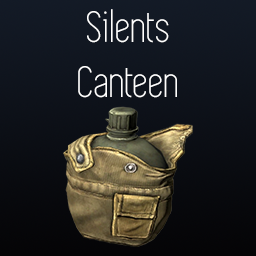
Silents Canteen (Deprecated)
par 76561198023600447
Adds in a military style canteen that's a smidge better than a bleach bottle. It's really only for aesthetics, the model isn't the prettiest either. It functions the same as a water bottle, if it's in your main inventory you will drink from it automatically. The canteen will spawn in two places - footlockers found in military installations, (try the big military checkpoint outside Louisville) as well as in the military surplus store. Workshop ID: 2815776428 Mod ID: SilentsCanteen
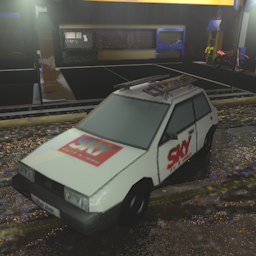
Uno with ladder
par 76561198417753042
This mod adds the Fiat Uno car with ladder to your game. Workshop ID: 2509647861 Mod ID: UnoEscada
![Mexiox's - Light Sabers [B41] – Project Zomboid Mod](https://images.steamusercontent.com/ugc/47950207618475467/E713897B68DE1260DF8D79C8C5C3A4E41CDFB74E/)
Mexiox's - Light Sabers [B41]
par 76561199036949265
Want the B42 Version? CLICK HERE Want some Light Saber action while on a realistic Zombie Apocalypse? Then this mod is for you! Thats right, now you can find some of the most iconic characters in your project zomboid experience and wield the their awesome lightsabers as you survive the the zombie apocalypse. This mods adds 3 options in which you can now add light sabers into your worlds, these 3 options are: Mexiox’s – Lightsabers This mod option will give you the FULL EXPERIENCE adding every item, lightsabers, magazine, zombies and clothes added with the mod, so this would be my recommendation for you to try first ? Mexiox's - Light Sabers Only Machetes This mod option ONLY adds the machetes, kyber crystals and magazine to craft the machetes, so if you don’t want any zombie or clothes or sw saga light sabers, this would be your best option Mexiox's - Light Sabers Without Machetes This mod option ONLY adds sw saga lightsabers, zombies and clothes, so if you don’t want any of the machetes, kyber crystals or the magazine to craft them, this would be your best option Remember to choose only the one you want to use in your world, choosing two or all of them might make you run into some issues The biggest question… HOW DO I TURN ON AND TURN OFF MY LIGHTSABER I JUST FOUND? In order to turn on and off your lightsaber, by default it’s to the key Z, but you can change it in your settings Unfortunately, there is a known issue with the lights in multiplayer, the light that the lightsabers produce is only seen by the player who wields it, I’ll try to get rid of this issue later on, but for now, that is just the way that it is. Another known issue is when you equip it in your hotbar while the lightsaber is on, it will stay that way but not produce any light, I wanted to get rid of this issue by turning it off automatically as it enters the hotbar again, but let me know If you wish it to be light even when the lightsaber is there! the main reason I didn’t its because it doesn’t really make sense anyway but, you can let me know what you think about this :) If you find anything else, let me know in the comments or in our Discord we mainly speak Spanish there but I will reply to you in English. ? With that out of the way, me show you what you will get with the mod options Remember, if you want everything that the mod has to offer, just choose the first option Mexiox's - Light Sabers Without Machetes Lightsabers Name Icon Anakin’s Saber Darth Vader's Saber Dooku's Saber Ben's Saber Kylo's Saber Mace's Saber Luke's Saber Clothes Name Icon Jedi Robes Jedi Robes Dark Jedi Robes Black gloves Black glove Jedi Pants Jedi Boots Luke’s Suit In case of the Jedi Pants there are also the light-toned option and the dark option. With the boots you can find either dark or brown boots So… WHERE DO I FIND THEM? You can find zombies in the world that have them, and this can be adjusted if you play in the sandbox option Mexiox's - Light Sabers Only Machetes As said before, with this mod option you’ll only get the machetes, kyber crystals and magazine part of the mod, so, these are the items added with this mod option: Machetes Name Icon Pink Machete Yellow Machete Orange Machete Blue Machete Purple Machete Red Machete Green Machete Kyber Crystals Name Icon Green Blue Orange Pink Purple Red Yellow Magazine So… HOW DOES IT WORK? AND WHERE DO I FIND THEM? First you’ll want to start leveling up that electrical skill because the only way to get a machete like this is to craft it, and to do so, you’ll need to be level 8 in said skill. While you’re doing that, you should search for the magazine, in game it’s called the Geek N Freak Issue #66 and find the Kyber Crystals, you can find them foraging or at any jewelry store in the map (meaning only the one in Riverside and the one in the mall in LV). And also, remember to also get the other components to craft your desired machete Workshop ID: 2927454765 Mod ID: Mexiox_ls Mod ID: Mexiox_machetes Mod ID: Mexiox_sw Workshop ID: 3405580818 Mod ID: Mexiox_machetes Mod ID: Mexiox_sw Mod ID: Mexiox_ls

Gun loot not destruct
par 76561198083556470
Gun container cannot destroy cannot disassemble Workshop ID: 2722992846 Mod ID: lootNotDestruct
![50% Metal, Stone & Wood Weight [B42 SP&MP] – Project Zomboid Mod](https://images.steamusercontent.com/ugc/17619652375939567167/BA1E423A650DED53203F1CDDDF2D37465F730CE6/)
50% Metal, Stone & Wood Weight [B42 SP&MP]
par 76561199133723249
Independent Unofficial Project Zomboid Build 42 mod. Reduces the weight of every vanilla material-category wood, metal, and stone item to 50% of its original Build 42 weight. Covers raw and crafted materials such as logs, planks, ores, ingots, sheets, scrap, fasteners, stone blocks, gravel, and material variants while leaving unrelated items unchanged. Contains original Lua code and original cover art. No Project Zomboid game assets, third-party mod assets, or third-party code are included. Not affiliated with or endorsed by The Indie Stone or Valve. Workshop ID: 3776526211 Mod ID: HalfWeightMaterials
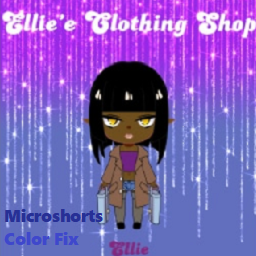
Ellie's Clothing Shop Microshorts Color Fix
par 76561198799609150
The sole purpose of this mod is to make the colour of Microshorts from Ellie's Clothing Shop mod actually appears so instead of being pitch black, by replacing the original texture with a whitened edit. Original Mod: Ellie's Clothing Shop https://steamcommunity.com/sharedfiles/filedetails/?id=2740197862 Workshop ID: 2885256049 Mod ID: ECS_MicroshortsColorFix
![[B42]Kiryu Voice – Project Zomboid Mod](https://images.steamusercontent.com/ugc/37817108447518507/084EE4DD24F1261CB1A95FF59257B88E3D9C7163/)
[B42]Kiryu Voice
par 76561198043417360
Adds Kiryu as a selectable voice in character creation. Sounds bites were taken from Yakuza 0, Yakuza 6 and Yakuza 3 Workshop ID: 3402965590 Mod ID: KiryuVoiceMod
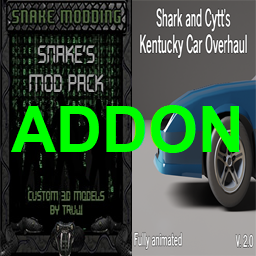
Snake's ModPack + Shark and Cytt's Kentucky Car Overhaul_Addon
par 76561198874558693
Mod que añade una simple compatibilidad que nos permite reparar las ventanas, parabrisas y neumáticos de los autos del mod: Shark and Cytt's Kentucky Car Overhaul usando los recursos del mod: Snake's Mod Pack Mod that adds a simple compatibility that allows us to repair the windows, windshields and tires of the mod's cars: Shark and Cytt's Kentucky Car Overhaul cars using the resources of the mod: Snake's Mod Pack También se pueden reparar los asientos, pero para que funcione correctamente debe tener instalado el mod: Snake's ModPack - Snake Clothing. Las demás reparaciones dependen del mod: Snake's ModPack - Pimp My Ride Mod. Ambos mods forman parte del Snake's Mod Pack. Siéntase libre de elegir si usa una o las dos reparaciones, de igual manera funcionará bien el mod si solo usa una de ellas. The seats can also be repaired, but for it to work correctly you must have the mod installed: Snake's ModPack - Snake Clothing. The other repairs depend on the mod: Snake's ModPack - Pimp My Ride Mod. Both mods are part of the Snake's Mod Pack. Feel free to choose whether to use one or both repairs, the mod will still work just fine if you only use one of them. Puede ser me falten algunas partes de autos por añadir, si los detectan, agradecería me informen para añadirlos. Gracias. It may be that I am missing some car parts to add, if you detect them, I would appreciate it if you would inform me to add them. Thank you. Todo el agradecimiento es para sus creadores. Gracias por sus maravillosos trabajos y gran esfuerzo. All thanks go to its creators. Thank you for your wonderful works and great effort. Workshop ID: 2995466329 Mod ID: SMPSCKCOAddon

Foxo Hat
par 76561198115582328
A simple little hat created for Foxo and his Twitch streams. The hat itself is similar to winter hats, offering a good amount of protection from the cold - though also boasts a meager amount of scratch protection, too - Jeremy is looking out for you. You can choose whether he spawns in your game, alongside the rarity of him. He appears in childrens' wardrobes, hat sections of clothing stores, and some other clothing loot tables. Alongside this, sometimes zombies will have one in their inventory. Works in Build 41 and Build 42. Workshop ID: 3417037066 Mod ID: PompFoxoHat
![Sleepy Moodle [B42] – Project Zomboid Mod](https://images.steamusercontent.com/ugc/15307435685988376/F5080BA0A37CE3CFA5DD440550EDA39FF7E57268/)
Sleepy Moodle [B42]
par 76561198833637652
Finally, it's reuploaded in B42. Note: This mod supports sandbox settings.Please check the sandbox settings. Adds an Out Of Breath moodle that is displayed a bit before the Moderate Exertion moodle kicks in. I should be able to feel how tired I am. How frustrating! Get a debuff without any warning! Out Of Breath Moodle Another mod in GIF: Barefoot Moodle Original author: TOTALLY NOT A SKELETON. I just reupload this mod to B42, and the honor and contribution belong to the original author. I'll delete this once the official mod is updated or if the original author asks me to. Original mod: Sleepy Moodle https://steamcommunity.com/sharedfiles/filedetails/?id=3027968416 The original text of the mod description is also here ↑ Workshop ID: 3461350318 Mod ID: SleepyMoodle42
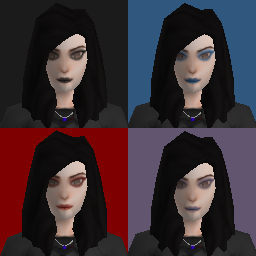
Simple Retextures - Makeup Rework
par 76561198060424805
Personal changes for some makeup in Simple Character Retextures. Primarily eyeshadow. Eyeshadow changes: white to full black, light blue to full blue, red to full red, pink to full purple, and yellow to thin black. Workshop ID: 3118888873 Mod ID: BetterMakeupForSimpleRetex
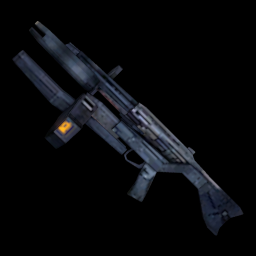
AR2 Test
par 76561198079252819
WIP mod for the base game that adds AR2, AR2 Mag, Pulse Catriges, materials and recipes to produce ammunition from just a stone(it is a test, cmon). Workshop ID: 2841613545 Mod ID: ar2
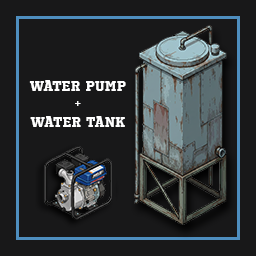
Water Pump
par 76561198066693482
AI USAGE DISCLAIMER This mod was developed entirely with code generated by Claude. There is not a single line written by hand. My work was designing the whole logic of the system, providing the game and modding knowledge, reading the debug output, giving context and steering the development until it did what I wanted. The project was supervised, tested and optimised throughout, including the multiplayer port, always aiming for efficient code with no unnecessary performance cost. The tiles and sound effects are my own work. Water Pump — running water after the end of the world, at last! A fuel-powered motor pump and a 3000 litre tank. You draw water from a river, a well or some barrels, lift it into a tank up high, and from there gravity feeds the taps of the whole house. No electricity needed. It also does something much simpler: moving water from one place to another without hauling cans by hand. Getting water running, step by step - Put the pump down near a water source and connect it to that source (river, well, barrels, another tank) and to an output container. - Fuel it and turn it on. Water starts moving on its own. - Build the tank up high — your roof is the natural spot — and connect it from its menu. - Install a water connection on each fixture with a pipe wrench. - Plumb the fixture with the game's own "connect to water source" option. This step is not optional: until you do it, the tap keeps serving its own leftover water and ignores your tank. How to tell it worked: a tap running off your tank reads 40/40. If it still reads 20/20, that is the tap's own leftover water and it is not on the tank yet. And if the tank is empty, a plumbed tap has nothing to give and shows no water options at all — exactly like an empty rain barrel. The pump Heavy: it takes both hands to carry. Place it from the menu to pick the facing, or just drop it on the floor and install it later. - Fuel: 20 litres, filled from cans or bottles. It burns about half a litre per hour while running, whether it is pumping or not. - Flow: 5 litres per in-game minute. - Range: draws from 3 tiles away on its own level, pushes up to 20 tiles away and 4 floors higher. - Condition: wears down with use, repaired with a pipe wrench and scrap. Do not run it dry. Left on with no water at the intake, the engine overheats in a couple of in-game hours. Below 20% condition it can burn out for good: it will not start and cannot be repaired. It only moves water. Petrol, bleach or anything else is refused, and if you force it the engine coughs, will not start and loses 15% condition. Rainwater is fine, but the pump does not purify — lift rainwater and rainwater is what you get up there. The info window shows status, fuel, condition and connection count, and while it is open it highlights the connections in the world: green for outputs, blue for sources, red for a contaminated one. The fast way to read a big setup. The tank Built from the construction menu with Welding 4 and the recipe learned. It holds 3000 litres and takes sheet metal, scrap and pipes. It starts disconnected, so you can fill it before it begins distributing. Once connected it feeds by gravity, with no fuel and no electricity: 20 tiles around, and downwards with practically no floor limit — a rooftop tank can supply a whole building or a bunker. Lifting water up is the pump's job, and that does have a limit of 4 floors. The water connections With a pipe wrench and a tank in range you can install a connection on any tap, toilet, shower, bathtub or washing machine. It is invisible: it does not clutter the house and you can keep building over it. It behaves like a rain collector sitting above the fixture — except one tank supplies every fixture at once. It has to be an enclosed space. The game's plumbing only works inside a space closed off by walls, a map house or one you built yourself. A roof alone is not enough: a covered patio will not do. That is the game, not the mod, so the menu tells you the reason instead of letting you waste the wrench. One connection covers a 3x3 area, so a sink and a toilet next to each other share one. If a spot is already covered the mod says so — including when what covers it is your own rain barrel, in which case you do not need the mod there at all. You can remove a connection from the same menu. While one is installed you cannot pick the fixture up, and if the fixture is destroyed the connection goes with it. Going further: cascading A tank can be the output of one pump and the source of another at the same time. Chaining pump → tank → pump → tank lifts water as high as you want: tested in the tallest buildings. Barrels work too. Every stage costs fuel, so it is a real decision. The highest tank fills first, then the ones below. With several pumps around, the menu lets you pick which one each thing connects to, showing position and status, so you never have to guess. How to get it - The pump shows up mostly in hardware stores, and at a lower rate in garages and industrial warehouses — roughly where you would find a generator. Sometimes it is lying on the floor of a garage. - The magazine "Off-Grid Water Systems" teaches both the tank and the pump. Hardware and electronics stores, and with less luck libraries, bookshops, magazine racks and house shelves. - Operating the pump is also learned on its own at Electrical 3 — but for the tank you do have to find the magazine. Multiplayer It works in multiplayer. Ported and tested against a real dedicated server: placing, installing, turning on, fuelling, connecting, the tank, the connections and the water transfer are all synced. If you hit a bug, leave it in the comments. Removing the mod from a save Straight answer: on a world where the water tank was built, you cannot fully remove the mod. Zomboid registers the tank's script in that save's WorldDictionary, and after that the client refuses to load the world without it — Missing dictionary script: WaterPump.WaterTank. I tested it: with the mod on both sides it loads; missing on the server, or on both, it fails. That is a Zomboid limitation, not a choice of the mod, and no mod can reach it. Nothing is lost, though. Put the mod back and the world opens again; Zomboid reinstates the entry by itself. So if what you want is a world with none of the mod's stuff in it, run the cleanup and just keep the mod in your load order — once the cleanup has run it does nothing at all. In the Lua console with debug mode on: - Single player: WPM.desinstalar() - Multiplayer, as admin: WP.pedir(getPlayer(), "desinstalar", {}) It wipes every pump, tank, connection and mod item from the loaded area, and lists whatever sits in an unloaded chunk with its coordinates. In multiplayer the report prints to the server log. If you truly need it gone, back up the save and look up Project Zomboid WorldDictionary missing dictionary script. Never just delete that .bin file: it scrambles the save's IDs. Tested on Build 42.20 (stable branch), single player and multiplayer with a dedicated server. Available in Spanish and English. Workshop ID: 3772302032 Mod ID: WaterPump
Dragons Simple Weapon Durability
par 76561197976409671
This is an extended version of Simple Weapon Durability by Ashleigh. Description Adds settings that dynamically adjust durability-related stats on weapons through code, no file replacements. Can apply to both vanilla and modded weapons. Works in multiplayer. A weapon is usually an item you can equip onto your hands and use to deal damage to e.g. zombies, at the chance of it losing durability (HP). Screwdriver, hammer, bat, crowbar, handgun, axe, spear, kitchen knife - are all examples of items in the "weapon" category. In rare cases, a modded item might be considered a weapon if it was implemented in a funky way to have the durability stat, but otherwise, this mod only affects "weapons" What is included/changed? A good bit was reworked to allow multiplayer use, while still retaining simple option menu changes. Several new settings were also added. The full list of features in this mod are: - Filter changes to apply to Melee, Ranged and Modded weapons. - Filter which melee weapons to apply changes to (SmallBlunt, Blunt, SmallBlade, LongBlade, Axe, Spear) - Increase "Condition Max". (base HP/durability) - Increase "Condition Lower Chance". (probability of changing HP/durability) - Flat and multiplication increases. - Changing settings no longer require game restart, just reloading the save if changed after loading a save. - Some filtering optimizations to make durability adjustments a bit faster. - Works in multiplayer using vanilla sandbox settings, while retaining Mod Options settings for singleplayer. Flat increases are applied AFTER multiplication. Customization You can configure singleplayer settings such as durability multiplier through Mod Options. Servers use vanilla sandbox settings. - Install Mod Options. - Open Project Zomboid. - Enable "Mod Options" in the mod menu. - Go to "Options". - Go to "Mods". - Adjust settings for "Dragons Simple Weapon Durability" to your liking. - Apply. NB: If you change settings while a save is loaded, you will have to reload the save for changes to apply. No need to shut down the game though. NB: If you want to change the settings for a server, you need to use the sandbox settings instead. Remember to have the mod enabled if you use the "Host" approach, as the sandbox settings wont show/get added otherwise. Default Settings - Include Melee = true - Include Ranged = true - Include Modded = true - Condition Max flat increase = 10 - Condition Lower Chance flat increase = 5 - Condition Max multiplier = 2x - Condition Lower Chance multiplier = 1x - Include SmallBlunt= true - Include Blunt= true - Include SmallBlade = true - Include LongBlade= true - Include Axe= true - Include Spear= true Compatibility - Weapon Stats Tooltip - Will not display the correct values for HP and Durability Change Chance. - Existing save compatible, though changes to e.g. "Condition Max" wont "repair" you existing items, - Soft conflicts with mods that add durability to existing weapons. You'll end up with insanely durable weapons. - Conflicts with mods that add "Weapon" type items that are not actually weapons -- may result in some odd behavior. Report issues if experienced. - Keep in mind that if you have modded weapons with already generous durability, they might become significantly more generous. Complimentary Mods Show Weapon Stats Plus - Will allow you to see durability stats on any item. I personally use this while testing, and have had no issue with it so far. Known Issues Firearms will randomly have their durability set to 0. You can disable modification of ranged weapons until a fix is found, but I have been unable to reliably re-create the bug, as it feels rather random. How can I support your work? If you enjoy the content I put out, consider supporting me, it would be greatly appreciated! Workshop ID: 3003693661 Mod ID: dragons_simple_weapon_durability

SilenceChat and Teleport Event B42+
par 76561199262875072
Workshop ID: 3502049877 Mod ID: SilenceChat 🔇⚡ SilenceChat + Teleport Event - Advanced Chat Control & Event Teleport System Enhance your server with a powerful combination of moderation and event management tools. ⚙️ MAIN FEATURES 🔇 SilenceChat – Toxic Player Control • Automatically mute toxic players • Persistent bans/mutes (even after reconnect) • Prevent chat abuse and spam • Backup log system for moderation tracking • Maintain a clean and controlled community 🟪 Application: In the game chat type: /silence user or /unsilence user Log folder on Server/Lua/... ⚡ Teleport Event – Dynamic Event System • Right-click option: "Go to Event" teleport • Custom target coordinates (X, Y, Z) • Teleport delay animation (anti escape) • Multiple random teleport zones (up to 4) • Fully configurable via Sandbox settings 🟪 Private & VIP Zones • Private teleport zones for selected players • Player whitelist system (comma separated) • Perfect for VIPs, events or admin control • Highly customizable system • Works for PvP, PvE and RP servers 🧠 OPTIMIZATION • Lightweight and optimized • Clean and modular code • Dedicated server compatible • Logging system included ⚠️ NOTES • Teleport delay helps prevent PvP abuse • Sandbox settings required for full configuration • Designed mainly for multiplayer servers 🚀 Control your chat. Control your events. Upgrade your server.

VSKIN GL
par 76561198376589492
Special Thanks to IBrRus (Tsars) and DOGEMENT Workshop ID: 2790404659 Mod ID: Skinvfactiongl
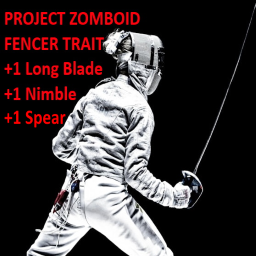
Amateur Fencer Trait
par 76561198041411600
Adds the "Amateur Fencer" trait: costs 7 points +1 Nimble +1 Long Blade +1 Spear The +1 Spear is because both spears and rapiers are long range, thrust centered weapons, and it is said that there's a large amount of crossover between a spear and a rapier fencing technique. The +1 Nimble is for all the footwork and dodging necessary in all fencing disciplines. For Build 41 only Workshop ID: 2573208580 Mod ID: AmateurFencerTrait
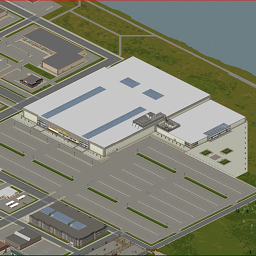
Louisville Grand Ohio Mall Spawn Points (Interior)
par 76561198001808866
My third spawn mod, this time you are at another Mall, but your shopping trip has turned into a nightmare! Will you turn the Mall into the ULTIMATE BASE? Questions> McDudeMan#7408 Workshop ID: 2935549871 Mod ID: LVMallSpawn Map Folder: Grand Ohio Mall
![[B42] Postal Dude Voice – Project Zomboid Mod](https://images.steamusercontent.com/ugc/10156244598700656122/CDC93100C5E71AFF7FEEADFC928D4C0541A78F70/)
[B42] Postal Dude Voice
par 76561198325319367
This mod adds the infamous voice of T. Postal Dude Jr. to Project Zomboid. He regrets nothing, and you will regret nothing too! A whole lotta voice lines for you to hear! From Postal 2 to Brain Damaged! Known bugs: Climbing Windows doesn't cause grunts to play. No voicelines for falling. Incompatible Mods: Gas Mask Breathing Sound Recent patch: Fixed repetition for blunt melee attack voicelines. (Hopefully, please tell me if it didn't go through in the comments.) Fixed a misaligned bit of code for scratch injury voicelines that might've been messing it up. (Again tell me if it worked or not in the comments.) Workshop ID: 3571976925 Mod ID: PostalDudeVoice
![[B42.20] Ogrim Mod's - Universal Profession Customizer – Project Zomboid Mod](https://images.steamusercontent.com/ugc/12942877278243554940/4C564B5B8489CFD7785DFC43748DAAB660CF661B/)
[B42.20] Ogrim Mod's - Universal Profession Customizer
par 76561198051362724
Start the apocalypse your way. This mod lets you define profession-based starting loot, with per-item chance — so every new run can feel different. 🔍 What it does Per-profession loot tables you edit directly in the Sandbox UI. Each entry supports Amount and Chance %, so items can be guaranteed or rolled. Auto-equip clothing you get; if a backpack is rolled, all unequipped items from main inventory are moved into it and the pack is equipped to Primary, for a fast, clutter-free start. Optional “Remove vanilla starting pistol” (enabled by default; toggle in Sandbox). Works with custom professions from other mods — you can configure them manually. 🧰 Powerful Sandbox UI (with clipboard tools) Add/Remove items, sort, filter by name/category. Export / Import your setup to the clipboard by profession or all at once. Saves with your Sandbox preset, so you can reuse it in future games. Export format example: policeofficer*Base.Bag_Police,6-75:Base.9mmClip;parkranger*Base.Hat_Ranger Entries are separated by ; A profession is separated from its items by * Items are separated by , Optional Amount-Chance after an item uses : then amount-chance e.g., 6-75:Base.9mmClip → amount 6, chance 75% ⚙️ Balance & Options Toggle remove starting pistol (default ON). Full control of per-profession loot lists via the Sandbox panel. Clean UI actions: Copy/Paste/Reset current or all professions, Sort, Filter. 🧭 How to use Open Sandbox → Universal Profession Customizer panel. Select a profession and build its loot table (amount & chance per item). (Optional) Export to clipboard and share or reuse in other presets. Start a new game — your character spawns with the configured gear. Clothing auto-equips; backpacks get auto-equipped and filled. 🤝 Compatibility Supports modded professions. Doesn’t touch global loot tables, only affects starting gear. 📝 Notes If something spawns in a container (e.g., backpack), the mod tidies up automatically to reduce spawn-time micromanagement — great for high-pop starts. Importing strings replaces the current list for the selected scope (profession/all). Tune your start. Keep the chaos ☕🧡 Want to Support me? https://ko-fi.com/ogrimdooh 👥💬 Join the community! https://discord.gg/rTd2P6pbEu This mod cannot be modified by anyone else, for anything else, at all, ever. Even if the user disappears, he or she would much rather you didn't touch the fruits of their hard labour. http://theindiestone.com/forums/index.php/topic/2530-mod-permissions/?p=36479 Workshop ID: 3558835419 Mod ID: GRM-UniversalProfessionCustomizer

Donkey-驴服汉化补丁
par 76561198169284458
自用汉化18 Workshop ID: 3685292646 Mod ID: LvTransv
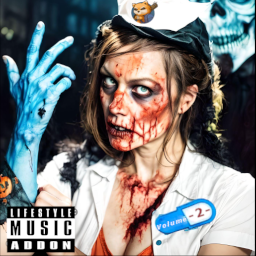
Lifestyle Music Addon: Engantor's Playlist Volume 2
par 76561198101835576
Alpha 0.4 Acoustic Guitar Tracks: Crazy by Gnarls Barkley I Miss You by Blink 182 Riders of Rohan from Lord of the Rings The Kids Aren't Alright by The Offspring Keytar Tracks: Dumpweed by Blink 182 Self Esteem by The Offspring What's My Age Again by Blink 182 Electric Bass Tracks: Halo Theme from Halo One More Time by Blink 182 Workshop ID: 3357165172 Mod ID: EngantorsPlaylistVol2
![Sisyphus meme [Death Sound] – Project Zomboid Mod](https://images.steamusercontent.com/ugc/2314351841354384999/1EEF5B6A1A6FEFE47AB38107805C4F0392826ACD/)
Sisyphus meme [Death Sound]
par 76561199011989673
Adds new death sound Workshop ID: 3125215886 Mod ID: SisyphusDeathSound
Project Zomboid Guides
Installer des mods Project Zomboid - Guide Workshop
Installe proprement des mods Project Zomboid via le Steam Workshop : saisir les IDs, vérifier l’ordre, redémarrer le serveur et corriger les erreurs typiques.
Louer un serveur Project Zomboid – guide multijoueur
Configurer un serveur Project Zomboid : RAM, paramètres sandbox, mods Workshop, droits admin et vérification propre des erreurs typiques.
Serveur Project Zomboid avec support des mods
Installez les mods compatibles et pris en charge depuis le tableau de bord.
Louer un serveur Project Zomboid