Mods et plugins pour Project Zomboid
Ce catalogue répertorie 60 000+ projets Project Zomboid provenant de Steam Workshop. Les entrées peuvent être côté serveur, côté client ou requises des deux côtés, et inclure des cartes ou d’autres contenus créés par les utilisateurs. Avant l’installation, vérifiez la page source liée, la version du jeu et les dépendances.
Laconia Pont Sud
par 76561198207513031
Pont sud de Laconia pour le serveur La Prophétie Workshop ID: 3111551990 Mod ID: LPS Map Folder: LPS

Sonia's Server Mod - Car
par 76561198034178949
Personal mashup mod of many more. This is a remixed package of recipes from several car repair mods that I made for the sake of a personal server. All credit goes to the original authors at: Car Tweaks - https://steamcommunity.com/sharedfiles/filedetails/?id=2719050833 Viperel's Vehicle Spare Parts - https://steamcommunity.com/sharedfiles/filedetails/?id=2712632417 Vehicle Repair Overhaul - https://steamcommunity.com/sharedfiles/filedetails/?id=2757712197 Workshop ID: 2826715230 Mod ID: Sonia's Custom Server Mod - Car
Simple Skill Books: Driving Skill Patch
par 76561198076948732
This patch was made to offer compatibility for Driving Skill mod when used in conjunction with my Simple Skill Books mod. Now, one can safely use thse two mods together, without the Driving Skill mod's books breaking the design behind Simple Skill Books. I made this patch on request. As such, this patch mod tweaks the Driving Skill books to fall in line with the vanilla books that Simple Skill Books already changes. Please note, like Simple Skill Books mod, the Driving Skill Patch is best added with a fresh game. It still can be added to an existing game, but be sure to burn any skill books that you found prior to adding the patch, as the fix is not retroactive. Workshop ID: 3422227581 Mod ID: DrivingSkillPatch

Bing Chilling Jumpscare
par 76561198012867335
The jumpscare noise is replaced by John Cena saying "Bing Chilling". There are four clips; one is randomly chosen each jumpscare. Zhong Xina feichang hao. 约翰·希南 早上好中国 现在我有冰淇淋 我很喜欢冰淇淋 但是《速度与激情9》比冰淇淋 《速度与激情9》我的最爱 所以现在是音乐时间 准备 一,二,三 两个礼拜以后 《速度与激情9》 不要忘记 不要错过 去电影院 看《速度与激情9》 因为非常好电影 动作非常好 差不多一样 冰淇淋,再见 Check out my other mods: John Cena Bing Chilling Jumpscare Broken & Burnt Body Cursed Crotch Feverish Fellow Workshop ID: 2867454095 Mod ID: BingChilling
Toxic Zones Sickness version
par 76561198182908886
This is another version of my Toxic zones mod. In this version zones don't do direct damage, they increase sickness (the queasy moodle). There are no protective items or visual effects. Zones are created by admin just like in the other versions but can be saved to a backup file and restored from it. Sponsored by TancredTerror. Made by Soul Filcher, join my Discord server to talk about my mods: https://discord.gg/dzbZgzXNTT And if you can always... Tags:B41,Hardmode,Multiplayer Workshop ID: 2964973202 Mod ID: ToxicZonesSickness
zRe 방어구 흡수 시스템 한국어 번역
par 76561199527548544
kEHRUS 모더의 zRe 방어구 흡수 시스템 모드를 번역해주는 간단한 모드입니다. 모든 권리는 원작자에게 있습니다. Workshop ID: 3301799776 Mod ID: zReAAS_KO
Plysken - Fix - Organized Categories
par 76561197967837587
📌 Before you post a bug — please read this Organized Categories reorganizes your inventory into clean item categories — but on Build 42 it has a few rough edges. This is a small companion mod that patches them. It does not add, rename or change any categories itself; it only makes Organized Categories run cleanly on Build 42. What this mod fixes 1. Category names showing as raw text Organized Categories ships its category-name translations in the old Build 41 format, which Build 42 ignores — so you see raw keys like IGUI_ItemCat_clothingBottom instead of readable names. This mod supplies those same translations in the correct Build 42 format, so every category name displays properly. 2. Console error from the auto-sort Organized Categories auto-sorts items that have no manual category. On some Build 42 items (certain moveables and modded items) this threw an error at startup — Object tried to call nil in autoSort — and stopped the sort early. This mod guards the auto-sort so those items are simply skipped: no more console error, and the rest of your items still get sorted. The guard is re-applied at the right moment so it holds regardless of your mod load order. 3. Vanilla Foods Expanded — the meals it misses Organized Categories now sorts Vanilla Foods Expanded itself, and it does it well — so this mod no longer duplicates that work. It only fills what is left over: the cooked meals and recipe results that still land uncategorized. Completely optional — safe whether or not VFX is installed. Requirements Organized Categories — required Project Zomboid Build 42 Loads after Organized Categories automatically (handled by the mod’s require field). Nothing to configure. Credits The category system, the categories and their names all belong to Organized Categories by its original author. This companion mod only: provides the Build 42 translation format, guards the auto-sort against a console error, and fills in the few Vanilla Foods Expanded meals Organized Categories does not sort yet. Workshop ID: 3726969314 Mod ID: OrgCatFix
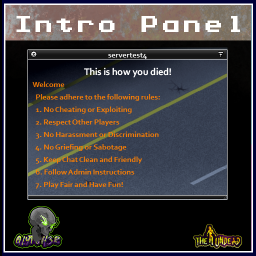
IntroPanel
par 76561199042257388
Customizeable Intro Panel Use this mod for you to communicate rules, announcements, events, notifications, etc it uses 2 customize able string input via sandbox options Header and Body To add line break just add ; Same as how you add mod id and workshop id Made for MP Servers Can be installed mid game -------------------------------------------------- Mod by Glytch3r Commissioned by Krusttyx All my mods are commissioned including this one For custom pz mod commissions contact Glytch3r discord: Glytch3r#7331 / glytch3r https://ko-fi.com/glytch3r Workshop ID: 3339957071 Mod ID: IntroPanel
![[COS] BF2042FaultLine – Project Zomboid Mod](https://images.steamusercontent.com/ugc/2470871583336216783/4C3B5984475EC086E44FAA93F8D4D7FAE98A4C93/)
[COS] BF2042FaultLine
par 76561199178116693
How Do I Use It? - You can go to the link below to see how to use it. - Link Recommended mode - Fashionoid - Gear Transmog - Hide All Attached Items - Clipping animation Fix How to use COS mode in build 42. - Navigate to the path where the mod is installed. - Create a 42.0 folder. - Create a common folder. - Paste the media folder / mod.info / preview.png into the 42.0 folder. The recipe code writing method has been changed in 42Build. Since COS (Costume) mode has approximately over 200 modes, converting to 42Build's recipe code is an extremely laborious task. In 42Build, you cannot create costumes in (42 build) the crafting tab. There are two methods: Spawn items in cheat mode. Select items in the clothing selection screen when creating a character. Like My Mode? - Join Our Discord If You Want Commission Workshop ID: 3296805116 Mod ID: BF2042FaultLine
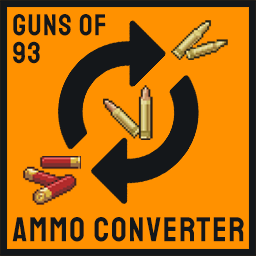
Ammo Converter Guns of 93
par 76561198047485926
Convert ammo to any type Guns of 93 .30-06 Round 7.92x57 Mauser Round Ammo Can of 7.92x57 Mauser Rounds .30 Carbine Round 7.62x39 Round .30-30 Round .22 LR Round .25 Auto Round .380 Auto Round .45 Colt Round .357 Magnum Round 10mm Round Buckshot Shell Shotgun Slug 9mm Rounds .40 S&W Rounds .45 Auto Rounds .44 Magnum Round .38 Special Round .223 Rem Ammo .308 Win Round Belted 5.56 Rounds 5.56 Belt Link Belted .308 Rounds .308 Belt Link 5.56 Round Exchange ammo for ammo No other recipe requires If you like this mod, please consider giving it an upvote so that other players can discover and enjoy it as well. Workshop ID: 3223196427 Mod ID: AmmoConverterGuns93
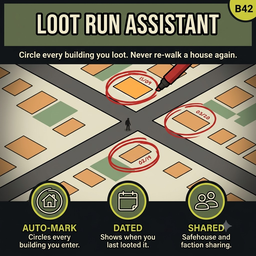
Loot Run Assistant (B42)
par 76561198007854792
A loot run mode you switch on. While it is on, every building you go into is circled in red on your world map and dated. Three days into a town you cannot tell, looking at the map, which of forty houses you already stripped. So you re-walk them, and you only find out the second visit was wasted once you are inside staring at empty shelves. You had that information at the time. It just had nowhere to live. Press F7 to start a loot run Rebindable. While loot run mode is on, any building you actually stop in gets a red circle with today's date inside it, at the building's centre on the world map and the minimap. Go back a week later and the mark re-dates itself. Press the key again to stop. Marks are drawn with the vanilla annotation system, so they look like something you drew yourself, they show up everywhere your own marks do, and they save with your game. While the mode is off the mod does nothing at all. Why a mode and not always-on Marking every building you ever walk into makes the map useless - a wall of red over everywhere you have sheltered, fought through, or cut across on the way somewhere else. A mark is only worth something if it means I searched this one, and only you know when that was true. The switch is how you say so. Taking marks off again One at a time - rub it out on the map. These are ordinary annotations, so the world map's own eraser removes them exactly like a symbol you drew by hand: open the map, pick up the eraser, click the mark. The mod notices and forgets the building properly, so it stays gone rather than coming back next time you load. Rubbing out either half takes the whole mark with it. Erasing needs an Eraser in your inventory, the same as erasing any other map annotation. That is vanilla's rule and these are vanilla annotations; the mod does not carve out an exception for its own. All of them - Clear all loot run marks in the options. Erases every mark this character has placed. Does not touch symbols you drew yourself, and needs no eraser. There is a short delay before a building is marked A door is a thing you walk through, not only a thing you go in. Cutting across a lobby to reach the street behind it would otherwise leave a mark saying you looted the place - which is worse than no mark, because you will believe it. So a building has to still have you in it a minute later. The delay is in in-game minutes, so it means the same thing at every day length: long enough that you stopped. Configurable, or switch it off. Works with Container Cleanup If you also run Container Cleanup, loot run mode arms it too - one key, one decision, for the whole run. Mark where you have been, and bin the junk where it stands. No dependency either way. Container Cleanup does not know this mod exists and works exactly as before without it; this mod looks for Container Cleanup and does without. Turn the handshake off in the options if you want the two modes separate. Requires Container Cleanup 1.1.0 or later for the handshake; older copies simply ignore it. Safehouses are never marked Buildings on protected ground are skipped entirely - no mark, and no record that you were there. Mostly this is about your own base. A loot run mark means stripped, do not come back, which is the exact opposite of what a safehouse is. Keeping out of other people's is the side benefit. Two systems are covered, because the admin panel builds them with two different tools: - Safehouses - player claims, and the admin panel's Safezone tool, which creates an ordinary safehouse under the hood. One and the same thing. - Non-PVP zones - the admin panel's Non PVP Zone tool and the Zone Editor's NonPVP mode. A separate system with no owner, usually drawn over a spawn town or a trade hub. The check runs against the square you are standing on and the building's corners and centre, so a warehouse straddling a zone boundary is skipped even when you are in the unclaimed half. Share marks with your group In multiplayer, everyone in your safehouse can see the buildings you have marked, and you see theirs - a wasted second visit is wasted whoever makes it. Faction sharing works the same way and can be combined with it. Both mean the same safehouse or the same faction - that is how the engine compares them. If you play as a group without one claimed building between you, tick Share marks with everyone instead and the whole server sees them. Sharing is off-by-default in the sense that matters: nothing leaves your map unless you ask it to. Sharing is decided when a mark goes down, so switching it on leaves the marks already on your map private. Share marks I have already placed brings those along too. This rides on Build 42's own annotation sharing, the same mechanism behind the sharing panel on the world map. No custom server component. Players without the mod see shared marks as ordinary map annotations. Settings Options -> Mods -> Loot Run Assistant, per player: - Loot run mode key - F7 by default, rebind to anything. - Mark buildings I enter - on. - Wait before marking - 1 in-game minute. Immediately, 1, 2 or 5. - Skip small structures - on. Sheds and outhouses are not worth a mark. - Show the date on the mark - on. - Arm Container Cleanup too - on. Does nothing if that mod is absent. - Share marks with everyone - off, multiplayer only. Overrides the two below. - Share marks with my safehouse - on, multiplayer only. - Share marks with my faction - off, multiplayer only. - Share marks I have already placed - shares the marks that went down before you switched sharing on. Press Apply first. - Clear all loot run marks - erases every mark and forgets them. Server Settings -> Loot Run Assistant, sandbox: - Enable loot run marking - on. Master switch for the server. - Allow sharing marks - on. Off forces every player's marks private. What it writes to your save Map annotations, in the same per-save store as symbols you draw by hand, and one small record per marked building on your character. Adds no items, no recipes and no tiles. Uninstalling leaves the annotations behind, since by then they are ordinary map symbols. Clear all loot run marks removes both halves and is the clean way out before you go. Credit The technique for reaching the map symbols without opening the map is lifted from TwisTonFire's Quick'n'Auto Mark, which proved it at scale. If you want automatic marking without a mode, a dock UI and a symbol picker, go and look at that one - it is a different design for a different taste and it is good at what it does. Workshop ID: 3777814834 Mod ID: LootRunAssistant
![Nade's Stalker Drinks [B42] – Project Zomboid Mod](https://images.steamusercontent.com/ugc/10310741943802292421/A713E1FCB34751266E2F4C135E92E0C0910BA445/)
Nade's Stalker Drinks [B42]
par 76561199263762467
This mod include drinks from STALKER games series: - Energy Drink - Energy Drink Non Stop - Energy Drink Non Stop Limited Edition - Cossacks Vodka Enjoy ! Workshop ID: 3569454584 Mod ID: STALKERDrinks
80s chevrolet opala
par 76561199082352521
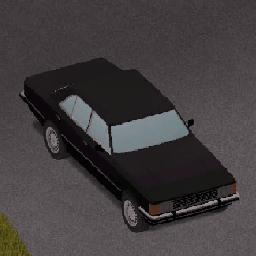
this mod adds the chevrolet opala, a muscle car that survived the 70s, 80s and early 90s this is my first mod, so it may be kinda bad unfortunately the car does not have mechanics ui, i still need to fix this bug Workshop ID: 3217662945 Mod ID: apollo
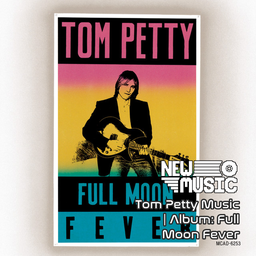
Tom Petty Music | Album: Full Moon Fever
par 76561199258285984
Tom Petty Music | Album: Full Moon Fever Generated with New Music Builder Full Moon Fever Side A 01 Free Fallin' 02 I Won't Back Down 03 Love Is A Long Road 04 A Face In The Crowd 05 Runnin' Down A Dream 06 Feel A Whole Lot Better Full Moon Fever Side B 01 Yer So Bad 02 Depending On You 03 The Apartment Song 04 Alright For Now 05 A Mind With A Heart Of Its Own 06 Zombie Zoo Workshop ID: 3757439932 Mod ID: 1PettyAlbum
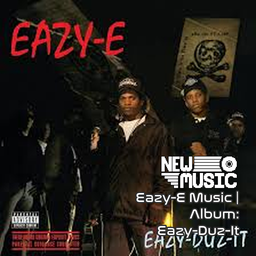
Eazy-E Music | Album: Eazy-Duz-It
par 76561199258285984
Eazy-E Music | Album: Eazy-Duz-It Generated with New Music Builder Eazy-Duz-It Side A 01 Still Talkin' 02 Nobody Move 03 Ruthless Villain 04 Hard Mutha's 05 Boyz-N-The-Hood - Remix 06 Eazy-Duz-It 07 We Want Eazy Eazy-Duz-It Side B 01 Eazy-er Said Than Dunn 02 Radio 03 No More Questions 04 I'mma Break It Down 05 Eazy - Chapter 8 Verse 10 06 We Want Eazy - Remix 07 Still Talkin' - Remix Workshop ID: 3754228184 Mod ID: 1EazyEAlbum

BAMBI01
par 76561198452865939
BBOK KS1 Workshop ID: 3547291171 Mod ID: Bambistiles_V1
![[DEPRECIATED][B41] On Your Toes Trait(Combat Stance/Pivot Speed Buff) – Project Zomboid Mod](https://images.steamusercontent.com/ugc/2018224307199148708/FF629BD60CEBACDFAD2368EAFF352377169B8697/)
[DEPRECIATED][B41] On Your Toes Trait(Combat Stance/Pivot Speed Buff)
par 76561198378787939
**B41/B42 VERSION NOW IN MAIN MOD** https://steamcommunity.com/sharedfiles/filedetails/?id=2946812728 Description: Characters turn way too slowly in this game. Enabling this trait will apply some tweaked speed & angle variables that change how your character turns, overall buffing your mobility and combat. It is near instant pivoting. This mod aims to increase the control given to the player. If your character has ever started running the opposite direction that you pointed them, this will fix that. Overall, it's pretty balanced because if you just right click behind you, your character will still play the normal turn around animation but if you physically move your cursor in that 180 degrees semicircle around your character from front to back, you can do it much faster and thus its left to your physical reaction speed and how fast you can perform that motion. ***IMPORTANT NOTE*** This tends to speed up the game play loop quite substantially and make fighting zombies generally "easier"(I think its important to have more control over your player). At the very least, the skill ceiling is much higher, it's not just completely unbalanced. I suggest buffing the zombies to counteract this or use the zombie mods & settings from my modpack: https://steamcommunity.com/sharedfiles/filedetails/?id=2927584023 Known bugs: -throws errors every tick in specific multiplayer circumstances(not sure why), in my testing is completely fine in singleplayer WITHOUT my other pivot mod to be safe **Multiplayer Compatible** Here is the global version: https://steamcommunity.com/sharedfiles/filedetails/?id=2946812728 (It does not hurt to have both enabled at the same time, but it makes no difference because it's already instant.) Workshop ID: 2999847600 Mod ID: OYTtrait
推僵尸入水 / Push Zombies Into Water
par 76561198258764906
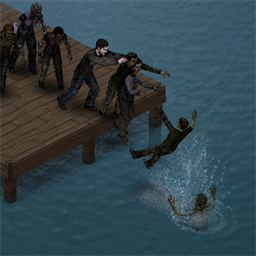
Push Zombies Into Water Turn the shoreline into part of the fight. When a zombie is close to the shore, stand on the opposite side and shove it toward the water. The zombie will fall into the water, slowly sink, and drown. Features - A roughly 1.8-second sinking and fading animation plays after a zombie is pushed into water. - The zombie dies after the animation instead of dying immediately on contact with the water. - Drowned corpses are not rendered on the water surface. - The corpse remains available as a ground container and can be looted from the shore. - All clothing and items carried by the zombie are preserved normally. - The effect only triggers when a shoreline zombie is actually shoved toward an adjacent water tile. - Normal weapon attacks, stomps, players, animals, items, and other game rules are unchanged. - Designed for both single-player and multiplayer. How to Use - Bring a zombie close to the edge of a river, lake, or other body of water. - Stand between the zombie and the land, opposite the water. - Shove the zombie toward the water. The drowning effect will not trigger if there is no adjacent water tile behind the zombie or if the shove is not directed toward the water. Compatibility - Project Zomboid Build 42.20+ - Single-player / Multiplayer - Can be added to an existing save - No required mods - Adds no items, recipes, or sandbox settings Mod Information Mod ID: PushZombiesIntoWater Version: 1.1.4 Workshop ID: 3777492921
Spongie's Character Customisation (NG_Fixed)
par 76561198122609812
Fork of Spongie's Character Customisation by Spongie. Original mod: https://steamcommunity.com/sharedfiles/filedetails/?id=3414634809 All credit for the mod goes to the original author. This fork only patches one bug, never behaviour. Fix - phantom weight from invisible appearance items Symptom, multiplayer only: a player carries weight that nothing in the inventory accounts for. The items are there, they just cannot be seen, and an admin has to delete them by hand. The mod's appearance parts are not cosmetic slots, they are real items: item M_Muscle { ItemType = base:clothing, ClothingItem = M_Muscle, BodyLocation = SPNCC:Muscle, hidden = true, } and the server puts them into the actual inventory before wearing them, in media/lua/server/CharacterCustomisation/FaceManager/Utility.lua: player:getInventory():AddItem(item) sendAddItemToContainer(player:getInventory(), item) player:setWornItem(item:getBodyLocation(), item) The removal path in the same file is documented by the author as unreliable: -- this doesnt work when the bodylocation is set to multi item -- player:removeWornItem(item) -- this works but doesnt send a syncpacket in mp so it needs a workaround to sync So in multiplayer an item can end up sitting in the inventory instead of on the body. Because hidden = true it is not drawn, and because none of the 23 items declared Weight they fell back to the engine default, which is not zero. Hence weight you can feel but cannot find. This fork adds Weight = 0 to all 23 appearance items across the three packs that define them. It does not touch the sync logic, so a stray item can still be left behind - it just weighs nothing when it is, which is what players actually notice. The two real items the mod adds (Appearance Changer, Appearance Unlocker) already declared their weight and are left alone. Items changed: SPNCharCustom_Blank, M_Beard_Stubble, M_Hair_Stubble, M_Hair_Body, F_Hair_Body, M_Muscle, F_Muscle, Detail_Freckles, Detail_Moles, Detail_MissingEye, Detail_Burn, Detail_Scar_Face, Detail_Scar_Body_Chest, Detail_Scar_Body_Stomach, Detail_Scar_Body_Other, Face_CaseyJo, Face_Janine, Face_Maryanne, Face_Vicky, Face_Frank, Face_James, Face_Chris, Face_Hank. Notes - Drop-in replacement: the mod ids are unchanged (SPNCC, SPNCCDetails, SPNCCDetailsHD, SPNCCFaces), so existing worlds and server configs keep working. - Unsubscribe from the original to avoid duplicate mod ids. - Existing phantom items keep their old weight until they are removed once; new ones weigh nothing. - Multiplayer: every player needs this same version. - This fork will be retired as soon as the original author fixes it upstream. Workshop ID: 3778551507 Mod ID: SPNCC Mod ID: SPNCCDetails Mod ID: SPNCCDetailsHD Mod ID: SPNCCFaces
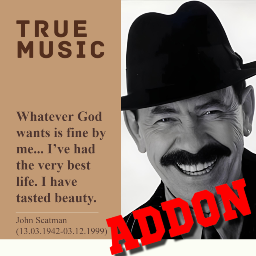
True Music Addon: John Scatman
par 76561198264141297
December 3, 2024 marks 25 years since the death of the great jazz musician in the style of «Scat Singing» John Scatman. In order to perpetuate the memory of such an outstanding personality for society, who made an invaluable contribution to the development of this direction of music, turned his main disadvantage into an advantage and contributed to other children struggling with their innate speech features with his creativity, I present True Music Addon, which includes all three lifetime music albums of this artist. All music has only a cassette edition due to the lack of proper official variety of vinyl covers. HISTORICAL REFERENCE: John Paul Larkin was born in the USA on March 13, 1942 with a speech dysfunction in the form of logoneurosis (i.e. stuttering). Such a health problem led to a difficult childhood with ridicule from peers. In connection with this, the musician, at a more mature age, decided to limit himself to the profession of a jazz pianist, without performing as a singer. In addition, he had alcohol and drug addictions, which he successfully overcame after the death of his musician friend, who died precisely as a result of drug addiction. In 1994, the author's first single, «Scatman (Ski-Ba-Bop-Ba-Dop-Bop)», was released in Germany, personifying the author's struggle with his own stutter, which led to worldwide success and the birth of John Scatman (the author adopted a new pseudonym). Subsequently, three full-length music albums were released in 1995, 1997 and 1999. Unfortunately, in 1998, the musician was diagnosed with a fatal disease (lung cancer), and despite doctors' orders to reduce his workload, the performer went on tour in support of his latest album. On November 26, 1999, John Scatman collapsed on stage during one of his concerts. The performer died on December 3, 1999 (at age 57). His body was cremated and his ashes were scattered over the ocean near Malibu, California. Playlist: —Scatman’s World (1995): 1. Scatman's World; 2. Only You; 3. Quiet Desperation; 4. Scatman (ski-ba-bop-ba-dop-bop); 5. Sing Now!; 6. Popstar; 7. Time (Take Your Time); 8. Mambo Jambo; 9. Everything Changes; 10. Song of Scatland; 11. Hi, Louis; 12. Scatman (Game over Jazz); —Everybody Jam! (1997): 13. Stop The Rain; 14. Everybody Jam!; 15. The Invisible Man; 16. Let It Go; 17. Message to You; 18. (I Want To) Be Someone; 19. Scatmusic; 20. Shut Your Mouth and Open Your Mind; 21. (We Got To Learn To) Live Together; 22. Ballad of Love; 23. People of the Generation; 24. Lebanon; 25. U-turn; 26. Everybody Jam! (Club Jam); —Take Your Time (1999): 27. Take Your Time; 28. Scatman's Dance; 29. Chickadee Song; 30. Take Me Away; 31. Scat Me If You Can; 32. I Love Samba; 33. Sorry Seems to Be the Hardest Word; 34. Ichi Ni San... Go; 35. Dream Again; 36. Everyday; 37. Night Train; 38. Scatmambo. NOTE: All music in addon and video on addon page are copyrighted by its respective owners. The images on the addon page were created by the addon author. This Project Zomboid addon is for personal use only. Workshop ID: 3347778378 Mod ID: TrueMusic_JohnScatman
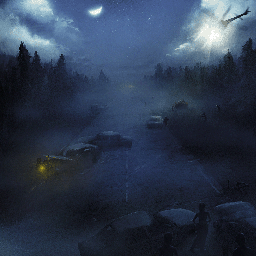
Background Art for Main Menu
par 76561198055260049
This mod adds custom new artwork for the main menu background. Restarting the game is required. B42 requires the Backkground Framework mod. Workshop ID: 3264765063 Mod ID: Okhans_KeyArt_1
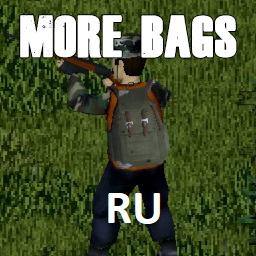
More Bags RU
par 76561198346091456
Больше сумок, рюкзаков и т.д теперь на русском (+небольшие приятные изменения параметров) Обновление: Возможность сшить медицинские поясные сумки, Штурмовой рюкзак и увеличить объем обычного рюкзака Если столкнетесь с вылетами после обновления, выключите мод, загрузите сохранение, включите (предварительно опустошите все рюкзаки они исчезнут в таком случае) Workshop ID: 3147291827 Mod ID: More BagsRu
![42] Ultimate Marksman v0.5 | Bows and Crossbows | WIP – Project Zomboid Mod](https://images.steamusercontent.com/ugc/9572036366739416764/285D0FD6919380B0CFFDF70C71C55E09B11D3166/)
42] Ultimate Marksman v0.5 | Bows and Crossbows | WIP
par 76561198126528525
Ultimate Marksman 0.5 Build 42.20 | Work in Progress Ultimate Marksman is a standalone mod that brings handmade bows, arrows, and crossbows into Project Zomboid Build 42.20. Note that AI was used to assist in the development of this mod, though was not used for the majority of the code or any of the assets. Latest patch - fixed arrow/bolt duplication on corpses and arrows/bolts show on zombie models where hit - endurance drain is affected by both strength/archery but tripled endurance drain on fully drawn bows, optional sandbox options to tweak - loaded ammo icon appears above cursor while aiming bow/crossbow - radial menu displays twice as fast - changed the meter to a gradient from red to green instead of pure white - removed arrow penetration on bows and reduced penetration of crossbows to one zombie - added sandbox option to modify bow/crossbow durability and disable dry firing. Dry firing also only has a chance to lower condition of bow instead of totally breaking - fixed multiplayer server Archery xp Current features - Shortbow, Longbow, Recurve Bow, and Compound Bow. - A dedicated Archery skill with books, experience rewards, and Archery Basics magazine recipes. - Bow draw-and-release controls: draw strength affects damage, Archery improves damage and range, and drawing/holding a bow drains Endurance. - Arrow crafting, recovery from zombie corpses, dry-fire feedback, and a chance to break a dry-fired bow. - Hunter starts with Archery and crossbow crafting knowledge, +1 Archery, and +1 Aiming. - Exposure Survival E9: a custom VHS that teaches bow and arrow crafting and awards Archery experience. - Crude, Improved, Compound, and Hand Crossbows using vanilla Aiming and Reloading, plus craftable/recoverable bolts and a bolt quiver. - Sandbox options, and multiplayer-aware ammunition recovery. WIP: planned next - Rebalancing. - More animations. - Different icons and models for bows. - More sound effects. - Hip and back quivers. Credits and provenance - Gluten the Sensitive — original Bow and Arrow mod. This mod builds on its bow/arrow concepts and bundled art assets, used with the original author's stated permission for derivative mods and artwork. - 3bip / Notem — PZ Simple Crossbows, whose Build 42 crossbow system, models, textures, icons, and supporting content are incorporated here. - rubberduck — 100 CC0 metal and wood SFX; source of the bow-break sound. - artisticdude — Battle Sound Effects; source of the bow-draw sound. The two bundled bow sound sources are CC0. Full audio provenance is retained in the mod files. Please report issues with a Project Zomboid console/log excerpt, the weapon involved, and whether the game is singleplayer or multiplayer. Workshop Mod ID: UltimateMarksman Workshop ID: 3775366853 Mod ID: UltimateMarksman Workshop ID: 3775366853 Mod ID: UltimateMarksman Workshop ID: 3775366853 Mod ID: UltimateMarksman
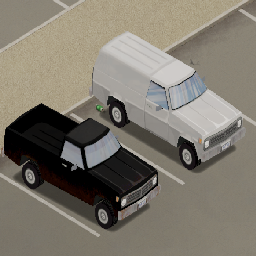
72-80 Dodge D Series and Ramcharger (3rd Generation)
par 76561198119566912
The 3rd Generation Dodge D100 (1972-1980) is one of the trucks that the Chevalier D6 and Dash Bulldriver are based on. This mod does not replace them, however serves as a real world equivalent vehicle for those interested in realism. Currently this includes the 72-73 and 74-76 body style for both the Dodge D100 and the Dodge Ramcharger. I am in the process of doing the 77-80 ones presently. If the mod gains enough traction, Ill consider making the 200 and 300 (heigher carrying weight), along with the W Series that was a 4WD variant. Eventually I'll get to the fun packages like the Little Red Express, Warlock, etc...
Project Zomboid Guides
Installer des mods Project Zomboid - Guide Workshop
Installe proprement des mods Project Zomboid via le Steam Workshop : saisir les IDs, vérifier l’ordre, redémarrer le serveur et corriger les erreurs typiques.
Louer un serveur Project Zomboid – guide multijoueur
Configurer un serveur Project Zomboid : RAM, paramètres sandbox, mods Workshop, droits admin et vérification propre des erreurs typiques.
Serveur Project Zomboid avec support des mods
Installez les mods compatibles et pris en charge depuis le tableau de bord.
Louer un serveur Project Zomboid