Mods et plugins pour Project Zomboid
Ce catalogue répertorie 60 000+ projets Project Zomboid provenant de Steam Workshop. Les entrées peuvent être côté serveur, côté client ou requises des deux côtés, et inclure des cartes ou d’autres contenus créés par les utilisateurs. Avant l’installation, vérifiez la page source liée, la version du jeu et les dépendances.

Edible Sugar and Recipe Tweaks (B41)
par 76561198040648347
Makes sugar edible! Sugar now has nutritional value! Minor tweaks to recipes that use sugar! Also buffed hot cuppa fatigue! DO NOT load this mod onto a previous save unless you're fine with the sugar you have looted disappearing. Specifics below! -Changes Sugar from a drainable item to a nonperishable, packaged food. -Sugar Nutrition: 2090.1 calories and 565.9 carbohydrates, 0 protein and lipids. -Changes cake preparation and both cuppas nutrition. -Cake Nutrition: 1003.2 calories and 271.6 carbohydrates, protein and lipids unchanged. -Cuppa Nutrition: 334.4 calories and 90.5 carbohydrates, protein and lipids unchanged. -Hot cuppas now provide -15 fatigue change! Now it's actually worth using those tea bags! -Recipes that used sugar as an ingredient (jarring, cuppa, and cake batter) will still use the same amount of sugar they did before I made sugar edible. -Because sugar is now a food item you can't find partially empty bags of sugar, this will result in more sugar in your playthroughs. -Adding sugar to a mug of water will provide you with calories and carbs as well as minor hunger reduction. You can do this in the base game but you'd actually get 0 calories and carbs from doing this, just wasting your sugar. A few of you may be wondering why I picked those specific calorie and carbohydrate values. Originally I was going to just use the value of 1 kg of sugar based off the USDA website, but I realized it might be a bit strong. Since honey is the closest thing to edible sugar in the base game I looked at it's ingame nutrition and USDA nutrition, found the equivalent ratios for calories and carbohydrates (irl honey has 1.84x more calories and 1.76x more carbs than the game honey for the same weight), and found the "game values" for sugar. I then made sure the cake and cuppa recipes had at least the same amount of calories and carbs as the amount of sugar that went in them. Note: This is my first Zomboid mod and one of the few mods I've ever made in general. If the base game or mods changes anything significant about what I've changed here I can't guarantee this will be compatible. Compatible with Vanilla Food Fixes (although the amount of sugar used in beverages, not cuppas, is changed with it on) Workshop ID: 2110914525 Mod ID: EatSugar Special thanks to Soul Filcher on TIS discord for helping me implement recipe changes.

ZLBOH
par 76561198328722618
Use for ZL Server Workshop ID: 2995661724 Mod ID: ZLBOH
Vanilla Hair Dyes in Character Creation
par 76561198069673478
"Does what it says on the tin!" Desc Adds vanilla hair dye colors to the character creation menu. Incompatible with other hair color mods. FAQ Q: Will this be updated? Can you add/change X? etc. A: ¯\_(ツ)_/¯ Q: This conflicts with X Y or Z mod! Can you fix it? A: ¯\_(ツ)_/¯ Q: Multiplayer? A: I don't see why not! Info Workshop ID: 3136671789 Mod ID: VHDCC Workshop ID: 3136671789 Mod ID: VHDCC
The Doors Music | Album: Waiting for the Sun
par 76561199258285984
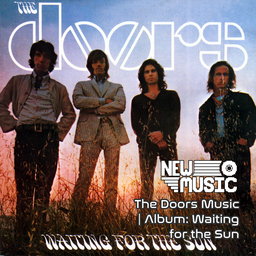
The Doors Music | Album: Waiting for the Sun Generated with New Music Builder Waiting for the Sun Side A 01 Hello, I Love You 02 Love Street 03 Not To Touch The Earth 04 Summer's Almost Gone 05 Wintertime Love Waiting for the Sun Side B 01 The Unknown Soldier 02 Spanish Caravan 03 My Wild Love 04 We Could Be So Good Together 05 Yes, The River Knows 06 Five To One Workshop ID: 3754911715 Mod ID: 3DoorsAlbum

UCP System PW
par 76561198007755703
🧾 UCP System PW — Registration System for Project Zomboid Mod developed by etomarat from the SW Team for the Project World server. UCP System PW adds a full-featured character registration system (UCP) for Project Zomboid, designed for serious roleplay communities. 🔗 Links — Enjoy! 💬 Discord Project World 🧠 Official Forum PW 🌐 Site SW Team ⚙️ Key Features - Character Limit per Player Limit players to 3 characters by default (customizable). Creating a new one requires admin approval. - Step-by-Step Registration After character creation, players enter a special “limbo” zone and complete: • Rules agreement • Short test (5 questions) • Biography and identity data • Selection of starting skills and items - Auto House Claim and Spawn Approved characters are spawned in a preselected house, which is automatically claimed. - LootExpress Delivery System A branded UI icon allows players to retrieve their approved starting gear from LootExpress. - Admin Panel Admins can view and manage applications, reject or send players back to a specific stage, leave comments, and approve for spawn. ⚠️ Important Information This mod is intended to work only on Sad World servers. Using it outside of the authorized environment will likely cause errors or unexpected behavior. 📜 Legal Notice This mod is the property of the SW Team. It is forbidden to: • Modify, redistribute, or republish this mod • Use any assets or systems from this mod for commercial purposes By publishing this mod on Steam, we confirm compliance with the Project Zomboid Modding Policy and Steam Workshop Terms of Use. 👥 Project and Team Developer: etomarat Team: SW Team Built with love for RP, tested with pain, launched with faith. ❤️🔥🧪🙏 Workshop ID: 3464576550 Mod ID: MRT_UCP
Diggertown
par 76561198026494787
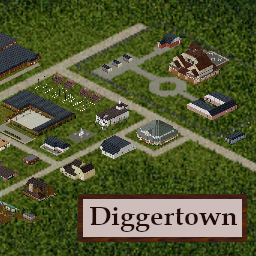
Diggertown Let me tell you how it all started, how Jerry Spade became the king of Diggertown. This town didn’t have nothin for nobody. A dried up farm town that died a dozen years ago. Then Jerry shows up. Money in his pocket and a silver tongue. Folks flocked to him like pigs to a trough. They built underground markets. Underground shops. Underground banks. A whole city. Someone called it Diggertown. The name stuck. But the money had to run out eventually, and Jerry clamped down. No one could enter or leave. Last I heard Jerry Spade locked himself in his mansion, and he watches as the towns folk scramble in the dirt. Mark my words. Stay away from Diggertown. Description This mod installs the map Diggertown. A 4x3 cell mod for the Vanilla map. Calls 19,23 to 22,25. Diggertown is an above ground and below ground city, traversed by climbable ladders, usable elevators, and rideable trains. Survive on the surface, or descend into Diggertown depths. Collectible maps and diaries are spread throughout the map. Explore the cult city and reap the rewards of the haunted underground. If you can survive, find your way into Jerry Spade's mansion, and learn the true story of what really happened in Diggertown. Special Thanks Special thanks to Azakaela, SAGE of Secrets, for extensive help with basement code and tons of great advice. Special thanks to Pert, Dylan, Daddie Dirks, Melo, Oujinjin, and anyone else's tiles I used. Special thanks to Lee-Bop Macaroni for helping so much with 3D work. Special thanks to Gabester for getting me in the PZ Mod Discord server. Special thanks to Kaizokuroof, Father GrimCreaper72, Gargisnar, and anyone else on Discord who reached out and helped me struggle through the endless, endless nonsense. Mod Details For Multiplayer servers: Disable Anti Cheat 2 and Anti Cheat 12 Workshop ID: 3231505663 Mod ID: Diggertown Map Folder: dtown
Fixing parts
par 76561199263121994
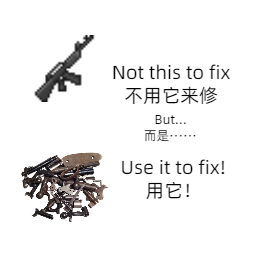
No more sitting in the safehouse and thinking about what to do with your stack of pistols. Now, take the parts out of firearms you're not going to use, then use them to fix your primary weapon! Dismantle: The more condition it has, the more parts you obtain from it. (absolute condition) Fix: Use your M9 parts to repair your favorite M16, even though it may not work in real life. Modify: You can change how many parts you obtain from each condition, you can also enable random result. Random result: When you dismantle a gun, there's a chance to obtain more or less parts, 1 or 2. Maybe add special part for each type of gun in the future? Workshop ID: 3154481170 Mod ID: Fixing parts
OADK
par 76561198313468433
Time alive, Zombie kill count, Overall average, Converted living days, Daily zombie kill count (empty every day at midnight). Double click will change the orientation between vertical and horizontal. Right control to hide/show and/or save position Workshop ID: 3013659687 Mod ID: OADK

Orange_server music for New Music
par 76561198800514029
个人服务器使用 thanks for New Music Workshop ID: 3776074114 Mod ID: OrangeServermusic
Eagles Music | Album: Desperado
par 76561199258285984
Eagles Music | Album: Desperado Generated with New Music Builder Media Mix 1 Side A 01 Doolin-Dalton 02 Twenty-One 03 Out of Control 04 Tequila Sunrise 05 Desperado Media Mix 1 Side B 01 Certain Kind of Fool 02 Doolin-Dalton (Instrumental) 03 Outlaw Man 04 Saturday Night 05 Bitter Creek Workshop ID: 3754867264 Mod ID: 2EaglesMusic
xPhone Sound Pack - GPS Voice Guidance
par 76561199841906216
GPS voice guidance pack for the xPhone mod. Adds turn-by-turn spoken directions in English and Spanish to the xPhone GPS navigation system. == REQUIRES == xPhone mod must be installed and loaded BEFORE this sound pack. == INCLUDED == - 52 GPS voice lines (26 ES + 26 EN) for turn-by-turn navigation - Earphone support — with earphones connected, GPS voice plays privately; without earphones, sound plays through the phone speaker and can attract zombies == VOICE COMMANDS == Turn left/right, slight left/right, sharp left/right, U-turn, go straight, onto street, recalculating, off-route, distance callouts (50m, 100m, 200m, 500m), navigation start/stop, destination near, arrived (walking/vehicle), danger zone, night warning, long trip, low fuel, and keep going. Without this sound pack, xPhone works normally but GPS voice guidance shows text-only directions instead of spoken audio. ☕ Support the Developer Thank you so much for downloading and playing my mods! Every subscriber, comment, and rating means the world to me. If you enjoy this mod and want to support my work, you can buy me a coffee! Your support helps me keep creating and improving mods for the community. ☕ buymeacoffee.com/XaviChang Every coffee fuels another late-night coding session! ☕🎮 Workshop ID: 3676436513 Mod ID: xPhoneSoundPack
![[RUS] MALE VOICE - REWORKED – Project Zomboid Mod](https://images.steamusercontent.com/ugc/10480833464395269573/14C9F157E608924C8A86F0382E43742465750868/)
[RUS] MALE VOICE - REWORKED
par 76561199167726397
Русский мужской голос Для озвучки персонажа я использовал нейросеть, остальные звуки взяты с интернета. Полностью переделал чтобы слышался как-будто настоящий человек. Версия женщины уже готова! Прикреплена как необходима. Если есть недочёты пишите! ========================================================================== Russian male voice For the character's voice I used a neural network, the rest of the sounds are taken from the Internet. Completely redesigned to make it sound like a real person. The woman's version is ready! Attached as needed. If there are any shortcomings, write! Workshop ID: 3401755398 Mod ID: VoiceSASHA
Sandbox Options-简中汉化
par 76561199440035517
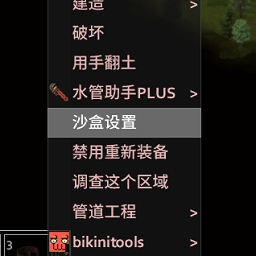
Simplified Chinese Translation Mod 修改沙盒设置Sandbox Options-汉化 适合强迫症使用(不装也不影响游玩) 汉化效果预览: 需要同时订阅启用原mod 需要确保加载mod时此汉化mod覆盖原mod 方式一、先加载原mod,后加载汉化 方式二、在游戏内调整加载顺序时让汉化mod在原mod下方 我的所有汉化mod,特别是以原mod作为前置mod运行的汉化mod,如果出现不能正常运行的情况请查看是否是原mod有更新,更新后可以留言通知我,我会尽快同步更新 点此加入TG群聊,反馈、提问及沟通更加方便高效,还能第一时间查看汉化施工进度。也能聊天,但目前没人,所以还是反馈汉化问题为主 其他由我创建的汉化 在此合集内查看 鸣谢(无先后顺序) - 所有的模组作者 没有他们的付出,社区不会有如此之多优秀的模组,更不会有这个汉化 - Chat-GPT4o、讯飞星火——我最聪明、可靠,学识过人的伙伴,没有TA们的帮助,我的工作量将成倍增加,虽然TA们不上Steam也不玩僵毁,不是个人,也不认识我 - 矮控 在如何给没有语言文件的mod做汉化这方面,姐姐的文章给了我极其大的帮助 Workshop ID: 3272189756 Mod ID: ZHCNChangeSandBox
![Tradução para B42 [42.14] – Project Zomboid Mod](https://images.steamusercontent.com/ugc/10855170660706813204/8105EDDEFA7EC8932D13D1954648CEBE503ADA77/)
Tradução para B42 [42.14]
par 76561199131666750
Tradução Brasileira da Build 42.14 99% Concluída! A tradução da Build 42 está praticamente finalizada, faltando apenas alguns detalhes. Como ativar: - Inscreva-se no mod - Ative-o no menu de mods - Assim que o Lua recarregar, é só jogar! Aproveite a imersão completa em Português! Quer apoiar o projeto Se essa tradução te ajudou e você se sentiu mais incluído no jogo, considere apoiar com qualquer valor. Isso vai me ajudar na minha meta de comprar uma placa de vídeo para meu pc, pois atualmente não tenho. Escaneie o QR code abaixo com sua câmera: Tamo junto! Workshop ID: 3684928892 Mod ID: PTBRB42.14
Simple Silencers - Recipe Magazine Fix (B42.19)
par 76561198826327559
Fixes the repeated console error from Simple Silencers on Project Zomboid Build 42.19.0: no such function "SpecialLootSpawns.OnCreateRecipeMagazine" In 42.19.0 the base-game recipe-magazine OnCreate handler was moved and renamed from SpecialLootSpawns.OnCreateRecipeMagazine to ItemCodeOnCreate.onCreateRecipeMagazine. Simple Silencers still references the old name on its ThugNotebook item, which no longer exists, spamming an error every time the item is created. This is a small compatibility patch that recreates the old global as a shim delegating to the new handler. It does not modify any Simple Silencers files and adds no load-order requirement. Requires Simple Silencers. Safe to add to existing saves. Workshop ID: 3749317235 Mod ID: SimpleSilencersRecipeMagFix
Maserati Shamal 1990
par 76561198954318645
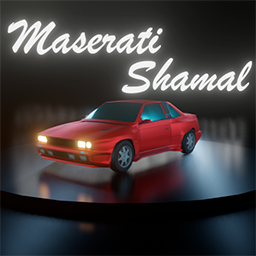
Adds Maserati Shamal to the game. Support and order mod: https://www.donationalerts.com/r/d4n Workshop ID: 2950142730 Mod ID: 90shamal
True Music Addon:True Music Addon: Guilty Gear Strive OST
par 76561198042763229
Guilty Gear Strive OST Addon for True Music Mod! Workshop ID: 2776581823 Mod ID: ggs_ost
![SmartZOptimizer[Legacy] – Project Zomboid Mod](https://images.steamusercontent.com/ugc/15670138492667454850/0CEBD89E1DFE4D6B12F90BBE33537BC9571A66E9/)
SmartZOptimizer[Legacy]
par 76561199044912599
Smart Z Optimizer Overview A performance optimization mod for Project Zomboid B42. Reduces processing load during scenes with large numbers of zombies and during bad weather. Requires ZombieBuddy's extension functionality. Features Enable Smart Z Optimizer When a large number of zombies are in the area, this feature reduces system load by skipping the AI processing of inactive zombies (including roaming ones) every few frames—such as those with no target, unalerted, or not attracted by sound. Once a zombie starts moving or reacts to sound or vision, it automatically returns to normal processing from the very next frame (a delay of up to approximately 100ms may occur before the reaction begins). This has almost no impact on standard zombie behavior. Weather Particle Render % Reduces the number of particles rendered during bad weather such as storms, heavy snow, and dense fog, lowering rendering load. 100% disables the effect; 50% halves the particle count. Can be combined with vanilla graphics settings. Enable OpenCL Weather Acceleration (Experimental) Offloads part of the weather simulation from CPU to GPU during active weather events, reducing CPU load. Requires an OpenCL-compatible GPU. Enable Performance Metrics Outputs optimization status to the console. Use for verification or troubleshooting. Exclude Corpse Containers Excludes items inside corpse containers from being scanned for crafting and building recipes. A restart is required for changes to take effect. You will no longer be able to rip clothing directly from the crafting UI while it is on a corpse; however, moving the items to your inventory or the floor will allow them to be recognized as crafting materials. Corpse Scan Right-Click Toggle Key binding to toggle the context menu crafting for items inside corpse containers. This setting is disabled when "Exclude Corpse Containers" is turned off. Requirements & Notes ZombieBuddy is required. Simply subscribing is not enough — please follow the installation instructions on the ZombieBuddy mod page. OpenCL acceleration is an experimental feature. Testing has only been performed with NVIDIA GPUs and drivers. Compatibility with AMD, Intel, or other GPU vendors is unknown. Some NVIDIA driver versions may cause issues. A crash was confirmed with driver version 566.36. If OpenCL is unavailable in your environment, the feature will be automatically disabled. Workshop ID: 3707376688 Mod ID: SmartZOptimizer
Pitstop Residential Spawn Points
par 76561198067727991
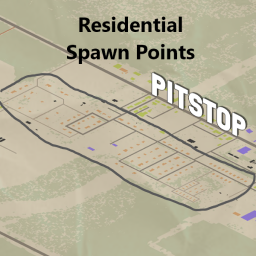
This only includes the residential spawn points for Pitstop. Workshop ID: 3011286273 Mod ID: Pitstop_Residential_Spawns Map Folder: Pitstop, KY (Residential)

简单交易Toy服务器版
par 76561198213023155
删除了太阳能发电机,修改电台重量为10,修改背包扩容与背包减重价格为10个单位。 Workshop ID: 2815555265 Mod ID: jiandanjiaoyikuozhan_Toy Mod ID: jiandanjiaoyi_Toy
超级美少女丧尸修复 适配无刺版
par 76561199437622778
修复了 https://steamcommunity.com/sharedfiles/filedetails/?id=3632402975 模组里无刺版美少女无法正常启用的问题,本模组是带刺版,是无刺版的前置模组。 Workshop ID: 3660958722 Mod ID: SuperGirlZombiesFixed
Dawn of the Zed
par 76561198276941338
Drastically improves on the game's existing ability to hide UI elements on screen! Play Project Zomboid like you're a character in the next great zombie movie! Upgrades: 1. Your UI will STAY hidden after you unpause. 2. Your UI will STAY hidden after you die and respawn as a new player. 3. Your UI will STAY hidden after you connect or disconnect a controller. 4. You can hide your vehicle dashboard (once a bug, now a feature)! 5. All usernames above people's heads will disappear (can be toggled in Mod Options). 6. Halo notes will not appear under most circumstances (can be toggled in Mod Options). 7. All gamepad users can now toggle the UI, rather than simply holding a button to hide it! 8. You can now save your default UI visibility using Mod Options! Load up with no HUD! 9. You can now set your mouse cursor to disappear when you hide your UI, too! 10. Use sandbox settings to define the behavior of a "Use Server Defaults" Mod Option! 11. Keyboard and mouse players can choose NOT to hide their inventory with this shortcut! 12. Added support for my new mod, Position Breakdown! 13. Confirmed compatible with over 400 mods! This even works on multiplayer, and does not impact anyone else who is on your server (even though showing other people's usernames is a server-level setting)! Default Bindings: Shortcut on Keyboard: Pause / Break (PAUSE) Shortcut on Gamepad: Right Thumbstick Button (R3) I've included a way to change the keyboard binding in Main Menu -> Options -> Key Bindings -> UI. Unfortunately, due to the lack of any clear way to configure other buttons easily using the in-game UI, no other gamepad button is available for this function. Hopefully you can get used to using the joystick; however, if you need to disable this function in order to avoid accidentally toggling your UI, you may disable the joypad shortcut in Main Menu -> Options -> Key Bindings -> UI. Why I Made This: In vanilla Zomboid, gamepad use causes the hide-UI button to take on a different behavior; it only hides the gamepad UI buttons, and it's not a toggle. Also, the UI does not stay hidden when you pause & unpause or die & respawn. This fixes all of that. Also, I fixed the bug that causes no-HUD players to have to double-tap hide after exiting the Main Menu or respawning while in-game (this is due to poorly conceived section of Lua code in the base game). Attention Fellow Gamepad Players: I cannot hide the cursor itself, which is usually useless to you on controller. For this, I recommend you check out Steam's Controller Layout options. They allow you to make any button (e.g., a touchpad click) move the mouse to the corner of your screen. Then you truly will be set to launch the game and basically ignore your keyboard and mouse. Important Details: Adding this to an existing server is fine, but reloading this mod while the game is running will cause it to stop working properly because it uses function decoration to accomplish the joystick button actions. Server defaults are ONLY used for the Use Server Defaults toggle in the player's Mod Options (while in game). Unfortunately, Mod Options does not currently allow me to preload your server defaults into the player's menu without causing problems for other modders. Trying to await various events in order to load Mod Options after the sandbox variables are accessible seems to cause other mods' options to fail to load into the Main Menu, so I have not been able to find a safe workaround for using the preferred server defaults as the default value that loads for new players. However, I have gone to great lengths to ensure that the current mod defaults will be optimally appealing to the majority of Zomboid players, I have made the Use Server Defaults button as accessible as possible so that players can choose to apply your server's preferred defaults quickly, and I have given everyone the freedom to customize every setting in detail while they are in the game. I am also in discussion with the creator of Mod Options about adding a feature for admins to force an update to their player's settings in various circumstances (e.g., when a player with no saved settings for this mod joins a server using this mod for the first time). Halo notes are notifications about levels gained and other player state changes. They appear above your head, usually in green text. My only solution for hiding halo notifications requires me to 0 the user's HoursSurvived for 120 ticks (about 2 seconds) before restoring it whenever I know a XP is incoming; this includes every time the character swings a weapon, lands a hit, is hit by a zombie, finishes an attack, or moves. Your real HoursSurvived will never be truly lost unless perhaps your game crashes during this 2-second window; it is restored immediately after you stop attacking, getting hit, or moving for 120 ticks (about 2 seconds). It is also restored when you enter the Main Menu, just in case you intend to quit. This may cause issues with any mechanics based on HoursSurvived while you are fighting, moving, or gaining XP. If this solution is not acceptable to you, it is entirely optional, and you can disable it in the settings. If you are a server admin, you can disable the ability to hide halo notes (and thus disable the abiliy to zero your HoursSurvived) in the Sandbox Settings under Dawn of the Zed. To make this mod's Sandbox Settings appear, you must enable Dawn of the Zed in MODS after launching the game (i.e., before editing your server settings). Other mods can still directly trigger halo notes to appear as long as they do not require HoursSurvived to be greater than 1 minute. When beginning the game with Hide UI By Default selected, be aware that the HUD may flicker very briefly before my mod closes it when you first join a server. I do not know how to intervene any earlier to prevent this. Contact me if you do! Like this mod? Feel free to explore some of my others below: Jumper: Teleport to countless locations with or without friends instantly. Meditation: Sit, cross your legs, and meditate in order to hide, rest, and recover. Interface Reflexes: Close windows that clutter your screen by aiming or using a shortcut key. Position Breakdown: Show your location (in tile, chunk, or cell terms) in a simple, highly customizable overlay that can be toggled using Dawn of the Zed. Trash Talker: Given a trait, you will talk trash when you kill zombies. Customizable lines. Talking draws zombies. Mobile Reader: Keep walking or driving while you read books or open your map. Legible Mods: Makes the windows for various hosting options larger so that longer names of mods and their locations can be read. Legible Container Headers: Makes your inventory capacity easier to read under various resolutions and font sizes. Workshop ID: 2875983658 Mod ID: DawnOfTheZed
M-NRG Energy Drink
par 76561198128013172
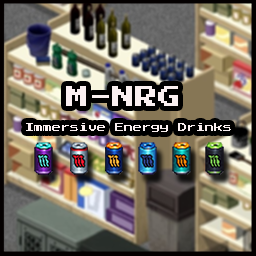
Adds 6 flavors of high-octane energy drinks with sugar rush, jitters, and heart strain mechanics. This mod adds some pros and cons for a more immersive energy drink add-on. Key Features: -The Rush: Upon finishing a drink, you gain an immediate 40% movement speed increase and Forced Panic (90) and your stress is actively suppressed for~5-7 Minutes (Real Time). Panic timer will stack with each additional drink. This is to mimic the jitters of a massive caffeine dose. -The 8-Hour Crash: Caffeine doesn't last forever. Exactly 8 hours after consumption, you will suffer a significant Fatigue and Stress penalty (Instant +0.4 Fatigue and +0.3 Stress.). Plan your day so you aren't crashing in the middle of a horde! -Heart Strain: Drinking a second NRG within the 8 hour window will incur a penalty of -25% Health and massive Pain. The -25% Health hit stacks. -Drinking any NRG variant leaves behind a crushed can in your inventory. (If you have my "Useful Junk" mod you can scrap these cans to aluminum.) Get Useful Junk here: https://steamcommunity.com/sharedfiles/filedetails/?id=3642553847 Workshop ID: 3645014365 Mod ID: M-NRG Energy
Foraging Light Tuning (B42)
par 76561199133259679
Compatible with Project Zomboid Build 42.12.3 – 42.20.3 Foraging Light Tuning Formerly: Foraging Light Fix & Tuning Foraging Light Tuning lets you control how much flashlights help during Search Mode / Foraging in Project Zomboid Build 42. In newer B42 builds, an active flashlight can make foraging behave almost like full daylight. That avoids older light fluctuation issues, but it can also make night foraging feel too forgiving. This mod restores configurable control over flashlight brightness for foraging, so a flashlight can help a lot without necessarily removing the darkness penalty completely. Safe for existing saves. Can be enabled or disabled anytime. The Workshop name changed, but the internal mod ID remains ForagingLightFix to preserve save/server compatibility and existing sandbox settings. What This Mod Does - Adds configurable flashlight support for Search Mode / Foraging. - Lets you control the minimum effective light provided by an active flashlight. - Allows flashlights to reduce the foraging Darkness Effect without always acting like full daylight. - Keeps foraging light calculations stable while using flashlights. - Allows stronger nearby light sources, such as daylight, ambient light, street lights, or lit rooms, to still improve visibility. - Affects both the real Search Radius and the Investigate Area tooltip. How It Works Minimum-Light Mode OFF If a flashlight is equipped and turned on, foraging uses the newer vanilla-style behavior: - Effective light can reach 1.0. - Darkness Effect becomes 1. - The flashlight removes the darkness penalty. Use this if you prefer the current vanilla flashlight behavior. Minimum-Light Mode ON If a flashlight is equipped and turned on, the flashlight provides at least the configured Min Light (Flashlight) value. - Default value: 0.8. - Higher value = less darkness penalty. - Lower value = harsher night foraging. - Nearby stable light sources can still raise the effective light level above the flashlight minimum. - The mod keeps tuned flashlight behavior stable while avoiding older square-to-square light spikes. This is the recommended mode if you want flashlights to help at night without making darkness behave exactly like daylight. Sandbox Options All options appear under Foraging Light Tuning: - Minimum-Light Mode — enables the tuned flashlight behavior. - Min Light (Flashlight) — minimum effective light while using a flashlight when Minimum-Light Mode is enabled. Suggested Presets - Easy: 1.0 — flashlight removes the darkness penalty. - Moderate: 0.8 — default; useful flashlight support without fully replacing daylight. - Tough: 0.5 — flashlights help, but night foraging remains punishing. Compatibility Notes - Designed for Project Zomboid Build 42. - Reviewed through Build 42.20.3. - Compatible with Build 42.12.3 – 42.20.3. - Does not add items, traits, recipes, map content, or permanent world data. - Safe to add or remove from existing saves. - Internal mod ID remains ForagingLightFix for compatibility with previous versions. Possible Conflicts Conflicts are more likely with mods that also change: - Search Mode / Foraging light calculations. - Foraging Darkness Effect behavior. - Flashlight handling specifically for foraging. Translations Includes translations for: CH, CN, CS, DA, DE, EN, ES, FR, HU, IT, JP, KO, NO, PL, PT, PTBR, RO, RU, TR and UA Suggestions and corrections are welcome. More Mods & Feedback You can find my other Project Zomboid mods here If you find this Workshop item useful, please consider leaving a thumbs up and adding it to your favorites — it helps other players discover it. Feedback, bug reports, balance suggestions, and translation improvements are always welcome. Workshop ID: 3596478900 Mod ID: ForagingLightFix
Project Zomboid Guides
Installer des mods Project Zomboid - Guide Workshop
Installe proprement des mods Project Zomboid via le Steam Workshop : saisir les IDs, vérifier l’ordre, redémarrer le serveur et corriger les erreurs typiques.
Louer un serveur Project Zomboid – guide multijoueur
Configurer un serveur Project Zomboid : RAM, paramètres sandbox, mods Workshop, droits admin et vérification propre des erreurs typiques.
Serveur Project Zomboid avec support des mods
Installez les mods compatibles et pris en charge depuis le tableau de bord.
Louer un serveur Project Zomboid