Mods et plugins pour Project Zomboid
Ce catalogue répertorie 60 000+ projets Project Zomboid provenant de Steam Workshop. Les entrées peuvent être côté serveur, côté client ou requises des deux côtés, et inclure des cartes ou d’autres contenus créés par les utilisateurs. Avant l’installation, vérifiez la page source liée, la version du jeu et les dépendances.
True Music Addon: Invisible by Duran Duran
par 76561198407476796
Has the memory gone, are you feeling numb? Or have I become Invisible? Workshop ID: 3474617613 Mod ID: invisible_duran_duran_addon

Pivozavr Shirt
par 76561198354031995
Mod is Adding a shirt with a PIVOZAVR print on it You can earn it by killing a zombie with this shirt or by a looting shelfs Workshop ID: 3245868058 Mod ID: pivozavrshirt

Anthro Survivors - Sonic the Hedgehog Characters
par 76561198162052038
A cosmetic mod that adds some Sonic characters from around the time and place Zomboid takes place in as playable characters, and it looks very silly. It adds them in as custom species for the Anthro Survivors mod. Characters included: - Sonic the Hedgehog - Miles "Tails" Prower - Dr. Robotnik - Sally Acorn - Bunnie Rabbot - Antoine - Rotor If you like Sonic and want to play as the characters from Sonic in Project Zomboid but with the authentic American 1993 feel, then here ya go. I might add more characters if I feel like it, idunno. If you don't understand any of this or don't know what the heck a Sonic is, I can't help you, I'm sorry. No guarantee that it will play nicely with every single piece of clothing. What's expected with the Anthro Survivors mod is expected here. Known bugs: - Parts of some of the characters disappear with some custom clothing items (especially the cybernetics on Bunnie and Robotnik) - Obviously a lot of clipping will happen with hats and masks, and in Bunnie's case, her cybernetic legs will clip through most pants. You can use the transmog mod to work around this. Workshop ID: 3010372640 Mod ID: SonicTheHedgehog
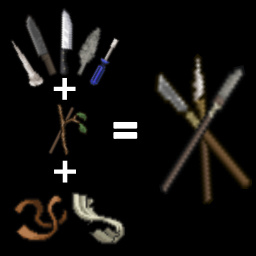
Fix Bind Spear
par 76561198376741826
Adds torn rags and ripped jeans as valid materials for crafting spears. Workshop ID: 3647553086 Mod ID: FixBindSpear
![[COS] Hayley – Project Zomboid Mod](https://images.steamusercontent.com/ugc/17087297847419679075/F2B1DC0FAF26C5582077F7223F61CA85A5162ACF/)
[COS] Hayley
par 76561198074175464
Racing Master Hayley (Black Version) This model is make by @CreamPie and I'm just commission it to him. If you have some problems Let me know and comment here. You can find more files If you want use this in B42 Version! Thanks for allowing to @CreamPie upload this on Steam workshop! You can see more his description with scroll down! 해당 모드는 제작자가 따로 있으며, 커미션을 통해 제작 되었고 서로 의논하에 파일은 제가 받아 대신 업로드 및 설명을 추가 하였습니다. B42 버전으로도 사용가능 하도록 파일이 정리 되어 있습니다. '스킨 제작' 에 대해 본래 주인은 @CreamPie 에게 있음을 알립니다. 아래에 원 제작자의 설명서를 그대로 읽으실 수 있습니다. ---------------------------------------------- How Do I Use It? - You can go to the link below to see how to use it. - Link Recommended mode - Fashionoid - Gear Transmog - Hide All Attached Items - Clipping animation Fix Like My Mode? - Join Our Discord If You Want Commission Workshop ID: 3567266421 Mod ID: Hayley

Dynamic Smoker Trait
par 76561198965805512
Description Adds the ability to get the smoking trait if you regularly smoke cigarettes. Also, a long period of quitting smoking will allow you to lose the smoking trait. This mod can be installed mid-game and on the server. How it works - Each cigarette smoked adds 1 addiction point - Every hour 1/24 addiction points are removed (for losing one point per day) - The minimum value of addiction points is 0 and the maximum is 30 by default - At 0 addiction points, the smoking trait disappears if it was present - At 30 addiction points by default, the smoking trait appears if it was absent Settings You can change the maximum number of addiction points and number of points to get a trait in the Sandbox settings. If you need to change mod settings in the mid-game: use this GUIDE to change your sandbox settings you can download mod Change Sandbox Options (by Star) to change the sandbox settings For the settings to take effect, you need restart the game. For example If you smoke 30 cigarettes at a time you will gain this trait. If you do not smoke for 30 days you will lose this trait. Increasing and decreasing addiction works regardless of the presence smoking trait. The change of this trait is accompanied by a text comment from the character. ( "I'm hooked on smokes" / "I quit smoking" ) Workshop ID: 3354608281 Mod ID: DinamicSmokerTrait
![[COS] Altair – Project Zomboid Mod](https://images.steamusercontent.com/ugc/43442802928143829/176F7AEDEE18A7801071E2611DB1B1BFA09E9988/)
[COS] Altair
par 76561199178116693
How Do I Use It? - You can go to the link below to see how to use it. - Link Recommended mode - Fashionoid - Gear Transmog - Hide All Attached Items - Clipping animation Fix How to use COS mode in build 42. - Navigate to the path where the mod is installed. - Create a 42.0 folder. - Create a common folder. - Paste the media folder / mod.info / preview.png into the 42.0 folder. The recipe code writing method has been changed in 42Build. Since COS (Costume) mode has approximately over 200 modes, converting to 42Build's recipe code is an extremely laborious task. In 42Build, you cannot create costumes in (42 build) the crafting tab. There are two methods: Spawn items in cheat mode. Select items in the clothing selection screen when creating a character. Like My Mode? - Join Our Discord If You Want Commission Workshop ID: 3372901165 Mod ID: Altair
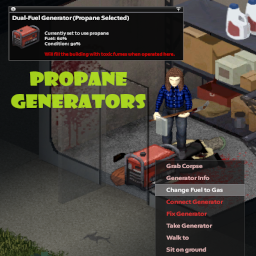
Propane Generators
par 76561197965618304
Adds propane and dual-fuel generators to the game as world objects and items. At first encounter, unmodded world object generators will randomly be assigned a type of gas, propane, or dual-fuel. Tips: As they exist in item form, you can store the new propane and dual-fuel generators just as you would the vanilla generator. Propane (or dual-fuel with propane selected) generators can be filled with propane tanks. Dual-fuel generators can be switched freely between types of fuel, as a timed action. Sometimes the event which fires to mod the generator is a little slow-- if you walk up to a generator and it looks unmodded, try right-clicking it to force things along. Positive ratings are encouraged, enjoyed, and very helpful for Workshop mods, so please rate Propane Generators highly if it adds something valuable to your Project Zomboid experience! If you have feedback of any kind, positive or negative, please feel free to leave a comment here, find me on Twitter, or create an issue on GitHub: https://github.com/TheCrimsonKing92/pz-propane-generators/issues. You may also like Item Searcher, the first mod I created for Project Zomboid! Item Searcher adds a custom UI which allows you to automate the task of looking through containers for an item, including searching all containers in an entire room. If you'd like that convenience in your PZ client, you can find it on the Steam Workshop here: https://steamcommunity.com/sharedfiles/filedetails/?id=2789003239. For those especially motivated to share their appreciation and support, I have a Ko-fi page: https://ko-fi.com/thedecenttech. Anything you are able to give further enables me to spend time outside of my full-time job polishing the mods I've created, or even creating other mods which may be enjoyed. Workshop ID: 3167672659 Mod ID: PropaneGenerators
![[B42MP]EggCustard – Project Zomboid Mod](https://images.steamusercontent.com/ugc/16128457478844299604/FD1726F7053EEC7A8EFB216399FE5DAB22478976/)
[B42MP]EggCustard
par 76561198302270564
Added recipes for Beaten Eggs and Steamed Egg Custard, making it easier to expand with more egg-based dishes later and use up eggs from the chicken farm. Also added a few other useful recipes. Steamed Egg Custard: 3 Eggs + Bowl + Whisk/Spoon = Egg Liquid Beaten Eggs + Water = Egg Custard Beaten Eggs + Milk = Milk Egg Custard You can freely add various seasonings to the custard mix before cooking. Sugar Beets: 10 Sugar Beets + Cooking Pot filled with water = Cooking Pot (with beets) After boiling, filter with a Bowl + Cheesecloth to get Sugar + a Bowl of Beet Pulp. Large Sausage: Made using Cooked Pork + Salt. Cola Chicken Wings: Can be made with 500mL Cola + 2 Chicken Wings. Chicken wings can be obtained by butchering a whole chicken. Workshop ID: 3644356758 Mod ID: EggCustard
B42.20 Cheat Menu Reloaded Fix
par 76561198251149150
UPDATES STOPPED This pack is no longer updated. Please use Cheat Menu: Rebuild instead: https://steamcommunity.com/sharedfiles/filedetails/?id=3786332527 Rebuild is a standalone cheat menu for Build 42.20. You do not need Cheat Menu Reloaded or this fix pack. 更新停止 この Mod の更新は停止しました。Cheat Menu: Rebuild を使ってください。 https://steamcommunity.com/sharedfiles/filedetails/?id=3786332527 Rebuild は Build 42.20 向けのスタンドアロンです。Reloaded 本体もこの Fix も不要です。 Build 42.13+ Workshop ID: 3784236361 Mod ID: B4220_CheatMenuReloaded
RimWorld-Corpse Disposal Expansion
par 76561199086675849
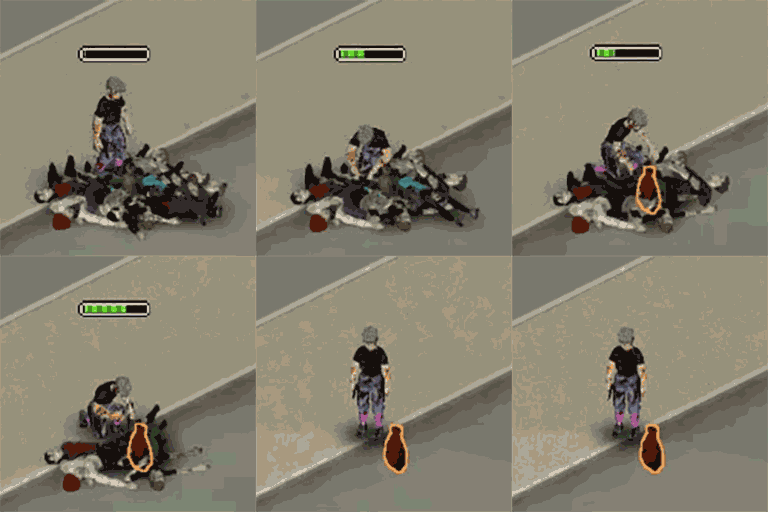
Channel: 🧟 Zombie‑Skull Bone Bowl Mod Full Introduction No moral judgement exists within the apocalypse, only the cold rules of survival. This mod lets you dissect zombie bodies and loot zombie meat and skulls. The broken zombie skull carries nothing but a murmur: “I am going to make a bowl out of your skull”. ⚙️ Core Functions New features will be added from time to time. Please click the link to view the new features:【论坛】 🥩 Zombie Meat Stats Raw Zombie Meat (100 Calories / 12 Protein): Eating it carries a high risk of poisoning and infection. It spoils in one in‑game day and may also serve as fishing bait Cooked Zombie Meat (180 Calories / 24 Protein): Consuming it still triggers the nauseous debuff ✅ Both raw and cooked zombie meat can be turned into compost (+5 fertilizer bonus) 🧑🦳 New Occupation 【论坛】 ✨ New Trait 【论坛】 🛠️ Sandbox Custom Settings 【论坛】 🌐 Supported Languages 中文 (CN)、English (EN)、Deutsch (DE)、日本語 (JA)、한국어(KO)、Русский(RU) 🎮 Gameplay Notes Multi‑player servers are supported (functionality has undergone basic testing) 👍 If you like this mod, please leave an upvote, favourite it and award it on Steam. Your support is greatly appreciated! -Slaughter zombies / Process zombie corpses / Destroy zombie corpses / Delete zombie corpses / Slaughter zombie corpses / Clean up corpses / Clean up zombie corpses / Zombie meat / Zombie skin / Corpse Disposal / Body Disposal Workshop ID: 3779284927 Mod ID: TuZhai Mod ID: Tuzhaiclothing Workshop ID: 3779284927 Mod ID: TuZhai Mod ID: Tuzhaiclothing
![Generator Powers Street Lights [B42] – Project Zomboid Mod](https://images.steamusercontent.com/ugc/17918290191592992524/DDBE21F7C2D643D2395A9B4FC1CEF88252CBC410/)
Generator Powers Street Lights [B42]
par 76561198036899112
Generator Powers Street Lights Miss the warm glow of street lights at night? In Build 42, generators stopped powering outdoor lights - this mod brings them back. Place a generator, watch the streets come alive. What This Does After vanilla grid power shuts down, generators power street lights, outdoor lamp posts, billboard lamps, and supported illuminated commercial signs within their range. While grid power is still available, the mod remains inactive and leaves street lights entirely under vanilla control. Street lamps, highway lights, billboard lights, verified sign switches, and player-built outdoor lights (Building Craft compatible) turn on when a nearby generator is connected and running after the outage. Lights keep their original colors from the game world. Features - Street lamps and highway lights power on with generators after the vanilla grid shuts down - Billboard lamps and verified illuminated commercial sign switches are supported - Lights glow in their original warm colors as placed by the map designers - Player-built outdoor lights supported (Building Craft compatible) - Realistic fuel flickering - lights blink erratically as the generator runs low on fuel - Configurable via Sandbox Options: power range, optional vanilla-style automatic day/night switching, and low-fuel flickering - Reliable while moving - nearby lights recover as their map chunks stream in while walking or driving - Client-side only - works in singleplayer and multiplayer - Lifecycle cleanup removes tracked emitters and stale visual references during normal generator, chunk, and save-load transitions Sandbox Options All settings can be changed mid-game via Debug Menu > Sandbox Settings. Changes take effect immediately when you click Apply - no generator toggle needed. - Street Light Power Range: Standard (20 tiles, default), Extended (40 tiles), Large (60 tiles), or Small (10 tiles) - Automatic Day and Night Cycle: optional and off by default; street lights and billboard lighting follow vanilla's seasonal darkness threshold, while manual floodlights and exterior wall lights keep their chosen ON/OFF state - Low Fuel Flickering (on/off) - Flicker Starts Below Fuel % (5% - 100%) Known Issues & Untested - Multiplayer: not yet tested in a live multiplayer session - Multiple generators: shared-light ownership is supported, but large overlap setups are not extensively tested - Other generator mods: not tested alongside mods that modify generator behavior (Ultimate Generator Overhaul, etc.) Reporting Bugs Please report bugs in the Discussions section with as much detail as possible: - What happened vs what you expected - Your Sandbox Options settings - Any other mods you're running - Log file is helpful: ~/Zomboid/Logs/date_DebugLog.txt - search for GenPowersSL Credits Special thanks to Daniel for reporting bugs and helping identify unsupported lights, signs, and edge cases. Compatibility - Build 42 only (tested on 42.20.03) - Should be compatible with most mods - May conflict with mods that also modify street light or generator behavior Workshop ID: 3778102777 Mod ID: GeneratorPowersStreetLights
Русификатор - CDDA Zombie B42.20.2
par 76561199209700420
CDDA Zombies Автор мода: HW_Lover Моя коллекция модов: B42.20.2 Для локального сервера ⚠️ Внимание: Этот мод всё ещё находится в разработке (WIP) и может содержать ошибки в мультиплеере! Спасибо, что используете этот мод! --- Добавляет несколько типов зомби из CDDA (Cataclysm: Dark Days Ahead). - Feral Z — Скорость: Быстрая, HP: Нормальное - Tough Z — Скорость: Нормальная, HP: Высокое - Fat Z — Скорость: Медленная, HP: Высокое - Skeleton — Скорость: Нормальная, HP: Низкое - Decayed Z — Скорость: Медленная, HP: Нормальное - Crawler — Скорость: Очень низкая, HP: Нормальное - Necromancer Z — Скорость: Медленная, HP: Нормальное (Может оживлять ближайшие трупы) - Brute Z — Скорость: Быстрая, HP: Высокое (Может отталкивать игрока при атаке) - Wrestler Z — Скорость: Нормальная, HP: Высокое (Может отталкивать игрока при атаке) - Screamer Z — Скорость: Нормальная, HP: Нормальное (Может кричать при преследовании цели) - Screecher Z — Скорость: Нормальная, HP: Нормальное (Может кричать громче при преследовании цели) - Grabber Z — Скорость: Нормальная, HP: Нормальное (Может хватать игрока) - Master Z — Скорость: Нормальная, HP: Нормальное (Может эволюционировать ближайших зомби) - Child Z — Скорость: Нормальная, HP: Низкое (Убийство делает персонажа несчастным) - Firefighter Z — Скорость: Нормальная, HP: Нормальное (Иммунен к огню) - Survivor Z — Скорость: Нормальная, HP: Нормальное (Обращённый игрок, может открывать двери) Вы также встретите: Cop Z, Hazmat Z, Soldier Z и другие. Поддержать переводчика модов — DonationAlerts. Workshop ID: 3728364943 Mod ID: CDDA_RU
![[B41-B42-Multi] Bandits - FR - Doublage – Project Zomboid Mod](https://images.steamusercontent.com/ugc/9990834923218142667/BFBE85FDE049A3CE11519723CE3598298D0E7B1A/)
[B41-B42-Multi] Bandits - FR - Doublage
par 76561198082272783
Traduction du mod Bandits Ils parlent en français ! Attention à respecter l'odre de chargement : Bandits, , Bandits FR Maj N'hésitez pas à me faire vos retours si vous trouvez des problèmes ! N'hésitez pas à checker les notes de changements lors des mises à jour ! A noter que ce n'est pas nécessaire pour Week One qui a son propre mod de Doublage. Merci énormément à tous les doubleurs qui ont prêté leurs voix ainsi qu'a MisterPacoThai pour l'idée du doublage! Pour les bandit(a)s : - Danouna - BotaLeaf - Cassandre - Zakiou - Popoche - Stopiax - Popi - Monsieur Poney Workshop ID: 3597402790 Mod ID: BFRMAJ
![Dungeon Maker [FIXED] – Project Zomboid Mod](https://images.steamusercontent.com/ugc/2424718567241368903/FFBCC3A571C019B317FC4D3384FC7311892C9DE0/)
Dungeon Maker [FIXED]
par 76561199042257388
Dungeon Maker Mod Update: Fixed the issue with sledge not working after entering dungeon the mod will now disable sledge only if youre dungeon crawling (as intended) Allows Server Admins to Setup Dungeon Challenges Keys = Entrance Chest = Exit (you may also exit anytime via right click context option) Keys and Chest Colors are related to their Level | LEVEL | COLOR | | 1 | White | | 2 | Blue | | 3 | Red | | 4 | Gold | Teleport: Entering / exiting will je done via teleport (require an anticheat to be turned off) Players may choose to leave dungeon anytime using context menu option, they will be sent back to entrance When a player enters a dungeon it will be locked no one else may enter time limit: there is a time limitation in real time seconds duration based on sandbox time limit = duration x level when time is up player will be sent back to the entrance dungeons will open again after its cooldown when a player logs out during dungeon crawl they will be teleported back when they login rewards can be configured for each dungeon chests Minions: during dungeon crawl the zeds are skeletons they have random set of properties they have various attack abilities: cause panic, knockdown, disarm, injure Defeating Minions: theres a chance for skeletons to drop random loot drop rate and loot list(per level) are customizeable via sandbox options skeletons will standback up Population control: each dungeon stage have population limit (sandbox) the mod will slowly despawn and spawn skeletons based on the number of zeds in the cell Players buffs: infinite carry weight no hunger no thirst no boredom no stress Player Restriction: players may not use sledgehammer during dungeon crawl Dungeon Maker Panel: Panels color changes based interactions Editing Existing Dungeons / Adding new Dungeon / Deleting Dungeons Adding new dungeon gate requires entrance and exit coordinates use the textbox to input dungeon destination coordinates or use the set exit button to automatically set to current players location to add entrance click set entrance and click on the floor (same as brush tool) To Delete / Overwrite Choose a dungeon id from the drop down Levels: lets you pick what level you want to set the dungeon Teleportation: You my teleport to entrance and exit points using teleport button Buttons: button sets random name button toggles the cooldown(for admins to manually turn on or off existing dungeons Ambiance: foggy dark blue color during dungeon crawl Can Be Installed Mid Save Made for MP Beta Version Mod is dynamic due to its panel feature Unlike most mods that relies you to use configured patch This mod uses its own system to do manage its data Disclaimer: There are no border restrictions It is up to the Server Admins to creatively setup their Dungeons Make sure you restrict players form crossing dungeon and non-dungeon areas Compatibility with other Mods: Not tested with anything as of now Requires some anti cheat to be turned off ----------------------- --------------------------- Custom Tileset Info: tiledef=ExtendedDungeon 109 pack=ExtendedDungeon Mod by Glytch3r Commissioned by Krusttyx For custom pz mod commissions contact me discord: Glytch3r#7331 / glytch3r https://ko-fi.com/glytch3r Workshop ID: 3359266342 Mod ID: ExtendedDungeon
![Tree Branches Stack [42.20] – Project Zomboid Mod](https://images.steamusercontent.com/ugc/13320708881332831129/1A3BFBD10200969EDB795706363F51247E702297/)
Tree Branches Stack [42.20]
par 76561198362138303
Allows you to gather 12 tree branches into one stack. The gathered pile can be used as fuel Workshop ID: 3628418491 Mod ID: TreeBranchesStack

KRBK_C&P
par 76561198179477498
KRBK_C&P Workshop ID: 3212657121 Mod ID: 3000000999
Gimme Smore
par 76561198018515088
You're sitting in the kitchen. In your right fist, you have chocolate. In your left fist, you have graham crackers. In front of you - a stove with some marshmallows on the burner. You angrily stuff the chocolate and graham crackers into your awaiting mouth, a tear in your eye as you watch the marshmallows burn. --- Yo I dont know It just a smore Workshop ID: 2713536368 Mod ID: gimmeSmore

Mod Template
par 76561198157062928
This is an example mod with two worlds. You can use this as a template for your own map mods. The first world has a single 300x300-tile cell. The second world adds cells all around the first world.
GhostSightB42
par 76561198062851438
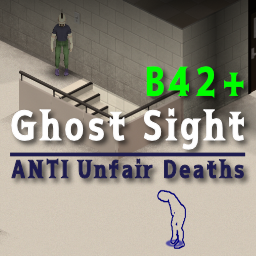
Ghost Sight B42.19 Compatible! ★🔤English description is below🔤★ 別階層のゾンビを検知・視覚化 / Detect and visualize zombies on other floors. ゲーム開始時に表示されるセットアップガイドを追加しました。 ■ このMODの目的 階段、梯子、窓枠越しの移動など、ゲームシステムの制限で視界が遮られる状況において、不可避なゾンビとの遭遇を防ぐためのMODです。 ■ 主な機能と挙動 - 死角の可視化: システム的に非表示になる上下階や、建物の裏側にいるゾンビの存在を察知可能。 - 装備連動の視界制限: 探知範囲をプレイヤーの「視界(扇形)」に限定可能。ガスマスクやヘルメット装着時、その装備に応じて物理的に探知範囲が狭まるリアルなシステムの採用。 - 階段の立体検知: 階段の上、踊り場、階段下などに潜むゾンビの、より確実な捕捉。 - 二段階の追跡表示: 直接視認時は「アウトライン」、壁越しや気配のみを捉えている間は足元の「サークル」としての表示。 - 表示階層の選択: 別フロアの検知に加え、同一フロアも可視化可能。※難易度低下のしすぎに注意。 ■ MODオプションでの調節 各種設定(ゲーム内Escメニュー→オプション→MODタブ)にて、お好みの難易度・表示形式にカスタマイズ可能。 - 表示条件 (常時 / エイム中 / 隠密中 / エイムor隠密中 / 探索中): MODの効果が有効になる条件。 - 検知半径 (2.0 ~ 50.0): ゾンビをスキャンする距離(タイル数)。 - 探知範囲を視界(扇形)に制限 (ON/OFF): 探知の視覚内のみへの絞り込み。※装備品による角度の動的変化。 - 壁による遮蔽 (透過 / 視界+階段 / 視界): 壁越しを検知するか、視覚が通る場所のみか、階段付近だけは通すかの選択が可能。 - 最大表示数 (10 ~ 500): 同時に描画するゾンビの最大上限。 - 感度モード (高い / 標準 / 低い): ゾンビの動きや音に対する検知感度。 - 視覚モード (円のみ / 縁取りのみ / 円+縁取り): サークルやアウトラインの表示スタイル。 - サークルの大きさ (0.2 ~ 3.0): 足元に表示される円のスケール。 - 垂直走査範囲 (1 ~ 10階層): 上下階のゾンビを検知する高さ(階数)の設定。 - 各種表示切り替え: 同階層の非表示、視認済みゾンビの表示、検知の揺らぎの有無。 - カラー & 透過度設定: 同階層 / 上の階 / 下の階ごとの表示色と不透明度。 ■ マルチプレイヤー(MP)対応 - サーバー設定: 管理者によるサンドボックス設定を通じた、サーバー全体での検知距離や最大表示数などの一括制限。 ※MP環境での挙動は完全には検証しきれていないため、不具合や同期ズレなどにお気づきの場合はコメント欄で教えていただけると助かります。 ■ 注意事項 - ゲームバランス: 広範囲検知によるゲーム緊張感喪失の恐れ。適切な設定での利用推奨。 - リセットボタン: オプション画面の「デフォルトに戻す」ボタンにおける、カラー設定のリセット対象外化(B42エンジンのクラッシュ回避用)。 - 描画の制限: プレイヤーの視界内や階下ゾンビのアウトライン強調が可能。上階ゾンビについてはエンジンの描画仕様上、足元の「サークル」のみの表示。 ■ おまけ情報(カスタマイズ) 足元の円のデザイン変更。MODフォルダ内 media/textures/GS_Circle.png のお好みの画像への差し替えによる変更(256x256px、透過PNG、メタデータなし推奨)。 ■ クレジット Author: Uni-SJ 背後に気をつけて。幸運を祈る。 ----------------------------------------------------------- Added a setup guide that appears at the start of the game. ■ Objective Provides visual aid to prevent surprise zombie encounters in blind spots like stairs, ladders, or window frames. ■ Key Features & Behaviors - Blind Spot Detection: Sense zombies on other floors or behind buildings that are normally hidden. - Gear-Linked FOV: Limits detection to your FOV. Gas masks and helmets dynamically narrow the detection angle for realism. - 3D Stair Scan: Accurately detects targets on stairs, landings, or different levels. - Visual Feedback: Outlines for direct sight; circles for targets behind walls/floors. *Upper floor outlines limited by B42 engine. - Floor Toggles: Detect other floors or include your current level. *Adjust for balance. ■ Adjustments via Mod Options Customize difficulty and visuals via Mod Options (Esc -> Options -> MOD tab). - Activation: Choose when the mod is active (Always, Aiming, Sneaking, Aiming or Sneaking, Searching). - Radius: Set scan distance (2.0 to 50.0 tiles). - FOV Lock: Limit scan to your front view. *Angle adapts to headgear. - Occlusion: Choose Transparent, Hybrid (Stairs focus), or Strict (Vision only). - Max Targets: Set limit for simultaneous zombie rendering (10 to 500). - Sensitivity: Adjust detection response to zombie noise or movement. - Style: Toggle between Circles, Outlines, or Both. - Circle Scale: Adjust the size of floor markers. - Z-Range: Set vertical scan depth (up to 10 floors). - Toggles: Hide same-floor targets, show visual targets, or toggle jitter. - Colors: Customize color and opacity for each floor level. ■ Multiplayer (MP) Support Detect and visualize zombies around yourself and other players in MP. - Admin Controls: Admins can cap radius and targets via Sandbox Options. *Report MP bugs or desync in comments (testing ongoing)! ■ Precautions - Balance: High radius reduces tension. Balanced settings recommended. - Reset: "Reset to Default" excludes color settings to prevent B42 engine crashes. - B42 Limits: Outlines work for vision/lower floors; upper floors are limited to circle markers. ■ Bonus Info (Customization) Change circle design by replacing media/textures/GS_Circle.png (256x256px PNG). ■ Credits Author: Uni-SJ Watch your back. Good luck. Workshop ID: 3722530128 Mod ID: GhostSightB42
Arsenal(26)-모르핀
par 76561198059519461
OVERRIDE SETTINGS FOR YOUR SERVER 모르핀서버용 options = { box1 = false , -- SHOW HIT DAMAGE (true or false) box2 = false , -- SHOW HIT % RANGE (true or false) dropdown3 = 1 , -- SHOW WEAPON INFO (1 - 3) box4 = true , -- DISPLAY AMMO COUNTER (true or false) box5 = true , -- DISPLAY MOVEMENT GAUGE (true or false) box6 = false , -- DYNAMIC RECOIL SYSTEM (true or false) dropdown7 = 1 , -- DYNAMIC RANGE SYSTEM (1 - 5) box8 = false , -- RESET SIGHT PICTURE (true or false) dropdown9 = 1 , -- FIREARM JAM (1 - 5) box10 = false , -- FIREARMS NEVER BREAK (true or false) dropdown11 = 5 , -- ATTACHMENTS BREAK ON MELEE (1 - 5) dropdown12 = 5 , -- ATTACHMENTS BREAK ON FIRE (1 - 5) dropdown13 = 6 , -- SOUND SUPPRESSION (1 - 6) dropdown14 = 21 , -- SOUND LINEAR BASE (1 - 21) dropdown15 = 1 , -- LAUNCHER RANGE MULTIPLIER (1 - 5) box16 = false , -- VEHICLE PENALTY (true or false) dropdown17 = 2 , -- DEBUG LEVELS (1 - 4) box18 = false , -- USE VANILLA SHOT SOUNDS (true or false) dropdown19 = 11 , -- EJECT SPENT CASINGS (1 - 11) dropdown20 = 9 , -- TYPE BOW (1 - 11) dropdown21 = 3 , -- TYPE FLAME (1 - 11) dropdown22 = 6 , -- TYPE GRENADE / ROCKET (1 - 11) dropdown23 = 3 , -- TYPE MINIGUN (1 - 11) dropdown24 = 8 , -- TYPE LIGHT MACHINEGUN (1 - 11) dropdown25 = 8 , -- TYPE SEMI AUTOMATIC (1 - 11) dropdown26 = 10 , -- TYPE AUTOMATIC RIFLE (1 - 11) dropdown27 = 7 , -- TYPE AUTOMATIC PISTOL (1 - 11) dropdown28 = 1 , -- TYPE LEVERGUN (1 - 11) dropdown29 = 1 , -- TYPE REVOLVER (1 - 11) dropdown30 = 5 , -- TYPE PUMP ACTION (1 - 11) dropdown31 = 5 , -- TYPE BOLT ACTION (1 - 11) dropdown32 = 5 , -- TYPE BREAK ACTION (1 - 11) dropdown33 = 10 , -- ORIGIN (UNITED STATES) (1 - 11) dropdown34 = 8 , -- ORIGIN (SOVIET UNION) (1 - 11) dropdown35 = 10 , -- ORIGIN (REP KOREA) (1 - 11) dropdown36 = 8 , -- ORIGIN (PAC RIM) (1 - 11) dropdown37 = 8 , -- ORIGIN (CZECH REP) (1 - 11) dropdown38 = 10 , -- ORIGIN (EUROPE) (1 - 11) dropdown39 = 8 , -- ORIGIN (ISREAL) (1 - 11) dropdown40 = 8 , -- ORIGIN (REST WORLD) (1 - 11) dropdown41 = 1 , -- CALIBER (50 BMG/MAG) (1 - 11) dropdown42 = 1 , -- CALIBER (4g SHOT) (1 - 11) dropdown43 = 1 , -- CALIBER (10g SHOT) (1 - 11) dropdown44 = 7 , -- CALIBER (12g SHOT) (1 - 11) dropdown45 = 1 , -- CALIBER (20g SHOT) (1 - 11) dropdown46 = 7 , -- CALIBER (30-06 SPG) (1 - 11) dropdown47 = 9 , -- CALIBER (308 WIN) (1 - 11) dropdown48 = 9 , -- CALIBER (7.62x54mm R) (1 - 11) dropdown49 = 9 , -- CALIBER (5.45x39mm) (1 - 11) dropdown50 = 8 , -- CALIBER (7.62x39mm) (1 - 11) dropdown51 = 9 , -- CALIBER (5.56x45mm) (1 - 11) dropdown52 = 1 , -- CALIBER (.223 REM) (1 - 11) dropdown53 = 1 , -- CALIBER (45 COLT / 410g) (1 - 11) dropdown54 = 1 , -- CALIBER (46-70) (1 - 11) dropdown55 = 1 , -- CALIBER (44 Mag) (1 - 11) dropdown56 = 7 , -- CALIBER (45 ACP) (1 - 11) dropdown57 = 1 , -- CALIBER (38 SPC) (1 - 11) dropdown58 = 9 , -- CALIBER (9mm) (1 - 11) dropdown59 = 7 , -- CALIBER (5.7x28mm) (1 - 11) dropdown60 = 1 , -- CALIBER (380 ACP) (1 - 11) dropdown61 = 1 , -- CALIBER (22 LR) (1 - 11) dropdown62 = 1 , -- CALIBER (177 BB) (1 - 11) dropdown63 = 4 , -- RANDOM CASES / CCW (1 - 11) dropdown64 = 6 , -- ATTACHMENT SUPPRESSOR (1 - 11) dropdown65 = 9 , -- ATTACHMENT OPTICS (1 - 11) dropdown66 = 7 , -- ATTACHMENT LIGHTS / LASER (1 - 11) dropdown67 = 6 , -- ATTACHMENT ALL OTHER (1 - 11) dropdown68 = 6 , -- AMMUNITION CANISTER (1 - 11) dropdown69 = 7 , -- AMMUNITION BOX (1 - 11) dropdown70 = 7 , -- MAGAZINE STANDARD (1 - 11) dropdown71 = 6 , -- MAGAZINE EXTENDED (1 - 11) dropdown72 = 5 , -- MAGAZINE DRUM (1 - 11) dropdown73 = 4 , -- POLYMER CANISTER (1 - 11) dropdown74 = 5 , -- MELEE KNIFE LARGE (1 - 11) dropdown75 = 4 , -- MELEE KNIFE SMALL (1 - 11) dropdown76 = 6 , -- MELEE SWORD (1 - 11) dropdown77 = 4 , -- MELEE AXE (1 - 11) dropdown78 = 4 , -- MELEE BLUNT (1 - 11) dropdown79 = 6 , -- MELEE SPEAR (1 - 11) dropdown80 = 8 , -- ARMOR (Brita's / USMC) (1 - 21) dropdown81 = 4 , -- POST 1992 PRODUCTION (1 - 5) dropdown82 = 3 , -- LEO IN CIV (1 - 5) dropdown83 = 2 , -- MIL IN CIV (1 - 5) dropdown84 = 2 , -- CIV IN LEO (1 - 5) dropdown85 = 3 , -- MIL IN LEO (1 - 5) dropdown86 = 1 , -- NON MIL IN MIL (1 - 5) dropdown87 = 3 , -- NON SEC IN SEC (1 - 5) dropdown88 = 3 , -- NON HNT IN HNT (1 - 5) dropdown89 = 3 , -- NON SUR IN SUR (1 - 5) dropdown90 = 4 , -- ROLLS GUNSTORE (GUNS) (1 - 5) dropdown91 = 5 , -- ROLLS GUNSTORE (AMMO) (1 - 5) dropdown92 = 3 , -- ROLLS GUNSTORE (PARTS) (1 - 5) dropdown93 = 3 , -- ROLLS GUNSTORE (ARMOR) (1 - 5) dropdown94 = 3 , -- ROLLS POLICE (GUNS+++) (1 - 5) dropdown95 = 3 , -- ROLLS POLICE (AMMO/MAG) (1 - 5) dropdown96 = 2 , -- ROLLS POLICE (NOT USED) (1 - 5) dropdown97 = 3 , -- ROLLS POLICE (ARMOR) (1 - 5) dropdown98 = 4 , -- ROLLS MILITARY (GUNS+++) (1 - 5) dropdown99 = 4 , -- ROLLS MILITARY (AMMO/MAG) (1 - 5) dropdown100 = 4 , -- ROLLS MILITARY (NOT USED) (1 - 5) dropdown101 = 4 , -- ROLLS MILITARY (ARMOR) (1 - 5) dropdown102 = 3 , -- ROLLS SECURITY (GUNS+++) (1 - 5) dropdown103 = 2 , -- ROLLS SECURITY (AMMO/MAG) (1 - 5) dropdown104 = 2 , -- ROLLS SECURITY (NOT USED) (1 - 5) dropdown105 = 3 , -- ROLLS SECURITY (ARMOR) (1 - 5) dropdown106 = 3 , -- ROLLS SURPLUS (GUNS) (1 - 5) dropdown107 = 2 , -- ROLLS SURPLUS (AMMO) (1 - 5) dropdown108 = 2 , -- ROLLS SURPLUS (PARTS) (1 - 5) dropdown109 = 3 , -- ROLLS SURPLUS (ARMOR) (1 - 5) dropdown110 = 3 , -- ROLLS HUNTING (GUNS) (1 - 5) dropdown111 = 3 , -- ROLLS HUNTING (AMMO) (1 - 5) dropdown112 = 2 , -- ROLLS HUNTING (PARTS) (1 - 5) dropdown113 = 3 , -- ROLLS HUNTING (ARMOR) (1 - 5) dropdown114 = 5 , -- CIVx (1 - 21) dropdown115 = 11 , -- LEOx (1 - 21) dropdown116 = 16 , -- MILx (1 - 31) dropdown117 = 5 , -- SECx (1 - 21) dropdown118 = 11 , -- HNTx (1 - 21) dropdown119 = 5 , -- SURx (1 - 21) box120 = true , -- CIVammo (true or false) box121 = true , -- LEOammo (true or false) box122 = true , -- MILammo (true or false) box123 = true , -- SECammo (true or false) box124 = true , -- HNTammo (true or false) box125 = true , -- SURammo (true or false) dropdown126 = 5 , -- MIL REGION (1 to 10) Workshop ID: 2927134351 Mod ID: Arsenal-Morphjne
![[B42+] Roof From Below – Project Zomboid Mod](https://images.steamusercontent.com/ugc/18159488805191917762/05BF3113E94AFFECC7F2A0540E93BAE3632EA5F2/)
[B42+] Roof From Below
par 76561197993439636
Roofing a building in Build 42 means standing on the level you want to build on. So before you can put a roof over your base you first have to build a staircase, roof around it, then tear the stairs back down. This mod adds a roof mode to the build cursor. Pick a wooden floor from the Carpentry menu as usual, press the roof-mode key (default K, rebindable under Options > Key Bindings), and the cursor places that floor one level above you. You stand on the ground and build your roof. Press it again to go back to normal building. It is the ordinary vanilla floor - same sprite, same plank and nail cost, same skill tiers, and it can be dismantled again like any other floor. Wooden, metal and brick floors all work. It still needs support A roof piece has to be carried by something: a wall on the level below, or a floor it can connect to sideways. So the workflow is the natural one - wall your room off at ground level, roof the wall line, then fill in the middle, because those squares now connect to the ring you just built. Open sky is refused. This does not let you build floating platforms across the map. Compatibility Adds no entity script, no sprite and no new build-menu entry, and changes no vanilla file. Normal floor building is untouched unless you press the key. Safe to add to an existing save, and safe on a dedicated server. English and German translations included. Workshop ID: 3788058753 Mod ID: RoofFromBelow
CanningBoxes
par 76561198037338618
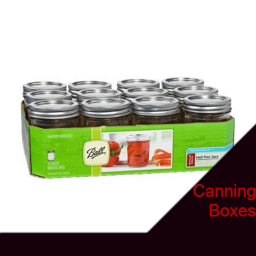
Adds small and large boxes filled with random canning supplies. Small Box can roll up to 12 items and the Large Box can roll up to 24 item rates are below -20% nothing -30% jar -30% jar lid -5% vinegar -10% sugar -5% brown sugar Workshop ID: 2946473524 Mod ID: CanningBoxes

Samir....You're breaking the car!!!
par 76561198000070781
Meme mod that adds sound effects from "Samir....You're breaking the car!!!" when you damage the car. - 5 different voice lines from video. Workshop ID: 2739333451 Mod ID: SamirYourBreakingTheCar
Project Zomboid Guides
Installer des mods Project Zomboid - Guide Workshop
Installe proprement des mods Project Zomboid via le Steam Workshop : saisir les IDs, vérifier l’ordre, redémarrer le serveur et corriger les erreurs typiques.
Louer un serveur Project Zomboid – guide multijoueur
Configurer un serveur Project Zomboid : RAM, paramètres sandbox, mods Workshop, droits admin et vérification propre des erreurs typiques.
Serveur Project Zomboid avec support des mods
Installez les mods compatibles et pris en charge depuis le tableau de bord.
Louer un serveur Project Zomboid