The server.properties file controls the basic rules of a Minecraft Java server. In the game-serverhosting panel, 36 selected settings are exposed as validated fields, with four presets for common server types. This guide shows where to find them, how related settings interact and what every current panel value does.
If you are still choosing a server, start with Minecraft server hosting. Back up the world and current configuration before changing the world name, seed, hardcore mode or resource-pack settings.
Open the configuration editor
Open your server and select Game → Configuration. The editor reads the active server.properties, converts supported keys into form controls and writes only validated values. Allocation-controlled and sensitive fields receive additional protection.
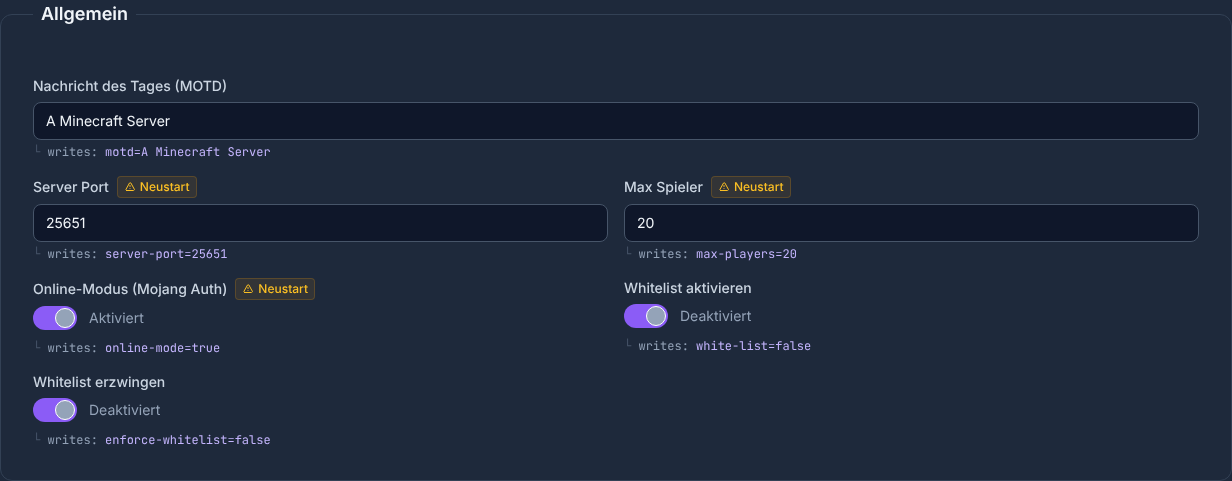
Change connected settings together, save them once and then test the result. This makes a failed start or unexpected gameplay change much easier to trace.
Combine the important settings correctly
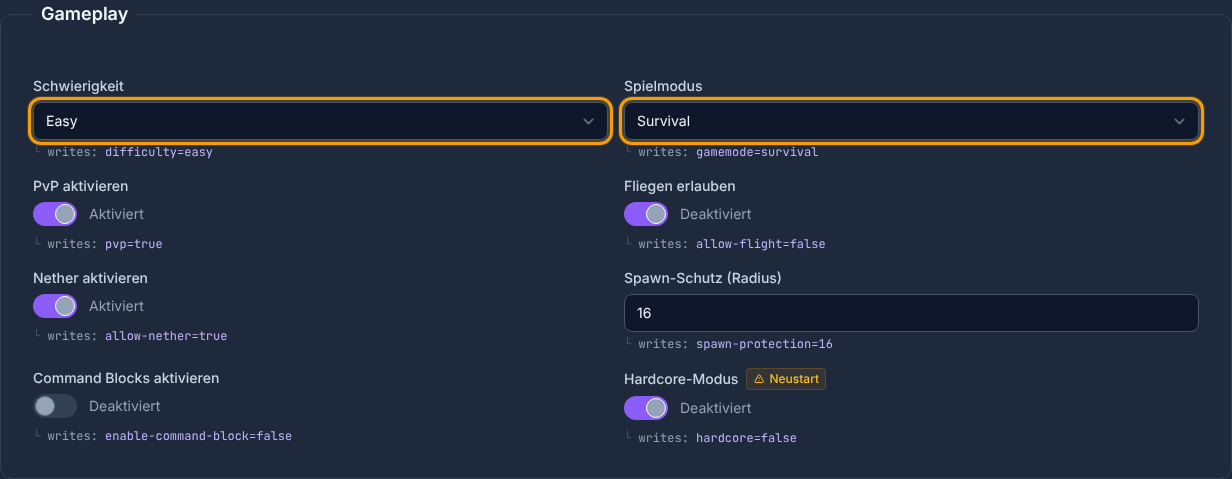
gamemode sets the default mode. force-gamemode=true reapplies that mode when a player joins. difficulty affects hostile mobs and damage rules, while hardcore=true changes how death is handled and should only be enabled with a current backup.
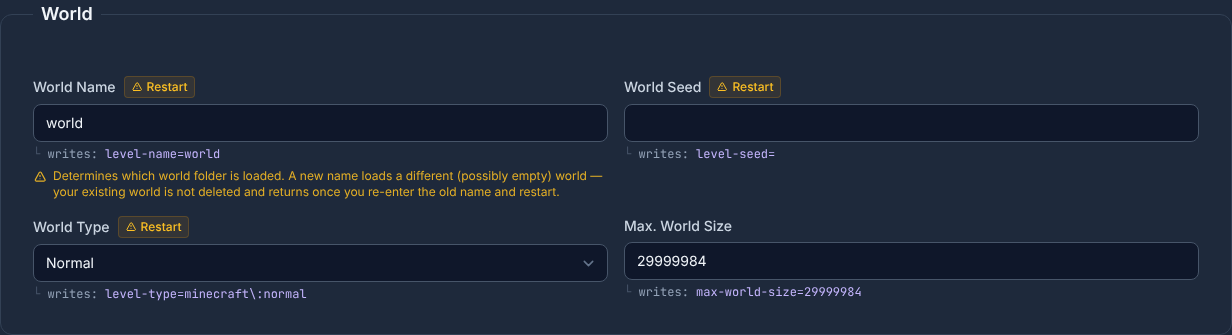
level-name selects the world directory. Changing it does not delete the old world, but the next start may create a new one if the named folder is absent. Enter the directory name exactly. level-seed, level-type and generate-structures mainly affect newly generated terrain.
view-distance controls how far chunks are sent to clients. simulation-distance controls the radius in which chunks keep ticking, including mobs and redstone. Raising either value increases load; change them gradually and watch tick time as well as the player experience.
Use a preset as a controlled starting point
- Survival: normal difficulty, Survival, PvP and 16 blocks of spawn protection.
- Creative: peaceful, Creative, no PvP, no spawn protection and flight allowed.
- Hardcore: hard difficulty, Survival, hardcore rules and no spawn protection.
- PvP Arena: hard difficulty, Survival, 32 players, PvP and no spawn protection.
A preset replaces every setting listed in its preview. Review that preview before saving and then adjust only the values needed by your community.
Version changes in Minecraft 1.21.2 and 1.21.9
Mojang removed several former server properties or moved them to gamerules. Since 1.21.2, spawn-animals and spawn-npcs are no longer effective server properties. Since 1.21.9, this also affects keys such as pvp, allow-nether, enable-command-block and spawn-monsters. The panel marks these legacy fields so older installations remain understandable while current versions can use the gamerule editor.
Every setting in the current panel
The full reference stays collapsed to keep the guide readable. Expand it for the data type, accepted range, panel default, effect and restart status of a specific key.
All 36 server.properties settings and four presets
- File:
server.properties
| Key | Panel label | Type and accepted values | Default | Effect / note | UI restart status |
|---|---|---|---|---|---|
motd |
Message of the Day (MOTD) | Text | A Minecraft Server |
Text shown for the server in the multiplayer server list. | no restart notice |
server-port |
Server Port | Integer · 1024 to 65535 | 25565 |
The port is assigned automatically when the server starts and cannot be changed here. Read-only; the panel does not write this value. | read-only |
max-players |
Max Players | Integer · 1 to 200 | 20 |
Limits concurrent players; this setting alone does not reserve a specific amount of RAM. | restart required |
online-mode |
Online Mode (Mojang Auth) | Toggle (true/false) | true |
Java Edition: online authentication protects player names and UUIDs. Disabling it enables identity spoofing and is not recommended. | restart required |
white-list |
Enable Whitelist | Toggle (true/false) | false |
Allows only players on the whitelist to join when enabled. | no restart notice |
enforce-whitelist |
Enforce Whitelist | Toggle (true/false) | false |
Disconnects online players who are no longer allowed when the whitelist is reloaded. | no restart notice |
enable-status |
Enable Server List Status | Toggle (true/false) | true |
Answers multiplayer list status requests. false hides status and player counts from queries. | restart required |
hide-online-players |
Hide Online Players | Toggle (true/false) | false |
Hides the names of connected players from the server-list response. | restart required |
broadcast-console-to-ops |
Broadcast Console Messages to Operators | Toggle (true/false) | true |
Sends console-command output to connected operators. | restart required |
broadcast-rcon-to-ops |
Broadcast RCON Messages to Operators | Toggle (true/false) | true |
Sends RCON-command output to connected operators. | restart required |
difficulty |
Difficulty | Selection · peaceful, easy, normal, hard | easy |
Sets the global difficulty from peaceful to hard, including mob and damage rules. | no restart notice |
gamemode |
Game Mode | Selection · survival, creative, adventure, spectator | survival |
Sets the default game mode for new players. | no restart notice |
force-gamemode |
Force Game Mode on Join | Toggle (true/false) | false |
Resets players to the configured default game mode when they join. | restart required |
pvp |
Enable PvP | Toggle (true/false) | true |
Allows or blocks damage between players. Removed or ineffective since version 1.21.9. Successor: gamerule pvp. |
no restart notice |
allow-flight |
Allow Flight | Toggle (true/false) | false |
Prevents automatic kicks for flying; it does not grant flight by itself. | no restart notice |
allow-nether |
Enable Nether | Toggle (true/false) | true |
Allows players to use Nether portals. Removed or ineffective since version 1.21.9. Successor: gamerule allowEnteringNetherUsingPortals. |
no restart notice |
spawn-protection |
Spawn Protection (Radius) | Integer · 0 to 100 | 16 |
Radius of the protected area around world spawn; 0 disables protection. | no restart notice |
enable-command-block |
Enable Command Blocks | Toggle (true/false) | false |
Allows command blocks to execute commands. Removed or ineffective since version 1.21.9. Successor: gamerule commandBlocksEnabled. |
no restart notice |
hardcore |
Hardcore Mode | Toggle (true/false) | false |
Enables hardcore rules; death can prevent a normal return to the server. | restart required |
spawn-monsters |
Spawn Monsters | Toggle (true/false) | true |
Allows hostile mobs to spawn naturally. Removed or ineffective since version 1.21.9. Successor: gamerule spawnMonsters. |
restart required |
spawn-animals |
Spawn Animals | Toggle (true/false) | true |
Allows peaceful animals to spawn naturally. Removed or ineffective since version 1.21.2. | restart required |
spawn-npcs |
Spawn NPCs | Toggle (true/false) | true |
Allows villagers and other NPCs to spawn naturally. Removed or ineffective since version 1.21.2. | restart required |
level-name |
World Name | Text | world |
Determines which world folder is loaded. A new name loads a different (possibly empty) world — your existing world is not deleted and returns once you re-enter the old name and restart. | restart required |
level-seed |
World Seed | Text | empty |
Seed for generating a new world; it does not retroactively change existing chunks. | restart required |
level-type |
World Type | Selection · normal, flat, largeBiomes, amplified | normal |
Chooses the generator type for new terrain, such as normal, flat or amplified. Accepted legacy names: normal, normal, flat, flat, largeBiomes, largeBiomes, amplified, amplified, normal, largeBiomes. | restart required |
generate-structures |
Generate Structures | Toggle (true/false) | true |
Controls whether the world generator creates structures such as villages. | restart required |
max-world-size |
Max. World Size | Integer · 1 to 29999984 | 29999984 |
Limits the maximum reachable world radius in blocks. | no restart notice |
view-distance |
View Distance | Integer · 2 to 32 | 10 |
Java view distance in chunks. High values increase network, memory and CPU load. | no restart notice |
simulation-distance |
Simulation Distance | Integer · 2 to 32 | 10 |
Java simulation distance for ticks, mobs and redstone. It is not Bedrock tick distance; high values increase CPU load. | no restart notice |
player-idle-timeout |
AFK Timeout (Minutes) | Integer · 0 to 999 | 0 |
Idle kick time in minutes; 0 disables AFK kicks. | no restart notice |
entity-broadcast-range-percentage |
Entity Broadcast Range (%) | Integer · 10 to 1000 | 100 |
Scales how far entities are sent to clients; 100 is the normal range. | restart required |
network-compression-threshold |
Compression Threshold (Bytes) | Integer · -1 to 65535 | 256 |
Packet size in bytes at which network data is compressed; -1 disables compression. | restart required |
require-resource-pack |
Require Resource Pack | Toggle (true/false) | false |
Rejects players who decline the configured resource pack. | restart required |
resource-pack |
Resource Pack URL | Text · max. 2048 characters | empty |
Direct download URL of the resource pack offered when players join. | restart required |
resource-pack-sha1 |
Resource Pack SHA-1 | Text · max. 40 characters | empty |
SHA-1 checksum of the resource pack; prevents use of an unexpected file revision. | restart required |
rcon.password |
RCON Password | Password | masked |
Password for RCON remote control; use only with a secured RCON setup. Sensitive value; masked in the panel. | restart required |
Presets
| Preset | Purpose | Values set |
|---|---|---|
Survival (survival) |
Standard survival experience with normal difficulty and PvP | difficulty = normal; gamemode = survival; pvp = true; spawn-protection = 16; hardcore = false; allow-flight = false |
Creative (creative) |
Peaceful creative mode without PvP and without spawn protection | difficulty = peaceful; gamemode = creative; pvp = false; spawn-protection = 0; hardcore = false; allow-flight = true |
Hardcore (hardcore) |
Maximum challenge: hard, hardcore, PvP active, no spawn protection | difficulty = hard; gamemode = survival; pvp = true; spawn-protection = 0; hardcore = true; allow-flight = false |
PvP Arena (pvp) |
Optimized for PvP: hard, 32 players, no spawn protection | difficulty = hard; gamemode = survival; pvp = true; spawn-protection = 0; hardcore = false; max-players = 32; allow-flight = false |
Save, restart and verify
Save the configuration and follow the restart status shown for each field. Then check, in order: a clean start without parse errors, a connection with the expected client version, the correct world directory and the changed gameplay rule. If an empty world appears, stop the server, restore the previous level-name and start it again.
Common problems
- A change has no effect: restart-required data was not reloaded, or the installed Minecraft version no longer uses that legacy key.
- A new empty world appears:
level-namedoes not exactly match the existing directory. - The resource pack does not load: check the direct URL, SHA-1 value and
require-resource-packtogether. - Players cannot join: review
white-list,enforce-whitelist,online-modeandmax-playersas one access configuration. - Performance dropped: restore the previous view or simulation distance and measure again.
FAQ
Do I need FTP to edit server.properties?
Not for the 36 settings listed here. The panel reads and validates them directly. Keys outside the catalog may still require targeted file editing.
Which preset should I use for a private survival server?
Use Survival as the starting point. Then adjust the player limit, whitelist, MOTD and, if needed, view or simulation distance.
Why is pvp marked as a legacy setting?
Minecraft Java 1.21.9 moved this rule from a server property to a gamerule. The property remains relevant to older versions; current versions use the gamerule editor.
Sources and review date
Reviewed: 8 September 2026. The field catalog is generated from the production panel schema. Version changes were checked against Mojang's release notes: