Project Zomboid 模组与插件

Lifestyle: Hobbies
作者:76561198048633600
[url=patreon.com/angryslifestyle][img]https://i.imgur.com/bI2Flkx.png[/img][/url] [img]https://i.imgur.com/qZ0qxjq.png[/img] [img]https://i.imgur.com/SKh9cwZ.png[/img] [h1]⠀⠀⠀⠀⠀⠀⠀⠀⠀⠀⠀⠀⠀⠀⠀⠀⠀ 0.1 Update - Music[/h1] [img]https://i.imgur.com/ghGTYK5.png[/img] [h1]⠀⠀⠀⠀⠀⠀⠀⠀⠀⠀⠀⠀⠀⠀⠀⠀⠀ 0.2 Update - Disco[/h1] [img]https://i.imgur.com/Uyko8oF.png[/img] [h1]⠀⠀⠀⠀⠀⠀⠀⠀⠀⠀⠀⠀⠀⠀⠀ 0.3 Update - Homestead[/h1] [img]https://i.imgur.com/Po0p1w3.png[/img] [h1]⠀⠀⠀⠀⠀⠀⠀⠀⠀⠀⠀⠀⠀⠀⠀⠀⠀⠀ 0.4 Update - Art[/h1] [img]https://i.imgur.com/l3Dk6pS.png[/img] [url=https://discord.gg/bfRMRJa8s8][img]https://i.imgur.com/rpiwLs6.png[/img][/url] [h1]Check out the wiki (currently WIP)[/h1] [url=https://lifestylemodwiki.miraheze.org/wiki/Main_Page][img]https://i.imgur.com/ENJaNaO.png[/img][/url] [h1]Images broken or blocked in your country?[/h1] [url=https://www.patreon.com/posts/workshop-front-145974072]VIEW THEM HERE![/url] [h1]For changelogs please visit:[/h1] [url=https://steamcommunity.com/sharedfiles/filedetails/changelog/3403870858]CHANGE NOTES[/url] [h1]Short FAQ:[/h1] [code] Game version: B42 Unstable (latest). Multiplayer: Yes. Added midgame: Yes. [/code] [h1]Technical Information:[/h1] [code] Workshop ID: 3403870858 Mod ID: LifestyleHobbies Mod Version: 0.4 Tiles Def: 5620 Build: 42.19+ Tags: Silly/Fun [/code] [h1]Permissions for Modders:[/h1] [code] [b]Ask for permission[/b] This mod can only be added to and extended with the express permission from the original creator. Having received permission, credit must be given to the original creator, both within the files of the mod and wherever the mod roams online. If no permission is received you may not alter the mod. [/code] [h1]Found a bug?[/h1] [url=https://discord.com/channels/1104109742521073774/1263073289690025984]Please report it here![/url]
![Building Menu [B41.78] - Simon MDs Tiles Addon](https://images.steamusercontent.com/ugc/2319983877122311535/3AB60F9A2DAD54DCB9C3561A77A1432909879E41/)
Building Menu [B41.78] - Simon MDs Tiles Addon
作者:76561199033892043
[img] https://raw.githubusercontent.com/eI1on/workshop_resources/main/building_menu_media/addons_media/building_menu_simonMD_preview/BM_Workshop_Addons_SimonMD_Desc_1.png [/img] [img] https://raw.githubusercontent.com/eI1on/workshop_resources/main/building_menu_media/workshop_images/BM_Workshop_Desc_2.png [/img] [url=https://www.youtube.com/watch?v=TbvAJmf9Lg4] [img] https://raw.githubusercontent.com/eI1on/workshop_resources/main/building_menu_media/workshop_images/BM_Workshop_Desc_3.png [/img] [/url] [img] https://raw.githubusercontent.com/eI1on/workshop_resources/main/building_menu_media/workshop_images/BM_Workshop_Desc_4.png [/img] [img] https://raw.githubusercontent.com/eI1on/workshop_resources/main/building_menu_media/workshop_images/BM_Workshop_Desc_5.png [/img] [quote=] [b] Windows [/b]: C:\Users\%USERNAME%\Zomboid\console.txt [/quote] [quote=] [b] Mac/Linux [/b]: $User$\Zomboid\console.txt [/quote] Open an issue and upload this file here: [url=https://github.com/eI1on/pz-building-menu/issues]GitHub[/url]. [img] https://raw.githubusercontent.com/eI1on/workshop_resources/main/building_menu_media/workshop_images/BM_Workshop_Desc_6.png [/img] [url=https://steamcommunity.com/sharedfiles/filedetails/?id=3067798182][img] https://raw.githubusercontent.com/eI1on/workshop_resources/main/building_menu_media/addons_media/bm_preview.png [/img][/url][url=https://steamcommunity.com/sharedfiles/filedetails/?id=3137094726][img] https://raw.githubusercontent.com/eI1on/workshop_resources/main/building_menu_media/addons_media/bm_melos_preview.png [/img][/url][url=https://steamcommunity.com/sharedfiles/filedetails/?id=3137092605][img] https://raw.githubusercontent.com/eI1on/workshop_resources/main/building_menu_media/addons_media/bm_pert_party_preview.png [/img][/url][url=https://steamcommunity.com/sharedfiles/filedetails/?id=3137091698][img] https://raw.githubusercontent.com/eI1on/workshop_resources/main/building_menu_media/addons_media/bm_dylan_preview.png [/img][/url][url=https://steamcommunity.com/sharedfiles/filedetails/?id=3137091536][img] https://raw.githubusercontent.com/eI1on/workshop_resources/main/building_menu_media/addons_media/bm_ddd_preview.png [/img][/url][url=https://steamcommunity.com/sharedfiles/filedetails/?id=3244396311][img] https://raw.githubusercontent.com/eI1on/workshop_resources/main/building_menu_media/addons_media/bm_greenhouse_preview.png [/img][/url][url=https://steamcommunity.com/sharedfiles/filedetails/?id=3225710182][img] https://raw.githubusercontent.com/eI1on/workshop_resources/main/building_menu_media/addons_media/bm_extras_noises_preview.png [/img][/url][url=https://steamcommunity.com/sharedfiles/filedetails/?id=3246568083][img] https://raw.githubusercontent.com/eI1on/workshop_resources/main/building_menu_media/addons_media/bm_throttlekittys_preview.png [/img][/url][url=https://steamcommunity.com/sharedfiles/filedetails/?id=3246567767][img] https://raw.githubusercontent.com/eI1on/workshop_resources/main/building_menu_media/addons_media/bm_oujinjins_preview.png [/img][/url] [url=https://steamcommunity.com/sharedfiles/filedetails/?id=3341098558][img] https://raw.githubusercontent.com/eI1on/workshop_resources/main/building_menu_media/addons_media/bm_tryhonestys_preview.png [/img][/url] [img] https://raw.githubusercontent.com/eI1on/workshop_resources/main/building_menu_media/workshop_images/BM_Workshop_Desc_7.png [/img] [url=https://discord.gg/asA9BuAasd] [img] https://raw.githubusercontent.com/eI1on/workshop_resources/main/workshop_images/Workshop_Desc_PZ_Modding_Disc.png [/img] [/url] [img] https://imgur.com/eZp8dXD.png [/img] [url=https://github.com/eI1on/pz-building-menu][img] https://raw.githubusercontent.com/eI1on/workshop_resources/main/workshop_images/Workshop_Desc_Github_Banner.png [/img][/url][url=https://ko-fi.com/ely0n][img] https://raw.githubusercontent.com/eI1on/workshop_resources/main/workshop_images/Workshop_Desc_Kofi.png [/img][/url] [url=https://github.com/eI1on/pz-building-menu/blob/main/DEVELOPMENT.md][img] https://raw.githubusercontent.com/eI1on/workshop_resources/main/building_menu_media/workshop_images/BM_Workshop_Desc_10_Framework.png [/img][/url] [quote=author] This mod's permissions fall under TIS's policy [url=https://theindiestone.com/forums/index.php?/topic/2530-mod-permissions/] On Lockdown [/url] This mod cannot be modified by anyone else, for anything else, at all, ever. Even if the user disappears, he or she would much rather you didn't touch the fruits of their hard labour. [/quote] [url=https://theindiestone.com/forums/index.php/topic/2530-mod-permissions/?p=36479][img] https://i.imgur.com/UJYBoAp.png [/img][/url] Workshop ID: 3137092790 Mod ID: BuildingMenuSimonMDsAddon

Monkey's Library
作者:76561198013042524
[code] [h1]Answers for FAQs[/h1] [list] [*][b]This mod is REQUIRED by some of my other mods[/b] [*]Mod is tested only in Singleplayer and Dedicated Server. COOP compatibility is not guaranteed. [*]This mod works as intended as of 41.73. [*]Mod is still in active development, so expect updates. [/list] [/code] [h1]Recent Changes[/h1] [list] [*]Performance improvements to Global mod data [*]Improvements to event scheduler framework [*]Added use of Global Mod Data [*]Refactored Monkey_EventScheduler to be more MP friendly [*]Minor fixes and tweaks [*]Fixed issue with Event Scheduler in local COOP [/list] [h1]What It Does[/h1] [olist] [*]Serves as a dependency for some of my other mods. Get in contact if you wish to use this in your mod. Unfortunately it's not well documented yet. [/olist] [h1]Check out my other mods[/h1] [url=https://steamcommunity.com/workshop/filedetails/?id=2843298732]Start Scenario - Vehicle Nomad Mod Collection[/url] [url=https://steamcommunity.com/sharedfiles/filedetails/?id=2846989295]Silent Hill Radio REDUX[/url] [url=https://steamcommunity.com/sharedfiles/filedetails/?id=2712620992]Permafrost[/url] [url=https://steamcommunity.com/sharedfiles/filedetails/?id=2627877543]Become Desensitized[/url] [url=https://steamcommunity.com/sharedfiles/filedetails/?id=2809204984]Become Brave[/url] [url=https://steamcommunity.com/sharedfiles/filedetails/?id=2434339338]Kingsmouth in KY[/url] [url=https://steamcommunity.com/sharedfiles/filedetails/?id=2461163224]Slocan Lake REDUX[/url] [url=https://steamcommunity.com/sharedfiles/filedetails/?id=2856413047]Zombies Can Trip When Bumping Into Each Other[/url] [h1]I do mod commissions - Discord: _mon.key[/h1] [url=https://ko-fi.com/pzmonkey] [img]https://raw.githubusercontent.com/TrifectaKS/MonkeyWorkshopAds/main/buymeacoffee.png[/img] [/url] Workshop ID: 2842158398 Mod ID: MonkeysLib
Yaki's Hair Retexture
作者:76561198112090080
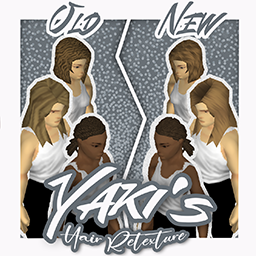
[img]https://i.imgur.com/p7Fv1Z6.gif[/img] [quote][h1][b]B42 Compatibility update out now[/b][/quote] [b]Compatible with the [url=https://steamcommunity.com/sharedfiles/filedetails/?id=2447729538]FluffyHair[/url] mod.[/b] [h1]YAKI'S HAIR RETEXTURE[/h1] This mod replaces the basegame hair textures for [b]every[/b] hair with new, smoother and realistic ones. It constist in new textures for [b]Wavy[/b], [b]Straight[/b] and [b]Braided[/b] hair. This mod is NOT compatible with my other mod [url=https://steamcommunity.com/sharedfiles/filedetails/?id=2761200458]Yaki's Hair Salon[/url] since it already changes the texture of every hair in the game to the new texture /!\ WARNING /!\ [b]It also changes the texture for "Harry's Hair", "Marisol Hair Pack" and "Spongie's Hair" and any other hair mods that uses the basegame texture ! Since i cannot modify the models of the hair on those mods, it might not work perfectly for them. [/b] [h1]Update - 05/04/2022[/h1] Fixed the UV of the "Rachel" hairstyle so the textures don't overlap [h1]Check out some other mods ![/h1] [url=https://steamcommunity.com/sharedfiles/filedetails/?id=2463184726][img]https://steamuserimages-a.akamaihd.net/ugc/1839169451814266686/A1DE6BD46F1B559F5C67CBBB97EA1D112822FEF3/?imw=200&imh=200&ima=fit&impolicy=Letterbox&imcolor=%23000000&letterbox=true[/img][/url][url=https://steamcommunity.com/sharedfiles/filedetails/?id=2761200458][img]https://steamuserimages-a.akamaihd.net/ugc/1809894273638294253/C309A1B48537960CF345B18592C67D08881E2A8C/?imw=200&imh=200&ima=fit&impolicy=Letterbox&imcolor=%23000000&letterbox=true[/img][/url][url=https://steamcommunity.com/sharedfiles/filedetails/?id=2335368829][img]https://steamuserimages-a.akamaihd.net/ugc/1825656106836748504/31688A1F7A26BF81927B125B49889B04F7B5E965/?imw=200&imh=200&ima=fit&impolicy=Letterbox&imcolor=%23000000&letterbox=true[/img][/url] ---- Workshop ID: 2787539183 Mod ID: YakiHRB42
Tools of The Trade
作者:76561198082611857
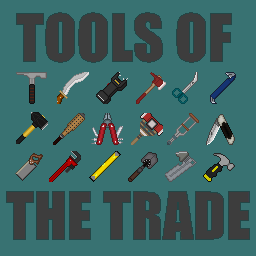
Adds a variety of weapons and tools to the game world. [h1]AXES:[/h1] [list] [*][b]Adze[/b] [*][b]Army Mattock[/b] [*][b]Bearded Axe[/b] [*][b]Brush Hook[/b] [*][b]Crash Axe[/b] [*][b]Felling Axe[/b] [*][b]Hatchet[/b] [*][b]Pulaski Axe[/b] [*][b]Splitting Maul[/b] [*][b]Tomahawk[/b] [/list] [h1]LONG BLUNT:[/h1] [list] [*][b]Aluminum Baseball Bat[/b] [*][b]Core Hammer[/b] [*][b]Cricket Bat[/b] [*][b]Crutch[/b] [*][b]Entry Tool[/b] [*][b]Heavy Shillelagh[/b] [*][b]Halligan Bar[/b] [*][b]Industrial Pipe Wrench[/b] [*][b]Industrial Wrench[/b] [*][b]Kanabo[/b] [*][b]Post Maul[/b] [*][b]Railroad Hammer[/b] [*][b]Railway Spike Hammer[/b] [*][b]Rebar[/b] [*][b]Rebar Club[/b] [*][b]Rebar Hammer[/b] [*][b]Trench Bat[/b] [*][b]Walking Stick[/b] [*][b]War Hammer[/b] [/list] [h1]SHORT BLUNT:[/h1] [list] [*][b]Branding Iron[/b] [*][b]Brick Hammer[/b] [*][b]Cast Iron Skillet[/b] [*][b]Candlestick[/b] [*][b]Fish Knocker[/b] [*][b]Gavel[/b] [*][b]Meat Tenderiser[/b] [*][b]Morning Star[/b] [*][b]Shillelagh[/b] [*][b]Spiffo Mace[/b] [*][b]Spirit Level[/b] [*][b]Stielhandgranate[/b] [*][b]Stubby Hammer[/b] [*][b]Telescopic Baton[/b] [*][b]Trench Club[/b] [*][b]Trench Shovel[/b] [*][b]Utility Bar[/b] [/list] [h1]LONG BLADES:[/h1] [list] [*][b]Bush Machete[/b] [*][b]Cavalry Sabre[/b] [*][b]Executioners Sword[/b] [*][b]Grass Scythe[/b] [*][b]Kukri[/b] [/list] [h1]SHORT BLADES:[/h1] [list] [*][b]Army Scissors[/b] [*][b]Barbecue Fork[/b] [*][b]Combat Knife[/b] [*][b]Cutthroat Razor[/b] [*][b]Fairbairn-Sykes Knife[/b] [*][b]Gladius[/b] [*][b]Jackknife[/b] [*][b]Kebab Skewer[/b] [*][b]Meat Hook[/b] [*][b]Multitool[/b] [*][b]Ryoba Saw[/b] [*][b]Seax[/b] [*][b]Spiff Army Knife[/b] [*][b]Utensil Tool[/b] [/list] [h1]SPEARS:[/h1] [list] [*][b]Brown Bess Musket[/b] [*][b]Halberd[/b] [*][b]Harpoon[/b] [*][b]Rebar Spear[/b] [*][b]Shaolin Spade[/b] [*][b]Trident[/b] [/list] [h1]TOOLS:[/h1] [list] [*][b]Army Can Opener[/b] [*][b]Back Saw[/b] [*][b]Bandage Scissors[/b] [*][b]Pencil w/Eraser[/b] [/list] [h1]SPECIAL:[/h1] [list] [*][b]Defiler[/b] [*][b]Despoiler[/b] [*][b]Industrial Breaching Hammer[/b] [*][b]Police Breaching Hammer[/b] [*][b]Stun Gun[/b] [/list] [h1]KNICK KNACKS:[/h1] [list] [*][b]Mjolnir[/b] [*][b]Scythe[/b] [/list] [b]STUFF NOT WORKING? COMPATIBILITY ISSUES?[/b] [list] [*]Should be fully compatible with saves in progress and safe to remove mid game in progress too. Works in multiplayer just fine. [*]Currently has incompatibility issues with "Improved Build Menu [Build 41]" by Vaileasys. You can try using "Improved Build Menu + Extra Buildings" by FallenTemplar instead. Also can openers suffer a mod conflict when using the "Moar Can Openers" mod by NoctisFalco. [*]If you're finding certain weapons in this mod having missing functions, it could be because of a mod conflict or incompatibility. Try this mod: [url=https://steamcommunity.com/sharedfiles/filedetails/?id=3020000656 ]Item Tags Compatibility Patch[/url] by opsedar. It's a useful patch mod that helps a variety of mods work better together! [/list] As always, a special thanks to my friend [url=https://steamcommunity.com/profiles/76561198041121447/] Cosmic [/url] for his help with understanding the codebase of this game, as well as being fully responsible for the Defiler / Despoiler Switch Stance ability. His workshop is [url=https://steamcommunity.com/profiles/76561198041121447/myworkshopfiles/?appid=108600] here,[/url] check it out! Also thanks to [url=https://steamcommunity.com/id/authentic_peach/] Authentic Peach [/url] helping me with adding custom sounds to the mod. Their [url=https://steamcommunity.com/id/authentic_peach/myworkshopfiles/?appid=108600]workshop[/url] is that way, take a look! [code][b]Note:[/b][i] My knowledge of coding can be written on the back of a postage stamp, with room to spare. I don't even know where to begin to make mods compatible with other mods, so any requests for compatibility are likely to be futile. Sorry about that. :([/i] [b]Note:[/b] [i]Please don't post my mods anywhere else or add them to other mods without seeking permission first, and please credit me when / where credit is due. Thanks![/i][/code] Workshop ID: 2870742794 Mod ID: ToolsOfTheTrade Mod ID: ToolsOfTheTradeKnickKnacks
Darker Map
作者:76561197994453674
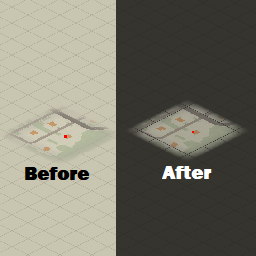
No more flash bang when opening map. Dark mode enthusiasts rejoice! Updated for B42! Copied folders to original B41 locations as well, so should work on B41 now too. Workshop ID: 2939187818 Mod ID: darkerMap
Old's Military Airfield
作者:76561198021393437
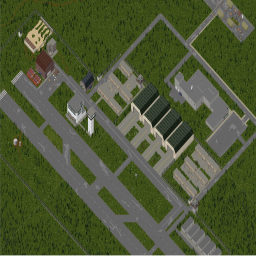
A zombie defended military airfield with custom military buildings and community ones from the build pool on the forums. I'm working on expanding the area surrounding the airfield, currently a small town is present north of the airfield. Every map update requires a world a wipe unfortunately due to the way the game renders tiles after their explored. Only way around this is by deleting those tiles from the files. recommend extremely rare loot for the best loot balance, the map is as fruitful as you make it and it's balanced with big multiplayer in mind. The map is connected to the road now and updated with the new mapping system. Report any bugs or layering issues. Workshop ID: 2737546323 Mod ID: Militaryairport Map Folder: militaryairport 32x26 ; 32x27 ; 32x28 ; 33x26 ; 33x27 ; 33x28
Repair Wall Cracks
作者:76561197962481352
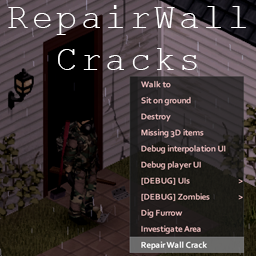
This mod will enable the ability to repair various cracks on structures around the world. To repair a crack, you need the following items in your inventory: Bucket of Plaster, Trowel. Workshop ID: 2746736222 Mod ID: RepairWallCracks
Craft Engine Parts
作者:76561198157213862
[hr][/hr][h1]Craft Spare Engine Parts yourself![/h1] This mod adds the magazine "[i]The Machinist[/i]". Find it and read it! This adds [u]three different recipes[/u] for making spare engine parts. Alternatively, you can unlock them by reaching a certain level in each required skill without ever reading the magazine (B42+ only). [olist] [*]Needs metal working skill and more metal parts [*]Needs mechanics skill and some additional uncommon parts [*]Needs electronics skill and additional electronic parts [/olist] It can be used for single player but the true reason I created this is multiplayer. Because often vehicles of entire towns are stripped of their engines to get these juicy spare parts, and this mod is meant to help with exactly this issue. [h3]Version and language support[/h3] This mod is compatible with B41 & B42 MP (B42.13.0+). It is safe to add or remove in existing games. In version 1.4 English, German, Russian, French, Spanish (ES and AR), Traditional Chinese, Hungarian, Italian, Dutch, Polish, and Portuguese (PTBR) are supported, but on player requests and with a little help I will definitely add more. [h3]Future of the mod[/h3] As B42 progresses, crafting is expected to get a great revamp, and a lot more recipes and items will be added. In response to this, the recipes in this mod will likely be changed in the future to better match B42's new crafting system. [h3]Reuploading and modpacks[/h3] For server owners it can be very useful to have their own modpack. That's why I allow reuploads of my mod as part of a modpack for a server if credit is given and if the modpack is unlisted on steam and only shared with the server members. Under all other circumstances please abstain from reoploads. [h1]Important: balancing settings[/h1] When installing the mod, it comes as four separate ones named "expensive - original", "moderate", "cheap", and "cheapest". These four mods all do basically the same, but the cost, results, and requirements of the crafting recipes are hugely different as can be seen in the images above. This allows you to choose a difficulty, how much impact you want this mod to have on your gameplay, and how much you would like to spare those poor car engines from looting. Only choose and activate one of the four mods. If more are activated, it won't break the game, but it will cause a recipe redundancy. I chose to implement difficulty / balancing settings this way and not via actual options within a single mod in order to prevent the need to add the ModOptions mod as a dependency. I have done this to avoid breaking people's save games and servers which already used the CEP mod before Version 1.2 and haven't got the ModOptions mod. [hr][/hr][i]Workshop ID: 2744114761 Mod ID: CraftEngineParts / CraftEnginePartsModerate / CraftEnginePartsCheap / CraftEnginePartsCheapest
AutoMechanics
作者:76561198329871201
So you are here ? Ah.. you wanna play with cars but you lack experience. You've come to the right place. [h1]How to ?[/h1] [list] [*]Get a Screwdriver, a Wrench, a Lug Wrench and a Jack. [*]Ensure you've read the book associated with your car. [*]Find a car you can spare, and just start training with serenity. [*]On vehicle mechanics menu, right click any mounted part and left click on Train Mechanics button. [/list] [h1]Other Actions[/h1] [list] [*]You can continue a previously interrupted training. [*]You can uninstall all parts in one click. [*]You can inflate all tires in one click. [/list] [h1]Mod Options[/h1] [list] [*]You can set a waiting timer between mechanical actions. This allows to adapt to servers with high latency in multiplayer. [*]You can select a threshold for uninstall attempts depending on risks of breaking the part. It is 100 (unrestricted) by default. [*]You can use or not a pause at the end of all actions (e.g. when using time speed increase for a full training). [*]You can re-try vanilla Uninstall and Install actions until they succeed. [*]Verbose options are logs that reduce (a lot) performances: only for debug analysis. [/list] [h1]Sandbox Options[/h1] [list] [*]You can enforce the failure threshold server side in multiplayer. [*]The lowest (most restricting) value between the client value (mod option) and the server value (sandbox option) is used. [*]It is 100 (unrestricted) by default. [/list] [h1]Tips and Tricks[/h1] [list] [*]Any mod with invalid fixing recipe will induce errors when right clicking on some vehicle parts. "attempted index: isEmpty of non-table: null" ISVehicleMechanics.lua:224. [*]This mod is for version B42 and further versions. [*]This mod is NOT compatible with version B41 and previous versions. [*]Remember there is no need to train more than once a day (per car). [*]You can increase game speed. [*]The training can reach a stall due to pathfinding. Keep a lot of free space around the car to avoid this. [*]Broken items will be dumped. (items you uninstalled and cannot reinstall will not be. e.g. a tire will not be reinstalled nor dropped if the suspension is broken and dropped) [*]Make sure to disable re-equipment before "Train Mechanics" if you're using the [url=https://steamcommunity.com/sharedfiles/filedetails/?id=2769706949]Tidy Up Meister[/url] mod. [*]This mod can be added to or removed from any save. [*]Project Zomboid gives much freedom to players and modders, but there are tricky stuff I will not explain a thousand times in the comments below. [/list] [h1]If you still have questions or problem reports, ask on [url=https://discord.gg/theindiestone]Official PZ Discord: mod_support channel[/url].[/h1] [h1]Credits[/h1] [list] [*]Uninstall all integrated from [url=https://steamcommunity.com/profiles/76561197999348418]Deadly_Shadow[/url]'s "hack". [*]Continue Train Mechanics, Inflate All Tires & a bunch of corrections by [url=https://steamcommunity.com/id/TwisTonFire/myworkshopfiles]TwistOnFire[/url]. [/list] [quote] [url=http://theindiestone.com/forums/index.php/topic/2530-mod-permissions/?p=36479]On Lockdown[/url] This mod cannot be modified by anyone else, for anything else, at all, ever. Even if the user disappears, he or she would much rather you didn't touch the fruits of their hard labour. [/quote] If you wanna support kind words are very welcome. If you don't have any, you can still give constructive criticism. That's it. Why are you still here ? There is nothing more for you here. Get lost ! .. let me remember my first student, sweet Kaylee.. Workshop ID: 3387539308 Mod ID: AutoMechanics
Fuu's Roleplay Poses
作者:76561198041982443
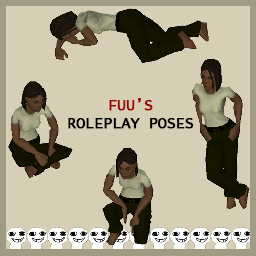
[h1] Fuu's Roleplay Poses [/h1] [url=https://steamcommunity.com/sharedfiles/filedetails/?id=2735579575]Radial Menu API is required.[/url] When you open your Q menu, you should have a list of all available poses. Special pose cards are only able to be spawned in by admins and will appear in a separate category. [h2] Current poses: [/h2] [b]15 standing animations[/b] [b]12 sitting animations[/b] [b]3 lying animations[/b] [b]Various eating/drinking/reading/writing actions[/b] Please don't edit this mod. You may extend it with your own, but please don't edit my code or reupload it. I will never take it down or remove content. Please don't bundle this into server asset packs. I don't update my mod often enough to justify it. Updates I push are reserved for major adjustments or additions. [b] Translated into Turkish by Oxygeniom! [/b] Workshop ID: 2876610875 Mod ID: RPActions

Dylan's 4 Maps Tile Bundle
作者:76561198278571151
[h1]A tile bundle consists of all tiles from [i]Dylan and Plenty T[/i]'s 4 maps (Grapeseed, Blackwood, Ekron, Pitstop) [b]("Dylan's Tile Pack" is not included)[/b].[/h1] This mod only contains [b].pack[/b] and [b].tiles[/b] files for in-game functions. Modders please check Dylan's [b]Google Drive[/b] for all texture [b].png[/b] files: https://drive.google.com/drive/folders/1PKOGWMpxe0B7M4SDGUHdkSTxs_7qlENP [b]Make sure you have [i]"Double-sized Textures"[/i] on in your Display settings when using such tile packs or any mods possibly overriding vanilla tiles.[/b] [u]For All[/u]: Be advised, if you have any of the 4 maps subscribed. This bundle [b]MIGHT HAVE CONFLICT[/b] with the 4 maps above and occurs unknown consequences. Although I haven't met any as of today with all of these installed. If you happened to witness any, please inform me below. And if you have all the 4 maps installed, there's no need to subscribe this anymore. [u]For Players[/u]: You only need this if you've downloaded a custom map that requires this mod. [u]For Modders[/u]: This is a bundle for those who wants to use the tiles from these 4 maps without the complete installation of those maps. Basically made for modders. So the players won't have to subscribe the 4 maps if they don't want to. And your [b]mod.info[/b] needs to have this line: require=dylanstiles_bundle If you use the tiles in your map make sure on the mod steam page you make it a requirement to use this mod. Check out the 4 maps mentioned here: Grapeseed: https://steamcommunity.com/sharedfiles/filedetails/?id=2463499011 Blackwood: https://steamcommunity.com/sharedfiles/filedetails/?id=2536865912 Ekron: https://steamcommunity.com/sharedfiles/filedetails/?id=2712480036 Pitstop: https://steamcommunity.com/sharedfiles/filedetails/?id=2597946327 [u]Authorized by Dylan. Much thanks to his team's delicate works and generous sharing[/u]. Workshop ID: 2923495608 Mod ID: dylanstiles_bundle
Nepenthe's Nearby Traps
作者:76561197968647786
Allows traps to work even if you are nearby. Updated to support B41 and B42. Updated again for B42.6, due to changes in the interactions between traps & zones. [h3]FAQ[/h3] [b]Can this mod be safely added/removed from existing games?[/b] Yes. Workshop ID: 2974760428 Mod ID: NepNearbyTraps
Remove Debris
作者:76561198259313273
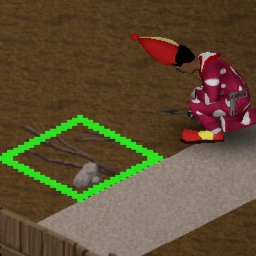
[h1]About:[/h1] Remove that junk ruining the look of your distinguished base. A simple mod that adds the ability to remove stumps, stones and other junk from the world. Just grab a trowel and right click on the bit of debris you want to remove. Requires a working trowel in your inventory. Google translated so translations may need tweaking. [h1]FAQ:[/h1] [list] [*]Is safe to add or remove from an existing save, just make sure to enable it in the save itself. [*]Should work in multiplayer [/list] Workshop ID: 2927744729 Mod ID: RemoveDebris
![Evolving Traits World (ETW) [B41/B42] - alternative to "Dynamic Traits"](https://images.steamusercontent.com/ugc/15363074706369900645/8B23DA6218645D049265B9D154516E59B696841F/)
Evolving Traits World (ETW) [B41/B42] - alternative to "Dynamic Traits"
作者:76561198152820942
[h1]Welcome to the world of Evolving Traits[/h1] This mod allows you to get really ripped in PZ and see an actual character progression besides getting your skills from lvl 0 to lvl10. You'll be able to purge the majority of negative traits and earn a lot of positive ones (but also earn some negative ones as well). This would help you to go from your average Joe to actual GigaChad in-game. You repair a lot of cars? You get better at it. You train yourself to take long-range kills with proper rifles? Why wouldn't it warranty getting Eagle-Eyed? You pick up thousands of plants through your lifetime and still can't call yourself Herbalist? Yea, that doesn't sound right to me. You maintain great sleeping schedule but for some reason you still need same amount of sleep as when you were sleeping whenever? Not anymore. Welcome to the Dynamic Traits World, ladies and gentlemen! [h1]Features[/h1] [list] [*]UI with all needed mod information in-game! Default hotkey is "[", changeable in settings. [*]70+ dynamic traits (vanilla + added by the mod). [*][h3][b]FULL sandbox customization[/b]. Choose which perks you want to be dynamic, choose how fast you get them, choose how fast you lose them, customize anything with more than 150 sandbox options. Nothing is forced upon player, if you like 1% of the mod, you can literally set it up so you get to use that 1% and nothing else.[/h3] [*]Advanced systems that affect a lot of traits. Affinity system, that allows you to stick to your starting traits better. Delayed traits system, that allows you to get/remove traits with random delay. [*](B41 ONLY) QOL (Quality of Life) submod - mark all traits that are dynamic so in character creating you can see which perks are obtainable during gameplay! Can be enabled without enabling main mod, so if you don't like main features added by this mod and just want to see which traits are dynamic in your game with SOTO/MST/MT/DT - you can do that. [*](B42 ONLY) supported by [url=https://steamcommunity.com/sharedfiles/filedetails/?id=3766701843]Mark Dynamic Traits Framework (MDTF)[/url] [*]For new traits (aka not vanilla game), customization is also present. Want Hoarder perk to give you more carry weight per point of STR? Go adjust it in Sandbox. Want to be even happier under rain with Pluviophile? Sandbox it is. [*](B41 requires mod, B42 has in-game mod options now)Client-sided configuration available with [url=https://steamcommunity.com/sharedfiles/filedetails/?id=2169435993]Mod Options[/url]. [*](B41 ONLY) Don't like some/all traits added by this mod but only want to have vanilla traits dynamic? Also possible, with help of [url=https://steamcommunity.com/sharedfiles/filedetails/?id=2934686936]Evolving Traits World (ETW) - Disable Selected Traits[/url]. [/list] [h1]Compatibility and Installation[/h1] Installation instructions can be found in [url=https://steamcommunity.com/workshop/filedetails/discussion/2914075159/3767857092594929252/]this discussion[/url]. List of compatible/incompatible mods can be found in [url=https://steamcommunity.com/workshop/filedetails/discussion/2914075159/4290313152633468883/]this discussion[/url], including details on: Dynamic Traits, Expanded Taits, More Traits, zRe ARMOR PACK by kERHUS, Simple Overhaul: Traits and Occupations (SOTO), More Simple Traits (MST), Explorer Trait, SixthSense, Superb Survivors!, Snake's Mod Pack 41.77 [h1]Recommended Mods (b41)[/h1] [list] [*][url=https://steamcommunity.com/sharedfiles/filedetails/?id=2694448564]Mod Manager[/url] and [url=https://steamcommunity.com/sharedfiles/filedetails/?id=2725216703]Mod Manager: Server[/url] - for the love of god, use these and not vanilla mod manager [*][url=https://steamcommunity.com/sharedfiles/filedetails/?id=2854030563]Moodle Quarters[/url] - so you can clearly see which stage your moodle is in right now [*][url=https://steamcommunity.com/sharedfiles/filedetails/?id=2763647806]Clear description for Moodles[/url] - so you know what your moodles do [*][url=https://steamcommunity.com/sharedfiles/filedetails/?id=2685168362]More Description for Traits[/url] - so you can read what your traits do [*][url=https://steamcommunity.com/sharedfiles/filedetails/?id=2894296454]Change Sandbox Options (by Star)[/url] - use this to change SP starting options mid-game. [b]ATTENTION[/b]: upon changing any settings it's highly recommended to reload save (if SP) or rejoin server (if MP) for technical reasons (mod decides what to run based on sandbox settings when character is loaded in game world) [/list] [h1]GitHub and Discord[/h1] If you want to submit translation files, make suggestions or report bugs, the easiest way to do it would be on Discord. [url=https://discord.gg/8pBN5Ccm7z][img]https://cdn.iconscout.com/icon/free/png-256/discord-3691244-3073764.png[/img][/url][url=https://github.com/MusicManiac/DynamicTraitsWorld][img]https://cdn.iconscout.com/icon/free/png-256/github-163-761603.png[/img][/url] [h1]Credits and Translations[/h1] List of credits, contributors and translators can be found in [url=https://steamcommunity.com/workshop/filedetails/discussion/2914075159/3785877016603169742/]this discussion[/url] (hitting description limit so had to move it). Currently mod supports following languages (note that not all translations are 100% complete as mod is getting updates): [list] [*]English [*]Italiano / Italian [*]Español / Spanish [*]簡体中文 / Chinese [*]繁體中文 / Traditional Chinese [*]Português Brasileiro / Brazilian Portuguese [*]한국어 / Korean [*]Türkçe / Turkish [*]Deutsch / German [*]Українська / Ukrainian [*]Русский/Russian [/list] [h1]Afterword and Permission[/h1] If you like this mod, check out collection on top of page for other mods I made or collaborated on! Rate ups are appreciated, and if you wanna send me a coffee, that's a real homie move, and you can do it here: [url=https://ko-fi.com/musicmaniac][img]https://uploads-ssl.webflow.com/5c14e387dab576fe667689cf/61e11d5cf697cee7ca5b65d9_Button-p-500.png[/img][/url] [quote]⛔ Permissions Redistribution of this mod without explicit permission from the creator is prohibited under any circumstances. This includes, but not limited to, uploading this mod to the Steam Workshop or any other site, distribution as part of another mod or modpack, distribution of modified versions. © 2026 [url=https://steamcommunity.com/profiles/76561198152820942]MusicManiac[/url] (SteamID64: 76561198152820942)[/quote] Workshop ID: 2914075159 Mod ID: EvolvingTraitsWorld Mod ID: EvolvingTraitsWorldMarkDynamicTraits <--- (doesn't work for b42.13+)
Grab and Drop
作者:76561198030703549
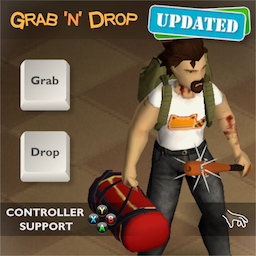
This mod adds hotkeys to quickly grab / drop carryable items. Along with a dedicated backpack hotkey. [quote][h1]Intermediate update: 24 Sep[/h1] [list] [*]Added mouse functionality. Select nearby items with single click and pick them up with double click. Suggested by [b]Jasdan[/b]. [*]Items in hands will no longer be dropped when you pickup other items. This behavior was more confusing than helpful. [*]Added new icon options, including a colored icon that matches the character's skin color. [*]Other icon improvements: more precise positioning and different offsets for each icon type. Added a small delay and timeout to hide the icon after a while. [*]A few small fixes. [/list] [/quote] [quote][h1]Update: 9 Sep[/h1] [img]https://i.imgur.com/q42KyXt.png[/img] [list] [*]New option: [b]"Grab Everything"[/b] allows to pickup non-carryable items too. [i]Requested by [b]nurver[/b] and [b]V1CeNtE[/b][/i]. [*]The [b]Auto-Equip[/b] option has been renamed to [b]Auto-Wear[/b] as it now also affects clothing. [*]Added several icon options to choose from. [/list] [/quote] [quote][h1]Update: 5 Sep[/h1] [list] [*]Weapons can now be dropped using the new [b]Weapon[/b] hotkey. Depending on the assigned key, it functions on its own or as a modifier to the [b]Drop[/b] key. [*]New option: [b]"Long press to drop"[/b]. Requested by [b]DogeGoblin[/b]. [*]New option: [b]"Drop attached weapons"[/b] [*]Options are now located in the drop-down panel below the buttons [*]Added icon that highlights items on the ground [*]Fixed items not dropping while the player is moving [/list] [h1]Additional update:[/h1] [list] [*]New option: [b]"Show Icons"[/b] to toggle icons on/off. Requested by [b]luca[/b]. [*]New option: [b]"Allow dropping weapons"[/b] to drop weapons along with other items without the [b]Weapon[/b] key. [*]Keys pressed with modifiers such as [b]Shift[/b], [b]Ctrl[/b], [b]Alt[/b], when isn't used by this mod, will be filtered to allow other mods to use it. [/list] [/quote] [quote][h1]Update: 26 Aug[/h1] [h3]Please, revisit [b]Key Bindings[/b] section. All mod settings are now located there. Redundant options was removed. [b]Mod Options[/b] isn't required anymore.[/h3] [i]Since the mod now supports more than just bags, it made sense to rename it. However, the Mod ID remaines the same ([b]BION_DropBags[/b]) to avoid issues for current users.[/i] [/quote] [h1]Features[/h1] [list] [*]Combined [b]Grab and Drop[/b] or separate [b]Grab[/b], [b]Drop[/b] keys can be assigned. [*]Dedicated [b]Backpack[/b] key to put on / drop the backpack (optional). [*]Dedicated [b]Weapon[/b] key to drop weapon (optional). [*]Wield a two-handed weapon in one hand when picking up an item, and equip in both hands when dropping it. [*][b]"Auto-Drop"[/b] option: Automatically drop items in hands when equipping a weapon. [*]Favorite items always remain with the character. [*]Compatible with [url=https://steamcommunity.com/sharedfiles/filedetails/?id=2366717227]Swap It[/url], [url=https://steamcommunity.com/sharedfiles/filedetails/?id=2904920097]Fancy Handwork[/url], [url=https://steamcommunity.com/sharedfiles/filedetails/?id=2289454303]Eggon's Hotkeys[/url]. [/list] [h1]Supported items[/h1] [list] [*]In short, any carryable item (visible in hands) is supported. Vanilla or from mods. [*]Handheld and wearable bags, backpacks, cases, gas cans, etc. [*]All weapon, flashlights, most tools, instruments, umbrella, fishing rod. [*]Everything from [url=https://steamcommunity.com/sharedfiles/filedetails/?id=2921029369]Skizot's Carryable Everything[/url] mod. [*]Water Jug from [url=https://steamcommunity.com/sharedfiles/filedetails/?id=2687798127]Water Dispenser[/url] mod. [*]Large Gas Can from [url=https://steamcommunity.com/sharedfiles/filedetails/?id=2688538916]Fuel API[/url] mod. [*]Generator and corpses from [url=https://steamcommunity.com/sharedfiles/filedetails/?id=2809719515]Visible Generators and Corpses[/url] mod. [*]Paper Bag from [url=https://steamcommunity.com/sharedfiles/filedetails/?id=3015956555]Grab That Paper Bag[/url] mod. [/list] [quote][i][b]"Grab Everything"[/b] option allows to loot any regular items using the [b]Grab[/b] key as well. These items will be stored in inventory instead of being carried in hands.[/i][/quote] [h1]Keyboard Controls[/h1] [img]https://i.imgur.com/1JddyRw.png[/img] [quote][i]It is safe to assign the same key to [b]Grab[/b] and [b]Interact[/b] actions. In that case, the mod checks for an available interaction and gives it priority if necessary.[/i][/quote] The layout is flexible and depends on which actions are bound and which are not. Pay attention to the tooltips for additional keyboard shortcuts. Here are examples of different configurations and available shortcuts: [h3]1. Combined "Grab and Drop" key only:[/h3] [img]https://i.imgur.com/QR6nW8y.png[/img] [img]https://i.imgur.com/hqI8lTz.png[/img] [h3]2. Separate "Grab" and "Drop" keys:[/h3] [img]https://i.imgur.com/kuLlnlq.png[/img] [img]https://i.imgur.com/XxEoMv1.png[/img] [h3]3. Separate "Grab", "Drop" and "Backpack" keys:[/h3] [img]https://i.imgur.com/xPG3Xxo.png[/img] [img]https://i.imgur.com/1i93V8D.png[/img] [h1]Controller Layout and Button Prompts[/h1] [img]https://i.imgur.com/BsBtPGp.png[/img] [h1]Does it work on existing saves?[/h1] Yes. Safe to enable/disable at any time. [h1]Check out my other mods[/h1] [url=https://steamcommunity.com/sharedfiles/filedetails/?id=3008416736]Plain Moodles[/url] [url=https://steamcommunity.com/sharedfiles/filedetails/?id=3012122638]Warm Up[/url] [url=https://steamcommunity.com/sharedfiles/filedetails/?id=3038682913]Clickless Radial Menus[/url] Workshop ID: 3018929461 Mod ID: BION_DropBags
Coryerdon or Dirkerdam to OTR road
作者:76561197993513950
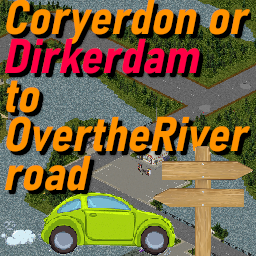
[h1]Welcome! Roads are cool![/h1] Simply put, this map connects Dirkerdam or Coryerdon to Over the River. There's also a spawn point, and the map can sustain itself somewhat via foraging, fishing, rummaging through the various buildings, etc. [h1]Features![/h1] [list] [*] 40 custom buildings, with some being based on real locations from my childhood. [*] In game map support, with POIs such as a grocery store, gas station, book store, etc. [*] Forest trails (hidden on map) w/shelter houses, fishing holes, wells, and stuff! [*] One spawn point, but in a tight spot resource-wise for a little challenge. [*] Vehicle spawns, working foraging, some great spots for secluded bases, and more. [/list] [h1]Please realize...[/h1] My main connecting road goes to the very edge of its cells without obstructions, besides zombies of course. There isn't anything I can do about how the other map authors treat their roads. So for now, you'll want to move/destroy those road blocks on the edge of Coryerdon, and clear out some trees and maybe even lay concrete down on the edge of Over the River. If you choose Dirkerdam instead of Coryerdon, it's a clean seamless connection. I chose not to overwrite the adjoining cell of Over the River or Coryerdon as this would require a specific map load order to line everything up, and that would surely cause confusion, not to mention I didn't feel comfortable with overlaying my work onto someone else's. [h1]Huge ass thanks to Daddy Dirkie Dirk[/h1] ...his videos were absolutely critical in learning how to pull all this off, thanks dude. Also want to thank TIS, what an awesome game! Cells used - 35x19 35x20 36x19 36x20 Known map conflicts - Liberty City, which also conflicts w/Coryerdon and Dirkerdam. [quote] [url=https://theindiestone.com/forums/index.php?/topic/2530-mod-permissions/#comment-36478]Ask for permission![/url] This mod can only be added to and extended with the express permission from the original creator. Having received permission, credit must be given to the original creator, both within the files of the mod and wherever the mod roams online. If no permission is received you may not alter the mod. [/quote] [h1]Don't forget to leave a rating, thanks![/h1] Workshop ID: 2892795238 Mod ID: CorOTRroad Map Folder: CorOTRroad
![[B42.19] Detailed Descriptions for Occupations and Traits](https://images.steamusercontent.com/ugc/36689471054128099/CAC95C51391B7D4C9F5B3E99B6A12EA6B0419964/)
[B42.19] Detailed Descriptions for Occupations and Traits
作者:76561198101200007
This mod provides more detailed descriptions for Occupations and Traits with values obtained directly from the game files and wiki. Original base game descriptions have been kept on the first lines. Added information/values, knowledge (innate/recipes/magazines) and foraging bonuses have been added after a line break. The mod works in both character creation screen and character info. [h2]Translations[/h2] The mod is available in the following languages: [h3]English [b42.19][/h3] [h3]Russian [b42.19][/h3] - Thanks to [b]@SonicGleb[/b] [h3]Brazilian Portuguese [b42.19][/h3] - Thanks to [b]@Serginho_Malandro[/b] [h3]Korean [b42.11][/h3] - Thanks to [b]@Hx[/b] [h3]Turkish [b42.11][/h3] - Thanks to [b]@borzoi_07[/b] [h3]Ukrainian [b42.11][/h3] - Thanks to [b]@rama2343[/b] [h3]French [b42.0][/h3] - Thanks to [b]@Furthick[/b] [h3]Spanish [b42.0][/h3] - Thanks to [b]@Sombra[/b] [h3]Simplified Chinese [b42.0][/h3] - Thanks to [b]@绿色羽毛球123[/b] [h3]Polish [b42.1][/h3] - Thanks to [b]@karolcia[/b] [h3]Traditional Chinese [b42.0][/h3] - Thanks to [b]@Tank5168[/b] [h3]Italian [b42.0][/h3] [i]Deve essere verificato, per favore aiutateci a correggere gli errori! | Needs to be verified, please help fixing errors![/i] I tried my best to be as accurate as possible, though its likely that I missed something or made a mistake. Please feel free to comment any errors, typos or suggestions. If you wish to help adding your own language, the mod can be found in the following folder: [code]steamapps\workshop\content\108600\3387957272\mods\Detailed Descriptions for Occupations and Traits\42\media\lua\shared\Translate\EN\UI.json[/code] Please do not reupload this mod or modified versions without asking for permission. Workshop ID: 3387957272 Mod ID: DetailedDescriptionsForOccupationsAndTraits
![[B41] Valhalla Community [Obsolete, read description]](https://images.steamusercontent.com/ugc/1849305905119756410/DE587D3729265964180D7A297FD9EA79AAA372A9/)
[B41] Valhalla Community [Obsolete, read description]
作者:76561198155883347
[h1]If you came here looking for "that vehicle claim" mod, read the following[/h1] There is no reason to be using this other than if you are using it already, waiting for the next wipe, and I suggest you change over to the provided alternatives soon. [b]This mod will stay up on the workshop[/b] so don't give me that "omg the mod will be deleted so I better pirate it" rhetoric. The Valhalla Community is dead and I am free from the burdens of this mod because alternatives have come around. This mod won't ruin my mornings, evenings and nights anymore, with people constantly "friend" requesting me for 24/7 hands-on support for already documented things, or with derogatory terms slung at me for not modifying my mod as they want for their server without contributing so much as a word of appreciation. I will leave you with the following and I wish you good luck. [quote][b]Vehicle claims[/b] Use BTSE_VehicleProtect from [url=https://steamcommunity.com/sharedfiles/filedetails/?id=2784972075]bikinitools: Server Edition[/url][/quote] [quote][b]Container and tile protection[/b] If you want a proper, customizable and extendable solution to protect objects in the world from griefing, enable BTSE_TileProtect from [url=https://steamcommunity.com/sharedfiles/filedetails/?id=2784972075]bikinitools: Server Edition[/url][/quote] ------------------------------------------- [quote=author]Do not copy, modify, redistribute, or repackage this mod without explicit permission from the creator. This includes on or off of steam, within another mod or modpack, or a different modified version. This item can be published on Steam only through an account with the name bikinihorst. If no permission is received you may not alter the mod, and it must be treated as a mod that is 'On Lockdown'. © 2021+ bikinihorst[/quote] ------------------------------------------- Workshop ID: 2694358451 Mod ID: ValhallaAegis Mod ID: ValhallaAdjustments
![Louisville Quarantine Zone [B41/B42]](https://images.steamusercontent.com/ugc/6297184322520791/1BE16F35717F62AB7C42B4F007A2CDC734092930/)
Louisville Quarantine Zone [B41/B42]
作者:76561198060684932
[quote][h1]⚠️MAP UPDATED FOR BUILD 42 UNSTABLE!⚠️[/h1] This map has been updated for build 42. There might be bugs and issues with the map in this version. This update does not affect the build 41 version, it should still work the same as before.[/quote] This mod restores the [url=https://pzwiki.net/wiki/Burnt_town]burnt town[/url] in the outskirts of Louisville and adds an abandoned military quarantine zone. The map is located inside the [url=https://pzwiki.net/wiki/Exclusion_Zone_border]Exclusion Zone border[/url] and contains a small town and a nearby trailer park. All burned down buildings have been rebuilt and military structures and barricades have been added. The security fencing has been expanded around the zone. This map can be used as a multiplayer safe zone or settlement. The zone has multiple buildings that can be used as safe houses and the zombie population is low in the area. [h1]Spawn locations[/h1] This map has one spawn point inside the infirmary tent in the center of the town. [h1]Map location[/h1] The quarantine zone is located in the center of the exclusion border south of Louisville. This mod will conflict with other map mods that use the same cells.[url=https://map.projectzomboid.com/#13627x4099x400]Link to online map[/url] [h1]Modpack Permission[/h1] You are allowed to use this mod in private and unlisted modpacks. [h1]Mod info[/h1] Version: 2.1.1 B41 cells: 44x13, 45x13, 46x13 B42 cells: 52x15, 52x16, 53x15, 53x16, 54x15, 54x16 Workshop ID: 2934132344 Mod ID: Louisville_Quarantine_Zone Map Folder: Louisville_Quarantine_Zone Coordinates: [url=https://map.projectzomboid.com/#13627x4099x400]13627x4099[/url]
Winchester, KY
作者:76561198003194515
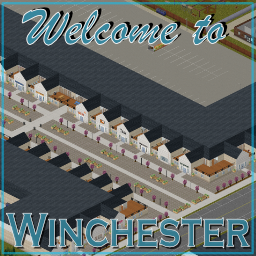
[h1] Welcome to Winchester, KY. [/h1] Winchester, KY, located at the far west side of the map, is a big [b] 49 cell [/b] addition to Kentucky. South west of Riverside and north west of Rosewood, Winchester is a zombie heavy town filled with a wide variety of exciting areas. With nearly 7,000 rooms within 863 buildings, there are numerous ways you can "enjoy" this map. - Chill out in the country club and play some snooker; - Grab an apartment above the pedestrianised town centre; - Watch a movie at the cinema after bowling a perfect 300 at the bowling alley; - Claim one of the 100+ house and make it your own; - Take over the farm and live the country lifestyle; - Go camping and take advantage of the excellent facilities in the east; - Brave the trailer park with the friendly neighbors; - Attempt to make the large hospital, police station and fire station your own; - Find and take over the military base; - Learn some new skills in one of the two top rated schools; - Or hunker down in one of the towns fine drinking establishments So head over to Winchester, have a nice cold pint, and wait for all this to blow over. This mod has been tested in both single-player and multi-player for the latest version of PZ (41.7). However, if you encounter and issues or errors, please let me know so I can attempt to correct them. Special thanks to all that contributed the Building Pool V3. [url=https://www.buymeacoffee.com/EndlessWire][img]https://media1.giphy.com/media/RETzc1mj7HpZPuNf3e/giphy.gif[/img][/url] Cells: 7,22 to 13,28 (7x7, 49 cells) If anyone is using the map on a stream, let me know as I'd love to watch. Workshop ID: 2890129618 Mod ID: Winchester Map Folder: Winchester, KY
![Open All Containers [42MP]](https://images.steamusercontent.com/ugc/14580050750148445957/C6259357B678C74AC46CB093B818254BE04B9137/)
Open All Containers [42MP]
作者:76561198866362317
Open all containers. When you look inside a container, it will open (you can disable this in ModOptions). Then, with the container selected, you can close or open it by pressing the 'E' key (you can change the key in ModOptions). If you want, you can enable Auto-close in ModOptions. New option to change the Tick Rate. Added a world context menu option to enable/disable Auto-close for chosen containers (for build 42.12, 42.13 and 42.15). [h3]Mod Options is now available for both build 42 and 41. For it to work on build 41, you need to have the mod 'Mod Options (Build 41)' enabled.[/h3] [b]It is safe to add or remove items mid-game.[/b] However, if you remove the mod, the opened containers will no longer be visible but will still be there, and you won’t be able to move them. [img]https://raw.githubusercontent.com/carlesturo/Images/refs/heads/main/steam_description3.gif[/img] [h3]Future plans:[/h3][list][*]Add new ModOption "not see what's inside until you open it". [*]Add the remaining containers. [*]Add overlays. [*]Add sound when opening and closing containers.[/list] [h3]Compatible with:[/h3][list][*][url=https://steamcommunity.com/sharedfiles/filedetails/?id=2847184718&searchtext=proximity+inventory] Proximity Inventory [/url] [*][url=https://steamcommunity.com/sharedfiles/filedetails/?id=3413150945&searchtext=more+damaged] More Damaged Objects [/url] [*][url=https://steamcommunity.com/sharedfiles/filedetails/?id=3184471683&searchtext=post+flag] Post Flag [/url][/list] [h3]Translations:[/h3][list][*]Brazilian/Portuguese: RexTollBar[/list] Workshop ID: 3465040406 Mod ID: OpenAllContainers
Wolf Extraction Quest
作者:76561198031822845
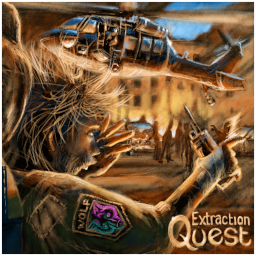
[h3]Mod Status[/h3] [quote] [b]After a lot of troubleshooting, I've finally got the mod updated and working (until next game updates break everything again) with version 42.15.[/b] The mod is now functional again in both singleplayer and multiplayer. However, I haven't had time to thoroughly test everything, so please report any issues you encounter. [quote] [b]Please consider supporting my work[/b]. This mod is my passion project, and I want it to be a source of fun for you. Your support makes it possible for me to dedicate the time and effort to fix bugs and keep the mod up-to-date with future game versions. [/quote] [/quote] [h2]A configurable endgame quest/mission/challenge[/h2] [quote] [i]You stare at the map in your hands, tracing the lines with your finger... the dying man had pressed it into your palm, his last gift to you. He had whispered about an extraction point, where a helicopter would come to save you. But you needed a military walkie talkie to call the pilot. You feel a pang of sadness, knowing that the man who gave you the map would never see you make it to safety... but you steel yourself for the dangerous journey ahead. You fold the map carefully and tuck it into your pocket, ready to begin.[/i] [/quote] You have a map and an extraction point. You have to find a military walkie-talkie to call the helicopter. Now you have a mission. A hope. A reason not to give up. [h3]Main Features:[/h3] [list] [*]Set the maximum number of days to reach the extraction point (or disable it). [*]Select the extraction zone (6 points in Louisville, 2 in Muldraugh, 1 in March Ridge, 1 in Rosewood) or pick it randomly. [*]Extraction zones for modded maps: 1 in Raven Creek currently (antenna needed). [*]Set the duration of the final extraction event... more hours, more zombies! [*]Set the number of days to wait before the radio signal becomes active. [*]Build and activate repeater antennas to gain enough signal strength (configurable). [*]Set the loot multiplier for mod-related items on zombie bodies. [*]Confined Mode: Choose if you must stay near the extraction point during the entire event. [*]Difficulty Scaling: Adjust the final extraction event multiplier. [*]Starter Kit: Choose to start with the military walkie-talkie already in your inventory. [*]Extended Quest Mode: The quest starts only after building/using the antenna. [*]Contact headquarters using the antenna to request a new extraction zone. [/list] [table] [tr] [td] [h3][url=https://steamcommunity.com/workshop/filedetails/discussion/2987772693/592888717905020241/]Notes[/url][/h3] [/td] [td] [h3][url=https://steamcommunity.com/workshop/filedetails/discussion/2987772693/592888629473361092/]FAQ[/url][/h3] [/td] [/tr] [/table] [h3]Latest Changelog[/h3] [i]Full Changelog in the "Changelog" tab or [url=https://steamcommunity.com/workshop/filedetails/discussion/2987772693/592888629473360084/]Pinned Discussion[/url][/i] [quote] [b]19/07/2025[/b] [list] [*][B42] Changed the antenna recipe: reduced aluminum foil from 6 to 2. [/list] [b]10/05/2025[/b] [list] [*][B42] Added new extraction point: Louisville Bruiser. [*][B42] Modified difficulty scaling to better handle higher multipliers. [*][B42] Optimized extraction points and final event handling. [*][B42] Fixed a bug with the "Louisville Orio Offices" extraction point. [/list] [/quote] [hr] [h2]Your encouragement means a lot![/h2] A kind word or constructive feedback is always welcome. If you'd like to show further support, consider buying me a coffee. [url=https://ko-fi.com/wolfshine78z][img]https://i.imgur.com/NuUOw1y.gif[/img][/url] [url=https://www.paypal.com/donate/?hosted_button_id=S848SE3MX5QVA][img]https://i.imgur.com/0LAgcCg.png[/img][/url] [h2]Please rate with a thumbs up if you like the mod! Thank you![/h2] [img]https://i.imgur.com/eZp8dXD.gif[/img] [hr] [b]This mod is not allowed in modpacks.[/b] [b]Please do not redistribute, re-use, or fork the source code of this mod without prior authorization.[/b] [hr] [b]Workshop ID:[/b] 2987772693 [b]Mod ID:[/b] WolfExtractionQuest
Simple Add Inventory Pages (for Build 41)
作者:76561198006033053
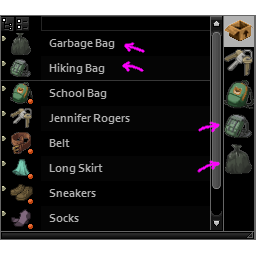
キャラクターのインベントリーにあるが装備はしていない入れ物のインベントリーをインベントリーウィンドウに追加します。 [list] [*]入れ物は装備してなくても使えるはず。 [strike]むしろ背負っていたら使えないのでは。 そこまではやらんけどね。( >ω・)[/strike] [*]Build 40までにも同様のModはありますが、動きがおかしかったので今は自分で作って使っています。 [*]高度な機能はありません。 もっと高度なものを作ってくれるクリエイターが現れるよう祈りましょう! [*]装備していない入れ物のボタンは色が暗く表示されます。 ボタンの枠と画像の色は頑張ればちょっと変えられます。 次のような内容のテキストファイルを作り、このModのmedia\lua\clientに入れると枠や画像の色を少し変えられます。 拡張子がluaになっていればファイル名は何でもかまいません。("SimpleAddInventoryPages.Custom.lua"など) 例:ボタンの枠を緑色にする。 [code] require "SimpleAddInventoryPages" SimpleAddInventoryPages["containerButtonBorderColor"] = {r=0.0, g=1.0, b=0.0, a=1.0} SimpleAddInventoryPages["containerButtonTextureColor"] = nil [/code] [b]分からない場合は諦めてください。[/b] [*]「入れ物の中の入れ物の中の……」というのも検討しましたが、見づらくなるのでやめました。 [*]装備していない入れ物は重いので気をつけましょう。 [*]Build 41.71で動作確認しました。 Build 41.47でBuild 40との互換性がなくなりました。 [*]このModはシングルプレイヤーモード用に作成しました。 マルチプレイヤーモードで動く保証はありません。 [/list] Add the inventory of the container that is in the character's inventory but not equipped to the inventory window. [list] [*]I think containers should be usable even if not equipped. [strike]Rather I think it should cannot be used if you carry it on your back. Although there is no such function. ;p[/strike] [*]There were similar mods up to Build 40, but now I'm making and using my own because it didn't seem to work properly. [*]It has no advanced features. Let's pray for creators who make more advanced mods appear! [*]Buttons for containers that are not equipped have a darker color. The color of the button frame and the image can be changed a bit with effort. Create a text file with the following content and put it in the media\lua\client of this mod, you can change the color of the frame and image a little. Any file name can be used as long as the extension is lua. e.g. SimpleAddInventoryPages.Custom.lua Example: Make the button frame green. [code] require "SimpleAddInventoryPages" SimpleAddInventoryPages["containerButtonBorderColor"] = {r=0.0, g=1.0, b=0.0, a=1.0} SimpleAddInventoryPages["containerButtonTextureColor"] = nil [/code] [b]If you do not understand, please give up.[/b] [*]I considered "in the container in the container ...", but stopped because it was hard to see. [*]Containers that are not equipped are heavy, so be careful. [*]I confirmed the operation with Build 41.71. Since Build 41.47, it is no longer compatible to Build 40. [*]This mod was created for the single-player mode. There is no guarantee that it will work in multi-player mode. [/list] Tags:B41,Interface Workshop ID: 1946782371 Mod ID: SimpleAddInventoryPages20191226