
Load a CS2 Workshop map through the server console with host_workshop_map <workshop_id>. First, check whether a regular client can download and join the map. For a persistent rotation, use the CS2 Map Pool in the panel with a Workshop collection. The standard map field and old Workshop paths in map groups are not substitutes for this method.
Requirements
You need access to your server in the panel and the ID of the CS2 map or collection you want to use. Make a note of the existing map pool configuration. Test one map individually first so you can distinguish download errors from rotation errors.
Valve's Steam Workshop is the official platform for Workshop content. Valve describes the Workshop as a platform where community content can be published and subscribed to: Documentation at steamcommunity.com. In practice, for CS2 servers, this means referencing Workshop content by its numeric ID and loading it on the server using the appropriate console commands.
If you want to check your general server setup first, see our guide to configuring CS2 server.cfg. For related Source server structures, the guide to configuring a Team Fortress 2 server: maps, mods, and settings is also useful, although the commands and file paths are not exactly the same.
Find the Workshop ID
Open the map you want in the Steam Workshop. The URL usually contains a numeric ID, for example after ?id=. This number is the Workshop ID you need for host_workshop_map or a Workshop collection. Copy only the number, without any additional URL parameters.
Also check whether the map is intended for Counter-Strike 2. Older Counter-Strike Workshop content or maps for other games may be unusable on a CS2 server. If a map fails to load, an incorrect or incompatible Workshop ID is one of the most common causes.
Start a Workshop Map
Via RCON or the console:
host_workshop_map <workshop_id>
Example for a popular aim map:
host_workshop_map 3070244462
The command loads the specified Workshop map and sets it as the active map. If you run the command through RCON, the server log or console should show whether the Workshop content was found and loaded. Wait a moment after running the command before testing whether you can join, as the server and clients need time to process the map.
 (Enlarge image)
Load a Workshop Collection
For a collection of maps:
host_workshop_collection <collection_id>
A collection is useful if you want to manage several training or fun maps. Instead of starting each map individually, you reference the collection. Make sure the collection contains only maps you actually want to use on the server. Unclear or mixed collections make troubleshooting harder later because you cannot immediately tell which individual map is blocking a change or download.
In the customer panel
Video (0:27): CS2 Workshop collection and map changes
Our own captures from a demonstration environment. The version and setup shown may differ from your server.
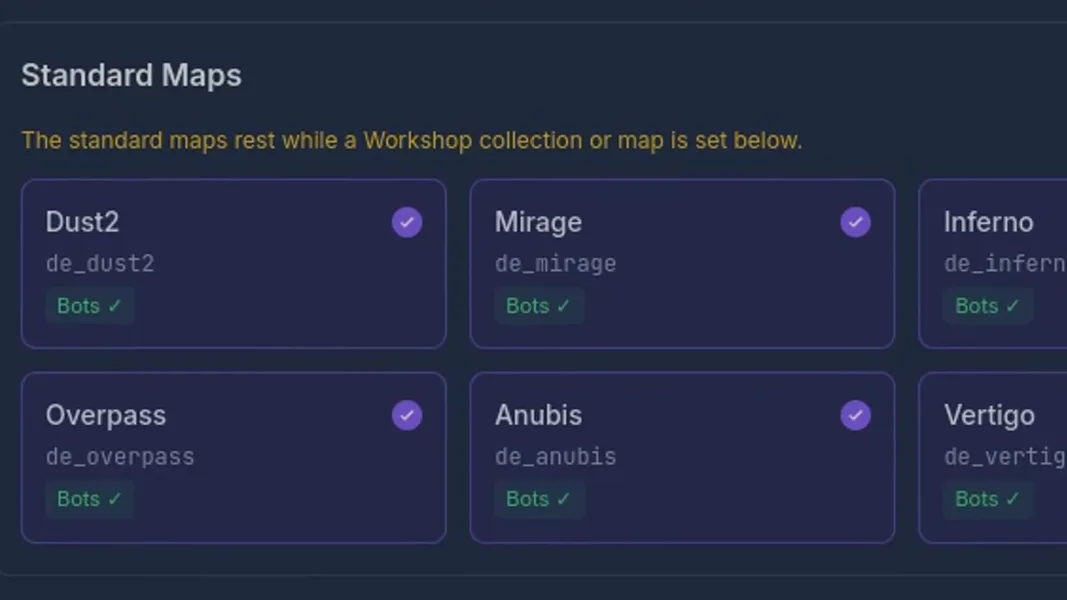
- Open Game Settings, the “Map Pool” tab, and paste a Steam Workshop collection link into the Workshop field.
- Click “Save Map Pool”: the panel confirms the collection and the standard maps rest.
- Restart the server and give the collection time to load.
- To switch right away, choose a map from the collection and click “Change map now”; a running match ends.
- After that the panel changes the map after each match; while a collection is set, the end-of-match map vote is hidden.
Set Up a Map Rotation in the CS2 Map Pool
Open Game → CS2 Map Pool. In the Steam Workshop field, enter a collection's ID or Steam link. For a single map, you can also use its ID. Save your selection and perform a controlled server restart; announce the interruption beforehand.
On startup, the server loads the collection with host_workshop_collection <collection_id> or the single map with host_workshop_map <workshop_id>. The standard map pool and voting are suspended while Workshop mode is active. The panel handles map changes after each match; CS2 itself does not reliably rotate through this collection using standard map group voting. Use Change Map Now to test a change directly.
Do not enter workshop/<id>/<name> paths in the standard map field or in gamemodes_server.txt. subscribed_file_ids.txt is not a substitute for the Workshop startup option either. To manually switch maps within the loaded collection, use this verified console command:
ds_workshop_changelevel <mapname>
Use the name of a map that is actually loaded. A standard changelevel call can lose the addon when switching Workshop maps and disconnect clients with NETWORK_DISCONNECT_CLIENT_NO_MAP. Prefer the panel button and test a complete map change at the end of a match.
Popular Workshop Maps
| Map | Type |
Description |
|---|---|---|
| Aim Botz | Training |
Aim practice with bots |
| Recoil Master | Training |
Spray pattern practice |
| Prefire Maps | Training |
Prefire spot practice |
| Surf Maps | Fun |
Surf gameplay |
| KZ Maps | Fun |
Climbing/movement |
| Retake | Competitive |
Retake scenarios |
These examples are typical categories for CS2 community servers. Before using a map, always check its specific Workshop page, how up to date it is, and its compatibility with your intended game mode. Training servers often only need a few clearly named maps. For public fun servers, a short rotation is better than a long list of maps players do not recognize.
Create Your Own Maps
If you want to use your own content, the basic process is:
- Open Hammer in the Counter-Strike 2 Workshop Tools
- Create and compile the map
- Publish it to the Workshop
- Load it on the server
Only put your own maps into live server use once you have checked spawn points, collision surfaces, buy zones, and team logic. A local test saves support work later, as many map issues are caused by incomplete map settings rather than hosting.
Check the Result
Start the server with the map you want or switch to it using a command. Then connect as a regular client, rather than checking only through the server console. Check three things: does the map load, does the download start on the client, and can multiple players join? Then test a map change to make sure the rotation works beyond the first map.
For Workshop maps, use Change Map Now in the CS2 Map Pool or ds_workshop_changelevel <mapname> for a map from the loaded collection. Afterwards, also check whether the panel switches to the next map at the end of the next match. Successfully loading the first map does not prove that the rotation works.
Troubleshooting
-
Map does not load: Check the Workshop ID. Open the Workshop page again and copy the numeric ID directly from the URL.
-
Players cannot join: The map must be downloaded through the Workshop. Test with a client that does not already have the map locally.
-
Map change fails: Use the panel button or
ds_workshop_changelevel <mapname>for a loaded Workshop map. -
Rotation skips a map: Check the collection, the visibility and compatibility of every map it contains, and the saved Workshop entry in the CS2 Map Pool. Test a map change at the end of a match; old Workshop paths in
gamemodes_server.txtwill not help here. -
Collection is hard to manage: Test individual maps with
host_workshop_mapbefore using the entire collection on your live server.
If the Log Says No Navigation Mesh, or Wrong Version
No Navigation Mesh, or Wrong Version
This message only affects bots. Bots need a nav mesh, a kind of map that tells them where they can move around the level. Official maps such as de_dust2 or de_mirage include one. Workshop maps lack one if the creator did not provide it. In that case, the bots stand still. Players are unaffected, and the map itself runs normally.
You cannot add a missing nav mesh through the server. It is part of the map.
What You Can Do
- First, check the bot settings:
bot_stop 0,bot_zombie 0, and a configuredbot_difficulty. - Switch to an official map. If the bots move normally there, the Workshop map is the cause.
- If you want to play with bots, choose a Workshop map that includes a nav mesh. Many creators mention this in the description.
If you play without bots, you can ignore this line.
FAQ
Can I load any Steam Workshop map on a CS2 server?
No. The map must be compatible with CS2 and correctly published in the Workshop. Maps for other games or older, incompatible content may fail to load.
What is the difference between host_workshop_map and host_workshop_collection?
host_workshop_map loads a single Workshop map using its ID. host_workshop_collection loads a collection that can contain multiple Workshop items.
Do I also need to upload Workshop maps to the server?
With this method, you reference the map through the Steam Workshop. What matters is that the Workshop ID is correct and clients can download the map when joining.
Why does the map work through the console but not in the rotation?
Check the collection in the Steam Workshop field of the CS2 Map Pool, the subsequent restart, and the map change at the end of a match. For Workshop maps, use the panel button or ds_workshop_changelevel, not the old path-based rotation in gamemodes_server.txt.
Should I test Workshop maps before using them publicly?
Yes. At a minimum, test startup, client downloads, joining, and map changes. This helps you spot early whether the ID, map name, game mode, and rotation work together.
