Back to overview

ARK: Survival Ascended: updates, settings and interface

Game updates, plugin versions and improvements to our interface with a traceable history.

Recorded, available and installed are different states. Your actual installation status and suitable updates are shown in the server panel.

Developer announcement Published

Community Crunch 510: Rise of the Tickle Chicken

Announcement from the official source. The source describes the changes; your server installation status is shown separately in the update center.

Interface Change documented

Guided startup parameters: revised

The guided tools were revised in the shared panel code. The entry concerns the interface or its processing. The date records the change; availability on an individual server depends on the game, software, plugins and permissions.

Interface Change documented

Guided startup parameters: revised

The guided tools were revised in the shared panel code. The entry concerns the interface or its processing. The date records the change; availability on an individual server depends on the game, software, plugins and permissions.

Interface Change documented

Guided startup parameters: revised

The guided tools were revised in the shared panel code. The entry concerns the interface or its processing. The date records the change; availability on an individual server depends on the game, software, plugins and permissions.

Interface Change documented

Guided startup parameters: revised

The guided tools were revised in the shared panel code. The entry concerns the interface or its processing. The date records the change; availability on an individual server depends on the game, software, plugins and permissions.

Interface Change documented

Guided startup parameters: revised

The guided tools were revised in the shared panel code. The entry concerns the interface or its processing. The date records the change; availability on an individual server depends on the game, software, plugins and permissions.

Interface Change documented

Guided startup parameters: revised

The guided tools were revised in the shared panel code. The entry concerns the interface or its processing. The date records the change; availability on an individual server depends on the game, software, plugins and permissions.

Interface Change documented

Guided startup parameters: added

The guided tools were added to the shared panel code. The entry concerns the interface or its processing. The date records the change; availability on an individual server depends on the game, software, plugins and permissions.

Developer announcement Published

Community Crunch 509: A Kraken Good Time

Announcement from the official source. The source describes the changes; your server installation status is shown separately in the update center.

Developer announcement Published

Community Crunch 508: Side by Tide

Announcement from the official source. The source describes the changes; your server installation status is shown separately in the update center.

Developer announcement Published

ARK Fantastic Tames Season 1: Burrowbuck and Araneo TLC are out now!

Announcement from the official source. The source describes the changes; your server installation status is shown separately in the update center.

Developer announcement Published

Community Crunch 507: Tunnel, Tear, and Transform!

Announcement from the official source. The source describes the changes; your server installation status is shown separately in the update center.

Developer announcement Published

Community Crunch 506: Now You See Me, Now You Don’t

Announcement from the official source. The source describes the changes; your server installation status is shown separately in the update center.

Developer announcement Published

Community Crunch 505: Deep Dives & Technical Strides. What’s Surfacing Next!

Announcement from the official source. The source describes the changes; your server installation status is shown separately in the update center.

Developer announcement Published

Community Crunch 504: From Shoulder to Savior

Announcement from the official source. The source describes the changes; your server installation status is shown separately in the update center.

Developer announcement Published

Community Crunch 503: Burrowbuck, The Tunnel Trickster

Announcement from the official source. The source describes the changes; your server installation status is shown separately in the update center.

Developer announcement Published

Community Crunch 502: Claim the High Ground

Announcement from the official source. The source describes the changes; your server installation status is shown separately in the update center.

Developer announcement Published

Community Crunch 501: Down The Rabbit Hole

Announcement from the official source. The source describes the changes; your server installation status is shown separately in the update center.

Developer announcement Published

Community Crunch 500: Springing Into Eggcellent Adventures!

Announcement from the official source. The source describes the changes; your server installation status is shown separately in the update center.

Developer announcement Published

Community Crunch 499: Threading the Needle: The Araneo Zips Back In!

Announcement from the official source. The source describes the changes; your server installation status is shown separately in the update center.

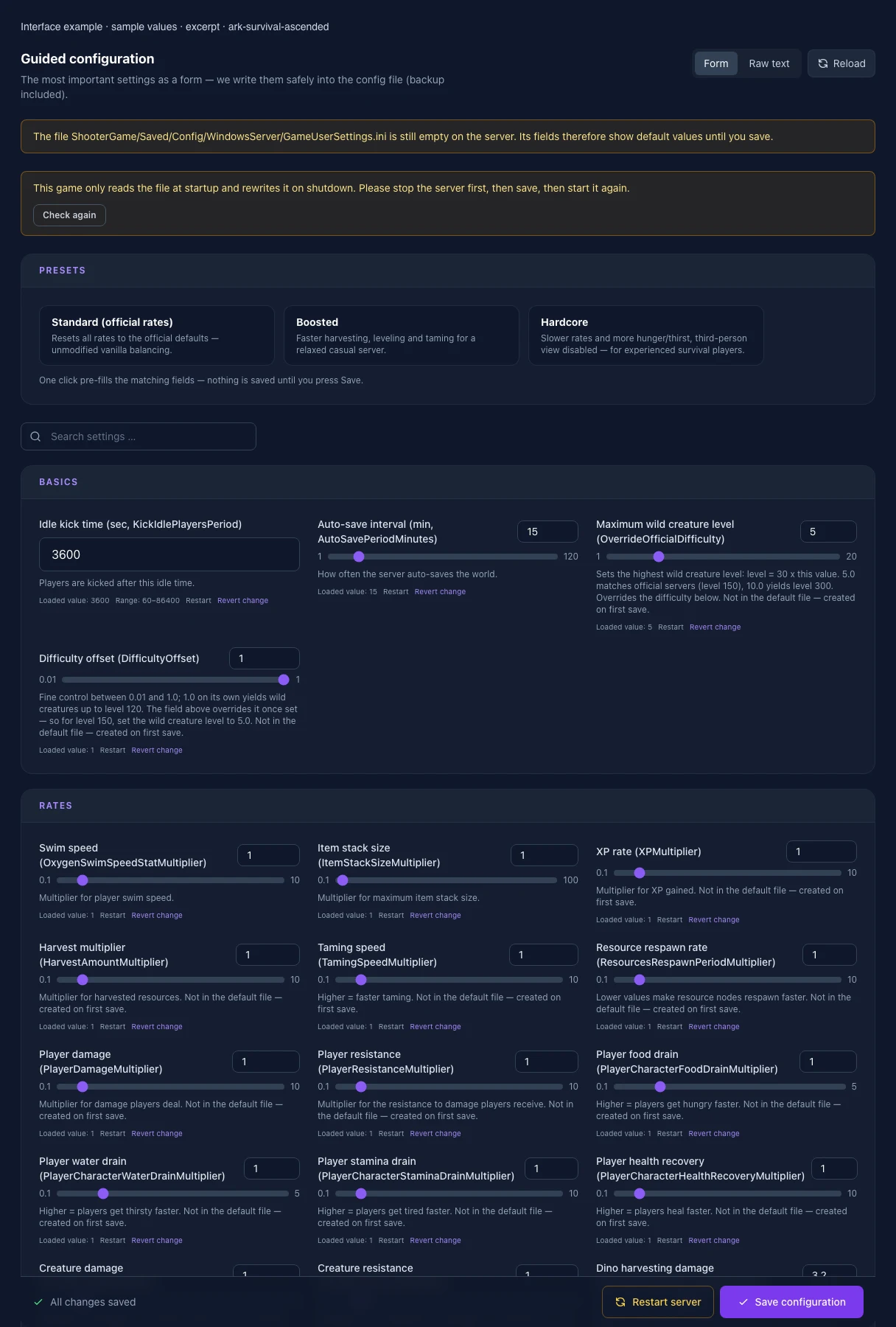
What the interface looks like

The image shows the interface on its capture date; earlier versions may differ.
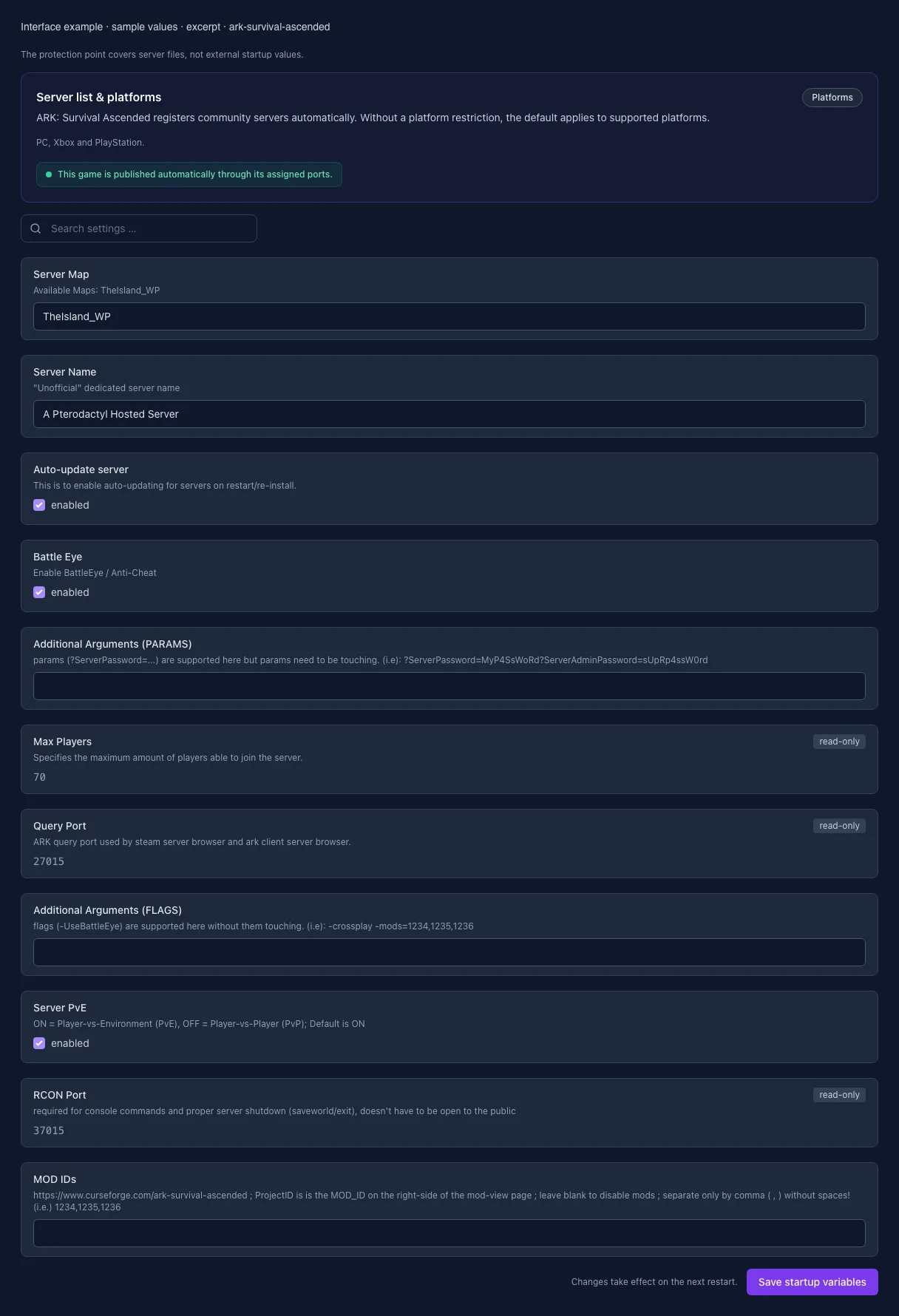
Excerpt of the current interface with sample values. Values and prerequisites illustrate the controls; available tools depend on server software, plugins and permissions.
Excerpt of the current interface with sample values. Values and prerequisites illustrate the controls; available tools depend on server software, plugins and permissions. · Captured on 2026-10-08
Excerpt of the current interface with sample values. Values and prerequisites illustrate the controls; available tools depend on server software, plugins and permissions.
Excerpt of the current interface with sample values. Values and prerequisites illustrate the controls; available tools depend on server software, plugins and permissions. · Captured on 2026-10-08

What the settings do

These values come from our guided editors. Defaults are the editor starting values; they do not show the contents of a customer server.

Idle kick time (sec, KickIdlePlayersPeriod)

Players are kicked after this idle time.

Setting
KickIdlePlayersPeriod
Default
3600
Range / options
60 – 86400
Auto-save interval (min, AutoSavePeriodMinutes)

How often the server auto-saves the world.

Setting
AutoSavePeriodMinutes
Default
15
Range / options
1 – 120
Maximum wild creature level (OverrideOfficialDifficulty)

Sets the highest wild creature level: level = 30 x this value. 5.0 matches official servers (level 150), 10.0 yields level 300. Overrides the difficulty below. Not in the default file — created on first save.

Setting
OverrideOfficialDifficulty
Default
5
Range / options
1 – 20
Difficulty offset (DifficultyOffset)

Fine control between 0.01 and 1.0; 1.0 on its own yields wild creatures up to level 120. The field above overrides it once set — so for level 150, set the wild creature level to 5.0. Not in the default file — created on first save.

Setting
DifficultyOffset
Default
1
Range / options
0.01 – 1
Swim speed (OxygenSwimSpeedStatMultiplier)

Multiplier for player swim speed.

Setting
OxygenSwimSpeedStatMultiplier
Default
1
Range / options
0.1 – 10
Item stack size (ItemStackSizeMultiplier)

Multiplier for maximum item stack size.

Setting
ItemStackSizeMultiplier
Default
1
Range / options
0.1 – 100
XP rate (XPMultiplier)

Multiplier for XP gained. Not in the default file — created on first save.

Setting
XPMultiplier
Default
1
Range / options
0.1 – 10
Harvest multiplier (HarvestAmountMultiplier)

Multiplier for harvested resources. Not in the default file — created on first save.

Setting
HarvestAmountMultiplier
Default
1
Range / options
0.1 – 10
Taming speed (TamingSpeedMultiplier)

Higher = faster taming. Not in the default file — created on first save.

Setting
TamingSpeedMultiplier
Default
1
Range / options
0.1 – 10
Resource respawn rate (ResourcesRespawnPeriodMultiplier)

Lower values make resource nodes respawn faster. Not in the default file — created on first save.

Setting
ResourcesRespawnPeriodMultiplier
Default
1
Range / options
0.1 – 10
Player damage (PlayerDamageMultiplier)

Multiplier for damage players deal. Not in the default file — created on first save.

Setting
PlayerDamageMultiplier
Default
1
Range / options
0.1 – 10
Player resistance (PlayerResistanceMultiplier)

Multiplier for the resistance to damage players receive. Not in the default file — created on first save.

Setting
PlayerResistanceMultiplier
Default
1
Range / options
0.1 – 10
Player food drain (PlayerCharacterFoodDrainMultiplier)

Higher = players get hungry faster. Not in the default file — created on first save.

Setting
PlayerCharacterFoodDrainMultiplier
Default
1
Range / options
0.1 – 5
Player water drain (PlayerCharacterWaterDrainMultiplier)

Higher = players get thirsty faster. Not in the default file — created on first save.

Setting
PlayerCharacterWaterDrainMultiplier
Default
1
Range / options
0.1 – 5
Player stamina drain (PlayerCharacterStaminaDrainMultiplier)

Higher = players get tired faster. Not in the default file — created on first save.

Setting
PlayerCharacterStaminaDrainMultiplier
Default
1
Range / options
0.1 – 10
Player health recovery (PlayerCharacterHealthRecoveryMultiplier)

Higher = players heal faster. Not in the default file — created on first save.

Setting
PlayerCharacterHealthRecoveryMultiplier
Default
1
Range / options
0.1 – 10
Creature damage (DinoDamageMultiplier)

Multiplier for damage wild creatures deal. Not in the default file — created on first save.

Setting
DinoDamageMultiplier
Default
1
Range / options
0.1 – 10
Creature resistance (DinoResistanceMultiplier)

Multiplier for the resistance to damage wild creatures receive. Not in the default file — created on first save.

Setting
DinoResistanceMultiplier
Default
1
Range / options
0.1 – 10
Dino harvesting damage (DinoHarvestingDamageMultiplier)

Higher = tamed dinos harvest resources faster. Not in the default file — created on first save.

Setting
DinoHarvestingDamageMultiplier
Default
3.2
Range / options
0.1 – 10
Creature food drain (DinoCharacterFoodDrainMultiplier)

Higher = creatures get hungry faster (also affects taming time). Not in the default file — created on first save.

Setting
DinoCharacterFoodDrainMultiplier
Default
1
Range / options
0.1 – 10
Creature stamina drain (DinoCharacterStaminaDrainMultiplier)

Higher = creatures get tired faster. Not in the default file — created on first save.

Setting
DinoCharacterStaminaDrainMultiplier
Default
1
Range / options
0.1 – 10
Creature health recovery (DinoCharacterHealthRecoveryMultiplier)

Higher = creatures heal faster. Not in the default file — created on first save.

Setting
DinoCharacterHealthRecoveryMultiplier
Default
1
Range / options
0.1 – 10
Creature spawn count (DinoCountMultiplier)

Multiplier for the number of creatures spawned. Not in the default file — created on first save.

Setting
DinoCountMultiplier
Default
1
Range / options
0.1 – 10
Raid dino food drain (RaidDinoCharacterFoodDrainMultiplier)

Food drain rate for titan/raid creatures like Titanosaurs.

Setting
RaidDinoCharacterFoodDrainMultiplier
Default
1
Range / options
0.1 – 100
PvE dino decay period (PvEDinoDecayPeriodMultiplier)

How long unclaimed dinos persist in PvE mode before decaying.

Setting
PvEDinoDecayPeriodMultiplier
Default
1
Range / options
0.1 – 10
Max tamed dinos (MaxTamedDinos)

Server-wide cap on tamed creatures.

Setting
MaxTamedDinos
Default
5000
Range / options
0 – 20000
Soft tame limit (MaxTamedDinos_SoftTameLimit)

Above this count, inactive dinos become eligible for automatic deletion.

Setting
MaxTamedDinos_SoftTameLimit
Default
5000
Range / options
0 – 20000
Deletion countdown (sec, MaxTamedDinos_SoftTameLimit_CountdownForDeletionDuration)

Seconds until automatic deletion once the soft tame limit is exceeded.

Setting
MaxTamedDinos_SoftTameLimit_CountdownForDeletionDuration
Default
604800
Range / options
0 – 2592000
Allow cave building in PvE (AllowCaveBuildingPvE)

True = allows building in caves in PvE mode. Not in the default file — created on first save.

Setting
AllowCaveBuildingPvE
Default
False
Flyer carry in PvE (AllowFlyerCarryPvE)

True = flyers may pick up wild creatures in PvE. Not in the default file — created on first save.

Setting
AllowFlyerCarryPvE
Default
False
Allow raid dino feeding (AllowRaidDinoFeeding)

True = allows permanently taming Titanosaurs by feeding them. Not in the default file — created on first save.

Setting
AllowRaidDinoFeeding
Default
False
Max structures in range (TheMaxStructuresInRange)

Cap on structures within a radius (performance protection).

Setting
TheMaxStructuresInRange
Default
10500
Range / options
1000 – 50000
Structure resource-block radius (StructurePreventResourceRadiusMultiplier)

Multiplier for the radius in which structures block resource respawn.

Setting
StructurePreventResourceRadiusMultiplier
Default
1
Range / options
0 – 10
Platform saddle build area (PlatformSaddleBuildAreaBoundsMultiplier)

Multiplier for the usable build area on platform creatures.

Setting
PlatformSaddleBuildAreaBoundsMultiplier
Default
1
Range / options
0.1 – 10
Max structures per platform (PerPlatformMaxStructuresMultiplier)

Multiplier for the max number of structures per platform creature.

Setting
PerPlatformMaxStructuresMultiplier
Default
1
Range / options
0.1 – 10
Always allow structure pickup (AlwaysAllowStructurePickup)

True = structures can always be picked back up, not just briefly after placement.

Setting
AlwaysAllowStructurePickup
Default
True
Pickup window after placement (sec, StructurePickupTimeAfterPlacement)

How long after placement a structure can be picked back up without losing materials.

Setting
StructurePickupTimeAfterPlacement
Default
30
Range / options
0 – 600
Hold-to-pickup duration (sec, StructurePickupHoldDuration)

How long the pickup key must be held down.

Setting
StructurePickupHoldDuration
Default
0.5
Range / options
0 – 10
Power required for aquatic compartments (NeedsPowerToActivateAquaticCompartments)

True = aquatic compartments (Aquatica) require an active power source.

Setting
NeedsPowerToActivateAquaticCompartments
Default
True
Auto-destroy old structures (AutoDestroyOldStructuresMultiplier)

0 = disabled, 1.0 = enables auto-destruction of abandoned structures. Not in the default file — created on first save.

Setting
AutoDestroyOldStructuresMultiplier
Default
0
Range / options
0 – 2
Structure damage (StructureDamageMultiplier)

Multiplier for the damage structures deal (e.g. spiked walls). Not in the default file — created on first save.

Setting
StructureDamageMultiplier
Default
1
Range / options
0.1 – 10
Structure resistance (StructureResistanceMultiplier)

Multiplier for the resistance to damage structures receive. Not in the default file — created on first save.

Setting
StructureResistanceMultiplier
Default
1
Range / options
0.1 – 10
Tribe rename cooldown (min, TribeNameChangeCooldown)

Minutes required between two tribe rename actions.

Setting
TribeNameChangeCooldown
Default
15
Range / options
0 – 1440
Hide damage source from logs (AllowHideDamageSourceFromLogs)

True = allows players to hide their name as the damage source in the tribe log.

Setting
AllowHideDamageSourceFromLogs
Default
True
Log admin commands (AdminLogging)

True = logs all admin commands to in-game chat. Not in the default file — created on first save.

Setting
AdminLogging
Default
False
Disable join notifications (DontAlwaysNotifyPlayerJoined)

True = globally disables the notification when a player joins. Not in the default file — created on first save.

Setting
DontAlwaysNotifyPlayerJoined
Default
False
Leave notifications (AlwaysNotifyPlayerLeft)

True = players always get notified when someone leaves the server. Not in the default file — created on first save.

Setting
AlwaysNotifyPlayerLeft
Default
False
Block cross-ARK downloads (noTributeDownloads)

True = prevents downloading cross-ARK data (tributes) onto this server. Not in the default file — created on first save.

Setting
noTributeDownloads
Default
False
Show player location on map (ShowMapPlayerLocation)

True = shows the own position on the in-game map.

Setting
ShowMapPlayerLocation
Default
True
Allow third-person view (AllowThirdPersonPlayer)

True = players may switch to third-person view.

Setting
AllowThirdPersonPlayer
Default
True
Show crosshair (ServerCrosshair)

True = shows a crosshair to all players.

Setting
ServerCrosshair
Default
True
Show hit markers (AllowHitMarkers)

True = shows visual feedback on successful hits.

Setting
AllowHitMarkers
Default
True
Start time (hour, StartTimeHour)

Hour (0-23) the in-game clock starts at on server boot. -1 = random.

Setting
StartTimeHour
Default
-1
Range / options
-1 – 23
Implant suicide cooldown (sec, ImplantSuicideCD)

Cooldown for the implant's self-destruct (suicide) function.

Setting
ImplantSuicideCD
Default
28800
Range / options
0 – 86400
Buried treasure auto-reveal (sec, OverrideSecondsUntilBuriedTreasureAutoReveals)

Seconds until buried treasure is automatically revealed on the map.

Setting
OverrideSecondsUntilBuriedTreasureAutoReveals
Default
1209600
Range / options
0 – 2592000
Auto-unlock all engrams (AutoUnlockAllEngrams)

True = all engrams are available from level 1 without spending engram points. Not in the default file — created on first save.

Setting
AutoUnlockAllEngrams
Default
False
Hardcore mode (ServerHardcore)

True = enables hardcore mode. Not in the default file — created on first save.

Setting
ServerHardcore
Default
False
Disable PvE gamma adjustment (DisablePvEGamma)

True = disables gamma (brightness) adjustment in PvE mode. Not in the default file — created on first save.

Setting
DisablePvEGamma
Default
False
Proximity chat (ProximityChat)

True = only nearby players can see each other's chat messages. Not in the default file — created on first save.

Setting
ProximityChat
Default
False
Mating interval (MatingIntervalMultiplier)

Cooldown between two matings. Lower = creatures can mate more often. Lives in Game.ini — the file is created on first save.

Setting
MatingIntervalMultiplier
Default
1
Range / options
0.01 – 5
Egg hatch speed (EggHatchSpeedMultiplier)

Higher = eggs hatch faster. Lives in Game.ini — the file is created on first save.

Setting
EggHatchSpeedMultiplier
Default
1
Range / options
0.1 – 50
Baby maturation speed (BabyMatureSpeedMultiplier)

Higher = juveniles grow up faster. The most effective lever against multi-day raising times. Lives in Game.ini — the file is created on first save.

Setting
BabyMatureSpeedMultiplier
Default
1
Range / options
0.1 – 50
Baby food consumption (BabyFoodConsumptionSpeedMultiplier)

Lower = juveniles eat more slowly and starve less often while unattended. Lives in Game.ini — the file is created on first save.

Setting
BabyFoodConsumptionSpeedMultiplier
Default
1
Range / options
0.1 – 10
Egg laying interval (LayEggIntervalMultiplier)

Cooldown between two laid eggs. Lower = eggs are laid more often. Lives in Game.ini — the file is created on first save.

Setting
LayEggIntervalMultiplier
Default
1
Range / options
0.1 – 5
Server Map

Available Maps: TheIsland_WP

Setting
SERVER_MAP
Default
TheIsland_WP
When it takes effect
Takes effect after saving and restarting the server.
Server Name

"Unofficial" dedicated server name

Setting
SESSION_NAME
Default
A Pterodactyl Hosted Server
When it takes effect
Takes effect after saving and restarting the server.
Auto-update server

This is to enable auto-updating for servers on restart/re-install.

Setting
AUTO_UPDATE
Default
1
When it takes effect
Takes effect after saving and restarting the server.
Anti-cheat

Protects public servers against known cheats; every client must support it.

Setting
BATTLE_EYE
Default
1
When it takes effect
Takes effect after saving and restarting the server.
Additional Arguments (PARAMS)

params (?ServerPassword=...) are supported here but params need to be touching. (i.e): ?ServerPassword=MyP4SsWoRd?ServerAdminPassword=sUpRp4ssW0rd

Setting
ARGS_PARAMS
Default
When it takes effect
Takes effect after saving and restarting the server.
Max Players

Specifies the maximum amount of players able to join the server.

Setting
MAX_PLAYERS
Default
70
Range / options
1 – 200
When it takes effect
Takes effect after saving and restarting the server.
Query Port

ARK query port used by steam server browser and ark client server browser.

Setting
QUERY_PORT
Default
27015
Range / options
1025 – 65535
When it takes effect
Takes effect after saving and restarting the server.
Additional Arguments (FLAGS)

flags (-UseBattleEye) are supported here without them touching. (i.e): -crossplay -mods=1234,1235,1236

Setting
ARGS_FLAGS
Default
When it takes effect
Takes effect after saving and restarting the server.
PvE mode

Enables player versus environment; disabled means PvP.

Setting
SERVER_PVE
Default
1
When it takes effect
Takes effect after saving and restarting the server.
MOD IDs

https://www.curseforge.com/ark-survival-ascended ; ProjectID is is the MOD_ID on the right-side of the mod-view page ; leave blank to disable mods ; separate only by comma ( , ) without spaces! (i.e.) 1234,1235,1236

Setting
MOD_IDS
Default
When it takes effect
Takes effect after saving and restarting the server.