Game updates, plugin versions and improvements to our interface with a traceable history.
Recorded, available and installed are different states. Your actual installation status and suitable updates are shown in the server panel.
InterfaceChange documented
Guided startup parameters: revised
The guided tools were revised in the shared panel code. The entry concerns the interface or its processing. The date records the change; availability on an individual server depends on the game, software, plugins and permissions.
Developer announcementPublished
DayZ Badlands Price Announcement | Creator Program
Announcement from the official source. The source describes the changes; your server installation status is shown separately in the update center.
The guided tools were revised in the shared panel code. The entry concerns the interface or its processing. The date records the change; availability on an individual server depends on the game, software, plugins and permissions.
InterfaceChange documented
Guided startup parameters: revised
The guided tools were revised in the shared panel code. The entry concerns the interface or its processing. The date records the change; availability on an individual server depends on the game, software, plugins and permissions.
InterfaceChange documented
Guided startup parameters: revised
The guided tools were revised in the shared panel code. The entry concerns the interface or its processing. The date records the change; availability on an individual server depends on the game, software, plugins and permissions.
InterfaceChange documented
Guided startup parameters: revised
The guided tools were revised in the shared panel code. The entry concerns the interface or its processing. The date records the change; availability on an individual server depends on the game, software, plugins and permissions.
InterfaceChange documented
Guided startup parameters: revised
The guided tools were revised in the shared panel code. The entry concerns the interface or its processing. The date records the change; availability on an individual server depends on the game, software, plugins and permissions.
InterfaceChange documented
Guided startup parameters: revised
The guided tools were revised in the shared panel code. The entry concerns the interface or its processing. The date records the change; availability on an individual server depends on the game, software, plugins and permissions.
InterfaceChange documented
Guided startup parameters: revised
The guided tools were revised in the shared panel code. The entry concerns the interface or its processing. The date records the change; availability on an individual server depends on the game, software, plugins and permissions.
InterfaceChange documented
Guided startup parameters: revised
The guided tools were revised in the shared panel code. The entry concerns the interface or its processing. The date records the change; availability on an individual server depends on the game, software, plugins and permissions.
InterfaceChange documented
Guided startup parameters: revised
The guided tools were revised in the shared panel code. The entry concerns the interface or its processing. The date records the change; availability on an individual server depends on the game, software, plugins and permissions.
InterfaceChange documented
Guided startup parameters: revised
The guided tools were revised in the shared panel code. The entry concerns the interface or its processing. The date records the change; availability on an individual server depends on the game, software, plugins and permissions.
Developer announcementPublished
DayZ Badlands | Dev Blog (Week 86) | Lizard and Dogs | Wishlist now!
Announcement from the official source. The source describes the changes; your server installation status is shown separately in the update center.
The definition of visible startup parameters changed in the panel code. The listed values explain added, changed and removed fields. The date records the definition change; existing server values were not automatically changed by it.
Supported server software: DayZ
Changed settings (22)
Disable Crosshair: Added
DISABLE_CROSSHAIR
When ON, will disable the crosshair from being visible while on the server.
After
Setting
DISABLE_CROSSHAIR
Default
0
When it takes effect
Takes effect after saving and restarting the server.
Disable Personal Light: Added
DISABLE_PERSONAL_LIGHT
When ON, will disable a personal light positioned above all clients during the night time while on the server.
After
Setting
DISABLE_PERSONAL_LIGHT
Default
1
When it takes effect
Takes effect after saving and restarting the server.
Disable Third Person: Added
DISABLE_THIRD
When ON, will disable third person view while on the server.
After
Setting
DISABLE_THIRD
Default
0
When it takes effect
Takes effect after saving and restarting the server.
Disable VoN: Added
DISABLE_VON
When ON, will disable Voice over Network (voice chat) in the server.
After
Setting
DISABLE_VON
Default
0
When it takes effect
Takes effect after saving and restarting the server.
Enforce Game Version: Added
ENFORCE_BUILD
When ON, the server will allow the connection only to clients with same the version as the server.
After
Setting
ENFORCE_BUILD
Default
1
When it takes effect
Takes effect after saving and restarting the server.
Darker Nights: Added
LIGHTING_CONFIG
When ON, will make nights darker (more accurate nights, but hard to see without a light).
After
Setting
LIGHTING_CONFIG
Default
0
When it takes effect
Takes effect after saving and restarting the server.
Max Players: Added
MAX_PLAYERS
Maximum number of players allowed to join the server.
After
Setting
MAX_PLAYERS
Default
64
When it takes effect
Takes effect after saving and restarting the server.
Additional Mods: Added
MODIFICATIONS
A semicolon-separated list of mod folders to load from the root directory. Useful for loading manually uploaded mods. Any mods in this list that are in "@workshopID" form will also be included in Automatic Updates (if enabled). NO capital letters, spaces, or folders starting with a number! (ex. myMod;@123456789;@987654321;etc;)
After
Setting
MODIFICATIONS
Default
When it takes effect
Takes effect after saving and restarting the server.
[Repair] Make Mod Files Lowercase: Added
MODS_LOWERCASE
Every mod that is set to be loaded will have its folder and files changed to lowercase (to prevent errors). It is recommended to enable this for one server boot after copying a mod from a Windows machine to the server, or if mods seem to not be loading.
After
Setting
MODS_LOWERCASE
Default
0
When it takes effect
Takes effect after saving and restarting the server.
Modlist File (Exported from DayZ Launcher): Added
MOD_FILE
Filename for an exported modlist. This file will be parsed for mod installation and loading. Upload your HTML file to the root directory (eg. /home/container/modlist.html). Leave blank to disable loading mods from a modlist.
After
Setting
MOD_FILE
Default
modlist.html
When it takes effect
Takes effect after saving and restarting the server.
Night Multiplier: Added
NIGHT_MULT
This is an additional multiplier to either speed up or slow down nights in-game. It is multiplied with the "Time Multiplier" variable to get it's final multiplier for night time speed. (Values: 0.1-64.0)
After
Setting
NIGHT_MULT
Default
1
When it takes effect
Takes effect after saving and restarting the server.
Persistent Time: Added
PERSISTENT_TIME
The actual server time is saved to storage, so when ON, the next server start will use the saved time value.
After
Setting
PERSISTENT_TIME
Default
0
When it takes effect
Takes effect after saving and restarting the server.
Query Port: Added
QUERY_PORT
Steam A2S query port (steamQueryPort in serverDZ.cfg, written at every boot by the startup prefix). Wired to the second allocation by CreateServerJob.
After
Setting
QUERY_PORT
Default
27016
Range / options
… – 65535
When it takes effect
Takes effect after saving and restarting the server.
[Advanced] Server-Side Only Mods: Added
SERVERMODS
Mod folders to be used with the "-serverMods" startup option. They only run server-side and are not required by clients if "Verify Signatures" is ON. Any mods in this list that are in "@workshopID" form will also be included in Automatic Updates (if enabled). NO capital letters, spaces, or folders starting with a number! Each folder must be followed with a semicolon (ex. @123456789;@987654321;etc;)
After
Setting
SERVERMODS
Default
When it takes effect
Takes effect after saving and restarting the server.
[Advanced] Server Binary: Added
SERVER_BINARY
Cannot currently be changed. Left in case other branches with different executable names are introduced at a later date.
After
Setting
SERVER_BINARY
Default
DayZServer
Range / options
DayZServer
When it takes effect
Takes effect after saving and restarting the server.
Server Name: Added
SERVER_HOSTNAME
Name of the server that will appear in the server list.
After
Setting
SERVER_HOSTNAME
Default
DayZ Server
When it takes effect
Takes effect after saving and restarting the server.
[Advanced] Extra Startup Parameters: Added
STARTUP_PARAMS
See https://community.bistudio.com/wiki/DayZ:Server_Configuration#Launch_Parameters for more info on valid flags for this field.
After
Setting
STARTUP_PARAMS
Default
-doLogs -limitFPS=120
When it takes effect
Takes effect after saving and restarting the server.
Time Multiplier: Added
TIME_MULT
This is a time multiplier for in-game time (ie. 12 would move a full 24-hour day in-game 12 times faster, making it last 2 hours "in real life"). (Values: 0-24)
After
Setting
TIME_MULT
Default
12
When it takes effect
Takes effect after saving and restarting the server.
Automatic Updates: Added
UPDATE_SERVER
MUSS 0 bleiben. Auf 1 startet der Image-Entrypoint bei jedem Serverstart ein steamcmd-Update fuer App 223350 — die ist ownership-gated, der Lauf endet in "No subscription" und der Server kommt nicht hoch. Updates liefert der naechtliche Cache-Refill.
After
Setting
UPDATE_SERVER
Default
0
When it takes effect
Takes effect after saving and restarting the server.
[Repair] Validate Server Files: Added
VALIDATE_SERVER
Validates all server files when Automatic Updates is ON. Note: This will significantly increase server startup times, so it is recommended to only enable this when needed.
After
Setting
VALIDATE_SERVER
Default
0
When it takes effect
Takes effect after saving and restarting the server.
Verify Signatures: Added
VERIFY_SIGNATURES
Ensures all clients have exactly the same version of mods or addons that the server is running. Otherwise, they will be kicked upon connection. (2 ON | 0 OFF)
After
Setting
VERIFY_SIGNATURES
Default
2
Range / options
0, 2
When it takes effect
Takes effect after saving and restarting the server.
VoN Quality: Added
VON_QUALITY
Voice over Network codec quality; the higher the better. (Values 0-30)
After
Setting
VON_QUALITY
Default
20
When it takes effect
Takes effect after saving and restarting the server.
InterfaceChange documented
Guided startup parameters: revised
The guided tools were revised in the shared panel code. The entry concerns the interface or its processing. The date records the change; availability on an individual server depends on the game, software, plugins and permissions.
InterfaceChange documented
Guided startup parameters: revised
The guided tools were revised in the shared panel code. The entry concerns the interface or its processing. The date records the change; availability on an individual server depends on the game, software, plugins and permissions.
InterfaceChange documented
Guided startup parameters: revised
The guided tools were revised in the shared panel code. The entry concerns the interface or its processing. The date records the change; availability on an individual server depends on the game, software, plugins and permissions.
InterfaceChange documented
Guided startup parameters: revised
The guided tools were revised in the shared panel code. The entry concerns the interface or its processing. The date records the change; availability on an individual server depends on the game, software, plugins and permissions.
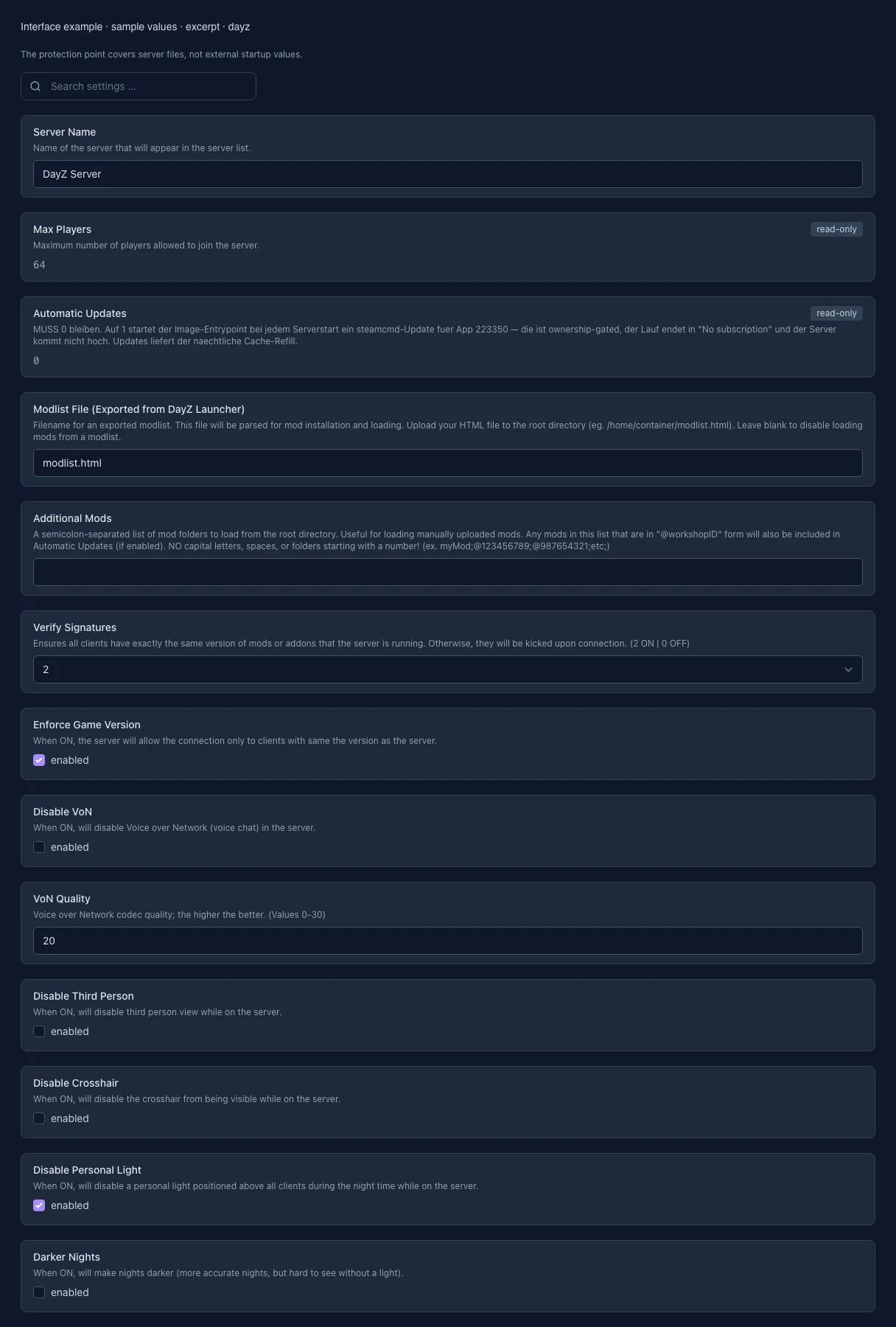
What the interface looks like
The image shows the interface on its capture date; earlier versions may differ.
Excerpt of the current interface with sample values. Values and prerequisites illustrate the controls; available tools depend on server software, plugins and permissions. · Captured on 2026-10-08
What the settings do
These values come from our guided editors. Defaults are the editor starting values; they do not show the contents of a customer server.
Server name
Name in the DayZ server list. No double quotes or line breaks; changes require a restart.
Setting
SERVER_HOSTNAME
Default
DayZ Server
When it takes effect
Takes effect after saving and restarting the server.
Player slots
Read-only maximum player count of the server.
Setting
MAX_PLAYERS
Default
64
When it takes effect
Takes effect after saving and restarting the server.
Automatic Steam updates
Read-only: the stable version is installed from our Steam cache. Updates use reinstallation in the update section.
Setting
UPDATE_SERVER
Default
0
When it takes effect
Takes effect after saving and restarting the server.
Mod list file (DayZ Launcher)
Filename of an HTML mod list exported from the DayZ Launcher in the server root. Leave empty to use no mod list file.
Setting
MOD_FILE
Default
modlist.html
When it takes effect
Takes effect after saving and restarting the server.
Additional mods (folder list)
Uploaded mod folders in the root, separated by semicolons, e.g. @123456789;@987654321. Use lowercase folder names without spaces. Workshop downloads in the stable container are disabled.
Setting
MODIFICATIONS
Default
When it takes effect
Takes effect after saving and restarting the server.
Takes effect after saving and restarting the server.
Disable third-person view
Enabled: players can only use first-person view.
Setting
DISABLE_THIRD
Default
0
When it takes effect
Takes effect after saving and restarting the server.
Disable crosshair
Enabled: the crosshair is hidden in-game.
Setting
DISABLE_CROSSHAIR
Default
0
When it takes effect
Takes effect after saving and restarting the server.
Disable personal night light
Enabled: the personal light above each player is turned off at night.
Setting
DISABLE_PERSONAL_LIGHT
Default
1
When it takes effect
Takes effect after saving and restarting the server.
Darker nights
Enabled: darker night lighting. Disabled: brighter night lighting.
Setting
LIGHTING_CONFIG
Default
0
When it takes effect
Takes effect after saving and restarting the server.
Preserve game time across restarts
Enabled: after a restart, the server uses the last saved game time.
Setting
PERSISTENT_TIME
Default
0
When it takes effect
Takes effect after saving and restarting the server.
Time acceleration (multiplier)
Game time multiplier: 12 means twelve times faster. The night multiplier is multiplied by this value.
Setting
TIME_MULT
Default
12
Range / options
0 – 24
When it takes effect
Takes effect after saving and restarting the server.
Additional night acceleration (multiplier)
0.1 to 64. Multiplied by time acceleration: a time multiplier of 2 and a night multiplier of 4 produce a night speed of 8.
Setting
NIGHT_MULT
Default
1
Range / options
0.1 – 64
When it takes effect
Takes effect after saving and restarting the server.
Lowercase mod files (repair)
Converts loaded mod folders and files to lowercase. This can fix loading issues after uploads from Windows. Enable for one startup, then turn it off again.
Setting
MODS_LOWERCASE
Default
0
When it takes effect
Takes effect after saving and restarting the server.
Validate server files
Validates server files through SteamCMD when automatic Steam updates are enabled. This feature is locked for DayZ Stable.
Setting
VALIDATE_SERVER
Default
0
When it takes effect
Takes effect after saving and restarting the server.
Server-only mods (folder list)
Mod folders loaded only on the server, separated by semicolons. Clients do not need these mods. Use lowercase folder names without spaces.
Setting
SERVERMODS
Default
When it takes effect
Takes effect after saving and restarting the server.
Additional startup parameters
Additional startup parameters of the DayZ server. They are read-only for DayZ Stable.
Setting
STARTUP_PARAMS
Default
-doLogs -limitFPS=120
When it takes effect
Takes effect after saving and restarting the server.
Server executable (read-only)
Provider-managed DayZ server executable.
Setting
SERVER_BINARY
Default
DayZServer
Range / options
DayZServer
When it takes effect
Takes effect after saving and restarting the server.
Steam query port (read-only)
Port for Steam server queries. Set from the assigned server ports.
Setting
QUERY_PORT
Default
27016
Range / options
… – 65535
When it takes effect
Takes effect after saving and restarting the server.
Loading...
Cookie settings
We use cookies to improve your experience and analyze our website.
Cookie settings
Essential cookies
Required
These cookies are required for the core functions of the website and cannot be disabled.
Analytics cookies
Help us understand how the website and customer area are used (our own usage analytics, Google Analytics, Microsoft Clarity).
Marketing cookies
Allow the pseudonymous matching of an ad click to an order in order to measure conversions.