Back to overview

Enshrouded: updates, settings and interface

Game updates, plugin versions and improvements to our interface with a traceable history.

Recorded, available and installed are different states. Your actual installation status and suitable updates are shown in the server panel.

Developer announcement Published

Introducing Enshrouded, a survival action-RPG from the makers of Portal Knights

Announcement from the official source. The source describes the changes; your server installation status is shown separately in the update center.
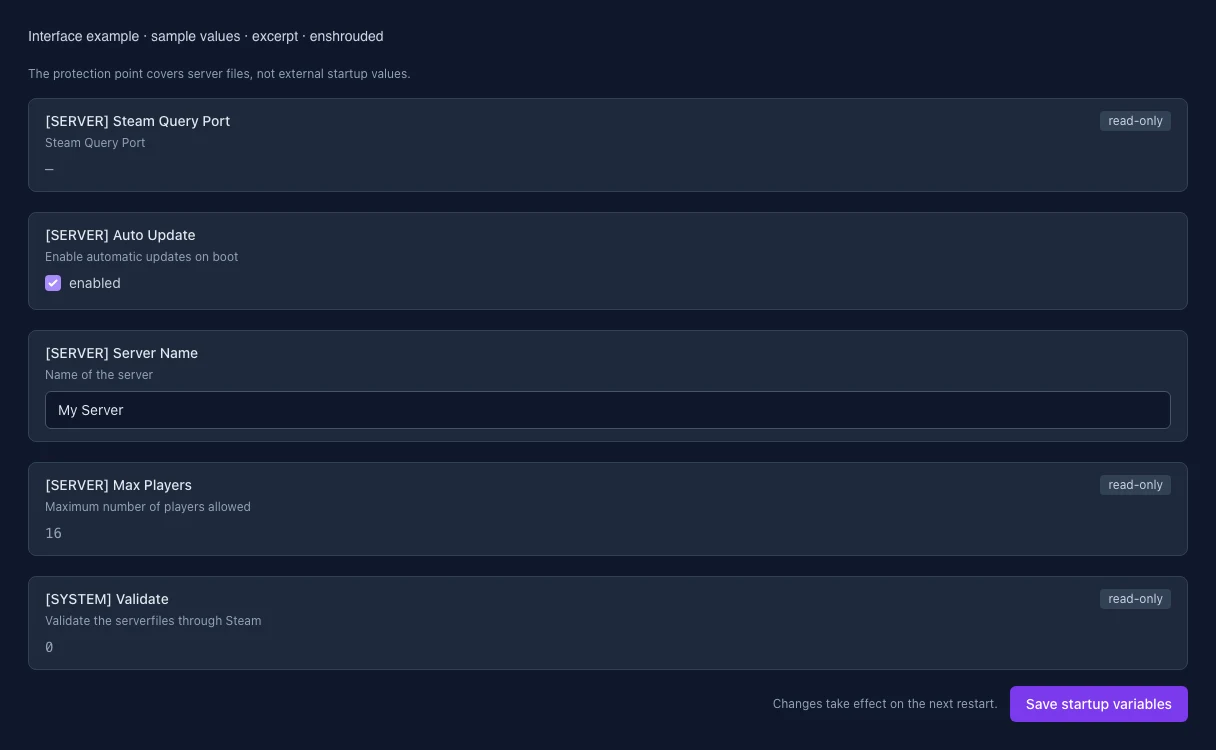
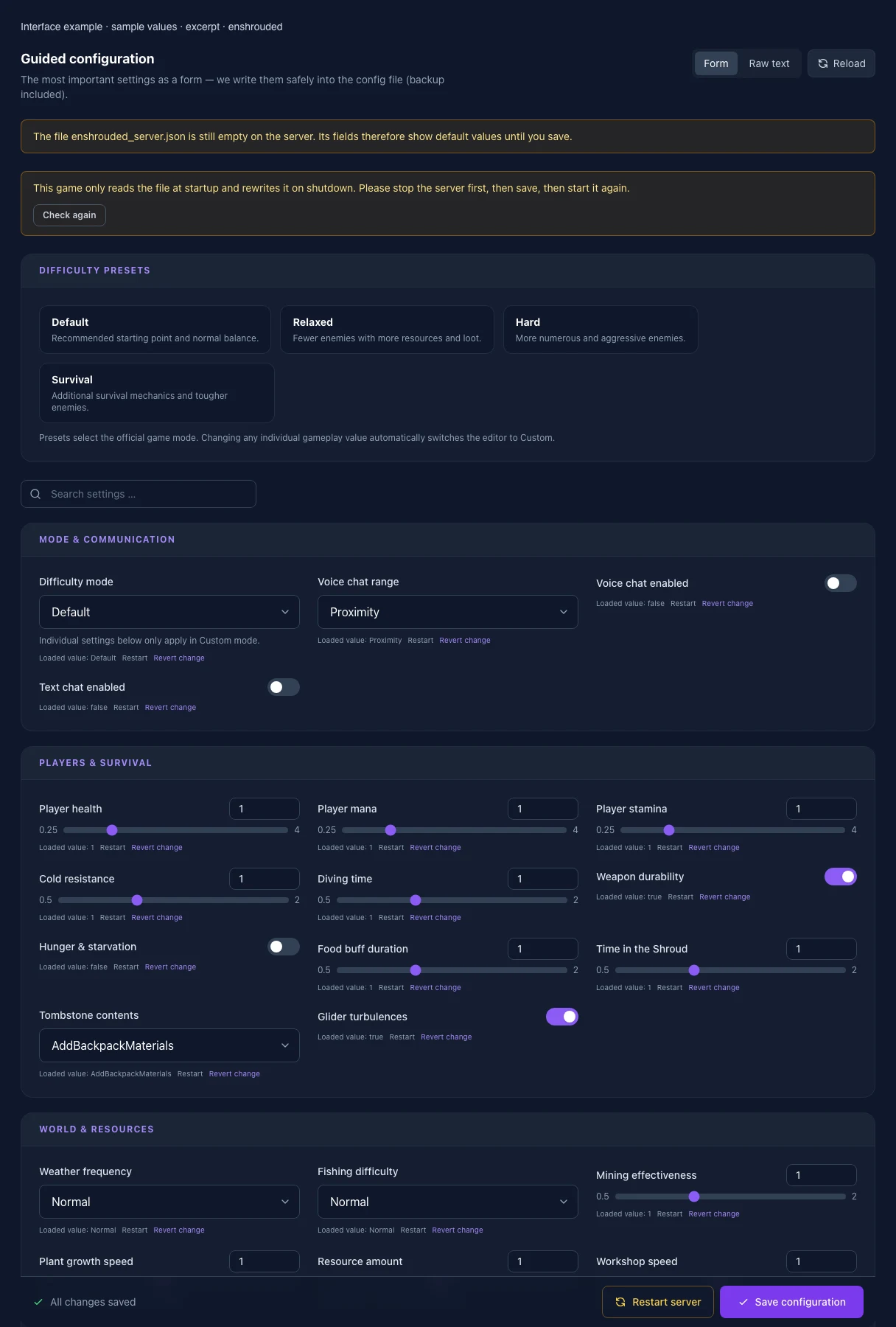
What the interface looks like

The image shows the interface on its capture date; earlier versions may differ.

Excerpt of the current interface with sample values. Values and prerequisites illustrate the controls; available tools depend on server software, plugins and permissions.
Excerpt of the current interface with sample values. Values and prerequisites illustrate the controls; available tools depend on server software, plugins and permissions. · Captured on 2026-10-08
Excerpt of the current interface with sample values. Values and prerequisites illustrate the controls; available tools depend on server software, plugins and permissions.
Excerpt of the current interface with sample values. Values and prerequisites illustrate the controls; available tools depend on server software, plugins and permissions. · Captured on 2026-10-08

What the settings do

These values come from our guided editors. Defaults are the editor starting values; they do not show the contents of a customer server.

Difficulty mode

Individual settings below only apply in Custom mode.

Setting
gameSettingsPreset
Default
Default
Range / options
Default, Relaxed, Hard, Survival, Custom
Voice chat range
Setting
voiceChatMode
Default
Proximity
Range / options
Proximity, Global
Voice chat enabled
Setting
enableVoiceChat
Default
false
Text chat enabled
Setting
enableTextChat
Default
false
Player health

Multiplier: 1 = 100 % of the default value; 0.5 = 50 %, 2 = 200 %.

Setting
gameSettings.playerHealthFactor
Default
1
Range / options
0.25 – 4
Player mana

Multiplier: 1 = 100 % of the default value; 0.5 = 50 %, 2 = 200 %.

Setting
gameSettings.playerManaFactor
Default
1
Range / options
0.25 – 4
Player stamina

Multiplier: 1 = 100 % of the default value; 0.5 = 50 %, 2 = 200 %.

Setting
gameSettings.playerStaminaFactor
Default
1
Range / options
0.25 – 4
Cold resistance

Multiplier: 1 = 100 % of the default value; 0.5 = 50 %, 2 = 200 %.

Setting
gameSettings.playerBodyHeatFactor
Default
1
Range / options
0.5 – 2
Diving time

Multiplier: 1 = 100 % of the default value; 0.5 = 50 %, 2 = 200 %.

Setting
gameSettings.playerDivingTimeFactor
Default
1
Range / options
0.5 – 2
Weapon durability
Setting
gameSettings.enableDurability
Default
true
Hunger & starvation
Setting
gameSettings.enableStarvingDebuff
Default
false
Food buff duration

Multiplier: 1 = 100 % of the default value; 0.5 = 50 %, 2 = 200 %.

Setting
gameSettings.foodBuffDurationFactor
Default
1
Range / options
0.5 – 2
Time in the Shroud

Multiplier: 1 = 100 % of the default value; 0.5 = 50 %, 2 = 200 %.

Setting
gameSettings.shroudTimeFactor
Default
1
Range / options
0.5 – 2
Tombstone contents
Setting
gameSettings.tombstoneMode
Default
AddBackpackMaterials
Range / options
AddBackpackMaterials, Everything, NoTombstone
Glider turbulences
Setting
gameSettings.enableGliderTurbulences
Default
true
Weather frequency
Setting
gameSettings.weatherFrequency
Default
Normal
Range / options
Disabled, Rare, Normal, Often
Fishing difficulty
Setting
gameSettings.fishingDifficulty
Default
Normal
Range / options
VeryEasy, Easy, Normal, Hard, VeryHard
Mining effectiveness

Multiplier: 1 = 100 % of the default value; 0.5 = 50 %, 2 = 200 %.

Setting
gameSettings.miningDamageFactor
Default
1
Range / options
0.5 – 2
Plant growth speed

Multiplier: 1 = 100 % of the default value; 0.5 = 50 %, 2 = 200 %.

Setting
gameSettings.plantGrowthSpeedFactor
Default
1
Range / options
0.25 – 2
Resource amount

Multiplier: 1 = 100 % of the default value; 0.5 = 50 %, 2 = 200 %.

Setting
gameSettings.resourceDropStackAmountFactor
Default
1
Range / options
0.25 – 2
Workshop speed

Multiplier: 1 = 100 % of the default value; 0.5 = 50 %, 2 = 200 %.

Setting
gameSettings.factoryProductionSpeedFactor
Default
1
Range / options
0.25 – 2
Weapon upgrade costs

Multiplier: 1 = 100 % of the default value; 0.5 = 50 %, 2 = 200 %.

Setting
gameSettings.perkCostFactor
Default
1
Range / options
0.25 – 2
Combat experience

Multiplier: 1 = 100 % of the default value; 0.5 = 50 %, 2 = 200 %.

Setting
gameSettings.experienceCombatFactor
Default
1
Range / options
0.25 – 2
Mining experience

Multiplier: 1 = 100 % of the default value; 0.5 = 50 %, 2 = 200 %.

Setting
gameSettings.experienceMiningFactor
Default
1
Range / options
0 – 2
Exploration & quest experience

Multiplier: 1 = 100 % of the default value; 0.5 = 50 %, 2 = 200 %.

Setting
gameSettings.experienceExplorationQuestsFactor
Default
1
Range / options
0.25 – 2
Enemy amount
Setting
gameSettings.randomSpawnerAmount
Default
Normal
Range / options
Few, Normal, Many, Extreme
Simultaneous attackers
Setting
gameSettings.aggroPoolAmount
Default
Normal
Range / options
Few, Normal, Many, Extreme
Enemy damage

Multiplier: 1 = 100 % of the default value; 0.5 = 50 %, 2 = 200 %.

Setting
gameSettings.enemyDamageFactor
Default
1
Range / options
0.25 – 5
Enemy health

Multiplier: 1 = 100 % of the default value; 0.5 = 50 %, 2 = 200 %.

Setting
gameSettings.enemyHealthFactor
Default
1
Range / options
0.25 – 4
Enemy stun resistance

Multiplier: 1 = 100 % of the default value; 0.5 = 50 %, 2 = 200 %.

Setting
gameSettings.enemyStaminaFactor
Default
1
Range / options
0.5 – 2
Enemy perception

Multiplier: 1 = 100 % of the default value; 0.5 = 50 %, 2 = 200 %.

Setting
gameSettings.enemyPerceptionRangeFactor
Default
1
Range / options
0.5 – 2
Boss damage

Multiplier: 1 = 100 % of the default value; 0.5 = 50 %, 2 = 200 %.

Setting
gameSettings.bossDamageFactor
Default
1
Range / options
0.2 – 5
Boss health

Multiplier: 1 = 100 % of the default value; 0.5 = 50 %, 2 = 200 %.

Setting
gameSettings.bossHealthFactor
Default
1
Range / options
0.2 – 5
Attack frequency

Multiplier: 1 = 100 % of the default value; 0.5 = 50 %, 2 = 200 %.

Setting
gameSettings.threatBonus
Default
1
Range / options
0.25 – 4
Enemies passive until attacked
Setting
gameSettings.pacifyAllEnemies
Default
false
Taming startle penalty
Setting
gameSettings.tamingStartleRepercussion
Default
LoseSomeProgress
Range / options
KeepProgress, LoseSomeProgress, LoseAllProgress
Shroud curse
Setting
gameSettings.curseModifier
Default
Normal
Range / options
Easy, Normal, Hard
[SERVER] Steam Query Port

Steam Query Port

Setting
QUERY_PORT
Default
When it takes effect
Takes effect after saving and restarting the server.
[SERVER] Auto Update

Enable automatic updates on boot

Setting
AUTO_UPDATE
Default
1
When it takes effect
Takes effect after saving and restarting the server.
[SERVER] Server Name

Name of the server

Setting
SRV_NAME
Default
My Server
When it takes effect
Takes effect after saving and restarting the server.
[SERVER] Max Players

Maximum number of players allowed

Setting
MAX_PLAYERS
Default
16
When it takes effect
Takes effect after saving and restarting the server.
[SYSTEM] Validate

Validate the serverfiles through Steam

Setting
VALIDATE
Default
0
When it takes effect
Takes effect after saving and restarting the server.