Project Zomboid Mods & Plugins
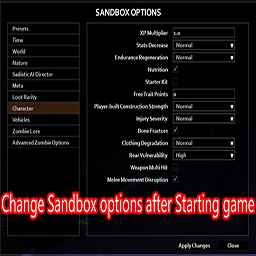
Change Sandbox Options
por 76561198145796765
You can change the Sandbox OPtions after Starting game. How to use? Press "[" key or right click ground to open the sandboxoptions. Some options do not take effect immediately and need to wait for some time or restart game. If you want to add this to a preexisting save, you have to go to Load > Select the save you want > More... > Choose mods. Simply enabling this mod in the "Mods" tab on the main menu wont work. Workshop ID: 2670674997 Mod ID: ChangeSandBox
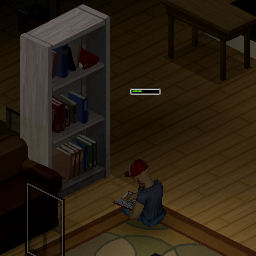
Read Faster When Sitting (for Build 41)
por 76561198006033053
座っていれば読書が少し速くなります。 [list] [*]立ってるよりは読書が捗るはず。 [*]これは[strike]チート[/strike]ロールプレイ用です。 速く読みたいだけならそのためのModが他にいくつもあるのでそちらで。 [*]実装の都合上、立った状態から座るとプログレスバーはリセットされます。 [*]車の座席に座った場合も効果があります。 [*]Build 41.78で動作確認しました。 他のバージョンで動くかは分かりません。 [*]このModはシングルプレイヤーモード用に作成しました。 マルチプレイヤーモードで動く保証はありません。 [*]この機能を扱う他のModと競合するかもしれません。 media\lua\client\TimedActions\ISReadABook.lua [/list] Reading is a bit faster if you sitting. [list] [*]I think it is more effective than reading while standing. [*]This is [strike]cheat[/strike] for role play. If you want to read much faster, there are many other Mods for that. [*]The progress bar is reset when sitting from standing for implementation reasons. [*]Sitting in a car seat also has an effect. [*]I confirmed the operation with Build 41.78. I don't know if it works with other versions. [*]This mod was created for the single-player mode. There is no guarantee that it will work in multi-player mode. [*]May conflict with Mod that handles the following features: media\lua\client\TimedActions\ISReadABook.lua [/list] Workshop ID: 1938484133 Mod ID: ReadFasterWhenSitting
Visible Generator Range
por 76561198131954636
[h1][i]Visible Generator Range aims to get rid of a bit of headache in your day-to-day power needs.[/i][/h1] [h1]Features:[/h1] [list] [*]Ability to view the effective range of a generator simply by viewing it's corresponding Info menu. Also indicates current power status with color of the radius. [*]Full compatibility with [url=https://steamcommunity.com/sharedfiles/filedetails/?id=2883397918]Generator Time Remaining[/url], [url=https://steamcommunity.com/sharedfiles/filedetails/?id=2857548524]Immersive Solar Arrays[/url], and [url=https://steamcommunity.com/sharedfiles/filedetails/?id=3150779947]Multiple Generators[/url]! [/list] [h1]Why use this?:[/h1] This mod was created with the purpose of remedying some headaches in the generator range guessing game. Although it may not address EVERYTHING, it's a step in the right direction. Workshop ID: 2972289937 Mod ID: GenRange
![Irrigation pipes for farming and water supply [B41+]](https://images.steamusercontent.com/ugc/1861675828722626529/2AF3813098AFA06D595CB01956DFDB1BC16C71C1/)
Irrigation pipes for farming and water supply [B41+]
por 76561198020757264
Irrigation pipes (aka Drip irrigation) for farming and water supply. Fixed for B41+ You can craft an irrigation pipe from a regular pipe, any hammer and a screwdriver. You can put this pipe on the ground next to a water barrel, every field on which a pipe is located counts as watered. Explanation of Smart pipes functionality (sandbox settings, default is on) Classic pipes (aka smart pipes setting off): After sowing the seeds, you need to manually water the fields at least once. The irrigation system will remember this value and then automatically supply the fields with the set amount of water. Some plants need less water and when it rains the water level rises above the set amount! The irrigation system cannot distinguish whether the user or the rain is watering to full 100% water level. A roof should be built over these fields. Smart pipes: Smart pipes will balance water levels to optimal. However after sowing new seeds, You should still water fields so health will not deteriorate too much before levels are optimal. Roof should be also build, so plants will not overflow and die from too much water (and also will lower chance of DWF). Planned: -auto-fertilizer - the good old function might be back) - Vanilla metal drum support - it's not recognized as "rain collector" by base game, so it will need to have special case for this. Pipes will work with rain collectors (modded also if do use rain collector component) but not with lakes, rivers, puddles, wells, blue barrels. ------------------------------------------------------------------------------------------------------ Workshop ID: 2464581798 Mod ID: waterPipes
![[B42/B41] The Motorious Zone Vehicle Pack](https://images.steamusercontent.com/ugc/10922954018187953484/F06726703BD0ADE195A96FA6B1867236480255C3/)
[B42/B41] The Motorious Zone Vehicle Pack
por 76561198035338496
This mod will add several vehicles to the game. The vehicles are vanilla-styled (including lore-friendly names, or optional real names), era appropriate (1993 and earlier), and support all the features of vanilla vehicles. The pack will be a variety pack, aiming to add a little bit of everything to the game from everyday sedans, vans and SUVs to sports cars, with sports cars being much more rare than everyday machines. All cars that are capable of it also support [url=https://steamcommunity.com/sharedfiles/filedetails/?id=2281256511]Paint Your Ride[/url] in B41, or [url=https://steamcommunity.com/workshop/filedetails/?id=3464606086]HDCP Immersive Vehicle Paint[/url] in B42! [h1]Also supports Build 42![/h1] The ID is slightly different for B42 (finally fixed the typo in it), but the B41 version should still work fine [h1]!!//////////////////////Notes for B42\\\\\\\\\\\\\\\\\\\\\\!![/h1] [list][*]The max vehicle texture size must be at least 1024 for now. The textures break if the game has to scale them down currently. [b]Texture compression does still work, and can be enabled if you need it[/b] [*]If the vehicle mechanics UI doesn't work, another mod in your list is likely breaking it. Mods that haven't updated to the new crafting system can break UI elements, and any mod that breaks the mechanics UI can also break other UI elements as well. [/list] [h1]If you were using my existing standalone vehicle mods, it is [b][u]safe (and best)[/u][/b] to switch to this mod.[/h1] This mod contains the following vehicle mods of mine: Lancia Stratos, R32 Skyline, Supra, Fox Body, Kei Sports, LM002, 240SX Coupe, Diablo, 300ZX, GT40, Miata, Toyota X90s, and Reliant Robin Mk. II. Disable these mods and use this instead if you plan on using this mod, as they can cause issues when used together. [h1]You can choose which cars you would like to spawn naturally, from 3 selections of car lists[/h1] [b][u]If you want all cars to spawn, you don't need to enable the optional Spawn Selection sub-mods[/u][/b] To choose which types of cars you'd like to have spawn, enable the Spawn Selection sub-mods of the cars you would like to allow to spawn in addition to the main mod. There are 3 lists to choose from, and you can select any combination of them: [list] [*][b]US Motors:[/b] This list contains cars that were available and sold in the US. Examples include the Bronco, Mustang, and 240SX. [*][b]Imports:[/b] This list contains cars that were not available and sold in the US, but common in other countries. Examples are the R32 Skyline, Toyota Mark II, and Reliant Robin [*][b]Rares and Exotics:[/b] This list contains cars that are either very expensive or produced in very low numbers. Examples are the GT40, Diablo, and Stratos. [/list] Also note that the imports and exotics are both very rare in the base spawn lists, and the Spawn Selection sub-mods will not make them more common. Additionally, the mod has been translated to German thanks to Eaglefire. Check out their German Project Zomboid community [url=https://discord.gg/project-zomboid-de]here![/url] [h1]This mod pairs well with [url=https://steamcommunity.com/sharedfiles/filedetails/?id=2793164190] Vehicle Spawn Zones Expanded. (B42 Update pending)[/url][/h1] Since the exotic and import cars are very rare, I started work on the spawn zones to give some specified areas for these cars to spawn, so there is a decent chance to find them on a save without it potentially becoming overwhelming. It eventually became more, adding a variety of new spawn areas beyond that. It works very well with this mod, and has many spawn lists for cars in this pack. [h1]Also check out these complimentary MZ-themed mods![/h1] [url=https://steamcommunity.com/sharedfiles/filedetails/?id=2895585037][img]https://i.imgur.com/POZK84w.png[/img][/url] [url=https://steamcommunity.com/sharedfiles/filedetails/?id=2841969842][img]https://i.imgur.com/IrKA7bh.png[/img][/url] [url=https://steamcommunity.com/sharedfiles/filedetails/?id=2856740739][img]https://i.imgur.com/TixgJf8.png[/img][/url] [h1]FAQ[/h1] [b]Q: Multiplayer compatible?[/b] A: [b][u]Yes![/u][/b] In general, all of my (and many of others') vehicles will be MP compatible unless stated otherwise. [b]Q: Can this be used with other vehicle mods?[/b] A: [b][u]Yes![/u][/b] It will work with other vehicle packs, and standalone vehicle mods. This mod was even made with use alongside mods like Filibuster Rhymes' Used Cars in mind, and has its spawn chances based around it. It doesn't alter anything vanilla either, so anything that changes vanilla vehicles will also work! [b]Q: What are the vehicle IDs?[/b] A: I've set up a post in the discussions with each vehicle ID and some small information about each car, check it out if you need the IDs. [b]Q: How rare are the exotic/import cars?[/b] A: They are [i]very[/i] rare, exotics in particular will be difficult to find on default (low) and normal car spawn rates. Exotics and imports will mostly only spawn near high-end houses, or anywhere else you can find the Cossette and Lang 4000 in vanilla, at a lower spawn rate. Some Easter Egg cars will spawn in similar areas to the Easter Egg cars from Used Cars. For some more specific hints, [spoiler]Riverside has a very large amount of possible spawn zones, and the bar across from the junkyard contains only sports car spawns, so that is the best place to look.[/spoiler] [b]Q: Can this be added mid-save?[/b] A: [b][u]Yes![/u][/b] Vehicles will only spawn in areas you have not explored yet however, so if you or your server have been all over the map, you may have trouble finding the vehicles. I'd recommend using [url=https://steamcommunity.com/sharedfiles/filedetails/?id=2871002471]Udderly Vehicle Respawn[/url] if you want to use this on an existing save, it will allow new vehicles to spawn in explored areas the world. [b]Q: I'm having issues joining/starting a server in MP (File mismatch, or connection lost after starting)[/b] A: First, check AuthenticPeach's guide about these issues [url=https://theindiestone.com/forums/index.php?/topic/42925-how-to-fix-updated-mods-in-build-41-multiplayer/]here.[/url] For more info, check the first post of the "Bug reports" thread in discussions. [b]Q: Can you make (x)?[/b] A: If you're going to request a car, note that my main focus at the moment are cars that fit the game's time period (1993 and earlier). I do have cars outside of this timeframe on my list, but it may be a while before I get to them. I also already have quite a few on my list, so there's no guarantee I'll get to all of them. [b]Q: What about animations?[/b] A: Animations are planned to officially come to vanilla vehicles, so they are planned for this pack as well. While I will redo some cars before TIS' animations are officially available, they will be released as separate mods for the time being with options to replace the ones in the pack, due to some features not working with animated parts. I'm still going to add vehicles in the current vanilla style to the pack, better set up for the upcoming animations. [url=https://discord.gg/hMqVf47TXA][img]https://i.imgur.com/fjDnNYl.png[/img][/url] B41 Mod IDs: fhqMotoriusZone fhqMotoriusZoneRealNames fhqMotoriusZoneUSDM fhqMotoriusZoneImports fhqMotoriusZoneExotics Workshop ID: 2791656602 Mod ID: fhqMotoriousZone Mod ID: fhqMotoriousZoneImports Mod ID: fhqMotoriousZoneExotics Mod ID: fhqMotoriousZoneRealNames Mod ID: fhqMotoriousZoneUSDM
Rosewood Expansion
por 76561198048683432
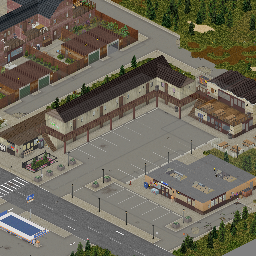
UPDATED: - Minimap! It should be working now, fully regenerated and updated (need to start new game) - Updated core tileset - should resolve at least some of the red question marks issues - Significantly decreased weapon spawns by removing military lockers in tents (was: 7-8 lockers, now 1-2 lockers) - New building: "Beers" Bar & Restaurant ABOUT: This mod adds an expansion to northern part of Rosewood as well as a Zoo. Plot twist is that Zoo was closed early during the pandemic, and later was used as an evac center. FEATURES: - The expansion occupies 4 cells north of Rosewood, exact coordinates at map screenshot. - Map implements 3 custom tilesets (which are required) so there will be plenty of new stuff to see. - Map implements new minimap features. - Properly zoned for foraging and zombie spawns. - This map removes a gas station in north Rosewood - there is a replacements gas station almost at the same location, just a little bith to east. I have removed the buildings list as it would be too long. I have both created my buildings as well as downloaded some from repository v2, huuuuge thanks to anyone who shared their builds there! There are few prominent locations worth noting: - American footbal field and premises - Dirkea with tons of furniture - Church with graveyard (because of course there is) - Hobo town with scrapyard - Supa secret bunker - Mini mall As well as countless shops, cafes, residential houses and more... Compatible with: - Pitstop - Blackwood - Grapeseed - Lake Ivy Township ...and all others further away Not compatible with: - Eggplant Safehouse Huge thanks to Cor for making a video! Workshop ID: 2718350686 Mod ID: pz_rosewoodexp_map Map Folder: pz_rosewoodexp_map
Little Township
por 76561198014312699
[url=https://steamcommunity.com/sharedfiles/filedetails/?id=3477336014][b]Check out BuchoJefe here, he made a version for B42.[/b][/url] Little Township is a small community in the middle of Knox County near Pony Roam-O. Made for 41.60+ Q: Does it... A: Yes it works in MP, yes it works with the new map, yes it works on any MP server rented or otherwise. No I am not going to help you with rented servers or MP servers in general. Q: Could you... A: No. This little town adds: - 14 new houses + garages/sheds - A farm - Fossoil fuel station + Ice parlor - Mojo's Motel - Grace's Groceries - Brandon's Bar - A few hidden things This map mod changes cell 27,28 and will be incompatible with any other mod that changes this cell. Anything else goes. I created this mod to spice up the middle of the map and to go together with my other mod [url=https://steamcommunity.com/sharedfiles/filedetails/?id=2485420813][b]Ed's Auto Salvage[/b][/url] but it works just fine on it's own. Probably a more balanced place to start your game then Ed's. :) It was not specifically made to include a player base, but the farm or one of the larger houses can certainly be used as your base. Big thank you to Trash Queen who made a [url=https://steamcommunity.com/sharedfiles/filedetails/?id=2551854952][b]plugin for the Eris Minimap![/b][/url] I made this for myself and I may or may not update this mod, I may or may not fix any issues, no promises. [b]Requests to add or change anything will be largely ignored.[/b] Permissions: Anyone may include it or make it compatible with any other mod or modpack, go nuts! Workshop ID: 2542249811 Mod ID: LittleTownship Map Folder: LittleTownship
ExtraNoise's Flag Tiles
por 76561197993918892
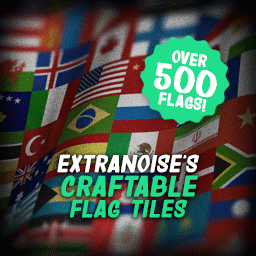
This flag pack adds 500 new flags that can be hung up on the walls around your house or base. Each flag comes in two sizes, large (three tiles wide) and small (one tile wide, hanging vertically). The flags have all been painstakingly designed to look like the game's original flags. Multiplayer server admins can spawn the flags using the names provided in the screenshots. As a point of note, all flags in this pack begin with the prefix "ENF" (ExtraNoise's Flags) followed by the flag name. Small flags include the suffix "Small". These are great for adding character to servers whose players might want to establish boundaries for their faction or other player representation. [h1]Included Flags[/h1] Included in this pack are: National flags (unfortunately not all nations are included, but it is a vast majority), European regional flags, Canadian provincial flags, US state flags, historical flags, independence movement flags, fictional flags from media, US national and international organization flags, various protest flags, pride flags, a collection random flags and banners, some handwritten "flags" using bedsheets for flavor and base labeling, and a selection of flags that are my favorites from reddit's r/vexillology subreddit. [h1]Now Craftable![/h1] I appreciate everyone's patience as I worked diligently to make each of the flags in the pack craftable--at almost 50,000 lines of code!--so that players can now make them in the game without having to rely on multiplayer server admins to spawn them in (helpful if you are not playing a multiplayer server, as you can imagine). In order to make them, you will need to first craft a blank flag using [b]sheets, scissors, a needle or sewing kit, and thread[/b]. Once a blank flag has been crafted, you will need [b]a paintbrush and paint buckets[/b] to paint the flag. It's not an elegant solution, but it is designed to keep your context menus simple instead of trying to list out 500 options when you accidentally right-click a sheet in your inventory. [b]A warning:[/b] Paint cans are heavy! I've updated the recipes so that flags can be crafted from paint cans on floors or shelves. You can also have the paint cans on you, but being overloaded can cause injury. Good luck and don't say I didn't warn you. [h1]Regular Players[/h1] You need to subscribe to this mod if you've downloaded a map that makes use of the tiles in this pack or a multiplayer server has been configured to use them. You don't have to enable the crafting sub-mod included unless you want to use it or the multiplayer server you're on uses it. [h1]Map Makers[/h1] You can download the raw tiles (with instructions on how to use them) here: https://www.dropbox.com/s/n6c9q4xu6gjz4zt/en_flags.zip?dl=0 [h1]A Note on Discretion[/h1] Flags are one of those things that are often considered benign and inoffensive... until they aren't. Included in this pack are a number of flags that have a sordid history. For example, even the United States flag could fall into this category for some people. That being said, where contentions arise I have chosen to use the current flag for any given nation/region instead of the 1993 version (which some flags use) based on the in-game start date. A good example of this is the inclusion of the 2021 Mississippi flag instead of its predecessor. This is purely up to my own choice and may be changed in future releases of this pack. I have chosen to omit a number of incredibly divisive or incendiary flags, such as those used by hate groups in the modern day. I will absolutely not entertain the idea of including these flags in future releases, so please do not ask. Anyone is free to modify the content of this pack as they need for their map/server. [h1]Take a look at my other mods![/h1] [url=https://steamcommunity.com/sharedfiles/filedetails/?id=3261072117][img]https://steamuserimages-a.akamaihd.net/ugc/2493384508219371550/EAF440D167A92599BFC0B6EB75ACF128007273FB/[/img][/url] [url=https://steamcommunity.com/sharedfiles/filedetails/?id=2948944961][img]https://steamuserimages-a.akamaihd.net/ugc/2118438277847436946/CAB91F2AFABB9DB188526EA5450933538970AEDE/[/img][/url] [h1]Where I hang out & post updates[/h1] [url=https://discord.gg/ZyeW8puzmh][img]https://i.imgur.com/eMLKTaU.png[/img][/url] Workshop ID: 2784607980 Mod ID: EN_Flags Mod ID: EN_Flags_Craft

True Crouching
por 76561198019112351
[b][h1] I'll update when B42 stable version is released. [/h1][/b] [hr][/hr] While sneaking, crouching animations will be played instead of sneaking animations. In other words, replaces sneaking animations with crouching animations. Includes crouched [b]idle[/b], [b]walking[/b], [b]running[/b], [b]turning[/b] and [b]SHOOTING[/b]. [hr][/hr] This mod will very slightly reduce your movement speed while sneaking. This is vanilla behavior. [hr][/hr] Has a sub mod named [i]"True Crouching - Shooting Only"[/i]. This will enable only the crouched shooting animations. It won't change sneaking animations. [b]Enable only ONE of the mods.[/b] [hr][/hr] [h1] Why this mod? [/h1] I don't like the way the character looks while sneaking. I always wanted the sneak key to function as a crouch key so I could roleplay(?). For example, now I can stand on the edge of a roof, crouch, and plan my next move in a realistic looking way. [h1] How does it work? [/h1] [b]Does not[/b] add/replace actual animation files, [b]mostly[/b]. I added animations only for crouched shooting. There are two base sneaking stances in the game: [i]Sneak[/i] and [i]LowSneak[/i]. LowSneak is the crouching animation we all know from every other game. Normally, this animation is played only when the character is sneaking next to a wall. I just changed a few lines in some files so that the game plays animations of LowSneak instead of Sneak whether the character is next to a wall or not. [h1] To do [/h1] [h3](maybe...)[/h3] [list] [*]Prevent crouching while fractured(and/or burnt?) [i](the game allows LowSneak while fractured/burnt in vanilla)[/i] [*]Add buff to hit chance when crouched [*]Swapping weapons while crouched and aiming a weapon shouldn't transitions to standing [*]Block aim ready stance while crouch aiming with melee if there are no zombies in range so the char doesn't stand up [/list] [h1] Notes [/h1] [list] [*][b]Conflicts with:[/b] [list] [*]Arsenal GunFighter ([i]Compatibility addon [url=https://steamcommunity.com/sharedfiles/filedetails/?id=3004680063][u]here[/u][/url][/i]) [*]Real Full Auto ([i]Weapons will use their default fire rate while shooting crouched[/i]) [*]Katana Stance ([i]Character will not crouch when idle while holding a katana[/i]) [*]Braven's Nail Guns ([i]Nailguns' fire rate will be reduced while shooting crouched[/i]) [/list] [*][b]Safe[/b] to add/remove mid-save. [*]Works in multiplayer. [*]Feedback/Suggestions are welcome. [/list] [h1] Recommended mods [/h1] [url=https://steamcommunity.com/sharedfiles/filedetails/?id=3008448748] True Crawl [/url] - Adds a [b]prone[/b] stance to the game! You can [b]crawl[/b] everywhere and [b]shoot[/b] while prone. [h2]Check out my other mods[/h2] [url=https://steamcommunity.com/sharedfiles/filedetails/?id=2920735875][IMG]https://i.imgur.com/uMPsEoo.png[/IMG][/url][url=https://steamcommunity.com/sharedfiles/filedetails/?id=2921642476][IMG]https://i.imgur.com/K6Zhrv7.png[/IMG][/url][url=https://steamcommunity.com/sharedfiles/filedetails/?id=3013901070][IMG]https://i.imgur.com/RPS3sfG.png[/IMG][/url] [hr][/hr] [url=https://www.buymeacoffee.com/the_bobcat][IMG]https://img.buymeacoffee.com/button-api/?text=Buy%20me%20a%20coffee!&emoji=&slug=the_bobcat&button_colour=ff8700&font_colour=000000&font_family=Cookie&outline_colour=000000&coffee_colour=FFDD00[/IMG][/url] My third mod. Learned a little PZ animation. It took a few hours to figure out how to do it. Then I implemented crouched shooting which really wore me out :/ [IMG]https://i.imgur.com/6OBlYju.gif[/IMG] [hr][/hr] Workshop ID: 2966176354 Mod ID: TrueCrouching Mod ID: TrueCrouchingSO
Smoker
por 76561198186843834
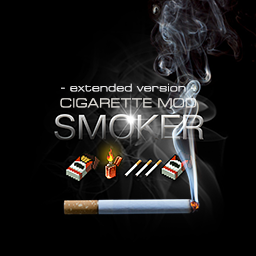
[b]The mod completely changes the mechanics of cigarettes - the cigarettes will be inside the pack.[/b] Smoker mod - can work both independently and with other mods that change cigarettes, in the second case it can use items and capabilities of other mods. All compatibility information is listed below. If Smoker mod is installed without mods specified in the compatibility list, it will work in the light version mode - with a basic set of features. [quote][b]Not save friendly! Attention! New game recommended.[/b] If you installed the mod to an existing save, then all vanilla cigarettes in your save will disappear. Further in the game, they will, as before, appear in dead zombies and in the game world. [b]Do not delete the mod in the save[/b], otherwise you will not be able to load it. After uninstalling the mod, you will need to create a new world. Unfortunately, I don't know how to solve this problem yet.[/quote] [b]Description:[/b] • Cigarettes can be removed and put back in a pack. • Found packs of cigarettes will contain a random number of cigarettes. • The character will say how many cigarettes are in the found pack when he opens it. • To pack cigarettes in Cigarette Carton - cigarette packs must be full and closed. You will need tape, or any glue, as well as packing material - newspapers, magazines, books, maps, or 5 empty packs of cigarettes. You can also find Cigarette Carton in the game world. • Mod contains a burning time fix - for vanilla toilet paper. • Functional matches in boxes. (45 pieces max / box). • Matches can be moved from box to box. • Lighter burning time increased by 200% when used as a light source. • Convenient refueling of lighters - the lighter can be refueled at any time - Use a vanilla [url=http://undeniable.info/pz/wiki/item.php?Name=PetrolCan]Petrol Can[/url] for this, or [url=http://undeniable.info/pz/wiki/item.php?Name=HCFuelcanister&lang=en]Hydrocraft's canister[/url], or [url=http://undeniable.info/pz/wiki/item.php?Name=HCLighterfluid]Lighter Fluid[/url] from the Hydrocraft mod, or refill with Lighter Fluid - an item from this mod. You can also use fuel bottles. • [url=https://en.wikipedia.org/wiki/Nicorette]Nicotine chewing gum[/url] - to reduce smoking cravings. • You can make a smoking device - from a plastic bottle by crushing it and punching a hole in the bottle + making a foil lid from an empty pack of cigarettes and punching holes in the foil. The foil burns out after several uses (the rate of burnout of the foil depends on the trait - Lucky/Unlucky). • You can disassemble cigarettes to obtain tobacco and filter. • Cigarette butts can be disassembled to obtain tobacco and filter. • Ashtrays for cigarette butts. When combined with AutoSmoke mod, your character will automatically throw cigarette butts into the nearest ashtray. • Cigarette butts can be smoked (when everything is very bad). • Cigarette butts can be burned in a fire. • You can sew a special leather tobacco pouch from pieces of leather. The tobacco can be taken from the pouch and put back in the required amount. • You can make homemade cigarettes from tobacco and paper, with or without a filter. • [b]To create a Garden Sprayer[/b] - in the Smoker mod, there is a separate "SM" tab on the recipe panel. • When creating a new character with the "Smoker" trait, the character's inventory will contain items from the mod (a random pack of cigarettes with a random number of cigarettes inside), as well as a lighter or matches (may be empty). Enjoy. [img]https://i.imgur.com/BvNpRsd.gif[/img] [b]Incompatible:[/b] [b]More Traits[/b] - may not be compatible (user information: It is impossible to take a cigarette out of the pack.) [b]Compatibility:[/b] Let me know if you find any problems with other mods. • Steam Remout Play - not supported. (I don't have a gamepad, I can't test it, and I don't use it). • [b]This mod is fully compatible with the [url=https://steamcommunity.com/sharedfiles/filedetails/?id=1703604612]GreenFire mod[/url][/b] without any problems and dancing with tambourines ([b]the GreenFire mod has built-in support for the Smoker mod[/b]) and can use items from it (recommend). In the future, I plan to do even more support for various items from the GreenFire mod. • Perfectly complements the Smoker - [url=https://steamcommunity.com/sharedfiles/filedetails/?id=2643751872]AutoSmoke[/url]. YYou can light a cigarette from the cigarette of another character in multiplayer, automatically put cigarette butts in the ashtray and much more. (I recommend) • This mod is partially compatible with the[url=https://steamcommunity.com/sharedfiles/filedetails/?id=2923439994][b] More Smokes mod[/b][/url]. • This mod is partially compatible with the [b]Hydrocraft mod[/b] (various bugs are possible, but this is not certain) • This mod is compatible with [url=https://steamcommunity.com/sharedfiles/filedetails/?id=2714198296]I Don't Need A Lighter[/url] - Cigarette lighter in the car and other great features current and new version - [url=https://steamcommunity.com/sharedfiles/filedetails/?id=2883633728&tscn=1669492874]I Might Need A Lighter[/url]. • This mod is compatible with [url=https://steamcommunity.com/sharedfiles/filedetails/?id=2812491628]More Loot Settings[/url] - You can adjust the rarity of cigarettes. • Install - [url=https://steamcommunity.com/sharedfiles/filedetails/?id=2857762294]Smoking Sounds Overhaul[/url] for improved smoking sound effects • This mod is compatible with [url=https://steamcommunity.com/sharedfiles/filedetails/?id=2289454303]Eggon's Hotkeys & Hot Actions[/url] • This mod is partially compatible with [url=https://steamcommunity.com/sharedfiles/filedetails/?id=2081538550]Hydrocraft[/url] and can use items from it. • This mod is compatible with [url=https://steamcommunity.com/sharedfiles/filedetails/?id=2142069709]Quit Smoking[/url] mod. • This mod is compatible with [url=https://steamcommunity.com/sharedfiles/filedetails/?id=2244879881]Soul Filcher's Exploring Time[/url] and can use items from it. • This mod is compatible with [url=https://steamcommunity.com/workshop/filedetails/?id=2719327441]Snake's Mod Pack[/url] + [url=https://steamcommunity.com/sharedfiles/filedetails/?id=2812664856]Le Gourmet Revolution Patch[/url] • This mod is compatible with [url=https://steamcommunity.com/sharedfiles/filedetails/?id=2459400130]Dynamic traits[/url]. • This mod is compatible with [url=https://steamcommunity.com/sharedfiles/filedetails/?id=2840805724]Simple Overhaul: Traits and Occupations (SOTO)[/url]. Check mods: [url=https://steamcommunity.com/sharedfiles/filedetails/?id=2268557398]Immersive CD Players[/url] - Take your music with you... [url=https://steamcommunity.com/sharedfiles/filedetails/?id=1945359259]Dreams[/url] - the character will have dreams... [url=https://steamcommunity.com/sharedfiles/filedetails/?id=2268577020]RealBody[/url] [b]Languages:[/b] English / Russian / French / German / Turkish / China / Japanese / Spanish / Italian / Portuguese / Polish [b]Thank you:[/b] RagingLoony - Thanks for the help with adding 3D models. French translation - HyperBagarre Chinese translation - Surgeol / NakiriFoxCN Japanese translation - Bigsky03 German translation - DaNeo Brazilian Portuguese - MonsterK1llerBR Clebenstein - Le Gourmet Revolution Patch recep ivedik - Turkish translation Polish translation - Enzoo | Nulled [table][tr][td] [b]Permission[/b] Distribution of this mod is prohibited. This includes, but is not limited to, uploading the mod to the Steam Workshop or any other site, distributing it as part of another mod or modpack, or distributing modified versions.[/td][/tr][/table] Tags:B41,Multiplayer,Items,Tweak,Realistic Workshop ID: 2026976958 Mod ID: Smoker
Fantasiado's More Street Details
por 76561198231150768
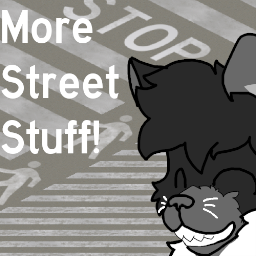
Hello! This is my first Tileset, it started as a personal thing for a map i have been working on but since some people were interested over on discord, i decided to post these for public use! Feel free to use the tileset on your maps! just credit me plox :) Theres also 2 extra tile types that i havent mentioned on the images, diagonal walkway stripes, the reason for that is that they are kind of ugly in my opnion, but its there in case you like it. *yeah uhm, to be honest i dont know much about street marks, but as far as ive seen this helps it looks prettier and more like something youd see in real life Like what i do? [url=https://steamcommunity.com/sharedfiles/filedetails/?id=2985730744] 𝘾𝙝𝙚𝙘𝙠 𝙤𝙪𝙩 𝙢𝙮 𝙣𝙚𝙬 𝙢𝙖𝙥![/url] Workshop ID: 2554699200 Mod ID: FantaStreetTiles_01
![Improved Build Menu [Build 41]](https://images.steamusercontent.com/ugc/1707412859154485729/6BEE2C57EFC63A3681D6CF661AE8A42DFA12D379/)
Improved Build Menu [Build 41]
por 76561198017611947
This is a quality of life mod with the main goal of tidying up the build menu for both Carpentry and Metalworking. Some new buildables from the base game are also added. [h1]Packaged with 3 versions[/h1] Enable the appropriate version for your game. If unsure which to choose, enable "basic". [olist] [*][b]Basic[/b] - requires [url=https://steamcommunity.com/workshop/filedetails/?id=566115016]Item Tweaker API[/url] [*][b]No ItemTweak[/b] - doesn't require Item Tweaker API [*][b]Old[/b] - for Build 41.50. [i]Will not be continually updated[/i] [/olist] [i]Please note that this mod was made for build 41.53 and may not be compatible with later versions. This mod has been made specifically for Build 41 and is NOT compatible with Build 40. For the build 40 version, see: [url=https://steamcommunity.com/sharedfiles/filedetails/?id=1832608432]Improved Build Menu [Build 40][/url][/i] [h1]Changes[/h1] Changes include reorganising the build menus, renaming objects, adding/changing tooltip descriptions, adding container capacities and more. Metal pipe and metal bar can now be crafted after reading 'Metalwork Magazine Vol. 4'. • Metal Pipe = 4 Empty Tin Cans or Empty Pop Cans. • Metal Bar = Metal Pipe or Lead Pipe [h1]New buildables[/h1] [b]Carpentry[/b] • Wooden Pillar • Wooden Fence Post • Outhouse Door • Wooden Gate • Brown Wooden Floor • Light Brown Wooden Floor • Bar Counter • Corner Bar Counter • Wooden Toilet • Log Pillar • Wooden Bar Stool • High Wooden Gate • Dark Wooden Stairs • Light Brown Wooden Stairs [b]Metalwork[/b] • Metal Door Frame • Metal Jail Wall • Metal Jail Door Frame • Metal Door • Metal Jail Door • Metal Wall Corner • High Wire Fence Post • Metal Floor [b]Other[/b] • Concrete Floor [h1]Compatibility[/h1] This mod overrides the "ISBlacksmithMenu.lua" and "ISBuildMenu.lua" files. This may cause compatibility issues with other mods that also replace these files, even if just changing a single value. This mod should be enabled AFTER other mods that override those files, otherwise the menus will not appear correctly. To ensure this mod is enabled last, or if you're experiencing compatibility issues: disable this mod, return to the main menu, then re-enable this mod. [h1]See also[/h1] • [url=https://steamcommunity.com/sharedfiles/filedetails/?id=1783799390]Improved Maps[/url] • [url=https://steamcommunity.com/sharedfiles/filedetails/?id=1832608432]Improved Build Menu [Build 40][/url] Tags:Build 41,Building,Interface,Balance Workshop ID: 1969456967 Mod ID: improvedbuildmenu41
Cherbourg
por 76561198113168136
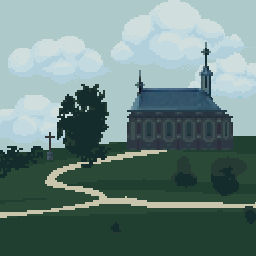
DISCLAIMER: **WORK IN PROGRESS** IF YOU FIND BUGS REPORT THEM IN THE COMMENTS IMPORTANT GAMEPLAY CHANGE: You will now find boats in relevant areas (harbours, beaches, islands, etc) While the whole world is watching the terrible events in Kentucky (USA), where several cities have been isolated due to the outbreak of the virus, a similar situation is starting to develop in one of the port cities of Europe: Cherbourg. The decision to isolate the entire peninsula of Cotentin in Normandy was ordered abruptly, in less than a couple of days most of the local residents were infected. Only a very few managed to escape the pandemics. You are one of the lucky ones. For several days you foundshelter in your house, until necessity forced you to go outside: you are out of croissants! Your task: to find this food of the gods and survive. You took your Guide du Routard with you and were able to gather some information about the quarantine area: - 162 km2 - 1000+ km of roads - 15 islands in the area - 10 000+ buildings In connection with the previously planned Olympics in the city of Cherbourg, the mayor of the city ordered the construction of many houses, which they did not have time to finish completely. In such a difficult time, the construction is carried out by the Tsar's loyal subjects. You can support them by becoming a boyar, as well as get a membership card to an elite yacht club: SUPPORT ON PATREON https://www.patreon.com/cherbourgzomboid TO CONSULT THE MAP GO THERE: https://cherbourg.pzmap.ru/ Now is time to write your own story! Workshop ID: 1827428289 Mod ID: cherbourg
Immersive Solar Arrays (v41, GitHub reupload)
por 76561199218026428
[code][h1][url=https://steamcommunity.com/sharedfiles/filedetails/?id=2969478819]>>> Check out b42 beta, it's a work in progress. <<<[/url][/h1][/code] [h1]Description[/h1] Immersive Solar Arrays (ISA) adds new items and lets you harvest solar power for the needs of your base! [h1]Required Mods[/h1] You need to have [URL=https://steamcommunity.com/workshop/filedetails/?id=2969455858]TARGET SQUARE ON LOAD COMMANDS[/url] added to your save mod list if you want to spawn special crates with this mod. It is rather safe to add / remove on existing saves. [h1]Links with useful resources[/h1] [URL=https://github.com/radx5Blue/ImmersiveSolarArrays/wiki]Mod's wiki pages on github[/url] [URL=https://steamcommunity.com/linkfilter/?url=https://discord.gg/denwquecsf]Original Mod's Discord Server Link[/URL] [URL=https://steamcommunity.com/sharedfiles/filedetails/?id=2623458493]Original Mod's Workshop Page[/url] [URL=https://www.youtube.com/watch?v=wLQXwUip1Rk]Video Guide: Project Zomboid Immersive Solar Arrays A to B by Shrek296[/url] [h1]Notice![/h1] [i][list] [*] Use only one version of the mod. Latest mod id is "ISA_41". If you have installed mods with same mod_id then you won't be able to select which one is loaded. [*] Mods that delete changes made to default actions like inventory transfer and generator interactions can cause problems. [*] Enable x2 Textures in options or tiles will appear wrong in world, if you have other tile problems try to identify which map or tile mod is incompatible. Disable any other mods and see if the issue persists. [*] [URL=https://steamcommunity.com/app/108600/discussions/0/3767859894285799675/]Missing recipes link[/URL] [*] [URL=https://steamcommunity.com/workshop/filedetails/discussion/2857548524/3463857594042602200/]MP troubleshooting link[/URL] [*] If you have problems downloading the mod with steam, you can find the latest version of the mod on GitHub. [*] Some options require game reload, Stash Houses might need a new game to work properly. [*] It's advised to test this mod in debug before adding it to your modlist, if you add it to an existing save then you should create a save backup. [/list][/i] [h1]I found a bug that's not covered above, what to do now?[/h1] First of all, you should try to reproduce the bug with only this mod enabled and write the steps necessary to reproduce the bug. If you can't reproduce it with only this mod then try to limit it to a specif set of mods. Check your logs for errors and post them with any other relevant information. [code][url=https://steamcommunity.com:/linkfilter/?u=github.com/Poltergeist-PZ-Modding][img]https://raw.githubusercontent.com/Poltergeist-ix/.images/main/polt-mod-icon-1.png[/img][/url][url=https://steamcommunity.com:/linkfilter/?u=ko-fi.com/poltergeist89261][img]https://raw.githubusercontent.com/Poltergeist-ix/.images/main/ko-fi-fire-2-100.gif[/img][/url][url=https://steamcommunity.com:/linkfilter/?u=theindiestone.com/forums/index.php/topic/2530-mod-permissions/?p=36477][img]https://raw.githubusercontent.com/Poltergeist-ix/.images/main/tis-mod-permissions-2-credit-where-its-due-100.png[/img][/url][url=https://steamcommunity.com:/linkfilter/?u=discord.gg/SReMnbV4V7][img]https://raw.githubusercontent.com/Poltergeist-ix/.images/main/PZWorkshopCommBanner-1.png[/img][/url] Feel free to report any issues or provide feedback on [url=https://steamcommunity.com:/linkfilter/?u=github.com/radx5Blue/ImmersiveSolarArrays/issues]GitHub[/url].[/code] [code] [h3]Contributors[/h3] Big thank you to everybody who has contributed to this mod, through various stages of it's existence. [table] [h3]Mod info[/h3] [tr][td] Permissions: [/td][td] [url=http://theindiestone.com/forums/index.php/topic/2530-mod-permissions/?p=36477]Give credit[/url] [/td][/tr] [tr][td] Workshop ID: [/td][td] 2857548524 [/td][/tr] [tr][td] Mod ID: [/td][td] ISA_41 [/td][/tr] [/table][/code]
Better Flashlights
por 76561198010652568
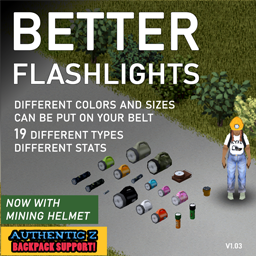
[h1]PLEASE NOTE: You'll [b]NOT[/b] see the light from other people's flashlight when on belt- this is a GAME issue, nothing a mod can change! If you want other people to see your light, hold it in your hand. Any further comment regarding this will not be answered anymore.[/h1] [h1]Content[/h1] This mod adds [b]18 new flashlights[/b] to the game that [b]can be put on your belt[/b]: - 4 Army / Military Flashlights - 1 Emergency Flashlight - 1 Man Lite - 1 Small Flashlight - 1 Old Flashlight - 1 EGENEREX Flashlight - 1 Spiffo Flashlight - 4 Normal Flashlights - 3 Toy Flashlights All in different colors and sizes, with different textures. [b]Additionally:[/b] - Mining Helmet with Light (Need Headlights) - Headlights Smaller hand torches and flashlights can be put on the mining helmet as well. They spawn in camping, tool and all the same locations as vanilla flashlights, albeit some with slightly more rarity. Feel free to leave feedback to the drop chances and stats. :) The vanilla flashlights have not been replaced, and can be put on your belt as well. [h1]Newest Update[/h1] - Added Authentic Z Support - Added tooltips for all flashlights - Fixed some Better Belts mistakes [h1]Update 1.02[/h1] - Added 3 more flashlights with own new 3d models - Added headlights and mining helmet - Changed distribution to a more realistic, widespread spawn (flashlights are spawning now in different locations) [h1]FAQ:[/h1] [b]Multiplayer[/b] Tested and works in multiplayer. [b]Will this mod change the overall flashlight count?[/b] Yes and no. Since the new flashlights have been added to several containers it increases the overall flashlights in the world. [b]Can this items be crafted?[/b] No. [b]Does this make the vanilla flashlights also belt-equippable?[/b] Yes. [b]Can I install it in an existing save file?[/b] The new flashlights will not spawn in already visited locations. Its usually better to start a new savegame with new mods. [b]Which game version works with this mod?[/b] I have tested it with game version 41.65 and 41.66 [b]Available Languages:[/b] - English If you want to help with translations feel free to contact me! [h1]Compatibility[/h1] This mod is compatible with these mods: - Noir Backpacks Attachments ( https://steamcommunity.com/sharedfiles/filedetails/?id=2754567348 ) - Better Belts ( https://steamcommunity.com/sharedfiles/filedetails/?id=2127583399 ) - Authentic Z ( https:/steamcommunity.com/sharedfiles/filedetails/?id=2335368829 ) Workshop ID: 2766033079 Mod ID: BetterFlashlights
'99 Ford Crown Victoria Police Interceptor
por 76561198089039119
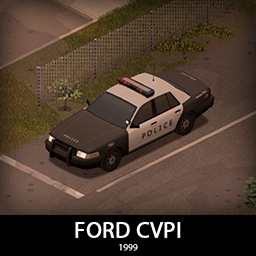
It's another Crown Vic! But this one is from 99! It features a full set of armor and some modern flashing lights! Trunk is big, rear seats are huge and there is even a gun rack inside. It comes in 2 variants, normal police chassis and the unmarked car with some cosmetic differences and a small hidden lightbar. It shares the armor and tires with the 92 variant. [b]Main features:[/b] [list] [*]2 Chassis variants [*]2 Front bumpers with 2 tiered protection [*]Fully animated hood, trunk, doors and windows [*]Visible interior and character (with improved exit/enter/aim animations) [*]All parts have 3d objects you can remove and place in the world [*]Extra parts to craft and find in the world to make the vehicle truly yours (push bumper, window armor etc) [*]Multiple texture variations [*]Armor protection for windows, doors, engine, headlights etc [*]2 seats in the front, 2 in the back. [/list] [b][list] [*]You can use it in your current save game, just enable the mod in the load menu [*]It can tow and be towed [*]Not recolorable [/list][/b] [b]Things to come:[/b] [list] [*]Civilian variant [*]Taxi variant [/list] If you can't wait to find this mod in your game and want to test it right away, use [url=https://steamcommunity.com/sharedfiles/filedetails/?id=2634426926]bikinitools[/url] to spawn it, hide the items that your character holds while in vehicle, or for all other good stuff that mod has, go get it! [b]If you like my mods, please consider supporting me with a coffee[/b], so I don't fall asleep while making new mods and supporting old ones :) [url=https://ko-fi.com/ki5mods][img]https://i.imgur.com/2uTskWl.png[/img][/url] Check out my vehicle mods: [url=https://steamcommunity.com/sharedfiles/filedetails/?id=2490220997][img]https://i.imgur.com/1C4iQ6U.png[/img][/url] [b]Credits:[/b] [list] [*]This mod is commission work by request of [url=https://www.twitch.tv/sheriffeli]Sheriff Eli[/url]. Big thank you to Sheriff Eli and his Community for the support! [*]Thanks to The Indie Stone for making this awesome game and all this possible. [*]Special thanks to bikinihorst for the huge help with code, optimization, and taking care of the multiplayer and part code.[/list] [quote=KI5] Ask for permission This mod can only be added to and extended with the express permission from the original creator. If no permission is received you may not alter the mod, and it must be treated as a mod that is 'On Lockdown'. You are not allowed to repack this mod under any circumstances, ever. [/quote] [b]Compatibility:[/b] ✅ B41 (b41.78.16) Single Player / Multiplayer fully supported ✅ B42 (b42.12) Single Player fully supported ✅ B42 (b42.13+) Single Player / Multiplayer fully supported Vehicle IDs: 99fordCVPI, 99fordCVPIunmarked Workshop ID: 2971246021 Mod ID: 99fordCVPI
![[B41|B42] Simple Status](https://images.steamusercontent.com/ugc/9555930505229944765/E1731741DA45F2350D41225A881C0F2DC33DECCC/)
[B41|B42] Simple Status
por 76561198245087280
Display the player's status in the form of bar chart values; Make everything simple. [b] Works in SP, CO-OP, MP [/b] [b] Current in CH, CN, DE, EN, ES, FR, HU, IT, KO, PL, PT, RU, TR [/b] [b] ' \ ' to toggle visible [/b] [b] ' L ' to lock UI [/b] [b] Right Click to open context menu [/b] [b] Hover on bars to see stat text in vertical mode [/b] [b] Drag and drop to move bars [/b] [h1] Recent Update [/h1] [2.260406.1] 1. Added new Portuguese (PT) translation 2. Removed the "required" warning that appeared after updating to 42.16 3. Adjusted default UI width to be more compact [2.260310.1] Update for B42.15, Re-config need [2.260303.1] Updated the logic for saving Mod settings. It should now save properly. Tested this on B42.14 in both single-player and multiplayer with no issues. If you still have problems, please let me know the details: 1. Single-player/Multiplayer/Dedicated Server 2. whether Steam is enabled 3. if you re-subscribed to the mod 4. if the issue still happens in a new save [2.260227.1] 1. Add support for B42 (Only tested in B42.14), recommended to update to latest game version 2. Add new vanilla stats 3. The way of saving configurations has been modified, no longer using config.json 4. The missing translation was supplemented using LLM 5. Now you can configure hotkeys in vanilla game settings 6. Add font-size option in context menu 7. Version B41 has not yet been updated; future updates will focus on bug fixes and will not add any new features. [1.230503.1] 1. Add missing icons 2. New translation: TR @Jonah, PL @Mciochu, IT @★Sairiin★ 3. Update translation: RU @xBuLLeTx 4. Add support for CO-OP 5. Fixed a bug that UI text not displaying properly in TR language, Thanks @Jonah [1.230430.1] HotFix 1. Hotfix: ruler config is not saved correctly , thanks @General M-13 [h1] NOTES [/h1] for gamers ( Only in B41 ! ): [b] If you got any error or the mod is not work, please try delete the config.json first, and check if error is still, report it [/b] config can not be change in game, you should edit 'config.json' under mod folder Key Code Reference [img]http://i.imgur.com/36vtvkK.png[/img] for modders: If you want to use the mod to display your stats, please check 'ss.mods.compatible.lua' and 'ss.stats.lua' [h1] Compatibility List (B41) [/h1] [list] [*] [url=https://steamcommunity.com/sharedfiles/filedetails/?id=2864043248] Excrementum [/url] [*] [url=https://steamcommunity.com/sharedfiles/filedetails/?id=2708312917] Urination [/url] [/list] Workshop ID: 2867431511 Mod ID: simpleStatus
![[ABANDONED/Help meeded for MP] Crashed Cars Mod](https://images.steamusercontent.com/ugc/34440133982471489/058DF7D314D65790F46E3FDFF7E590B305C853ED/)
[ABANDONED/Help meeded for MP] Crashed Cars Mod
por 76561198310309885
The mod no longer gets updates because I can't figure out how to update it to newest build due to insuficcient skill. If anyone wants to help, please, I'll add to creators. [h1]Warnings:[/h1] [b]Build 42 Compatible.[/b] [b]The mod WORKS with Multiplayer in Build 41.[/b] [hr][/hr] [h1]Description:[/h1] Ever wanted to have the famous highway scene from The Walking Dead in Project Zomboid? Ever wanted to see more chaos on the streets? Did you hate the bland burnt car models that game offered that had no use other than to take up space? Fear no more! This mod replaces various burned vehicles all over the map, where developers spawn them. It improves game's visual fidelity, it makes wrecks actually usefull. However, the old burnt wrecks are still present... there's just less of them! [h1]Features:[/h1] [b]Build 42:[/b] - 10 new, reworked modelled crashed vehicle variants with working GUI and naming. - (Vanilla) Correct vehicle scale and proportions (1:1 with vanilla cars) unlike Build 41 version. - Utilizes Dev-made wrecks, modified to spawn naturally in congestions. - No more pre-baked textures - all cars have randomized textures and colors just like normal cars and utilize standard car shaders with window gloss. - All wrecks have all car parts! You can loot them or uninstall parts and gain XP! - Much like dev-smashed vehicles, the cars no longer have static wheels, they rotate and behave like standard wrecks/cars (you can also tow them). [b]Build 41:[/b] - 20 modelled crashed vehicle variants with their textures, working GUI and naming. - Lootable Trunks! - Lootable Gloveboxes! - Towable Wrecks! ...and of course: More chaos on the roads! (If you can call that a feature). [hr][/hr] [b]Build 42 version REQUIRES FRESH SAVE.[/b] [b]Build 41 version WORKS WITH EXISTING SAVES.[/b] [hr][/hr] [h1]Credits:[/h1] Modelling - Snek, The Indie Stone LUA coding - Aiteron Some of the coding and help - Filibuster Rhymes, Soul Filcher Lua help - Nolan Model loader (deprecated) - Fenris_Wolf Workshop ID: 1539281445 Mod ID: CrashedCarsMod

个人mod汉化
por 76561198033514903
[img]https://i.imgur.com/kehPlLT.gif[/img] [h1]本模组仅翻译文本 [h1]本模组仅翻译文本 [h1]适配42.15版本 [h1]适配42.15版本 [h1]适配42.15版本 ----------------------- 如有意见建议请在评论区留言 ----------------------- 已翻译模组简易名称翻译分类请在讨论区查看 ----------------------- ---随缘更新/随缘汉化--- ---简体翻译/繁体翻译--- ---------------------- ---------------- [b][u]更新时间:月/季/年??? 工作原因/更新速度减缓缓缓缓缓缓[/u][/b] ----------------[/h1] [u]---------------- 暂时不会更新新模组 暂时不会更新新模组 暂时不会更新新模组 ---------------- 以42版本模组更新为主更新 如更新模组内自带中文将补全 ---------------- -----------------------[/u] [img]https://i.imgur.com/kehPlLT.gif[/img] ----------------------- ----------------------- ----------------------- Workshop ID: 2216172287 Mod ID: GRTranslationCN42
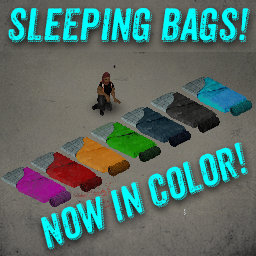
Sleeping Bags! (B41)
por 76561198035595562
This Mod Is No Longer Necessary in Build 42 as sleeping bags have been added to the vanilla game. Thanks for all your Support! Adds working sleeping bags to Project Zomboid! Search places you might find a tent for them. Like Self storage and hunting stores! Rollup sleeping bags to store them as 3d models in your base! Unroll sleeping bags to sleep on them.... I mean You knew that but, ya know... Have Fun Surviving! ChangeLog: Update 2.2: 1/15/2022 Adjusted Distribution of Sleeping Bags to be MUCH lower. Hopefully no more finding boxes full of nothing but sleeping bags.... Sleeping Bags Now Spawn Pre-Rolled in containers. Rolled Sleeping Bag Weight Reduced from 1.3 > 1.0 Un-Rolled Sleeping Bags Remain at 1.3 Tweaked 3d Model Textures Slightly. Won't Be Adding True Actions Lying Support any time soon Due to Floating Player Bug in True Actions Mod When Attempting to Place Lying Player on ground.... I spent like 4 hours trying to fix it... It aint happening anytime soon folks.... Hotfix: Fixed Distribution Error. Update 2.0! Edited World Sprites, Added colored Sleeping bags, Added Rolled Sleeping bags, Changed Sleeping bag Weight. Update 1.1 Edited the WorldSprite Workshop ID: 2714848168 Mod ID: PwSleepingbags

Lifestyle: Hobbies
por 76561198048633600
[url=patreon.com/angryslifestyle][img]https://i.imgur.com/bI2Flkx.png[/img][/url] [url=https://steamcommunity.com/sharedfiles/filedetails/?id=3403870858][img]https://i.imgur.com/v1faUQN.png[/img][/url] [img]https://i.imgur.com/qZ0qxjq.png[/img] [img]https://i.imgur.com/SKh9cwZ.png[/img] [img]https://i.imgur.com/ghGTYK5.png[/img] [img]https://i.imgur.com/Uyko8oF.png[/img] [img]https://i.imgur.com/lyBIyH2.png[/img] [url=https://discord.gg/bfRMRJa8s8][img]https://i.imgur.com/rpiwLs6.png[/img][/url] [h1]Images broken or blocked in your country?[/h1] [url=https://www.patreon.com/posts/workshop-front-145974072]VIEW THEM HERE![/url] [h1]For changelogs please visit:[/h1] [url=https://steamcommunity.com/sharedfiles/filedetails/changelog/2997342681]CHANGE NOTES[/url] [h1]Technical Information:[/h1] [code] Workshop ID:2997342681 Mod ID:Lifestyle Tiles Def:5620 Build 41 Tags Silly/Fun [/code] [h1]Permissions for Modders:[/h1] [code] [b]Ask for permission[/b] This mod can only be added to and extended with the express permission from the original creator. Having received permission, credit must be given to the original creator, both within the files of the mod and wherever the mod roams online. If no permission is received you may not alter the mod. [/code] [h1]Found a bug?[/h1] [url=https://discord.com/channels/1104109742521073774/1263073289690025984]Please report it here![/url] Workshop ID: 2997342681 Mod ID: Lifestyle
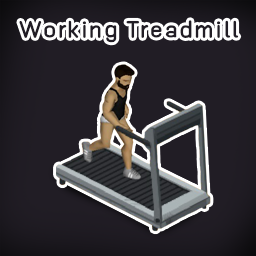
Working Treadmill
por 76561198993933776
[h1]Want to train your fitness?[/h1] With this mod, now you can use a treadmill. You will gain fitness XP a little more than squat and gain sprinting XP as well. If you carry weight is more than a half you will gain strength XP too. -You can change fitness, strength, and sprinting XPmultiply in sandbox options. -You can set XPmultiply to 0 to disable. -The treadmill needs electricity to run. -MP supported. -Get exercise fatigue after workout. [img]https://steamuserimages-a.akamaihd.net/ugc/819002974403344349/DD18664314A26EA83C62E9B0127FFCB35092B53A/[/img] Problems: -Treadmill doesn't consume electricity Workshop ID: 2752895143 Mod ID: FC4WT
Eggon's Modding Utils
por 76561198093590691
This is a support utility mod for my other mods and for any modders that could find useful the provided functionalities. At present the mod contains: [h3]1. Additional events[/h3] [list] [*]OnAfterItemTransfer [*]OnBeforeItemTransfer [*]OnBeforeOpenHood [*]OnHotbarItemAttach [*]OnHotbarItemUnattach [*]OnBeforeFirstInventoryTooltipDisplay [*]OnDisplayContainerContents [*]OnDisplayInventoryContainerContents [*]OnDisplayLootContainerContents [/list]If you'd like to use them, [url=https://steamcommunity.com/workshop/filedetails/discussion/2617575303/2958293022032766400/]check out the documentation[/url]. [h3]2. Some inventory utility functions[/h3] [h3]3. Distribution API[/h3] [h3]Mods using Modding Utils[/h3] [url=https://steamcommunity.com/sharedfiles/filedetails/?id=2631149521]1) Eggon's Have I Found This Book[/url] [url=https://steamcommunity.com/sharedfiles/filedetails/?id=2617651659]2) Eggon's Holsters Tweaker[/url] [url=https://steamcommunity.com/sharedfiles/filedetails/?id=2656148564]3) Eggon's Sharpen Your Blades[url] [url=https://steamcommunity.com/sharedfiles/filedetails/?id=2655192961]4) Thermos of Coffee by Tchernobill[/url] [h3]Credits[/h3] Thanks to [url=https://steamcommunity.com/profiles/76561198329871201/myworkshopfiles/?appid=108600]@Tchernobill[/url] for suggestions regarding events. [h3][b]SUPPORT ME[/b][/h3] If you appreciate my content and want to encourage me to deliver more... consider supporting me on Ko-Fi or Patreon! Also check out [url=https://steamcommunity.com/profiles/76561198093590691/myworkshopfiles/?section=items&appid=108600]my other mods![/url] :) [url=https://ko-fi.com/eggon][img]https://i.imgur.com/ULMwSUt.png[/img][/url] [url=https://www.patreon.com/eggon666][img]https://i.imgur.com/KUfQ5Ma.png[/img][/url] [img]https://i.imgur.com/cKVBRWw.gif[/img] Workshop ID: 2617575303 Mod ID: eggonsModdingUtils
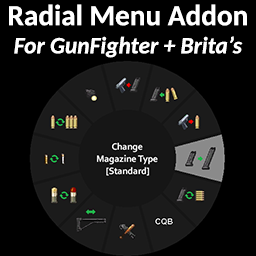
GunFighter Radial Menu
por 76561197962438296
Add-on for Arsenal[26]'s GunFighter Mod / Brita's Weapon Pack that adds their hotkey functions to the firearm radial menu. SP, MP, and controller compatible, but the buttons won't work for player 2 in split-screen as GunFighter was not designed for it. If playing split-screen, player 1 will have to set up weapons for player 2. Hold the reload key (default "R") to access the firearm radial menu. Make sure your GunFighter keybinds are set and don't conflict with other keys, the menu buttons work by simulating those key inputs. If the menu opens instantly and you aren't able to reload by quick pressing R, make sure you have "Display reloading radial menu immediately" disabled in the accessibility options. [h3]GunFighter Mod Versions[/h3] The latest GunFighter update includes two versions, the new 2.0 and the old Legacy version. This mod works with either one and will automatically determine which version of GunFighter you're using to show the correct functions. [b]NOTE: Make sure you enable only ONE version, Legacy OR 2.0. Having both versions enabled at the same time will cause problems.[/b] [h3]CONTROLLER NOTE: NV and Laser attachments[/h3] [i]The latest version of GunFighter made NV Optics and Laser attachments only toggle while aiming. With KB+Mouse the radial menu can still be used for this, but as controller users can't open the radial menu while aiming, you'll have to rely on using the Auto Laser and Auto Night Vision settings in the GunFighter mod options. Alternatively, if you want toggleable NV, you can use the NV Goggles from Brita's Armor mod, which this mod also supports.[/i] [hr][/hr] - [u][b]Buttons are context sensitive[/b][/u] The radial will only show buttons if the currently held gun is capable of that action. Eg. the "Cycle Fire Mode" button will only appear if the gun actually has more than one firemode. Easier to see at a glance what each gun is capable of. - [u][b]Displays current status of each setting[/b][/u] Hovering over a button will display the [i]current[/i] setting in square brackets [-]. Eg. if the CQB button info says [On], that means it is currently active. - [u][b]Weapon Night-Vision Optics[/b][/u] Requires a weapon with NV Optics/Scope installed and the Night Vision API mod: https://steamcommunity.com/sharedfiles/filedetails/?id=2776633989 While aiming. the button will toggle NV on/off. While not aiming, it will cycle the NV mode between Manual and Auto. When set to Auto the NV automatically turns on while aiming. Alternatively, there is also support for NV Goggles from Brita's Armor mod. If you equip one of these, they will override any weapon NV attachments and the button will always act as an On/Off Toggle. - [u][b]What CQB does:[/b][/u] "CQB... Limits target lock range to 15 for those firearms that can fire further than that. This prevents the core game from locking onto far targets in the wrong order, as they are not designed to reach as far as this mod allows them to." - [u][b]Changing Magazine Type[/b][/u] Changing the gun's magazine type will first automatically eject the current magazine if it contains one, then set the new magazine type. The gun will then accept the new magazine type (if you have one) when pressing reload. [hr][/hr] This mod only overrides a couple functions from media\lua\client\ISUI\ISFirearmRadialMenu.lua. Likely not compatible with mods that affect the firearm radial menu. [b][i]NOTE: This mod is not made by Arsenal[26] or Brita, so if you have any issues with the radial menu specifically, please post a comment below rather than asking them about it.[/i][/b] [h1]If you have an issue to report, please include which version of GunFighter you are using (Legacy or the newer 2.0) and whether it happens only with a specific weapon/attachment or any weapon.[/h1] Workshop ID: 2884558190 Mod ID: GunFighter_Radial_Menu
Project Zomboid Guides
Instalar mods en Project Zomboid – Guía del Workshop
Instala mods en tu servidor de Project Zomboid. Steam Workshop, lista de mods y los mods más populares.
Alquilar un servidor de Project Zomboid – Guía multijugador
Configura tu propio servidor de Project Zomboid. Ajustes sandbox, mods y configuración multijugador.
Servidor Project Zomboid con soporte de mods
Instala todos los mods directamente desde el panel con un clic.
Alquilar un servidor Project Zomboid