अपना Rust Server तब फायदेमंद है जब तुम नियम, Wipe साइकल, Map पैरामीटर, Admin अधिकार और Plugins खुद कंट्रोल करना चाहते हो। game-serverhosting पर तुम इसके लिए Panel, File Management, Live Console और Support वाला paid Multi-Game Hosting किराए पर लेते हो, बजाय इसके कि Rust को सिर्फ local या किसी private कंप्यूटर पर साइड में चलाओ।
शर्तें और प्लानिंग
Rust कई Koop Games की तुलना में काफी ज्यादा demanding है, क्योंकि World Size, खिलाड़ी संख्या, Entities, Monuments, Bases, Plugins और Wipe Interval एक साथ असर डालते हैं। इसलिए पहले प्लान करो कि तुम किस तरह का Server चलाना चाहते हो: छोटा Friends Circle, moderated Community Server, PvE Project, Vanilla के करीब राउंड या Comfort Features वाला modified Server।
Starting point के तौर पर मौजूदा recommendation सही रहती है: अगर तुम छोटा Rust Server चलाना चाहते हो तो कम से कम 8 GB RAM चुनो। बड़ी Maps, बहुत सारे खिलाड़ी, लंबे Wipe Cycles और Plugin Sets जरूरत बढ़ाते हैं। नीचे दिए गए values guaranteed performance values नहीं हैं, बल्कि first configuration के लिए practical orientation हैं।
| Map Size | Players | Recommended RAM |
|---|---|---|
| 2500 | 1-25 | 8 GB |
| 3500 | 25-75 | 10 GB |
| 4250 | 75-150 | 12 GB |
| 4500+ | 150+ | 16 GB |
अगर तुम कम PvP pressure वाला Koop Survival Project ढूंढ रहे हो, तो दूसरे Games भी फिट हो सकते हैं। similar group planning के लिए तुम्हें Valheim Server Koop Guide 2026 और Enshrouded Server Koop Guide मिलेंगे।
Server ऑर्डर करना और basic settings सेट करना
- game-serverhosting पर जाओ
- कम से कम 8 GB RAM चुनो
- ऑर्डर करो और automatic setup का इंतजार करो
Provisioning के बाद तुम पहले basic values सेट करते हो। यही तय करते हैं कि तुम्हारा Server list में कैसे दिखेगा, World कितनी बड़ी होगी और Server कितनी बार automatic save करेगा।
server.hostname "मेरा Rust Server"
server.description "Community Server – कोई Pay2Win नहीं"
server.maxplayers 100
server.worldsize 3500
server.seed 12345
server.saveinterval 300
server.hostname और server.description साफ बताने चाहिए कि players को क्या expect करना है: भाषा, playstyle, wipe days, Solo/Duo/Trio rules या PvE/PvP focus। server.maxplayers RAM, CPU performance और moderation capacity के हिसाब से होना चाहिए। server.worldsize और server.seed World तय करते हैं; running Server पर इन values को हल्के में मत बदलो, अगर तुम्हारी Community stable Wipe expect करती है।
सभी Server files – cfg, oxide, World saves और ज्यादा – तुम integrated File Management के जरिए सीधे Panel में edit करते हो। SFTP client की जरूरत नहीं।
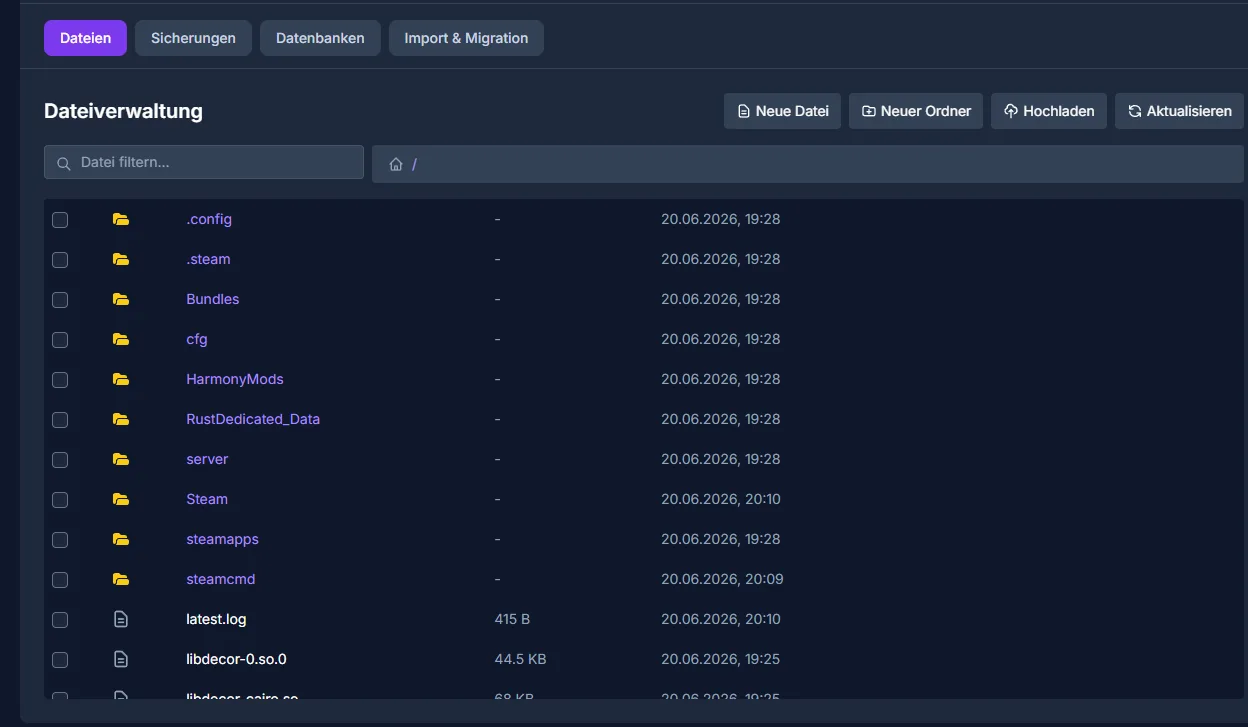
Dedicated Server basics के लिए official primary source के रूप में Facepunch Rust Server documentation की ओर इशारा करता है: wiki.facepunch.com पर Documentation। जब तुम start parameters, server files या console commands को बाद की Rust versions से match करते हो, तो ऐसे official details को हमेशा reference के रूप में use करो।
Admin rights और Console
Administration के लिए तुम्हें संबंधित व्यक्ति की SteamID64 चाहिए। Owner और Moderators को Live Console के जरिए enter करो और फिर configuration save करो।
ownerid <steamid64> "Name"    # Owner जोड़ें
moderatorid <steamid64>       # Moderator जोड़ें
server.writecfg               # Config save करें
server.save                   # World save करें
Commands तुम सीधे Panel की Live Console में enter करते हो – यह first start पर World generation और सभी Server logs real time में भी दिखाती है।
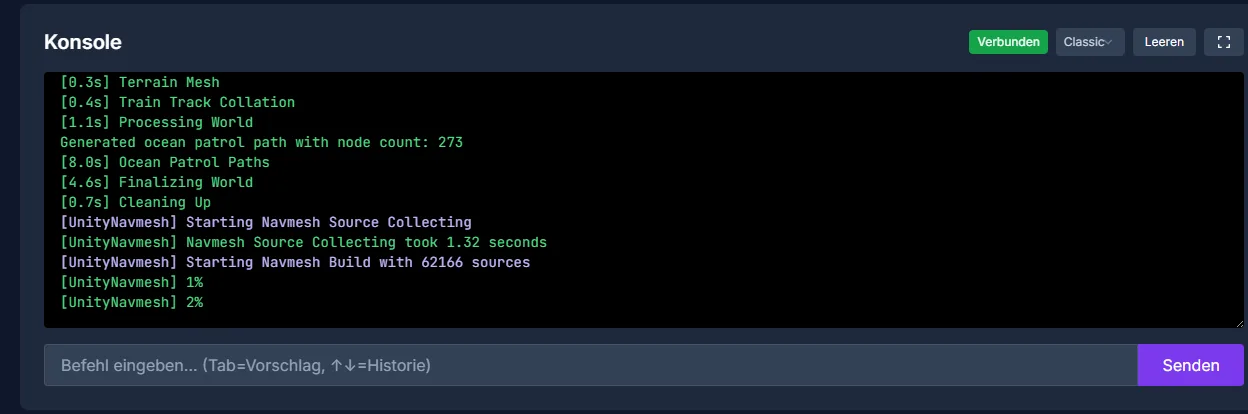
Entry के बाद check करो कि roles सच में apply हो रहे हैं: Server में login करो, कोई harmless admin command चलाओ और फिर Console check करो। अगर किसी Admin के पास rights नहीं हैं, तो ज्यादातर वजह गलत SteamID64, missing server.writecfg या pending restart होती है।
uMod/Oxide और Plugins install करना
uMod/Oxide Rust Plugins के लिए common base है। इसे तभी install करो जब Vanilla configuration साफ start हो। इससे बाद में बेहतर समझ आता है कि problem Rust में ही है, Server configuration में या किसी Plugin में।
- Dashboard में Mods → uMod/Oxide activate करें
- Server automatically update होगा
- Plugins को
/oxide/pluginsfolder में upload करें - Server restart करें
मौजूदा Plugin selection typical Community functions cover करता है:
- GatherManager – Gather rates adjust करना
- NTeleportation – Teleport system
- Clans – Clan system
- BetterChat – Chat formatting
- ServerRewards – Reward system
सब कुछ एक साथ install मत करो। एक Plugin upload करो, Server restart करो, Console और function check करो, फिर अगला करो। खासकर heavily modified Servers में यह approach तुम्हारी काफी troubleshooting बचाती है। साथ ही Plugin versions, configuration changes और dependencies document करो, ताकि Rust update के बाद तुम जल्दी react कर सको।
Performance, Wipes और operation
सबसे important performance levers secret नहीं हैं, लेकिन इन्हें consistently apply करना पड़ता है:
- Map Size: छोटी = बेहतर। 3500 कई Community setups के लिए अच्छा starting point है
- Entity Cleanup: अगर तुम्हारा ruleset allow करता है तो
Rust Entity Cleanupजैसे Plugins use करो - Decay: accelerated Decay Base spam कम कर सकता है
- FPS.limit: CPU load limit करने के लिए 60 पर set करो
सही classification जरूरी है: ये points suitable Server size की जगह नहीं लेते और specific FPS, tickrates या player counts की guarantee नहीं हैं। लेकिन ये load को traceable तरीके से control करने में मदद करते हैं। Events, raid nights और wipe से ठीक पहले logs और save behavior खास तौर पर observe करो।
Wipes transparent तरीके से plan करो। Rust Communities Map Wipes और, अगर use हो, Blueprint Wipes के लिए clear dates expect करती हैं। Rules को Server description, Discord या अपनी Website पर लिखो और उन्हें अचानक मत बदलो, जब players पहले ही progress बना चुके हों।
अगर तुम Multi-Game Hosting compare कर रहे हो या बाद में और projects start करना चाहते हो, तो Minecraft Server Complete Guide 2026 और Palworld Server Guide 2026 भी useful हैं, क्योंकि वे RAM, configuration और Community operation से जुड़े similar decisions cover करते हैं।
Result check करना
Setup के बाद सिर्फ यह मत देखो कि Server online है या नहीं। Specifically check करो:
- Server सही नाम और description के साथ दिखता है।
- Rust Client से connection काम करता है।
- Map Size और Seed तुम्हारी planning के मुताबिक हैं।
- Admin rights
owneridयाmoderatoridके बाद apply होते हैं। server.saveConsole में visible errors के बिना चलता है।- uMod/Oxide error messages के बिना load होता है।
- हर Plugin game में अपना function पूरा करता है।
जब ये points fit हों, तभी Server को public advertise करो या players invite करो।
Troubleshooting
Server start नहीं होता
पहले Live Console check करो। Common reasons हैं गलत start parameters, broken Plugin files या incomplete updates। Test के लिए last added Plugins disable करो और फिर start करो।
Admin rights काम नहीं कर रहे
SteamID64 check करो, server.writecfg run करो और Server restart करो। ध्यान रखो कि तुमने गलती से profile URL, player name या shortened ID enter न कर दी हो।
Plugins load नहीं हो रहे
Check करो कि uMod/Oxide active है और Plugin files सच में /oxide/plugins folder में हैं। फिर Console output पढ़ो: syntax errors, missing dependencies या outdated Plugins आमतौर पर वहीं दिखते हैं।
Server slow लगता है
Test के लिए Map Size, player limit या Plugin count कम करो। साथ ही entity count, decay rules और save intervals check करो। अगर load लगातार high रहता है, तो बड़ा plan या leaner Server concept लगातार नए workarounds से ज्यादा useful है।
जाँच, सीमाएँ और safe rollback
Guide “Rust Server किराए पर लेना और सेट अप करना – पूरी गाइड” Article में described Server type और check time पर visible version state पर लागू होती है। Menu names, available versions, mod या plugin compatibility और required resources updates के बाद अलग हो सकते हैं। इसलिए values को unchecked किसी दूसरे game, loader या server version पर transfer मत करो।
World, savegame, configuration या extensions में changes से पहले affected files का backup बनाओ। फिर सिर्फ एक related step बदलो और उसे उसी client और server version से check करो जिससे तुम बाद में खेलना चाहते हो।
| Checkpoint | Expected result | Abort और rollback |
|---|---|---|
| Server start | Server बिना नई error message के operational state तक पहुंचता है। | Start errors पर change revert करो और last backup restore करो। |
| Connection test | एक test account Panel में दिखाई गई address से connect कर सकता है। | Version या connection errors पर version, port और permissions फिर से compare करो। |
| Function test | Specifically changed function existing world या game data को damage किए बिना काम करता है। | Side effects पर Server stop करो और backed-up files restore करो। |
Successful single test performance या availability guarantee नहीं है। World size, mods, plugins, player count, network path और simultaneous load result बदल सकते हैं। Version, change और test result document करो, ताकि तुम later deviations समझ सको।
FAQ
Rust Server को कितनी RAM चाहिए?
Small setups के लिए 8 GB RAM एक sensible starting point है। बड़ी maps, ज्यादा players, लंबे wipe cycles और कई plugins अधिक RAM require कर सकते हैं। ऊपर वाली table को orientation के रूप में use करो, guarantee के रूप में नहीं।
क्या मुझे Rust Vanilla चलाना चाहिए या uMod/Oxide के साथ?
Vanilla maintain करना आसान है और base game के ज्यादा करीब है। uMod/Oxide तब worthwhile है जब तुम्हें Clans, Teleport, Chat customization या changed Gather rates जैसे targeted Community functions चाहिए।
शुरुआत के लिए कौन सी Map Size sensible है?
कई groups के लिए server.worldsize 3500 एक usable starting point है। छोटी maps operate करना आसान होता है और encounters को बढ़ावा देती हैं, बड़ी maps को ज्यादा resources चाहिए और वे active Communities के लिए ज्यादा fit होती हैं।
क्या हर change के बाद restart करना जरूरी है?
हर console change को restart की जरूरत नहीं होती, लेकिन कई file, plugin और mod changes restart के बाद ही cleanly load होते हैं। पहले server.save से save करो और बाद में logs check करो।
Wipe Cycle में क्या important है?
Map Wipes और possible Blueprint Wipes को जल्दी define करो और clearly communicate करो। Players अपनी progress उसके हिसाब से plan करते हैं; sudden changes trust damage करते हैं और Community build करना कठिन बनाते हैं।