With the CS2 Match Center, you set up a managed match server for Counter-Strike 2 without manually installing MetaMod:Source, CounterStrikeSharp, and MatchZy one by one. You configure teams, map, format, ready system, and GOTV centrally in the panel and keep control over start, restart, end, demos, and stack status.
What the CS2 Match Center Does
The Match Center bundles the match stack made up of MetaMod:Source, CounterStrikeSharp, and MatchZy as a managed installation. Instead of manually uploading archives, checking paths, and loading plugins one by one, you start the setup in the Match tab of your CS2 server. This fits the game-serverhosting positioning: paid multi-game hosting with technical control, support, and traceable operating procedures.
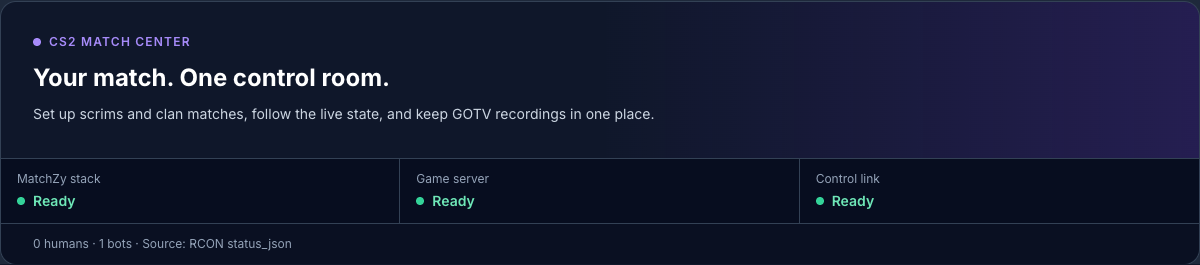
In the upper area, you can see the state of the match stack, game server, and controls. The player row lists humans and bots separately. This information comes from status_json via RCON, so it is a server query, not an estimate. That lets you see whether the server is currently occupied before installations, restarts, or match actions.
The official MatchZy documentation describes the manual installation as a sequence of MetaMod, CounterStrikeSharp, and MatchZy, along with check commands such as meta list and css_plugins list: documentation at shobhit-pathak.github.io. The Match Center maps this stack in the panel and reduces the manual work to guided steps.
No SourceMod for CS2
A common misconception is that a CS2 match server needs SourceMod. For this stack, that is not the case: MatchZy runs on CounterStrikeSharp. AlliedModders lists Counter-Strike 2 in the official SourceMod compatibility overview with the SourceMod status “Unsupported”: documentation at wiki.alliedmods.net.
That is why SourceMod appears in the match stack as “Not yet for CS2”. The entry is visible, but cannot be activated. If the status changes later through verified builds, a provider switch can be prepared within the same interface. For the setup in this guide, however, the rule is: you use MetaMod:Source, CounterStrikeSharp, and MatchZy, not SourceMod.
The Match Stack at a Glance
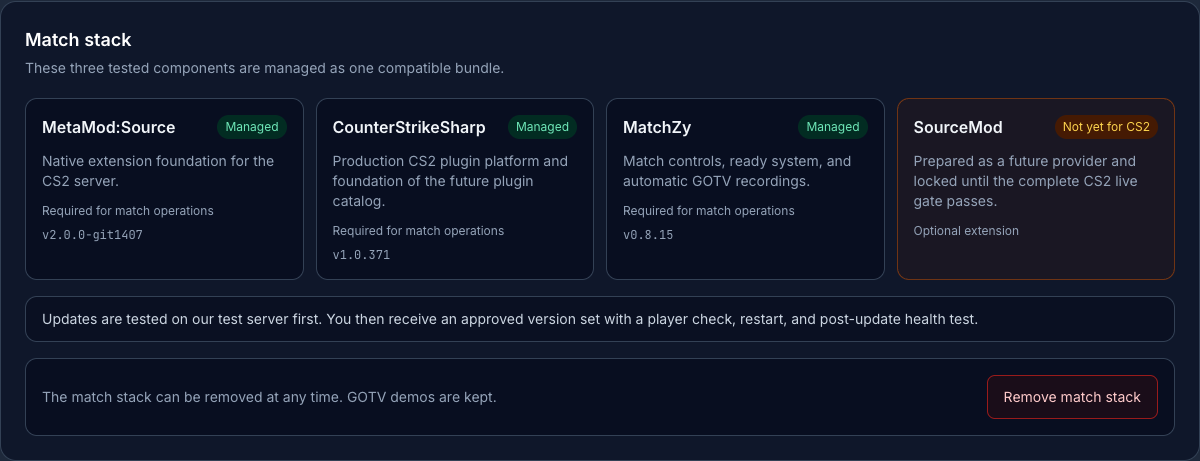
| Component | Version | Status |
|---|---|---|
| MetaMod:Source | v2.0.0-git1407 | Managed |
| CounterStrikeSharp | v1.0.371 | Managed |
| MatchZy | v0.8.15 | Managed |
| SourceMod | – | Not yet for CS2 |
“Managed” means: versions and updates are not pulled onto the server unchecked as latest. The stack is treated as a connected version set. Before deployment, installation, server start, plugin load, RCON status, test match, and GOTV demo are checked. Downloads are validated against their SHA-256 checksum before unpacking.
Before restarts, the system also checks the player status. If the server is occupied or the status cannot be determined reliably, the update waits. This is important because match servers are often used in fixed time slots, and an unplanned restart would disrupt a scrim or tournament match.
Requirements
You need an active CS2 server in the game-serverhosting panel and access to the Match tab. The server should be reachable so status queries via RCON work. Also make sure no players are active on the server when you install, update, or remove the stack.
Your own GSLT token is not required in this setup if your CS2 server is operated in the panel with the token provided by game-serverhosting. For differing special configurations, still check the server details in the panel or ask support before planning production matches.
Install the Match Stack
Open the Match tab of your CS2 server. If your server is enabled for the Match Center, you will see the installation area for the match stack. Start the managed installation. The panel installs MetaMod:Source, CounterStrikeSharp, and MatchZy in the intended paths and prepares the MatchZy configuration.
After installation, the stack should be shown as managed in the panel. Then check the server status. If the server does not start or the plugin status remains unclear, do not start a match. Use the notes in the troubleshooting section first.
Set Up a Match
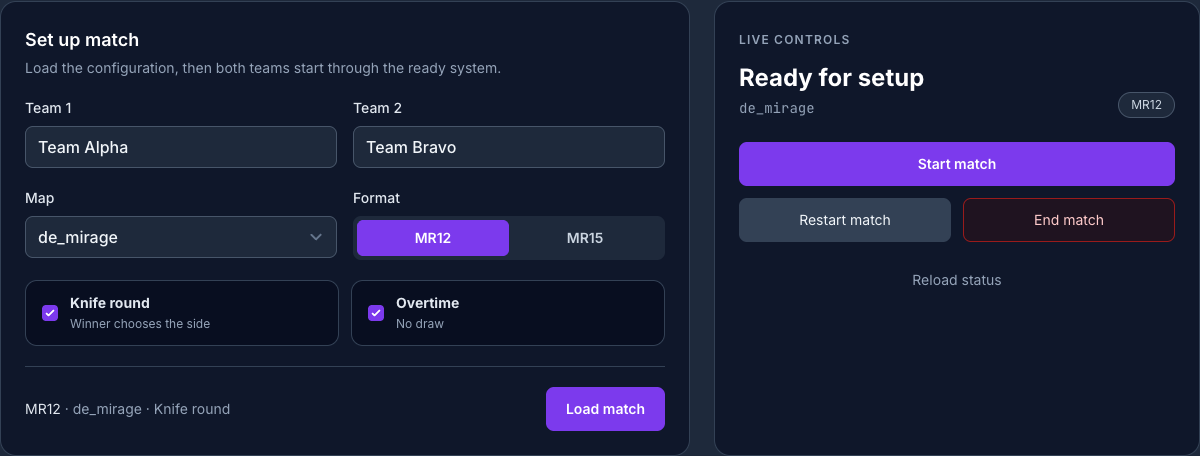
In the “Set up match” form, enter Team 1 and Team 2. Then choose the map, for example de_mirage, and set the format. MR12 and MR15 are available. Optionally, enable Knife Round and Overtime using checkboxes.
Then click “Load match”. This transfers the configuration to MatchZy. The ready system ensures that the match does not start uncontrolled: all players mark themselves ready before you trigger the start.
Live Control and Checks
The live control shows the current match state, such as “Ready for setup”. From there, you start the match, end it, or run a restart. Before starting, you should check three points: Are both teams named correctly? Is the desired map loaded? Is the game server shown as reachable?
During the match, you can continue monitoring the state through the panel. MatchZy continuously saves the round score. In case of disconnects or false starts, you can go back to an earlier round score instead of setting up the whole match again.
Download GOTV Demos
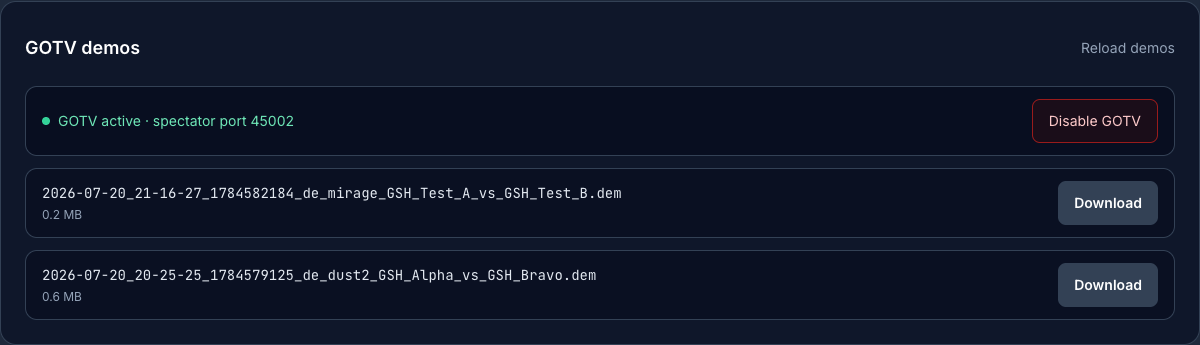
For every match, the Match Center records a GOTV demo if GOTV is active. In the GOTV section, you can see the status and the spectator port. The screenshot shows 45002 as an example; your actual port is assigned individually.
You can use the toggle to disable or re-enable GOTV when needed. Completed demos are available for download in the panel. Download the demo after the match and check whether the file, date, and match reference match the game that was played.
Remove the Match Stack
You can uninstall the managed stack again via “Remove match stack”. The same safety rules apply as for installation and updates: active players or an unknown player status block the restart.
Only the managed paths are removed: MetaMod:Source, CounterStrikeSharp including MatchZy, and the managed MatchZy configuration. GOTV demos remain as customer data. Self-installed third-party plugins are not intentionally removed.
Availability and Context
The Match Center is being enabled for CS2 servers step by step. Internal test servers and individually enabled pilot servers run first. Your server receives the feature as soon as its server ID has been added to the allowlist. This statement is a snapshot as of July 22, 2026.
If you run other games with your team besides CS2, the internal guides on server structure can help you further: the guide Rent and Set Up a Valheim Server – Co-op Guide 2026 shows a similar approach for co-op hosting, while Rent and Set Up a V Rising Server – Vampire Guide explains how to set up another dedicated multiplayer server.
Troubleshooting
Match stack is not shown as managed
First check whether the installation has finished and the server was allowed to restart. If players were active or the player status was unknown, the restart may have been deliberately blocked. Wait for an open time slot and start the installation again through the panel.
Match does not load
Check team names, map selection, and format. Only use maps offered in the dropdown. If the panel cannot read the server status cleanly, the match configuration should not be used in production until RCON and server status are reachable again.
Ready system does not start
The match only starts once the players are ready and the live control shows the appropriate state. Check whether all intended players are connected and whether bots or wrong slots are distorting the player overview.
GOTV demo is missing
Check whether GOTV was active before the match. Also make sure the match ended normally. If no demo is displayed, check the GOTV section again later or contact support with the match time, server ID, and map.
Checks, Limits, and a Safe Way Back
The guide “Set Up the CS2 MatchZy Match Center – One-Click Match Server with GOTV” applies to the server type described in the article and the version state visible at the time of checking. Menu names, available versions, mod or plugin compatibility, and required resources may differ after updates. Therefore, do not transfer any values to another game, loader, or server version without checking them first.
Before making changes to the world, savegame, configuration, or extensions, create a backup of the affected files. Then change only one connected step and test it with the same client and server version you want to play with later.
| Checkpoint | Expected Result | Abort and Way Back |
|---|---|---|
| Server start | The server reaches the operational state without a new error message. | If start errors occur, undo the change and restore the latest backup. |
| Connection test | A test account can connect using the address shown in the panel. | If version or connection errors occur, compare version, port, and permissions again. |
| Function test | The specific changed function works without damaging existing world or game data. | If side effects occur, stop the server and restore the backed-up files. |
A successful individual test is not a performance or availability guarantee. World size, mods, plugins, player count, network route, and simultaneous load can change the result. Document the version, change, and test result so you can trace later differences.
FAQ
Do I need SourceMod for my CS2 match server?
No. For this CS2 match stack, you use CounterStrikeSharp as the plugin platform. MatchZy runs on it, not on SourceMod.
Which components does the Match Center install?
The managed stack consists of MetaMod:Source, CounterStrikeSharp, and MatchZy. SourceMod is shown, but it is not active for CS2 in this setup.
Do I need my own GSLT token?
No, if your CS2 server is operated with the GSLT provided in the game-serverhosting setup. In special cases, you should check the server details in the panel.
Will my GOTV demos be kept if I remove the match stack?
Yes. GOTV demos count as customer data and are kept when you remove the managed match stack.
Can I restore rounds after a disconnect?
Yes. MatchZy saves round scores, so you can go back to an earlier state in case of disconnects or false starts.
Is the Match Center available for every CS2 server?
As of July 22, 2026, it is being enabled step by step. Your server needs explicit approval in the pilot list.