CS2-Performance को तुम किसी एक जादुई Tickrate-Setting से ऑप्टिमाइज़ नहीं करते, बल्कि स्थिर Server-FPS, साफ नेटवर्क स्थितियों, उपयुक्त खिलाड़ी संख्या और नियंत्रित Plugins से करते हो। Sub-Tick-System क्लासिक 64- या 128-Tick चर्चाओं के मूल्यांकन को बदल देता है: निर्णायक बात यह है कि तुम्हारा Server वास्तविक लोड में लगातार प्रतिक्रिया देता है या नहीं और कनेक्शन समस्याएं समझने योग्य तरीके से मापी जा सकती हैं या नहीं।
Tickrate, Sub-Tick और अपेक्षा प्रबंधन
Tickrate क्या है?
Tickrate यह तय करती है कि Server प्रति सेकंड कितनी बार गेम स्थिति की गणना करता है। पुराने Counter-Strike-Versionen में यह एक केंद्रीय तुलना मान था, क्योंकि मूवमेंट, हिट रजिस्ट्रेशन और अपडेट्स काफी हद तक निश्चित Server-Ticks से जुड़े थे।
| Tickrate | Updates/s | उपयोग |
|---|---|---|
| 64 Tick | 64 | Standard (Matchmaking) |
| 128 Tick | 128 | Competitive (FaceIT) |
CS2 Sub-Tick System
CS2 एक नया Sub-Tick-System इस्तेमाल करता है:
- Actions सटीक टाइमस्टैम्प के साथ Server को भेजे जाते हैं
- Server Tick की गणना करता है और Position को interpolate करता है
- सिद्धांत रूप में Tickrate का प्रभाव कम होना चाहिए
व्यवहार में इसका मतलब है: अपने Server को केवल Startparameter में दी गई किसी संख्या से मत आंको। अगर खिलाड़ी Delay, Rubberbanding या असमान हिट रजिस्ट्रेशन की शिकायत करते हैं, तो पहले CPU-Load, Server-FPS, Packet Loss, Ping variation, Map complexity और Plugin interventions जांचो। game-serverhosting जैसा paid Multi-Game-Hosting यहां खासकर तब उपयोगी है, जब तुम्हें तकनीकी नियंत्रण, Support और पारदर्शी संचालन प्रक्रियाएं चाहिए हों, बजाय इसके कि सब कुछ किसी भी Root-System पर खुद चलाओ।
आधिकारिक प्राथमिक स्रोत के रूप में Valve का Steam-Support प्रासंगिक है: Source Dedicated Servern पर Steam documentation Servername, maximum player count, UDP-Port, RCON और “Secure (Valve Anti-Cheat)” option जैसी चीजों का वर्णन करती है: help.steampowered.com पर documentation. CS2-specific Server starts के लिए Valve का अपना rules repository Major-Setups के लिए SteamCMD के साथ app_update 730 validate और ./cs2 -dedicated के जरिए start बताता है: github.com पर documentation.
Optimization से पहले की requirements
Values बदलने से पहले Server को reproducibly start होना चाहिए, reachable होना चाहिए और तुम्हारी target configuration के साथ चलना चाहिए। कम से कम ये जांचो: current Server-Build, सही Game Server Login Token, खुला UDP-Port, काम करने वाली Maprotation, RCON access और तुम्हारी server.cfg की documented initial state। साथ ही नोट करो कि realistic रूप से कितने खिलाड़ी एक साथ खेलेंगे और क्या Workshop-Maps, Training-Plugins, Retake-Modi, Deathmatch या tournament setups चल रहे हैं।
Performance problems को साफ तरीके से तभी evaluate किया जा सकता है जब तुम idle state और match operation को अलग रखो। कोई Server panel में सामान्य दिख सकता है और फिर भी Utility-Spam, बहुत सारी Entities या Plugin-Events के दौरान थोड़े समय के लिए drop कर सकता है। इसलिए कई players या bots के साथ ऐसा test plan करो जो तुम्हारे real operation जैसा हो।
Network optimization
नीचे दिए गए Client values original setup से लिए गए हैं और तब checkpoint के रूप में काम आ सकते हैं जब तुम Client या training environments control करते हो। इन्हें guaranteed cure-all की तरह मत लगाओ; CS2 updates behavior बदल सकते हैं, और server-side limits या matchmaking environments values को अलग तरह से handle कर सकते हैं।
rate 786432
cl_interp 0
cl_interp_ratio 1
cl_cmdrate 128
cl_updaterate 128
इसके बाद measurement महत्वपूर्ण है। Stable ping, packet loss की अनुपस्थिति और movement, spray control और peeks के दौरान consistent response पर ध्यान दो। अगर एक ही region के कई players similar problems report करते हैं, तो यह ज्यादा संभावना Server, routing या load issues की ओर इशारा करता है। अगर केवल individual players affected हैं, तो उनकी connection, WLAN, background downloads और Server location से regional distance जांचो।
Server-Performance मापना
Measurements running round के दौरान इस्तेमाल करो, केवल start के तुरंत बाद नहीं। नीचे दिए गए commands practical diagnosis points के रूप में काम आते हैं:
sv_showfps 1          # FPS दिखाएं
net_graph 1           # Network statistics
stats                 # Server performance
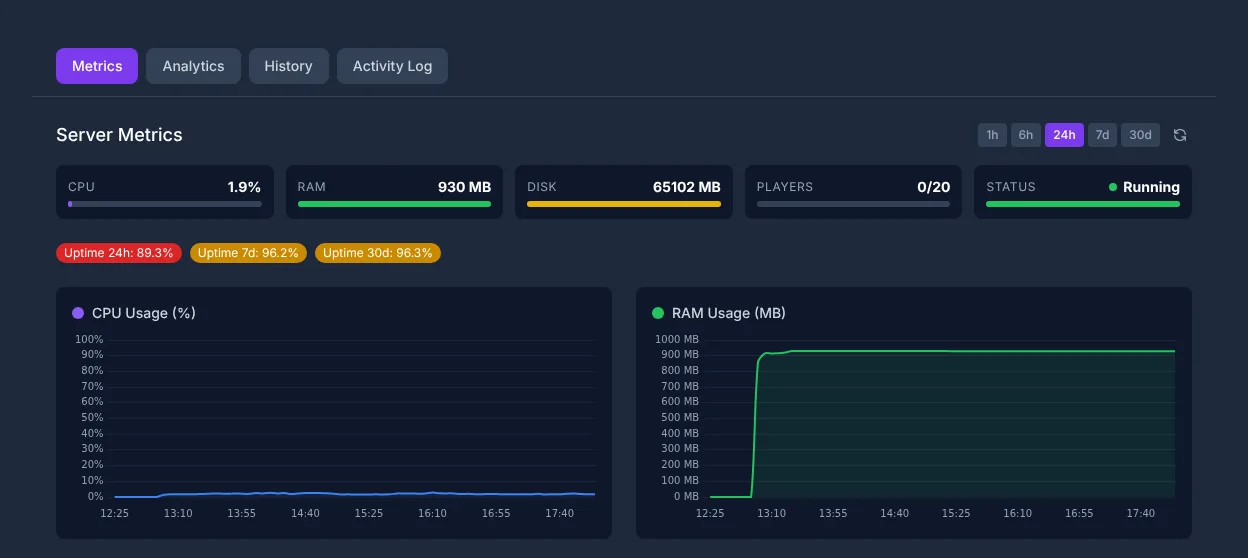
हर test run में वही situations जांचो: Warmup, full round, कई grenades, map change और कई consecutive matches। अगर CPU spikes बिल्कुल lags के साथ coincide करते हैं, तो सबसे likely tuning point कोई network Cvar नहीं, बल्कि load reduction या ज्यादा CPU headroom है। अगर RAM कम पड़ती है, तो map changes, plugin logs और longer uptime observe करो। दूसरे games में weighting अलग होती है; context के लिए तुम्हें Palworld Server-Performance और RAM guide और Valheim Server rent और setup guide में similar resource planning मिलती है।
Server admins के लिए performance tips
- CPU priority: CS2 Server CPU-heavy होते हैं, RAM-heavy नहीं
- Player count: 5v5 = optimal, 10v10 को ज्यादा CPU चाहिए
- Workshop-Maps: Standard-Maps से ज्यादा resources ले सकते हैं
- Plugins limit करो: हर Plugin performance cost करता है
- Server region: अपने players के पास location चुनो (DE = Frankfurt/Nürnberg)
इन points को test sequence के रूप में implement करो। Standard-Map और बिना additional Plugins के start करो। अगर Server इससे stable चलता है, तो extensions को एक-एक करके activate करो। Workshop-Maps में file size, entity density, scripting और logs पर ध्यान दो। Plugins में जांचो कि वे actively maintained हैं या नहीं और current CS2 version के साथ fit होते हैं या नहीं। कोई Plugin जो केवल occasionally errors throw करता है, फिर भी certain events के दौरान frametimes खराब कर सकता है।
Anti-Cheat (VAC) और tournament operation
VAC CS2 Servern पर default रूप से active होता है। Tournaments के लिए हम अतिरिक्त रूप से recommend करते हैं:
- Anti-Cheat-Plugin के साथ Workshop-Map
- Replay recording के लिए GOTV activate करो
Anti-Cheat expectations realistic रखो: VAC Valve का system है, लेकिन साफ tournament administration की जगह नहीं लेता। Organized matches के लिए तुम्हें RCON access limit करना चाहिए, server passwords regularly बदलने चाहिए, GOTV/CSTV पहले से test करना चाहिए और logs preserve करने चाहिए। Plugins के मामले में विशेष सावधानी जरूरी है, क्योंकि हर extension seriously maintained नहीं होती या future CS2 updates के साथ compatible नहीं रहती।
Result जांचना
एक optimized CS2-Server real load में consistent Server-FPS, कोई noticeable CPU spikes नहीं, target region के players के लिए stable ping और console में कोई recurring errors नहीं दिखाता। अपनी working configuration को date, player count, map, plugin list और observed behavior के साथ document करो। इस तरह updates या plugin changes के बाद तुम targeted comparison कर सकते हो, बजाय हर lag report पर शुरू से शुरू करने के।
Troubleshooting
अगर players lag report करते हैं, तो पहले time, map, player count, ping, loss और यह पूछो कि क्या कई players simultaneously affected थे। उसके बाद उसी period में server metrics check करो। Update के बाद problems होने पर server files validate करो, new plugins deactivate करो और Standard-Map test करो। Routing problems में players की majority के पास location मदद करती है। अगर केवल individual players affected हैं, तो cause अक्सर client-side या उनके respective internet provider के पास होती है।
Check, limits और safe rollback
Guide “CS2 Server Tickrate और Performance ऑप्टिमाइज़ करना” article में described Server type और check time पर visible version state के लिए लागू है। Menu names, available versions, mod या plugin compatibility और required resources updates के बाद differ कर सकते हैं। इसलिए values को unchecked किसी दूसरे game, loader या server version पर transfer मत करो।
World, savegame, configuration या extensions में changes से पहले affected files का backup बनाओ। इसके बाद केवल एक related step बदलो और उसे उसी Client और Server version के साथ check करो जिसके साथ तुम बाद में खेलना चाहते हो।
| Checkpoint | Expected result | Stop और rollback |
|---|---|---|
| Server start | Server बिना नए error message के operational state तक पहुंचता है। | Start errors पर change revert करो और last backup restore करो। |
| Connection test | एक test account panel में shown address से connect कर सकता है। | Version या connection errors पर version, port और permissions फिर से match करो। |
| Function test | specifically changed function existing world या game data को damage किए बिना काम करती है। | Side effects पर Server stop करो और backed-up files restore करो। |
Successful single test कोई performance या availability guarantee नहीं है। World size, Mods, Plugins, player count, network path और simultaneous load result बदल सकते हैं। Version, change और test result document करो, ताकि तुम बाद की deviations समझ सको।
FAQ
क्या मैं CS2 को बस 128 Tick पर set कर सकता हूं?
CS2 Sub-Tick इस्तेमाल करता है, इसलिए CS:GO वाली classic 128-Tick argumentation एक-से-एक लागू नहीं होती। Stable Server-FPS, good connection और reproducible tests पर focus करो।
CS2 के लिए कितने players meaningful हैं?
Classic Competitive matches के लिए 5v5 obvious target size है। 10v10 जैसे बड़े setups काम कर सकते हैं, लेकिन उन्हें ज्यादा CPU headroom चाहिए और real load में test किया जाना चाहिए।
क्या Workshop-Maps performance risk हैं?
हां, वे Standard-Maps से ज्यादा resources require कर सकते हैं। नई Workshop-Maps को individually test करो और full rounds के दौरान CPU, RAM, console errors और player feedback observe करो।
Tickrate number से ज्यादा कौन से metrics important हैं?
Stable Server-FPS, low और consistent ping, no packet loss, no CPU spikes और real gameplay situations के दौरान error-free console ज्यादा important हैं।
क्या मुझे बहुत सारे Plugins install करने चाहिए?
केवल तब, जब तुम्हें उनकी सच में जरूरत हो। हर Plugin complexity बढ़ाता है और performance या stability को affect कर सकता है। Plugins को individually activate करो और effect document करो।