Chunky generates world areas in advance and can thereby reduce the load caused by new chunk generation while playing. Choose the world, shape and radius deliberately and check your free storage. Pre-generated chunks still have to be loaded and simulated later; lag is not guaranteed to disappear as a result. The screenshots come from a test server running Paper 1.21.4 and Chunky 1.4.40.
Installation
Chunky is available as a plugin for Paper and Spigot and as a mod for Fabric, NeoForge and Forge. In the panel you will find it under Plugins → Browser; the plugin page also offers the Chunky assistant, which starts the generation and displays the progress. The commands require the chunky.command permission; they belong in the moderation group.
Defining the Area and Starting
Generation runs in four steps:
/chunky world world
/chunky shape square
/chunky center 4000 4000
/chunky radius 128
/chunky start
world selects the world (default: the world you are standing in). shape defines the shape; square is the usual one, circle saves corners. center is the center point, radius the distance in blocks to the edge. Chunky confirms every setting in chat and reports the world, shape, center and radius on start.
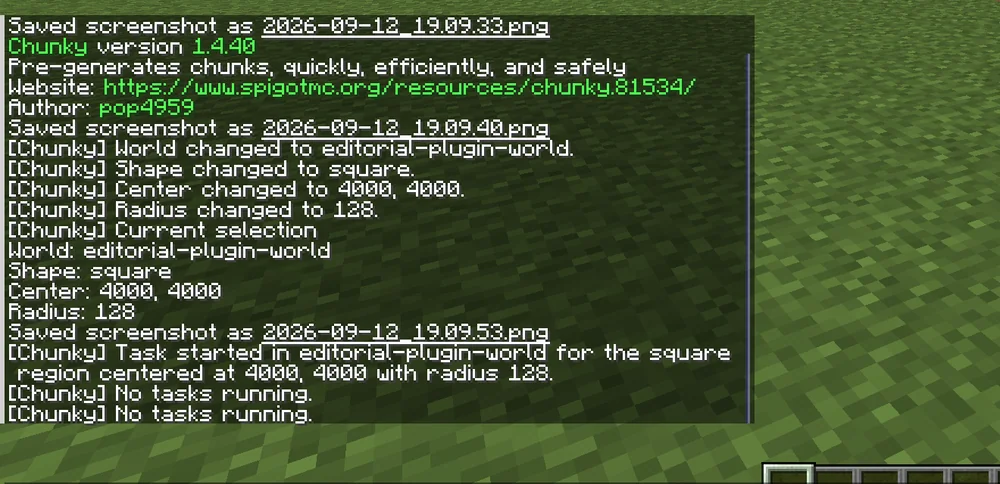
If the world has a world border, /chunky worldborder adopts it directly as the area. This is the cleanest way, since players can't get beyond it anyway.
How Large Should the Area Be?
For a square area, the surface can be roughly planned as (2 × radius)². The chunks actually processed depend on chunk boundaries, center and selection; check them in Chunky rather than deriving an exact task count from the block area. Disk usage depends on the world, dimension, entities and extensions. Measure it on a small area and plan sufficient reserve; a fixed KB-per-chunk figure is not a reliable capacity guarantee. Before starting, check your server's free storage in the panel.
Choose the radius according to your exploration goal and world border. The number of players alone does not determine it. The Nether has an 8:1 coordinate scaling for portals; for its own exploration and pre-generation, define a suitable area separately.
Pre-Generating an Already Played World Afterwards
Chunky only generates chunks that are not yet on disk. You can therefore catch up on a world that has already been played on at any time: areas that were already visited are skipped, and progress jumps quickly at the beginning and slows down once unknown terrain begins.
The order matters with a new world border: first set the border, then /chunky worldborder, and only then /chunky start. Otherwise you generate chunks that lie beyond the border and will never be entered — they cost storage space without any benefit. Overworld, Nether and End are separate worlds and each needs its own run with /chunky world.
During Generation
Do not assume a guaranteed automatic player priority. Watch the server load and pause the task if needed as soon as players are disturbed by the generation. Even so, it is worth letting large areas run at night or while the server is empty. Useful commands:
/chunky progressshows progress, chunks per second and remaining time./chunky pause worldhalts and saves the task state;/chunky continue worldresumes a saved task./chunky cancel worldaborts; chunks that have already been generated are kept.
Replace world with the actual world folder. For pause, continue and cancel, an omitted world argument affects all worlds; the previously selected world does not automatically restrict these management commands.
Speed depends on the CPU. Measure the actual rate with /chunky progress; world generation, hardware, dimension and mods change the runtime.
Common Mistakes
- Server full. Generation aborts when the disk fills up, and the server can no longer save. Check storage beforehand and create a backup.
- Wrong world. The command used the world you were standing in. Set
/chunky worldwith the name. - Generation stands still after a restart. Tasks are saved on pause and on normal shutdown. Automatic resuming is off by default and requires
continue-on-restart; check existing tasks before manually using/chunky continue world. A hard crash can limit the last saved state. - Area too small. Chunky generates nothing outside the area; players who travel further trigger normal chunk loading again.
FAQ
How long does pre-generation take?
A fixed runtime per core or radius cannot be stated reliably without measuring. /chunky progress gives chunks per second and the estimated remaining time for your specific server.
Does the server have to be empty during pre-generation?
An empty server is not required. However, automatic player priority is not a general guarantee; check TPS and pause if the load is disruptive. For large areas, a time window with an empty server is still worthwhile, because the run then finishes significantly faster.
How much storage space do I need?
That depends on the world content and extensions. Measure a small test area and plan a reserve instead of adopting a fixed GB-per-radius rule. Check the free storage in the panel before you start — if the disk fills up, the server can no longer save.
Do I have to pre-generate the Nether and End separately?
Yes, each dimension is its own world and needs its own run with /chunky world. The 8:1 portal coordinate scaling does not automatically determine a sufficient exploration radius. Choose the Nether area to match your planned routes.
Is progress lost on a restart?
Chunky saves the task when pausing and on normal shutdown. By default it does not start again on its own afterwards; continue-on-restart exists for that. Check the saved task and resume it if needed with /chunky continue world. /chunky cancel world discards the task but does not remove any chunks that have already been generated.
Further Guides
Whether chunk loading is really the cause of stutters is shown by spark: Analyzing Lag. The world border and other basic values are explained in Configuring server.properties.
Sources
- Chunky wiki: https://github.com/pop4959/Chunky/wiki
- Chunky FAQ: performance, storage and resuming after a restart
- Commands: https://github.com/pop4959/Chunky/wiki/Commands
- Project page: https://www.spigotmc.org/resources/chunky.81534/
Measuring Runtime and Storage on a Small Area
Start with a limited test area in the intended dimension. Note the progress, the actual chunks per second and the additional disk usage. Use these values as a rough plan for a larger area instead of adopting universal minute or KB-per-chunk figures. Watch TPS during the task and pause if the load is disruptive. Choose the Nether radius according to the area you actually need; the portal coordinate scaling is not a mandatory limit for exploration. After a pause, check the saved task and target world before you resume. Chunks that have already been generated remain even after cancellation.
Chunky: view an example
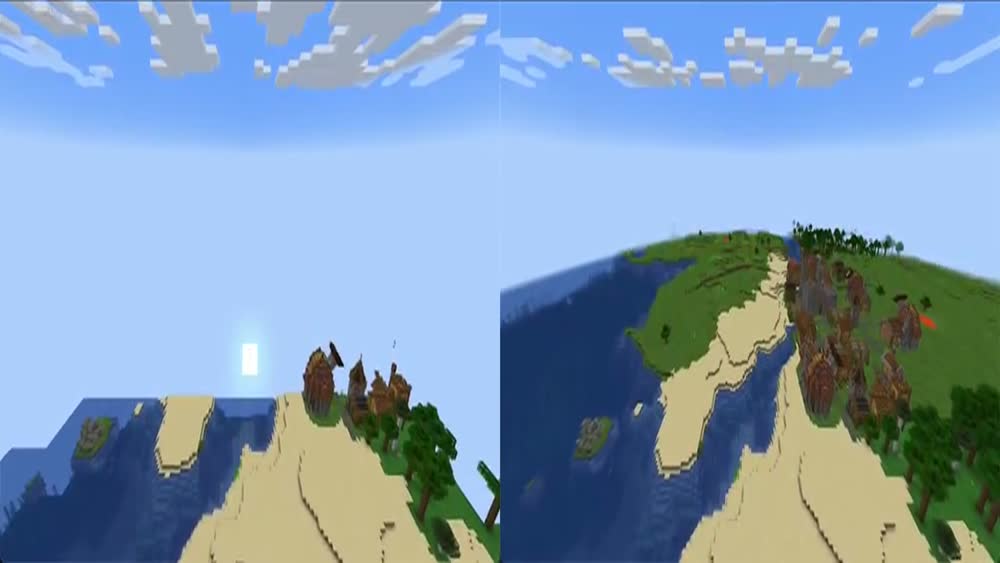
Our own captures from a demonstration environment. The version and setup shown may differ from your server.
- The same route illustrates the before-and-after difference. The second run may also benefit from caching, so this is not a general performance measurement.
Minecraft-Demo · 2026-09-25

1.4.40