
For a Garry’s Mod TTT server, you need the terrortown gamemode, installed TTT maps and the right ConVars. Test a vanilla TTT round without extra roles first; then add Workshop content and moderation. That way, any error can be traced back to a specific change.
The Facepunch guide for dedicated servers documents installation and launch parameters; the map and gamemode must match the configuration that is actually loaded.
What Is Garry's Mod?
Garry's Mod (GMod for short) is a sandbox game platform based on the Source engine. There are no fixed objectives. Instead, GMod offers a huge community library of game modes, addons and maps that completely transform the experience. The most popular game mode is TTT (Trouble in Terrorist Town): a social deduction game similar to Mafia or Among Us, in which Innocents and Detectives have to identify the hidden Traitors.
To run your own server, you need your own Garry's Mod dedicated server setup with a chosen game mode. At game-serverhosting, everything comes preconfigured with active Workshop support.
Order a Server
Select Garry's Mod as the game in the order wizard. TTT is the most played mode, but you can use the same server slot later for other game modes (Sandbox, DarkRP, Deathrun) by changing the gamemode flag in the startup configuration.
After ordering, your server is ready to go within a few minutes. You can see its status in the dashboard.
If you want to set the hostname, slots, password and the basic gamemode properly first, start with the general guide to setting up a Garry's Mod server. This guide then focuses on TTT balance, maps and moderation.
Edit Server Variables in the Panel
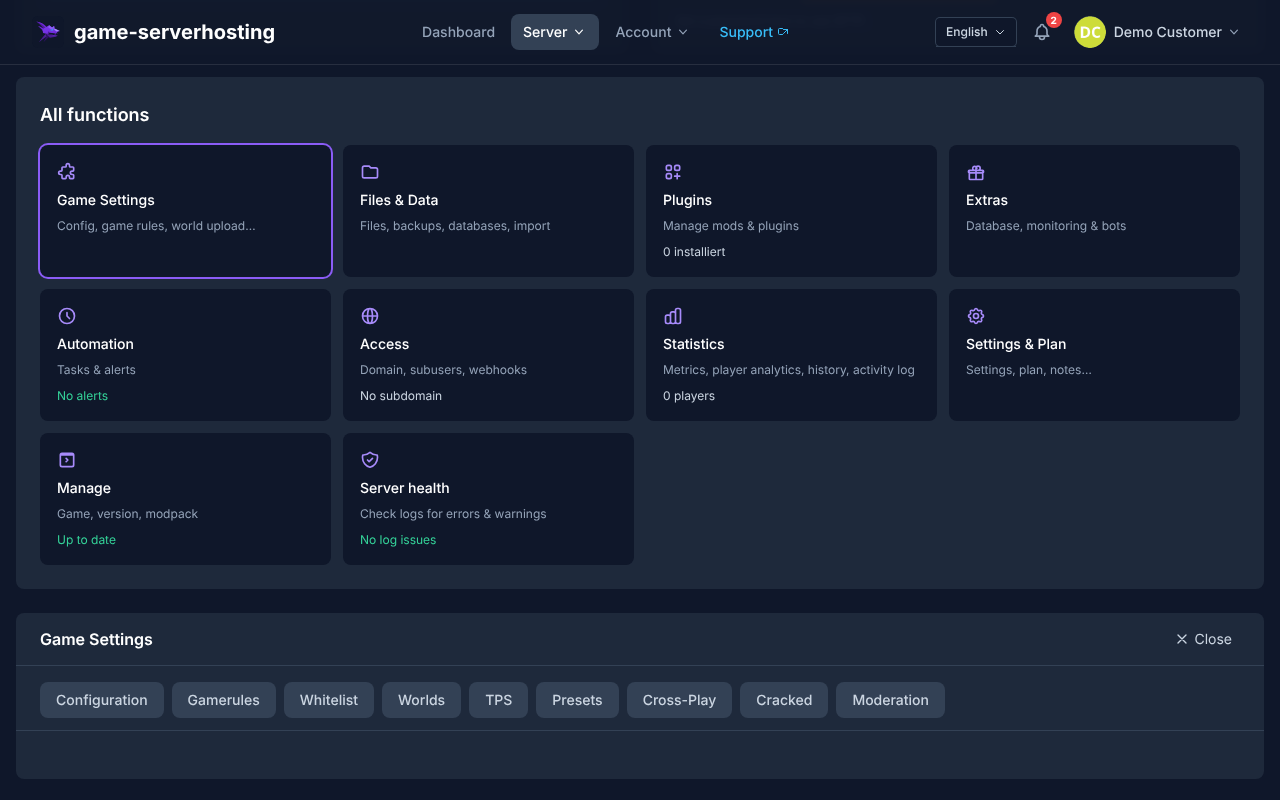
You set the most important Source server variables, such as sv_cheats, sv_gravity, voice chat and the sbox_ limits (props, ragdolls, vehicles, NPCs), directly in the panel using a guided form. game-serverhosting writes them safely to server.cfg (including a backup), so you don't have to edit the file manually. You'll find the editor in the server panel under Game settings → Configuration.
 (Enlarge image)
Set Up TTT Mode
Step 1: Set the Gamemode to TTT
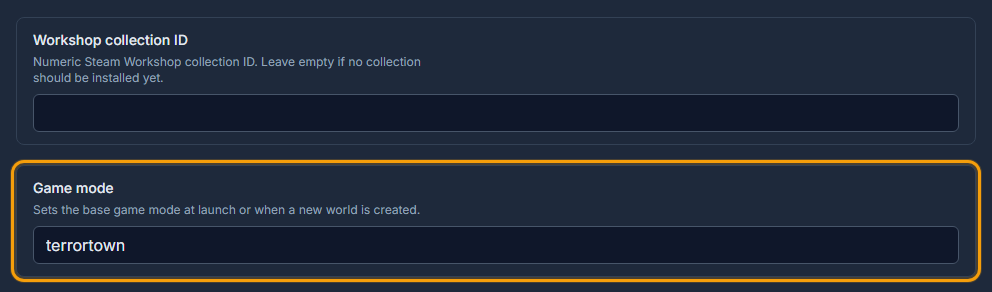
In the panel under Game settings → Server Variables, pick terrortown as the game mode. This corresponds to the parameter:
GAMEMODE=terrortown
 (Enlarge image)
For a self-managed launch, the launch parameter is +gamemode terrortown. A gamemode line in server.cfg does not replace the selection before the map loads.
Restart the server after the change. GMod will then automatically load the TTT game mode.
Step 2: Adjust the TTT Configuration
TTT settings are controlled via ConVars in server.cfg. The following table has been checked against the TTT source code by Facepunch that ships with Garry's Mod and its karma configuration. “Default value” means the vanilla TTT value; addons like TTT2 can add their own variables or change behavior.
| ConVar | Default value |
Effect |
Practical note |
|---|---|---|---|
ttt_ |
2 |
Minimum number of active players before a round is prepared |
Suitable for testing; for regular TTT rounds, a larger group makes sense. |
ttt_ |
0.25 |
Share of players who become Traitors |
0.25 equals 25 percent; the actual number is limited to whole roles. |
ttt_ |
32 |
Maximum number of Traitors |
This is not a minimum value. Only lower it if you deliberately want to cap large groups. |
ttt_ |
0.13 |
Share of players who can become Detectives |
Works together with the minimum player count and the cap. |
ttt_ |
32 |
Maximum number of Detectives |
For typical private groups, you can keep the default. |
ttt_ |
8 |
Detectives are selected from this player count upwards |
Below this value, Innocents play against Traitors without a Detective. |
ttt_ |
10 |
Maximum round duration without Haste adjustment |
The unit is minutes; ttt_ is not a vanilla TTT ConVar. |
ttt_ |
30 |
Preparation time before the round starts |
Values that are too short can feel hectic with slow clients or large maps. |
ttt_ |
30 |
Results phase after the round ends |
Gives players time to see the result and role reveal. |
ttt_karma |
1 |
Enables the karma system |
1 lets friendly fire affect later damage potential. |
ttt_ |
1000 |
Karma of a new player |
Should not be higher than ttt_. |
ttt_ |
450 |
Threshold for low-karma kick/ban |
Only applies together with enabled low-karma automation. |
For a first vanilla TTT test, you can set the confirmed default values explicitly:
ttt_minimum_players 2
ttt_traitor_pct 0.25
ttt_traitor_max 32
ttt_detective_pct 0.13
ttt_detective_max 32
ttt_detective_min_players 8
ttt_roundtime_minutes 10
ttt_preptime_seconds 30
ttt_posttime_seconds 30
ttt_karma 1
ttt_karma_starting 1000
Afterwards, change only a few values per test run and use find <convar> or cvarlist <prefix> in the server console to check whether vanilla TTT or your addon actually recognizes the variable. A message like Unknown command means the line was not applied.
Step 3: Set Up TTT Maps
TTT works best with dedicated TTT maps (prefix: ttt_). Create the file garrysmod/cfg/mapcycle.txt:
ttt_minecraft_b5
ttt_67thway_v14
ttt_rooftops_2016_v1
ttt_dolls
The maps must be present on the server. The easiest way is via a Workshop collection (see below).
Set Up a Workshop Collection
The easiest way to get maps and addons onto your server is a Steam Workshop collection.
For the collection ID, Workshop launch parameters, resource.AddWorkshop() and the separation between server and client content, use the in-depth guide Install Garry's Mod Workshop Addons. In the Garry's Mod browser for mods and plugins, you can then compare suitable content before adding it to your production collection.
Create a Collection
- Go to https://steamcommunity.com/workshop/browse/?appid=4000
- Click "Your Workshop Items" → "Create Collection"
- Add all the maps, weapons and content packs you want
- Publish the collection as “Public” or “Unlisted” (the server can't load private collections)
Enter the Collection ID in the Panel
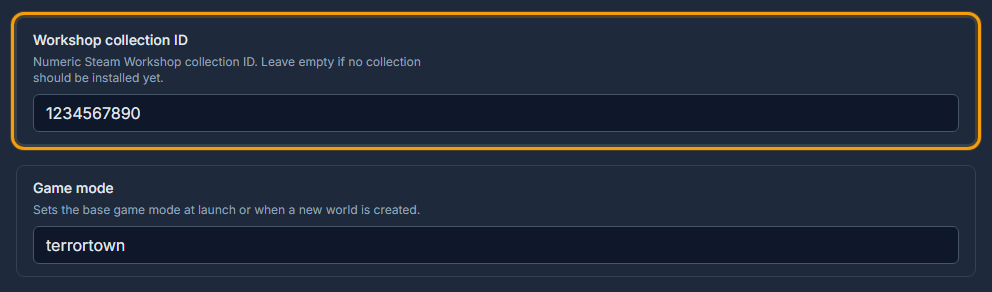
In the panel under Game settings → Server Variables, enter the Workshop collection ID:
WORKSHOP_ID=<collection_id>
 (Enlarge image)
You can create the Steam Web API key for free at https://steamcommunity.com/dev/apikey. The server automatically downloads all items in the collection on startup.
ULX: Admin Tool for GMod
ULX is the standard admin framework for Garry's Mod. It offers a comprehensive command set for admins as well as a permission system (ULib) for fine-grained permissions.
Install ULX
- Subscribe on the Steam Workshop: ULX (https://steamcommunity.com/sharedfiles/filedetails/?id=557962280) and ULib
- Add both to your Workshop collection, or upload them manually to
garrysmod/addons/
Assign Admin Rights
Permissions are set in the server console or via RCON:
ulx adduser "PlayerName" superadmin
ulx adduser "ModeratorName" admin
Important ULX Commands
| Command | Function |
|---|---|
ulx ban <name> <minuten> <grund> |
Ban a player |
ulx kick <name> <grund> |
Kick a player |
ulx slay <name> |
Kill a player |
ulx goto <name> |
Teleport to a player (ulx teleport <name> brings the player to where you're looking) |
ulx noclip <name> |
Enable noclip |
ulx menu |
Open the admin menu (console or !menu in chat; bind it to a key with bind m "ulx menu") |
TTT-Specific Addons
| Addon | Function |
|---|---|
TTT2 |
Extended TTT framework with additional roles and features; vanilla TTT stays installed |
Randomats |
Random round events for more variety |
TTT Weapon Placer |
Place weapons on maps without code |
Custom Items |
Add your own Traitor/Detective items |
Common Problems
"Missing content": purple textures
Missing textures are usually caused by absent Valve game data (CS:S, HL2, etc.). Since the July 2025 update, Garry's Mod ships most of the CS:S and HL2 episode content itself; you can fill remaining gaps (maps, sounds) by mounting the original games via garrysmod/cfg/mount.cfg. CS:S content packs on the Workshop violate the guidelines and get removed.
Players can't see addon items
The client automatically downloads content from the collection or from resource.AddWorkshop() when joining; no subscription is needed. Check whether the addon is in the collection and whether the player has cl_downloadfilter set to all; sv_allowdownload is the outdated ServerDL and stays off.
TTT round doesn't start
Check the minimum player count: TTT needs at least 2 players (default 2, recommended 4+). Check ttt_minimum_players in the config.
Conclusion
Running Garry's Mod TTT on your own server gives you full control over configuration, addons and your moderation team. Workshop collections make content sync easy, and ULX provides professional server administration.
FAQ
Which map rotation is recommended for TTT beginners?
For beginners, classic maps like ttt_minecraft_b5, ttt_67thway_v14 and ttt_rooftops_2016_v1 are a good choice. Before choosing, check whether each map is included in your own collection and whether the required content is available on both server and clients. A collection only contains the Workshop items that have actually been added.
Do I need CS:S for a GMod server?
Since July 2025, most CS:S models and textures are included in Garry's Mod, so players no longer need CS:S for them; only CS:S maps, voice files and music are still missing.
How many players are ideal for TTT?
TTT is most fun with 8–12 players, since the Traitor ratio (default: 25%) creates enough tension. With fewer than 6 players, the game feels thin; with more than 20, rounds can get very long.
Can I run multiple game modes on one server?
Technically not at the same time: a GMod server always runs in one gamemode. However, you can switch modes via RCON or a map change, or use multiple server slots for different modes.
Troubleshooting a TTT Round That Won't Start
First, check whether terrortown and an existing TTT map are really loaded. Then compare the active player count against ttt_minimum_players; spectators don't automatically count as active participants. If the Detective role is missing in a small round, check ttt_detective_min_players instead of reinstalling. For unknown ConVars, check whether vanilla TTT or a different framework is running. After changing an addon, first restart the same map and test with the same group. This lets you distinguish a map error from a role or Workshop dependency.
