Project Zomboid Mods & Plugins
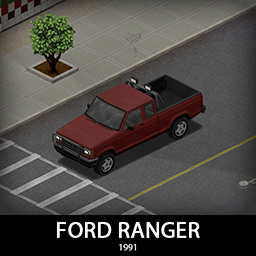
'91 Ford Ranger
by 76561198089039119
Ford Ranger doesn't really need an introduction, it had a cult following, it was reliable and respected in compact pickup truck segment, very common in rural areas, a true workhorse and probably a good companion in the apocalypse. It comes with 2 cab sizes and 2 bed sizes and a police variant too. Rear seats are too small to really use for seating but together with some floor storage in the back of Supercab, it is a nice bonus. Roofrack is integrated in the bed cap and that will help keep your stuff safe from other survivors. [b]Main features:[/b] [list] [*]5 variants (Single cab, Supercab with both bed sizes and Police variant) [*]3 Front bumpers and a rear bumper with 2 tiered protection [*]Fully animated hood, trunk, doors, windows etc [*]Visible interior and character (with improved exit/enter/aim animations) [*]All parts have 3d objects you can remove and place in the world [*]Extra parts to craft and find in the world to make the vehicle truly yours (bumpers, bullbars, window armor, bed cap, rollbar etc) [*]Multiple texture variations [*]Armor protection for windows, doors, engine, headlights etc [*]2 seats [/list] [b][list] [*]You can use it in your current save game, just enable the mod in the load menu [*]It can tow and be towed [*]Not recolorable [/list][/b] If you can't wait to find this mod in your game and want to test it right away, use [url=https://steamcommunity.com/sharedfiles/filedetails/?id=2634426926]bikinitools[/url] to spawn it, hide the items that your character holds while in vehicle, or for all other good stuff that mod has, go get it! [b]If you like my mods, please consider supporting me with a coffee[/b], so I don't fall asleep while making new mods and supporting old ones :) [url=https://ko-fi.com/ki5mods][img]https://i.imgur.com/2uTskWl.png[/img][/url] Check out my vehicle mods: [url=https://steamcommunity.com/sharedfiles/filedetails/?id=2490220997][img]https://i.imgur.com/1C4iQ6U.png[/img][/url] [b]Credits:[/b] [list] [*]This mod is commission work by request of the [url=https://discord.com/invite/projectapocalypse]Project Apocalypse Community[/url] [*]Thanks to The Indie Stone for making this awesome game and all this possible. [*]Special thanks to bikinihorst for the huge help with code, optimization, and taking care of the multiplayer and part code.[/list] [quote=KI5] Ask for permission This mod can only be added to and extended with the express permission from the original creator. If no permission is received you may not alter the mod, and it must be treated as a mod that is 'On Lockdown'. You are not allowed to repack this mod under any circumstances, ever. [/quote] [b]Compatibility:[/b] ✅ B41 (b41.78.16) Single Player / Multiplayer fully supported ✅ B42 (b42.12) Single Player fully supported ✅ B42 (b42.13+) Single Player / Multiplayer fully supported Vehicle IDs: 91fordRangerPD, 91fordRangerSC, 91fordRangerSClong, 91fordRangerXC, 91fordRangerXClong, 91fordRangerRanger Workshop ID: 3539691958 Mod ID: 91fordRanger
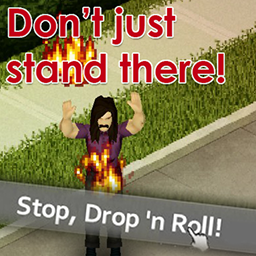
Stop, Drop 'n Roll (the "Fire Self-Extinguish" Mod)!
by 76561197993517109
[h1]Stop, Drop, and Roll![/h1] "Stop, drop, and roll" is a fire-safety technique for when your clothes catch fire. If your clothes catch fire: [list] [*] STOP where are you are! [*] DROP to the ground and cother your nose and mouth! [*] ROLL over back and forth until the flames are out! [/list] Please note that clothes can get damaged from this technique, and you should quickly clean and dress any burns as soon as possible. (The above text is a parody and should not be considered as valid medical or fire-safety advice in any form or fashion.) [h2]How the mod works[/h2] If you catch yourself on fire, you can right-click anywhere and select 'Stop, Drop 'n Roll.' This will extinguish the flames, but is likely to add holes to your clothing. The number of holes added is based around your character's luck levels. Works in Multiplayer! Workshop ID: 2908614026 Mod ID: DropRollMod
![KATTAJ1 Clothes Core [B41/B42MP]](https://images.steamusercontent.com/ugc/52463316440908304/D6744E19183BD5F840E084150C5B05B06061790D/)
KATTAJ1 Clothes Core [B41/B42MP]
by 76561198958138845
[h1] Description [/h1] [B]KATTAJ1 Clothes Core is a library that stores 3D models and logic used for all KATTAJ1 clothing mods and can be used as API by community for creating their clothing mods [u]without taking models and files out from this mod.[/u][/b] [Img]https://i.imgur.com/YdWnBk5.png[/img] [H2]How to use is for creating your own clothing mods?[/h2] Simply add KATTAJ1 Clothes Core as a dependency, refer to its logic, use the same paths to the models, write scripts for your items, xml files, create textures, and upload your awesome mods to the workshop! [i]Basic modding skills are required. However, don't hesitate to ask. We'll figure something out and may be will make a guide on it together.[/i] [H2] Any examples? [/H2] This logic has already been implemented in the [url=https://steamcommunity.com/sharedfiles/filedetails/?id=3470426196]KATTAJ1 Military pack [/url]mod. The KATTAJ1 Military itself contains only what is necessary for that specific mod: [List] [*] Loot tables with chances for zombies to spawn with items from the mod. [*] Loot tables with chances for items to spawn in the world. [*] Scripts for items with all their characteristics. [*] Textures. [*] Icons. [*] XML files with paths to the models, unique GUID identifiers, chances of items spawning on zombies around. [/list] The rest is handled by the KATTAJ1 Clothes Core library. [H2]Mods that currently use this library:[/h2] [url=https://steamcommunity.com/sharedfiles/filedetails/?id=3470426196][img] https://i.imgur.com/UVR4DNe.png [/img][/url][url=https://steamcommunity.com/sharedfiles/filedetails/?id=3124618860][img] https://i.imgur.com/XYP8aID.png [/img][/url][url=https://steamcommunity.com/sharedfiles/filedetails/?id=3135319464][img] https://i.imgur.com/v2rqVZG.png [/img][/url][url=https://steamcommunity.com/sharedfiles/filedetails/?id=3206579556][img] https://i.imgur.com/OxeILqW.png [/img][/url][url=https://steamcommunity.com/sharedfiles/filedetails/?id=3210604443&searchtext=][img] https://i.imgur.com/oOgfLRz.png [/img][/url] [h1]Permissions[/h1] [code]This mod's permissions fall under TIS's policy [url=http://theindiestone.com/forums/index.php/topic/2530-mod-permissions/?p=36478]On Lockdown[/url] This mod cannot be modified by anyone else, for anything else, at all, ever. Even if the user disappears, he or she would much rather you didn't touch the fruits of their hard labour. Explicitly forbidden to add this mod to any public modpacks. Each modpack with the elements from this mod inside will be taken down. [url=https://theindiestone.com/forums/index.php/topic/2530-mod-permissions/?p=36478][img]https://i.imgur.com/zoH7SUA.png[/img][/url] [/code] Workshop ID: 3470422050 Mod ID: KATTAJ1_ClothesCore [hr][/hr] Old Workshop ID: 3079932014 (In case you still somehow used legacy version) Discord: https://discord.gg/mxqZbpgn3S
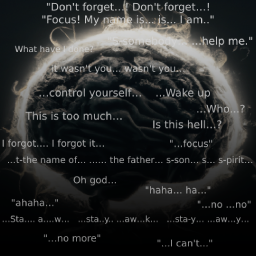
Lingering Whispers...
by 76561198053282739
Features: Throughout your play-through, you may hear a singular murmur in the horde, a contorted voice at the door as it tries to break in, pleading souls hidden away, fleeting minds of men giving guidance or begging for mercy as well as lot more. This occurrence is exceptional rare (0.1% chance but adjustable), you may forget this mod even exists. Their minds are extremely broken & degraded, but despite it all, you can sometimes witness 1-4 understandable words amongst the endless thrum of undeciphered protospeech. This mod is purely text-based (no voice acting) as well as state-sensitive depending on what the zombie is doing, it is meant to be an immersive, somewhat vanilla-friendly, creepy horror mod & works in Multiplayer. This is my first mod, hope you enjoy :) There is a lot that i'd like to add to this, such as even more whispers, multi-speak lines, state-sensitivity based on current zombie decay level (how far they are gone), a whole bunch more creepy scenarios where they can talk & so on but unfortunately I am not a very competent coder, so if you'd be interested in helping out with this or future projects, let me know. ------------------------------------------------------------------------------------- STORY VIDEO NARRATION: "Dwindling minds... Trapped bodies no longer their own, an internal struggle takes root... Festering psyches on fire, it sputters & cracks with madness! The horrors they've committed... the loved ones they betrayed... And the struggle for control through waves of insanity & the tortuous decay of thoughts and flesh!... ...But somehow, through that seemingly endless ocean of hallucinogenic thought, rare cases of unfathomable mental resilience somehow occurs... Is this the human spirit...?! Or echos of deeply nested psyche barely holding on! Whatever it may be, through that manic & necrotic choir, Lingering Whispers are heard! . . . █ █ █ █ █ █ . . . What was that.... real?! Or is it just a cruel trick of the dwindling mind of my own...?" ------------------------------------------------------------------------------------- Also, check out Lingering Reflexes, a mod created by Mr Sunshine that expands upon this concept and takes these dwindling minds a little further! ------------------------------------------------------------------------------------- Special thank you to Albion for assisting with fixes & additional content this mod! ᵀʰᵃᵗ ᵈᵉᵉʳ... ᴰᶦᵈⁿ'ᵗ ʲᵘˢᵗ ˢᵖᵉᵃᵏ... ᴿᶦᵍʰᵗ...ˀ Credit for the original code goes to Morry - Creator of the Talking Dead mod: https://steamcommunity.com/sharedfiles/filedetails/?id=1135650782 Workshop ID: 2874678809 Mod ID: Lingering Voices Workshop ID: 2874678809 Mod ID: Lingering Voices
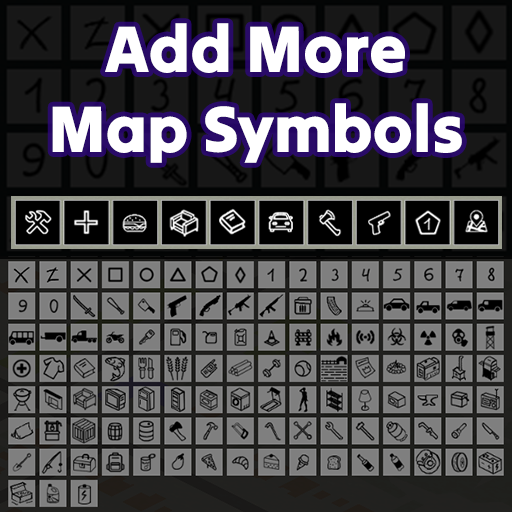
Add More Map Symbols (AMMS)
by 76561198254477021
[b] [h1] Add More Map Symbol (AMMS) [/h1] [/b] [h1] Version for build 42. [/h1] [hr][/hr] [b] [h3] The mod for build 42 is different from the one for 41, because it uses a tab system that the developers added. [/h3] [/b] [b] Therefore, at the moment it should not conflict with any other mods. [/b] [i] Currently 3 tabs are available, more will be added over time. [/i] [h1] Version for build 41. [/h1] [hr][/hr] [b] The mod adds new symbols to the map. Also divides them into categories. Expands the capabilities of the map interface. [/b] [list] [*] Vanilla [*] Marks / Numbers [*] Weapons [*] Tools [*] Cars / Car Tools / Car Parts [*] Signs [*] Furnitures [*] Foods [*] Medicines [*] Craft [*] All [/list] [h2] Compatibility. [/h2] [list] [*] Works with saves. You can turn on at any moment of the game. (You don't need to start a new game). [*] Works in multiplayer. [*] Adapts to any display resolution. [*] In theory, a mod should be compatible with any other mod. (Except those that change the map interface.) [/list] [h2] Works with mods: [/h2] [list] [*] Map Symbol Size Slider [*] 4 Color Bic Pen [*] Draw on the map [*] Map Legend UI [*] Share Annotations [*] Extra Map Symbols UI [/list] [h2] Does not work with mods or causes errors for some users: [/h2] [list] [*] Share Annotations - Some users experience interface bugs. [/list] [h1] (((( Attention )))) [/h1] [h2] Can help if something is wrong with the interface after updating the mod. [/h2] Enter the game --> Disable mod "Add More Map Symbols (AMMS)" --> Exit the game --> Unsubscribe from the mod "Add More Map Symbols (AMMS)" --> Wait 1 min. --> Subscribe again (Wait for it to load) -> Enter the game --> Enable the mod "Add More Map Symbols (AMMS)" [h3] [i] In the sandbox settings you can change the number of symbol columns. In a multiplayer game it will affect all players. [/i] [/h3] Workshop ID: 3020323164 Mod ID: AMMS_Standalone Workshop ID: 3020323164 Mod ID: AMMS_Standalone

Thread and Twine
by 76561198052872078
Adds simple recipes that allow you to make thread, twine and rope from ripped sheets, AND GAIN XP DOING IT! Ever found yourself in need of any of the 3 and thought to yourself, why can't I just use a series of sheet ropes to make an actual rope? Or how about, why can't I cut these ripped sheets down into basic threads, which ripped sheets are made of? And finally, why can't I pull this rope into smaller pieces, twine, and use it for my fishing rod? No more will anyone be struck down in the wilderness by these silly redundancies! With this mod, the obstacles that are sewing, twining and roping will no longer be a hindrance to you! Be free to take on more important matters at hand with this simple mod! Please note, this mod isn't intended to be realistic and might make tailoring a lot easier for you, but alas, to each their own. A huge thanks to RapidMinimumBeaver for adding a lot of flavor to this mod, by writing the code to gain small amounts of XP from the recipes. [img]https://steamuserimages-a.akamaihd.net/ugc/819002974403344349/DD18664314A26EA83C62E9B0127FFCB35092B53A/[/img] [h1] PayPal for the generous and thankful! [/h1] [url=https://paypal.me/JohnnyDollar28] Donations are very much appreciated! [/url] [url=https://steamcommunity.com/sharedfiles/filedetails/?id=2688151429] Want to be able to tear up underwear or throw them into a fire? [/url] Workshop ID: 2143039189 Mod ID: Threads Workshop ID: 2143039189 Mod ID: Threads

Functional Appliances 2
by 76561198092535367
[b][h3]New Extractor Hoods in B42![/h3][/b] Build them in a square where you place your generator to extract the fumes from it out of the building. All automatically, but the hood will not start until power is there and will not extract unless a running generator is under the hood in the same square. [h3]Popcorn Machines:[/h3] They now have function and will convert instant popcorn packets and Sapph's corn kernels into edible popcorn without the pain of burning the food. Popcorn buckets are also added and you can butter the popcorn when in a bucket. [h3]Hotdog Machines:[/h3] They also have function and will keep from burning those priceless sausages. It uses the base sausages and sliced bread in the game to make hotdogs. If you have Sapph's Cooking mod installed you can also use the sausages and hotdog buns from that mod as well. [h3]Soda Fountains:[/h3] Are now plumbed objects and will dispense water for all the uses. It also dispenses soda to fountain cups and refills soda/water bottles for preserved use. They use soda syrups and CO2 tanks to operate. Just drop them into the counter the table top unit is on or put them inside the Slurp 'n Burp stand alone unit. These can now pull materials from any static container in the square or the square behind them. If water is a problem, try using water jugs from the Water Dispenser mod or plumb it like a sink. [h3]Bar Taps and Kegs:[/h3] Setup the kegs in furniture containers with the taps connected and you can pour them into red cups, beer mugs, and refill bottles. Kegs pulled from any static container in the square with the bar taps. Compatible with More Brews and More Brews kegs now spawn in bar tap counters in 2.0! [h3]Food Display Counters, Buffet Islands, Rounded Glass Display Counters and Vending Machines:[/h3] These are now temperature settable appliances for food storage. Some have Hot, Warm, or Cold others just Warm and Cold. Each segment has it's own settings. Now automatically spawn on when they can and switch to cold in ice cream parlors, cafes, bakeries, etc. Pizza parlors and other restaurants will default to warm. Soda Machines automatically default to cold. [h3]Industrial Deep Fryers:[/h3] The deep fryers are now setup to randomly have vegetable oil in them. You can add and drain the oil. If you have power you can turn them on and fry various foods that usually need a pan of oil with Sapph's Cooking mod. A few new recipes have been added: Doughboys, Chicken Fillets, Chicken Tenders, Blooming Onions, and Fried Cheese Sticks. Added Sapph's Cooking Oil for a second option to fill the vats. [h3]Pay Phones:[/h3] They have a minor interaction. If you touch them they might just ring but they'll attracted anyone that happens to be listening... [h3]Wall Clocks:[/h3] They will now display the time. Clicking on them will give you the current time. Wall clocks work based on electrical availability, once off the grid they run off a built in battery that slowly drains. Power up a generator and they will recharge over time. If you are desperate, you can drop a new standard flashlight battery into them, but that's a one way trip. Clocks now show 12hr format and stop when dead. All times accurate to the minute when powered. [h3]Paper Towel and Napkin Dispensers:[/h3] They show up as small containers and come standard with a few loose napkins. Napkins can now dry off players and wet napkins can wash off dirt and blood. In order to allow compatibility, the new ones drop in the dispensers. Vanilla game napkins have a conversion recipe to use them as well. [h3]Coffee X-Press and Espresso Machines:[/h3] Turn on the machines and make coffee. Use mugs, teacups, and thermos or lowballs from Sapph's. Tea and instant coffee options exist in the vanilla game to make a quick fix. Add Sapph's to get coffee beans that can be ground in the espresso machine. Then you can brew coffee or espresso. Take the espresso and foam it up in the espresso machine with any "Milk" type item and turn it into a latte or cappuccino. Don't forget you need power and water. If the water is off, any source in inventory will be used for the coffee. [h3]Bulletin Boards:[/h3] Both large and small corkboards, you can now add things into it's container and the random notices appear as overlays. [h3]Peg Boards:[/h3] Containers that spawn with tools and have an overlay. [h3]Pool Cue Stands:[/h3] Containers that spawn with pool cues and have an overlay. [h3]Green Oven Silo Generators:[/h3] It has the same depletion of fuel as a standard generator and the same radius of power. It can be turned on/off manually and has an auto start feature. It can be used as a backup to other generators and sense when it's time to start. It can be repaired with electronic scrap or scrap metal but will need the generator skill, electrical 4, or mechanics 4. The standard generator manual can spawn with the machine. It has a 500 fuel unit capacity and can be filled or emptied while running. There is no need to connect these as they are stationary and already connected. If found indoors they are also vented to keep the toxins out. If they run out of fuel they will shutdown, if they run out of condition they make a loud *BOOM* that attracts zombies in the area. Now moveable in 2.0 thanks to the Green Oven Corporation! "When your power is lean, buy Green!" [h1][b]***Fuel and Condition of generators zeros out when moving, empty first!***[/b][/h1] v2.07 Updated for B42 Not all aspects of the original Functional Appliances are available due to changes in the game. Display cases, buffets, and vending machines still have temperature settings. Peg boards still load tools. Bulletin boards now have photos and fliers. Napkins can be used to dry or wet them to wash yourself off in a pinch. Vanilla napkins can be converted to FA versions. Beer taps work with the kegs and pour into an empty vessel of choice. Soda Fountains now have all the flavors available in the game, non-vanilla sodas will spawn with cans and bottles too. Popcorn machines use vanilla items to still make the popcorn. Hotdogs can now be made with sausage or wieners and use the vanilla buns or bread slices. All can be cooked in the machine. v2.08 hotfix Corrected error with distribution in 42 [h1][b]***On servers you may need to set anti-cheat 21 as false if it kicks players, it points to a file mismatch between player and server.***[/b][/h1] If you see any bugs let me know. I tried to make the functions and items as unique as possible to keep from any conflicts. A big thank you to everyone that has helped with identifying the bugs and Lazarus for his support and time fighting them on our server to try and make things right. Thank you and enjoy! My other mods: [h3]All New: True Music Radio! Powered by True Music media[/h3] Now with multiplayer sync! https://steamcommunity.com/sharedfiles/filedetails/?id=3100475013 [h1]The new multiplayer true music jukebox is now available![/h1] [b]True Music Jukebox[/b] https://steamcommunity.com/sharedfiles/filedetails/?id=3118990099 Workshop ID: 3118990099 Mod ID: TrueMusicJukebox Need help? Find me on discord... also state your current version... they are all different... Discord: https://discord.gg/9xNdeBr7Wz [url=https://ko-fi.com/norby0072438][img]https://storage.ko-fi.com/cdn/brandasset/kofi_button_dark.png[/img][/url] Workshop ID: 3042138819 Mod ID: FunctionalAppliances2
![Pillow's Random Spawns [B42]](https://images.steamusercontent.com/ugc/1832399958532917145/5885EB03899A754229B37D33A2739C6EFF6A18A9/)
Pillow's Random Spawns [B42]
by 76561197984541682
There are 2,689 hand picked spawn points across the entire map. Many of these spots are businesses or interesting locations across the map. 2025-12-17 - 1to1 copy of b41 files from 2024-12-18 version for backward compatability to b41 players. 2025-12-16 - 300+ new locations added mostly in the B42 new areas. Cleaned up a number of spawns that failed due to being outdoors. Many new variations added including Even Distribution - 1 spawn point per every eligible cell in the game world. One Per City - 1 spawn point for every major town in game, which includes 1 for Louisville Louisville by Neighborhood as defined by the in-world map. Anywhere But - complete adding "Anywhere, But" for every major city. Cabins, Camps and Cabins, Mallrats, Urban Dwellers, Rural Retreats. Made sure to have 41, 42.12 and 42.13 folders for backward compatability. 2024-12-18 - Initial B42 compatability. The new locations are not included yet. This should be 100% backwards compatible with B41. 2023-02-15 - Pushing fix for some casual edition errors. Early draft of two "Anywhere But.." sub-mods allowing you to spawn anywhere, except for some place you'd rather not spawn. 2022-11-16 - Add note of Ekron's canonical name as "Fallas Lake". Add MP Resources folder within "MP Edition" folder, which is also available on Github. Here is the database of all locations possible : https://github.com/crispiboi/Pillow-s-Many-Spawns-Pack/blob/master/projectzomboidmapping.ods So many thanks to blindcoder's tool that allows me to easily see these locations and pinpoint the coordinates https://map.projectzomboid.com/ Variations of mod are packed as separate sub-mods that need to be enabled for those options to show on the spawn selection menu. Also available at : https://github.com/crispiboi/Pillow-s-Many-Spawns-Pack/releases Workshop ID: 1911132112 Mod ID: ManySpawnsLouisville Mod ID: ManySpawnsLouisville Mod ID: 1911132112/ManySpawnsLouisvilleByNeighborhood Mod ID: 1911132112/ManySpawnsLouisvilleByNeighborhood Mod ID: ManySpawnsLouisvilleByNeighborhood Mod ID: ManySpawns Mod ID: 1911132112/ManySpawns Mod ID: ManySpawns Mod ID: ManySpawnsAll Mod ID: 1911132112/ManySpawnsAnywhereBut Mod ID: 1911132112/ManySpawnsAnywhereBut Mod ID: 1911132112/ManySpawnsAnywhereBut Mod ID: 1911132112 Mod ID: 1911132112/ManySpawnsLocation Mod ID: 1911132112/ManySpawnsLocation Mod ID: 1911132112/ManySpawnsLocation Mod ID: ManySpawnsLocation Mod ID: 1911132112/ManySpawnsProfession Mod ID: 1911132112/ManySpawnsProfession Mod ID: 1911132112/ManySpawnsProfession Mod ID: ManySpawnsProfession Mod ID: 1911132112/ManySpawnsMP Mod ID: 1911132112/ManySpawnsMP Mod ID: ManySpawnsMP Mod ID: 1911132112/ManySpawnsVariations Mod ID: 1911132112/ManySpawnsVariations Mod ID: 1911132112/ManySpawnsVariations Mod ID: ManySpawnsVariations Map Folder: Many Spawns Louisville Map Folder: Audobon Map Folder: Downtown Map Folder: East Market Map Folder: Germantown Map Folder: Iroquois Park Map Folder: Limerick Map Folder: Parkwood Map Folder: Portland Map Folder: Wyandotte Map Folder: Audobon Map Folder: Downtown Map Folder: East Market Map Folder: Germantown Map Folder: Iroquois Park Map Folder: Limerick Map Folder: Parkwood Map Folder: Portland Map Folder: Wyandotte Map Folder: Audobon Map Folder: Downtown Map Folder: East Market Map Folder: Germantown Map Folder: Iroquois Park Map Folder: Limerick Map Folder: Parkwood Map Folder: Portland Map Folder: Wyandotte Map Folder: Many Spawns Casual Map Folder: Many Spawns root Map Folder: Many Spawns Casual Map Folder: Many Spawns Even Distribution Map Folder: Many Spawns Full Map Folder: One Per City Map Folder: Many Spawns Casual Map Folder: Many Spawns Even Distribution Map Folder: Many Spawns Full Map Folder: One Per City Map Folder: Rosewood Map Folder: Valley Station Map Folder: Rosewood Map Folder: Valley Station Map Folder: Anywhere But - Brandenburg Map Folder: Anywhere But - Dixie Map Folder: Anywhere But - Echo Creek Map Folder: Anywhere But - Ekron Map Folder: Anywhere But - Fallas Lake Map Folder: Anywhere But - Irvington Map Folder: Anywhere But - Isolated Areas Map Folder: Anywhere But - Louisville Map Folder: Anywhere But - March Ridge Map Folder: Anywhere But - Muldraugh Map Folder: Anywhere But - Riverside Map Folder: Anywhere But - Rosewood Map Folder: Anywhere But - Valley Station Map Folder: Anywhere But - West Point Map Folder: Anywhere But - Brandenburg Map Folder: Anywhere But - Dixie Map Folder: Anywhere But - Echo Creek Map Folder: Anywhere But - Ekron Map Folder: Anywhere But - Fallas Lake Map Folder: Anywhere But - Irvington Map Folder: Anywhere But - Isolated Areas Map Folder: Anywhere But - Louisville Map Folder: Anywhere But - March Ridge Map Folder: Anywhere But - Muldraugh Map Folder: Anywhere But - Riverside Map Folder: Anywhere But - Rosewood Map Folder: Anywhere But - Valley Station Map Folder: Anywhere But - West Point Map Folder: Dixie Map Folder: Fallas Lake Map Folder: Industrial Zone Map Folder: Many Spawns All Map Folder: Many Spawns Casual Map Folder: Many Spawns root Map Folder: March Ridge Map Folder: Muldraugh Map Folder: Riverside Map Folder: Rosewood Map Folder: Valley Station Map Folder: West Point Map Folder: Dixie Map Folder: Fallas Lake Map Folder: Industrial Zone Map Folder: Many Spawns All Map Folder: Many Spawns Casual Map Folder: Many Spawns root Map Folder: March Ridge Map Folder: Muldraugh Map Folder: Riverside Map Folder: Rosewood Map Folder: Valley Station Map Folder: West Point Map Folder: Brandenburg Map Folder: Dixie Map Folder: Echo Creek Map Folder: Ekron Map Folder: Fallas Lake Map Folder: Irvington Map Folder: Isolated Areas Map Folder: Louisville Map Folder: March Ridge Map Folder: Muldraugh Map Folder: Riverside Map Folder: Rosewood Map Folder: Rural Retreats Map Folder: Urban Dwellers Map Folder: Valley Station Map Folder: West Point Map Folder: Dixie Map Folder: Fallas Lake Map Folder: Industrial Zone Map Folder: Many Spawns All Map Folder: Many Spawns Casual Map Folder: Many Spawns root Map Folder: March Ridge Map Folder: Muldraugh Map Folder: Riverside Map Folder: Rosewood Map Folder: Valley Station Map Folder: West Point Map Folder: By Profession Map Folder: By Profession Map Folder: By Profession Map Folder: By Profession Map Folder: Many Spawns All Reduced Map Folder: Many Spawns Knox Reduced Map Folder: Many Spawns All Reduced Map Folder: Many Spawns Knox Reduced Map Folder: Many Spawns All Reduced Map Folder: Many Spawns Knox Reduced Map Folder: Knox County Building Inspector Map Folder: Knox County Car Wrecks Map Folder: Knox County Hitchhikers Map Folder: Knox County Patients Map Folder: Knox County Prisoners Map Folder: Knox County Schools Map Folder: Knox County Visitors Map Folder: Knox County Building Inspector Map Folder: Knox County Car Wrecks Map Folder: Knox County Hitchhikers Map Folder: Knox County Patients Map Folder: Knox County Prisoners Map Folder: Knox County Schools Map Folder: Knox County Visitors Map Folder: Knox County Building Inspector Map Folder: Knox County Cabins Map Folder: Knox County Camps and Cabins Map Folder: Knox County Patients Map Folder: Knox County Prisoners Map Folder: Knox County Schools Map Folder: Knox County Visitors Map Folder: Mallrats Map Folder: Knox County Building Inspector Map Folder: Knox County Cabins Map Folder: Knox County Camps and Cabins Map Folder: Knox County Car Wrecks Map Folder: Knox County Hitchhikers Map Folder: Knox County Patients Map Folder: Knox County Prisoners Map Folder: Knox County Schools Map Folder: Knox County Visitors Map Folder: Mallrats
![Inventory Tetris - Grid Based Inventory Overhaul [B41 Legacy Version]](https://images.steamusercontent.com/ugc/2048622427227514146/5C7AB233EC9BF226C18B059080039754E52344C5/)
Inventory Tetris - Grid Based Inventory Overhaul [B41 Legacy Version]
by 76561198031391228
[h1]The B41 verison of this mod is no longer actively developed.[/h1] [h1]It still works fine, but compatibility issues with other mods are likely.[/h1] [hr][/hr] [h1]The B42 version contains nearly 2 years of additional work in the form of new features, fixes, and significantly improved mod compatibility.[/h1] [hr][/hr] [h1][url=https://steamcommunity.com/sharedfiles/filedetails/?id=3397561666] >>> B42 Version Here! <<< [/url][/h1] [h1][url=https://steamcommunity.com/sharedfiles/filedetails/?id=3397561666] >>> B42 Version Here! <<< [/url][/h1] [h1][url=https://steamcommunity.com/sharedfiles/filedetails/?id=3397561666] >>> B42 Version Here! <<< [/url][/h1] [img]https://i.imgur.com/agDCBaI.png[/img] [h1]Inventory Tetris[/h1] Inventory Tetris is a comprehensive inventory overhaul for Project Zomboid. [list] [*] The inventory is replaced with a grid based system. [*] All items now have a size. [*] [b]See inside all your equipped bags at once[/b] [*] Bags now provide additional inventory space, not just weight reduction. [*] Worn items do not take up inventory space. [*] No more shoving 3 boxes of cereal and a carton of milk in your pants. [/list] [h1]Short Example Video[/h1] [url=https://www.youtube.com/shorts/DwMLMtnbZuI]Here[/url] [b][i]Search Mode![/i][/b] [i]Use sandbox settings when creating your world to enabled searching! When enabled, containers must be searched before they can be looted.[/i] [h1]High FPS Tetris[/h1] For a smoother experience disable this option (Increases system requirements): [code]Options -> Display -> UI -> UI Offscreen Rendering[/code] [h1]CONTROLS[/h1] [list] [*] [b][i]Drag and Drop[/i][/b] - Almost everything can be dragged and dropped across the inventory [*] [b][I]Split Stacks[/i][/b] - Drag and drop while holding [b]CTRL[/b] [*] [b][i]Popup Window![/i][/b] - Double click on containers to open them in a popup window [*] [b][i]Quick Gather[/i][/b] - Double click on stackable items to quickly gather them up [*] [b][i]Rotate items[/i][/b] - Press [b]R[/b]* [*] [b][i]Quick Move[/i][/b] - Hold [b]CTRL[/b] + Left Click [*] [b][i]Quick Equip[/i][/b] - Hold [b]ALT[/b] + Left Click [/list] [h3]Check out keybinds and mod options to customize these controls![/h3] [h1]TRAITS[/h1] Inventory Tetris makes sure to give new uses to the vanilla traits related to the inventory! [list] [*] [b]Organized[/b] - When using quick move, items will ALWAYS stack. If they cannot stack, they will always be placed into the first available slot of the grid. [*] [b]Disorganized[/b] - When using quick move, items will not always stay stacked and will end up in a random spot in the grid. Cannot autosort (in the future when its added). [*][b][i]Neither[/i][/b] - The container receiving the items will determine what happens. [*] [b]Dextrous[/b] - Faster container searching. [*] [b]All Thumbs[/b] - Slower container searching. [/list] [h1]Mod Options[/h1] You may also install [url=https://steamcommunity.com/sharedfiles/filedetails/?id=2169435993&searchtext=mod+options]Mod Options[/url] to access a few settings for UI scaling. Very useful on high resolution displays or when playing on a TV. [h1]FAQ[/h1] [h3]Why BETA?[/h3] The mod is mostly complete and very stable, however, it still needs some polish here and there. Further, the mod was a huge undertaking and it will inevitably need some additional balancing and tweaks in response to player feedback. [h3]Multiplayer Support?[/h3] The mod works fine in multiplayer from my testing. As usual, report any bugs you encounter and I'll fix them ASAP. [h3]Can I add/remove this on existing saves?[/h3] Yes. Inventory Tetris can added/removed at any point without issue. (Note: When adding the mod the player may drop items to the ground if they do not have enough space.) [h3]How do items from other mods works?[/h3] Inventory Tetris automatically examines items from other mods and determines what size they should be. [h2]Make My Own Changes?[/h2] [i]Inventory Tetris includes some very easy to use dev tools that can be used to quickly create compatibility/balance packs to provide more fine tuned support for popular mods or fit your personal tastes.[/i] [url=https://steamcommunity.com/sharedfiles/filedetails/?id=3044166761&searchtext=tetris]GUIDE HERE - By Lily[/url] [h2]I Can't Pickup Furniture![/h2] Use your hands. They can only hold 1 item each, but it can be as big as you want. [h2]Keyring!?[/h2] Double click it. [h3]If you enjoy my mods, consider supporting me on Ko-fi![/h3] [url=https://ko-fi.com/notloc][img]https://i.imgur.com/jLt3Dyv.png[/img][/url] Or, just come check out some previews of what I'm working on next! [h1]Special Thanks[/h1] [list] [*] [b]dbert[/b] - Assistance with Equipment UI [*] [b]JaeDogg[/b] - Feedback, suggestions, and testing [*] [b]Maudiis[/b] - Balance suggestion [*] [b]Mr Sunshine[/b] - Moral Support [*] [b]Lily[/b] - Writing a guide on using the dev tools [/list] [h1]Required![/h1] [url=https://steamcommunity.com/workshop/filedetails/?id=2950902979][img]https://i.imgur.com/w5yeFNP.png[/img][/url] [h1]Work Great With:[/h1] [url=https://steamcommunity.com/sharedfiles/filedetails/?id=2901962885][img]https://i.imgur.com/XS0ayqq.png[/img][/url] [url=https://steamcommunity.com/sharedfiles/filedetails/?id=2881764317][img]https://i.imgur.com/y7qmeSF.png[/img][/url] [h1][url=https://steamcommunity.com/sharedfiles/filedetails/?id=3397561666] >>> B42 Version Here! <<< [/url][/h1] [h1][url=https://steamcommunity.com/sharedfiles/filedetails/?id=3397561666] >>> B42 Version Here! <<< [/url][/h1] [h1][url=https://steamcommunity.com/sharedfiles/filedetails/?id=3397561666] >>> B42 Version Here! <<< [/url][/h1] Workshop ID: 2982070344 Mod ID: INVENTORY_TETRIS
Rabbit Hash, KY
by 76561198044620835
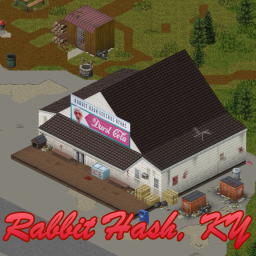
[h1]About the Map: [/h1] A generally quiet river town, Rabbit Hash is known for its iconic General Store. Here, you will find all manner of goodies to help you out on your journey along the rural route to Louisville. Rabbit Hash is a real-world location in KY, although it has been displaced a bit geographically and now finds itself a fair ways down the river from its former home. [h1]Map Features: [/h1] [list] [*]🗺️ In-game map support [*]🔍 Foraging Zones [*]🚙 Modded 'military' vehicle spawn zones [*]🥾 Lots of 4-wheeler trails to sneak between various POIs [*]🌽 A big fancy farm with several facilities to explore [*]🏪 A really cool general store with custom tiles for the sign [*]⛵ A variety of docks & other infrastructure to support your boating habits [*]👮♀️ A Police Station [/list] [h1]Technical Stuff:[/h1] Rabbit Hash and its particular geometry and layout seemed to fit well into the chosen cells & surrounding road system. I feel like the map does a decent job of filling in some dead space between Riverside & West Point. This is our first map & as such it only uses the vanilla tiles (aside from the awesome sign). The map may have some errors, feel free to comment and I'll do my best to fix anything. You may also feel that the loot is too heavy or light as I built a majority of the buildings as I went, so feel free to voice any bugs/loot/etc issues as well. Expect semi-frequent updates early on as I finish refining & polishing the map after some play-testing. [h1]Compatibility:[/h1] So far, the only map I've found that Rabbit Hash conflicts with is North Peak. The cell is included in that map, but isn't used. Simply load Rabbit Hash before North Peak and both maps should work fine. [b]Like the map? Please show your support, it helps a lot![/b] [img]https://i.imgur.com/EEVrGqY.gif[/img] [url=https://discord.gg/dXGSVBnNKE] DURST Mapping Discord [/url] Cells: 30x24 - 31x24 Workshop ID: 2815966702 Mod ID: RabbitHashKY Map Folder: RabbitHashKY
Eggon's Have I Found This Book???
by 76561198093590691
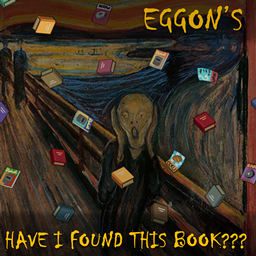
Are you frustrated when you don't remember which of the plethora of books you haven't found yet? Are you fed up with constant checking and writing down? Install this mod and relax. Or at least focus on killing zeds. This mod will [b]AUTOMATICALLY[/b] remember everything for you. Just pick up a book to any container in your carried inventory and it will be remembered. Tooltip will tell you if a book has been previously found or not. [h2]Features[/h2] 1. Remember finding a book/magazine/map/VHS/CD when you add them to any inventory container. 2. See found/not found status on the tooltip. 3. Right click on any book/magazine/map in container to take all yet unfound books in one go. 4. Customization available if [url=https://steamcommunity.com/sharedfiles/filedetails/?id=2169435993]Mod Options[/url] mod is installed: [list] [*]Turn on / off VHS or CDs being included [*]Choose highlight text [*]Turn on color border [*]Turn off color text [/list] Beware! After you pick up a book and lose it somewhere, your character will still remember it being picked up! If you want to "forget" a book, you need to follow [url=https://steamcommunity.com/workshop/filedetails/discussion/2631149521/3279192252273756600/]this instruction[/url]. [h3]Existing saves[/h3] The mod should be compatible with existing saves, but you need to add already collected books to your inventory to remember them. Just once, just for a moment. [h3]Compatibility[/h3] This mod should be compatible with all other book organizing mods. It should also be compatible with any custom books/magazines/maps, as long as they are configured like the vanilla ones. If you find any incompatibilities, let me know. [url=https://steamcommunity.com/sharedfiles/filedetails/?id=2544353492]Has Been Read[/url] - compatible [url=https://steamcommunity.com/sharedfiles/filedetails/?id=2071347174]An Exhilaratingly Organized Literature Mod[/url] - compatible Incompatible: [url=https://steamcommunity.com/sharedfiles/filedetails/?id=2615254987]ExtraSauce Quality of Life[/url] - conflicts with BookSkills functionality, shich however might be turned off in that mod. [url=https://steamcommunity.com/sharedfiles/filedetails/?id=2689032656]Better UI[/url] - includes ExtraSauce Quality of Life [h3]Requirements[/h3] This mod requires my utility mod [url=https://steamcommunity.com/sharedfiles/filedetails/?id=2617575303]Eggon's Modding Utils[/url] to function. [url=https://steamcommunity.com/sharedfiles/filedetails/?id=2169435993]Mod Options[/url] mod is optional if you want to use, well, options. :) [h3]Known issues[/h3] Literature found and picked up via foraging does not get flagged as "found". You need to put it aside and transfer it to your inventory again. [h3][b]SUPPORT ME[/b][/h3] If you appreciate my content and want to encourage me to deliver more... consider supporting me on Ko-Fi or Patreon! Also check out [url=https://steamcommunity.com/profiles/76561198093590691/myworkshopfiles/?section=items&appid=108600]my other mods![/url] :) [url=https://ko-fi.com/eggon][img]https://i.imgur.com/ULMwSUt.png[/img][/url] [url=https://www.patreon.com/eggon666][img]https://i.imgur.com/KUfQ5Ma.png[/img][/url] [img]https://i.imgur.com/cKVBRWw.gif[/img] Workshop ID: 2631149521 Mod ID: eggonsHaveIFoundThisBook

QNWLibrary
by 76561198419748977
A pre-mod for a mod I made. Workshop ID: 2845810596 Mod ID: QNW_QNWLibrary
Fix Capacity Overlap
by 76561198164339567
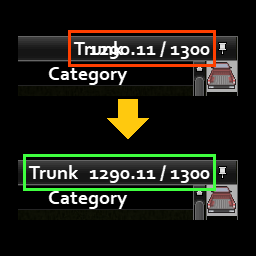
[h2]Works on 41.78.16 SP/MP[/h2] [h2]Safe to add to/remove from existing saves[/h2] The text of container name will now dynamically change its position to leave space for displaying the weight and capacity. Especially useful for big font size (2x, 3x, 4x). Only loot inventory (container name) is altered for now, character inventory leaves untouched due to changing position of TransferAll button could break compatibility. [h1]Compatibility[/h1] [url=https://steamcommunity.com/sharedfiles/filedetails/?id=2809595776]Alternative Inventory Rendering[/url] [url=https://steamcommunity.com/sharedfiles/filedetails/?id=2577903374]AutoLoot[/url] [url=https://steamcommunity.com/sharedfiles/filedetails/?id=2871469707]Easy Drop'n'Loot[/url] [url=https://steamcommunity.com/sharedfiles/filedetails/?id=2867163008]Everything Has a Name[/url] [url=https://steamcommunity.com/sharedfiles/filedetails/?id=2847184718]Proximity Inventory[/url] [url=https://steamcommunity.com/sharedfiles/filedetails/?id=2880687295]Rename Containers[/url] This mod partially changes the behavior of [i]ISInventoryPage.prerender[/i] when [i]not self.onCharacter[/i]. Workshop ID: 2957932451 Mod ID: FixCapacityOverlap [b]Check out [url=https://steamcommunity.com/id/Js-2nd/myworkshopfiles/?appid=108600]my other mods[/url][/b] [url=https://steamcommunity.com/sharedfiles/filedetails/?id=2957932451][img]https://steamuserimages-a.akamaihd.net/ugc/2071133993659098010/C2F75607F37F134413FDDF135811943A6E43F6FF/?imw=120&imh=120&ima=fit&impolicy=Letterbox&imcolor=%23000000&letterbox=true[/img][/url] [url=https://steamcommunity.com/sharedfiles/filedetails/?id=3093700684][img]https://steamuserimages-a.akamaihd.net/ugc/2313224038739447322/E38463B915CC7F9A9400859DBBC7077AB0964DE1/?imw=120&imh=120&ima=fit&impolicy=Letterbox&imcolor=%23000000&letterbox=true[/img][/url] [url=https://steamcommunity.com/sharedfiles/filedetails/?id=2968616376][img]https://steamuserimages-a.akamaihd.net/ugc/2072261795957925686/55DD4B65C704BE108804A37464FE0500BE011255/?imw=120&imh=120&ima=fit&impolicy=Letterbox&imcolor=%23000000&letterbox=true[/img][/url] [url=https://steamcommunity.com/sharedfiles/filedetails/?id=3354781435][img]https://steamuserimages-a.akamaihd.net/ugc/2483264726468999201/85CC4C5AEA05CD4271CC2A38BD0CF96FF9C9014A/?imw=120&imh=120&ima=fit&impolicy=Letterbox&imcolor=%23000000&letterbox=true[/img][/url] [url=https://steamcommunity.com/sharedfiles/filedetails/?id=3047075627][img]https://steamuserimages-a.akamaihd.net/ugc/2256927864525027694/7C628F9A74051FC1D574CF67AEF5613D16A5E656/?imw=120&imh=120&ima=fit&impolicy=Letterbox&imcolor=%23000000&letterbox=true[/img][/url]
Ed's Auto Salvage
by 76561198014312699
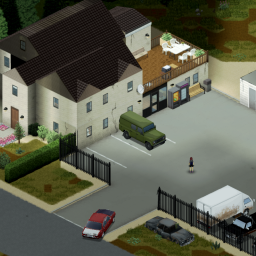
A junkyard & garage just east of Pony Roam-O in the middle of Knox Country. Made for 41.60+ Q: Does it... A: Yes it works in MP, yes it works with the new map, yes it works on any MP server rented or otherwise. No I am not going to help you with rented servers or MP servers in general. Q: Could you... A: No. I wanted a central base location with a gas station nearby, there wasn't any so I made one! - Centrally located - It has it's own gas pump. - Partially walled off. (high fence) - It has plenty of space for all your cars and loot. - There are no major zombie spawns nearby so a good place to hold out. - Large 2nd floor with a big balcony. (Collect your water safely!) - A variety of things for you to find. It can be a very powerful start so I recommend spawning somewhere else and making your way over to Ed's. [url=https://steamcommunity.com/sharedfiles/filedetails/?id=2664486423][b]Check here for a version WITHOUT a gas pump.[/b][/url] It goes very well with my other mod: [url=https://steamcommunity.com/sharedfiles/filedetails/?id=2542249811][b]Little Township[/b][/url] There is also map mod next to Ed's made by Ammo Pack check it out: [b][url=https://steamcommunity.com/sharedfiles/filedetails/?id=2671414643&searchtext=old+town]Old Park Town[/url][/b] Trash Queen made a [url=https://steamcommunity.com/sharedfiles/filedetails/?id=2488660136][b]plugin for the Eris Minimap![/b][/url] Ed's Auto Salvage changes cell [29,28] and will not be compatible with other mods that change this cell. Anything else goes! ;) The screen shots were made with car spawn setting high, just for some nice visuals. ;) I made this for myself, so I may or may not update it, I may or may not fix any issues, no promises. [b]Requests to add or change anything will be largely ignored.[/b] How to add to an existing game: You can change the mod loadout of a save by clicking load instead of continue and there you can change the mods list for that save. In addition if you already visited cell 29,28 you can follow the guide here: https://steamcommunity.com/app/108600/discussions/0/1630791709839359257/ Before you do this be sure to make a backup!! Permissions: Anyone may include or make it compatible with any other mod or modpack, go nuts! Workshop ID: 2485420813 Mod ID: EdsAutoSalvage Map Folder: EdsAutoSalvage
![Moodle Quarters [B41]](https://images.steamusercontent.com/ugc/1749106328797076821/645FD7D2186000D12D667825B039D30C350056E5/)
Moodle Quarters [B41]
by 76561198032279821
[quote] [h1][u]REGARDING BUILD 42:[/u][/h1] [h1]They changed how the moodles work and there a no longer multiple textures for different levels. There is now only a single texture and they change the color programatically. I currently see no way how to update this mod to Build 42. If you have ideas, please contact me.[/h1][/quote] ====================================== [h1]Informations:[/h1] Changes one additional quarter of the moodle background to a square for each moodle level. [h1]Known issues:[/h1] [list] [*] None so far [/list] [h1]Credits:[/h1] [list] [*] Thanks to [url=https://steamcommunity.com/id/safc]Riko Prushka[/url] for showing me how to create pack files with only the changed files. :) [/list] [h1]Compatibility:[/h1] [list] [*] Works with [url=https://steamcommunity.com/sharedfiles/filedetails/?id=2926455909]Large Progress Indicator[/url] [/list] [h1]If you want to support me[/h1] [list] [*] https://paypal.me/Drandarov [*] https://github.com/sponsors/drandarov-io [/list] [h1]Check out my other mods if you don't mind[/h1] [list] [*][url=https://steamcommunity.com/sharedfiles/filedetails/?id=2850167382]Pass Out[/url] [*][url=https://steamcommunity.com/sharedfiles/filedetails/?id=2849442345]Just Sleep[/url] [/list] [h1]GitHub[/h1] [list] [*] https://github.com/drandarov-io/project-zomboid-mod-moodle-quarters [/list] Workshop ID: 2854030563 Mod ID: moodle_quarters
![[B41] 10 Years Later](https://images.steamusercontent.com/ugc/2431468257623318811/806AB1F212928281D56B17AF81C187FABC23BA85/)
[B41] 10 Years Later
by 76561197993119254
[h1] 10 Years Later [/h1] [h1] [url=https://steamcommunity.com/sharedfiles/filedetails/?id=3319710114] 10 Years Later setup guide ! [/url][/h1] [h1] If you only want the overlays, just enable 10YL_HIGH or 10YL_MEDIUM or 10YL_LOW and disable 10YL_MAPS[/h1] OR use light edition: [url=https://steamcommunity.com/sharedfiles/filedetails/?id=3301815478]10 Years Later - Light version[/url] [h1] 1) SOLO : Mod load order [/h1] [img]https://i.postimg.cc/wvMgvhJG/9.jpg[/img] [h1] 2) SOLO : Map load order [/h1] [img]https://i.postimg.cc/k5B7MQWh/10.jpg[/img] [h1] 3) COOP / SERVER Map load order [/h1] [h1][url=https://www.youtube.com/watch?v=7UZQh3yzgxk]SETUP VIDEO[/url][/h1] Copy/past in your servertest.ini : # Enter the mod loading ID here. It can be found in \Steam\steamapps\workshop\modID\mods\modName\info.txt Mods=Diederiks Tile Palooza;DylansTiles;FearsFunkyTiles;PertsPartyTiles;simonMDsTiles;SkizotsTiles;tkTiles_01;melos_tiles_for_miles_pack;10YL_HIGH;10YL_VH;10YL_RC;10YL_KINGSMOUTH;10YL_SAVEYOURSTATION;SaveOurStation_Core;SaveOurStation_KnoxCountry;10YL_MAPS # Enter the foldername of the mod found in \Steam\steamapps\workshop\modID\mods\modName\media\maps\ Map=RC10YL;KS10YL;SOS10YL;SaveOurStation_KnoxCountry_World;10YL;Muldraugh, KY # List Workshop Mod IDs for the server to download. Each must be separated by a semicolon. Example: WorkshopItems=514427485;513111049 WorkshopItems=2337452747;2599752664;2901328637;2837923608;2852704777;2740919036;2384329562;2879745353;2820757649;2398274461 [hr][/hr] Too many trees ? [url=https://steamcommunity.com/sharedfiles/filedetails/?id=2968450356] 10 Years Later - Less trees [/url] Special thanks to Alree for the extraction of the vanilla map ! [hr] WorkshopId: 2820757649 Mod ID: 10YL_HIGH = HIGH Vegetation Mod ID: 10YL_KINGSMOUTH = Kingsmouth maps with trees Mod ID: 10YL_LAUNCHER = Launcher with special backgroud and custom menu Mod ID: 10YL_LOW = Low vegetation Mod ID: 10YL_MAPS = Vanilla maps with trees Mod ID: 10YL_MEDIUM = Medium vegetation Mod ID: 10YL_RC = Ravencreek with trees (original map isn't mandatory) Mod ID: 10YL_RF = Riverside forest Mod ID: 10YL_SAVEYOURSTATION = Save Ur Station (original mod is mandatory, respect the mod load order) Mod ID: 10YL_VH = High vehicle spawn with random angle Mod ID: 10YL_VHV = Vanilla vehicle spawn with random angle Map Folder: KS10YL Map Folder: 10YL Map Folder: RC10YL Map Folder: RF10YL Map Folder: SOS10YL
Spear Traps
by 76561198056536755
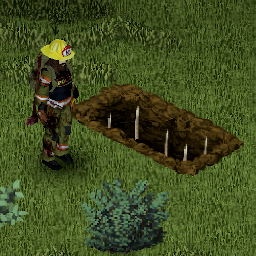
[h1]Brings spear traps to the game.[/h1] [h1]How to build a spear trap?[/h1] First you have to dig a grave. Then you need one or more spear in your inventory (up to 5 spears per grave). Finally, simply right-click the grave and you'll see a menu option: [list][*][b]Add Spear to Grave[/b][/list] Once a spear has been added to the trap, it can also be retrieved with the menu option: [list][*][b]Remove Spear from Grave[/b][/list] [b]Beware, spear traps are dangerous![/b] It's a double-edged sword. While it can kill zombies quite efficiently, [b][u]you will also die if you walk on the trap!!![/u][/b] [h1]Features[/h1] [list] [*]When zombies walk over a grave with no spear, they'll get knocked down. [*]When zombies walk over a grave with at least one non-broken spear, they'll get killed instantly, breaking one spear. [*]When players run over a grave with no spear, they will get injured (foot or lower leg). [*]When players walk over a grave with at least one non-broken spear, they will get killed instantly too. [/list] [spoiler]If you don't want to risk dying by walking over a spear trap, you can disable this behavior in Sandbox settings. In that case the players won't die, but will receive as many injuries as there are spears in the grave: [b]Sandbox settings -> Sadistic AI Director -> Spear Traps Kill Players[/b][/spoiler] [h1]Version[/h1] Latest version: 0.0.9 [h1]Can I use this mod in a modpack?[/h1] No. Redistribution of this mod without explicit permission from the original author is strictly prohibited under any circumstances. This includes, but not limited to, uploading this mod to the Steam Workshop or any other site, distribution as part of another mod or modpack, distribution of modified versions. [h1]Contribute[/h1] Your help is needed for translations! If you speak any of the language supported in the game, please help! Translation files are available here: https://github.com/quarantin/zomboid-spear-traps/tree/main/media/lua/shared/Translate [h1]Bugs[/h1] Please submit any bug you find here: https://github.com/quarantin/zomboid-spear-traps/issues Feedbacks are welcome! You can find me on the official Project Zomboid Discord server: https://discord.com/invite/theindiestone [h1]Support Me[/h1] If you like my work please consider supporting me on Ko-Fi! [url=https://ko-fi.com/quarantin][img]https://raw.githubusercontent.com/ChuckTheSheep/chuckImages/main/kofi.png[/img][/url] Have fun! ;D Workshop ID: 2640351732 Mod ID: SpearTraps
Brita Weapon Model Fix
by 76561198003562675
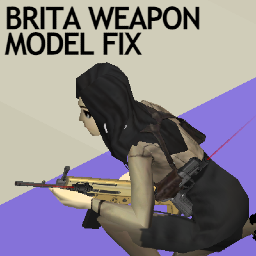
Fix model glitches on models and textures from Brita Weapon Pack. - Rearranged UV maps for laser sights (green and red) to fix texture mismapping. - Fixed flipped normal of red laser sights. - Lasers are not solid sticks anymore and laser sights actually emitt semi-transparent laser beams which fade out at the tip. - Made 'Weapon Light (Small)' 25% smaller to fit better on small arms like pistols. Workshop ID: 2898603426 Mod ID: BritaModelTweak
Coryerdon-科里尔登
by 76561198282627872
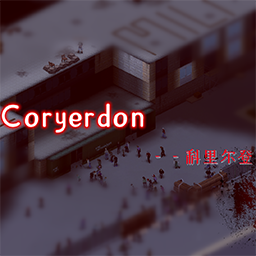
coryerdon-科里尔登 坐落于河畔东部跨河城市,总面积约为路易斯维尔的五分之三。 僵尸密度较高,主要集中于城区入口,难度较高,前期略高于路易斯维尔 物资主要集中于城区,郊区有一个军事基地,拥有较多的河边别墅,更适用于多人联机以及服务器的安全屋设置。 城区更类似于小型渡鸦港,高楼较多,总体物资量与路易斯维尔大致持平. Located in the river crossing city in the east of the river, the total area is about three fifths of Louisville. The density of zombies is high, mainly concentrated at the entrance of the urban area, which is more difficult, and it is slightly higher than Louisville in the early stage The materials are mainly concentrated in the urban area. There is a military base in the suburbs, with more riverside villas, which is more suitable for multi person online and server safe house settings. The urban area is more similar to the small Raven harbor, with many tall buildings, and the overall material volume is roughly the same as that of Louisville Q群:620128561 ,群内有稳定服务器 Workshop ID: 2782415851 Mod ID: coryerdon Map Folder: coryerdon
Share Annotations
by 76561198001801811
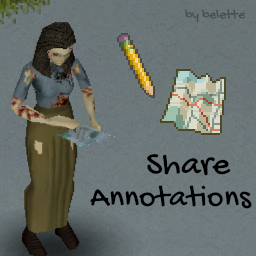
[b]Compatible with version 42.2.0 and 41.78.16 (solo & multiplayer).[/b] This mod allows you to share your map annotations with your friends using any piece of paper in a lore-friendly way. Features: [list] [*] write down annotations using pen and paper to share with others [*] trade and store annotations as a regular item [*] memorize Annotated Maps to your own map [*] pick which sets of annotations you'd like to see on your map [*] easily forget learned annotations if needed [*] opt-in to loot fully annotated maps off player corpses [/list] Officially compatible with: [list] [*] Draw On Map (see caveat below) [*] Map Symbol Size Slider [/list] Muchas gracias to HawK for the Spanish translation! 謝謝 UnsetLay for the Traditional Chinese translation! Merci Furthick for the French translation! Спасибо FREEMAN96REG for the Russian translation! Teşekkürler Neo Wolffe for the Turkish translation! Díky NarcisSally for the Czech translation! Obridago Hicaro for the Brazilian Portuguese translation! Grazie Art Tippet for the Italian translation! Enjoy! [u][b]Compatibility with Draw On Map[/b][/u] Draw On Map works by adding a LOT of "dot" annotations to your map to simulate drawing lines. This can lead to thousands of symbols created. Project Zomboid has a 2,097,152 bytes limit for player objects when saving them to the database. Player objects include inventory, which may include a Shared Map created with this mod. Now, if you created a map containing thousands of symbols, you may hit the 2MB limit, meaning that your player cannot be saved anymore. If that happens, you will see a red box error in the bottom right corner. This simply means that you cannot keep that map item in your inventory, because it contains too much data (the thousands of "dots" created by Draw On Map). After using the map (e.g. remembering annotations), you can drop it on the ground, store it or delete it, and your character should be fine again. [img]https://i.imgur.com/E0TTrTs.gif[/img] [url=https://ko-fi.com/I2I6D0YS4][img]https://i.imgur.com/ULMwSUt.png[/img][/url] Enjoy! Workshop ID: 2815560151 Mod ID: BLTAnnotations
Elysium Island
by 76561198016727334
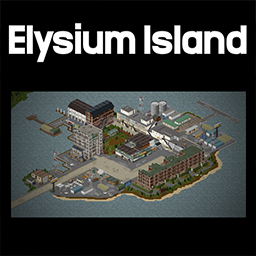
[b]As featured on PC Gamer- https://www.pcgamer.com/project-zomboid-mod-is-disco-elysium-but-its-the-apocalypse/[/b] "In the dark times, should the stars also go out?" [b]🗺️Elysium Island is a map mod located west of Westpoint.[/b] -There is a couple of wrong room defs (it's not game breaking, and the map doesn't support loot respawn). I know about these issues. But I won't be updating the map. It will break too many saves and I don't have the time. Please enjoy the map as it is. --- [h1] The mod includes[/h1] [list] [*]A spawn point in the Whirling-In-Rags, a hostel cafeteria [*]Working ingame map. [*]Foraging [*]One particular warehouse floor doesn't have lights. You'll need a torch to discover a gruesome secret. [*]Very close to Westpoint or a great base spot 'three houses by the lake'. [*]There is a chance vehicles can spawn outside in the parking bay.[/list] It is a destroyed and poor area, that lacks in policing and investments. Inspired by Martinaise from 'Disco Elysium' you may find a few familiar locations. Spoilers are kept to a minimum, so it should be enjoyable for anyone who wants to try it out. Why not try the Disco Elysium Clothing pack, found here https://steamcommunity.com/sharedfiles/filedetails/?id=2791315598 Cells- 35,22 & 35,21 [quote] Thanks to all the tile makes- Dylan, Dirkie, Throttlekitty and ExtraNoise If you want to learn how to make maps on Zomboid, start here - https://www.youtube.com/watch?v=zKMrQsxyXTQ&list=PLc7_sQ-Tb6e3siC4Cwu4JfxuqJZkGO6sy --- Ask for permission This mod can only be added to and extended with the express permission from the original creator. Having received permission, credit must be given to the original creator, both within the files of the mod and wherever the mod roams online. If no permission is received you may not alter the mod, and it must be treated as a mod that is 'On Lockdown'. [/quote] Workshop ID: 2819655145 Mod ID: Elysium_Island Map Folder: Elysium_Island
![CleanUI [B42]](https://images.steamusercontent.com/ugc/9722033132850048245/53D3C1C2D04F0DBF1346DF60EF9984C1AC345797/)
CleanUI [B42]
by 76561199485575276
[h2]Build Support: B42.12 to B42.19 — Build 42 only[/h2] [b]CleanUI[/b] is a streamlined inventory and loot interface overhaul for [b]Project Zomboid Build 42[/b]. It makes the player inventory and external container panels cleaner, faster, more compact, and easier to read while keeping the vanilla gameplay flow familiar. [hr] [h2]Requirements & Load Order[/h2] [list][*][b]NeatUI Framework is required.[/b] [*][b]NeatUI Framework must load before CleanUI.[/b] [*][b]NeatUI Framework v1.0.6 or newer is recommended.[/b] [*][b]Build 42 only.[/b] [/list] For servers, make sure both mods are included and that NeatUI Framework loads before CleanUI. [hr] [h2]Bug Reports / Help / Compatibility Questions[/h2] For setup help, troubleshooting, compatibility notes, and bug reports, please use the [url=https://steamcommunity.com/workshop/filedetails/discussion/3437629766/800092645914367037/][b]Questions and Bug Reports[/b][/url] thread. Reports with enough details are much easier to reproduce and fix. Please include: [list] [*]Project Zomboid build. [*]SP / MP Host / Dedicated Server. [*]Keyboard + mouse or controller. [*]Full mod list / load order. [*]What you were doing when the issue happened. [*]Steps to reproduce. [*]Screenshot or short video if possible. [*]Relevant part of [b]console.txt[/b], [b]coop-console.txt[/b], or server console if an error appears. [/list] For performance issues, please also include the container type, approximate number of items, and whether search/filter/sorting was active. [hr] [h2]Main Features[/h2] [list] [*]Cleaner and more compact inventory / loot panels. [*]Container buttons moved to the left side. [*]Built-in container reordering by dragging container icons. [*]Collapsible side panel with utility actions. [*][b]Transfer All[/b] and [b]Take All[/b] integrated into the capacity area. [*]Search by item name, category, or both at the same time. [*]Split quick buttons for transfer actions. [*]Sorting, item/category text options, and automatic text truncation. [*]Merged hotbar-equipped items in the [b]Equipped Items[/b] section. [*]Optional toggle between [b]CleanUI[/b] and vanilla inventory panels. [*]Mod Options for layout, transparency, button scale, text colors, transfer behavior, and compatibility notifications. [/list] [img]https://i.imgur.com/TFFM7ZZ.png[/img] [h2]Search & Transfer Tools[/h2] Right-click the search box to choose between: [list] [*][b]Search by Item Name[/b] [*][b]Search by Category[/b] [*][b]Search by Name and Category[/b] [/list] Matching rows move to the top of the inventory list and use CleanUI’s search highlight. Transfer buttons can use either: [list] [*][b]Single Menu Button[/b] — one compact transfer button with menu options. [*][b]Split Quick Buttons[/b] — separate quick buttons for [b]Transfer by Item Names[/b], [b]Transfer by Categories[/b], and [b]Move To Floor[/b] when available. [/list] Split mode also includes a quick toggle for [b]Single Container[/b] / [b]Nearby Containers[/b] transfer mode. [h2]Clean Usage Guide[/h2] [img]https://i.imgur.com/3qBGq7M.png[/img] [list] [*][b](1) Transfer Button:[/b] opens transfer options or split quick buttons. [*][b](2) Transfer All / Take All:[/b] transfers or takes all items; can also show capacity. [*][b](3) Lock Button:[/b] prevents dragging or resizing the panel. [*][b](4) Search:[/b] searches items or categories depending on the selected mode. [*][b](5) Divider Drag Button:[/b] adjusts the name/category column width. [*][b](6) Sort Button:[/b] opens sorting options. [*][b](7) Collapse / Expand Items:[/b] expands or collapses item stacks. [*][b](8) Equipped Items:[/b] click the icon next to [i][b]Equipped Items[/b][/i] to hide or show equipped items. [/list] [b]Inventory UI Toggle:[/b] right-click the [b]open box icon[/b] in the left-side button bar to toggle [b]Use CleanUI Inventory[/b]. [img]https://i.imgur.com/0goWZXm.png[/img] [h2]Compatibility Notes[/h2] Most gameplay, item, map, and content mods should work normally. Conflicts are more likely with mods that replace or heavily modify inventory UI files, loot UI files, inventory context menu functions, or container panel behavior. Known compatibility notes: [list] [*]Compatible with [url=https://steamcommunity.com/sharedfiles/filedetails/?id=3662387304][b]Item Rarity UI[/b][/url]. [*]Compatible with [url=https://steamcommunity.com/sharedfiles/filedetails/?id=3586216562][b]Better Containers[/b][/url], including its proximity-style loot containers. [*]Compatible with [url=https://steamcommunity.com/sharedfiles/filedetails/?id=3669550831][b]Proximity Inventory B42.19+[/b][/url] in my current tests. [/list] [b]Important:[/b] [list] [*][b]Better Containers[/b] and [b]Proximity Inventory[/b] are not compatible with each other. [*]Using multiple inventory UI overhaul mods together is more likely to cause conflicts. [*]Compatibility can depend on load order, mod versions, Project Zomboid build, and server settings. [/list] [h2]Mods You May Not Need With CleanUI[/h2] CleanUI already includes or overlaps with some functionality from other mods: [list] [*]Reorder Containers — already integrated. [*]Search Container — already integrated. [*]Smart Stack — similar functionality already exists here. [*]Auto Drop n' Loot — similar functionality already exists here. [*]Bigger Inventory Container Icon — may cause UI display issues. [*]JB Max Capacity Override — may cause inventory UI display issues. [*]Other inventory UI overhaul mods that replace the same interface files. [/list] [h2]Controller Support[/h2] Controller compatibility has not been fully tested. CleanUI keeps the game's original controller support where possible, and recent versions include fixes for controller-friendly startup inventory behavior. Some limitations may still remain. Controller users may want to try [url=https://steamcommunity.com/sharedfiles/filedetails/?id=3475293985][b]Clean UI Menu Support[/b][/url], which exposes CleanUI actions through a context menu. I have not personally tested it with a controller. [h2]Clean Redownload / Update Troubleshooting[/h2] If Steam does not update the mod correctly: [list] [*]Close Project Zomboid completely. [*]Unsubscribe from CleanUI. [*]Wait until Steam finishes uninstalling it. [*]Subscribe again. [*]Let Steam finish downloading before starting Project Zomboid. [/list] After major Build 42 updates, verifying game files can also help (close PZ): Steam Library → right-click PZ → Properties → Installed Files → Verify integrity of game files. [h2]Support the Original Author[/h2] If you enjoy this mod and your circumstances allow, it would be amazing if you could buy the original author a cup of coffee — but first and foremost, enjoy your game! [url=https://afdian.com/a/23754956rocco][img]https://i.imgur.com/WLIHcQs.jpeg[/img][/url] Rocco's Discord: [url=https://discord.gg/QCznu6naGw]Rocco's Mod[/url] [h2]Credits[/h2] [list] [*]Original mod by [b]Rocco[/b]: [url=https://steamcommunity.com/profiles/76561199485575276/myworkshopfiles/?appid=108600]PZ Workshop Items[/url] [*]Maintenance / compatibility updates by [b]Afyrmo[/b]: [url=https://steamcommunity.com/profiles/76561199133259679/myworkshopfiles/?appid=108600]PZ Workshop Items[/url] [/list] [quote][b]About permission[/b] You are free to extract and use any content from this mod without asking for permission. If you want to republish this mod: 1. There must be substantial and important improvements. 2. If this mod has not been updated for a long time and has caused many issues, you may modify and republish it. [/quote] Workshop ID: 3437629766 Mod ID: CleanUI

'49 Ford 8N Tractor
by 76561198089039119
And now for something completely different, a small Ford! This little guy will not win any speed records or conquer the rough off-road terrain, it's a fun little tractor that will help you around the farm. it can tow smaller trailers and it is not fast so it will not kill you and that is always nice. It has some front and rear armor and the zeds will munch on you while you sit on it so be careful! [b]Main features:[/b] [list] [*]Front and rear bumper offer some protection [*]Fully animated hood, trunk, doors and windows [*]Visible interior and character (with improved exit/enter/aim animations) [*]All parts have 3d objects you can remove and place in the world [*]Extra parts to craft and find in the world to make the vehicle truly yours (bumpers, tires, seat, etc) [/list] [b][list][*]B41.78+ Single Player / Multiplayer Compatible [*]You can use it in your current save game, just enable the mod in the load menu [*]It can tow and be towed [*]Not recolorable [/list][/b] If you can't wait to find this mod in your game and want to test it right away, use [url=https://steamcommunity.com/sharedfiles/filedetails/?id=2634426926]bikinitools[/url] to spawn it, hide the items that your character holds while in vehicle, or for all other good stuff that mod has, go get it! [b]If you like my mods, please consider supporting me with a coffee[/b], so I don't fall asleep while making new mods and supporting old ones :) [url=https://ko-fi.com/ki5mods][img]https://i.imgur.com/2uTskWl.png[/img][/url] Check out my vehicle mods: [url=https://steamcommunity.com/sharedfiles/filedetails/?id=2490220997][img]https://i.imgur.com/1C4iQ6U.png[/img][/url] [b]Credits:[/b] [list] This mod is commission work by request of DZ from the [url=https://discord.com/invite/projectapocalypse]Project Apocalypse Community[/url] [*]Thanks to The Indie Stone for making this awesome game and all this possible. [*]Special thanks to bikinihorst for the huge help with code, optimization, and taking care of the multiplayer and part code.[/list] [quote=KI5] Ask for permission This mod can only be added to and extended with the express permission from the original creator. If no permission is received you may not alter the mod, and it must be treated as a mod that is 'On Lockdown'. You are not allowed to repack this mod under any circumstances, ever. [/quote] Vehicle IDs: 49ford8N Workshop ID: 3171176891 Mod ID: 49ford8N
![Immersive Suicide [B42/B41]](https://images.steamusercontent.com/ugc/46828112627107656/51C9FA98D5B904F3452F888B6A1A076FE3D5F431/)
Immersive Suicide [B42/B41]
by 76561198129001160
[url=https://ko-fi.com/N4N61AUUX0][img]https://i.imgur.com/JCnfTPw.png[/img][/url][url=https://github.com/KyleStank/ImmersiveSuicide][img]https://i.imgur.com/BXLu71n.png[/img][/url] [h1]Works on B41 and B42[/h1] Adds the option to immersively end the suffering early. Actively maintained and supported. [h2]Features[/h2] [list] [*]Gun suicide (both one handed and two handed) via right-click context menu [*]Supported in multiplayer [*]Firearm Radial Menu Support [*]Optionally aim, walk, or run to cancel suicide [*]Requires ammo and functional weapon for immersion [*]Restores built-in but unused suicide animations [*]Prevents becoming a zombie since the head is destroyed [*](Optional) Enable custom sandbox option to always become a zombie upon suicide [*]Can be safely added or removed mid-save [*]Full translation support powered by the community, Google Translate, and DeepL [*]Integration with a couple mods so far (see below: Compatibility). I am open and willing to integrate with any conflicting mod. [/list] [h2]IMPORTANT, READ THIS[/h2] For the B42 version of the mod, only the latest version of B42 is supported. I am not maintaining every single version of B42 until it reaches stable. There are simply too many changes to keep track of until that happens and in my opinion, it isn't worth the effort. [h2]Compatibility[/h2] [list] [*]Works with Brita's Weapon Pack. Should work with any other weapon mod as long as the mod correctly marks items as one-handed or two-handed firearms. [*]B42 Rain's Firearms & Gun Parts [*]Official integration with the Efficiency Skill mod [/list] [h2]Languages Supported[/h2] This mod has native translations for English (EN), Turkish (TR), and Russian (RU). The rest of the languages have been translated by Google Translate, DeepL, or a mix of both. [b]If any issues with translations are noticed, please post them on the bug board.[/b] [h2]Thank Yous[/h2] [list] [*][url=https://steamcommunity.com/id/xeotn]xeotN[/url] for providing the Turkish translation [*][url=https://steamcommunity.com/id/jeblanoid]Ксерокопия члена[/url] for providing the Russian translation [*][url=https://steamcommunity.com/id/zendachi/myworkshopfiles/]Burryaga[/url] for providing Joypad Lua code [/list] [h2]Disclaimer[/h2] This mod contains potentially sensitive images and content for some players. The goal is [b]NOT[/b] to make suicide look cool but rather to offer another immersive way to die in a game that is [b]about[/b] dying. Workshop ID: 3426448380 Mod ID: stanks_suicide
Project Zomboid Guides
Project Zomboid server with mod support
Install all mods directly from the dashboard with one click.
Rent a Project Zomboid server