For Better MC BMC4, Forge, Minecraft 1.20.1, and the specific pack version must match on the server and the clients. After the first start, check whether the active world was generated with the pack. The documented 8 GB allocation and idle values are not a load test for a large group of players.
Status of this guide: September 24, 2026. The pack data comes from our catalog and the server pack. The times, RAM, and settings come from our own test server of the same day and from our nightly test runs; the images are our own captures.
What Is Better MC BMC4, and Who Is a Dedicated Server For?
Better MC is a modpack series that makes Minecraft bigger without turning it upside down. BMC4 is the Forge edition for Minecraft 1.20.1. You keep playing survival by the familiar rules. On top of that come new biomes, hundreds of structures and dungeons, new creatures, bosses, additional dimensions, and quests. If you like vanilla but want to discover something again while exploring, this is the right place.
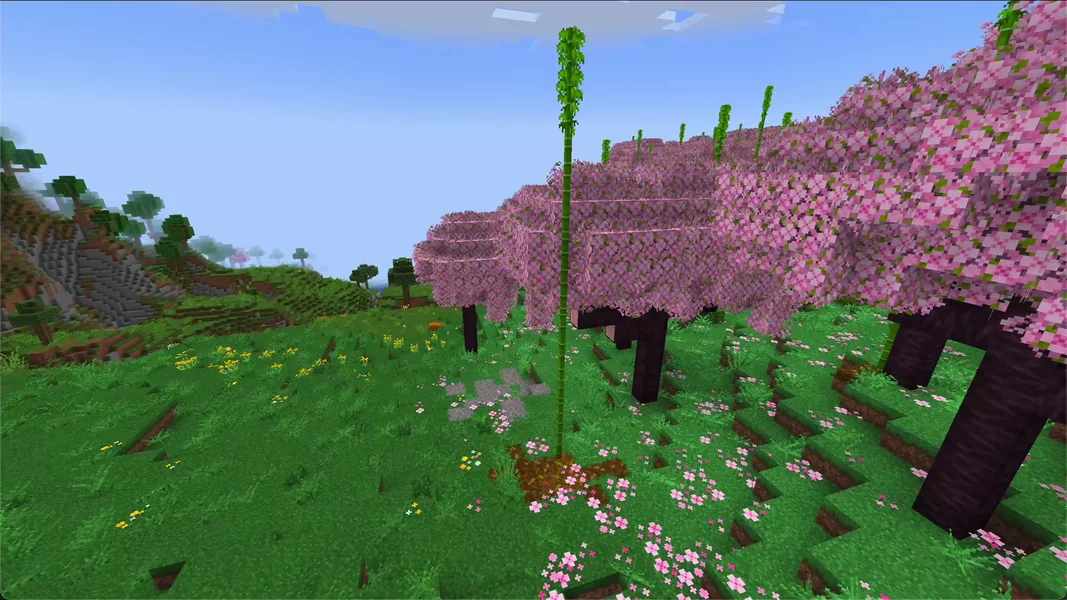
A dedicated server is worth it if your group wants to explore a shared world and it should keep running even when the host is offline. Because BMC4 keeps the vanilla rules, even players who otherwise don't play modpacks find their way in quickly. For a short solo session, the singleplayer world is enough.
These mods make up a large part of the pack's feel. All of them are in the server pack we install:
| Area | Mod in the pack (version) |
|---|---|
| Bosses and creatures | Mowzie's Mobs 1.8.2, L_Ender's Cataclysm 3.31, Alex's Mobs 1.22.9, Friends and Foes 3.0.9 |
| Additional dimensions | The Aether 1.5.2, Twilight Forest 4.3.2508, Blue Skies 1.3.31, Deeper and Darker 1.3.3 |
| Nether and End | Better Nether 9.0.10, Better End 4.0.11 |
| Biomes | Biomes O' Plenty 19.0.0.96, YUNG's Cave Biomes 2.0.5, Serene Seasons 9.1.0.3 |
| Structures and dungeons | ten mods by YUNG, including YUNG's Better Dungeons 4.0.4, plus When Dungeons Arise 2.1.58, Repurposed Structures 7.1.25 |
| Food, building, comfort | Farmer's Delight 1.3.3, Supplementaries 3.1.43, Quark 4.0-462, Handcrafted 3.0.6 |
| Quests and travel | FTB Quests 2001.4.22, Waystones 14.1.20, Nature's Compass 1.12.0 |
| Server performance | ModernFix 5.27.76, FerriteCore 6.0.1, Radium 0.12.4 |
| Diagnostics | spark 1.10.53 (profiler, see section 4) |
Which Version, Which Loader, Which Java Version?
| Property | Value |
|---|---|
| Pack version | BMC4 [FORGE] 1.20.1 v61 |
| Minecraft | 1.20.1 |
| Loader | Forge 47.4.20 |
| Java on the server | Java 17 (17.0.20) |
| Mods on the server | 310, plus 58 disabled client mods |
| RAM in our setup | 8 GB |
The 58 disabled mods are pure client mods, such as Audio Improvements, Better Advancements, or Controlling. They sit as .jar.disabled in the mods folder and are not loaded on the server. This is intentional; you don't have to enable them. You also don't have to set the right Java version yourself: the server automatically gets Java 17 for this pack. In the startup log, the pack reports All mods found!, so all dependencies were present.
Better MC BMC4 or BetterMC: VanillaReborn?
We offer two packs from the Better MC world. The names are similar, the packs are not:
| Better MC [FORGE] BMC4 | BetterMC: VanillaReborn | |
|---|---|---|
| Minecraft | 1.20.1 | 1.21.1 |
| Loader | Forge | NeoForge |
| RAM in our setup | 8 GB | 4 GB |
| Scope | large, over 300 server mods | lean, around 60 mods |
| Page | Better MC BMC4 | VanillaReborn |
Choose BMC4 if you want as much world as possible with bosses, dimensions, and quests. Choose VanillaReborn if you want to play a newer Minecraft version and less content is enough. This guide applies only to BMC4. For an overview of more packs, see the guide The Best Minecraft Modpacks for Your Own Server.
How Much RAM Does Better MC BMC4 Need? Our Measurement
We offer BMC4 with 8 GB RAM. Our test server from September 24, 2026 had exactly this allocation and showed the following values:
| Measurement | Value |
|---|---|
| RAM at idle, 5 minutes after a restart | 4,063 MiB (about 4 GiB), CPU around 10% |
| Highest RAM value after the restart | 3,996 MiB |
| Highest RAM value on the first start | 4,287 MiB |
| Disk space after the first start | 1.43 GB |
This is the server without players. Every player who explores new terrain makes the server generate chunks, place structures, and spawn creatures. That's what the gap between roughly 4 GB and 8 GB is for. We haven't measured how much RAM a full server needs. We therefore don't promise a player count.
The CPU stands out: at idle it was around 10%. The older packs on Minecraft 1.12.2 that we measured on the same day were at 0.5 to 0.6%. With over 300 mods, even an empty server isn't completely idle.
The pack ships with the profiler spark. With /spark tps you can see in the game or in the console whether the server is running at 20 ticks per second. The panel shows memory in the resource display. If the TPS drops permanently, first check with spark what is costing the time before you increase RAM.
Ordering the Server and the First Start
- Open the Better MC BMC4 page and click “Configure Server Now”.
- In the configurator, the game, loader, and the verified package are preselected, and the RAM is set to 8 GB. You see the price there before you pay.
- After the order, the system creates the server and installs the pack. You don't have to upload anything; the server pack comes directly from CurseForge.
- Wait until the console shows the line
Done (…)! For help, type "help". On our test server, that was 7 minutes and 54 seconds after creation. In our nightly runs with 8 GB (August 29 and September 15, 2026), the whole test from creation to a passed join took 10 to 15 minutes. - A later restart on the test server took 126 seconds from container start to
Done. The number in parentheses afterDoneis shorter, around 12 seconds for us, because Minecraft only measures the world loading there.
Don't be alarmed at the first look into the console: On the first start, our test server wrote 939 lines with ERROR and 1,738 lines with WARN into the log. Most belong to a few groups, such as [worlds_together] Error for jar:file:… or RuntimeDistCleaner: Attempted to load class …. The second group occurs because some mods try to load client classes on the server. In addition, there were errors when reading individual recipes, for example from Farmer's Delight. The server still ran normally. The messages mentioned were observed in this test. You check new, recurring, or function-relevant errors based on their specific content; a Done line alone doesn't confirm all mod functions.
Important: The First World Is Created Before the Modpack
During the test on September 24, 2026, we noticed something. The world folder was created on the first start of the base Minecraft server, before BMC4 ran for the first time. The area around the spawn therefore came from this first start, without the pack's biomes and structures. We didn't check how the world looked in the game. Areas further away that are newly explored are then generated with the pack.
For new orders, we changed this (as of September 25, 2026): the world that the base server creates in advance is deleted before the pack is installed. If you order after this change, the world is created on the first start of BMC4 right away with the pack's content.
If you ordered your server before that, want the whole world with BMC4's content, and haven't built anything yet, you regenerate it once:
- Stop the server in the panel.
- Create a backup. How that works is explained in the guide Create a Minecraft Server Backup.
- Only for the backed-up, unplayed wrong world: rename the
worldfolder, for example toworld-vor-bmc4-test, and keep it. - Start the server again and wait for
Done.
On startup, the server creates a new world, this time with the pack's biomes and structures. Use this approach only for an unplayed wrong world: the renamed, additionally externally backed-up world is preserved, but its content does not appear in the newly generated active world.
What Settings Does Better MC BMC4 Bring?
Unlike some other packs, BMC4 comes with no server.properties of its own. The file comes from the base Minecraft server, so the usual default values apply. You'll find it in the panel's file manager:
| Setting | Value on the test server | Note |
|---|---|---|
allow-flight |
false |
Default. If players on flying mounts get kicked for “flying”, set the value to true. |
difficulty |
easy |
Default. Set to normal or hard for more challenge. |
view-distance |
10 |
Default. |
simulation-distance |
10 |
Default. |
The mod settings under config/ contain further adjustment options. On our test server, these values were set:
| File | Setting | Value in the pack | Effect |
|---|---|---|---|
config/sparsestructures.json5 |
spreadFactor |
1.1 |
Structures are only 10% farther apart than in vanilla. Values above 1 make them rarer, values below 1 more frequent. |
config/waystones-common.toml |
worldGenStyle / frequency |
"BIOME" / 25 |
Waystones appear in the style of the biome, roughly every 25 chunks. 0 turns them off. |
Change such values only with the server stopped and after a backup. The values are in simple text files. A change takes effect after the next restart, and for world generation only in new chunks.
What Awaits You in the World
The most striking enemies in BMC4 are the bosses, for example from Mowzie's Mobs and L_Ender's Cataclysm. For the images, we placed two bosses from Mowzie's Mobs by command and turned off their AI. In the real game, you find them out in the world, and they attack.
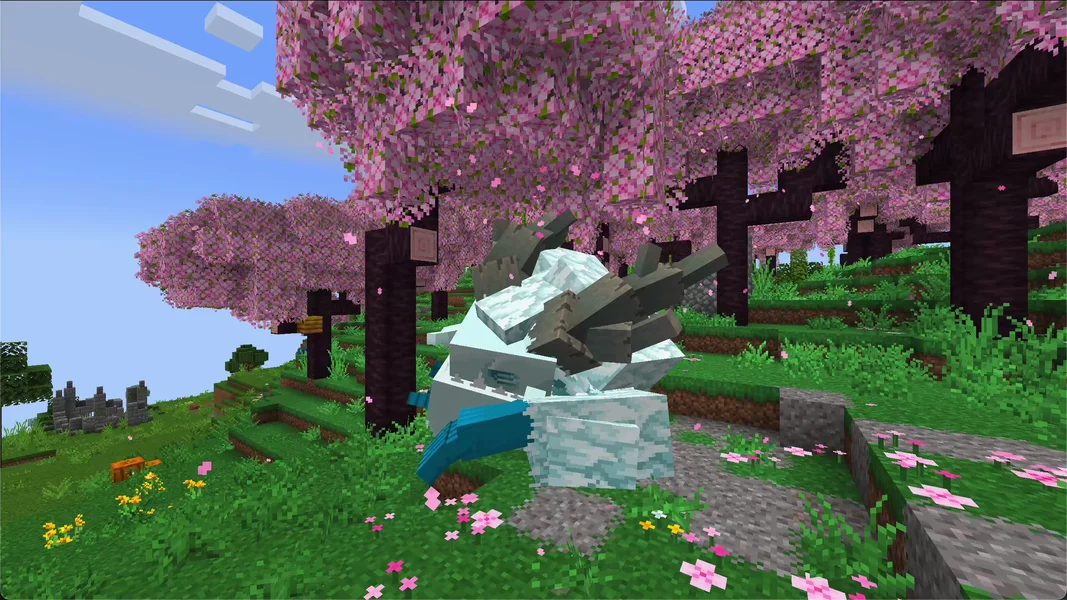
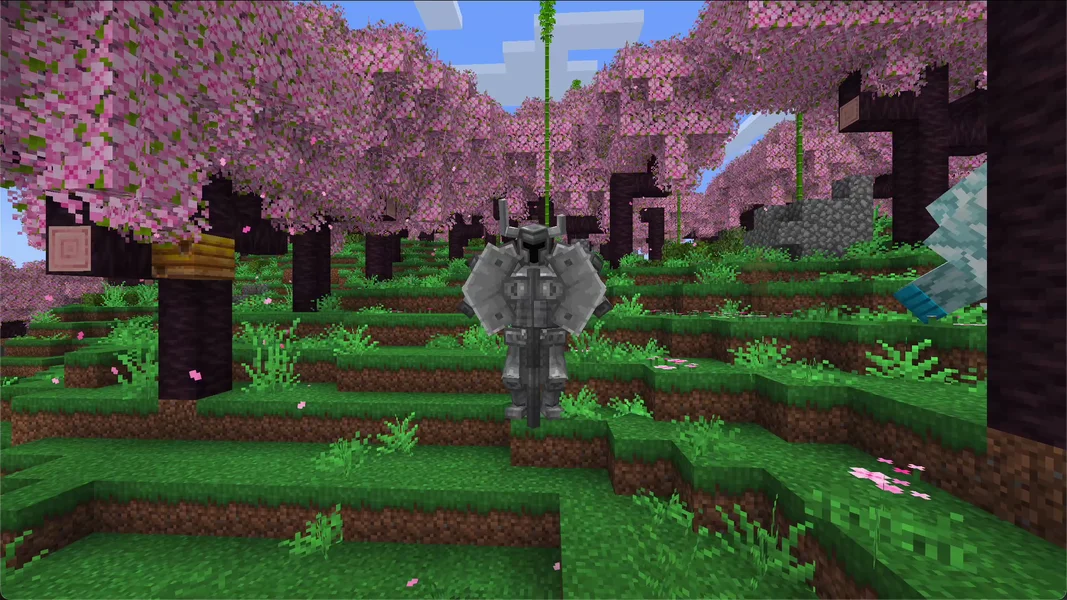
For the server, this means: boss fights produce lots of particles, creatures, and block damage at once. If several players are traveling in different places at the same time, the server generates new terrain with many structures in multiple locations simultaneously. Back up the world before a big fight, so a destroyed camp is only a setback of a few minutes.
Common Problems and Their Causes
| Problem | Cause | Solution |
|---|---|---|
| The new biomes are missing around the spawn | The first world was created before the modpack started (on servers from before the change) | On a fresh server: stop, back up, delete world, restart |
| Players get kicked for “flying” | allow-flight is set to the default false |
Set the value in server.properties to true, restart the server |
| Joining fails with a message about missing or wrong mods | A fellow player has a different BMC4 version | Install the same pack version as the server, see next section |
Many ERROR and WARN lines in the log |
Normal startup messages of the pack | Do nothing as long as Done appears and players can join |
| Server gets slow when many players explore | Lots of new terrain at once | Check with /spark tps, then lower view-distance and simulation-distance in server.properties |
Connecting Your Fellow Players
Every player needs Better MC [FORGE] BMC4 on their own PC, in the same version as the server. The easiest way is via the CurseForge app: search for BMC4, select the matching version, install it, and start it. The client mods that are disabled on the server run completely normally on the PC. In the game, the player enters the server address from your panel under “Multiplayer”. If the versions don't match, the server rejects the join. The detailed guide covering all launchers is at Joining a Minecraft Modpack Server.
Bedrock players, meaning console and mobile, cannot join a BMC4 server. The pack requires Java Edition with the installed mods on every device.
FAQ
Why Minecraft 1.20.1 and not the latest version? BMC4 is built for Minecraft 1.20.1. If you want a newer version, take BetterMC: VanillaReborn on Minecraft 1.21.1, with far fewer mods.
Is 8 GB enough for my group?
Without players, our test server used around 4 GB. How much more is added with several players depends on how far apart you spread out. We haven't measured that. Watch the first evenings with /spark tps and the RAM display in the panel before you increase RAM.
Do I have to pre-generate the world? No, that isn't a requirement. The world is generated as you explore.
How long does a restart take?
On our test server, 126 seconds from start to Done.
Why are there so many errors in the log?
The pack consists of over 300 mods, some of which bring client parts along. BMC4 writes such messages on every start. What matters is that Done appears at the end.
Can I enable the disabled mods on the server? You shouldn't. They are client mods for display, sound, and controls. On the server they accomplish nothing and can disrupt the startup.
Sources and Test Status
Test status: All measurements come from our own test server on September 24, 2026 and from our automatic nightly runs; the pack data comes from our catalog and the server pack. In detail:
- Pack: Better MC [FORGE] BMC4 on CurseForge, version 1.20.1 v61, server pack file 8689213, Forge 47.4.20, 310 mods plus 58 disabled client mods (catalog and package status September 24, 2026).
- Test server: September 24, 2026, 8 GB RAM, Java 17. Time and RAM measurements taken from the container, settings and mod list read from the server's files. Server deleted afterwards.
- Nightly runs: automatic installation and join tests with 8 GB on August 29, 2026 (909 seconds) and September 15, 2026 (602 seconds), both passed.
- Not measured: RAM and TPS with real players, player capacity, the appearance of the first world in the game.
- Images: own captures from a local world with Better MC BMC4 v59, without shaders. The test server ran v61. The bosses are placed by command, their AI is turned off.
Don't Rush to Regenerate an Old Spawn
First check whether only already generated spawn chunks show normal landscape or whether new areas also don't match the pack. Note the active world folder, pack version, and generator hints in the startup log. On a world that has been played, existing builds matter more than a uniform landscape. Therefore, test a new pack world separately. Only with a truly fresh wrong world do you rename the backed-up folder and let it regenerate. You check new or recurring mod errors individually; a successful start doesn't confirm every recipe, dimension, or structure function.