An ATM10 server needs the matching NeoForge/Minecraft 1.21.1 version and the same pack version on the clients. Check the installation, the world and the real memory limit separately. The measured start time describes one test run; for capacity, heap, container usage and load measurements are what matter.
Status of this guide: September 24, 2026. The pack data comes from our catalog and the server pack. Times, settings and idle RAM come from our own test server on the same day and from our nightly test runs; the images are our own captures. How much RAM ATM10 needs under load is covered in a separate guide, see below.
What is All the Mods 10, and is your own server worth it?
All the Mods 10, ATM10 for short, is a so-called kitchen-sink pack: it puts tech, magic, storage systems, new dimensions and exploration into a single modpack. On our test server there were 464 mod files in the mods folder. The quests in FTB Quests provide a common thread, but you can just as well build only a factory or set up a colony with MineColonies.

With ATM10 your own server is almost always worth it as soon as you play with several people. A save runs for weeks, and machines, farms and storage should keep working even when the host is offline. Everyone on the team can follow their own path, one the tech, another the magic, and in the end the systems mesh together.
These mods shape the pack. All of them are in the server pack that we install:
| Area | Mod in the pack (version) |
|---|---|
| Tech | Create 6.0.10, Mekanism 10.7.19.85, Immersive Engineering 12.4.2, Powah 6.2.10, Modern Industrialization 2.5.8 |
| Storage and logistics | Applied Energistics 2 19.2.17, Refined Storage 2.0.9, Sophisticated Storage 1.5.91, Sophisticated Backpacks 3.26.3 |
| Magic | Ars Nouveau 5.13.1, Iron's Spells 'n Spellbooks 3.16.3, Occultism 1.224.4, Nature's Aura 41.10 |
| Progression and resources | Allthemodium 3.0.1, Mystical Agriculture 8.0.28, Productive Bees 13.13.5, Apotheosis 8.8.0 |
| Colony | MineColonies 1.1.1396 |
| Exploration and enemies | Twilight Forest 4.8.3345, Ice and Fire 2.0-beta.17, L_Ender's Cataclysm 3.33, When Dungeons Arise 2.1.68 |
| Multiplayer | FTB Chunks, FTB Teams, FTB Essentials, FTB Ranks, FTB Quests |
| Travel | Waystones 21.1.45, JourneyMap 6.0.9 |
| Diagnostics | spark 1.10.124 (profiler) |
Which version, which loader, which Java version?
| Property | Value |
|---|---|
| Pack version | All the Mods 10 8.2 |
| Minecraft | 1.21.1 |
| Loader | NeoForge 21.1.251 |
| Java on the server | Java 21 (21.0.12) |
| Mod files on the server | 464 |
| RAM on our side | 10 GB |
| Disk space after installation | 1.71 GB |
You don't have to set the Java version yourself. The server automatically gets Java 21 for this pack. We query CurseForge anew for every order to find out which server pack file gets installed. If a new ATM10 version is released, a new server therefore gets the new file, and the numbers in this guide may shift slightly.
How much RAM does ATM10 need? The short version
We offer All the Mods 10 with 10 GB RAM. The detailed load measurement with peak values, measurement setup and limits is in the guide How much RAM does ATM10 really need?. It ran on pack version 8.0.
For this guide we measured idle on version 8.2 twice. On September 24, 2026, still with the heap limit from the pack (8 GiB), the server used 7,700 MiB 5 minutes after a restart with no players. On September 25, 2026, after our change to 10 GiB heap, it was 8,700 MiB at 2% CPU. The highest usage during startup was 8,824 MiB, the server's limit was 12 GiB. There was no crash due to lack of memory. Why an empty server uses this much is explained in the next section.
Why does the server show so much RAM at idle?
The ATM10 server pack ships its own user_jvm_args.txt file. Among other things, it contains these values:
-Xms4G -Xmx8G -XX:+AlwaysPreTouch
Our server starts Java with -Xmx10240M, so 10 GB of heap. However, the pack's file is read afterwards in the same start line, and with Java the later value wins. On the test server from September 24, 2026, we verified this in the running JVM: the maximum heap was 8 GiB, the initial heap 4 GiB. This means:
- Java used at most 8 GiB of heap with ATM10, even though the server had 10 GB. Java itself, loaded classes and off-heap buffers need the rest.
-XX:+AlwaysPreTouchmakes the JVM claim the initial heap immediately at startup, so 4 GiB with-Xms4G. The memory display in the panel is therefore high from the very first moment. That is not a memory leak and not a sign of too little RAM.
What has changed (as of September 25, 2026): On every installation of the pack we now remove -Xmx and -Xms from user_jvm_args.txt. All other values of the pack, including -XX:+AlwaysPreTouch, stay in place. On a server ordered or freshly installed with the pack after this change, the heap from our start line applies, i.e. the booked 10 GB. At the end of the file there is then a comment from us noting this.
Older server with -Xmx8G? If your user_jvm_args.txt still contains -Xms4G -Xmx8G, remove the two values yourself. The file is in the server's root directory and can be edited in the panel's file manager:
- Stop the server in the panel.
- Create a backup, see Create a Minecraft Server Backup.
- Open
user_jvm_args.txtand delete only-Xms4Gand-Xmx8G. The remaining values in the line stay. Do not delete the whole file; the server needs it to start. - Save and start the server. If something goes wrong, restore the backup or put the old values back.
You can set your own, smaller heap the same way with an -Xmx value in this file. In that case leave some room between the heap and the server's RAM, because Java also needs memory outside the heap.
The load measurement in the RAM guide still ran with 8 GiB of heap. With 10 GiB we have so far only measured idle. Whether a larger heap helps you depends on your play style. Check this with the spark profiler before you change anything: /spark tps shows whether the server manages 20 ticks per second, /spark health shows memory usage among other things. If the TPS holds, more heap usually brings nothing.
Ordering the server and the first start
- Open the ATM10 page and click “Configure Server Now”.
- In the configurator the game, loader and pack are preselected, and the RAM is set to 10 GB. You see the price there before you pay.
- After the order, the system creates the server and installs the pack. You don't have to upload anything; the server pack comes directly from CurseForge.
- Wait until the console shows the line
Done (…)! For help, type "help". On our test server this was 5 minutes and 21 seconds after creation. The pack's first start itself took 195 seconds of that. - A later restart took 188 seconds from the start of the container to
Done. The number in parentheses afterDone, about 6.5 seconds for us, is much shorter because Minecraft only measures the world loading there. So expect a good three minutes for every restart.
In our nightly tests with 10 GB, the whole process from creation to a passed join took 9 to 11 minutes (September 7, 15 and 21, 2026). An additional run on September 24 with the ATM10 8.2 server pack file also passed, but took 34 minutes. For the first setup, therefore plan a buffer of half an hour.
Don't be alarmed at the first look into the console: On the first start, our test server wrote 138 lines with ERROR and 758 lines with WARN to the log, for example LootDataType: Couldn't parse element or Cannot get config value before config is loaded. The server ran normally anyway, and the join test passed. Done only confirms that startup has completed. Check new or recurring messages and the affected game features separately; the successful join test of this one test run is not a general all-clear for later errors.
Tip for older servers: On our test server from September 24, 2026, the world folder was already created on the first start before the pack installation. The first chunks around spawn may therefore have been generated without the pack's world generation. For new orders we have changed this (as of September 25, 2026): the world that the base server creates in advance is deleted before the pack is installed, and the world is created on the first start of ATM10. If you ordered earlier, have no progress yet and want a world made entirely with ATM10: stop the server, create a backup, rename the externally backed-up, unplayed world folder and keep it; then restart the server. The world will then be generated anew.
Which settings apply on the server?
Unlike some older packs, ATM10 doesn't ship its own server.properties. The file comes from us and has Minecraft default values:
| Setting | Value | Note |
|---|---|---|
difficulty |
easy |
Set to normal or hard for more challenge |
allow-flight |
false |
If players with jetpacks or flight items get kicked, set to true |
view-distance |
10 |
View distance in chunks. Lower relieves the server |
motd |
A Minecraft Server |
Text in the server list, freely changeable |
The more important adjustment knobs for a multiplayer server are in the FTB mods. With FTB Chunks, a team claims chunks on the map so that strangers can't break anything there, and keeps chunks permanently loaded so that machines keep running. The values are in config/ftbchunks-world.snbt:
| Setting | Value in the pack | Effect |
|---|---|---|
max_claimed_chunks |
500 |
This many chunks can a team claim |
max_force_loaded_chunks |
25 |
This many chunks of a team stay permanently loaded, even without players nearby |
max_idle_days_before_unclaim |
0.0d |
Claims never expire, even if a team no longer plays |
pvp_mode |
"always" |
PvP is also allowed inside claims. "never" and "per_team" are also possible |
max_force_loaded_chunks is the most important dial for server load. Every permanently loaded chunk with farms and machines works constantly, even at night when nobody is online. With several teams this adds up. If the server gets slower later, first take a look at the loaded chunks. With FTB Ranks you can give individual players a different claim limit via the ftbchunks.max_claimed permission.
FTB Essentials provides commands like /home and /rtp. The values are in config/ftbessentials.snbt:
| Area | Value in the pack | Effect |
|---|---|---|
home |
max: 1, cooldown: 10 |
One home per player, 10 seconds cooldown |
rtp |
cooldown: 600, max_distance: 25000 |
/rtp every 10 minutes, up to 25,000 blocks away |
rtp |
dimension_blacklist: ["minecraft:the_end"] |
No /rtp in the End |
According to the comment in the file, /rtp ignores claims. A player can therefore land in the middle of another team's base. If that bothers you, agree on rules or turn off PvP in claims with pvp_mode.
The file defaultconfigs/ftbessentials-server.snbt is empty in the pack. There you enter values that should apply to every newly generated world.
Change all of these files only with the server stopped and after a backup. The values are in simple text files and take effect after the next start.
What awaits you in the world
Besides tech and magic, ATM10 also has strong enemies. Dragons come from Ice and Fire, bosses like the Netherite Monstrosity from L_Ender's Cataclysm. For the images we spawned both via command in a local creative world and turned off their AI. In the real game you find them out in the world, and they attack.
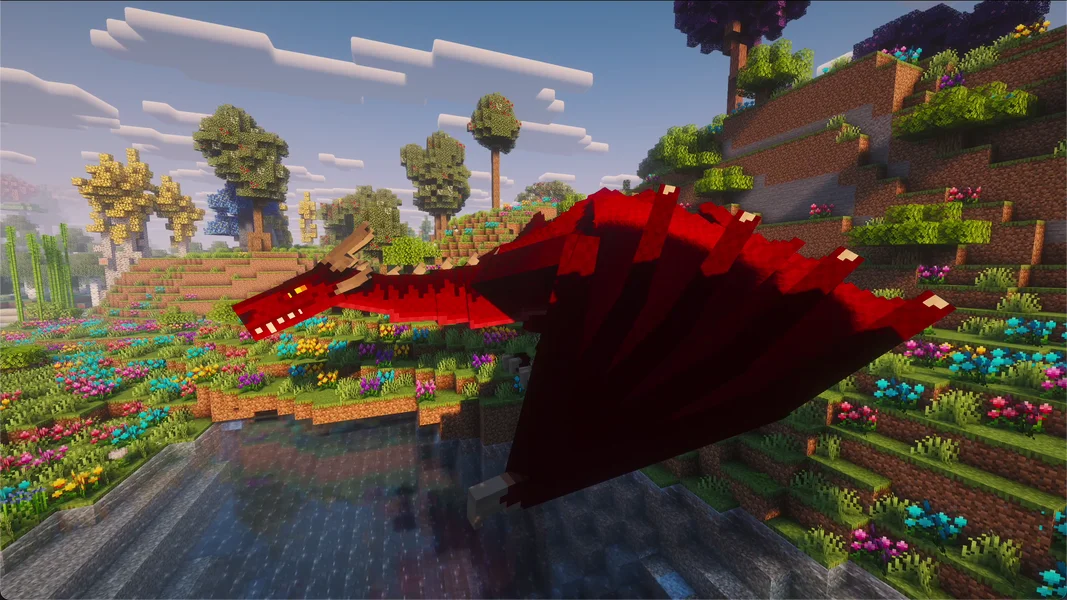
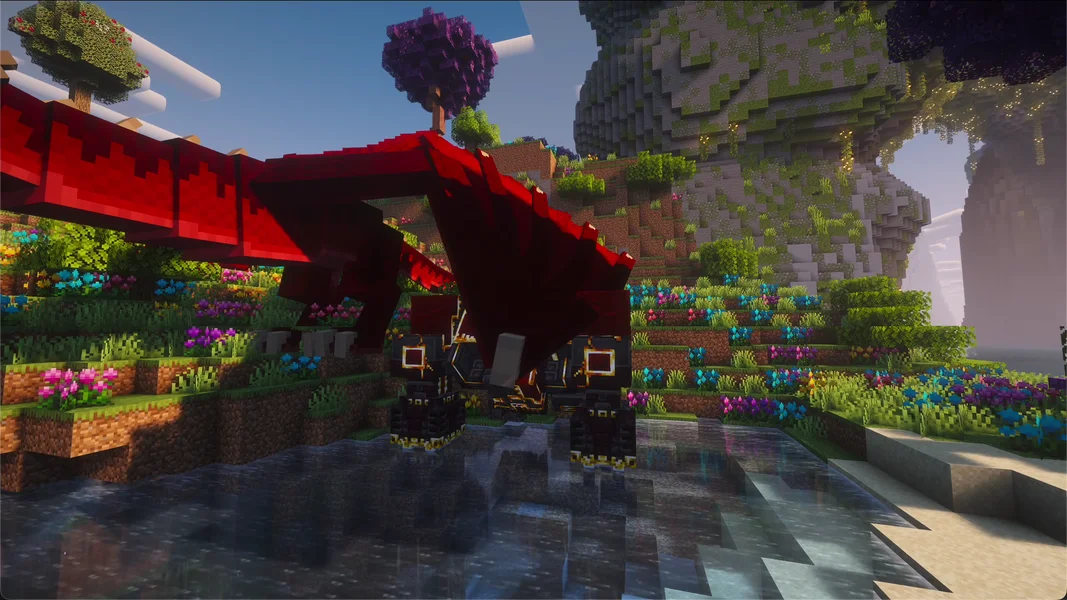
For the server this means: boss fights create many creatures, particles and block damage at once, and dragons can damage a base. Back up the world before a big fight, then damage is only a short setback.
Common problems and their cause
| Problem | Cause | Solution |
|---|---|---|
| Joining fails with a message about missing or wrong mods | Player has a different ATM10 version | Install exactly the server's version, see next section |
| Players are kicked for “flying” | allow-flight is set to false |
Set it to true in server.properties, restart the server |
| RAM display high at idle | AlwaysPreTouch from user_jvm_args.txt claims the initial heap immediately |
Normal, see the section on idle RAM |
| Server gets slower over time even though few players are online | many permanently loaded chunks with machines | Check with /spark tps, lower max_force_loaded_chunks or dismantle farms |
| The area around spawn looks like normal Minecraft | World was created before the pack installation (on servers from before the change) | Only rename and keep the backed-up, unplayed wrong world, see tip above |
Many ERROR and WARN lines in the log |
specific pack/mod messages | check the first relevant message and the affected feature; Done alone is not a complete all-clear |
Connecting players
Every player needs All the Mods 10 on their own PC in the same version as the server. The easiest way is via the CurseForge app: search for All the Mods 10, select the same version, install and start it. The launcher brings the Java for Minecraft 1.21.1. In the game, they enter the server address from your panel under “Multiplayer”. If the versions don't match, the server rejects the join. The detailed guide with all launchers is in Join a Minecraft Modpack Server.
Bedrock players, i.e. console and mobile, cannot join an ATM10 server. The pack needs Java Edition with the installed mods on every device.
An overview of more packs can be found in the guide The Best Minecraft Modpacks for Your Own Server.
FAQ
Is there ATM10 for another Minecraft version? All the Mods 10 runs on Minecraft 1.21.1 with NeoForge. The server sets the matching version automatically.
Is 10 GB enough for my group? Without players, our test server used 8,700 MiB after the change, a large part of which is heap that Java claims when loading the 464 mods. How much ATM10 needs under load is shown in the RAM guide. We don't promise a player count.
Why does my server use only 8 GB of heap even though it has 10 GB?
Because your user_jvm_args.txt still contains -Xmx8G from the pack, and Java reads this value last. Since our change on September 25, 2026, we remove it on every installation. On an older server you delete -Xms4G and -Xmx8G yourself, see above.
How long does a restart take?
On our test server 188 seconds from start to Done.
Can I turn off PvP in claims?
Yes: stop the server and set pvp_mode: "never" in config/ftbchunks-world.snbt to prevent PvP in all claims. "per_team", on the other hand, leaves the decision to each team's PvP setting and does not disable PvP across the board. After the restart, check the team rules that actually apply in the game.
Can I upload an existing world?
Yes, via the file manager into the world folder. It should come from All the Mods 10, ideally from the same version as the server. Create a backup first.
Sources and test setup
Test setup: All measurements come from our own test server on September 24, 2026 and from our automatic nightly runs, the pack data from our catalog and the server pack. In detail:
- Pack: All the Mods 10 on CurseForge, version 8.2, server pack file 8945094, NeoForge 21.1.251, Minecraft 1.21.1, 464 mod files (catalog status September 24, 2026).
- Test server: September 24, 2026, 10 GB RAM, Java 21. Times and idle RAM from the container, heap read with
jcmdin the running JVM, settings from the server's files. Server deleted afterwards. - Nightly runs: automatic installation and join tests with 10 GB on September 7, 15 and 21, 2026, all passed; additional run with ATM10 8.2 on September 24, 2026, passed.
- Load measurement: separately in the RAM guide, on ATM10 8.0.
- Not measured: RAM and TPS with real players on version 8.2, player capacity, the effect of a changed heap, the behavior of
allow-flightwith jetpacks. - Images: own captures from a local creative world with All the Mods 10 8.2 and the Complementary Reimagined shader. Dragon and boss are spawned by command, their AI is turned off.
Investigate force-loading before a RAM upgrade
Note the number and type of permanently loaded chunks and the machines running in them. Compare MSPT and memory in the same operating window. If the tick load stays high even with no players online, check these machines and force-loading rules specifically. High container usage can result from JVM settings and is not a direct heap fill level. Therefore record -Xmx, container limit and GC behavior separately. Change only one setting per comparison. Before regenerating the world, keep the previous folder; a wrongly generated spawn is not gently corrected by deleting a world that has since been played.