Моды и плагины для Project Zomboid
В этом каталоге перечислено 60 000+ проектов Project Zomboid из Steam Workshop. Они могут быть серверными, клиентскими или требоваться с обеих сторон, а также включать карты и другой пользовательский контент. Перед установкой проверьте связанную страницу источника, версию игры и зависимости.
![Autotsar Tuning Atelier - Bus [TUNING 2.0] – Project Zomboid Mod](https://images.steamusercontent.com/ugc/1679268304887504641/B0AEB746D367D26452D40ED0F1F89B3A2A3D1729/)
Autotsar Tuning Atelier - Bus [TUNING 2.0]
автор 76561198082682625
To access the tuning menu, use the "V" key while standing beside the car and select "Modifications" (the dash key icon with the plus sign). Dear Clients! We are glad to announce that Autotsar has opened a new tuning studio! Today Autotsar Tuning Atelier (abbreviated - ATA) is releasing its own version of "Bear Bus" buses. The difference between the tuned version and the original: - armored doors; - protective grilles for all windows; - increased roof rack; - roof-mounted toolbox; - bullbar. All elements are made of high-quality steel and are fully functional. Now you can safely go to the supermarket and not be afraid to damage glass, tires or get stuck in a crowd of neighbors. Don't have money for an updated model? No problem! Especially for you, we have issued a magazine with a detailed description and drawings of all elements. If you have certain skills and materials, you will be able to customize "Bear Bus" buses on your own. You can buy magazines in bookstores and gas stations in your city. To access the tuning menu, use the "V" key while standing beside the car and select "Modifications" (the dash key icon with the plus sign). This version of the bus was developed by the order of EGNH CLAN. Archer Perez tiktok.com/@archerperezz Aya Ezmaria twitch.tv/ayaezmaria Mr.13 twitch.tv/mrlabintatlo Screenshot from the game "Dead Ahead: Zombie Warfare" is used for the poster. Android IOS You can freely use this mod on your server. We publish information about mod update times on Discord in advance: https://discord.gg/PHhsuQxDue Mod permission according to TIS policy: Ask for permission Redistribution of this mod without explicit permission from the original creator is prohibited under any circumstances. This includes, but not limited to, uploading this mod to the Steam Workshop or any other site, distribution as part of another mod or modpack, distribution of modified versions. The product can be published on Steam only through an account with the name iBrRus. © iBrRus Version:2.01 Workshop ID: 2592358528 Mod ID: ATA_Bus
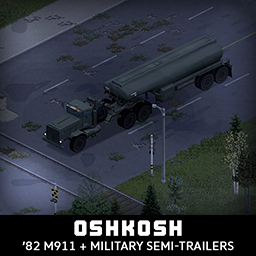
'82 Oshkosh M911 + Military Semi-Trailers
автор 76561198089039119
So you want to move your whole base to another location, or you want to hoard all the gas in Knox County, maybe you just want to steal all the fridges and get them to your super secret base, you do you, I'm just here to help. M911 was the workhorse of US Armed forces for decades, his last job was to transport M1 Abrams tanks to battlefield. It's huge, it's ugly and it's one of the most iconic semi-trucks ever made. It comes in normal, armored and burnt flavor, with many texture variations. Main features: - 2 Chassis variants - Bullbar protection - RunFlat tires and CTI System - Fully animated hood, trunk, doors and windows - Visible interior and character (with improved exit/enter/aim animations) - All parts have 3d objects you can remove and place in the world - Extra parts to craft and find in the world to make the vehicle truly yours - Multiple texture variations - Armor protection for windows, doors, engine, headlights etc - 2 seats in the cab - You can use it in your current save game, just enable the mod in the load menu - It can tow and be towed - Not recolorable Military Semi-Trailers - M126 Stake Semi-Trailer - M127 Van Semi-Trailer - M128 Van Semi-Trailer - M747 Lowbed Semi-Trailer - M967 Fuel Tanker Semi-Trailer (Requires Tsar's Common Library to have fuel functionality) Trailers are NOT towable by normal vehicles, only M911, but the M911 can also tow normal trailers, M911 is not compatible with other semi mods, they use different connection method. You attach the trailer by aligning the truck under the trailer just like in the pictures above, exit, press v and select + from radial menu just like with normal trailers. If you like my mods, please consider supporting me with a coffee, so I don't fall asleep while making new mods and supporting old ones :) Check out my other mods: Credits: - Thanks to The Indie Stone for making this awesome game and all this possible. - Special thanks to bikinihorst for the initial idea, all help along the way and helping me resurrect this guy for 2026 and both b41 and b42 - Fuel tanker functionality was made possible by iBrRus and the Tsar's Common Library - Awesome maps in previews: Coyote County Araxas, Fort Redstone and Fort Crosstown Ask for permission This mod can only be added to and extended with the express permission from the original creator. If no permission is received you may not alter the mod, and it must be treated as a mod that is 'On Lockdown'. You are not allowed to repack this mod under any circumstances, ever. ✅ B41 (b41.78.19) Single Player / Multiplayer fully supported ✅ B42 (b42.13+) Single Player / Multiplayer fully supported Vehicle IDs: 82oshkoshM911, 82oshkoshM911B, TrailerM127stake, TrailerM128van, TrailerM129van, TrailerM747lowbed, TrailerM967tanker Workshop ID: 2618213077 Mod ID: 82oshkoshM911
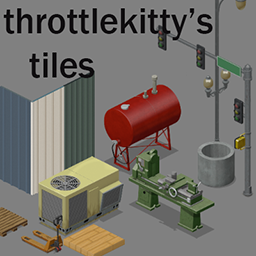
throttlekitty's tiles
автор 76561197971984255
This is a collection of world tile sprites I've made to be used as a resource in creating custom maps. Some sprites may have additional functionality, I'll be including lua for those in this mod as needed. I don't plan on making anything here craftable, however. Currently supports b41.xx IWBUMS For Players: You only need this if you've downloaded a custom map that requires this mod. For Modders: Editor tilesheets are found in the in my google drive, place them in your Tiles\2x\ folder with the others. I've included my own copy of BuildingFurniture.txt. This goes in %userprofile%\.TileZed\ You may want to make a backup of that file first, my copy includes many fixes for the building editor objects as well as adding my own tiles. https://drive.google.com/drive/folders/1i2VYWHNvrGXfDS1dv_9VYgCnI4PpTqxc?usp=sharing Your mod.info needs to have this line: require=tkTiles_01 Be aware that this is a work in progress, I won't try to break maps with updates, just know that it can happen if I need to make changes that do. If tile positions in this mod change, check out the TileZed lua scripts, there are examples of how to swap a tile instance with another. Anyone is free to use or modify anything in this mod for their own, I just ask to be credited, no need to ask me directly. Have fun with them! Additional Credits: Filibuster Rhymes -- changelog located in the sidebar -- Workshop ID: 2384329562 Mod ID: tkTiles_01 Workshop ID: 2384329562 Mod ID: tkTiles_01
![Bushcraft Gear - Tools [B41/B42] – Project Zomboid Mod](https://images.steamusercontent.com/ugc/1716409376326790752/9694E82D01199769FDCB5C82D66EBAA725EE4ABE/)
Bushcraft Gear - Tools [B41/B42]
автор 76561198095143909
Adds 6 new vanilla friendly weapons to your world: - Hand Hatchet - Splitting Axe - Cheap Survival Knife - Survival Knife - Kukri Machete - Rancher Machete (Default weapons has not been replaced, they are still in the game) Every weapon/tool has different states to make them suite to different combat styles. The "Hand hatchet" for example is a shorter hand axe which is quicker and more accurate (slightly higher crit and attack speed) than the default handaxe, but has a shorter range and deals less damage to zombies and doors. Feel free to leave feedback to the drop chances and stats. :) Credits to Hea for creating the russian translation and helping out with some balancing! Credits to Stonechild for updating the loot distribution to the new system! Credits to 「Arko Piktuviry」 for creating the spanish translation! Credits to Ankha for ukraine translation! Thanks! FAQ: Will this mod change the overall weapon count? Yes and no. Weapons attached in zombies are as rare as before since they share one loot table with the default weapons. But since the new weapons have been added to several containers it might increase the overall weapons in the world. Will this mod work with a existing savegame? It should, but you may wont find them in already discovered loot places. Its usually better to start a new savegame with new mods. Do you take comission for new weapons? It depents. If i like a idea or weapon i might add it if i want to play with it, but mostly the anwser is: no Am i allowed to use this mod in a Server mod pack? Yes Workshop ID: 2423906082 Mod ID: BCGTools Workshop ID: 2423906082 Mod ID: BCGTools
![Autotsar Motorclub [Only for B41] – Project Zomboid Mod](https://images.steamusercontent.com/ugc/1823400596098476669/4AE617BD3E35527C9666274FA7271221C661A07F/)
Autotsar Motorclub [Only for B41]
автор 76561198082682625
This day has come! Autotsar Inc. together with KI5-Production, are pleased to present the new vehicles: ______________ 1984 BWM R80/7 Monolever - Classic ______________ Classy and fast, can seat 2 people, it even has 2 bags for some light storage. The most versatile model for all death occasions. ______________ 1984 BWM R80/7 Monolever - Custom ______________ It's even faster... no storage, no indicators or mirrors, no passangers, it's for you only! It's like bleach but more fancy. ______________ 1986 Xarley-Davitsan Sportstep XL 1200 ______________ Strap some guns in those 2 holster, load the 2 bags with ammo and go looking for trouble, or beer. ______________ 1988 Suvzuki 250 Quadruiner ______________ 4 wheels bring additional stability, 2 seats and a lot of storage space, ideal for places where cars can't squeeze through. ______________ 1990 Yamama Waveruiner 650TL ______________ Yes, this is not a dream! It's The Yamama, with all it's glory! Enjoy some waves far away from zombies and apocalypse! If you wish, you can always drown yourself and feed the crayfish. Motorcycle, quad bike or jet ski? Which one will be your best friend during the zombie apocalypse? If you like our mods, please consider supporting us with a coffee, or become our patron on Boosty. F.A.Q. Does this mod work without the Tsar's Common Library mod? No. Does this mod work without the Aquatsar Yacht Club mod? Yes, but the jet skis stop spawning and working. Mod Aquatsar Yacht Club works without mod Cherbourg? Yes. What are the id's of the new vehicles? Base.AMC_bmw_classic Base.AMC_bmw_custom Base.AMC_harley Base.AMC_quad Base.AMC_Waverunner Base.TrailerAMCWaverunnerWithBody You can freely use this mod on your server. We publish information about mod update times on Discord in advance: https://discord.gg/PHhsuQxDue Mod permission according to TIS policy: Ask for permission. Redistribution of this mod without explicit permission from the original creator is prohibited under any circumstances. This includes, but not limited to, uploading this mod to the Steam Workshop or any other site, distribution as part of another mod or modpack, distribution of modified versions. The product can be published on Steam only through an account with the name iBrRus or KI5. © 2022 iBrRus, KI5 Version: 1.02 Tags: Moto, Motorcycle Workshop ID: 2778576730 Mod ID: amclub
![More Description for Traits [b41] [Not b42!] – Project Zomboid Mod](https://images.steamusercontent.com/ugc/28808171714934556/C37A592DC0C07F047DC271FA9E30ABBCF8DAE139/)
More Description for Traits [b41] [Not b42!]
автор 76561198041411600
DOESNT WORK WITH VERSIONS ABOVE 42.15+. This mod is intended for players who are confused about what effects each trait and profession has on the character. It adds description to the traits that need it to describe their effects on the character in detail, instead of leaving people guessing with vague sentences. This way, players can have an easier time imagining their own builds by themselves. It also adds the description on mouse hover in the character's info screen, in game. This works with descriptions of traits from other mods too, like Banjo's item kits or Dynamic traits for example. This is based on a combination of my own knowledge, the game's non-exposed Java files (that I learned how to decompile), the game's exposed Lua files, your feedback, and the wiki of PZ. Most of what I added in the traits' descriptions are in parenthesis so you can distinguish what is vanilla description and what is not. If you notice a typo, or know of an effect that is not listed, or spot something that is wrong or poorly worded, please leave a comment to point it out to me. I don't think I got every single effect that could be listed, and I may have made a mistake somewhere, so I'm relying on you guys for that. Compatibility Works with build 41, in multiplayer b41. DOESNT WORK with 42.15+. It should be compatible with any mod that adds traits or skills. Translations B41 translations are CLOSED. B42 translations are open , but be advised that it risks becoming obsolete soon as B42 gets more matches, and I will most likely take a couple weeks to add the translation. Anyone is welcome to volunteer to translate to their language. Foraging stats: The mod details the foraging stats bonuses for each trait and profession. Stats are : Foraging radius bonus, Weather Effect reduction, and Darkness Effect reduction and also Specialisation bonuses for every foraging category. All foraging stats are added dynamically, which means any balance changes will be automatically updated, and other traits that get foraging stats in their descriptions (if they have foraging stats). Source file: media/lua/shared/Foraging/forageDefinitions.lua Character Info Screen Tooltip: The mod displays the detailed description of each trait in the character's info screen window on mouse hover. Works for professions too (except Unemployed since it doesn't have an image). Works with traits of other mods too! Although their descriptions probably won't be as detailed. Dynamic Free recipes Free recipes have been dynamically added to each trait and profession description, which means any future free recipe changes in vanilla will automatically show up on this mod, without needing to update the mod. Modded traits will also have their free recipes added to their description, just like the foraging stats. And modded recipes will also dynamically show up if they are given for free to a trait or profession. As of 42.8 I limited the number of recipes that can show up on one trait. Mod Options There are now 3 mod options : - Show more description - Show Free Recipes - Show Foraging Stats So you can now disable the things you don't want to see. Give your feedback I've tried to be as exhaustive as possible, but I'm sure I've made some mistakes or interpreted things wrongly here and there. Please tell me in the feedback & bug reports discussions , or just leave a comment. Workshop ID: 2685168362 Mod ID (b41): MoreDescriptionForTraits4166 Mod ID (b42): MoreDescriptionForTraits42

Spongie's Hair
автор 76561198042060301
WORKS IN 42.20 STABLE FLUFFY HAIR NEEDS TO BE ADDED TO THE MOD LIST IN SERVER SETTINGS OR THE MOD WILL NOT BE ENABLED !!!!!!!!!!!!!!!!!! Supports B41 and B42.20. Works in multiplayer B41 USERS SWITCH TO THE B41 LEGACY VERSION HERE. I WILL REMOVE THE B41 FILES FROM THE MAIN MOD WHEN STABLE RELEASES Adds 80 new hairstyles for both body types Immersion breaking hairstyles don't spawn on zombies Full hairstyle list is in the preview images above and the pinned discussion below Recommended Mods: - Fluffy Hair - REQUIRED - Improved Hair Menu B41 - Improved Hair Menu B42 - Yaki's Hair Salon - Yaki's Hair Retexture - Spongie's Hairstyle Unlocker - Unlocks all hairstyles when using scissors in-game Hair Modding Guide View on Github This mod is open source so you can do whatever you want with it. Workshop ID: 2463184726 Mod ID: SpnHair
True Actions. Act 3 - Dancing
автор 76561198082682625
Almost all important events in the life of a primitive man were marked by dancing: birth, death, war, the election of a new leader, the healing of the sick. These dances expressed prayers for rain, sunshine, fertility, protection, and forgiveness. Dancing is exactly what you need in these difficult times. That is why we have published the magazine "Dance". Explore 45 different dance moves by finding and reading the issues of our new magazine. We'll remind you that the general partner of the magazine is TMC, the producer of the сereal, Kosmotsars. Kosmotsars are lovingly made from 100% natural ingredients and whole grains, which is why they are so nutritious and healthy. Each cereal pack contains one trading card that will give you access to a unique dance move. Delight your family with a delicious breakfast, and your neighbors with a wonderful dance. FAQ: How to dance? Open the emotion menu (press and hold Q) and select the appropriate item. Will the mod work if I add it to an existing save? Yes, it will. How do I learn the dance? You need to find and read a dance magazine. Do I necessarily need a magazine to learn a dance? At the beginning of the game, each player knows 3 random dances. The remaining dances can be learned from the magazine, or find a trading card. What are the trading cards for? When a trading card is in a player's inventory, a special dance becomes available to him. Each card has its own dance. Can I learn the trading card dance? No, the dance will only be available if the card is in a player's inventory. Where can I get trading cards? The cards can be found in the сereal, Kosmotsars. These boxes of сereal appear on store shelves, in houses, and in other places where сereal should appear. Credits: Thanks to AuthenticPeach for help with this mod. You can freely use this mod on your server. We publish information about mod update times on Discord in advance: https://discord.gg/PHhsuQxDue Mod permission according to TIS policy: Ask for permission Redistribution of this mod without explicit permission from the original creator is prohibited under any circumstances. This includes, but not limited to, uploading this mod to the Steam Workshop or any other site, distribution as part of another mod or modpack, distribution of modified versions. The product can be published on Steam only through an account with the name iBrRus. © iBrRus Version:1.06 Workshop ID: 2648779556 Mod ID: TrueActionsDancing
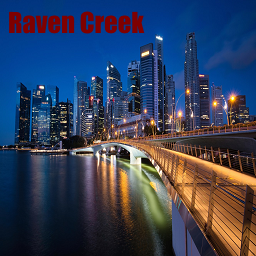
Raven Сreek
автор 76561198967942212
This adds the port city of Raven Creek to the vanilla game world. ______________________ WARNING! READ ALL BEFORE DOWNLOAD!BY SUBSCRIBING TO THIS MOD, YOU CONFIRM THAT YOU HAVE FULLY READ THE DESCRIPTION, AND YOU HAVE NO PROBLEMS WITH IT. ONLY FOR 41.78.16 BUILD What you need to know: 1.After EACH update for avoid bugs, you MUST start a new game. Sad but true. 2.Turn ON in the game settings (Double-sized textures: Yes) There are several zones on the map with varying difficulty. They have a different spawn number of infected, and other features. This map may be too hard for some people, it is not designed for beginners. Some spawn points can be very difficult, others easy. It depends on your luck. Sometimes you may appear surrounded by zombies. Still do not forget that you personally adjust the difficulty of the game in the sandbox, if it seems to you that the map is too hard or easy, then change your own settings. There is a lot of loot on the map. The map was created to gain a different experience from vanilla, where there will be more action, and where there will be a lot of everything - from infected to weapons. The city was planned for fast raids with friends (or solo), and not to establish a base here. How do I get in from the standard map? The last screenshot on the mod page shows the current position of the city in the vanilla world. Unfortunately, the text in the description is limited, click on the link below to read the description in full. https://theindiestone.com/forums/index.php?/topic/87613-raven-creek-2025/ If you like the mod, don't forget support it. Thanks and enjoy the map. ________________________ Этот мод добавляет портовый город Raven Creek на стандартную карту разработчиков. ВНИМАНИЕ! ПРОЧИТАЙТЕ ВСЕ ПЕРЕД СКАЧИВАНИЕМ! ПОДПИСЫВАЯСЬ НА ЭТОТ МОД, ВЫ ПОДТВЕРЖДАЕТЕ, ЧТО ПОЛНОСТЬЮ ОЗНАКОМИЛИСЬ С ОПИСАНИЕМ, И У ВАС НЕ ВОЗНИКЛО ПРОБЛЕМ С ЭТИМ ТОЛЬКО ДЛЯ 41.78.16 БИЛДА Что нужно знать: 1.После КАЖДОГО обновления во избежание багов нужно начинать новую игру. 2.ВКЛЮЧИТЕ двойной размер текстур в настроиках игры. На карте есть несколько зон с разной сложностью. В них разное кол-во зомби и другие особенности. Эта карта может оказаться слишком сложной для некоторых людей, она не предназначена для новичков. Некоторые точки спавна могут быть очень сложными, другие - легкими. Это зависит от вашей удачи. Иногда вы можете оказаться в окружении зомби. Тем не менее, не забывайте что сложность игры вы лично настраиваете в песочнице, если вам кажется что карта слишком сложная или простая, значит измените свои настройки. На карте много лута. Карта создана для получения иного типа опыта, где будет больше действий и изобилие всего - от зомби до оружия. Город был спланирован для быстрых рейдов с друзьями (или в одиночку), а не для создания здесь базы. Как попасть в город со стандартной карты? Последний скриншот на странице мода показывает текущее положение города в ванильном мире. К сожалению, текст в описании ограничен лимитом, нажмите на ссылку ниже, чтобы прочитать описание полностью. https://theindiestone.com/forums/index.php?/topic/87613-raven-creek-2025/ Если вам понравился мод, то не забудьте лайкнуть его.Спасибо и надеюсь вам понравится. Workshop ID: 2196102849 Mod ID: RavenCreek Map Folder: RavenCreek
![Map Legend UI [B42\41] – Project Zomboid Mod](https://images.steamusercontent.com/ugc/1831278003372708650/CCD99E070163DC62D21FF47673853CAF7B21830A/)
Map Legend UI [B42\41]
автор 76561198018793570
Works with Build 42.20 Stable! Playing build 41, but still don't remember what all the building colors stand for? Or, perhaps, like me, you think that the vanilla build 42 map key looks a bit... off? Suffer no longer. This mod adds a legend from old town maps to in-game world map. Compatibility - Works with all stable builds (41.65 or newer), including build 42! - Might work with newer experimental builds, but no guarantee - Compatible with Multiplayer - Сompatible with the following mods: - Extra Map Symbols & Extra Map Symbols UI - Russian Language Pack (41.x) - Share Annotations - Any other mod, theoretically. NEW IN VERSION 2.0: - The legend window is now an actual UI element - Created a standalone button to close and open the legend window. - Added support for translations - Currently supported languages are listed in the pinned discussion - Legend window size adjusts automatically depending on your language setting - Adjusted text alignment (padding) when using languages with non-standard fonts - Want to submit a translation? Post it in the pinned discussion! FAQ Q: "Can I use this mod in my modpack?" A: Yes, as long as you credit the original owner of the mod (me) Q: "Can this mod be used in an existing world\save?" A: It should, but back up your save file before enabling the mod just in case. No guarantees here. Special Thanks: - MrBounty for a bunch of useful information on building a UI and help with the code - Wipe for creating compatibility between this mod and the "Extra Map Symbols UI" mod If you like this mod, don't forget to leave a rating Mod Info Workshop ID: 2710167561 Mod ID: MapLegendUI
![More Traits [Legacy, read description] – Project Zomboid Mod](https://images.steamusercontent.com/ugc/921419892343911553/57FEEE04CC786646074F5DE52A1BD812B1CABF95/)
More Traits [Legacy, read description]
автор 76561198035789219
Regarding future of More Traits MT stays at this workshop in the state it is now. There will be no support, bugfixes, updates or compatibility patches anymore. If you want "official" updated version that's actively maintained and expanded, it's been integrated as part of Evolving Traits World. At the moment - not all traits, but it's being worked upon. Alternatively use this until it fully breaks or try finding AI-vibecoded "fixed" version on the workshop. Godspeed o7 Information: This mod adds a great deal more variety to the traits available to players during character creation. This includes, but not limited to: traits that add some starting equipment, traits that increase your starting level in specific skills but don't give exp multiplier, a bunch of unique traits with interesting effects (examples: better weapons proficiencies, better exp gains for specific playstyle, zombie infection immunity with cure period, scavenging perks, driving perks, and so on). Of course, your typical +1/2 in some skills perks are also present. The mod also attempts to add a greater variety of expense, as in there are more -1, -2, -3, -5 traits. This should help prevent the annoying feeling of having one solitary point left with nothing to spend it on. Dynamic Traits submod is present - you can earn/lose traits by leveling skills, list of all available perks can be found here. Note, that almost everything is configurable through sandbox settings (120 Sandbox options). Want to make only specific perks dynamic? I got you covered,choose which perks you want 1by1. Want to change Skill level requirement to make it easier or harder? No problem, do that. Out of 90+ or so available perks, 50+ can be made dynamic. Some additional info can be found here Known Issues - Made of Glass trait sometimes hurts players while sleeping. (Haven't experienced this in a while. Might be fixed?) - Killing players in Multiplayer with Martial Artist does not sync their death to the server. - Evasive Insta-Death is usually caused by Instant Infection Mortality. Fix is not expected, as we got no clue why this is happening. Mod Compatibility: - Evolving Traits World (ETW) - ETW submod marks which traits are dynamic, also makes Butterfingers dynamic. - Dynamic Traits - The mod will opt to use their Alcoholic trait over its own. - The Only Cure - The Amputation is now officially supported, and the mod will opt to use their amputation method instead of its own. - Mod Options - Allows for Client-Side settings to be adjusted. Install if you would like extra options. - Moodle Framework - Adds in support for Alcoholic as a moodle. - Driving skill - some traits will be auto-disabled to avoid conflicts - Scavenging skill (fixed) - some traits will give exp boost in scavenging if mod is present. Scrounger perk is disabled if mod is present, it does same thing as Skill. Original works too. Opening The Project Up To The Community: The Mod is now available on GitHub for others to contribute. https://github.com/hypnotoadtrance/MoreTraits Here you will find the bleeding-edge version of the mod as I and the community continue to build upon it. Regular updates will be posted to the Steam Workshop when appropriate. Public Discord: Because Steam comment sections aren't the best space for collaboration, I've set up a Discord server for this mod. Since the project is officially moving to Github and opening up, it stands to reason that anyone working together on the project will want a place to work together. https://discord.gg/6Czm3uqn4z There, you will be able to share servers, discuss suggestions, make bug reports, perform translations, and get help coding for the project. Authors: Creators: HypnoToadTrance - main mod Fajdek - main mod MusicManiac - dynamic submod Additional Coding: SteadySpring Xenu47 Aristrofl Vaikke Domestos Spring hi117 curveo Josko FallenTemplar (Fallen) Translations: Simplified Chinese, by EndsM Traditional Chinese, by ???? Russian, by Xenu47, Hea, rodriguez German, by Marcv0dka Portuguese , by Cinissh Korean, by teray French, by MonsterKillers1973 Turkish, by Sariserpito, Atlantic Spanish, by franz, HawK Polish, by Tony Italian, by Lore11 Workshop ID: 1299328280 Mod ID: 1299328280/ToadTraits Mod ID: 1299328280/ToadTraitsDisablePrepared Mod ID: 1299328280/ToadTraitsDisableSpec Mod ID: 1299328280/ToadTraitsDynamic
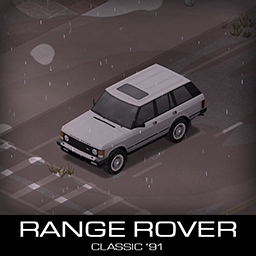
'91 RANGE ROVER Classic
автор 76561198089039119
Iconic SUV from 1991, perfect fit for your post apocalyptic world of project ZOMBOID. It now comes with a full set of armor, roofrack and many extras to explore and use. Have fun! Main features: - 2 chassis variants with their unique pros and cons - 3 front Bumpers/Bullbars and 2 rear Bumpers/Bullbars with 2 tiered protection - Fully animated hood, trunk, doors and windows - Insert key opens up the sunroof - Visible interior and character (with improved exit/enter/aim animations) - All parts have 3d objects you can remove and place in the world - Extra parts to find in the world to make the vehicle truly yours (bullbars, armor plates, side steps, roofracks, mudflaps, snorkels etc) - Many texture variations - Armor protection for windows, doors, engine, headlights etc - - You can use it in your current save game, just enable the mod in the load menu - It can tow and be towed - Not recolorable If you can't wait to find this mod in your game and want to test it right away, use bikinitools to spawn it, hide the items that your character holds while in vehicle, or for all other good stuff that mod has, go get it! If you like my mods, please consider supporting me with a coffee, so I don't fall asleep while making new mods and supporting old ones :) Check out my other mods: Credits: - This mod remake is a THANK YOU to all people that supported me in the last 2 years, you rock! - Thanks to The Indie Stone for making this awesome game and all this possible. - Special thanks to bikinihorst for the huge help with code, optimization, and taking care of the multiplayer and part code. Ask for permission This mod can only be added to and extended with the express permission from the original creator. If no permission is received you may not alter the mod, and it must be treated as a mod that is 'On Lockdown'. You are not allowed to repack this mod under any circumstances, ever. Compatibility: ✅ B41 (b41.78.19) Single Player / Multiplayer fully supported ✅ B42 (b42.13+) Single Player / Multiplayer fully supported Vehicle IDs: 91range, 91range2 Workshop ID: 2409333430 Mod ID: 91range
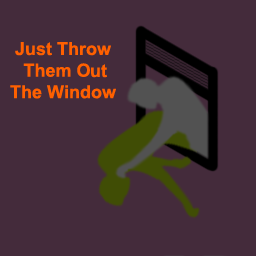
Just Throw Them Out The Window
автор 76561198056536755
What is this about? This mod is meant to address a single problem. You all know too well that awkward moment when the upper levels of your base get invaded by zombies. If you're lucky enough to survive this, you end up with piles of corpses all around the place. But then it's so annoying to get rid of all the corpses, right? Well, in that case you can just throw them out the window! ;D Features - Throw corpses out of windows - Throw corpses over fences Support me on Ko-fi Version Latest version: 0.0.8 Can I use this mod in a modpack? No. Redistribution of this mod without explicit permission from the original author is strictly prohibited under any circumstances. This includes, but not limited to, uploading this mod to the Steam Workshop or any other site, distribution as part of another mod or modpack, distribution of modified versions. Contribute Your help is needed for translations! If you speak any of the language supported in the game, please help! Translation files are available here: https://github.com/quarantin/zomboid-out-the-window/tree/main/media/lua/shared/Translate Bugs Please submit any bug you find here: https://github.com/quarantin/zomboid-out-the-window/issues Feedbacks are welcome! You can find me on Project Zomboid Discord server: https://discord.com/invite/theindiestone Have fun! ;D Workshop ID: 2659216714 Mod ID: OutTheWindow
![[B41] Fuel Side Indicator – Project Zomboid Mod](https://images.steamusercontent.com/ugc/1835790490129754021/2CAE6FE7A4902A5C701D5DD783792323F4FAB36C/)
[B41] Fuel Side Indicator
автор 76561198060092910
FOR B41 ONLY. DOES NOT WORK WITH B42 The Indie Stone has already added this feature in vanilla! So you do not have to install this mod if you are in B42. It's been an honor. Thank you all for the awards and support given through the years. o7 - Kabaww EXCITING NEWS! The latest blog post by The Indie Stone (https://projectzomboid.com/blog/news/2023/11/one-door-openz/) seems to hint that they will add a fuel-side indicator to the vanilla game on Build 42. I'm so happy that the developers noticed this small UI/UX tweak enough to warrant it to be in the base game. It has always been my intention to make this mod in the hopes of getting it implemented in vanilla. Cheers to all who have supported this mod and I'm sure it will still come handy until B42 comes out. Also, This mod still works even though it's been over a year since I updated it. Works for Build 41.78+. Build 41.68 Patch - Fixed error with Agrotsar Tractor* - Fixed compatibility with two-wheeled vehicles** **For some bikes, the mod makers made it so that you could refuel on both sides, in this case I have disabled the indicator. *You may also find that the indicator does not appear in certain vehicles, this is because the mod makers have done some weird stuff on their vehicles that hinders this mod to get info on the gas tank location. One example of this is the Agrotsar Tractor that does not have a gas tank area which this mod relies on. This mod should be loaded LAST. Specifically, after enabling other vehicle mods. For server owners, place FSI at the end of the list of mods or after other vehicle mods. Description Find it annoying to turn your vehicle around in a gas station and attracting MORE zombies? Do you wish there was a way to know which side your car's gas tank is at? Fuel Side Indicator is a simple addition to your vehicle's dashboard that lets you know which side you have to park your car when refuelling! Author's Notes This is my first UI mod! Please be patient with any bugs you may encounter and report them in the comments below. - No need for a new save, just enable it and you're ready - To disable, just disable the mod itself Big thanks to the PZ discord modding community! Special shout out to Shurutsue as well! COMPATIBILITY: Build 41 ONLY *Compatible with ALL vehicle mods! (as long as the vehicle has wheels) *If you have a mod that tweaks the vehicle dashboard, this mod may conflict with it but not likely if it's a minor tweak. MULTIPLAYER COMPATIBILITY: * This should work since this is a client-side mod. Let me know down in the comments if you have trouble with the mod on your server. REPACKING is ALLOWED. Just credit me and don't whine at me when something breaks when you repack. Workshop ID: 2616986064 Mod ID: fuelsideindicator
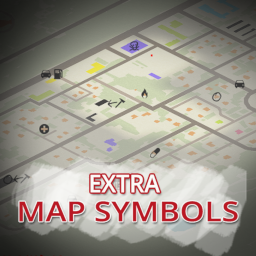
Extra Map Symbols
автор 76561198173442777
Extra Map Symbols - adds additional map symbols following base game style - adds symbols variants to base game symbols (requires Extra Map Symbols UI) - replaces angled arrows with own version, aligned to roads - replaces "KnifeFork" with own version - replaces "Wrench" with own version Extra Map Symbols UI Map symbols interface tweaks. - allows to change number of columns used for symbols - allows to change size of symbols/text - allows to use crayons for adding symbols to maps - allows to add symbols variants - slightly resizes and repositions ui elements External mods support: - custom events for smoother integration with external mods Note that while both mods are independent (for now), and do not require each other, some of features are not available if only one mod is enabled. In future, mods will be merged into single one Requires PZ v41.66+ Works in multiplayer Archive Workshop ID: 2701170568 Mod ID: ExtraMapSymbols Mod ID: ExtraMapSymbolsUI
Build 42+ UNSUPPORTED - Item Tweaker API
автор 76561198007584659
Workshop ID: 566115016 ModID: ItemTweakerAPI --EDIT 3 - End of Support -- I thank you all who have subscribed, and with these numbers am humbled. I am aware this mod no longer works for build 42. I am okay with this, and in fact am glad, as this mod was honestly never really needed. It has been 9 years, and was once drastically needed to help spread modding awareness, this is by far no longer true. It is time to return the attention this mod has been given back to the Zomboid devs, who laid the framework this mod piggybacked. For Context: This mod was built during a time where new Zomboid modders would release mods containing entire files worth of item definitions, in order to only change a single entry, thus removing any changes a mod loaded previously would make. This mod mod makes use of code that Zomboid always had simply to make new modders know how to make mods more compatible. I honestly never intended for people to continue to use this mod for their mods for the last 9 years instead of discovering the real method behind how to do it themselves. That being said, while I appreciate the support, and the sheer number of people subscribing, I am going to keep this mod in a mothballed state, ending support for build 42 onward, but keeping it available to any mod still relying on it in build 41. Feel free to unsubscribe when the time for it comes, but it's still been quite a trip. --EDIT 2-- For those of you who are -still- getting missing file errors, Unsubscribe from the other item tweaker here. https://steamcommunity.com/workshop/filedetails/?id=2510747487 Having both versions subscribed list alone can cause issues, as they are using the same ModID, and is 100% confusing your game's mod enabling/loading attempts. This alone is making it try to load both my still working code, and the outdated version's now broken code. Furthermore, if this issue is still happening, and you know you haven't subscribed to this mod, then there may be another mod you've subscribed to that is still using the outdated mod's script files. I recommend looking into which those are, and suggest those mods switch back to this still working version. ---EDIT--- It's come to my attention that there is another version of item tweaker that had been updated at one point. While it may have been an improvement at one point, and I thank him for trying to keep this mod alive, his version is apparently causing many issues in the new build. This version seems to still work very well. I have not been modding for PZ in quite a long time, however knowing this mod still works now as it did before makes me feel glad to have been part of the modding community. Should this start acting up for real, I may pass it on to someone more active, but as of now, I hope you continue to enjoy it. Thank you again Brybry and Blindcoder for helping to make improved mod compatability possible all these years ---ORIGINAL POST--- This modding API allows any modders to more simply make multiple changes to any items loaded into the game's current database, while leaving the rest of the remaining values alone. This uses code that Zomboid already has implemented, but intended for new modders that haven't discovered those commands yet. Change any item's weight, display name, display category, hunger reduction, or anything else, while keeping the item as mod friendly as possible. (WARNING: changing TYPE will delete all instances of already spawned items) You can change only an item icon, while another mod changes the same item's weight, all without conflict (Unless mods do not use this mod to do so, or two mods try to change the same value, in which case, the last loaded mod will win) For the Simplest Implementation through LUA: -----------------------------------------------------------------------Begin File if getActivatedMods():contains("ItemTweakerAPI") then require("ItemTweaker_Core"); else return end TweakItem("Base.Needle","Icon", "Worm"); TweakItem("Base.Needle","Tooltip", "Wearable: Waist"); TweakItem("Base.Needle","DisplayCategory", "Repair"); -----------------------------------------------------------------------End File For each item and property you wish to change, create a new line, and place the related values in place. You can even add custom ModData to items. TweakItem("Base.Needle","BaseValue", "500"); Organized Item Names is an example mod to hopefully show beginner modders how to make use of this API Mods I know of using this API: Custom Categories JPCategoriesPlus - By: Proxyer Littering - By: Svarog Jaw Stab Proliferation - By: LoonyLadel Wedge's Item Name Fixes - By: Wedge McCloud (Includes changes for some other mods) Custom Categories(Outdated: Use Wedge's Item Name Fixes instead) Organized Item Names (Outdated: Use Wedge's Item Name Fixes instead) Wedge's Hydrocraft Tweaks - By: Wedge McCloud (Requires Hydrocraft) Better Carts - By: yuriy206 (Requires Hydrocraft)
Minimal Display Bars (Build 40/41.65)
автор 76561198001763646
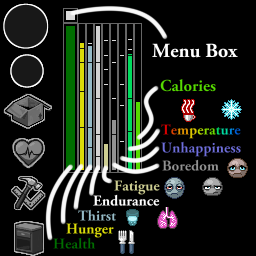
Minimal Display Bars 4.3.5 (Updates (Discontinued)) I apologize as I am not currently maintaining this project. Here's a port of this mod with Vorshim's B42 port: Minimal Display Bars + Nutritions + Discomfort Everyone has permission to fork, rework, or reuse code under the Github MIT license. GitHub: - Repo: https://github.com/ATPHHe/Minimal-Display-Bars - Releases: https://github.com/ATPHHe/Minimal-Display-Bars/releases Quick Info: - Current Display Bars: Health, Hunger, Thirst, Endurance, Fatigue, Boredom, Unhappiness, Temperature, Calories. - Everyone with credit given may add this to their modpacks and servers. - Tested on Build 40.43 and Build 40.43 Multiplayer. - Tested on IWBUMS Build 41.53. - Tested on Build 41.65 MP. Mod Info: - Displays some of your stats. (Right-click a bar and click "Hide" if you don't want some stats to show) - Health, Hunger, Thirst, Endurance, Fatigue, Boredom, Unhappiness, Temperature, Calories. - Health bar turns yellow and red when injured. - Health bar flashes if you have the following untreated conditions: - deep wounded, bitten, bleeding, scratched, is on fire, burned, fracture, lodged bullet. - starving, dying of thirst, fever, drinking bleach, highly sick from too much food poisoning (raw foods, tainted water, etc.). - Has a little menu box above the health bar. Right-click it for some more extra settings. You may reset everything back to the default settings, etc. - Left-click and drag to position the menu box and display bars how you like. - Right-click any display bar for more options on them. (Reset Display Bar, Set Vertical, Set Horizontal, Hide) - Split-Screen Support (Up to 4 players). (Each player get's their own set of displays) Links: - Github (You can find all releases here) Language Translations: - Simple Translations for: AF, ES-AR, CH, CN, CS, DA, DE, EE, ES, FR, HU, IT, JP, KO, NL, NO, PL, PT, PTBR, RU, TH, TR. - German (DE): Improved by Amalek. - Russian (RU): Improved by star. - Brazilian Portuguese (PTBR): Improved by deskulpa - Turkish (TR): Improved by SariserpitoTR Bugs/Issues: - Bug causing configurations to not save for some players. - Icon Size setting is not saving. Compatibility Issues: - Not compatible with Minimal HP Bar. - No others issues currently. Older mod here: Minimal HP Bar. Tags:B40,B41,Interface,Multiplayer Workshop ID: 2004998206 Mod ID: MinimalDisplayBars
RV Interior
автор 76561198313186392
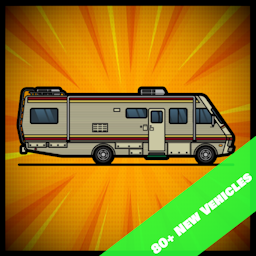
READ THE INSTRUCTIONS BEFORE ENABLING THE MOD Simulate interiors of some vehicles. Support over a 100 vehicles. Each vehicle has 25 fully-customizable independent spaces. The power is tied to the car battery. Some trailers have no battery of their own, and need to be attached to another vehicle to have power. Some vehicles are entered from the back (trunk area) via the radial menu or hotkey. The trunk can be locked to avoid entry. An interior with a sink has water collector on the roof available for plumbing. Instructions - /!\ FOLLOW THIS GUIDE TO ADD THE MOD TO AN EXISTING SAVE. FOR MP FOLLOW PHONEY'S GUIDE IN THE DISCUSSION. - Non-standard maps (such as Challenge maps) are not supported. - In Multiplayer, the map file "vehicle_interior" needs to be put in top priority. Map=vehicle_interior;OtherMaps;Muldraugh, KY; - In Multiplayer, Anti cheat Type 2 and 12 might need to be disabled. Enable the mod "RV Interior". The same mod works in both singleplayer and multiplayer. RV Interior - Vanilla Addon is an optional add-on for vanilla vehicle support. Enter a vehicle and open the vehicle radial menu. If the vehicle is of a type that has an interior map, an "Enter" option will appear. To exit an interior, right click on the ground and select the "Exit" context menu option. With the Mod Options mod installed, a hotkey can be defined to enter and exit the interior (Options -> Keybindings -> Vehicle) The safe zombie distance to enter can be configured (or disabled) in the Sandbox options. Players in SP who want to change these mid-game can use the Change Sandbox Options mod. At least one of the following mods is required: Full list available here. Recommended Mods allows a hotkey to be defined to enter and exit the interior (Options -> Keybindings -> Vehicle) allows you to take a trait to start the game somewhere random on the back-roads of Kentucky with an RV. (SP ONLY) Spawns additional vehicles in locations appropriate to their type. Credits Maxwelt44 - Programming, Map, Custom Textures RobRendell - Programming AuD - Debug Menu, 3D Models Special thanks to BIBI who inspired this mod with Doomsday MotorHome Version: 1.4.14 Workshop ID: 2822286426 Mod ID: RV_Interior_MP Mod ID: RV_Interior_Vanilla Map Folder: vehicle_interior
KillCount
автор 76561198329871201
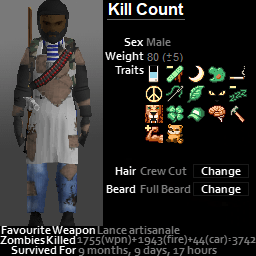
Details kills by weapon category and by weapon in a new dedicated tab of character window. Adds to the genuine character panel the number of Z that died of other things than player weapon. B42.12 Limitations - Car kills are now partially counted by vanilla. This can create counters discrepencies. - Ask your questions on Discord mod_support channel. Technical details - Total number of kills can be exported (if selected in sandbox options) to %username%/Zomboid/lua/killcount.txt (windows path) - Counts fire kills in addition to vanilla weapon kills on the genuine character sheet. - Details kills by weapon category and by weapon in a new dedicated tab of character window. - You can visualise the kills of other players, with a delay (configurable in sandbox options). - You can visualise the total number of kills on the server (same delay). - You can deactivate the sharing of dead characters from sandbox options (to reduce GlobalModData size on never-wiping servers). - You can deactivate the sharing of kill count from sandbox options (to remove GlobalModData use). - Visible at death time in the PostDeathUI text (can be removed in sandbox options). - Handles character specific counters (saved with mod data, so server must be stopped properly for the values to be saved). - Works only for one local player. i.e. not for multiscreen. - Ask your questions on Discord mod_support channel. Credits where it is due: this is inspired from Additional Kill Counter Workshop ID: 2553809727 Mod ID: KillCount
'78 AM General M35 Series Trucks
автор 76561198089039119
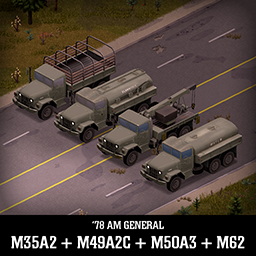
Deuce was a workhorse for decades, adaptable and reliable machine, good choice for the apocalypse. It can be fitted with armor plates that will help you survive longer. His front bumper will take a lot of punishment before it breaks and it will protect the engine and the hood. Front grille will protect headlights so keep it in good condition if you want your lights to stay on. It can haul decent amount of stuff but will not break any speed record. Now with gas and water tankers! (Tankers will spawn only if you enable them in mod menu) Main features: - 4 vehicles with interchangeable parts: M35A2 Cargo truck, M49A2C Gas tanker, M50A3 Water tanker and M62 Wrecker - Fully animated hood, tailgate, doors and windows - Visible interior and character (with improved exit/enter/aim animations) - All parts have 3d objects you can remove and place in the world - Extra parts to find in the world to make the vehicle truly yours (bullbars, armor plates, covers) - Run-flat Tires - They will run even when damaged, but with reduced friction - Many texture variations - Detachable Spare tire, cab covers, flatbed covers, mudflaps etc - Armor plates for windows and bumper protection - You can use it in your current save game, just enable the mod in the load menu - It can tow and be towed - Not recolorable Things to come: - Troop carrier variant If you can't wait to find this mod in your game and want to test it right away, use bikinitools to spawn it, hide the items that your character holds while in vehicle, or for all other good stuff that mod has, go get it! If you like my mods, please consider supporting me with a coffee, so I don't fall asleep while making new mods and supporting old ones :) Check out my other mods: Credits: - This mod is commission work by request of Zhenja1. Thanks for your support of pz modding community! - M62 Wrecker is commission work by request of Outlaw43 - Thanks to The Indie Stone for making this awesome game and all this possible. - Mr Loggins for taking a break from the danger zone to showcase yet another mod. - Special thanks to bikinihorst for the huge help with code, optimization, and taking care of the multiplayer and part code. - Thanks to iBrRus for providing the library for gas tanker functionality and thanks to Trealak for providing library for water tanker functionality. Ask for permission This mod can only be added to and extended with the express permission from the original creator. If no permission is received you may not alter the mod, and it must be treated as a mod that is 'On Lockdown'. You are not allowed to repack this mod under any circumstances, ever. Compatibility: ✅ B41 (b41.78.16) Single Player / Multiplayer fully supported ✅ B42 (b42.12) Single Player fully supported ✅ B42 (b42.13+) Single Player / Multiplayer fully supported Vehicle IDs: 78amgeneralM35A2, 78amgeneralM49A2C, 78amgeneralM50A3, 78amgeneralM62 Workshop ID: 2799152995 Mod ID: 78amgeneralM35A2 Mod ID: 78amgeneralM35A2extra Mod ID: 78amgeneralM49A2C Mod ID: 78amgeneralM50A3 Mod ID: 78amgeneralM62
![Equipment UI - Paper Doll Equipment Interface [DISCONTINUED] – Project Zomboid Mod](https://images.steamusercontent.com/ugc/15297208347053313/448635806D66AA8737F9EAB7AB0340E610187FCD/)
Equipment UI - Paper Doll Equipment Interface [DISCONTINUED]
автор 76561198031391228
Mod is MIT licensed. No further support will be provided. Old Description: Equipment UI Equipment UI is an addition to Project Zomboids interface that adds a paper doll (STALKER / tArKov inspired) equipment panel for managing and viewing your character's equipment. Use mod options to hide equipped items from your inventory. Part 2 - NOW AVAILABLE ? Drag and Drop Drag and Drop items to and from the equipment ui to easily adjust your equipment! Equipment slots will highlight and change color to visualize conflicting equipment. Customize Your Layout The equipment window can be detached and positioned anywhere. It will follow and collapse with the inventory when it is attached. The layout is saved between sessions. Hotkey Includes a customizable control for opening/closing the Equipment UI. The keyboard control can be adjusted in the game's regular control options. The controller binding can be changed via Mod Options. The keyboard defaults to comma. The controller defaults to SELECT (or LS/L3 if using Wookiee Gamepad Support) Mod Options Install mod options to adjust the mod to your liking! Hide equipped items from your inventory and change the scale of the Equipment UI! FAQ Does this work in multiplayer? Yes. Does this work with modded items? Yes. I've accounted for many non-vanilla body slots, anything not accounted for will neatly display at the bottom of the equipment ui before the hotbar slots. Part 2 - Click ? If you enjoy my mods, consider supporting me on Ko-fi! Or, just come check out some previews of what I'm working on next! Other Mods To Check Out! Special Thanks - dhert - Providing a comprehensive list of bodyslots and helping hide equipped items. - Burryaga - Controller support feedback and testing Workshop ID: 2950902979 Mod ID: EQUIPMENT_UI
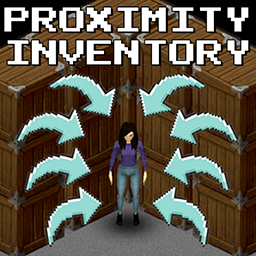
Proximity Inventory B42.20+ | We are so back
автор 76561198092605730
Now Updated to work with B42! Check out the new keybinds in the options! Proximity Inventory Are you tired of having to manually loot a pile of 300 zombies to find some damn cigarettes? Are you tired of getting lost in the 30th box of this damn warehouse to find a sledgehammer? Are you forgetting where you put those 12g shotgun shells? Me too! I'm tired of all of this! And this is why this mod is for YOU! From now on, you can see the content of ALL the containers close to you on a single page! And not only that! You can get stuff OUT of these containers from that single page! Try it now! And experience the comfort of the "Proximity Inventory"! No more wasting time clicking and scrolling. Enjoy your loot FAST! Options Using the sandbox options - Zombie Only Mode: Enable this if you want the Proximity Inventory to work only on zombies Using the Mod Options - Highlight Toggle: Enable or the disable the prox inv highlight - Enable Proximity Inventory: Enable or disable prox inv only for your client, other clients are unaffected Rick click Features : Toggle -> Now, you have to toggle the proximity inventory on and off. (Check the screenshots) Highlight -> when toggled, Proximity Inventory it will highlight all the containers loaded by the proximity inventory. Force Selected -> This options forces the Proximity Inventory to be always selected Compatibility: Works on 41.73 and above (?) Works in MP Can be added mid-game Can be added mid-game on a server For Donations: https://paypal.me/massimomxUK Extra Credits: - JS for improved icons and translation Permissions: Ask for permission This mod can only be added to and extended with the express permission from the original creator. Having received permission, credit must be given to the original creator, both within the files of the mod and wherever the mod roams online. If no permission is received you may not alter the mod, and it must be treated as a mod that is 'On Lockdown'. Workshop ID: 2847184718 Mod ID: ProximityInventory
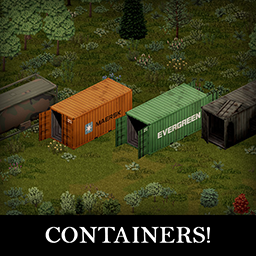
Containers!
автор 76561198089039119
This time something for base builders out there! ISO Containers! Containers are perfect for storing heavy things, vehicles parts, unused furniture etc... Gas tanks have all the functions of a gas tanker trailer. Perfect for large backups of gas in your base. They will spawn all around the world, containers mostly in McCoy spawns and tanks in fossoil spawns. They can be towed with vehicles but are slow. They are not meant to be used as trailers so don't load them up and try to drive, it will not go well. Also use something else than a Dart to tow it please. - B41 / B42 Compatible - Animated doors / removable objects - You can use it in your current save game, just enable the mod in the load menu - It can be towed - Not recolorable - You will need the Tsar's Common Library for fuel storage in B41 to work If you like my mods, please consider supporting me with a coffee, so I don't fall asleep while making new mods and supporting old ones :) Check out my other mods: Credits: The Indie Stone for leaving enough clues in the base game to help me make the animations, thanks guys! Fuel tanker functionality was made possible by iBrRus and the Tsar's Common Library Special thanks to bikinihorst for the crazy ideas and help along the way and German localization Mr Kenny Loggins for taking a break from the danger zone to make the showcase video Ask for permission This mod can only be added to and extended with the express permission from the original creator. If no permission is received you may not alter the mod, and it must be treated as a mod that is 'On Lockdown'. You are not allowed to repack this mod under any circumstances, ever. Compatibility: ✅ B41 (b41.78.16) Single Player / Multiplayer fully supported ✅ B42 (b42.12) Single Player fully supported ✅ B42 (b42.13+) Single Player / Multiplayer fully supported Vehicle IDs: isoContainer2, isoContainer3tanker, isoContainer4, isoContainer5 Workshop ID: 2625625421 Mod ID: isoContainers
The Workshop
автор 76561198089678877
Welcome! This mod adds more crafting features to the game! With this mod you no longer have to drop your broken tools on the ground. Now you can disassemble them for scrap (screws, metal parts, wood) You can also disassemble any metallic vanilla item in the game to get small amounts of metal scrap. This mod also works with other popular mods like Bushcraft Tools! To disassemble something you need a Metal Workbench which needs to be learned by a recipe book and some metalworking skill. You can scrap items in the "Scrapping" crafting tab. This mod also adds a few more crafting items and tools which are needed for the scrap series mods. All items have 3D models and textures. UPDATE: Fixed all loophole exploits. COMING SOON: More crafting components More mod compatibility KNOWN ISSUES: None Thanks to Chuck for the cool preview image! Mods that require this mod: I am open to suggestions, mod support, i also need help keeping this mod balanced! @Modders feel free to use my mod as a requirement for your own mod if you want to use some recources for crafting recipes! Tags:Gameplay,Balance,B41,Framework,Items,Books,Literature,Models,Multiplayer,Realistic,Textures,Weapons Workshop ID: 2680473910 Mod ID: TheWorkshop(new version) IF YOU FORK THIS MOD DONT USE AI ARTWORK
Project Zomboid Подробнее →
Project Zomboid Guides
Установка модов Project Zomboid — гайд по Workshop
Установи моды Project Zomboid через Steam Workshop: внеси ID, проверь порядок, перезапусти сервер и исправь типичные ошибки.
Аренда сервера Project Zomboid – гайд по мультиплееру
Настройка сервера Project Zomboid: RAM, параметры песочницы, Workshop-моды, права администратора и аккуратная проверка типичных ошибок.
Сервер Project Zomboid с поддержкой модов
Устанавливайте совместимые поддерживаемые моды из панели сервера.
Арендовать сервер Project Zomboid