Моды и плагины для Project Zomboid
В этом каталоге перечислено 60 000+ проектов Project Zomboid из Steam Workshop. Они могут быть серверными, клиентскими или требоваться с обеих сторон, а также включать карты и другой пользовательский контент. Перед установкой проверьте связанную страницу источника, версию игры и зависимости.
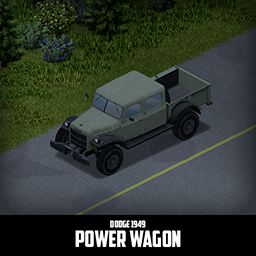
'49 Dodge Power Wagon Crew Cab
автор 76561198089039119
First generation Dodge Power Wagon is a legend among pickup trucks. It is big, powerful and reliable. And if that is not enough for you, there is an Apocalypse variant that is even bigger and even more powerful, there is also a Police variant. All variants can be armored up with craftable armor. There are many parts available and most of them are craftable now. Main features: - 3 Chassis variants with their own features: Stock, Police and Apocalypse - Fully animated hood, trunk, doors and other parts - Visible interior and character (with improved exit/enter/aim animations) - Optional truck bed seat that can be used to shoot - All parts have 3d objects you can remove and place in the world - Many texture variations - Armor protection for windows, doors, engine, headlights and even tires (fenders will save you with this one) - Run-flat Tires for the Apocalypse variant- They will run even when damaged, but with reduced friction - You can enable/disable Apocalypse variant spawns in sandbox settings for mp - You can use it in your current save game, just enable the mod in the load menu - It can tow and be towed - Not recolorable If you can't wait to find this mod in your game and want to test it right away, use bikinitools to spawn it, hide the items that your character holds while in vehicle, or for all other good stuff that mod has, go get it! If you like my mods, please consider supporting me with a coffee, so I don't fall asleep while making new mods and supporting old ones :) Check out my vehicle mods: Credits: - This mod is commission work by request of Gunrunner, DeZeeuw2, LAZER, Clickeh, GhostRecon, Altah, ChiefBacon, AMP, Vernage, zee, veras1, Cyridius, Saltyminx and Ricksaw of the Project Apocalypse Community - Thanks to The Indie Stone for making this awesome game and all this possible. - Special thanks to bikinihorst for the huge help with code, optimization, and taking care of the multiplayer and part code and the fantastic spawn setup. Ask for permission This mod can only be added to and extended with the express permission from the original creator. If no permission is received you may not alter the mod, and it must be treated as a mod that is 'On Lockdown'. You are not allowed to repack this mod under any circumstances, ever. Compatibility: ✅ B41 (b41.78.16) Single Player / Multiplayer fully supported ✅ B42 (b42.12) Single Player fully supported ✅ B42 (b42.13) Single Player / Multiplayer fully supported Vehicle IDs: 49powerWagon, 49powerWagonPD and 49powerWagonPA Workshop ID: 2900580391 Mod ID: 49powerWagon
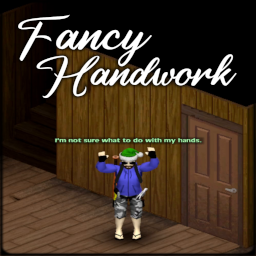
Fancy Handwork
автор 76561197997880978
Supports B41. Works in Multiplayer A new save is not required A VERSION FOR B42 WILL BE AVAILABLE SOON. There is currently a bug in B42 where Animation Sets are not recognized from the new B42 folder structure, and thus have to be duplicated which doubles size of a B42 mod. This is an issue unique to Animations. Once this is fixed by the developers (it's been reported), the B42 version will be made available. A Suite of Animations to make your player more alive! Features - Attaching or Detaching an item to your Hotbar now has a chance to be done with the left arm - Equipping and Unequipping your secondary item is now done with the left arm - "Hand Swap" action to quickly swap the primary and secondary held items - Modifier key to quickly equip items in secondary hand using from your Hotbar - Animation Mask for the Left and Right Arms to correct the Positions and Rotation of the held item - Includes 2 new poses when aiming a handgun and holding a secondary tool, based on your "Aim" level! Configurable in the Sandbox Options. - World Interaction animations! - NEW: World Interaction animations from the rear! - Cooking Animations! - Appropriate Vanilla Animations have now been placed on over 50! TimedActions that previously did not have one. - NEW: Wrench Repair Animation! Updates Important information is updated on this page, but full information and release notes are available in the Discussions. Please see the latest: Fancy Handwork - "It's Over 9,000!" Update IMPORTANT If you receive an error about missing actions, or world interactions are simply not playing, you may need to restart Project Zomboid. I have noticed that enabling this mod for the first time on an already-existing save and starting the game will result in the new animations not being loaded until the game is restarted. This is a BASE GAME issue, but should only happen the first time. If you receive an error following any update, please see: How to fix updated mods in Build 41 Multiplayer This mod adds many additional animation and action files, which may change between releases. I try to minimize this, but sometimes it is necessary. Unfortunately, Steam sometimes doesn't like to update these correctly resulting in errors. Usage When Attaching or Detaching an item on your Hotbar, you have a chance for the action to automatically be done with your left hand. A modifier key is added as well, which by default is bound to "Left Control". Note: By default, "Left Control" is the "Aim" key. I personally do not use the keyboard to aim (its right-click on the mouse anyways) so I disable this keybind. You are free to rebind the key in options. When you press the Modifier Key and a Hotbar slot, the item slotted there will go into your Secondary Hand. Example: (Left Control + 2) equips a Hammer to your left hand. Pressing the Modifier and "E" will swap the items in your hands. (Configurable) Interacting with the world normally, such as opening and closing doors and curtains, flicking light switches, and more, all now have an Animation! Almost ALL TimedActions now have an Animation! No longer will your character just stand there, waiting for a progress bar to fill up! Notes about World Interactions If you are standing still you will turn and face the object you are interacting with if you are not already doing so. There is a Sandbox setting to control how long of a delay before you character is standing still, or the forced turn can be disabled or required. When performing a World Interaction and moving your character will slow down slightly, and stop altogether in the case of opening a Garage Door, for a very brief moment. I have no plans on this being a configurable option, and this is done intentionally. It is a fantastic inclusion for immersion in my opinion, and in tight situations makes planning your movement all the more important. After time, you will hardly notice it. NEW 01/19/2023 - The speed reduction has been reduced from 50% to 25%. This should help prevent the player from being trapped, while still being a nice addition to immersion. Multiplayer Animations should sync across multiplayer with little to no issues! Controllers There is currently no support for controllers, unless an action is done via the Context Menu. I will be working on Controller Support in a future Update. Compatibility Mouse Click World Interactions are not triggered from: Left Click Redux - Click To Act Compatible with The Only Cure but better. Thanks Pao! Should be compatible with everything else. Recommended other Mods: Swap It by Chuckleberry Finn Danger Zone (Dual Wield) by OgreLeg Body Remodel - FINGERS. by Akyet Skizot's Carryable Boxes and Garbage - by Skizot OR Visible Generators and Corpses by planetalgol Source: GitHub Workshop ID: 2904920097 Mod ID: FancyHandwork
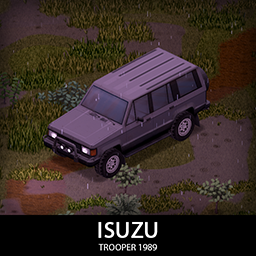
'89 Isuzu Trooper
автор 76561198089039119
Have plans for a long drive, maybe want to try out that nomad life? A trooper with a full set of armor, generator, some extra gas and a lot of space to store stuff will be your best friend! It comes in 3 variants: Short RS 2 door, normal 4 door and the 4 door Offroad Pack variant. All share the same parts but the OP variant has some additional features like a cage and the ability to store generator and some extra gas cans on the roof. Main features: - 3 chassis variants with their unique pros and cons - 3 front Bumpers/Bullbars and 1 rear Bumper with 2 tiered protection - Fully animated hood, trunk, doors and windows - Visible interior and character (with improved exit/enter/aim animations) - All parts have 3d objects you can remove and place in the world - Extra parts to find in the world to make the vehicle truly yours (bullbars, armor plates, side steps, roofracks, mudflaps etc) - Many texture variations - Armor protection for windows, doors, engine, headlights etc - You can use it in your current save game, just enable the mod in the load menu - It can tow and be towed - Not recolorable If you can't wait to find this mod in your game and want to test it right away, use bikinitools to spawn it, hide the items that your character holds while in vehicle, or for all other good stuff that mod has, go get it! If you like my mods, please consider supporting me with a coffee, so I don't fall asleep while making new mods and supporting old ones :) Check out my vehicle mods: Credits: - This mod is commission work by request of A Path Above Community - Thanks to The Indie Stone for making this awesome game and all this possible. - Special thanks to bikinihorst for the huge help with code, optimization, and taking care of the multiplayer and part code. Ask for permission This mod can only be added to and extended with the express permission from the original creator. If no permission is received you may not alter the mod, and it must be treated as a mod that is 'On Lockdown'. You are not allowed to repack this mod under any circumstances, ever. Compatibility: ✅ B41 (b41.78.16) Single Player / Multiplayer fully supported ✅ B42 (b42.12) Single Player fully supported ✅ B42 (b42.13) Single Player / Multiplayer fully supported Vehicle IDs: 89trooper, 89trooperRS, 89trooperOP Workshop ID: 2932549988 Mod ID: 89trooper
Tidy Up Meister
автор 76561199151439614
The vanilla game added automatic item return behavior in Build 42.8.0. However, some actions are still not covered by the vanilla implementation, including certain firearm operations and restoring items to their original placement on the ground. Tidy Up Meister complements the vanilla behavior and is designed to work alongside it rather than disable or replace it. Overview : Automatically restores your equipment and returns temporarily moved items after an action is completed. Confirmed to work with Build 41/42 Stable and in MP. Features : - After an action temporarily changes your equipment, the items in your hands and worn equipment are restored to their previous state. - Items temporarily moved out of a bag or other container are returned to their original container. - Items taken from the ground are returned to their original square, position, and rotation. - Replacement items, such as food left after opening or partially consuming an item, can also be returned to the original location. - You can toggle automatic re-equipping from the context menu. This setting is stored separately for each character, making it useful when you want to perform several actions continuously without restoring your equipment each time. - For a visual demonstration, please check the introduction video above. Build 42 V2 : The Build 42.20 implementation has been completely redesigned. Instead of individually modifying every supported action, V2 observes the Timed Action queue and identifies sequences in which equipment or items are temporarily moved for another operation. This allows V2 to support a much wider range of vanilla and modded actions without requiring a separate patch for every action. Explicit player actions, such as manually equipping, unequipping, or placing an item, are distinguished from temporary equipment changes and are not automatically reverted. Because actions from other mods may use unusual queue behavior, compatibility with every modded action cannot be guaranteed. Please report any action that is not detected correctly. Options : Build 42 options are available from the built-in Mod Options screen. Build 41 uses Mod Options, and the available legacy options may differ. - Show Re-Equip Toggle in Context Menu : Adds an option to the context menu that enables or disables automatic re-equipping after actions. - Re-Equip Held Items After Interruptions : By default, interrupted actions do not restore your equipment. Enable this option to restore only the items that were in your hands before the interrupted action. - Return Materials from Dismantling : Returns materials obtained by dismantling an item to the container the dismantled item came from. - Diagnostic Output : Outputs troubleshooting information to the game log. Detailed logging may affect performance, so enable it only while reproducing an issue. Compatibility : - V2 is designed to work alongside the automatic return behavior included in the vanilla game. - Because V2 observes general Timed Action sequences instead of modifying individual actions, many modded actions can work without dedicated compatibility code. - Inventory placement information is preserved where the current game APIs provide it. - Compatibility with unusual or custom Timed Actions cannot be guaranteed. Please report any action that does not restore correctly or is reverted when it should not be. For Modders : Most Timed Actions do not require any special integration with Tidy Up Meister. However, compatibility registration may be necessary if your action intentionally changes equipment, clothing, or an item's container as its final result. Without registration, Tidy Up Meister may interpret those changes as temporary preparation and restore the previous state. Please consider implementing the compatibility enhancements based on the For Modders: Compatibility API thread. Known Issues : - No known critical issues. - Some modded actions may use queue or cancellation behavior that V2 cannot identify correctly. - If you encounter a problem, please report it in Bug & Issue Reports. - Use the character context menu to disable re-equipping, reproduce the problem again, and state whether this changes the behavior. - If the issue occurs only when this mod is enabled, please follow the steps below to gather and report detailed information. - Enable "Diagnostic Output" and select "Log only" or "Log + overhead text." - Reproduce the problem. - Open the "console.txt" file in your Zomboid user folder. - Include the lines containing "" in your report. - Describe the action you were performing and the exact steps that caused the problem. - List any mods that may be related. - State whether the problem occurred in SP or MP. Future plans : - Bug fixes and compatibility improvements as needed. Remarks : - You may include this mod in a mod pack without requesting permission or providing credit. However, please use it at your own risk. - The mod has been tested in both SP and MP, but behavior may differ depending on the game version, server configuration, and other installed mods. Release Notes : - v2.0 - Completely redesigned for Build 42.20. - v1.37 - Hotfix for Build 42.15. - v1.36 - Hotfix for Build 42.13. - v1.35 - Fixed an error in Build 42.11.0. - v1.34 - Added restoration of X/Y rotation in Build 42. - v1.33 - Added support for Bath Towels Overhaul. Please refer to "Change Notes" for older release history. My favorite mod, "Pump Pury," has been flagged as sensitive content and is no longer visible to many users. Please help rescue this mod! If you enjoy this mod and would like to support its development, donations through Ko-fi are greatly appreciated. Donations help cover the cost of a dedicated server for MP testing and AI services used during development. Thank you for helping me continue maintaining and improving my mods! Workshop ID: 2769706949 Mod ID: P4TidyUpMeister
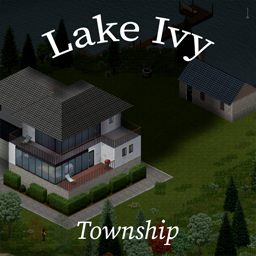
Lake Ivy Township
автор 76561197999630144
Lake Ivy Fishing Resort, Campgrounds & Township Workshop ID: 2252982049 Mod ID: lakeivytownship Map Folder: li_township Occupied Cells: (29,32) (29,33) (29,34) (30,32) (30,33) (30,34) (31,32) (31,33) (31,34) ---------------------------------------------------------------------------------------------------------------------------------------------------- October Update: Fixed a number of bugs that I've been putting off for awhile. -Fixed the firestation roof -Fixed walled garage doors -added missing staircases -Added southern lake to in-game map -A couple of minor tweaks here/there
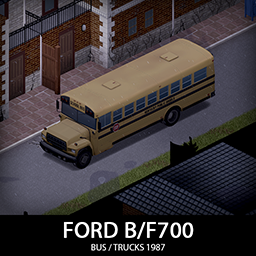
'87 Ford B700/F700 Trucks
автор 76561198089039119
B700 is the best known school bus, probably of all time and the F700 trucks are used everywhere, the ford base was used in many variants and generations and Kentucky was not immune to it. 6 variants, every with some special features but most of the parts are interchangeable and craftable. They have special spawns so you should be able to see them in their natural surroundings if you enable the sandbox option for it. They are big and heavy so don't expect race car performance here. Now with a SWAT van, Armored bank truck and a Box truck! Main features: - 6 Chassis variants with their own features: School Bus, Military Bus,Prison Bus, SWAT Van, Armored Truck and Box Truck - 2 tiered protection with 2 front bumpers and 2 sets of armor - Fully animated hood, trunk, doors and windows - Visible interior and character (with improved exit/enter/aim animations) - All parts have 3d objects you can remove and place in the world - Extra parts to craft and find in the world to make the vehicle truly yours (bumpers, window armor, roofracks etc) - Multiple texture variations - Armor protection for windows, doors, engine, headlights etc - 1 Driver seat and 14 passenger seats for the bus, 2 seats for box truck and armored truck and 8 seats for swat van. - B41 / B42 Compatible - You can use it in your current save game, just enable the mod in the load menu - It can tow and be towed - Not recolorable If you can't wait to find this mod in your game and want to test it right away, use bikinitools to spawn it, hide the items that your character holds while in vehicle, or for all other good stuff that mod has, go get it! If you like my mods, please consider supporting me with a coffee, so I don't fall asleep while making new mods and supporting old ones :) Check out my vehicle mods: Credits: - This mod is commission work by request of the Project Apocalypse Community - F700 Trucks addon was a commission work by request of Gkmatt - Thanks to The Indie Stone for making this awesome game and all this possible. - Special thanks to bikinihorst for the huge help with code, optimization, and taking care of the multiplayer and part code. Ask for permission This mod can only be added to and extended with the express permission from the original creator. If no permission is received you may not alter the mod, and it must be treated as a mod that is 'On Lockdown'. You are not allowed to repack this mod under any circumstances, ever. Compatibility: ✅ B41 (b41.78.20) Single Player / Multiplayer fully supported ✅ B42 (b42.17+) Single Player / Multiplayer fully supported Vehicle IDs:87fordB700school, 87fordB700prison, 87fordB700military, 87fordF700swat, 87fordF700bank, 87fordF700box Workshop ID: 3110911330 Mod ID: 87fordB700
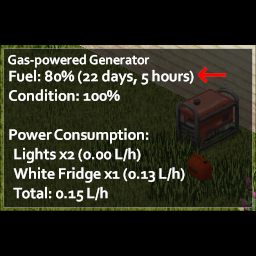
Generator Time Remaining
автор 76561197961203813
A simple mod that displays the days and hours left before a generator runs out of fuel. Features NOTE: To configure the options, Mod Config Menu is required (link) - Option to convert in-game time to real time (Default is In-Game Time) - Option to set minimum Electrical level to unlock (Default is 0) - Accounts for Sandbox Settings (Generator Fuel Consumption, Days Length) - Supported Languages: English, Spanish, Russian, Deustch, Portuguese-Brazil, Chinese-Traditional, Chinese-Simplified Turkish, French, Korean FAQ - Can it be added to a saved game? Yes - Can it be removed from a saved game? Yes - Does it work in multiplayer? Yes - Can I use it in my modpack? Yes - What's the PZ version it works on? Tested and working on 41.71 and 41.78, should work on lower B41 builds Submit Translation If you'd like to submit a translation, please do so in this thread. Credits: - mezz (Mod Config Menu) - FABULOSO (Portuguese-Brazil Translation) - Anderson (Russian Translation) - Anderson (Deutsch Translation) - EPEQ (Chinese-Traditional Translation) - Pasako (Turkish Translation) - Furthick (French Translation) - AKCQB (Korean Translation) - xugoudan (Chinese-Traditional) Workshop ID: 2883397918 Mod ID: GeneratorTimeRemaining
![41.78+ Propane Torch Fix [B42 Supported] – Project Zomboid Mod](https://images.steamusercontent.com/ugc/1893227872150839597/DBC267C88AC9A25DEAC3ED405612967996B6C54A/)
41.78+ Propane Torch Fix [B42 Supported]
автор 76561197970491905
Now works in B42 This mod is meant to readjust the capacity of the propane torch in the 41.78 and 42 builds from 10 back to 100 IF YOU ADD THIS MOD MID-GAME YOU WILL HAVE TO REFILL YOUR ALREADY SPAWNED TORCHES AT LEAST ONCE TO SEE THE NEW VALUES This fix will help ease the transition to the new capacity until mod makers rebalance their recipes. To answer some common questions. 1) it didn't empty your torches, it doesn't have any code in there to do that. The only way that happens if you're running more mods in addition to this one that is conflicting and are both attempting to modify the torch in some way. that said, it will not change the use delta on torches you've picked up until you go to refill them, however. You can disable the mod mid-game and nothing will happen beyond getting reverted back to your original use delta of 10 charges per torch for any new torches you pickup. The old ones will still have the increased capacity until you refill them. Also torch capacity will not reflect the new 100 charges until you refill them. If you see the override but it's not working check your other mods installed or use a small amount and then refill the torch, as I just re-tested on B42 and it changed the capacity to 100/2 for a recipe to cut 4 small metal sheets from one steel sheet after using a 10/10 torch, refilling and it became 100/100 BUILD MENU OVERWRITES WHAT THIS MOD DOES - You do not need and are not able to run both at the same time. Workshop ID: 2883755057 Mod ID: UBPropFix
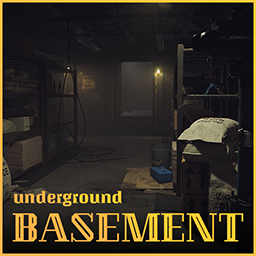
Basements
автор 76561198261072538
Basements are here! Whether to make your own hideout, storage room or a fancy underground lounge, we've all wanted a basement in PZ at one point or another. This mod introduces them to the game in fully customizable fashion! Features You can check out all the features this mod offers here. Below is a simplified version of them. - Basements of 3 different sizes: Small, medium and large! - Custom electric panel that provides electricity! - Build up to 152 basement per playthrough, plenty for multiplayer! - Magazines you must read to unlock basement building! - Do whatever you want with your basement! Patches Bestments patch by Pertominus: https://steamcommunity.com/sharedfiles/filedetails/?id=2949998111&searchtext=basement Admin tools & padlock by AuD: https://steamcommunity.com/sharedfiles/filedetails/?id=2995102170 F.A.Q Does it work in Multiplayer? Of course it does! Just remember to include Basements map in the servertest.ini and turn off Anti-Cheat Type 3. Can zombies enter the basement? NOPE however, zombies can crowd the trapdoor so watch you back when entering the basement. Does it work on existing saves? At the moment the mod doesn't work with existing saves! Is the mod compatible with ? This mod should be perfectly compatible with any other mods at this time. If this ever changes, I'll include a link here where you can check the incompatible mods. How do I build a basement? You will need to find and read the respective "In the basement" magazine of the basement size you want to build. Additionally, you will need a hammer and a shovel, as well as enough planks, nails, hinges and a door knob. Where can I build a basement? At the moment only inside structures. You can have 1 basement per structure. (E.g house, building, etc.) Unfortunately, player made structures do not count. Can I destroy basements? Basements are permanent! Once you build one, you cannot go back. Found a bug? Because of the sheer scale of this mod, some bugs may have passed right through us. If you do experience any problems please report them here. You are free to use the mod for personal use, in multiplayer servers, and even include it in mod packs! Just please do not redistribute or reutilize the files of this mod elsewhere without permission ❤️ Credits Programming by Konijima. Map and textures by Pertominus. Cover art by Riko Prushka. All else, by BitBraven. Huge thanks to the team for helping me turn this idea into an actual fully functional mod! And of course, thank you for supporting us! Version: 1.0.2 Workshop ID: 2849247394 Mod ID: Basements Map Folder: Basements
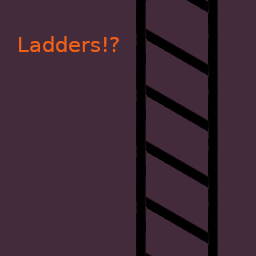
Ladders!?
автор 76561198056536755
Ladders You Said!? Yes! Ever wished you could climb those ladders to escape from a horde? Ever dreamt of crafting your own ladders? Well this mod is for you then! Features - Climb ladders - Climb fire poles - Craft wooden and steel ladders Possible Upcoming Features - Damage wooden ladders on every use - Make wooden ladders destroyable by zombies - Less HP for Wooden ladders built with low carpentry skills - Improved animation for the climbing action - Climbing ladders should consume endurance - Can't climb ladders when running out of endurence Version Latest version: 0.0.13 Can I use this mod in a modpack? No. Redistribution of this mod without explicit permission from the original author is strictly prohibited under any circumstances. This includes, but not limited to, uploading this mod to the Steam Workshop or any other site, distribution as part of another mod or modpack, distribution of modified versions. Contribute Your help is needed for translations! If you speak any of the language supported in the game, please help! Translation files are available here: https://github.com/quarantin/zomboid-ladders/tree/main/media/lua/shared/Translate Bugs Please submit any bug you find here: https://github.com/quarantin/zomboid-ladders/issues The following bugs are already known: - Sometimes the player falls while climbing a ladder. Feedbacks are welcome! You can find me on Project Zomboid Discord server: https://discord.com/invite/theindiestone Credits People listed here made significant contributions: - Gyropilot: Add climbing animation - Burryaga: Add support for game controller - Poltergeist: Complete rewrite descriptiopn - GravGunner: B42 compatibility Special Thanks I'd like to say thank you to the following people for their constant help, availability, testing, or feedback: - AuthenticPeach - Chuckleberry Finn - Dane - Fenris Wolf - JadeLavenza - Konijima - MasterSplinter - Shurutsue - throttlekitty - Xianah Maybe I forgot to add someone to this list, just let me know if that's the case. Support Me If you like my work please consider supporting me on Ko-Fi! Have fun! ;D Workshop ID: 2737665235 Mod ID: Ladders
![Undead Survivor [B41/B42] – Project Zomboid Mod](https://images.steamusercontent.com/ugc/1826772852932730765/FBE03C9B935D0C999FD8EE28E45599B3531FAD49/)
Undead Survivor [B41/B42]
автор 76561198095143909
This mod adds currently 5 new outfits which only spawn on zombies! More to come time to time Features: - Outfits will spawn on zombies, this is the only way you can find them - You can tuck the trousers into your shoes - Hood up and Hood down features for hoodies - All objects have proper ground objects when placed down - Male and female compatible - Blood, dirt and holes appear on the right spots - And more individual features on certain outfits! The Stalker is geared for getting in close combat and situations where you have to be light and agile. If you are lucky and find his knife, then you cannot be better prepared for any melee encounter. Only downside is that due to its lightweight tailoring, the outfit does not withstand very cold and rainy weather. - Stalker Mask (Does not spawn always) - Stalker Cloak - Stalker Jacket - Stalker Trousers - Stalker Gloves (Does not spawn always) - Stalker Boots - Stalker Knife (Does not spawn always) The Nomad has the perfect outfit to hike through the lone wilderness in the cold and rainy weather. They aren't fighters; their outfit will slow you down and doesn't have the best protection against the dead, but if you are lucky, you can spot one with a backpack which can hold all your equipment if you are strong enough to carry it. - Nomad Mask - Nomad Parka - Nomad Trousers - Nomad Boots - Nomad Backpack (Does not spawn always) The Prepper, aka. Gear-junkie, isn't best suited for infectious bites. His strategy is to keep death 10 feet away. To make sure he doesn't run out of ammo, he's equipped with gun magazine pouches and small, but efficient bags which can be mounted to the vest as some sort of backpack. If the walking dead gets too close, he has a small knife attached to his vest and can retrieve it by a quick hand, in addition to a flashlight. - Prepper Helmet - Prepper Gasmask - Prepper Jacket - Prepper Trousers - Prepper Flashlight (Can be attached to the vest) - Prepper Knife (Can be switched between stab and swing attacks which have slightly different stats) - Prepper Vest (Can be combined with bags) - Prepper Vest with Bags (Does not spawn always) - Prepper Bags (Does not spawn always) Like a stoic stone from a distance, the Headhunter observes and waits for his victims to appear. His gasmask and long mantle covers him from hazard rains and the storm while doing so. The customized rifle is heavy and slow, but a deadly and reliable weapon with 20 bullets and a range you haven't seen before. No victim can escape once spotted. - Headhunter Gasmask - Headhunter Mantle - Headhunter Backpack (Does not spawn always) - Headhunter Rifle (Does not spawn always) - Headhunter Scope(Does not spawn always) A team of women who retain their beauty in dark times and still strong enough to survive. Their self-made clothing can be deceiving; a dress and cloak made of thick fabric and fur gives good protection from bites and keeps them warm. In addition, they also have a hip bag that keeps them light and flexible. Their spear is an effective weapon and tool for hunting or fishing. - Amazona Cloak - Amazona Dress - Amazona Hip Bag (Does not spawn always) ---> Double click to equip <--- - Amazona Boots - Amazona Spear (Does not spawn always) - Amazona Makeup (Always available) - And some more Extras FAQ: You found a bug or want to give feedback? Please post your B42 reports or feedback in this discussion. B41 state is frozen and won't be updated anymore. Will this mod work with a existing savegame? Yes Hair Pokes through the hoodies Make sure that you have installed the mod "Fluffy hair". If you have Fluffy Hair installed and the Vanilla hair still pokes through then please report like so: "Gender - Outfit - Hairstyle" I cannot find your Outfit / The Outfits are too rare The Outfit is indeed very rare. Its hard to say how much the chance is exactly. But i have seen a few of them after a few minutes of running around in a city with zombie count on "insane". In your sandbox settings you can set the relative chances under the "Undead Survivor" Page. Am i allowed to use this mod in a Server mod pack? Yes Any Actively supported Mods? These are supported on Build 41 only: "Udderly Attachments": Its a framework to make it easy for modders to share custom attachments with each others weapons. "FirearmsB41" It adds more Firearm stuff and changes some behavoirs. For example you keep your weapon in your hand after adding/removing attachments. What outfits will come next? Sometimes i post in my "kofi" stuff i am working on. Click here to see the Credits! Workshop ID: 2713921292 Mod ID: UndeadSuvivor

'70 Plymouth Barracuda
автор 76561198089039119
Up for some more muscle car action in Kentucky? One and only Plymouth Barracuda! 3 chassis variants with their own distinctive features, try to find them all! Barracuda has a full set of armor and a some parts to customize it. It's fast and loud, it lacks in storage and tire protection so be warned and have fun! It can use Challenger and Camaro tires also, and they will be able to use Barracuda tires also. Moving in packs and helping out your mates with repairs will be a lot easier! Main features: - 3 chassis variants with unique features, performance, handling etc (Barracuda, Cuda and AAR) - 2 Spoiler types - 3 Front bumper types - Fully animated hood, trunk, doors and windows - Visible interior and character (with improved exit/enter/aim animations) - All parts have 3d objects you can remove and place in the world - Extra parts to find in the world to make the vehicle truly yours (bullbars, armor plates, spoilers, tires etc) - Many texture variations - Armor protection for windows, doors, engine etc - You can use it in your current save game, just enable the mod in the load menu - It can tow and be towed - Not recolorable If you can't wait to find this mod in your game and want to test it right away, use bikinitools to spawn it, hide the items that your character holds while in vehicle, or for all other good stuff that mod has, go get it! If you like my mods, please consider supporting me with a coffee, so I don't fall asleep while making new mods and supporting old ones :) Check out my vehicle mods: Credits: - This mod is commission work by request of Mistasandman - Thanks to The Indie Stone for making this awesome game and all this possible. - Special thanks to bikinihorst for the huge help with code, optimization, and taking care of the multiplayer and part code. Ask for permission This mod can only be added to and extended with the express permission from the original creator. If no permission is received you may not alter the mod, and it must be treated as a mod that is 'On Lockdown'. You are not allowed to repack this mod under any circumstances, ever. Compatibility: ✅ B41 (b41.78.16) Single Player / Multiplayer fully supported ✅ B42 (b42.12) Single Player fully supported ✅ B42 (b42.13+) Single Player / Multiplayer fully supported Vehicle IDs: 70barracuda, 70cuda, 70barracudaAAR Workshop ID: 2913633066 Mod ID: 70barracuda

'93 Ford F-Series
автор 76561198089039119
Heavy duty beast that can take some punches! It comes in multiple variants, dually variant that can haul more stuff and police and fire department variants. They all have some unique features but they share most of the parts and functionality. Just make sure you don't get stuck in a narrow alley! Now with F150 and F250! Main features: - Multiple Chassis variants - 6 Front bumpers with 2 tiered protection - Fully animated hood, trunk, doors and windows - Visible interior and character (with improved exit/enter/aim animations) - All parts have 3d objects you can remove and place in the world - Extra parts to craft and find in the world to make the vehicle truly yours (bumpers, window armor, side steps, lights, toolbox etc) - Multiple texture variations - Armor protection for windows, doors, engine, headlights etc - 2 seats in the front + 2 in the back for crew cab variant. - You can use it in your current save game, just enable the mod in the load menu - It can tow and be towed - Not recolorable Things to come: - More skin variants - More chassis variants If you can't wait to find this mod in your game and want to test it right away, use bikinitools to spawn it, hide the items that your character holds while in vehicle, or for all other good stuff that mod has, go get it! If you like my mods, please consider supporting me with a coffee, so I don't fall asleep while making new mods and supporting old ones :) Check out my vehicle mods: Credits: - This mod is commission work by request of The Ranger - Additional variants and parts are commission work by request of Gkmatt - Additional F150S variant and parts are commission work by request of Demolition Gaming - Thanks to The Indie Stone for making this awesome game and all this possible. - Special thanks to bikinihorst for the huge help with code, optimization, and taking care of the multiplayer and part code. Ask for permission This mod can only be added to and extended with the express permission from the original creator. If no permission is received you may not alter the mod, and it must be treated as a mod that is 'On Lockdown'. You are not allowed to repack this mod under any circumstances, ever. Compatibility: ✅ B41 (b41.78.16) Single Player / Multiplayer fully supported ✅ B42 (b42.12) Single Player fully supported ✅ B42 (b42.13) Single Player / Multiplayer fully supported Vehicle IDs: 93fordF150, 93fordF150S, 93fordF250, 93fordF350, 93fordF350dually, 93fordF350pd, 93fordF350fd Workshop ID: 3073430075 Mod ID: 93fordF350

Over the River
автор 76561198033598643
Hi survivors! I am Woldren and this is my map: Over the River The bridge has a town above it, as in Fallout 3. Warning: place the generator on the roof, check the pictures above to see where it is. The bridge is a giant building, so if you place it on the street, you'll receive damage, since the street is part of the building. The bridge is connected to a ship, that has secret passages, secret rooms etc etc. Through the ship you can reach the land on the other side of the river. Cell 38x20 contains Walter White's house, from Breaking Bad. Cell 38x19 contains a large military base. Cell 39x20 contains a logging factory. Cell 39x19 contains Grove Street, from GTA San Andreas. The military base contains a new hospital Inside the base there is also an underground bunker full of loot. if you don't see the changes after the update, in your current game, you could try to follow this little guide: https://steamcommunity.com/workshop/filedetails/discussion/2442138468/3169946351449188290/ Workshop ID: 926737806 Mod ID: Otr Map Folder: Otr
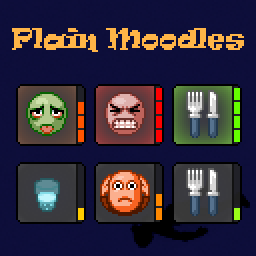
Plain Moodles
автор 76561198030703549
Minimalist semi-transparent background textures for moodles with level indicator. Does it work in Multiplayer? Yes. Does it work on existing saves? Yes. Safe to enable/disable at any time. Compatibility - Compatible with Clear description for Moodles, Weather Moodles, Big Moodles, MoodleFramework and all the mods that use it, Large/Medium/Hidden Progress Indicator and many others - Generally, compatible with any mod except mods that change the background textures of moodles (like Moodle Quarters, Simple Number Moodles, Moodle Qulity) - Incompatible with Big Progress Bar as that mod overrides the entire UI.pack If mod doesn't work - Make sure it's enabled in the MODS menu. - Make sure it's also added to an existing save. Click the Load button >> Select the save >> Click More... >> Press Choose mods... - (If you host a server), make sure it's enabled in the Steam Workshop and Mods tabs in server settings. You can always check which mods are being used while playing by clicking the Mods button in the Pause menu. Workshop ID: 3008416736 Mod ID: BION_PlainMoodles
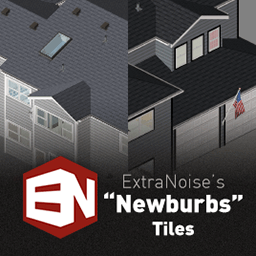
ExtraNoise's Newburbs Tiles
автор 76561197993918892
Standardized suburban development exploded in popularity in the 1980s and 1990s and continues to this day. The kind of communities where all the houses look a little too similar, where the sprawl stretches for miles in all directions. This is a collection of tiles for Project Zomboid that add those kinds of style walls, roofs, doors, windows, and other details that you would typically see these kind of communities. Regular players You only need to subscribe to this mod if you've downloaded a map that makes use of the tiles in this pack. Map makers You can download the raw tiles (with instructions on how to use them) here: https://www.dropbox.com/s/isiwcuki7zo9wmv/en_newburbs.zip?dl=0 For anyone that would like to use the houses in the screenshots (and some apartment buildings I created), I've dropped everything into a ZIP file here: https://mega.nz/file/zRZx2b6J#DHr6Ao6npHgSpi9D-Fpqp35u6XsLNZCpHhzsglgNzSY This is a work-in-progress with plans for future expansion including brick siding, new windows, and construction elements. Anyone is free to modify the content of this pack as they need for their map. Where I hang out & post updates Workshop ID: 2774834715 Mod ID: EN_Newburbs
Braven's Utilities
автор 76561198261072538
A set of tools This simple "mod" adds basic functionality I tend to use in my actual mods. This is absolutely necessary for some of my mods. Click here to see the full list. Free to Use Anyone is hereby granted permission by me to use this mod's functionality in any mods they want, free of charge. That is to say, you can call these functions from your mod's code, to make your life easier. You can add this mod as a requirement of yours in your mod's files and Steam page. If you have any suggestions, let me know! Does it work in the Latest Build? Right out of the box! Powered by BitBraven Heartfelt thanks to my Patreons for their unwavering support. And of course, a special thank you for being a part of this journey! Like my mods? Join me on Discord and maybe on Patreon if you feel like it! I also accept Ko-Fi tips. All money is used on mod development. This product is protected under © copyright law. You are free to use it for personal purposes. Redistribution, for commercial purposes or not, is strictly prohibited without prior permission. Please note that the English version of this disclaimer takes precedence over translations, as they may be outdated. For more information, please Click Here to read the full End User License Agreement. Enjoy! 💖 Workshop ID: 2850135071 Mod ID: BB_Utils
Working Masks
автор 76561197960537531
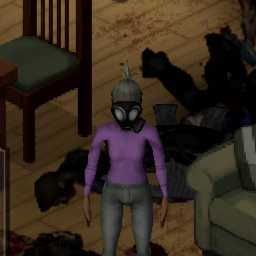
This Mod attempts to make masks (such as gas masks) affect the sickness gain from corpses. It does not protect against engine fumes inside buildings. Condition of the mask is considered. Gas Masks offer full protection at 100% condition. Other specific masks as surgical masks half protection at 100% condition. Lastly, items such as Balaclavas, Bandanas, etc. offer 25% protection at full condition, if they cover the mouth and Nose. Currently supported mods: Authentic Z, Shark's Law Enforcement Overhaul, Shark and Peach's Military Uniform Improvements, Brita's Armor Pack, Swatpack, ADVANCED GEAR, Paw Low Loot, Undead Survivor, Scrap Armor, Toxic Fog, They Knew, Stalker Armor Pack, slyy's Spicy Attire, Asura Chi, Insurgent - Black Ops Profession See the discussion thread for a detailed list and protection values, Any masks added by unsupported mods will work normally, but not offer any protection. Better Masks Mod provides it's own compatibility mod. It uses different protection values than described above. Feel free to suggest other masks to support or balance changes. Should be safe to be added to or removed from an ongoing game as no items are being modified. I have not tested it in MP, any feedback is welcome, if you give it a try. Feedback so far has been positive. Adding this mod to a modpack is permitted, if credit is given and a link to this workshop page is included. If you'd like to contribute, the source code for this mod can be found here: https://github.com/jaype87/WorkingMasks Special thanks goes to Werlias for creating the video! Workshop ID: 2760742937 Mod ID: WorkingMasks
![Sapph's Cooking [B41] – Project Zomboid Mod](https://images.steamusercontent.com/ugc/13217565217742123569/F25B5F847D1A67039A26ED40E2080E8D19D6B35A/)
Sapph's Cooking [B41]
автор 76561198048783002
This version of the mod wont be update anymore as it's on a older version of Project Zomboid if you're looking for a B42 version, check here This mod expands the vanila options for the Cooking category, adding more recipes, weapons and food related item drops. What can i expect downloading this mod? As Project Zomboid is constantly updating, if any recipes i've added are put into the game, i'll make sure to remove them. Check out this mod's Wiki: - Does this work on Multiplayer? It works on version 41.78. - How can i cook using oil pans? I've added a new way to cook in some recipes(not all of them require this), now needing a hot pan. And remember, turn OFF your ovens! If you're having any problems remembering/learning recipes, i recommend trying Craft Helper, it'll make things easier! Currently avaliable translations are: - Brazilian Portuguese. - Traditional Chinese (Thanks to Smokedfish, 冷沔泠-35P and 水煮麵包) - Simplified Chinese(Thanks to BEIBIAO!, 少爷该起床捡垃圾了 and 水煮麵包). - German (Thanks to LittleTempest! and Lampiooo). - Spanish (Thanks to CarlosRojasCu). - French (Thanks to HugoTLS!, Zunder, inkredibehl and Xianah!). - Polish (Thanks to TheMitu97 and Damireewq!). - Korean (Thanks to Fender and 이스트!). - Thai (Thanks to Riko Prushka). - Russian (Thanks to ГАЧАМУЧА, Malevi4, Khiuk, Мепсель and Movmav!). - Ukrainian (Thanks to Kizukkk! and Gwendalf). - Japanese (Thanks to Suzue!). - Italian (Thanks to Eternity!). - Dutch (Thanks to Purple Nebula!). - Turkish (Thanks to Taha (Dylan Rhodes)) and VVentos. Special Thanks Glytch3r, Poltergeist and everyone at PZ oficial discord for helping on some coding parts! (and Spongie for the Hair mod in the pictures) If you're interested in helping translate this, you can ask here or join the discord bellow! I'm also not very active on this mod page, so... it's best to find me on my discord or by private dming me! Liked my mod? Be sure to leave a Rating and a Favorite! Workshop ID: 2832136889 Mod ID: sapphcooking Mod ID: sapphcookingbettersorting
'63 Volkswagen 1300 Beetle
автор 76561198089039119
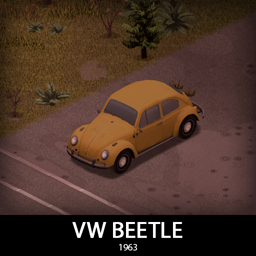
The Beetle! It comes in 3 flavours: the classic one we all know, small light and fun to drive, dune buggy variant for the adventurers and the high performance one for the racing enthusiasts. They all have their unique features but share most of the parts for easy maintenance. They all can be equipped with craftable set of armor, roofracks and many other things. Main features: - 3 Chassis variants with their own features: Stock, Dune Buggy and High Performance - 2 tiered protection with 3 front bumpers and 2 rear bumpers - Fully animated hood, trunk, doors and windows - Visible interior and character (with improved exit/enter/aim animations) - All parts have 3d objects you can remove and place in the world - Extra parts to craft and find in the world to make the vehicle truly yours (bumpers, window armor, roofracks, bodykits etc) - Multiple texture variations - Armor protection for windows, doors, engine, headlights etc - 4 seats on the stock variant and 2 seats on other two - You can use it in your current save game, just enable the mod in the load menu - It can tow and be towed - Not recolorable If you can't wait to find this mod in your game and want to test it right away, use bikinitools to spawn it, hide the items that your character holds while in vehicle, or for all other good stuff that mod has, go get it! If you like my mods, please consider supporting me with a coffee, so I don't fall asleep while making new mods and supporting old ones :) Check out my vehicle mods: Credits: - This mod is commission work by request of the Project Apocalypse Community - Thanks to The Indie Stone for making this awesome game and all this possible. - Special thanks to bikinihorst for the huge help with code, optimization, and taking care of the multiplayer and part code. Ask for permission This mod can only be added to and extended with the express permission from the original creator. If no permission is received you may not alter the mod, and it must be treated as a mod that is 'On Lockdown'. You are not allowed to repack this mod under any circumstances, ever. Compatibility: ✅ B41 (b41.78.16) Single Player / Multiplayer fully supported ✅ B42 (b42.12) Single Player fully supported ✅ B42 (b42.13) Single Player / Multiplayer fully supported Vehicle IDs:63beetle, 63beetleBuggy, 63beetleHP Workshop ID: 3005903549 Mod ID: 63beetle
PZ-ClothingUI - Clothing items grid view (B41 + B42 Updated)
автор 76561198018329331
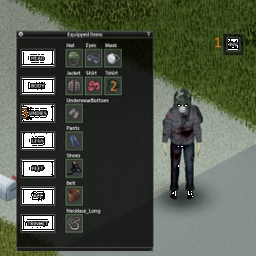
PZ-ClothingUI - Clothing items grid view Info This mode provides alternative graphical UI for equipped clothing items. Features - Draggable button to display equipped items in an overview window (drag by grey border) - Items are displayed in categories (right click category button or item icon for equip possibilities) - Left mouse double click on item icon for quick unequip - Item tooltips on mouse hover - (Build 42 only) Configurable hotkey for toggling the window Options / configuration For full guide click here. Configuration is done via MOD OPTIONS. It's optional but recommended for anyone with different than FullHD resolution. - Start the game and enable the Options mod (Don't forget to enable it also on your save file) - Load into Single Player Game - Open game settings, click on tab Mods (Doesn't show in the Multiplayer games!) - Configure the mod to you liking (To be able to see the changes, you need to open/close the Clothing UI window) Configure your view in SP games and than load to MP, even though the mod is not enabled in MP. The config is loaded. Multiplayer Multiplayer is supported if server has allowed this mode. See https://github.com/rempAut/PZ-ClothingUI#multiplayer-support Languages Translations are now possible. Supported languages: - English (EN) - Russian (RU) - Русский - Chinese (CN) - 简体中文 - German (DE) - Deutsch - Spanish (ES) - Español - French (FR) - Français - Brazilian Portuguese (PTBR) - Português Brasileiro - Thai (TH) - ไทย - Turkish (TR) - Türkçe The mode is not text-heavy, so if you want to help with translating, see https://github.com/rempAut/PZ-ClothingUI#how-to-add-translation Bug reports See this guide how to report bug. Development See the dev progress here https://github.com/rempAut/PZ-ClothingUI If you want to report a BUG or make a Feature request, please consider using github. Otherwise, you can still use discussions here on Steam. Manual installation You can find and download all releases here. Hotfixes - If you cannot see the button, try to delete clothingui.ini inside C:\Users\\Zomboid\Lua Workshop ID: 2695471997 Mod ID: myclothinguimod Workshop ID: 2695471997 Mod ID: myclothinguimod

'59 Cadillac Miller-Meteor + ECTO-1
автор 76561198089039119
A Cadillac hearse in the apocalypse? Sure! It's loooong, has a lot of storage and it's upgradeable with even more storage and full armor set. And the best part is the Ecto-1 optional variant with all those features too! Main features: - 3 Variants: Meteor hearse, Ambulance and Ecto-1 - Ecto-1 optional variant with his iconic siren and light bars (it will not spawn if you don't enable it's submod) - Fully animated hood, trunk lid, doors and windows - Visible interior and character (with comical exit/enter/aim animations) - All parts have 3d objects you can remove and place in the world - Extra parts to find in the world to make the vehicle truly yours (bullbar, armor... etc) - Craftable reinforced tires - They will run even when damaged, but with reduced friction - Multiple texture variations - Armor plates for windows and bullbar protection - Roofrack for additional storage - You can use it in your current save game, just enable the mod in the load menu - It can tow and be towed - Not recolorable Things to come: - Better exit/enter animations (First fix is included and will be expanded over time) - Armored plates for far back windows (Cosmetic item) - More roofracks - Rear facing back passenger seat If you can't wait to find this mod in your game and want to test it right away, use bikinitools to spawn it, hide the items that your character holds in hands while in vehicle, or for all other good stuff that mod has, go get it! If you like my mods, please consider supporting me with a coffee, so I don't fall asleep while making new mods and supporting old ones :) Check out my other mods: Credits: This mod is commission work by request of Sheriff Eli. Big thank you to Sheriff Eli and his Community for the support! Thanks to The Indie Stone for making the game and all this possible and special thanks to bikinihorst for the huge help with code, optimization and taking care of the multiplayer code. Thanks to MasterSplinter for screenshot sauce Ask for permission This mod can only be added to and extended with the express permission from the original creator. If no permission is received you may not alter the mod, and it must be treated as a mod that is 'On Lockdown'. You are not allowed to repack this mod under any circumstances, ever. Compatibility: ✅ B41 (b41.78.16) Single Player / Multiplayer fully supported ✅ B42 (b42.12) Single Player fully supported ✅ B42 (b42.13+) Single Player / Multiplayer fully supported Vehicle IDs: 59meteor, 59ambulance, ECTO1 Workshop ID: 2772575623 Mod ID: 59meteor Mod ID: ECTO1
![Simon MDs Tiles [B41/B42] – Project Zomboid Mod](https://images.steamusercontent.com/ugc/11386050844477740316/85B4D5E5EBDFC16EACA50E152E8A8FFD4F83AF25/)
Simon MDs Tiles [B41/B42]
автор 76561198006141780
Tiles are updated for B42 now with a lot of new tile sheets only available on B42. B41 does not receive any updates anymore! For server owners: You can use my tiles on your server and also create your own mod pack with it, to avoid too frequent updates as long as you do not change anything and give credit. For modders/map creators: If you want to use my tiles in your mods or maps, you can do so as long as you give credit. Thanks @Miss Raptor (https://twitter.com/Miss_Raptor_) for providing your beautiful art so I can integrate them into my builds and tiles! Thank you @Erin Azakaela Redfire for allowing me to use your Mount Aza tiles to make blends with my quarry tiles! I have also included them in my B42 tiles as well. Also a big thank you to @throttlekitty for allowing me to use a couple of your tiles to incorporate them into my junk walls! Thank you also to Zubludok for the amazing consoles, one of which I used for my industrial metal smelter as well as the power switch. For the amazing cave tiles, I thank Skizot a ton and I used them as inspiration to create additional tiles for the caves contained in my tile set. Thank you @Gabester for allowing me to include your amazing museum tiles as well (B42 only). Another thank you goes to MelosTilesForMiles whose ruin tiles and wall overlays I used for inspiration to create even more (B42 only). More thanks go out to DaddyDirkieDirk whose tiles I used to make some recolors and also used to create even more pipes for sewers (B42 only) Credits for the gore tiles go to https://flippednormals.com that I used to combine and make more. Find my tiles on my Google drive: https://drive.google.com/drive/folders/1t_7mAsDJeF7DKnmdocP3ymEhUtJdeZZD?usp=sharing You can find the buildings for the airplanes also on my Google drive, so you do not need to assemble them: https://drive.google.com/drive/folders/1KAcG2lWRSYBNzzisbwxfdUNbumUGnf0z?usp=drive_link Workshop ID: 2852704777 Mod ID: simonMDsTiles
'69 Mini Mk2
автор 76561198089039119
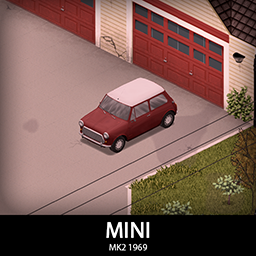
The smallest 4 seater you will find in Kentucky! It's small, agile, light, small, silent, fun and small. It comes in many optional pop culture variants. It has a full set of armor and many parts to customize it. Also small. Main features: - Right hand drive - Many variants with their unique pros and cons: Base mod and optional Mr Bean's Mini, Italian Job Minis and Test Drive Pitbull Special - 3 front Bumpers and 2 rear Bumpers with 2 tiered protection - Fully animated hood, trunk, doors and windows - Visible interior and character (with improved exit/enter/aim animations) - All parts have 3d objects you can remove and place in the world - Extra parts to find in the world to make the vehicle truly yours (bumpers, armor plates, roofracks etc) - Many texture variations - Armor protection for windows, doors, engine, headlights etc - You can use it in your current save game, just enable the mod in the load menu - It can tow and be towed - Not recolorable If you can't wait to find this mod in your game and want to test it right away, use bikinitools to spawn it, hide the items that your character holds while in vehicle, or for all other good stuff that mod has, go get it! If you like my mods, please consider supporting me with a coffee, so I don't fall asleep while making new mods and supporting old ones :) Check out my vehicle mods: Credits: - This mod is commission work by request of Greb - Thanks to The Indie Stone for making this awesome game and all this possible. - Special thanks to bikinihorst for the huge help with code, optimization, and taking care of the multiplayer and part code. Ask for permission This mod can only be added to and extended with the express permission from the original creator. If no permission is received you may not alter the mod, and it must be treated as a mod that is 'On Lockdown'. You are not allowed to repack this mod under any circumstances, ever. Compatibility: ✅ B41 (b41.78.16) Single Player / Multiplayer fully supported ✅ B42 (b42.12) Single Player fully supported ✅ B42 (b42.13) Single Player / Multiplayer fully supported Vehicle IDs: 69mini, 69miniUnionJack, 69miniIJ, 69miniMrB, 69miniPS Workshop ID: 2937786633 Mod ID: 69mini Mod ID: 69mini_ItalianJob Mod ID: 69mini_MrBean Mod ID: 69mini_PitbullSpecial
Project Zomboid Подробнее →
Project Zomboid Guides
Установка модов Project Zomboid — гайд по Workshop
Установи моды Project Zomboid через Steam Workshop: внеси ID, проверь порядок, перезапусти сервер и исправь типичные ошибки.
Аренда сервера Project Zomboid – гайд по мультиплееру
Настройка сервера Project Zomboid: RAM, параметры песочницы, Workshop-моды, права администратора и аккуратная проверка типичных ошибок.
Сервер Project Zomboid с поддержкой модов
Устанавливайте совместимые поддерживаемые моды из панели сервера.
Арендовать сервер Project Zomboid