Моды и плагины для Project Zomboid
В этом каталоге перечислено 60 000+ проектов Project Zomboid из Steam Workshop. Они могут быть серверными, клиентскими или требоваться с обеих сторон, а также включать карты и другой пользовательский контент. Перед установкой проверьте связанную страницу источника, версию игры и зависимости.
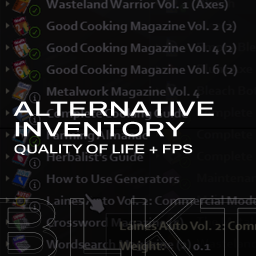
Alternative Inventory Rendering
автор 76561197999893894
Alternative Inventory Rendering 41.71 Tested This mod replaces existing Inventory Rendering Code with Alternative Rendering Code to get more FPS. Also it comes with some new features that could be useful for your Zomboid Run. This mod does not requires new save. Features - Adjustable with Mod Options. - Track and display what you can read or you've read. This mod will let you know what you can read and what you've red with nice icons - Track the media that you've seen or listened (CD/DVD) - Show more verbose information for some items - New fancy icons from Modulz - Pretty compatible with most of QoL mods (if it does not adds any icons on the display) - Less FPS loss with many items in container (like trunk, GeneralContainers. etc..) 1300 Capacity Trunk, 60FPS. (No Pause) - Adjusted brightness and more. - Check if the weapon has some attachments on it Now you can check what attachments are there if you enable the option. - Check which magazine is full or half by expanding magazines in the inventory. Recent Changelogs - Added Detailed Magazine Status (Check picture above.) - Added Duplicated Item Tracking Attention! Since this is pretty much replacing existing inventory rendering code This mod is not compatible with mods listed below: - Show duplicates (This mod will have this feature, in the later version.) - Show Read Books (This mod has this feature) - Some of esQol Feature (This mod covers show drainable / use counts) - Any kind of mod that adding icons to the inventory. If you want something, please leave your thoughts in the comment section below. Checkout my other mods: Workshop ID: 2809595776 Mod ID: blkt_invtrack
Simple UI library
автор 76561198117640434
Simple UI Library Want to make a simple menu for your mod to : - Ask the player to choose between two things? - Ask the player a nickname, age, height, weight, etc ? - Display a map ? - Display player-related information from your mod such as amount of money, time on server, etc ? - Warn players the start of an event ? - Make a job board systeme ? - And more ? This mod is for you ! If you did something with this mod, pls comment it. Hello world (for modders) Make a window that display "Hello world": local UI = NewUI(); UI:addText("", "Hello world", "Small", "Center") UI:saveLayout() TODO - Make rich text scrollable - Add slider element - Make the window scrollable Find all informations and examples here: https://github.com/MrBounty/PZ-UI_API Mod that use it The Only Cure: https://steamcommunity.com/sharedfiles/filedetails/?id=2703664356 Pager mod: (best exemple to look at) https://steamcommunity.com/sharedfiles/filedetails/?id=2773785202 Example mod with example UI: https://steamcommunity.com/sharedfiles/filedetails/?id=2760157169 I will not answer questions asked in the comments! If you have any questions, make a discussion here, an issue on github or a message on discord (modding channel of the official the indie stone discord or a pm). I prefer here or github because like that people can use it back later if they have the same question. I do not authorize the use of my CODE (copy paste) for modpacks. If you want it, ask it pls. But you can you use the mod for your mod or server if everyone is sub the this mod thx ! (Mod is different from code) Workshop ID: 2760035814 Mod ID: UIAPI
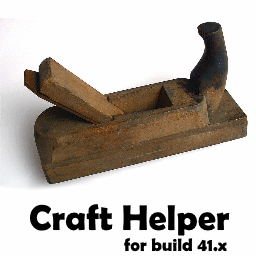
Craft Helper (41.x)
автор 76561198010154992
Craft Helper for build 41 This is a new version of famous mod "Craft Helper" with improved UI. Original version for build 40 and lower is here: https://steamcommunity.com/sharedfiles/filedetails/?id=911399676 This mod will add a "Craft Helper 41" context menu item when right-clicking on any item in your inventory or a container. Selecting that will bring up a dialogue of every recipe that that item is part of. Selecting a recipe will show the recipe components and what is already obtained by the player and what needs to be obtained, as well as quantities. The mod in many cases reuses string resources from the core UI, so it supports all game languages. If you play with Hydrocraft, you definitely need this mod😉 Update: * bugfix * show required book Tags:B41,Interface Workshop ID: 2186592938 Mod ID: CraftHelper41
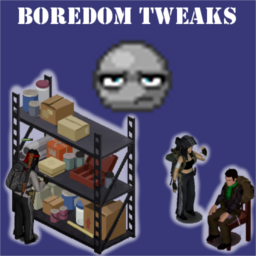
Boredom Tweaks
автор 76561197996101857
Something I found when playing Zomboid was that the Boredom moodle was always a bit frustrating to manage. The way it functions in vanilla, any time you are indoors you are slowly gaining boredom, and it is slightly slower while reading. If you are in multiplayer and speak in chat, this lowers it, along with handling for when NPCs are in the game you will lose boredom if you are around them. You also will gain boredom if you sit in a vehicle and are not moving, but lose it when you are moving. Finally, you lose boredom if you are not a structure, and if you are panicked (anything greater then 5 for the panic levels) it immediately just sets your boredom to 0. A recent update has added proper boredom to player-built structures! I'm hoping my bug report helped this. With Boredom Tweaks, the boredom is a good bit more manageable. If you are in any building, this is how boredom will work: - While doing nothing, you are slowly gaining boredom - If you are reading, this slows that gain down - If you do any Timed Action, you will lose boredom instead! This includes things like storing/retrieving items, working out, or preparing food. The only exception is reading - as I wished to keep things similar to vanilla. But anything that puts the timed progress bar above your head is generally a Timed Action! If you are currently doing something, I don't think you'd be bored, especially in a survival scenario! - If you are playing in multiplayer, and you are within five squares of another player, you will lose boredom! If someone is that close, you are probably hanging out and friends, or they are hostile and you probably will find it hard to be bored then! - The vanilla checks for speaking in chat as well as NPCs being around you are also preserved, and you will lose boredom if you do them as well! This should mean that once the future updates come out, it will be compatible - hopefully! - If you are in a vehicle, these same conditions also apply now as well! - Finally, if you are outdoors, you will constantly be losing boredom, and when you are panicked, you are still entirely unable to be bored. The biggest change I added with this mod: any time that you are losing boredom and you are practically at empty boredom levels (less then 5 while looking at the debug values), as long as you do not see the sadness moodle showing on the screen (less then 25), you will become happier slowly. If you are sad enough that it does show (greater then 25), then you will have to resort to other methods to get happier again. This has the effect of making it a bit easier to manage your boredom and mood together if you are being active, but if you go around doing things that will make you bored and sad, you still will have to manage that with other methods. Books and Comics are still important! These are personal little tweaks I found that makes it more enjoyable, and sensible too. This is my first mod for Zomboid, so please let me know of any issues! And I hope that you enjoy it as well! While it will always be free to enjoy no matter what, if you are willing and able to give a little, it is immensely appreciated! https://paypal.me/JonRMods Workshop ID: 2725360009 Mod ID: BoredomTweaks

TchernoLib B41
автор 76561198329871201
Features and tools with high reuse potential. Global Object - Simple interface to add your own Global Objects to the game. - Details here. see Portal Gun mod for example. Spawn - Spawn a specific item in a specific container. - Spawn a specific item from a right click + action on a specific square. - Details here. see Portal Gun mod for example. Sandbox Options - Handle sandbox color selection as enum. - Details here. see Portal Gun and Battle Royale mods for examples. Spectate - Simple interface for spectating in multiplayer. - Spectating remove all interactions. - Spectating makes invisible. - Spectating allows to follow other player's medical state from any distance. see Battle Royale mod for example. Player Variables - Simple interface for spreading player variables in multiplayer. - Adds IsoPlayer Flags to player variables. - Corrects ZombiesDontAttack flag. Inspired by Camouflage from the awesome Braven. - Player variables are (mainly) used for animations. - Adds isCmdReady(). A function to know when sendClientCommand can be safely used in MP. see Infected Player mod for example. Movement control - Simple interface for movement control. - Simple interface for teleport. - Vanilla movement speed recomputed with lua. - Tuning options for movement speed. see No Limping mod for example. World Chat - Simple interface to make any world object talk. - Detailed interface. see NPC Baelin The Fisherman mod for example. UI - Simple interface for custom keybinds. Credits to Star. - Simple interface for adding a new tab to Character Info window. - Adds Player ModData Debug to Debug Dev menu (below Global Mod Data Debug). - Draw circles on world (better than vanilla). - Draw lines (better than vanilla). - Shows modded icon in Item List. Thx to Notloc. see Battle Royale mod for drawing example. Geometry - Detects point inclusion in triangle. - Detects point inclusion in rectangle. - Detects intersecting point of two segments. see Battle Royale mod for example. Targeting - Adds getPlayerMouseSquare(player,goThroughWindow). Detects the square under the mouse, including lower levels. see Portal Gun mod for example. luautils - Deep lua table copy. - Transform square to table for data storage. - Formatting table, square, player for easy debug. see Portal Gun and Battle Royale mods for examples. FAQ - Safe to add midgame. - Safe to remove midgame (items may be lost). - Works in solo and multiplayer. - Untested for splitscreen. - Untested for joypad. Ask for permission This mod can only be added to and extended with the express permission from the original creator. Having received permission, credit must be given to the original creator, both within the files of the mod and wherever the mod roams online. If no permission is received you may not alter the mod. You wanna support? A nice word is always welcome. Constructive feedback too. Workshop ID: 2986578314 Mod ID: TchernoLib
![[B42] Chestown – Project Zomboid Mod](https://images.steamusercontent.com/ugc/9948971000841861441/58F9B5A05F9570CC149F32BDBA939CB5139ECD35/)
[B42] Chestown
автор 76561198277779770
Welcome to Chestown, KY, now for B42! Narrow alleyways and even narrower staircases, Chestown is a nest of urban density in the vast Kentuckian landscape that is Knox Country. A short drive away from the Ohio River, Chestown sits to the south of the small town of Riverside. Boasting its very own Courthouse and Police Precinct, there is plenty to do in this quaint city. Whether you prefer the space and privacy afforded by Suburbia or the downtown lifestyle, with its numerous bars, restaurants and stores, Chestown has a place for ya! Pas mal non ? C'est toujours français. B42 cell occupied (18,26) What is new in the B42 version The main new features of the map are the addition of (non-randomized) basements, from mancaves to boiler rooms, as well as a sewer system that spans the city. Some layouts in various buildings have been modified to accomodate for basement accesses. Other than those and cosmetic changes to a few buildings, the map is for the most part the same as the B41 version. The map should work fine for B42 but I have not tested it extensively, use the bug report thread if you have issues with it. For those still playing on B41 If you have an issue where Chestown has disappeared from your modlist you should try to unsubscribe from the mod and resubscribe to it to force Steam to download the new version. This only applies to those that were already subscribed to this mod prior to the B42 update released 28/05. I think the update changed the Workshop ID of the mod so there could be some rare cases where it does mess things up for you if your game setup relies on strict Workshop ID order, however for the vast majority of people this is a non-issue and a simple re-download of the mod will be fine. I consider the B41 version done and it is, for all intents and purposes, a deprecated version of this mod. There will be no additional bugfixes or work on it (though it doesn't need any). B41 cell occupied (15,22) You may add this map to a mod pack for private use, such as multiplayer servers. This mod pack must be used and shared privately for you and your community and must not be shared publicly on the steam workshop or anywhere else. Workshop ID: 2840889213 Mod ID: Chestown Map Folder: Chestown, KY
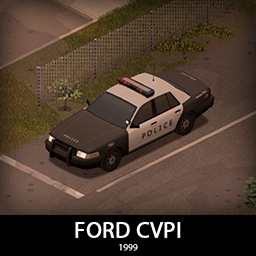
'99 Ford Crown Victoria Police Interceptor
автор 76561198089039119
It's another Crown Vic! But this one is from 99! It features a full set of armor and some modern flashing lights! Trunk is big, rear seats are huge and there is even a gun rack inside. It comes in 2 variants, normal police chassis and the unmarked car with some cosmetic differences and a small hidden lightbar. It shares the armor and tires with the 92 variant. Main features: - 2 Chassis variants - 2 Front bumpers with 2 tiered protection - Fully animated hood, trunk, doors and windows - Visible interior and character (with improved exit/enter/aim animations) - All parts have 3d objects you can remove and place in the world - Extra parts to craft and find in the world to make the vehicle truly yours (push bumper, window armor etc) - Multiple texture variations - Armor protection for windows, doors, engine, headlights etc - 2 seats in the front, 2 in the back. - You can use it in your current save game, just enable the mod in the load menu - It can tow and be towed - Not recolorable Things to come: - Civilian variant - Taxi variant If you can't wait to find this mod in your game and want to test it right away, use bikinitools to spawn it, hide the items that your character holds while in vehicle, or for all other good stuff that mod has, go get it! If you like my mods, please consider supporting me with a coffee, so I don't fall asleep while making new mods and supporting old ones :) Check out my vehicle mods: Credits: - This mod is commission work by request of Sheriff Eli. Big thank you to Sheriff Eli and his Community for the support! - Thanks to The Indie Stone for making this awesome game and all this possible. - Special thanks to bikinihorst for the huge help with code, optimization, and taking care of the multiplayer and part code. Ask for permission This mod can only be added to and extended with the express permission from the original creator. If no permission is received you may not alter the mod, and it must be treated as a mod that is 'On Lockdown'. You are not allowed to repack this mod under any circumstances, ever. Compatibility: ✅ B41 (b41.78.16) Single Player / Multiplayer fully supported ✅ B42 (b42.12) Single Player fully supported ✅ B42 (b42.13+) Single Player / Multiplayer fully supported Vehicle IDs: 99fordCVPI, 99fordCVPIunmarked Workshop ID: 2971246021 Mod ID: 99fordCVPI
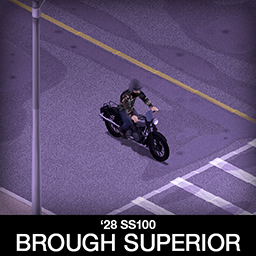
'28 Brough Superior SS100
автор 76561198089039119
Big and powerful! One of the most iconic classics of all time, Brough Superior SS100 looks fantastic even 100 years after it was designed! It has 2 variants with interchangeable parts. Main features: - Detachable storage bags on the back - Slot for tent storage - 2 variants, one setup for speed and another for handling - All parts have 3d objects you can remove and place in the world - Many color variations for the bike and the bags - B41.78+ Single Player / Multiplayer Compatible - You can use it in your current save game, just enable the mod in the load menu - Not recolorable - You will need Tsar's Common Library and Autotsar Motorclub - You will NOT need Aquatsar Yacht Club or Cherbourg If you can't wait to find this mod in your game and want to test it right away, use bikinitools to spawn it, hide the items that your character holds in hands while in vehicle, or for all other good stuff that mod has, go get it! If you like my mods, please consider supporting me with a coffee, so I don't fall asleep while making new mods and supporting old ones :) Check out my other bike mods: Side note: This mod has a low poly 3d model and high detail textures, and is highly optimized, so it should not affect the game performance. All models, textures and animations were made by me. Credits: - This mod is commission work by request of Kinori - Thanks to The Indie Stone for making the game and all this possible and to bikinihorst for the huge help with code and optimization. - Also thanks to iBrRus for his work on our collaboration mod which was the foundation for this mod. - Don't forget to also check out Kino's Journey mod that was used for some preview images Ask for permission This mod can only be added to and extended with the express permission from the original creator. If no permission is received you may not alter the mod, and it must be treated as a mod that is 'On Lockdown'. You are not allowed to repack this mod under any circumstances, ever. Vehicle IDs: 28ss100, 28ss100hermes Workshop ID: 2913634132 Mod ID: 28ss100

Tsar's Common Library B42
автор 76561198329871201
Details - See B41 mod here for expected content. Maintenance - Maps are changing in B42. I cannot maintain this alone. You can help here if you like. - If you have questions, bugs, ask on Official PZ Discord: mod_support channel. Credits to the Author - iBrRus Workshop ID: 3402491515 Mod ID: tsarslib
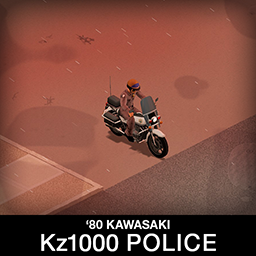
'80 Kawasaki Kz1000 Police
автор 76561198089039119
Famous Kz1000 Police bike from 80s TV show CHiPs! It's animated, packed with features and has a lightbar, what else would you need? It's not the fastest bike but that will help you survive for longer, it has 3 storage boxes for some necessities. Runflats will be your best friends on a long trip. Main features: - Working siren and light bar - 3 Storage boxes in the back - Fully animated trunk lids - All parts have 3d objects you can remove and place in the world - CHiPs helmet included - Runflat tires - They will run even when damaged, but with reduced friction - B41.71+ Single Player / Multiplayer Compatible - You can use it in your current save game, just enable the mod in the load menu - Not recolorable - You will need Tsar's Common Library and Autotsar Motorclub - You will NOT need Aquatsar Yacht Club or Cherbourg If you can't wait to find this mod in your game and want to test it right away, use bikinitools to spawn it, hide the items that your character holds in hands while in vehicle, or for all other good stuff that mod has, go get it! If you like my mods, please consider supporting me with a coffee, so I don't fall asleep while making new mods and supporting old ones :) Check out my other mods: Side note: This mod has a low poly 3d model and high detail textures, and is highly optimized, so it should not affect the game performance. All models, textures and animations were made by me. Credits: This mod is commission work by request of Sheriff Eli. Big thank you to Sheriff Eli and his Community for the support! Thanks to The Indie Stone for making the game and all this possible and to bikinihorst for the huge help with code and optimization. Special thanks to iBrRus for his selfless work on character animations and all the code in our collaboration mod which was the foundation for this mod. Ask for permission This mod can only be added to and extended with the express permission from the original creator. If no permission is received you may not alter the mod, and it must be treated as a mod that is 'On Lockdown'. You are not allowed to repack this mod under any circumstances, ever. Vehicle IDs: 80kz1000 Workshop ID: 2818847163 Mod ID: 80kz1000
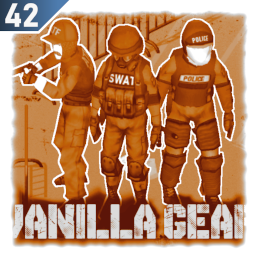
Vanilla Gear Expanded
автор 76561197988012597
Vanilla Gear Expanded New outfits and gear to expand the various law enforcement agencies & special police forces that would likely be in the area. Some vanilla textures have also been altered to improve quality and fix poor font choices. Items can be found in various police stations around the map, zombies also have a small chance to spawn wearing the uniforms. Will work on current saves though items wont spawn in areas you've already visited. - Performance friendly - all textures are at the vanilla resolution - Authentic lore reason for dogs and guns being absent in Knox County - Angled flashlights & radios can be attached to the vests in B42 - Works on Build 41 but not all items are available, see below New Items: Items marked with wont be avaliable in B41 - FBI Jacket - Bullet vest - ATF - Bullet vest - Press - Bullet vest - FBI (blue, gray) - Bullet vest - Police (gray variant) - Baseball Cap - FBI (blue, gray) - Baseball Cap - ATF - Baseball Cap - Press - Tactical Pants (blue/gray/green, pants tucked/untucked) - Tactical Shirt (blue/gray/green, sleeves rolled/unrolled) - Tactical Helmet (blue/gray/green) - Tactical Vest - Tactical Chest Rig - Tactical Gloves - Tactical Gloves Fingerless - Tactical Riot Helmet - Tactical Riding Helmet - Tactical Balaclava (wont hide facial hair on B41) - Tactical Goggles - Tactical Belt - Tactical Headset - Prison Riot Uniform - Prison Riot Armor Vanilla Textures Replaced: - Tactical Kneepads & Elbow Pads - Tactical Thighpads & Shin Pads - Holster - Black - Bullet Vest - Police - Bullet Vest - SWAT - Baseball Cap - SWAT - Chest Rig - Gas Mask (3 variants) - All hunting camouflage textures Workshop ID: 3401134276 Mod ID: VanillaGearExpanded
![Clean HotBar [B42] – Project Zomboid Mod](https://images.steamusercontent.com/ugc/10625835939624056538/69BCD2511D4567951B543FA8947C91F9A0E084FA/)
Clean HotBar [B42]
автор 76561199485575276
Compatible with Project Zomboid Build 42.12.3–42.20.4 (SP / MP) Clean Hot Bar improves Project Zomboid’s hotbar and hand-equipped UI with clearer item information, cleaner visuals, customizable scaling and opacity, compatible-slot highlighting, and built-in slot reordering. Its goal is simple: show useful information at a glance without turning the hotbar into visual clutter. Item Status at a Glance Clean Hot Bar displays Build 42 item information directly in each slot: - Overall condition through the slot background and its color - Weapon head condition and sharpness in a combined bar on applicable weapons - Firearm status: loaded ammo, spare ammo in the player’s inventory, and weapon jams - ON / OFF indicators for flashlights and other activatable items - Remaining contents for drainable and liquid containers - Compatible-slot highlighting when dragging an item over the hotbar For applicable weapons, white represents current sharpness and the remaining colored section represents head condition above that sharpness. Since sharpness cannot exceed head condition, both values share one bar instead of using two separate indicators. Hand-Equipped UI The main-hand and off-hand slots use the same cleaner visual style and can display item condition, weapon status, ammunition, liquids, and activation states. Status indicators and tooltips can be configured separately for the hotbar and the hand-equipped interface. Liquid System Integration Build 42 liquid containers use color-coded bars so their contents and remaining amount are easier to recognize. Some liquid colors were originally created with AI assistance, so feedback is welcome if a color looks inaccurate or is difficult to distinguish. Visual Feedback - Items briefly shake and flash when condition decreases - Liquids use a smooth drain animation while being consumed - An optional warning appears above the character when the equipped weapon loses durability - Dragging an item previews compatible visible slots and potential replacements Customizable Settings Move the pointer over the hotbar and click the button with three horizontal lines to open the settings panel. You can: - Show or hide item condition, head condition, sharpness, and ammunition information - Adjust status-bar height and ammunition-text size - Configure hotbar and hand-equipped tooltips separately - Enable or disable the weapon-condition warning - Set hotbar opacity from 20% to 100% - Scale the hotbar from 0.6x to 2.0x - Configure the built-in reordering system Settings are client-side. Each player can configure their own UI independently. Empty Slots and Extra Attachments The circular-arrow button on the left of the hotbar shows or hides empty attachment slots without removing them. This keeps the hotbar compact when equipment or mods add many slots, including backpack upgrades from Authentic Z. Built-in Hotbar Reordering Unlock reordering in the settings panel and drag slots to rearrange them: - Swap exchanges two slot positions - Insert moves a slot and shifts the slots between both positions - Lock prevents accidental changes The selected order is saved and restored automatically. Reorder The Hotbar is normally unnecessary. If detected, Clean Hot Bar disables its own reorder implementation and lets the external mod handle it. Using only one reordering system is recommended when troubleshooting. If you use QoL Compendium, disable Change quick access bar order when using Clean Hot Bar’s built-in reordering. Compatibility - Project Zomboid Build 42.12.3 through 42.20.4 - SP, MP Host, and dedicated servers - Compatible with CleanUI - Supports additional attachment slots, including Authentic Z backpack upgrades - No framework dependency - Best placed near the bottom of the mod load order Conflicts are most likely with mods that replace hotbar rendering, attachment-slot logic, drag-and-drop handling, tooltips, equipping or unequipping behavior, or the hand-equipped UI. Clean Hot Bar already includes slot reordering. Test suspected hotbar or attachment conflicts on a new save with the smallest possible mod set. A compatible automatic hotbar-hiding option is also available through Minimal Hotbar It has worked in my tests, although every possible mod combination has not been tested. Installation Clean Hot Bar works on Build 42 only. Enable it for an existing save through: Main Menu > Load > select save > More... > Choose Mods... For multiplayer servers, include: - Mods=...;CleanHotBar;... - WorkshopItems=...;3461263912;... Then fully restart the server. Settings and Troubleshooting Current versions save client-side settings in: C:\Users<YourName>\Zomboid\Lua\CleanHotbarConfig.txt The legacy CleanHotbarConfig.lua file may still be read to migrate settings from older versions. Since v1.12.4, configuration files are read with a restricted parser compatible with Build 42.20.4. Invalid files are rejected and valid defaults are used instead. If the mod or its settings stop working after an update, close Project Zomboid and: - Unsubscribe and wait for Steam to remove the old Workshop download - Subscribe again and wait for the download to finish - Verify Project Zomboid’s files through Steam - If only settings are affected, back up and delete both Clean Hot Bar configuration files Deleting those files resets only Clean Hot Bar’s local settings. Questions and Bug Reports For setup questions, item-disappearance reports, slot problems, errors, or compatibility issues, use: Questions and Bug Reports Please include the exact game version, SP/MP environment, reproduction steps, affected item and slot, mod list and load order, relevant logs, and a screenshot or video when useful. Credits - Original mod by Rocco: PZ Workshop Items - Maintenance and compatibility updates by Afyrmo: PZ Workshop Items Support the original author: Workshop ID: 3461263912 Mod ID: CleanHotBar

Canteens And Bottles
автор 76561198082611857
Adds three types of Canteen, two types of drinking Flask, some Gym Bottles, some Waterskins, a Giant Water Bottle and some Jerry Cans to the game world. MILITARY CANTEEN: - Olive Drab - Army Green Military Canteen info: Weight when empty = 0.3 Weight when full = 0.7 Capacity = 16 Also has capacity for 2 units of gasoline Metallic CAMPING CANTEEN: - Army - Ready Prep - Tartan Camping Canteen info: Weight when empty = 0.4 Weight when full = 1.8 Capacity = 30 Also has capacity for 3 units of gasoline Metallic MEDICINAL CANTEEN: - Green and White - White and Green - Red and White - White and Red Medicinal Canteen info: Weight when empty = 0.2 Weight when full = 0.7 Capacity = 10 Also has capacity for 1 unit of gasoline Can also rarely spawn filled with Serum or Medicine GYM BOTTLE: - Blue and Yellow - Orange and Charcoal - Purple and Grey - Spiffo Gym Bottle info: Weight when empty = 0.2 Weight when full = 1.2 Capacity = 15 Also has capacity for 2 units of gasoline Spiffo bottle can rarely be filled with Spiffoade, an energy drink DRINKING FLASKS: - Metal Flask - Spiffo Flask Metal Flask info: Weight when empty = 0.1 Weight when full = 0.5 Capacity = 12 Also has capacity for 1 unit of gasoline Can rarely be found filled with bourbon Metallic Spiffo Flask info: Weight when empty = 0.1 Weight when full = 0.5 Capacity = 10 Also has capacity for 1 unit of gasoline Can rarely be found filled with Spiffo Juice GIANT WATER BOTTLE: Giant Water Bottle info: Weight when empty = 0.2 Weight when full = 20 Capacity = 200 Also has capacity for 8 units of gasoline WATERSKINS: - Small Waterskin - Large Waterskin - Quality Waterskin Small Waterskin info: Weight when empty = 0.05 Weight when full = 1 Capacity = 12 Also has capacity for 1 unit of gasoline Must be crafted Large Waterskin info: Weight when empty = 0.1 Weight when full = 2 Capacity = 25 Also has capacity for 3 units of gasoline Must be crafted Quality Waterskin info: Weight when empty = 0.05 Weight when full = 0.9 Capacity = 15 Also has capacity for 2 units of gasoline Must be crafted JERRY CANS: - Jerry Can - Jumbo Jerry Can Jerry Can info: Weight when empty = 2 Weight when full = 8 Capacity = 16 units of gasoline Unsafe for holding water Metallic Jumbo Jerry Can info: Weight when empty = 3 Weight when full = 15 Capacity = 32 units of gasoline Unsafe for holding water Metallic NOTE: - Should be fully compatible with saves in progress and safe to remove mid game in progress too. Works in multiplayer just fine. Special thanks goes to my friend Cosmic for helping me understand Project Zomboids inner workings. He also makes mods! Check out his stuff! Thanks to KI5 for their encouragement and general help getting into 3D modelling, and also their help with .xml files and path structure. Their workshop is right here, take a look! Also a big thanks to Authentic Peach for their help with the attachments compatibility, understanding of bones and skinning, their modding guide and general support. You definitely need to check out their workshop! Note: My knowledge of coding can be written on the back of a postage stamp, with room to spare. I don't even know where to begin to make mods compatible with other mods, so any requests for compatibility are likely to be futile. Sorry about that. :( Note: Please don't post my mods anywhere else or add them to other mods without seeking permission first, and please credit me when / where credit is due. Thanks! Workshop ID: 2863949128 Mod ID: CanteensAndBottles
![[B41/B42] Faster Hood Opening – Project Zomboid Mod](https://images.steamusercontent.com/ugc/32187155757263029/130812CCDBEE85D8B8A06FBFC3C394143177CC97/)
[B41/B42] Faster Hood Opening
автор 76561198260417411
Faster Hood Opening Makes the Hood Opening be almost instant instead of taking a few seconds. Last Tested On: B42.15.2 Workshop ID: 2584112711 Mod ID: FasterHoodOpening
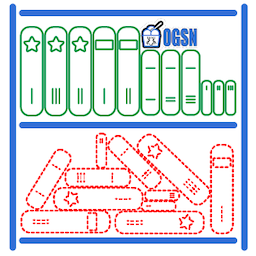
An Exhilaratingly Organized Literature Mod
автор 76561198014897042
For a truly superlative book sorting experience Some features only available in English for now, looking for translators to help. Don't like pictures? Here's a written description of the mod. https://steamuserimages-a.akamaihd.net/ugc/1018320033333686586/CDF15798CE4108E5D85C4F4C5CE3159F0EF4B36B/ Improved Sorting: Skill books, magazines, entertainment, etc. are now separated into groups. https://steamuserimages-a.akamaihd.net/ugc/1018320153788997397/113F24AF28C6647601BA1F5AB4A0FCDD7E9FA25B/ https://steamuserimages-a.akamaihd.net/ugc/1018320033333686586/CDF15798CE4108E5D85C4F4C5CE3159F0EF4B36B/ Flag Books as Owned: You can now instantly 'read' the first page of advanced books. If you find a new copy you will now be able to tell that you already own one. This will not affect the time it takes to read that book once you are ready for it. Your character will even re-read the first page! https://steamuserimages-a.akamaihd.net/ugc/1018320517901007546/47E2881350AB79C6070C3315089B623D587C487F/ https://steamuserimages-a.akamaihd.net/ugc/1018320033333686586/CDF15798CE4108E5D85C4F4C5CE3159F0EF4B36B/ Magazines now all have unique icons. Chapter is denoted by color and visible numbers. Similar books share logos and main color palette. https://steamuserimages-a.akamaihd.net/ugc/1018320033333556248/B5918DA8B4EF0342A1F1889AA2542EA0115E5249/ Modders: You may notice I made a bunch of extras. Feel free to use them in your own work! https://steamuserimages-a.akamaihd.net/ugc/1018320033333686586/CDF15798CE4108E5D85C4F4C5CE3159F0EF4B36B/ Four optional sets of stylish skill book icons to choose from. You may also keep the default set. https://steamuserimages-a.akamaihd.net/ugc/1018320153791677462/140D28164332549A661439021C62A615450BB119/ https://steamuserimages-a.akamaihd.net/ugc/1018320153791790613/EC5D48FE83FCE0256367DF29A97BE163C1008D59/ https://steamuserimages-a.akamaihd.net/ugc/1018320033333686586/CDF15798CE4108E5D85C4F4C5CE3159F0EF4B36B/ Enjoy the mod? I would love it if you gave me some fake internet points. They are easy to give, and totally free! https://i.imgur.com/p7Fv1Z6.gif https://i.imgur.com/jEczML7.png Tags:B40,B41,Framework,Interface,Items,Books,Literature,Realistic Workshop ID: 2071347174 Mod ID: LitSortOGSN_gold Mod ID: LitSortOGSN_diamond Mod ID: LitSortOGSN_readOnePage Mod ID: LitSortOGSN Mod ID: LitSortOGSN_chocolate Mod ID: LitSortOGSN_rice
![Building Menu [B41.78] – Project Zomboid Mod](https://images.steamusercontent.com/ugc/2319983877122306270/4C03BAEEA19589CF31F89F71288CFD5169B35CDA/)
Building Menu [B41.78]
автор 76561199033892043
Windows : C:\Users\%USERNAME%\Zomboid\console.txt Mac/Linux : $User$\Zomboid\console.txt Open an issue and upload this file here: GitHub. This mod's permissions fall under TIS's policy On Lockdown This mod cannot be modified by anyone else, for anything else, at all, ever. Even if the user disappears, he or she would much rather you didn't touch the fruits of their hard labour. Workshop ID: 3067798182 Mod ID: BuildingMenu
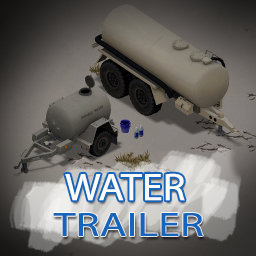
Water Trailer
автор 76561197966794882
New water trailers and mechanics. File: rWaterTrailer Adds two new water trailers to the game, fitting to KI5's '86 Oshkosh P19A + Military Trailers. Both have been designed specifically to fit visually and mechanically as good as possible. Features: - Custom water storage system. - Take water from items and "natural sources." - Take water from, and add water to rain barrels. - Multiple texture variants (military and civilian). - Animated trunk and tank lids. - The big cistern comes equipped with a pump to speed up the filling process. - The small cistern can be equipped with a filter to tap water that is safe to drink. File: rWaterTrailerSemi Optionally, you can also enable rWaterTrailerSemi, which adds a water-variant of the '82 Oshkosh M911 semi-trailer to the game. NOTE: NEEDS '82 Oshkosh M911 + Military Semi-Trailers TO WORK! WITHOUT THIS MOD, YOU CAN'T USE THE SEMI-TRAILER. Other mod suggestions: - Water Purification Tablets - '82 Oshkosh M911 + Military Semi-Trailers For server admins, the trailers can be spawned via: /addvehicle Rotators.TrailerWaterSmall /addvehicle Rotators.TrailerWaterBig /addvehicle Rotators.TrailerM967tankerWater Workshop ID: 2732639855 Mod ID: rWaterTrailer Mod ID: rWaterTrailerSemi
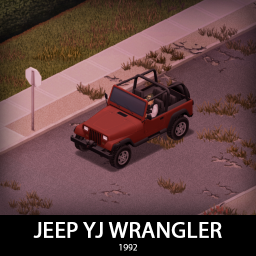
'92 Jeep YJ Wrangler
автор 76561198089039119
This guy doesn't really need any fancy introductions, it's a classic we all know and love, it was featured in many movies, tv shows and it's impossible you don't know about it. So let's get down to business, it has a few variants but they all share all parts, a lot of them. This is probably the most customizable vehicle i have ever made, so have fun building your own unique Wrangler! Main features: - 3 variants (Basically the same car but spawned with a different set of parts) - 3 Front bumpers and 2 rear bumpers with 2 tiered protection - Fully animated hood, trunk, doors and windows - Visible interior and character (with improved exit/enter/aim animations) - All parts have 3d objects you can remove and place in the world - Extra parts to craft and find in the world to make the vehicle truly yours (bumpers, bullbar, window armor, roofrack, snorkel, winch, window frames, rollbars, bodykits, roof covers etc) - Multiple texture variations - Armor protection for windows, doors, engine, headlights etc - 4 seats - You can use it in your current save game, just enable the mod in the load menu - It can tow and be towed - Not recolorable If you can't wait to find this mod in your game and want to test it right away, use bikinitools to spawn it, hide the items that your character holds while in vehicle, or for all other good stuff that mod has, go get it! If you like my mods, please consider supporting me with a coffee, so I don't fall asleep while making new mods and supporting old ones :) Check out my vehicle mods: Credits: - This mod is commission work by request of the Project Apocalypse Community - Thanks to The Indie Stone for making this awesome game and all this possible. - Special thanks to bikinihorst for the huge help with code, optimization, and taking care of the multiplayer and part code. Ask for permission This mod can only be added to and extended with the express permission from the original creator. If no permission is received you may not alter the mod, and it must be treated as a mod that is 'On Lockdown'. You are not allowed to repack this mod under any circumstances, ever. Compatibility: ✅ B41 (b41.78.16) Single Player / Multiplayer fully supported ✅ B42 (b42.12) Single Player fully supported ✅ B42 (b42.13+) Single Player / Multiplayer fully supported Vehicle IDs: 92jeepYJs, 92jeepYJse, 92jeepYJjp, 92jeepYJranger Workshop ID: 3287727378 Mod ID: 92jeepYJ Mod ID: 92jeepYJJP18
Inspect Weapon
автор 76561198088870567
About Tired of scrolling to your equipped section of the inventory to check your weapon's status and attachments? This mod allows you to inspect your currently equipped weapon on your primary hand at anytime, by: - Hold down the reload button and choose "Inspect Weapon" - Right click on any weapon in your inventory or a world container and choose "Inspect Weapon" will automatically try to equip it in your primary hand slot and inspect it - Pressing ; button to inspect current weapon. You can rebind this button through PZ's default option menu This mod comes with a simple UI and a terrible animation that took an hour to make :) Stats & Navigating UI Unlike the exact stats that are shown within the weapon's tooltip, the "condition" and "number of repair" stat are shown in estimation text (yes, I took this out of the DayZ book). I personally think that this will give players a better immersion on how their characters physically see the condition of the weapon, rather than numbers on a datasheet. Condition - Pristine: This weapon has a perfect 100% condition, and on top of that, it was never repaired - Used: This weapon has a condition between 50%, all the way to 100%. Weapons that are 100% but were repaired even once will get knocked down from "Pristine", to this category - Damaged: This weapon has a condition between 30% to 50% - Badly Damaged: This weapon has its condition less than 30% Number of repair - No sign of repair: Pretty self-explanatory, this weapon hasn't been repaired even once - Slightly repaired: This weapon has been repaired, but less than 3 times - Heavily repaired: This weapon has been repaired at least 3 times It is sort of hard to determine what's the good number for "Number of repair" stat. Realistically, I think 3 times duct taping or replacing some parts of a firearm would look noticeable enough to be deemed "Heavily repaired" Repair If weapon is damaged, an "information" button will be shown next to "Number of repair" stat. You can press on it and directly fix your weapon from the pop-up context menu, just like how you usually do it within the inventory pane Attachments This section is only shown for ranged weapon. I am not too sure if the melee weapons can use attachments (or any mods out there that allows it), prove me wrong :) Attachments can be equipped by clicking on a blank attachment slot, and a list should show options for compatible attachments for that slot. To un-equip it, double clicking on a currently equipped slot. For "Magazine" slot specifically, ammo will be shown for each one, and you can choose to load or unload them by right clicking on them. For controller You can navigate the UI using D-Pad buttons, with A (South) Button as accept, B (East) Button as Back/Close, and X (West) Button as Context/Sub menu Also please be advised, I am aware of the issue that the radial menu entry not showing. This has to do with other gun mods overwriting all the radial menu entries. For VFE specifically, I am working with the devs to figure out a solution to that. To-do list High priority - Repair weapon - Indication for screwdriver in inventory - Potential fits into attachment slot - Magazine display (if applicable) - Working with multiplayer - Custom keybind to inspect current weapon - Window position save Low priority - Controller support for all my Steam Deck homies out there - Splitscreen coop support - Add ability to move window for controller - Skill check to enable potential fits into attachment slot Frequently asked questions Is this compatible with VFE? - Some adjustments to the mod has been made for VFE for attachments of several firearms to show up. There might be other undiscovered issues, so if you have found any, let me know how to recreate it. Is this compatible with other weapon mods? - So far several of them were confirmed to be working, but some might have some issues, if they introduce new mechanics to how vanilla weapon should work. I can't test it all myself, so do try it for yourself. My goal for this mod is to keep it as compatible with the vanilla as possible, so any changes in the future by IndieStone wouldn't affect it too much. Why don't those melee weapons have inspect animation? - I actually do not know how to make the animation for this to look interesting enough...? I'm open for suggestion on this one. Does it work with B42? - Currently, yes! Feedback This is my first ever published mod. It took about a week of work to make. Any feedback from the end-user experience, to code improvement is appreciated. Credits Massive thanks to: - Vilespring for helping with VFE integration - Booker_D_Fred for code review/suggestions - Jarl44 for potential attachment feature suggestion - Mr.Shersh for reminding me to add disclaimer about having attachment in main inventory - BryanComY, NopOYes for Brazilian Portuguese translation - Inferno Dydimos for Spanish translation - Riko Prushka for Thai translation - Booker_D_Fred for Russian translation - HugoTLS for French translation - secdet for Ukrainian translation - Nozownik for Polish translation - Dunganga for Turkish translation - 76561198177186117 for Traditional Chinese translation - Gladicek for Czech translation - KimLeon for Korean translation - Eternity, Art Tippet for Italian translation - Lampiooo for German translation Like the mod? Buy me a coffee if you can :) Workshop ID: 2948824747 Mod ID: RiskyInspectWeapon
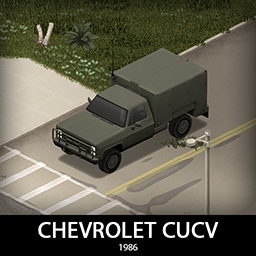
'86 Chevrolet CUCVs + M101A2 Trailer
автор 76561198089039119
This is one of those packs of vehicles that are all too interesting to pick a favorite, at least for a military fan like me. It covers all the classics and has some civilian bonus vehicles that made sense with the available parts. They share most of the parts, tires and will share parts with other 80s chevys that will get added in the future. Have fun with some iconic military boxes! Main features: - 9 Chassis variants with more on the way (K5 Blazer, K5 PD, K5 KSP, M1008, M1009, M1009 MP, M1010, M1028, M1031) - Military cargo trailer M101A2 - Military variants feature CTI and Gunracks - Fully animated hood, trunk, doors and windows - Visible interior and character (with improved exit/enter/aim animations) - All parts have 3d objects you can remove and place in the world - Extra parts to craft and find in the world to make the vehicle truly yours (bumpers, bullbars, window armor, sidesteps, tarps, sun visors etc) - Multiple texture variations - Armor protection for windows, doors, engine, headlights etc - 2/4 seats - You can use it in your current save game, just enable the mod in the load menu - It can tow and be towed - Not recolorable If you can't wait to find this mod in your game and want to test it right away, use bikinitools to spawn it, hide the items that your character holds while in vehicle, or for all other good stuff that mod has, go get it! If you like my mods, please consider supporting me with a coffee, so I don't fall asleep while making new mods and supporting old ones :) Check out my vehicle mods: Credits: - This mod is commission work by request of The Ranger - Thanks to The Indie Stone for making this awesome game and all this possible. - Special thanks to bikinihorst for the huge help with code, optimization, and taking care of the multiplayer and part code. Ask for permission This mod can only be added to and extended with the express permission from the original creator. If no permission is received you may not alter the mod, and it must be treated as a mod that is 'On Lockdown'. You are not allowed to repack this mod under any circumstances, ever. Compatibility: ✅ B41 (b41.78+) Single Player / Multiplayer fully supported ✅ B42 (b42.20+) Single Player / Multiplayer fully supported Vehicle IDs: 86chevyK5blazer, 86chevyK5ksp, 86chevyK5pd, 86chevyM1008, 86chevyM1009, 86chevyM1009mp, 86chevyM1010, 86chevyM1028, 86chevyM1031, TrailerM101A2cargo Workshop ID: 3428008364 Mod ID: 86chevyCUCV
![Barricaded World - Extended Erosion [b41/b42] – Project Zomboid Mod](https://images.steamusercontent.com/ugc/1830149517982468802/CDF2C79C8DF4684AC27BCEFA15BB65862B5DB727/)
Barricaded World - Extended Erosion [b41/b42]
автор 76561198072923012
Features Most of the time, I play at very advanced erosion. But I always found that houses were "too clean" so I created this mod to put erosion to the next level. It makes most of the houses look like abandoned safehouses and city buildings appear desolated. Depends on the world's current erosion level. When loaded, windows and doors in the world may be broken and/or randomly barricaded. Windows - 60% will be destroyed - 44% chance of planks barricades - 6% chance of metal sheet barricade - Note: Only ground floor windows may get barricaded Doors - 40% will be destroyed - 20% chance of planks barricades - Note: Only doors leading outside may get barricaded You can protect some doors / windows from erosion - Right click on your safehouse s doors/windows and select Protect from erosion - You can also remove protection from erosion the same way - See it in action here Erosion Integration Here is my personal recommendation for playing with this mod: Sandbox Config You could also use the "Six Month Later" Sandbox preset with a "Normal" zombie count for a quicker configuration. Apparition of broken and barricaded windows depends on erosion advancement: - In options, adjust erosion with "Erosion Speed" and keep "Erosion Days" at 0 - The more advanced the erosion, the more chances the following code has to happen - 25% of current erosion advancement means 25% chance for a window to go through the Barricaded World code - If erosion below 100%, 30 days after a place load, if the place is loaded again, the code will be run again - When code is loaded for a place at 100% erosion, it will not run anymore even past several days Examples of Sandbox configuration for erosion: - A world with normal "Erosion Speed" (100 days) and with "Month since Apocalypse" set to 2 (60 days) will start at 60% of Erosion. - A world with very fast "Erosion Speed" (20 days) and with "Month since Apocalypse" set to 1 (30 days) will start at 100% of Erosion. Upcoming Plans I have several ideas that I may implement in the future: - Increase performance if possible to rely on something else than LoadGridsquare - More configurability of script (percentages, toggle on-off, etc.) - Find a way to handle alarms being triggered when glasses are broken Map Pre-loading (optional) If you are encountering performance issues using the mod, it is because checking squares for windows and doors can be performance intensive and rely on the LoadGridsquare function. If you want to benefit from the apocalypse look allowed by this mod but are experiencing stuttering, you can pre-load the key parts of the map one time and then disable the mod from your save/server. I have created a mod specifically for that use case: Since this is a one-shot map loading. It will obviously not work for progessive erosion but only at the erosion level set during the map loading (I usually do it with maximum erosion, but you may want to load your map at lower erosion levels). The process takes time but I find it very useful, especially when preparing a server as admin before playing with friends. Hope this can help, meanwhile I will continue to try improving the mod s performance! Extra I tested the mod in solo and local multiplayer. It relies on the LoadGridsquare event so it has more impact on performances than some other mods. Many thanks to co` for showing me how to access decompiled PZ code which allowed me to do the erosion integration. Workshop ID: 2696986935 Mod ID: BarricadedWorld More Mods by Onkeen: Workshop ID: 2696986935 Mod ID: BarricadedWorld

'81 DeLorean DMC-12
автор 76561198089039119
I've promised you a tribute month to Mr. John DeLorean, so let's start with one of his most iconic cars, DMC-12 doesn't really need an introduction so let's move on to all quirky features, gull-wing doors, fighter jet cockpit interior, weird placement of every single part, large rear tires, stainless steel chassis, weird storage solutions and much more. It also features the rare paintjobs that didn't make it to production and of course the time machine as an optional spawn mod. Have fun, I know I did! Main features: - 2 variants - 3 Front bumpers and a rear bumper with 2 tiered protection - Fully animated hood, trunk, doors and windows - Visible interior and character (with improved exit/enter/aim animations) - All parts have 3d objects you can remove and place in the world - Extra parts to craft and find in the world to make the vehicle truly yours (bumpers, bullbars, window armor etc) - Multiple texture variations - Armor protection for windows, doors, engine, headlights etc - 2 seats - You can use it in your current save game, just enable the mod in the load menu - It can tow and be towed - Not recolorable If you can't wait to find this mod in your game and want to test it right away, use bikinitools to spawn it, hide the items that your character holds while in vehicle, or for all other good stuff that mod has, go get it! If you like my mods, please consider supporting me with a coffee, so I don't fall asleep while making new mods and supporting old ones :) Check out my vehicle mods: Credits: - This mod is commission work by request of Konokou - Thanks to The Indie Stone for making this awesome game and all this possible. - Special thanks to bikinihorst for the huge help with code, optimization, and taking care of the multiplayer and part code. Ask for permission This mod can only be added to and extended with the express permission from the original creator. If no permission is received you may not alter the mod, and it must be treated as a mod that is 'On Lockdown'. You are not allowed to repack this mod under any circumstances, ever. Compatibility: ✅ B41 (b41.78.16) Single Player / Multiplayer fully supported ✅ B42 (b42.12) Single Player fully supported ✅ B42 (b42.13+) Single Player / Multiplayer fully supported Vehicle IDs: 81deloreanDMC12, 81deloreanDMC12BTTF Workshop ID: 3253385114 Mod ID: 81deloreanDMC12 Mod ID: 81deloreanDMC12BTTF

Simplified Chinese fonts
автор 76561198279677106
Simplified Chinese fonts. Switch to the simplified Chinese page for details.
Random Zombies
автор 76561198001801811
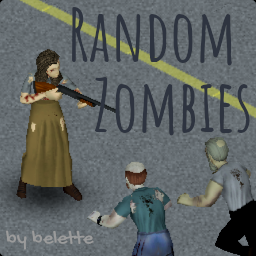
Compatible with version 41.76 (solo & multiplayer). This mod lets you customize how many zombies of each type (crawler, sprinter, smart, tough, etc.) appear in your game. Inspired by Customizable Zombies. Please make sure you've read the FAQ below before commenting if you have any issues. Features - easily customize how many Crawlers, Shamblers, Fast Shamblers or Sprinters appear in the world - easily customize how many Smart zombies, which can open doors, appear in the world - easily customize how many Tough and Fragile zombies appear in the world - more consistent and less CPU-intensive approach than other mods, with customizable update rate How to customize spawn rates and update rate - go to the Random Zombies page during Sandbox creation (make sure the mod is enabled at the main menu for the Random Zombies sandbox tab to appear) or edit your (servername)_SandboxVars.lua file - note that Crawler%, Shambler%, FastShambler% and Sprinter% must add up to 100% - note that Fragile%, NormalTough% and Tough% must add up to 100% - speed defaults to 2% crawlers, 15% shamblers, 78% fast shamblers, 5% sprinters - toughness defaults to 100% normal, 0% fragile, 0% tough - cognition defaults to 0% smart - you can disable the check in the sandbox settings if you know what you're doing/can't be bothered configuring the mod Frequently Asked Questions & Troubleshooting - Can you use it in an existing save? You can safely enable/disable this mod in an existing save. - How does using Random Zombies compare to the sandbox settings available in B42? With 42.20.0, this mod is retired. This mod was indispensable for me and many in B41, but the value added in B42 is small, and I cannot justify the time spent working on it any longer. - I'm getting a lot of red box errors This is most likely due to a misconfiguration. Please make sure you read the How to customize spawn rates and update rate section above. If you're still having issues, check the actual error messages in your console.txt file or comment below with a link to your console.txt file (it can be found at C:\Users\(yourname)\Zomboid\console.txt, or ~/Zomboid/console.txt on macOS and Linux). - I am not seeing the exact number of sprinters I configured There is a random component to the algorithm, but the probability distribution has been tested to be accurately represented (in the limits of what computers can do, i.e. pseudo-randomness). If you notice a consistent large disparity, please check for conflicts with other mods. If you're still having issues, please run `BLTRandomZombies.fullCheck()` in your Lua console in Debug mode and comment below with a link to the 5 generated files (placed in C:\Users\(yourname)\Zomboid\Lua, or ~/Zomboid/Lua on macOS and Linux). - Do I need to set Zombie Lore Speed to Random? No, the mod will overwrite zombie speed regardless of that setting. - What is the Frequency parameter? Because of how the game works (modability, zombie recycling, etc.), Random Zombies has to check at regular intervals if the zombies are properly configured. Frequency allows you to choose how often RZ should do the check. In practice, the default setting (7500) works really well and you should not have to worry about it. - Can you allow the customization of strength, sight, memory as well? Unfortunately, there's no way to do that that I know of today. - Is this mod compatible with Night Sprinters? Yes, thanks to TheIlluminati! Enjoy! Workshop ID: 2818577583 Mod ID: BLTRandomZombies
Project Zomboid Подробнее →
Project Zomboid Guides
Установка модов Project Zomboid — гайд по Workshop
Установи моды Project Zomboid через Steam Workshop: внеси ID, проверь порядок, перезапусти сервер и исправь типичные ошибки.
Аренда сервера Project Zomboid – гайд по мультиплееру
Настройка сервера Project Zomboid: RAM, параметры песочницы, Workshop-моды, права администратора и аккуратная проверка типичных ошибок.
Сервер Project Zomboid с поддержкой модов
Устанавливайте совместимые поддерживаемые моды из панели сервера.
Арендовать сервер Project Zomboid