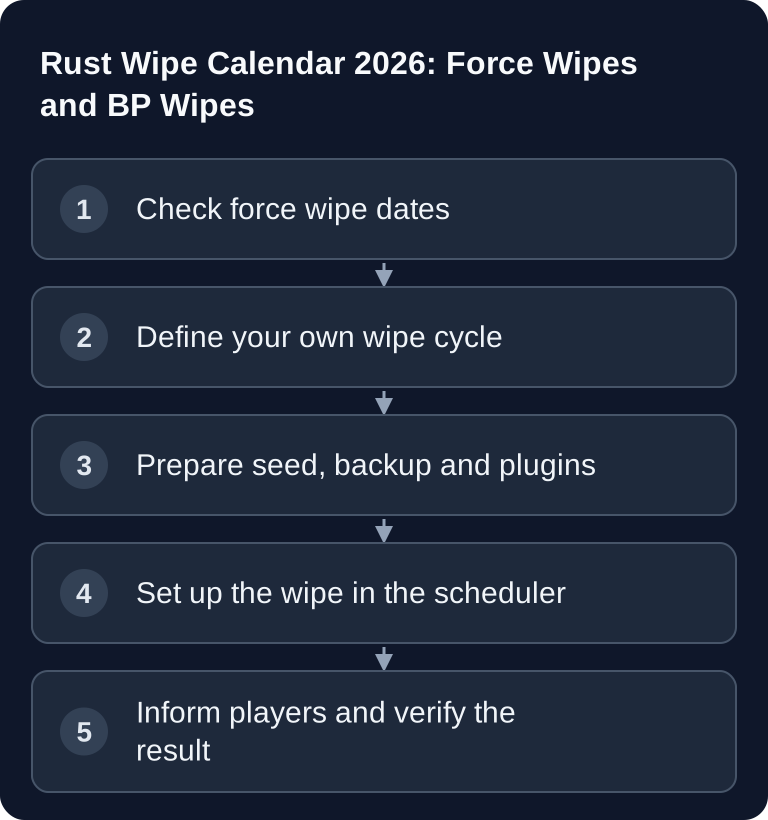
The next regular monthly Rust force wipe after October 7, 2026 is Thursday, November 5, 2026; after that comes December 3, 2026. Plan a map wipe and check separately whether Facepunch or your own rules also call for a blueprint wipe.
In 2026, Rust force wipes regularly take place on the first Thursday of each month. For server planning, what matters most is this: at a force wipe, the map, buildings and inventories are reset; blueprint wipes depend on server rules and Facepunch guidelines. So firmly plan dates, backups, seeds and player communication before every wipe.
Rust Wipe Calendar 2026
In the server wipe timer, Facepunch documents monthly as the first Thursday, weekly as every Thursday and biweekly generally as the first and third Thursday, with special cases for months with five Thursdays. The default timer uses 19:00 Europe/London, corresponding to 20:00 Europe/Berlin. This timer is no guarantee of the actual release of the update. On wipe evening, check whether the server and client builds as well as Oxide are available.
Force Wipe Dates 2026
| Month | Force wipe date | Update expected |
|---|---|---|
| January | 01.01.2026 | Done, update "Surviving 12 Years" |
| February | 05.02.2026 | Done, update "Naval Update" |
| March | 05.03.2026 | Done, update "Shipshape" |
| April | 02.04.2026 | Done, update "Spring Clean" |
| May | 07.05.2026 | Done, update "Upgrade hard, raid harder" |
| June | 04.06.2026 | Done, update "Built Different" |
| July | 02.07.2026 | Done, update "Common Ground" |
| August | 06.08.2026 | Done, update "Power Trip" |
| September | 03.09.2026 | Done, update "Breach and Clear" |
| October | 01.10.2026 | Regular date already passed |
| November | 05.11.2026 | Yes, monthly force wipe (update name to follow in the devblog) |
| December | 03.12.2026 | Yes, monthly force wipe (update name to follow in the devblog) |
Watch out at the start of the year: in 2026, the first Thursday fell on New Year's Day, 01.01.2026, and the wipe actually took place on that day. For announcements and player communication, you should use absolute dates, not just "first Thursday", to avoid misunderstandings.
Wipe Types Explained
Force Wipe
A force wipe is the mandatory monthly wipe triggered by Facepunch. Servers have to stay compatible after the update; in practice, that means at least a map wipe. Buildings, placed objects, inventories and the current world are reset. Community servers can have additional rules, but shouldn't ignore the force wipe date.
BP Wipe
A BP wipe resets learned blueprints. This is particularly relevant for progression, trading and PvP balance, because players have to learn recipes again after the wipe. Some servers wipe blueprints monthly, others less often or only for bigger changes. Communicate BP wipes separately from the map wipe, because players pay very close attention to this distinction.
Map Wipe
A map wipe only resets the world. Blueprints are kept unless you trigger a BP wipe. For many community servers, this is the standard between force wipes, because the world starts fresh without removing all progress through blueprints.
Common Wipe Cycles for Community Servers
| Cycle | When to wipe | Who it's for |
|---|---|---|
| Weekly | Every Thursday | Hardcore PvP, high pop |
| Bi-weekly | Every 2 weeks | Balanced |
| Monthly | Force wipe only | Casual, roleplayers |
Weekly wipes keep the pressure at the start high and work well for active PvP communities. Biweekly wipes give bases, teams and the economy more time without the map stagnating for too long. Monthly wipes suit slower servers, roleplay settings and players who want to build for the longer term.
If you're still working on your server setup, the internal guide on Renting a Rust Server: RAM, Settings & Plugins will help you. For choosing the next map, the guide Find a Rust Server Map Seed is also a good fit, because seed, size and monument distribution directly influence how a wipe plays out.
Setting Up Your Own Wipe Cycle
Only set up a wipe after the map and blueprint scope, backup and update timing have been clarified. Check in the panel whether a suitable wipe action is offered. The Rust wipe timer shows the scheduled date; it does not replace an update installation or a targeted save file action.
- Note down the announced map/BP scope and time zone.
- Create a backup and verify that it succeeded.
- Stop the server in a controlled way and check the available build.
- Perform the desired wipe, then test the world and blueprints.
Don't choose the time too close before the expected Facepunch update. An automatic wipe that's too early can cause players to be hit by the update again shortly afterward. A sensible sequence is: backup, announcement, update check, wipe and then a verification start. If you need admin commands for notices, checks or moderation, use the overview Rust Server Commands – All Admin Commands 2026.
Preparation on Wipe Day
Requirements
Before the wipe, have at least these items ready: access to your game-serverhosting dashboard, the server console or RCON, a clear decision on map wipe and BP wipe, the desired seed, current plugin versions and a communication channel for your players. Create a backup before the wipe if you need a fallback option. A wipe itself, as a reset of the game state, can't simply be undone.
Concrete Procedure
Send players a warning 30 minutes beforehand. Then stop the server in a controlled way or let your scheduled task run. Check whether the Rust update is available for server and client. Restart the server after the wipe, check the console for errors and enter the map as a test. On modded servers, pay particular attention to checking Oxide/uMod, extensions and permissions.
Verifying the Result
After the restart, a fresh map should be loaded, old buildings must no longer exist and the server description should correctly state the current wipe cycle. If blueprints were supposed to be kept, test with a known player profile or admin account. If a BP wipe was planned, check whether learned recipes are really reset.
Troubleshooting
The Server Doesn't Start After the Wipe
First check whether the Rust server update is fully installed. Then check the logs for plugin errors, corrupted save files or incompatible extensions. Test-start without problematic plugins before making further changes to the wipe cycle.
The Old Map Is Still Visible
Then the map wipe probably wasn't executed, or the server is still loading old save files. Check the scheduler task, the wipe action and the active seed. Only make the server public again once the fresh world has clearly loaded.
Blueprints Were Deleted Unexpectedly
Distinguish between a map wipe and a BP wipe. If you wanted to keep blueprints, check the selected wipe option and your server rules. For player communication, you should say openly whether it was a planned BP wipe or whether you're still investigating the cause.
Players See Connection Errors
On force wipe evening, the server and client version have to match. If players can't connect, check the update status, server restart and mod compatibility. For bigger updates, it's better to wait a few minutes longer than to start the server several times half-updated.
FAQ
When is the next Rust force wipe in 2026?
After October 7, 2026, the next regular date is Thursday, November 5, 2026; after that comes December 3. The default timer corresponds to 20:00 Berlin time. You have to check the actual update availability separately on the day.
Is a BP wipe done with every force wipe?
A map reset and a blueprint reset are separate processes. Check the current Facepunch devblog to see whether a mandatory BP wipe has been announced; in addition, the explicitly published rules of your server apply. Don't derive a BP wipe solely from a monthly force wipe date.
Which wipe cycle suits my Rust server?
For active PvP, a weekly wipe often makes sense. For balanced community servers, a biweekly cycle is often a good fit. Casual and roleplay servers usually do better with monthly wipes around the force wipe.
Should I create a backup before every wipe?
Yes, if you want a technical fallback option. A backup doesn't replace clear wipe communication, but it helps with errors, wrong settings or plugin problems after the restart.
When should I inform players?
Announce fixed wipe cycles permanently in the server description, on Discord or on your website. On wipe day, an additional warning about 30 minutes beforehand makes sense, so players don't plan fights, raids and loot transfers right in the middle of the reset.