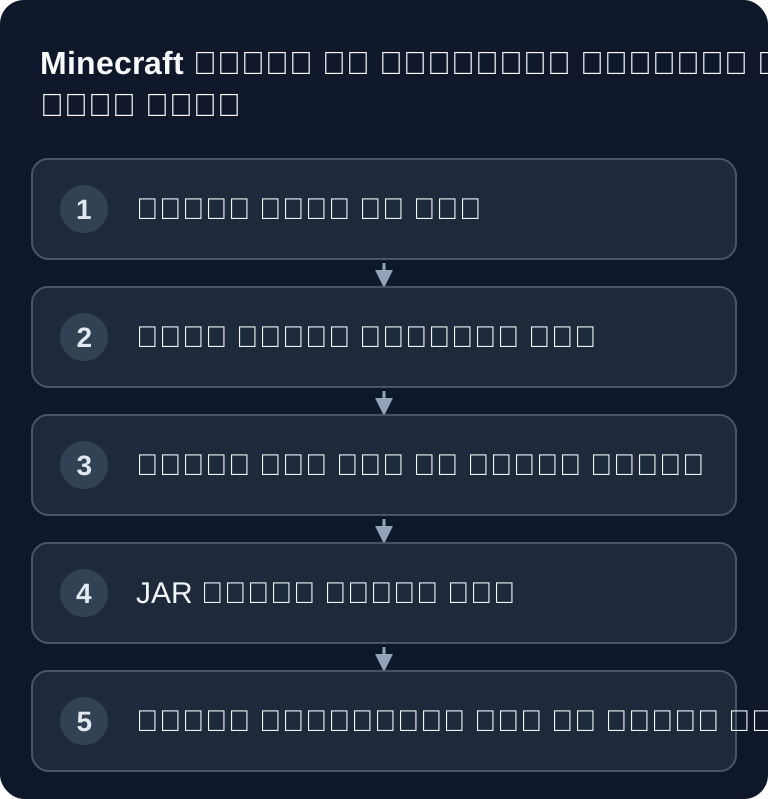
आखिरी जाँच: 26 सितंबर 2026। मॉड और प्लगइन तुम्हारे Minecraft सर्वर को बढ़ाते हैं, लेकिन दोनों एक जैसे काम नहीं करते: प्लगइन Paper या Spigot के लिए होते हैं और ज़्यादातर बिना क्लाइंट इंस्टॉलेशन के चलते हैं, जबकि Forge, NeoForge या Fabric वाले मॉड अक्सर सर्वर और खिलाड़ी के PC, दोनों पर एक जैसे मौजूद होने चाहिए। Minecraft वर्ज़न, सर्वर सॉफ़्टवेयर, डिपेंडेंसी और हर रीस्टार्ट के बाद एक साफ़ टेस्ट सबसे ज़रूरी हैं।
प्लगइन या मॉड: सही आधार चुनो
फ़ाइलें अपलोड करने से पहले तय करो कि तुम्हारा लक्ष्य क्या है। अगर तुम्हें परमिशन, होम पॉइंट, प्रोटेक्शन रीजन, इकोनॉमी, मॉडरेशन या एडमिन टूल जोड़ने हैं, तो Paper/Spigot प्लगइन ज़्यादातर सही रास्ता हैं। अगर तुम्हें नए ब्लॉक, बायोम, टेक सिस्टम, मॉब या गहरी गेम मैकेनिक्स चाहिए, तो आम तौर पर Forge, NeoForge या Fabric मॉड चाहिए होंगे।
| फ़ीचर | प्लगइन (Paper/Spigot) | मॉड (Forge/NeoForge/Fabric) |
|---|---|---|
| इंस्टॉलेशन | प्लगइन JAR सीधे /plugins में |
लोडर के अनुकूल मॉड JAR /mods में |
| क्लाइंट ज़रूरी? | आम तौर पर अतिरिक्त क्लाइंट ज़रूरी नहीं | प्रोजेक्ट पर निर्भर: साझा गेमप्ले मॉड के लिए सही क्लाइंट चाहिए |
| लोड | फ़ंक्शन और कॉन्फ़िगरेशन पर निर्भर | कंटेंट, लोडेड एरिया और मॉड लॉजिक पर निर्भर |
| कम्पैटिबिलिटी | सर्वर वर्ज़न और प्लगइन डिपेंडेंसी जाँचो | Minecraft, लोडर, डिपेंडेंसी और क्लाइंट/सर्वर साइड जाँचो |
| उदाहरण | EssentialsX, WorldEdit प्लगइन के रूप में | Create या बायोम मॉड, सही लोडर वर्ज़न में |
आधिकारिक Paper डॉक्यूमेंटेशन Paper को Minecraft: Java Edition के लिए सर्वर सॉफ़्टवेयर बताता है और प्लगइन के लिए PaperMC इकोसिस्टम की ओर इशारा करता है। इसलिए Paper प्लगइन का एक स्वाभाविक प्राथमिक स्रोत PaperMC का Hangar है; जोड़ने की आधिकारिक गाइड Paper-डॉक्यूमेंटेशन में मिलेगी, जिसमें Hangar के साथ Modrinth का भी ज़िक्र है। प्लगइन मैनेजमेंट के लिए यह विस्तृत इंटरनल गाइड भी काम की है: पैनल में Minecraft प्लगइन इंस्टॉल और मैनेज करना।
इंस्टॉलेशन से पहले की ज़रूरतें
सबसे पहले अपने सर्वर का इंस्टॉल किया हुआ Minecraft वर्ज़न जाँचो। प्लगइन या मॉड उसी वर्ज़न और चुने हुए सर्वर सॉफ़्टवेयर से मेल खाना चाहिए। किसी दूसरे मेजर वर्ज़न की फ़ाइल कभी-कभी शुरू तो हो जाती है, लेकिन उसे स्थिर नहीं मानना चाहिए। मार्च 2026 से Minecraft वर्ज़न की गिनती साल और ड्रॉप (26.1, 26.2, 26.3 …) के हिसाब से होती है, 1.21.x के बजाय; आखिरी पुराना वर्ज़न 1.21.11 था। इसलिए कई मॉड और प्लगइन अपनी वर्ज़न लिस्ट में दोनों तरह के नाम देते हैं – बिल्कुल सही मिलान करो।
अपने सर्वर का Java वर्ज़न भी जाँचो। Minecraft 1.18 से 1.20.4 Java 17 पर चलता है, 1.20.5 से 1.21.11 को Java 21 चाहिए, और Minecraft 26.1 (मार्च 2026) से Java 25 अनिवार्य है – Paper, NeoForge और Fabric भी यही मानकर चलते हैं। नए गेम वर्ज़न का मॉड या प्लगइन बहुत पुराने Java वर्ज़न के साथ शुरू ही नहीं होता। साथ ही, मॉड सर्वर का Minecraft वर्ज़न तब तक न बढ़ाओ जब तक हर इंस्टॉल किया हुआ मॉड अपनी वर्ज़न लिस्ट में नया वर्ज़न न दिखा दे – बड़े कंटेंट मॉड को नए ड्रॉप के बाद अक्सर हफ़्ते से महीने लग जाते हैं।
JAR फ़ाइलें बदलने से पहले सर्वर बंद करो। वर्ल्ड, कॉन्फ़िगरेशन और प्लगइन या मॉड फ़ोल्डर का ताज़ा बैकअप बनाओ या जाँचो। खासकर Forge, NeoForge और Fabric सेटअप में एक अकेला वर्ज़न कॉन्फ़्लिक्ट भी सर्वर को पूरी तरह शुरू होने से रोक सकता है।
डिपेंडेंसी पर भी ध्यान दो। कुछ प्लगइन को अतिरिक्त लाइब्रेरी या Vault जैसे बेस प्लगइन चाहिए। कुछ मॉड को Fabric API, Cloth Config या दूसरी मॉड लाइब्रेरी चाहिए। ये जानकारी आम तौर पर उस एक्सटेंशन के प्रोजेक्ट पेज पर होती है।
Paper या Spigot के साथ प्लगइन इंस्टॉल करना
- प्लगइन को Hangar या Modrinth से डाउनलोड करो – वर्ज़न लिस्ट में प्लेटफ़ॉर्म (Paper, Spigot, Purpur) और Minecraft वर्ज़न पर ध्यान दो। Modrinth पर तुम बाईं ओर प्लेटफ़ॉर्म के हिसाब से फ़िल्टर कर सकते हो; कुछ प्रोजेक्ट वही फ़ंक्शन Fabric मॉड के रूप में भी देते हैं, और वह गलती से प्लगइन फ़ोल्डर में पहुँच जाता है।
- game-serverhosting पर अपने सर्वर डैशबोर्ड में जाओ।
- Mods & Plugins टैब पर जाओ।
- मनचाहा प्लगइन खोजो और अगर वह पैनल में उपलब्ध है तो इंस्टॉल करें पर क्लिक करो।
- सर्वर को रीस्टार्ट करो।
वैकल्पिक रूप से तुम JAR फ़ाइल को मैन्युअली /plugins फ़ोल्डर में अपलोड कर सकते हो। रीस्टार्ट के बाद प्लगइन आम तौर पर अपने सबफ़ोल्डर में अपने आप एक कॉन्फ़िगरेशन फ़ाइल बना देता है। इस फ़ाइल को तभी खोलो जब सर्वर एक बार प्लगइन के साथ शुरू हो चुका हो, वरना अक्सर डिफ़ॉल्ट वैल्यू गायब रहती हैं।
शुरुआती लोगों के लिए सुझाए गए प्लगइन वही बेसिक टूल हैं, लेकिन सिर्फ़ वही इंस्टॉल करो जो तुम्हें सच में चाहिए:
- EssentialsX – बुनियादी फ़ंक्शन (Home, Warp, Kits)
- LuckPerms – परमिशन सिस्टम
- WorldGuard – रीजन प्रोटेक्शन
- Vault – इकोनॉमी/परमिशन के लिए API ब्रिज (इसके लिए एक इकोनॉमी प्लगइन चाहिए, जैसे EssentialsX)
- CoreProtect – ब्लॉक लॉगिंग / एंटी-ग्रीफ़
इंस्टॉलेशन के बाद सिर्फ़ यह मत देखो कि सर्वर शुरू होता है या नहीं। गेम में कम से कम एक प्लगइन कमांड, परमिशन असाइनमेंट और कंसोल आउटपुट जाँचो। अगर प्लगइन लोड तो होता है लेकिन कमांड ब्लॉक हैं, तो समस्या अक्सर परमिशन या गायब डिपेंडेंसी में होती है।
Forge, NeoForge या Fabric के साथ मॉड इंस्टॉल करना
संक्षेप में समझ लो: NeoForge 2023 से Forge का फ़ॉर्क है, जिस पर लगभग पूरी मूल टीम काम कर रही है। Minecraft 1.21 और नए वर्ज़न के लिए ज़्यादातर पुराने Forge मॉड अब सिर्फ़ NeoForge बिल्ड जारी करते हैं; पुराने मॉडपैक (जैसे 1.12.2, 1.16.5 या 1.20.1) के लिए Forge ही सही विकल्प रहता है। Fabric अपना अलग, हल्का इकोसिस्टम है – Fabric मॉड न Forge पर चलते हैं, न NeoForge पर।
- पक्का करो कि तुम्हारा सर्वर Forge, NeoForge या Fabric पर चल रहा है – और उसी लोडर के साथ जिसके लिए मॉड बना है। Minecraft 1.21 और नए वर्ज़न के लिए NeoForge ही Forge का आम उत्तराधिकारी है; Forge और NeoForge फ़ाइलें 1.20.2 से आपस में बदली नहीं जा सकतीं।
- मॉड को Modrinth या CurseForge से डाउनलोड करो – लोडर (Forge, NeoForge या Fabric) और Minecraft वर्ज़न के मुताबिक। NeoForge फ़ाइल Forge सर्वर पर नहीं चलती और उल्टा भी यही सच है।
- JAR को
/modsफ़ोल्डर में अपलोड करो। - प्रोजेक्ट में दी गई क्लाइंट/सर्वर साइड की जानकारी जाँचो। साझा गेमप्ले मॉड दोनों तरफ़ संगत वर्ज़न में मौजूद होने चाहिए; सिर्फ़ सर्वर वाले मॉड खिलाड़ियों को नहीं चाहिए, सिर्फ़ क्लाइंट वाले मॉड डेडिकेटेड सर्वर पर नहीं रखे जाते।
- सर्वर रीस्टार्ट करो।
मॉड के साथ वर्ज़न का एक जैसा होना खास तौर पर ज़रूरी है। सर्वर, खिलाड़ी का क्लाइंट, मॉडलोडर और मॉड फ़ाइलें आपस में मेल खानी चाहिए। अगर कनेक्ट करते समय किसी खिलाड़ी को मॉड लिस्ट या रजिस्ट्री की एरर मैसेज दिखता है, तो आम तौर पर क्लाइंट पर कोई मॉड गायब है, किसी दूसरे वर्ज़न में इंस्टॉल है या क्लाइंट गलत लोडर इस्तेमाल कर रहा है।
नए मॉड धीरे-धीरे इंस्टॉल करो। कुछ बदलावों के बाद सर्वर शुरू करो और कंसोल जाँचो। इस तरह कॉन्फ़्लिक्ट जल्दी मिलते हैं, बजाय इसके कि 30 नई फ़ाइलों के बाद पता ही न चले कि कौन सा मॉड स्टार्ट रोक रहा है। अगर तुम अक्सर मॉडलोडर के साथ काम करते हो, तो ऐसी ही प्रक्रिया दूसरे गेम में भी काम आती है, जैसे गाइड BepInEx के साथ Valheim मॉड इंस्टॉल करना या BepInEx के साथ V Rising मॉड में।
नतीजा जाँचना
रीस्टार्ट के बाद कंसोल तुम्हारी पहली जाँच की जगह है। ERROR, WARN, Could not load, Missing dependency जैसे मैसेज या वर्ज़न संबंधी संकेत खोजो। हर वार्निंग गंभीर नहीं होती, लेकिन स्टार्ट रुकना, बंद हुए प्लगइन और गायब क्लासेस तुम्हें ठीक करनी ही होंगी।
फिर गेम में ठोस फ़ंक्शन जाँचो: क्या वर्ल्ड सही लोड होता है? क्या खिलाड़ी जॉइन कर सकते हैं? क्या नए कमांड काम करते हैं? क्या नए ब्लॉक, आइटम या मेन्यू दिखते हैं? प्लगइन में अतिरिक्त रूप से परमिशन और ग्रुप टेस्ट करो। मॉड में कम से कम एक खिलाड़ी को बिल्कुल वही मॉडपैक लेकर कनेक्ट करना चाहिए।
आम गलतियों में समस्या समाधान
प्लगइन लोड नहीं होता: Minecraft वर्ज़न जाँचो और यह भी कि प्लगइन Paper/Spigot के लिए है या नहीं। Forge मॉड Paper प्लगइन की तरह काम नहीं करता, भले ही दोनों फ़ाइलें JAR के रूप में हों।
सर्वर शुरू नहीं होता: कंसोल में एरर मैसेज जाँचो। अक्सर डिपेंडेंसी गायब होती हैं, कोई फ़ाइल दूसरे Minecraft वर्ज़न के लिए बनी होती है या दो एक्सटेंशन एक ही फ़ंक्शन को ओवरराइट करते हैं।
मॉड कॉन्फ़्लिक्ट: कॉन्फ़्लिक्ट ढूँढने के लिए मॉड को एक-एक करके या छोटे समूहों में हटाओ। हाल में इंस्टॉल की गई फ़ाइलों से शुरू करो और हर बदलाव के बाद रीस्टार्ट करो।
खिलाड़ी कनेक्ट नहीं कर पाते: सर्वर और क्लाइंट के बीच मॉडलोडर, Minecraft वर्ज़न और मॉड फ़ाइलों की तुलना करो। Forge, NeoForge और Fabric में क्लाइंट साइड को आम तौर पर वही मॉड और वही लोडर इस्तेमाल करना होता है।
इंस्टॉलेशन के बाद लैग: अगर spark इंस्टॉल है, तो /spark profiler start चलाओ और कुछ मिनट गेम खेलने के बाद /spark profiler stop, ताकि देख सको कि कोई प्लगइन या मॉड असामान्य रूप से ज़्यादा समय तो नहीं ले रहा। जो एक्सटेंशन ज़रूरी नहीं हैं उन्हें बंद करो और असली खिलाड़ी गतिविधियों के साथ दोबारा टेस्ट करो।
अगर लॉग में java.lang.NoClassDefFoundError दिखे
java.lang.NoClassDefFoundError: some/Mod/Class
कोलन के बाद का पाथ हर एरर में अलग होता है, वह उस क्लास का नाम बताता है जो गायब थी। मैसेज का मतलब है: किसी मॉड ने किसी दूसरी फ़ाइल का कोड इस्तेमाल करना चाहा, और Java को वह स्टार्ट के समय नहीं मिला। इससे मिलता-जुलता java.lang.ClassNotFoundException है, जिसका नतीजा वही होता है।
लगभग हमेशा इनमें से कोई एक वजह होती है:
- कोई डिपेंडेंसी गायब है। कई मॉड को एक लाइब्रेरी मॉड चाहिए, जैसे कोई API या लाइब्रेरी मॉड। Modrinth और CurseForge पर वह मॉड पेज पर „Dependencies“ या „निर्भरताएँ“ के नीचे लिखी होती है।
- मॉड किसी दूसरे वर्ज़न के लिए बना है। Minecraft 1.20.1 की फ़ाइल को 1.21 में अपनी क्लासेस नहीं मिलतीं। यही तब होता है जब मॉड और डिपेंडेंसी अलग-अलग वर्ज़न की हों।
- गलत लोडर। NeoForge सर्वर पर Fabric मॉड या 1.20.2 के बाद NeoForge पर Forge फ़ाइल अक्सर ठीक इसी मैसेज के साथ फ़ेल होती है।
- क्लाइंट मॉड सर्वर पर रखा है। ग्राफ़िक्स, मेन्यू या मिनीमैप वाले मॉड ऐसी क्लासेस इस्तेमाल करते हैं जो सिर्फ़ गेम क्लाइंट में होती हैं। सर्वर पर वे नहीं होतीं।
समस्या वाला मॉड कैसे ढूँढें
latest.logया क्रैश रिपोर्ट खोलो और मैसेज के ठीक ऊपर और नीचे की लाइनें पढ़ो। आम तौर पर वहीं उस मॉड का नाम होता है जिसे लोड होना था।- अगर क्लास पाथ अकेला दिखे, तो उसकी शुरुआत अक्सर प्रोजेक्ट बता देती है। जैसे अगर वह
dev/architectury/…है, तो क्लास Architectury API की है। - गायब डिपेंडेंसी को उस वर्ज़न में इंस्टॉल करो जो Minecraft वर्ज़न और लोडर से मेल खाता हो, या प्रभावित मॉड को सही फ़ाइल से बदलो।
- अगर मॉड किसी क्लाइंट मॉडपैक से आया है, तो उसे
/modsसे हटाओ। मॉडपैक में जहाँ तक हो आधिकारिक सर्वर-पैक इस्तेमाल करो, उसमें सिर्फ़ क्लाइंट वाले मॉड पहले ही हटा दिए गए होते हैं। - रीस्टार्ट करो और जाँचो कि मैसेज गया या नहीं। अगर उसके बाद कोई नई क्लास दिखे, तो अभी एक और डिपेंडेंसी गायब है।
पूरा लॉग तुम हमारे Minecraft क्रैश-रिपोर्ट एनालाइज़र में भी डाल सकते हो। वह संबंधित लाइन को मार्क कर देता है।
FAQ
क्या मैं Paper प्लगइन और Forge मॉड एक साथ इस्तेमाल कर सकता हूँ?
आम स्टैंडर्ड सेटअप में नहीं। Paper/Spigot प्लगइन और Forge/NeoForge/Fabric मॉड अलग-अलग सर्वर इकोसिस्टम के हैं; PaperMC टीम इस बारे में साफ़ कहती है: या तो मॉड या प्लगइन। Mohist या Arclight जैसे हाइब्रिड सर्वर दोनों का वादा करते हैं, लेकिन उन्हें अस्थिर माना जाता है और Paper तथा प्लगइन डेवलपर उन्हें सपोर्ट नहीं करते। वही प्लेटफ़ॉर्म चुनो जो तुम्हारे लक्ष्य के मुताबिक हो।
क्या खिलाड़ियों को प्लगइन इंस्टॉल करने पड़ते हैं?
क्लासिक Paper या Spigot प्लगइन के लिए आम तौर पर नहीं। खिलाड़ी सामान्य Minecraft क्लाइंट से कनेक्ट करते हैं। अपवाद क्लाइंट-साइड अतिरिक्त फ़ीचर या रिसोर्सपैक हो सकते हैं, जिन्हें कोई प्लगइन वैकल्पिक रूप से इस्तेमाल करता है।
किसी मॉड के बाद मेरा सर्वर शुरू क्यों नहीं होता?
आम तौर पर कोई वर्ज़न मेल नहीं खाता, कोई डिपेंडेंसी गायब है या दो मॉड असंगत हैं। कंसोल में पहला प्रासंगिक एरर मैसेज पढ़ो और टेस्ट के तौर पर हाल में इंस्टॉल किया गया मॉड हटाओ।
JAR फ़ाइलें कहाँ रखनी चाहिए?
प्लगइन /plugins में और मॉड /mods में रखे जाते हैं। सही फ़ोल्डर सिर्फ़ फ़ाइल टाइप पर नहीं, बल्कि सर्वर सॉफ़्टवेयर पर निर्भर करता है: Paper/Spigot प्लगइन इस्तेमाल करता है, Forge/NeoForge/Fabric मॉड इस्तेमाल करता है। Paper में JAR सीधे /plugins में होनी चाहिए – सबफ़ोल्डर में खोज नहीं की जाती।
क्या मुझे एक साथ कई एक्सटेंशन इंस्टॉल करने चाहिए?
नहीं। उन्हें छोटे चरणों में इंस्टॉल करो और हर रीस्टार्ट के बाद टेस्ट करो। इससे गलतियाँ समझ में आती हैं और कॉन्फ़्लिक्ट होने पर तुम्हें सारी फ़ाइलें एक साथ जाँचनी नहीं पड़तीं।