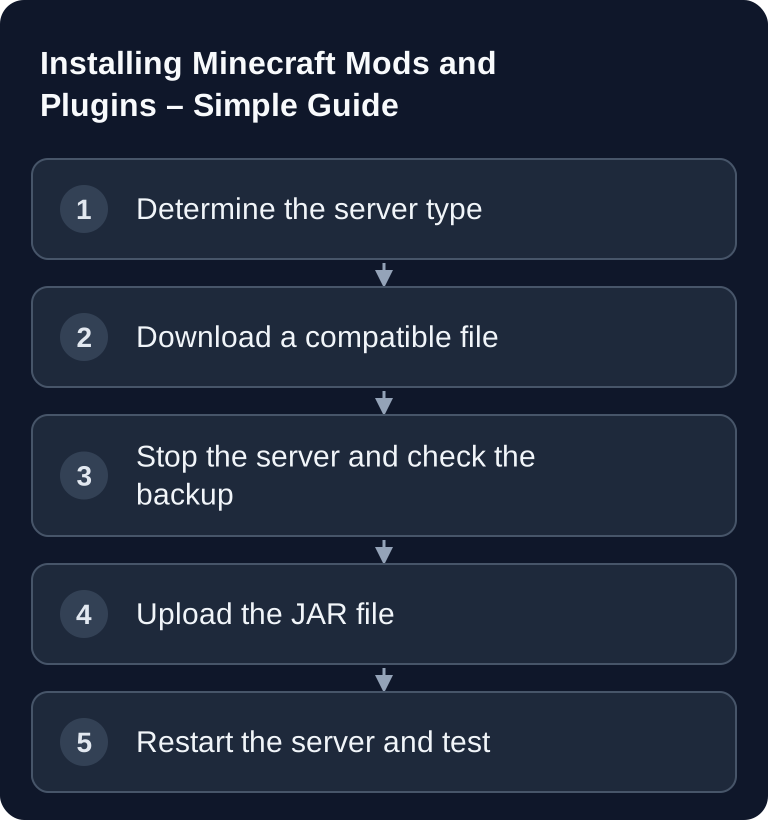
Last checked: September 26, 2026. Mods and plugins extend your Minecraft server, but they don't work the same way: plugins are made for Paper or Spigot and usually run without any client installation, while mods using Forge, NeoForge or Fabric often have to be present identically on the server and on the player's PC. What matters is the Minecraft version, the server software, dependencies and a clean test after every restart.
Plugins or Mods: Choosing the Right Foundation
Before you upload any files, decide what you want to achieve. If you want to add permissions, home points, protected regions, economy, moderation or admin tools, Paper/Spigot plugins are usually the right way. If you want to add new blocks, biomes, tech systems, mobs or deeper game mechanics, you generally need Forge, NeoForge or Fabric mods.
| Feature | Plugins (Paper/Spigot) | Mods (Forge/NeoForge/Fabric) |
|---|---|---|
| Installation | Plugin JAR directly into /plugins |
Mod JAR suited to the loader into /mods |
| Client required? | Usually no additional client needed | Depends on the project: shared gameplay mods require the matching client |
| Load | Depends on function and configuration | Depends on content, loaded areas and mod logic |
| Compatibility | Check server version and plugin dependencies | Check Minecraft, loader, dependencies and client/server side |
| Examples | EssentialsX, WorldEdit as a plugin | Create or biome mods in the matching loader release |
The official Paper documentation describes Paper as server software for Minecraft: Java Edition and points to the PaperMC ecosystem for plugins, among other things. An obvious primary source for Paper plugins is therefore Hangar by PaperMC; you can find the official instructions for adding them in the Paper documentation, which also mentions Modrinth alongside Hangar. For additional plugin management, the in-depth internal guide Installing and Managing Minecraft Plugins in the Panel is also a good fit.
Requirements Before Installation
First check the installed Minecraft version of your server. A plugin or mod has to match this version and the server software you chose. A file built for a different major version may sometimes start, but it should not be assumed to be stable. Since March 2026, Minecraft counts by year and drop (26.1, 26.2, 26.3 …) instead of 1.21.x; the last old version was 1.21.11. Many mods and plugins therefore list both notations in their version list – compare exactly.
Also check your server's Java version. Minecraft 1.18 to 1.20.4 runs on Java 17, 1.20.5 to 1.21.11 needs Java 21, and since Minecraft 26.1 (March 2026) Java 25 is mandatory – Paper, NeoForge and Fabric require it as well. A mod or plugin for a new game version won't start at all with a Java version that is too old. Also, don't raise the Minecraft version of a mod server until every installed mod lists the new version in its version list – larger content mods often need weeks to months after a new drop.
Stop the server before you swap JAR files. Create or check a current backup of the world, configuration and the plugin or mod folder. Especially with Forge, NeoForge and Fabric setups, a single version conflict can prevent the server from starting completely.
Also pay attention to dependencies. Some plugins need additional libraries or base plugins such as Vault. Some mods require Fabric API, Cloth Config or other mod libraries. This information is normally found on the project page of the respective extension.
Installing Plugins with Paper or Spigot
- Download the plugin from Hangar or Modrinth – pay attention to the platform (Paper, Spigot, Purpur) and the Minecraft version in the version list. On Modrinth you can filter by platform on the left; some projects also offer the same functionality as a Fabric mod, and that one mistakenly ends up in the plugin folder.
- Go to your server dashboard on game-serverhosting.
- Navigate to the Mods & Plugins tab.
- Search for the plugin you want and click Install if it is available in the panel.
- Restart the server.
Alternatively, you can upload the JAR file manually to the /plugins folder. After the restart, the plugin usually creates a configuration file in its own subfolder automatically. Only open this file after the server has been started once with the plugin, otherwise default values are often missing.
Recommended plugins for beginners remain the typical basic tools, but only install what you really need:
- EssentialsX – core features (homes, warps, kits)
- LuckPerms – permission system
- WorldGuard – region protection
- Vault – API bridge for economy/permissions (needs an economy plugin, e.g. EssentialsX)
- CoreProtect – block logging / anti-grief
After installation, don't just test whether the server starts. In-game, check at least one plugin command, the permission assignment and the console output. If a plugin loads but commands are blocked, the problem is often permissions or missing dependencies.
Installing Mods with Forge, NeoForge or Fabric
A quick note for context: NeoForge has been the fork of Forge since 2023, and almost the entire original team continues to work on it. For Minecraft 1.21 and newer, most former Forge mods only publish NeoForge builds; Forge remains the right choice for older modpacks (such as 1.12.2, 1.16.5 or 1.20.1). Fabric is its own lightweight ecosystem – Fabric mods run on neither Forge nor NeoForge.
- Make sure your server runs with Forge, NeoForge or Fabric – and specifically with the loader the mod was built for. For Minecraft 1.21 and newer, NeoForge is the usual successor to Forge; Forge and NeoForge files have no longer been interchangeable since 1.20.2.
- Download the mod from Modrinth or CurseForge – matching the loader (Forge, NeoForge or Fabric) and Minecraft version. A NeoForge file does not run on a Forge server and vice versa.
- Upload the JAR to the
/modsfolder. - Check the project's information on the client/server side. Shared gameplay mods must be present in compatible versions on both sides; players don't need server-only mods, and client-only mods don't belong on the dedicated server.
- Restart the server.
With mods, matching versions are especially important. Server, player client, mod loader and mod files must all fit together. If a player sees a mod list or registry error message when connecting, a mod is usually missing on the client, is installed in a different version, or the client is using the wrong loader.
Install new mods step by step. Start the server after a few changes and check the console. This way you find conflicts faster, instead of no longer knowing after 30 new files which mod is preventing the start. If you work with mod loaders more often, similar workflows also help with other games, for example in the guide Installing Valheim Mods with BepInEx or with V Rising Mods with BepInEx.
Checking the Result
After the restart, the console is your first checkpoint. Look for messages such as ERROR, WARN, Could not load, Missing dependency or version notices. Not every warning is critical, but startup aborts, disabled plugins and missing classes must be fixed.
In the game, you then check concrete functions: Does the world load correctly? Can players join? Do the new commands work? Are new blocks, items or menus displayed? For plugins, you additionally test permissions and groups. For mods, at least one player should connect with the exact same modpack.
Troubleshooting Common Errors
Plugin does not load: Check the Minecraft version and whether the plugin is suitable for Paper/Spigot. A Forge mod does not work as a Paper plugin, even if both files are JARs.
Server does not start: Check the console for error messages. Often dependencies are missing, a file was built for a different Minecraft version, or two extensions override the same function.
Mod conflict: Remove mods one by one or in small groups to find the conflict. Start with the most recently installed files and restart after every change.
Players cannot connect: Compare mod loader, Minecraft version and mod files between server and client. With Forge, NeoForge and Fabric, the client side usually has to use the same mods and the same loader.
Lag after installation: Use /spark profiler start and, after a few minutes of gameplay, /spark profiler stop, if spark is installed, to check whether a plugin or mod consumes a noticeable amount of time. Disable extensions you don't need and test again with realistic player actions.
If the Log Shows java.lang.NoClassDefFoundError
java.lang.NoClassDefFoundError: some/Mod/Class
The path after the colon is different for every error; it names the class that was missing. The message means: a mod wanted to use code from another file, and Java did not find it at startup. Closely related is java.lang.ClassNotFoundException with the same finding.
Almost always one of these causes is behind it:
- A dependency is missing. Many mods need a library mod, for example an API or library mod. On Modrinth and CurseForge it is listed on the mod page under "Dependencies".
- The mod is built for a different version. A file for Minecraft 1.20.1 can no longer find its classes in 1.21. The same happens if the mod and its dependency come from different version states.
- Wrong loader. A Fabric mod on a NeoForge server or a Forge file on NeoForge from 1.20.2 onward often fails with exactly this message.
- A client mod is on the server. Mods for graphics, menus or minimaps access classes that only exist in the game client. They are missing on the server.
How to Find the Mod Causing It
- Open
latest.logor the crash report and read the lines directly above and below the message. Usually the name of the mod that was supposed to be loaded is there. - If the class path stands on its own, its beginning often reveals the project. If it reads something like
dev/architectury/…, the class belongs to Architectury API. - Install the missing dependency in the version that matches the Minecraft version and loader, or replace the affected mod with the matching file.
- If the mod comes from a client modpack, remove it from
/mods. With modpacks, use the official server pack if possible, since client-only mods have already been sorted out there. - Restart and check whether the message is gone. If a new class appears afterward, another dependency is still missing.
You can also paste the whole log into our Minecraft Crash Report Analyzer. It highlights the relevant line.
FAQ
Can I use Paper plugins and Forge mods at the same time?
Not in a normal standard setup. Paper/Spigot plugins and Forge/NeoForge/Fabric mods belong to different server ecosystems; the PaperMC team is clear on this: either mods or plugins. Hybrid servers such as Mohist or Arclight promise both, but are considered unstable and are not supported by Paper and plugin developers. Choose the platform that fits your goal.
Do players have to install plugins?
With classic Paper or Spigot plugins, normally not. Players connect with a normal Minecraft client. Exceptions can be client-side extra features or resource packs that a plugin optionally uses.
Why does my server no longer start after adding a mod?
Usually a version doesn't match, a dependency is missing, or two mods are incompatible. Read the first relevant error message in the console and, as a test, remove the most recently installed mod.
Where do JAR files go?
Plugins go in /plugins, mods in /mods. The right folder doesn't depend on the file type alone, but on the server software: Paper/Spigot uses plugins, Forge/NeoForge/Fabric uses mods. With Paper, the JAR must be directly in /plugins – subfolders are not searched.
Should I install many extensions at once?
No. Install them in small steps and test after every restart. This makes errors traceable and prevents you from having to check all files at once when there are conflicts.