RAM matters in Minecraft, but it is not the only performance factor. What counts for planning is your specific setup: player count, server software, mods, plugins, world size, loaded chunks and settings like view-distance. The table below gives you a reliable starting point, and afterwards you can check whether optimization or a larger plan makes more sense.
Estimating RAM Requirements Realistically
Minecraft reserves memory for world data, chunks, entities, players, plugins, mods and internal Java processes. A vanilla server with a few players needs significantly less RAM than a Forge or Fabric modpack with many new blocks, machines, dimensions and automatically loaded areas.
A fixed RAM formula based on player count and number of mods is not reliable. Plan according to the documented requirements of your pack version, and then measure consumption while exploring, in active bases and during save cycles.
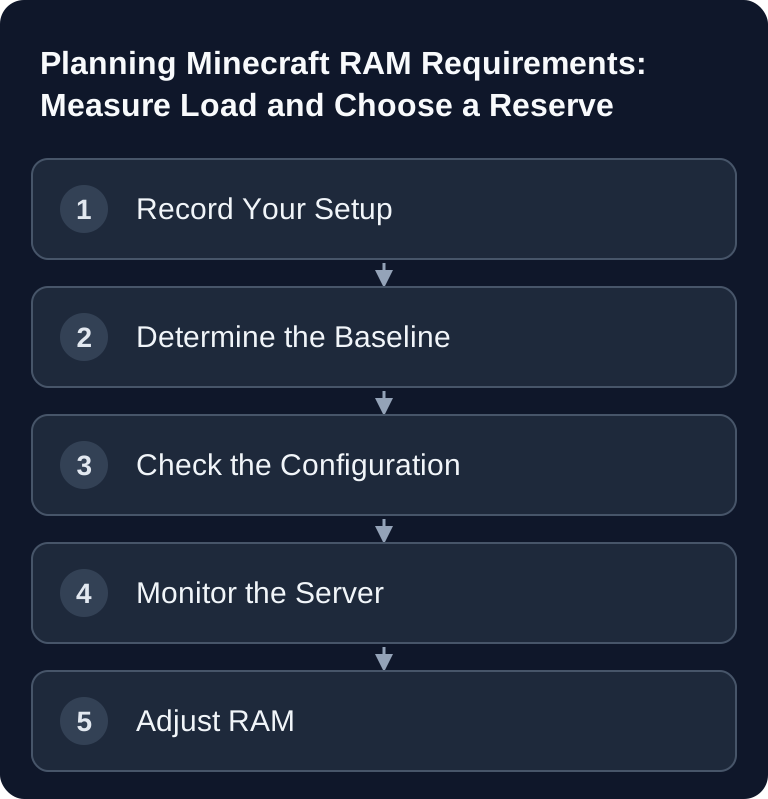
1. Compare pack requirements and plan limit
2. Measure with the same world and typical player activity
3. Evaluate heap errors, container limit and CPU lag separately
An empty first start is not a suitable load test: several players in separate areas, new chunks and active machines can produce different peaks. Record the Minecraft, loader and pack version together with the measured results.
If you are still at the beginning of your server planning, the guide Rent a Minecraft Server: The Complete Guide 2025 will help. For fine-tuning default values, the guide Configuring Minecraft server.properties Correctly is also useful.
Recommendation Table
| Setup | Players | RAM | Monthly Price* |
|---|---|---|---|
| Vanilla | 1-5 | 2 GB | from €2.80 |
| Vanilla | 5-10 | 4 GB | from €4.88 |
| Paper + 10 plugins | 10-20 | 6 GB | from €6.89 |
| Paper + 30 plugins | 20-50 | 8 GB | from €10.29 |
| Forge + 50 mods | 5-10 | 6 GB | from €6.89 |
| Forge + 100 mods | 10-20 | 10 GB | from €12.79 |
| Modpack (ATM9) | 5-10 | 8 GB | from €10.29 |
| Modpack (ATM9) | 10-20 | 12 GB | from €15.28 |
*Prices at game-serverhosting
The table is a practical guideline for typical setups. If you use many worlds, large redstone builds, permanent chunk loaders or very active farms, you should rather choose the larger recommendation. If your server stays manageable and you keep view distance and entity load properly limited, a smaller plan can be enough.
What Uses RAM?
Chunks and View Distance
Every loaded chunk needs memory. That is why view-distance is one of the most important values in server.properties. A high view distance looks nicer, but it increases the amount of loaded world area per player. With several players this effect grows quickly, especially when they are far apart from each other.
Entities and Items
Animals, monsters, villagers, items on the ground, boats, minecarts and other entities put load on RAM and CPU. Many entities in one place can cause problems even when there is theoretically enough RAM available.
Plugins, Mods and Modpacks
Plugins usually have a base consumption, while mods can weigh in significantly more depending on their scope. Large modpacks bring additional blocks, structures, recipes, machines, dimensions and background logic. This increases memory requirements and startup time.
Players and Worlds
Players in the same chunks share part of the loaded world; widely spread players load additional areas. This is why no fixed memory overhead per player can be given. You must include additional dimensions and chunk loaders in the load test. For imported worlds, use Upload and Switch a World.
If the Log Shows java.lang.OutOfMemoryError: Java heap space
java.lang.OutOfMemoryError: Java heap space
If this exact signature appears in the server console or in latest.log, the Java Virtual Machine could no longer find free space in the Java heap for a new object. On a Minecraft server, this means the available heap is not sufficient for the current load.
The heap holds, among other things, world and chunk data, entities, and data from plugins and mods. If their demand rises to the configured maximum and garbage collection cannot free enough unused objects, the next memory allocation fails. However, the single log line does not yet prove a memory leak. The Oracle documentation on Java heap errors also distinguishes between a heap that is generally too small and memory consumption that grows over a longer period.
What the Error Means for Your RAM Planning
The message applies here to server-side Minecraft Java processes, for example Vanilla, Paper, Purpur, Spigot, Forge or Fabric. Typical triggers are many simultaneously loaded chunks, high view or simulation distances, large entity farms, permanently active chunk loaders or a sizable modpack.
The timing is decisive:
- If the error occurs under normal load or when exploring new chunks, first check
view-distance,simulation-distance, chunk loaders and entity spikes. - If it began right after a plugin, mod or modpack update, test the previous compatible version or isolate the most recently changed extensions.
- If the memory still isn't enough for the desired, sensibly optimized load, plan an appropriate additional reserve using the documented pack requirements, your measurements and the guideline table.
- If consumption keeps rising over hours or days under comparable load, more RAM may only delay the next crash. In that case the causing extension must be narrowed down.
At game-serverhosting, the JVM startup parameters are already tuned to the booked memory. So do not change -Xmx on a hunch; first optimize the load and then adjust the plan if needed.
Verifying Success and Ruling Out Similar Errors
The change was successful if the server starts up to the Done message, stays stable under the same player, chunk and mod load, and the exact signature does not return. Therefore test the scenario that was previously problematic, not just an empty server start.
GC overhead limit exceeded, Metaspace and an OOM kill by Linux or the container are different error patterns. Messages like Can’t keep up or a watchdog timeout also point first to tick or CPU problems.
Open the complete checklist for “Java heap space”
Optimization Before the Upgrade
Before you book more RAM, check the configuration. More memory fixes OutOfMemory errors, but not automatically poor plugin configurations, excessive view distances or entity spikes.
The keys in paper-global.yml change with the Paper version. Do not copy an old configuration block if the current file or the Paper reference does not list those keys.
view-distance=8
simulation-distance=6
These are test values for server.properties, not a general recommendation for every modpack. Comments belong on their own lines; text after a number is not a reliable properties comment.
Paper officially documents its configuration areas at Documentation at docs.papermc.io. Use such references when you want to check individual options more closely, and change values step by step instead of touching many settings at once.
JVM Flags for Optimal RAM Usage
-Xms4G -Xmx4G
-XX:+UseG1GC
-XX:+ParallelRefProcEnabled
-XX:MaxGCPauseMillis=200
-XX:+UnlockExperimentalVMOptions
-XX:+DisableExplicitGC
-XX:G1NewSizePercent=30
-XX:G1MaxNewSizePercent=40
-XX:G1HeapRegionSize=8M
Important: At game-serverhosting, suitable JVM flags are already preconfigured. You normally do not need to maintain these values manually. They become interesting mainly when you compare your own startup parameters or analyze a specific modpack.
Verifying the Result
Test the server under real load. Do not just start it empty once; connect with several players, teleport to different areas, load new chunks and watch the console, TPS and memory usage. A short peak is not automatically critical. Recurring lag spikes, permanently low TPS or memory errors are problematic.
These symptoms need a diagnosis first. Repeated Java heap space errors under the desired load point to too little heap or unusually growing consumption. Low TPS and rubberbanding alone do not prove a lack of RAM; check tick time and profiler output for that.
- TPS below 18, for example checked with
/spark tps - frequent lag spikes during normal activity
- OutOfMemory errors in the console
- Rubberbanding or delayed block interactions
- severe problems when exploring new chunks
If you switch between Vanilla, Paper, Purpur, Forge or Fabric, the RAM requirements can change. The guide Switching the Minecraft Server Version explains what to watch out for when switching.
Troubleshooting
The Server Lags Despite Enough RAM
Then the cause is probably not only memory. Check TPS, entity counts, plugin timings, farms, redstone circuits and chunk generation. RAM does not help against every CPU or tick load.
RAM Is Almost Full Right After Startup
Java does not always use reserved memory the way a simple display suggests. What matters is whether the server stays stable, throws no OutOfMemory errors and the TPS stay healthy under load.
Consumption Rises After a Modpack Update
That is plausible if new mods, dimensions or background systems are added. Check the modpack's changelogs and test with the same player count as before before you permanently plan for a larger plan.
New Chunks Cause Lag
Chunk generation puts load on memory and CPU. Reduce the view distance, avoid massive simultaneous exploration and consider a pre-generated world if many players travel far right from the start.
Sources and Verification Basis
The linked subpages support the technical basis explained immediately before or after them. Product prices and account features are additionally checked against the currently visible order or dashboard path.
Limits and Way Back
RAM requirements cannot be derived from player count alone. World, view distance, entities, plugins, mods and version changes can change the requirements significantly; the table serves only as a starting point. Back up the affected files or the world before making changes. Then check the result with the same version and the same test procedure; if there are errors, restore the backup.
FAQ
How much RAM does a Minecraft server need for 10 players?
For Vanilla, 4 GB is a sensible guideline. With Paper and several plugins, 4 to 6 GB may be more realistic. For modpacks, you should plan on 6 to 8 GB or more.
Is more RAM always better?
No. Too little RAM causes errors and instability, but oversized RAM does not replace a clean configuration. View distance, entities, plugins and mods remain decisive.
Which setting saves the most RAM?
Usually a reduced view-distance brings the most, because fewer chunks are loaded per player. simulation-distance additionally helps limit entity and tick load.
When should I upgrade at game-serverhosting?
Increase the memory if the desired load repeatedly exceeds the available heap or the plan limit despite sensible restrictions. If TPS is low without memory errors, check the CPU and tick load first.
Do Forge and Fabric need more RAM than Vanilla?
Often yes, because mods load additional content and logic. The exact requirement depends on the modpack, the player count, the worlds and the configuration.