Minecraft game rules control the behavior of your saved world, such as inventory loss, mob interference and growth. Before every change, query the current value and use the name for your edition and version. The panel editor makes selection easier, but doesn't replace testing the effect.
Last checked: September 26, 2026.
Mojang's release notes for Java 1.21.11 document the new gamerule registry and the changed names. For other editions or older builds, check their own rule names.
What Are Game Rules?
Game rules are server-side settings of a Minecraft world. They don't change mods, plugins or server JARs, but control existing gameplay behavior. Many rules are simple yes/no switches, for example keep_inventory or mob_griefing. Other rules expect numeric values, such as random_tick_speed, players_sleeping_percentage or max_entity_cramming. On Java servers up to 1.21.10, the same rules are still called keepInventory, mobGriefing, randomTickSpeed, playersSleepingPercentage and maxEntityCramming; since 1.21.11, all game rules have been switched to the new spelling.
Game rules are stored in the world's level.dat (section GameRules). They apply to the whole world including the Nether and the End, not per dimension. If you switch worlds or restore a backup, that world's rules come along with it – so check them again after changing worlds.
The official Microsoft documentation describes the /gamerule command as a way to set or query a game rule: Documentation at learn.microsoft.com. For your server, this means in practice: you can change rules either conveniently in the panel or set them specifically via a console command.
You can edit game rules in two ways:
- In the panel under Settings → Gamerules using the integrated editor from game-serverhosting.
- Via the server console or in-game:
/gamerule <rule name> <value>. In-game, on Java you need operator permissions (permission level 2); on Bedrock you need the "Game Directors" level (level 1). If you omit the value, the command shows the current value. Since Java 26.1, there is also a game rules screen with a search field in the pause menu under "World Options".
The panel editor shows the available rules with their current setting. This is especially useful if you don't know every exact command name by heart or want to adjust several rules in a well-documented way.
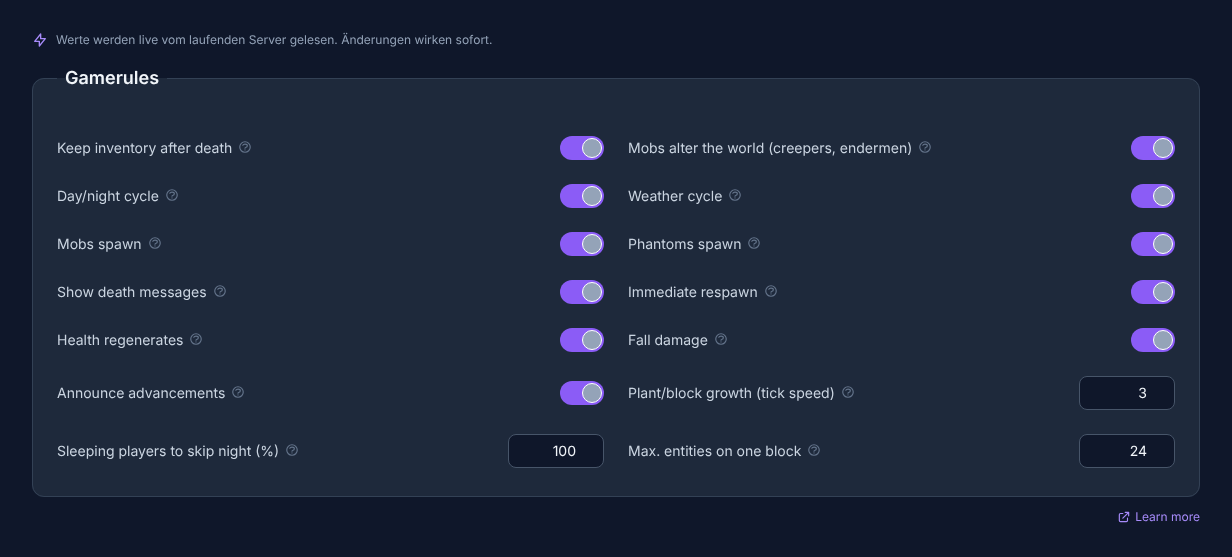
Note: Open your server in the panel and switch to the Gamerules tab in the Settings section to see and edit all rules. Don't have a server yet? Order a Minecraft Server.
Requirements
Before you change game rules, you should know which world is affected and whether players are online at the moment. Many changes take effect immediately, but can affect ongoing gameplay situations. For larger changes or public servers, a short heads-up to players makes sense.
Also check whether you use Java Edition or Bedrock and which Minecraft version is running. Some rules differ by edition or version. The most important boundary on Java is 1.21.11 (December 2025): since then, all game rules are lowercase with underscores (keep_inventory instead of keepInventory), and this applies to all current 26.x versions – since 2026, Minecraft counts by the scheme year.drop (26.1 in March, 26.2 in June, 26.3 in September 2026). Bedrock counts independently (26.10, 26.30, 26.50 …); there, the rule names haven't changed. The list shown in the editor is therefore the authoritative snapshot for your specific server.
If you also want to adjust basic server values, the guide Configure Minecraft server.properties Properly – All Settings Explained fits well. For reachability and connection problems, Minecraft Server Ports Explained – 25565, 19132, SRV Records helps.
New Rule Names Since Java 1.21.11
With Java 1.21.11 (December 9, 2025), Mojang moved all game rules into a registry. Since then, they are addressed like blocks and items as minecraft:<name>, lowercase and with underscores; you may omit the minecraft: prefix in the command. The effect of the rules hasn't changed, but some names have. For the rules in this guide:
| Up to Java 1.21.10 | Since Java 1.21.11 (26.1, 26.2, 26.3) | Bedrock |
|---|---|---|
| keepInventory | keep_inventory | keepinventory |
| mobGriefing | mob_griefing | mobgriefing |
| doDaylightCycle | advance_time | dodaylightcycle |
| doWeatherCycle | advance_weather | doweathercycle |
| doFireTick | fire_spread_radius_around_player (number, 0 = off) | dofiretick |
| doMobSpawning | spawn_mobs | domobspawning |
| doInsomnia | spawn_phantoms | doinsomnia |
| showDeathMessages | show_death_messages | showdeathmessages |
| doImmediateRespawn | immediate_respawn | doimmediaterespawn |
| naturalRegeneration | natural_health_regeneration | naturalregeneration |
| fallDamage | fall_damage | falldamage |
| announceAdvancements | show_advancement_messages | – (Bedrock has no advancements) |
| randomTickSpeed | random_tick_speed | randomtickspeed |
| playersSleepingPercentage | players_sleeping_percentage | playerssleepingpercentage |
| maxEntityCramming | max_entity_cramming | – |
Old names are no longer accepted on new versions; the command then reports an invalid argument. For three rules, the meaning of the value was also inverted: disableRaids is now called raids, disablePlayerMovementCheck is called player_movement_check, and disableElytraMovementCheck is called elytra_movement_check – an "On" there now means the feature is active.
Overview of All 15 Game Rules
The following table lists the rules from the editor with their default value and effect.
| Rule | Default | Effect |
|---|---|---|
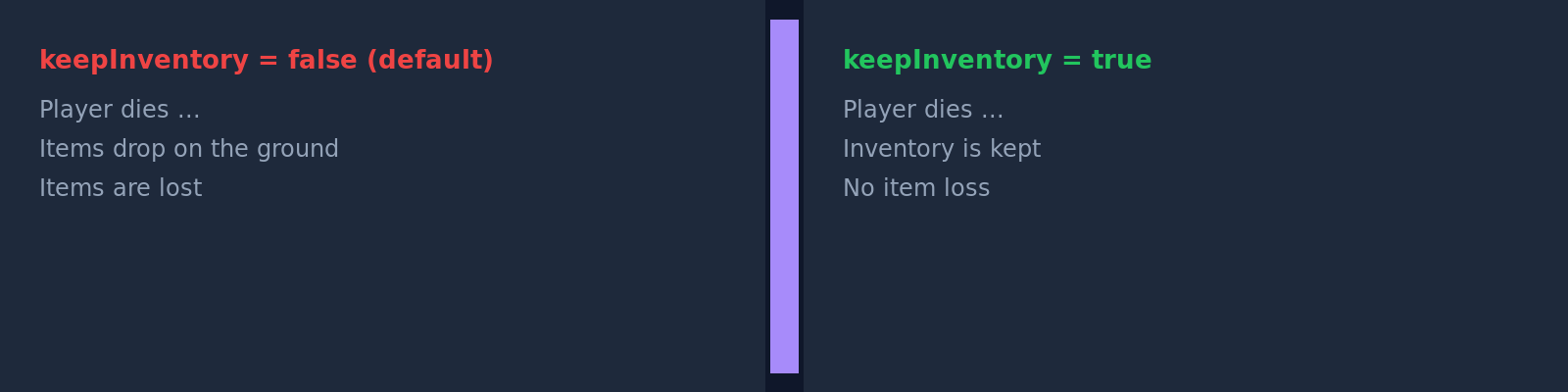
| Keep inventory after death | Off | Players keep their entire inventory and experience after death. Suitable for creative, building and family servers. |
| Mobs change the world (Creeper, Enderman) | On | Creeper explosions, Endermen carrying blocks and zombies breaking down doors. Off means: these mob effects don't change the world. |
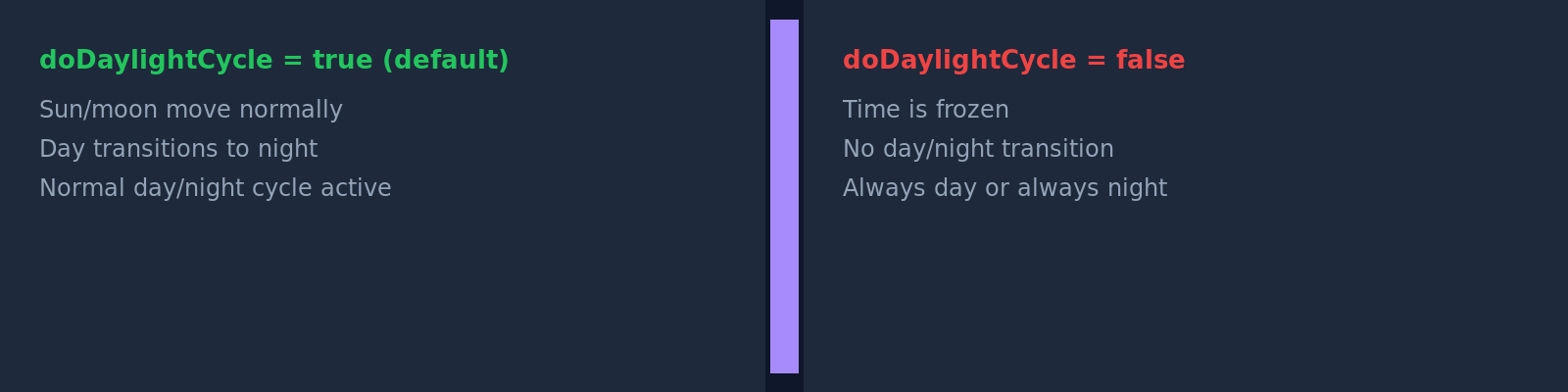
| Day/night cycle | On | Off freezes the time of day, for example for permanent day or permanent night. |
| Weather cycle | On | Off holds the current weather and prevents the normal change between clear, rain and thunderstorm. |
| Fire spreads | On | Off prevents fire spread. On Java only up to 1.21.10 (doFireTick). Since 1.21.11, the numeric rule fire_spread_radius_around_player replaces this rule. On Bedrock, dofiretick still exists. |
| Fire spread around players (radius) | 128 (−1 or at least 0, Java 1.21.11+ only) | Radius in blocks around each player in which fire spreads. 0 = no spread (replacement for "Fire spreads: Off"), −1 = fire spreads everywhere, even in chunks without players. |
| Mobs spawn | On | Off prevents natural mob spawning. Existing mobs remain; spawners, structures and events such as raids still spawn. |
| Phantoms spawn | On | Off prevents phantoms, even if players don't sleep for several nights. |
| Show death messages | On | Off suppresses chat messages about player deaths. |
| Immediate respawn | Off | On lets players re-enter immediately after death, without the respawn screen. |
| Health regenerates | On | Off disables natural regeneration via the hunger bar; food then only fills hunger. Healing then only comes from healing and regeneration potions, golden apples or effects like the beacon bonus. |
| Fall damage | On | Off prevents damage from falls. |
| Announce advancements | On | Off prevents public chat messages about achieved advancements. |
| Plant/block growth (tick speed) | 3 on Java, 1 on Bedrock (min. 0) | Higher values speed up random-based ticks such as plant growth and leaf decay. Java has no upper limit; from about 4096, the processes effectively happen instantly; Bedrock allows a maximum of 4096. Very high values can strain the server. |
| Sleeping players for night skip (%) | 100 (min. 0) | Share of players in the Overworld who must sleep to skip the night. 0 means: one player is enough. A value above 100 prevents skipping completely. Also applies to the straw beds available since 26.3. |
| Max. entities per block | 24 (min. 0, Java only) | How many animals or mobs may crowd into a tight space before they take damage (6 health points every half second). 0 turns this damage off. Lower values can limit entity density on farms. This rule doesn't exist on Bedrock. |
Concrete Examples
Family or Creative Server
If building, exploring and playing together are the focus, these rules help you avoid frustration from death, creeper craters or fall damage:
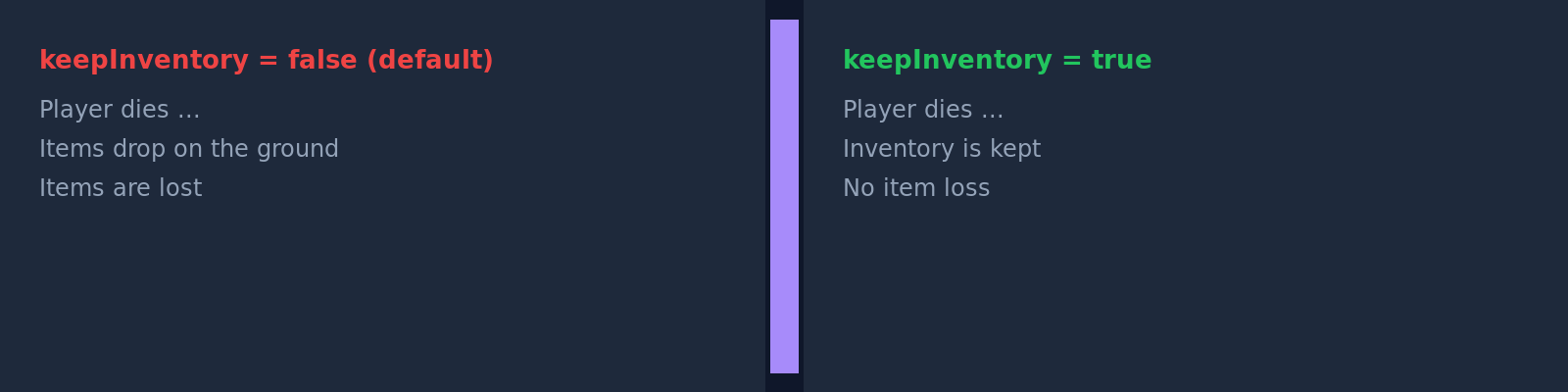
keep_inventory = On   → No inventory loss after death        (up to Java 1.21.10: keepInventory)
mob_griefing   = Off  → Creepers and Endermen cause no block damage  (mobGriefing)
fall_damage    = Off  → No fall damage when building at height   (fallDamage)
Hardcore PvP Server
For PvP rounds, death, loot and visibility should often remain deliberately noticeable. Harsher settings then fit better:
immediate_respawn   = On    → Immediate respawn without a screen          (up to Java 1.21.10: doImmediateRespawn)
show_death_messages = On    → Everyone sees who died and why      (showDeathMessages)
keep_inventory      = Off   → Inventory stays on the ground at death (default)   (keepInventory)
Showcase or Adventure Map
For exhibitions, adventure maps or build presentations, a stable environment matters more than natural world change:
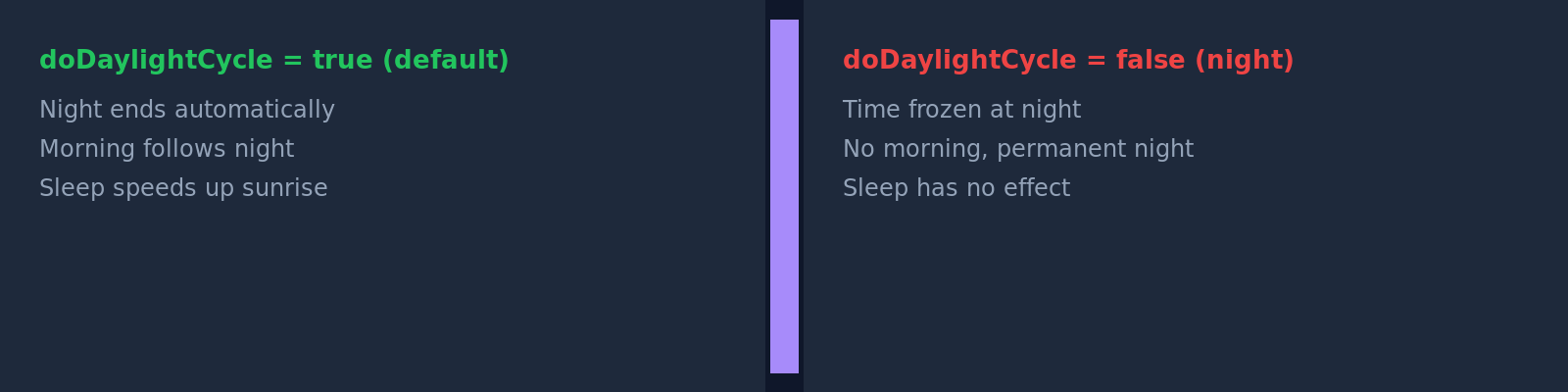
advance_time    = Off   → Server stays permanently at the set time of day  (up to Java 1.21.10: doDaylightCycle)
advance_weather = Off   → No automatic weather change                     (doWeatherCycle)
spawn_mobs      = Off   → No newly spawning mobs on the map              (doMobSpawning)
If you want to use a dedicated world for such scenarios, also read Upload & Switch a Minecraft World – Your Own Map on the Server.
Important Notes on Individual Rules
random_tick_speed (randomTickSpeed)
The default value of 3 is standard for normal survival play. Higher values speed up random-based processes such as plant growth, but depending on the world, farms and player count, they can create additional load. Use high values selectively and temporarily.
doFireTick and fire_spread_radius_around_player
Whether the Fire spreads rule is available depends on the Minecraft version in use. On Java 1.21.10 and older, it's called doFireTick. Since Java 1.21.11, it was removed together with allowFireTicksAwayFromPlayer and replaced by fire_spread_radius_around_player: a number specifying the radius around players within which fire may spread (default 128). With /gamerule fire_spread_radius_around_player 0 you turn off fire spread completely; with -1, fire keeps burning even without players nearby. Bedrock keeps dofiretick. If your panel doesn't show the yes/no rule, that's not an error, but depends on the version and server software.
players_sleeping_percentage (playersSleepingPercentage)
At 100, all relevant players must sleep to skip the night. A lower value is often more comfortable on public servers. At 0, a single player is enough, which can be practical for small groups.
mob_griefing (mobGriefing)
mob_griefing (formerly mobGriefing) is one of the most important rules for build worlds that stay beautiful. When it's active, certain mobs can leave visible consequences. When it's disabled, many mob events remain in the game but don't change the world in the same way.

Bedrock Servers
On Bedrock (BDS), the rules are consistently lowercase without underscores (keepinventory, dodaylightcycle, dofiretick) and are accepted regardless of case. Differences from Java: randomtickspeed defaults to 1 instead of 3 and is capped at 4096; playerssleepingpercentage has existed since Bedrock 1.20.30 (September 2023); maxentitycramming and the advancement messages don't exist; dofiretick is still the yes/no rule for fire spread. Some rules can be changed on Bedrock without enabling cheats, so achievements are preserved – the panel editor shows you which rules your server knows.
Check the Result
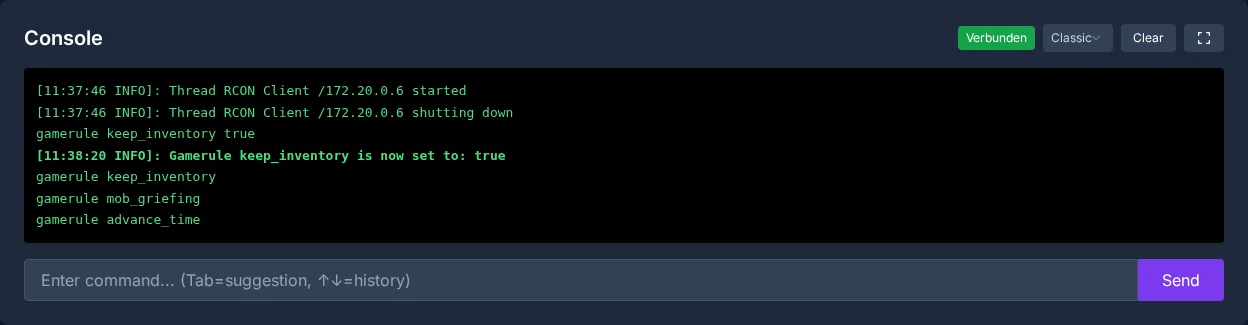
After saving, don't just rely on the confirmation in the panel, but test the affected rule in practice. Die in a controlled way with an empty or unimportant inventory when you check keep_inventory. Wait for night when you test players_sleeping_percentage. Use a safe test area when you check mob_griefing, fall damage or growth settings.
The panel also confirms changes in the server console:
Troubleshooting
If a change isn't visible, first check whether you edited the right world and the right server. Then check in the console with /gamerule <rule name> which value is currently active. Pay attention to the exact spelling of the rule names. On Java servers it depends on the version: since 1.21.11 (December 2025), and therefore on all 26.x versions, the rules are lowercase with underscores, for example keep_inventory, mob_griefing or advance_time; the old spellings like keepInventory or doDaylightCycle are no longer accepted there. On Java 1.21.10 and older, conversely, only the old spelling applies, and case matters (keepInventory, not keepinventory). Bedrock accepts the names regardless of case (keepinventory). If the command isn't accepted in-game, the permission is usually missing: on Java you need operator permissions (level 2), on Bedrock the "Game Directors" level; this doesn't apply in the server console.
If a rule is missing, it may be due to the edition, Minecraft version or server software. For Bedrock setups, it also matters whether you use BDS or alternative software. PocketMine or BDS? Minecraft Bedrock Server Software Compared helps with the classification.
Checking a Rule Deliberately and Rolling It Back
Note the rule name, old value, edition and Minecraft version. First query the value without a new parameter; that way you spot unknown names before you change anything. Check the effect in a suitable gameplay situation: keep_inventory on the death of a test player, mob griefing on the affected mechanic and growth on randomly ticking blocks. A rule does not automatically remove entities that already exist. If the effect is unwanted, set the noted old value back. After a world upload or restore, query the rules again, because the saved world state is what counts.
FAQ
What is the difference between game rules and server.properties?
Game rules control behavior inside the world, such as death, mobs, weather or growth. server.properties governs server basics such as ports, game mode, whitelist or visibility.
Do I need to restart the server after changing a gamerule?
Many game rules take effect directly on the running server. Still, check the result in-game or via the console, because some effects only become visible in the next matching gameplay situation.
Which game rule is most important for beginners?
For relaxed private servers, keep_inventory (keepInventory up to 1.21.10) is often the first sensible adjustment. It prevents inventory loss after death and takes pressure off the game, especially for new players.
Why do mobs still spawn despite the change?
spawn_mobs = Off (doMobSpawning up to 1.21.10) prevents new natural spawning, but doesn't automatically remove mobs that already exist. Clear out existing mobs separately or wait until they disappear naturally.
Can random_tick_speed strain my server?
Yes, high values can create additional load because more random-based block updates are processed. For normal survival, stay close to the default value of 3 and only raise it deliberately.
doDaylightCycle: view an example
Our own captures from a demonstration environment. The version and setup shown may differ from your server.
- Timelapse: a Minecraft day lasts 20 minutes, here it runs in 12 seconds.
- Sunrise, noon, sunset and night follow each other because doDaylightCycle is on (default).
- With /gamerule doDaylightCycle false (1.21.11 and later: advance_time) the sky stays at the current time.

Minecraft Java 1.21.6 · Vanilla · 20 min → 12 s · 2026-09-24

Minecraft Java 1.21.6 · Vanilla · 20 min → 12 s · 2026-09-24