Mods & Plugins für Project Zomboid
Dieser Katalog listet 52.000+ Project Zomboid-Projekte von Steam Workshop. Einträge können serverseitig, clientseitig oder auf beiden Seiten erforderlich sein und auch Karten oder andere nutzergenerierte Inhalte umfassen. Prüfe vor der Installation die verlinkte Quellseite, Spielversion und Abhängigkeiten.

No Food Expiration (B41)
von 76561198025379813
Removes the "DaysTotallyRotten" and "DaysFresh" parameters from food items to prevent them from becoming rotten. This version of the mod is for the stable Zomboid release, currently B41. Workshop ID: 2695935241 Mod ID: NoFoodExpiry If you find something broken, you can DM me on Discord (I'm "sheff"), or, you can join my Discord server with this link: https://discord.gg/VGZmayatM7 Caveat: This mod will not work if you add it to a multiplayer server that's already running. It requires a complete deletion and remake of the server in order to work in multiplayer. This isn't the case in singleplayer, and I'm not sure why it is in multiplayer, but there you go.
![[B42] - BOB Training Dummy – Project Zomboid Mod](https://images.steamusercontent.com/ugc/9824058583889787476/955E64D9753EB8634F8A518A3849240E772F39F7/)
[B42] - BOB Training Dummy
von 76561198034043894
🥊 Training Dummy - Master Your Combat Skills! 🥊 A craftable training dummy that lets you practice combat skills and gain XP based on your equipped weapon! CARREFUL : Do not use this mod with any mod that modify the base game ISTimedActions ✅ UPDATE: Multiplayer XP synchronization bug is now FIXED! The mod works perfectly in both single-player and multiplayer! ✨ Features - 🥊 Weapon-Based XP - Gain XP in the combat skill matching your equipped weapon (Axe, Blunt, Small Blunt, Long Blade, Small Blade, Spear) - ✊ Bare-Handed Training - Train without a weapon for reduced Small Blunt XP - ⏱️ Timed Training Sessions - Choose training durations: 5, 10, 15, 20, 25, or 30 minutes - 📈 Progressive XP Gain - Earn XP continuously throughout your training session - � Realistic Fatigue System - Experience endurance loss and muscle stiffness, influenced by your Fitness and Strength levels - 🛑 Auto-Stop on Exhaustion - Training automatically stops when you're too tired to continue - 🔨 Craftable - Build your own training dummy with carpentry skills - 🎨 Custom 3D Model - Unique training dummy design - ⚙️ Sandbox Options - Fully configurable XP and stiffness rates to match your playstyle ⚙️ Sandbox Options - Customize Your Experience! IMPORTANT: This mod includes sandbox options to let you adjust the training difficulty to your preferences! - 🎯 XP Multiplier (0.1x to 5.0x, default 1.0x) Adjust how much XP you gain from training. Lower values make progression slower and more realistic, higher values speed up skill development. - 💪 Stiffness Multiplier (0.0x to 3.0x, default 1.0x) Control how much muscle soreness you get from training. Set to 0 to disable stiffness completely, or increase for a more challenging experience. ⚠️ Why adjust these settings? Training on a dummy is safer than fighting zombies, so it's important to balance it for your game: - 🎮 Casual Play: Increase XP multiplier (2.0x-3.0x) and reduce stiffness (0.5x or 0) for faster, easier training - ⚖️ Balanced Play: Keep default values (1.0x) for a fair, vanilla-like experience - 💀 Hardcore Play: Reduce XP (0.5x-0.7x) and increase stiffness (1.5x-2.0x) to make training less efficient than real combat 💡 Tip: Configure these settings when creating a new game in the Sandbox Options menu under "BOB Training Dummy"! 🎮 How to Use - Craft a Training Dummy (requires Carpentry level 3, 10 planks, 5 nails, hammer, saw) - Place the dummy in your base or training area - Equip the weapon you want to train with - Right-click the dummy and select "Train on dummy" - Choose your training duration (5-30 minutes) - Watch your combat skills improve! ⚔️ Weapon Categories The training dummy recognizes all vanilla weapon categories: - 🪓 Axe - Train with axes and hatchets - 🔨 Blunt - Train with baseball bats, crowbars, sledgehammers - 🔧 Small Blunt - Train with hammers, wrenches, rolling pins - ⚔️ Long Blade - Train with machetes, katanas, long blades - � Small Blade - Train with knives, letter openers, scissors - 🗡️ Spear - Train with spears and garden forks 💪 Fatigue & Stiffness System Training is physically demanding, just like real combat: - 😮💨 Endurance Loss - Your endurance decreases during training (reduced by Fitness level) - 💪 Muscle Stiffness - Your arms become stiff from training (reduced by Strength level) - 🛑 Automatic Stop - Training stops when your endurance is too low (level > 2) - � Skill-Based - Higher Fitness and Strength = less fatigue and stiffness ⚙️ Technical Details - XP Rate: 0.09 XP per second (progressive gain) - Endurance Loss: 0.0015/sec base (reduced by Fitness: -0.0001 per level, min 0.0005) - Stiffness Gain: 0.002/sec base (reduced by Strength: -0.0001 per level, min 0.0008) - Crafting Requirements: Carpentry 3, 10 planks, 5 nails, hammer, saw - Weight: 15.0 units - Training Durations: 5, 10, 15, 20, 25, 30 minutes 🌟 Perfect For - � Safe House Training - Practice combat skills safely at home - � Skill Grinding - Level up combat skills without risking your life - � Roleplay - Perfect for martial artists, fighters, or disciplined survivors - � New Players - Learn combat mechanics in a safe environment - 💪 Fitness Training - Build endurance and strength alongside combat skills 🔧 Compatibility ✅ Fully compatible with vanilla Project Zomboid Build 42 ✅ No conflicts with other mods ✅ Multiplayer compatible ✅ Works with existing saves ✅ Compatible with all vanilla weapons 🌍 Languages Supported - 🇬🇧 English - 🇫🇷 Français - 🇮🇹 Italiano - 🇪🇸 Español - 🇨🇳 中文 📝 Notes - Training provides real XP gain, not just practice - Fatigue and stiffness are realistic - take breaks between sessions! - Higher Fitness and Strength make training more efficient - Bare-handed training gives 50% XP compared to weapons - Training automatically stops if you move or become too exhausted ❤️ Support the Mod If you enjoy this mod, please: - ⭐ Rate it 5 stars - 👍 Give it a thumbs up - 💬 Leave a comment - 🔔 Subscribe for updates Train hard, survive harder! 🥊� Workshop ID: 3643337169 Mod ID: BobTrainingDummy

The Girl In The Rope Descent
von 76561198401026277
Replace the main menu with anime wallpaper Enable this mod in both the main menu mod and the saved mod (if not enabled in the saved mod, BGM will not stop after entering the game), and be aware that this is not the only main menu wallpaper mod you have enabled. Do not enable more than one wallpaper mod at the same time After enabling this module, reopen the game to display it. If you encounter a mosaic, please check the texture compression option in the settings and restart the game Currently supports the following resolutions: 1920x1080 Currently supports a resolution of 1920X1080 Image source: https://www.pixiv.net/artworks/106047489 Workshop ID: 3227877325 Mod ID: The girl in the rope descent Main Menu mod 1920x1080

ks_somtana
von 76561198414086191
somtana https://steamcommunity.com/sharedfiles/filedetails/?id=2781054058 占쏙옙占쏙옙 占쏙옙크 Workshop ID: 3169390053 Mod ID: somtana

Computer - Game Pack Vol 1
von 76561198127814021
!!!ONLY A SMALL EXPANSION FOR ORIGINAL MOD!!! Original mod is created by KONIJIMA and - Yuhiko. Computer mod: https://steamcommunity.com/sharedfiles/filedetails/?id=2635550102&searchtext=computer Credits for original mod: KONIJIMA, - Yuhiko 10 games are added (+1 my own game Nightzoid, you can search on Steam if you are curious :3 ). So in total 11 games (Soundtrack + Audio): -Minecraft -Terraria -Call of Duty -Call of Duty 2 -Call of Duty 3 -Diablo -Far Cry -Far Cry 2 -Age of Empires -Age of Empires: Definitive Edition -Nightzoid . . . . . This small expansion for original mod Computer is created by me, edybtt. Computer - Game Pack Vol 1, 2023, 2 Nov Workshop ID: 3070054598 Mod ID: ComputerGamePackVol1
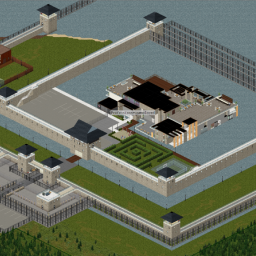
瑰拉城堡 (Quella's Castle)
von 76561199190885540
河畔西边的超级豪华城堡别墅,双层围墙+双层护城河,中心别墅地上三层,地下三层,地下室藏品厅包含五十多张高质量英雄联盟瑟瑟画作。 一座为末日而建的奢华堡垒。双层城墙、密布的瞭望塔和护城河环绕四周,将奢华转化为层层防御。堡垒的核心是一座现代化的U型别墅——地上三层气派非凡,地下三层掩体则用于应对真正的危机。视线、杀伤区和之字形通道有效地减缓了丧尸群的推进速度,让你(几乎)过上了如同明星幸存者般的生活。 特色 双重防御:内外两道城墙,设有高架巡逻道和相互连接的塔楼火力。 护城河环绕,引导丧尸群,保护主入口。 中央别墅:上层三层时尚优雅;下层三层功能齐全的掩体(储藏室、医疗室、工作间、指挥部)。 专为炮塔和近战控制而设计的咽喉要道和杀伤走廊。 直升机停机坪/停车坪及服务区,用于物流和车辆集结(地图区域已准备就绪,可进行调整)。 自带电源,安装照明设备,然后决定这座宫殿是沦为门面,还是成为诺克斯县最后的文明地标。 A decadent stronghold built for the end of the world. Encircled by a double curtain wall, studded guard towers, and a full moat, this compound turns luxury into layered defense. At its heart sits a modern U-shaped villa—3 floors above ground for show, and 3 bunker levels below for when things get real. Sightlines, kill-zones, and zig-zag approaches slow hordes to a crawl while you live (almost) like a celebrity survivor.basement with nsfw painting. Features Two defensive perimeters: outer and inner walls with elevated patrol walks and interlocking tower fire. Moat ring to funnel the undead and protect the main gate approach. Central villa: 3 stylish floors up top; 3 functional bunker tiers beneath (storage, medical, workshop, command). Chokepoints & kill-corridors designed for turret analogs and melee control. Helipad/parking apron & service courtyards for logistics and vehicle staging (map zones ready to tweak). Bring your own power, wire the lights, and decide whether this palace stays a fa?ade—or becomes the last civilized address in Knox County. Workshop ID: 3609837689 Mod ID: Quella's Castle Mod ID: Quella's Castle Map Folder: Quella's Castle
![[B42.13] eris food expiry – Project Zomboid Mod](https://images.steamusercontent.com/ugc/16614883964124198025/49F96935213A684A8BB18A3D02E028262019CEE2/)
[B42.13] eris food expiry
von 76561198110022711
Displays expiration date of food as inventory bar + tooltip. Not requires Nutritionist trait Features Exact food expiry time for packaged foods. Displays fresh-bar in inventory when the item list is expanded. old mod is here : https://steamcommunity.com/sharedfiles/filedetails/?id=3392259028 This is not my mod. I only updated it for compatibility with v42.13 single player. and it hasn't been tested for very long,cannot guarantee it is bug-free I don't really know how to mod, so I might not be able to help with any bugs or further issues. Workshop ID: 3629527156 Mod ID: eris_food_expiry

The Doobie Brothers Bikini Economy
von 76561198049006419
Build 41 and Build 42.20 configuration for Bikini Tools Server Edition using the BTSE_Economy submod. Includes ATM exchange values and a large item and vehicle Shop Terminal catalog. Prices use Base.Money as a value of 1 and include jewelry, crops, fish, vehicles, furnishings, and supported third-party mod items. All the "required" workshop items are not necessarily required. But adding those mods will make some items from those mods available for sale/purchase. Car shop is configured, various car mods not added to required list. Workshop ID: 3395195376 Mod ID: TDB_Bikini_Economy

LG Skill Journal
von 76561198068466334
Write down what you know. When you die, your next character reads it back. Craft a journal, transcribe your progress into it, and stash it somewhere safe. Your next character reads it and gets that progress back - once, exactly, and never more than you actually had. How to use it - Bind a journal. All three recipes are known from character creation, under the Skill Journal crafting category. - Transcribe into it. Right-click and take Transcribe into journal. Your character sits down and writes. Do it again any time to bring the journal up to date. - Die. Stash it first, or fetch it back off your corpse. - Read it. Your next character right-clicks, takes Read journal, and the progress comes back. It asks first where something is at stake - transcribing over a journal that already has something in it, or reading one that gets used up. Three journals Which one you carry decides what it can hold. - Skill Notebook - the skill half. XP and levels, the skill books you read (finished or not) and their reading bonus, and the tapes that teach. - Skill Notepad - the recipe half. Magazines, photo schematics, seed packets. Much quicker to fill. - Skill Journal - both, bound from one of each, and it keeps whatever is already written in them. The Journal is the one you hand down. It survives being read and stays with your successor, where the other two are used up. It comes out looking like whatever book you bound it from, and it keeps the penlight you built it with, so it's the only one you can write or read in the dark - about a thousand in-game minutes on a charge, then the light dies mid-sentence and it's an ordinary book until you put a battery in. It takes as long as it should Writing and reading are both priced in pages, at the same speed your game reads a book - so a server that has already tuned reading speed gets journals to match for free. A whole skill is 220 pages and a passive one 550, on a steep curve: level 5 is about 19 pages, level 10 the full 220. Books, magazines, schematics, seed packets and tapes cost what they cost to read or watch. - You can stop. Walk away mid-sentence and the journal remembers the page, then charges you only for what's left. - Updating is cheap. Transcribing again bills only what you've learned since. - Reading is billed the same way, but only for what you'd actually gain, and nothing is granted until the last page - so a part read can't be farmed. Every vanilla skill book runs 220 to 380 pages, so a well read character can owe more time for their books than for every skill they have. Eight sandbox options weight all of it from 1 to 1000 percent if that's too steep. No XP duping The part other journal mods get wrong, so I'll be specific. - Totals, not gains. Reading grants the difference between what's written and what you have, so a second journal grants nothing. They can't be stacked into free levels. - Reading bonuses can't get stuck on. A book's bonus only comes back for tiers you haven't outgrown. One you're already past would run for ever, and that's where "I suddenly had max XP" comes from. - Tapes can't be farmed twice. The XP comes back and the tape is marked watched in the same moment. - Nothing to gain, nothing to lose. A journal with nothing left to give you says so, and isn't destroyed. A half written journal can't be read at all - it doesn't describe anybody yet. And no journal ever spawns in the world. Whose journal is it In singleplayer the lock is your character's name, so a successor with the same name reads it as though the character never died. In multiplayer it's the character name and your account. Nobody loots your corpse and absorbs your skills, and re-crafting can't launder a journal into someone else's hands. It's all worked out on the server, so a client can't fake it. Somebody in the comments pointed out that this makes your next character wear a dead one's name, so the name half is now a sandbox option. Turn Lock a journal to one name off and your account alone owns the journal: your successor inherits it whatever they're called, and everyone else is still locked out exactly as before. In singleplayer there's no account to fall back on, so off there means any character in that save can read any journal in it. Other mods Books, tapes and recipes from other mods are sorted by what they actually grant rather than by a hardcoded list, so a modded tape, book or skill that teaches is picked up on its own - I don't need to know your mod exists. No vanilla file is replaced and no vanilla behaviour patched. Options A journal carries two things, and each has its own switch at the top of the list: Restore skill XP and Restore what was read. Both start on. Turn the XP one off and a successor inherits the books, recipes and tapes but earns their own levels; turn the other off and they get the XP and nothing else. A journal that gives less back costs less to write and less to read. Twenty-two sandbox options in all, under Skill Journal, read live so a change lands on the very next transcribe or read: the time costs and a weight per kind of knowledge, how much skill XP comes back, which kinds of progress return at all, whether a journal can be rewritten, who it's locked to, and whether each one survives being read. Safe to add mid-save - the recipes are known the moment it loads, with no new character and no relog. Safe to remove, but read your journal first, since any you're carrying go with the mod. Singleplayer, hosted multiplayer and dedicated server. Needs Build 42.20 or newer, on the server as well as the client. Workshop ID: 3779162647 Mod ID: LGSkillJournal
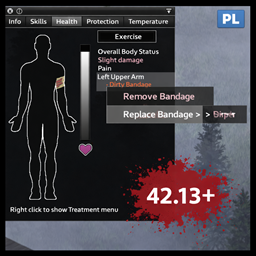
Replace Bandage 42.13+ compatibility patch
von 76561199681438308
ALPHA TESTERS wanted! A new sorting mod, successor of Better Sorting and Core Categories is under development. if you would like to take part in the testing phase, please register at this form, Testing starts 7th January. Announcement of suspension of support for the patches 42.12 -> 42.13. Due to the ongoing development of my new project (as stated above) I cannot address issues in regard to the patch mods. I therefor grant permission to pick up where I left and rework the patch creations of mine, so long as I get the credit if you publish these reworks. THIS MOD WAS CREATED BY Sioyth The following patch is only a temporary fix. It will not run without the original mod enabled. The patch will be deleted once the author uploads a working version. FAQ Do I need the original mod? Yes. This is only a patch. I fixed the parts of the code that were causing errors after the 42.13 update - that is the only thing I did. You must have the original mod installed. My patch simply makes it work again. Is it multiplayer compatible? I did not focus on MP. It works 100% fine in singleplayer, but I cannot guarantee MP compatibility. If you want MP support, please contact the original author of the mod. Does it work with 42.13.1? Yes. Did it take a lot of work to make this patch? Definitely less than the combined time and effort of everyone who left comments like: "Pls update", "Not working in 42.13", etc. ;D Did you make any changes beyond fixing errors? Yes. In some cases I included small personal tweaks that I had already been using for my own playthroughs. These tweaks are minor, do not alter the core design or intent of the original mod, and do not turn it into a new or derivative work. They exist only where I considered them safe, reasonable, and non-invasive. The original mod remains the original mod. Can you add features or change things in the mod? No. Unless something is clearly broken and must be fixed to preserve basic functionality. This mod is a patch, not my original work. I do not intend to expand, redesign, or creatively reinterpret someone else's creation. I respect original authors and their work. My original mods Mods - patches modID: ReplaceBandage42.13patch, workshopID: 3631612624 Workshop ID: 3631612624 Mod ID: ReplaceBandage42.13patch

Faster Hit Reactions
von 76561198315588136
Much faster hit reactions when the player character is defending or getting a bite Workshop ID: 2899956996 Mod ID: FastHits
![Real Working Cooler [B42] – Project Zomboid Mod](https://images.steamusercontent.com/ugc/14950925423734578415/E5AE8904D5633E472CB402CD4804836372B3742C/)
Real Working Cooler [B42]
von 76561198010744100
implements an abstract battery system for cold packs and coolers. The game already uses an abstract heat value as a multiplier for food spoilage not a direct C temp. How to use. Find some cold packs, put them in a working freezer and wait a couple hours. They will get an added suffix to indicate the state from (Warm) to (Frozen). Find a cooler and put Frozen cold packs in, the cooler will also get a suffix added to indicate how cold it is from (Warm) to (Very Cold). Once you have a cold cooler, put food in it to keep the food cold, cold items will retain their blue bar to indicate they are cold, the blue bar indicates they are spoiling slower. food cooling is relative to the coldness of the cooler, swap cold packs with frozen ones to keep the cooler (Very Cold) and get the best performance. May still need to look at balace, my target was for 1 weight of cold packs to keep 4 weight of food at least cool for an entire day. Putting cold food in a warm cooler will cool down the cooler a little, but is not recommened. Future plans Ice trays and ice. This took way longer than I planned and I nearly quit on it a couple times, but its done now. Technical Cold Packs and coolers are scanned for on game start on player, in area, in vehicies, they are added to a registry and we tick each of them every tick. Was the only way to reliably fight the vanilla game heat values. If you hoard 100 coolers and a thousand cold packs, expect some performance cost. I did not notice any issue with a couple coolers and a dozen cold packs. YMMV. Newly discoverd cold packs and coolers should also go on the registry automatically, and it not they are captured when items are moved. The registry is rebuilt every world load from scratch and only counts items in loaded cells. Workshop ID: 3606373523 Mod ID: RealWorkingCooler
![(Waiting for Build 42 Stable) Konnor's - Project Nemesis [B42] – Project Zomboid Mod](https://images.steamusercontent.com/ugc/2219773166242924661/57CBDA2A34A74D0F26A6EA55397FD1FCC3D85F64/)
(Waiting for Build 42 Stable) Konnor's - Project Nemesis [B42]
von 76561198110276283
This is a mod for Project Zomboid that is still in development. This version of the mod is operational, but it doesn't have all the features yet. It's just a first version for the Steam Workshop. Project Nemesis Project Nemesis is a mod for Project Zomboid that adds the iconic enemy from Resident Evil 3 to the game. How does it work? Project Nemesis acts as another enemy, or could be called a boss within the game. After a predetermined number of days (obviously, they can be modified), a warning message will arrive on the emergency radios in the game, alerting about a terrifying presence that is ravaging several survivor locations. It advises you to be cautious when venturing outside, as this creature is roaming around Knox County. Customization This mod aims to be completely customizable so that the player can have a more enjoyable experience tailored to their playstyle. For example: the visibility range of Nemesis, among other things, can be customized. Is the mod compatible with ? This mod shouldn't have any incompatibility with other mods. You are free to use the mod for personal use and on multiplayer servers, but not in Mod Packs! Do not redistribute or reuse files from this mod anywhere else without permission. Credits Developed by ImNotKonnor. And without further ado, thank you for your support! Workshop ID: 3087654225 Mod ID: KNL_Nemesis

MVXIVY utils
von 76561198216563933
Utilities for my mods Workshop ID: 3630174904 Mod ID: MVXIVY_UTILS
There Goes My Hero FIXED (Build 42+)
von 76561198314132900
"There wasn't even an awning." The meme is back. When you commit to a fall, time dilates, gravity warps, and the legendary audio cue kicks in to soundtrack your final (or most epic) moments. 🎮 VERSIONS & NETWORKING 🎮 SINGLE-PLAYER MULTIPLAYER (BETA) • 2D DIRECT AUDIO Always plays at full volume for the player. Perfect for solo survival. • ZERO IMPACT Lightweight code that only fires during fall events. • OFFLINE STABILITY SP version is separate mod, use one or the other NOT BOTH • ZOMBIE PROTECTION Ensures zombie lunges won't break the cinematic sequence mid-air. • 3D SPATIAL AUDIO Other players can hear your "heroic" moment from up to 100 tiles away. • DISTANCE FADING Audio naturally attenuates. If someone falls in Louisville, you might hear the faint echo of their mistake. • STATUS: Reported as "not functioning." Update is in the works. • ZOMBIE PROTECTION Same logic, but BETA, ha get it? 🚀 KEY FEATURES 🚀 🎬 CINEMATIC SLOW-MOTION Configurable time dilation (1%–100% speed). Time returns to normal the exact millisecond you hit the pavement for that perfect comedic hard-cut. 🎵 PERFECT AUDIO SYNC Featuring the iconic "My Hero" excerpt. With optimized trigger to ensure the song cuts out exactly when the "crunch" happens—no awkward fading, just the punchline. ⚙️ FULLY CUSTOMIZABLE - Slow-Mo Intensity: From Matrix-level (0.01) to real-time (1.0). - Minimum Height: Set your regret threshold (0.5 to 10 stories). - Audio Toggle: Enable or disable music independently of the physics. ⚙️WHERE ARE THE SETTINGS⁉ Launch the game -> Options -> Mod Options tab -> Look for "There Goes My Hero FIXED". 🛠️ COMPATIBILITY 🛠️ • Aim For The Bushes: ✅ Fully Compatible. Surfaces will still reduce damage. • Cinematic Falling: ❌ Incompatible. They use conflicting physics hooks. • PZAPI: 📦 Built-in logic. Works out of the box with B42.13.1+ Known Issues The preview video above showcasing this mod is misrepresenting itself apparently. Bugs reported as of yet are as follows: Build 42.17 reported stress testing resulted in loss of total functionality, Will be looked into following big update. and volume too low? If something breaks: • Post your game version • Single-player or multiplayer • Other mods installed It will be investigated. 📜 A NOTE ON THE LEGACY 📜 The original modder's description stated: "This statement acts as written consent that anyone may create a fixed version and distribute it without any further permission from myself." Consider this that fixed version. We kept the spirit, fixed the code, and added the options the community has been asking for since the original started breaking. Please go rate, and subscribe the old mod in respectful remembrance: There Goes My Hero 🎬 PRODUCTION WRAP 🎬 👍 Rate • 🌟 Subscribe • 💀 Enjoy the splat If you like physics-based consequences, you may also like: "Aim For The Bushes" Adjusts fall damage and injury severity based on the surface you land on. 👉 View on Steam Workshop Cinematic Falling Briefly pauses time and plays an audio cue during dangerous falls. 👉 View on Steam Workshop Workshop ID: 3633733971 (SP version) Mod ID: ThereGoesMyHeroFIXED (MP beta test) ModID: ThereGoesMyHeroMP
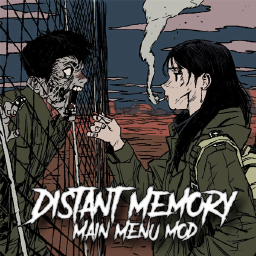
Distant Memory - Main Menu Mod (21:9)
von 76561198014147486
Custom Main Menu Mod (Ultrawide 21:9) Your current character meets their distant past. Artist Twitter: @Ongoo18 Instructions / Info - Enable mod. Quit game and re-enter. - Will conflict with other main menu mods. - Two options included on the thunder flash. Enable one only. Not BOTH. 16:9 Version Here https://steamcommunity.com/sharedfiles/filedetails/?id=2950004488 Workshop ID: 2949605665 Mod ID: NIMP001CustomMenu Mod ID: NIMP001CustomMenuB

Nowhere (connects Shepherdsville and St. Bernard's Hill)
von 76561198127843659
Just a road connecting Shepherdsville and St. Bernard's Hill... for now. No tile packs required and feel free to include in mod packs. North road replaces cells 49,28-49,36 West road replaces cells 46,37-49,37 Workshop ID: 3400079842 Mod ID: Nowhere Map Folder: Nowhere North Map Folder: Nowhere West
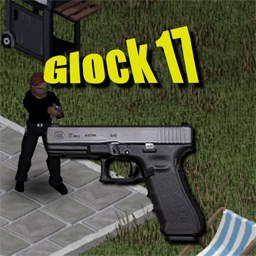
KD6's Glock 17
von 76561198034115854
This mod adds a glock 17 Pistol chambered in 9mm. Items should spawn in gun stores. This mod requires the 'KD6's Weapon Attachment Companion Mod' mod to function properly. -Mid Damage weapon -17 Round capacity Works with build .41+ and MP compatible. Workshop ID: 2955223744 Mod ID: KD6GLK17 ------------------------------------------------------------------------------------------------------------------------- Ask for permission This mod can only be added to and extended with the express permission from the original creator. Having received permission, credit must be given to the original creator, both within the files of the mod and wherever the mod roams online. If no permission is received you may not alter the mod. ------------------------------------------------------------------------------------------------------------------------- Thanks for stopping by, Also if you wish to support me with a donation please feel free to donate here. https://ko-fi.com/kd6pzproject

Mexiox's Mexican Jobs
von 76561199036949265
Version 1.1 ------------------------------------------------------------- Iniciamos el mod con: - Taquero - Tortillero - Maistro - Jardinero - Chalan: - Policia Corrupto ------------------------------------------------------------- Version 1.2 ------------------------------------------------------------- Se agregaron: - Malandro - Puntero - Repartidor de garrafones - Vago - Narco ------------------------------------------------------------- Version 1.3 ------------------------------------------------------------- Se agregaron: - Talachero - Herrero - Rescatista - Enfermero trunco - El inge En el futuro agregaremos que cuando escojas alguna profesion aparezcas con ropas de esa profesion en especifica. AVISO: En este mod solo se agregan nuevos trabajos al juego vanilla pero no los elimina, solamente los agrega, esto no deberia causar ninguna interferencia con otros mods del mismo o o de diferente estilo, en caso de hacerlo, no dudes en decirnoslo en nuestro discrod y con gusto veremos como solucionar tu problema, igual si solo quieres hablar con nosotros o darnos alguna idea, entra y cuentanos: https://discord.gg/Qy34fwSqCZ Copyright 2022 Mexiox. This item is not authorized for posting on Steam, except under the Steam account named ESuances that includes copy, modify or redistribute files of code contained in this mod. Workshop ID: 2860948972 Mod ID: MexicanJobs
![Force Crop Remover [B42.13.1 Fix] – Project Zomboid Mod](https://images.steamusercontent.com/ugc/9679783635841785927/08F67A1E45FE9CC1321035E959E674CD4BBE3BBB/)
Force Crop Remover [B42.13.1 Fix]
von 76561198076345872
THE "IMMORTAL CROP" FIX For Build 42.13.1 (Unstable) Tired of staring at dead cabbages that refuse to die? The recent farming overhaul in Build 42 is amazing, but it brought a nasty glitch: destroyed or harvested crops often leave behind "ghost" sprites that no shovel can remove. They block your tiles, ruin your aesthetic, and mock your attempts at farming. This mod is the answer. It reaches into the game code and forces those tiles to clear. FEATURES - Seamless UI Integration: No clunky menus. The fix is nested directly inside the standard right-click "Remove" menu. - Nuclear Option: Bypasses the bugged farming interactions and forces the server to delete the object sprite directly from the map data. - Intelligent Detection: Specifically targets objects with "farming" or "crop" in their internal ID, so you don't accidentally delete walls or floors. - Multiplayer Ready: Uses transmitRemoveItemFromSquare to ensure the crop disappears for everyone on the server, not just you. HOW TO USE 1. Right-click the bugged crop tile. 2. Hover over the "Remove" option. 3. Select "DEBUG: Force Remove Dead Crop". 4. Enjoy your clean soil. COMPATIBILITY Save Game Safe: Can be added or removed from an existing save at any time. Game Version: Tested and working on Build 42.13.1. Note: This is a temporary fix for an unstable build. Once the developers patch the farming logic natively, this mod may no longer be necessary. Workshop ID: 3636824030 Mod ID: ForceCropRemover
Jeeve's QoL
von 76561197963562430
Jeeve's QoL A collection of quality-of-life improvements for Project Zomboid Build 42. All features are included in the main mod, or install individual sub-mods for just what you need. Enable either the all-in-one or the individual sub-mods — not both. Enabling the main mod alongside its own sub-mods loads the same content twice. Adding & Removing Mid-Save Add to an existing save: Safe. Everything here is either pure UI or a change to how existing items behave, and both apply immediately. The one piece of loot the mod adds — the Grease Monkey's Guide magazine — will only start appearing in containers that have not already been generated. Remove from an existing save: Safe. Nothing is ever placed in the world. The Grease Monkey's Guide vanishes from inventories and containers along with the three engine-part recipes it teaches. Everything else is an override of an item the base game already owns, so removal simply restores vanilla behaviour — gas mask and respirator filters go straight back to their normal drain rate, and seated reloads back to normal speed. Filters already worn down keep the condition they have. Safe Login Protects players during server login with temporary invisibility. 30 seconds on spawn, reduced to 10 seconds on movement, cancelled on any other action. Both durations are sandbox-configurable. Proximity Inventory Aggregates nearby container contents into a single Proximity tab. Improved ordering and smart container selection. Optional zombie-only mode via sandbox. Based on Proximity Inventory by mxswat. Filter Lifespan Gas mask and respirator filters last 3x longer than vanilla. Overrides the drain rate introduced in 42.16 so filters are less disposable. Affects all filter types: standard, crafted, and recharged variants — and the Improvised Gas Mask's rag filter, so improvised masks get the same 3x protection. GunPlay — Seated Reload Speed 20% faster reloading while seated on furniture. Applies to all reload actions: inserting magazines, loading bullets, racking, and ejecting. Vanilla precedent: vehicle drivers get 20% slower — this is the inverse for seated players. GunPlay — Reload All Magazines Bulk-reload every not-full magazine of a given type in sequence. Two entry points: - Radial slice — hold R on the vanilla firearm radial menu, click "Reload All Mags." Targets the currently-equipped weapon's magazine type. Custom pixel art icon matching the vanilla firearm radial style. - Right-click context option — "Reload All" on any magazine in your inventory. Targets the clicked mag's own type (not the equipped weapon's type), so you can prep mags for any weapon in your loadout without having to equip it first. Mags are filled fullest-first, so partial mags top off before empty ones. If the reload chain is interrupted the player always holds maximum ready-to-use firepower at every point during the reload. Each mag's reload is a self-contained event — the chain naturally stops when it runs out of empty mags or matching bullets. GunPlay — Open All Ammo Boxes Right-click any ammo box in your inventory: "Open All Boxes (N, ~duration)". Opens every box of the clicked type in sequence — one right-click replaces N double-clicks. Handy when you've just looted a gun store and have 30 boxes to crack open before the next horde night. - Strict type match — .30-30 boxes and 9mm boxes are separate pools, so you only open what you right-clicked - Duration estimate in the label so you know what you're signing up for: "Open All (24 boxes, ~2m)" - Works with vanilla ammo boxes AND any modded box that uses the standard DoubleClickRecipe convention (including the .30-30 box, fixed by Jeeve's Patches) - Built on vanilla's multi-craft timed-action queue, so skill XP, animation, sound, and interrupt handling all work exactly like double-clicking each box manually Craftable Engine Parts Craft engine parts from scrap using welding, mechanics, or electrical skill. Requires reading the "Grease Monkey's Guide" magazine found in bookstores, mechanic shops, and libraries. - Welding Path — MetalWelding 3 (auto-learn 5). Uses blow torch, welding rods, scrap metal, pipes, sheet metal, and metal bar - Mechanics Path — Mechanics 5 (auto-learn 7). Uses blow torch, welding rods, duct tape, hinges, pipes, and sheet metal - Electrical Path — Electricity 2 (auto-learn 4). Uses blow torch, welding rods, duct tape, wire, electronics scrap, and sheet metal Each recipe outputs 2 Engine Parts. Inspired by Craft Engine Parts by Titoxic — rebuilt from scratch for B42 compatibility. Sub-Mods Install the main mod for everything, or pick individual features: - Jeeve's QoL — Safe Login (JeevesQoL_SafeLogin) - Jeeve's QoL — Proximity Inventory (JeevesQoL_ProxInv) - Jeeve's QoL — Filter Lifespan (JeevesQoL_FilterLifespan) — 3x filter durability - Jeeve's QoL — GunPlay (JeevesQoL_GunPlay) — seated reload, reload all mags, open all ammo boxes - Jeeve's QoL — Engine Parts (JeevesQoL_EngineParts) — Craftable engine parts Credits - Engine Parts recipes inspired by Craft Engine Parts by Titoxic - Proximity Inventory based on work by mxswat Compatibility Build 42 — Works in singleplayer and multiplayer. Server-side mod with client components for UI. No dependencies on other Jeeves mods. Part of the Jeeves Ecosystem - Jeeve's Integration — Discord relay, player ranks, moodles and server commands - Jeeve's Claims — Safehouse, land and vehicle claim protection - Jeeve's Drops — Airdrop and supply events with guarded loot - Jeeve's Hordes — Scheduled zombie horde night events - Jeeve's Journals — Skill recovery journals - Jeeve's Patches — Compatibility fixes for popular mods - Jeeve's Personal Computer — Computers, arcade games, training disks and skill backup - Jeeve's Zones — Admin-defined map zones with per-zone rules - Jeeve's Build — Buildable walls, frames and fixtures from licensed tile packs - Jeeve's Solar Arrays — Solar power for Build 42 (Immersive Solar Arrays) Workshop ID: 3687487317 Mod ID: JeevesQoL Mod ID: JeevesQoL_EngineParts Mod ID: JeevesQoL_FilterLifespan Mod ID: JeevesQoL_GunPlay Mod ID: JeevesQoL_ProxInv Mod ID: JeevesQoL_SafeLogin
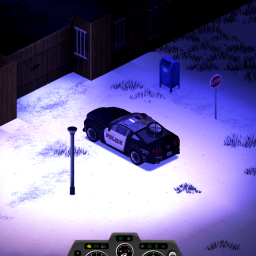
Car Dashboard Emergency Lights and Siren Buttons
von 76561198085542719
Adds buttons to toggle emergency lights and siren on the car dashboard Sources: https://github.com/NightKosh/CarDashboardEmergencyLightsAndSirenButtons/tree/main

Discord short link: http://claire.sx
von 76561198108456579
Workshop ID: 3147462486 Mod ID: clairemodpack
Firearms B41 Rifles, Pistols and Revolvers Tweak
von 76561198130649647
If you've noticed that when playing around with bolt action rifles like RugerM77 and M24, very often 1 shot isn't enough to kill a zombie, even with high level in aiming. It makes the weapons useless compared to their counter parts in semi-automatic rifles such as the M14 which uses same ammo. With these tweaks I'm aiming to make it so that if I land a shot on a zombie it's a nearly guaranteed kill at high level in aiming. Also some changes to some handguns for my personal preference (most of it is slight increase in damage and crit chance) I've been changing the values manually for my own use for a while now but it is very tedious when you join a friend's server and you have the incorrect values/files so I made this mod to make life easier for myself and others who might be interested. Values changed are as goes : Colt M1911 --- minimum damage / Critical chance Desert Eagle --- min. dmg. / CC Glock --- Sound / CC M625 --- min. dmg. / CC SW29 --- min. dmg. / CC Colt Python --- min. dmg. / CC Colt Python Hunter --- min. dmg. / CC Colt Anaconda --- min. dmg. / CC Remington Model 700 --- min. dmg. / max. dmg. / CC Ruger M77 --- min. dmg. / max. dmg. / CC M24 --- min. dmg. / max. dmg. / CC / Hit Chance TL:DR is most weapons have a damage buff and critical buff, with bolt action rifles *hopefully* becoming more playable with high level aiming. This is my 1st ever attempt at uploading a workshop item on Steam. Thank you to Hyzo for creating this great vanilla friendly firearms mod! All props to him. This mod was initially created for personal use but I will leave it here for anyone that wants these tweaks easily. I recommend this mod made by Inpo the ED that will completely rebalance ARs and SMGs which pairs well with this mod: https://steamcommunity.com/sharedfiles/filedetails/?id=2855773771 Workshop ID: 2981596279 Mod ID: firearms41riflespistolsrevolverstweak
Project Zomboid Details →
Project Zomboid Guides
Project Zomboid Mods installieren - Workshop Guide
Installiere Project-Zomboid-Mods sauber per Steam Workshop: IDs eintragen, Reihenfolge prüfen, Server neu starten und typische Fehler beheben.
Project Zomboid Build 42 auf dem eigenen Server: Umstieg, Spielstände und Mods
Build 42 ist Stable: Spielstände aus Build 41 sind nicht kompatibel. Umstieg, legacy41-Zweig, neue Serveroptionen, Anti-Cheat und der Hotfix 42.20.1 gegen Serverlag.
Project Zomboid Server mieten – Multiplayer Guide
Project Zomboid Server einrichten: RAM, Sandbox-Einstellungen, Workshop-Mods, Admin-Rechte und typische Fehler sauber prüfen.
Project Zomboid Server mit Mod-Support
Kompatible, unterstützte Mods über das Server-Dashboard installieren.
Project Zomboid Server mieten