Mods & Plugins für Project Zomboid
Dieser Katalog listet 52.000+ Project Zomboid-Projekte von Steam Workshop. Einträge können serverseitig, clientseitig oder auf beiden Seiten erforderlich sein und auch Karten oder andere nutzergenerierte Inhalte umfassen. Prüfe vor der Installation die verlinkte Quellseite, Spielversion und Abhängigkeiten.
![生化危机[平衡版] – Project Zomboid Mod](https://images.steamusercontent.com/ugc/1836907111913171289/63A4E0576B85DBAA403CCC630256B0E90CEB3EED/)
生化危机[平衡版]
von 76561198414482323
中国结容量150 移除病毒解药 提高装备商人武器价格 武器伤害降低 全部降低 Workshop ID: 2728886366 Mod ID: REMOD1.0 Mod ID: REWMOD1.0
![Smarter Mechanics [Discontinued] – Project Zomboid Mod](https://images.steamusercontent.com/ugc/1803104276620922501/D705582BD725CC09CCF92166B6AAC0BE75006A66/)
Smarter Mechanics [Discontinued]
von 76561198073258167
No more cruel & unusual punishment for amateur mechanics! Are you sick of destroying your plastic tires? Buy yourself some real American made car parts! Better durability than the leading Chinese garbage guaranteed! Instruction manuals included! This mod removes the chance of parts being damaged by 1% randomly when installing/uninstalling anything until mechanic skill level 7, and significantly reduces the likelihood of failing to install parts. Un/installing tires at 0 experience is now 85% successful instead of 65%, for example, which is more realistic. Currently planned but not working: Reduce the amount of damage to parts when you fail to un/install them due to not being skilled enough to around 1-3% (from 5-10%) Realistically you're not going to destroy a tire because you slipped on a lug nut. May add checks in the future to make glass take more damage. Depends on if I can get the game to listen to me or not. I've been trying to make the unfixable parts like the heater fixable and making armored parts but it's proving to be a real pain in the neck. Workshop ID: 2454057677 Mod ID: SmarterMechanics Tags:B41,B40,Cars,Vehicles,Tweak,Easy,Easier Workshop ID: 2454057677 Mod ID: SmarterMechanics
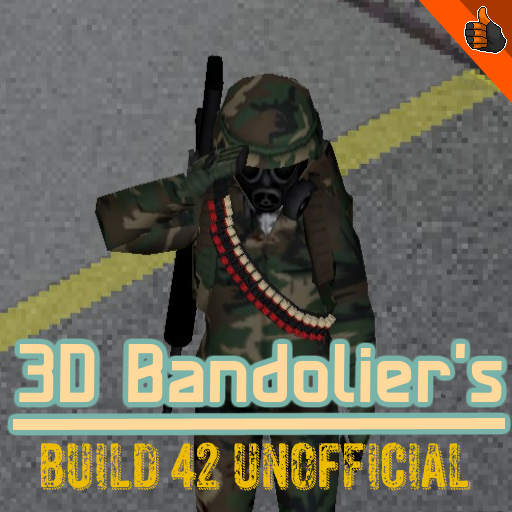
3D Bandolier B42 UNOFFICIAL UPLOAD
von 76561198424985702
This is an unofficial upload of one of my favorite build 41 mods. I want to heavily thank the original creators BongoRaccoon32 and darlak97 for the original mod. As they have said they will upload a new version when B42 stable releases I will probably deactivate this mod when it is officially updated. This should Work in pre-existing saves I believe, it worked in mine at least. This is my first time uploading so let me know if there are problems in the comments. Thank you to anyone who downloads this mods and I thank the original creators and none of these textures in this mod belong to me. Thank you <3 Workshop ID: 3712585935 Mod ID: 3D_bandolier
JaCrispy's Rifle Sling Upgrade
von 76561198872105257
The original mod made it so that the player could attach a rifle onto theyre body using a rifle strap I made it so the strap has extremely high durability because it constantly broke. The original mod: https://steamcommunity.com/sharedfiles/filedetails/?id=2644986930&searchtext=rifle+sling Workshop ID: 2763160181 Mod ID: JaCrispySlingUpgrade
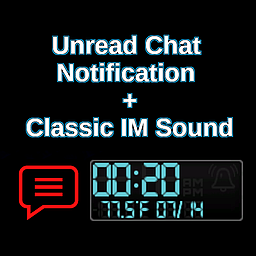
Unread Chat Notification + Classic IM Sound
von 76561197966975040
Unread Chat Notification + Classic Instant Messenger Sounds B42.20+ Compatible! This mod helps prevent players from missing chat messages and important system messages while playing on Multiplayer servers. No more missed Server Restart Warnings! How it Works: When a new chat message arrives while the chat box is closed, a Red Chat Bubble Notification will appear near the Upper Right Corner of the screen, next to the clock display. The notification can also appear while the chat box is open if it is not scrolled to the newest message, helping make sure you don't miss new messages while reading older chat. A classic Instant Messenger Sound will also play to provide an audible notification! The chat box will automatically close after one in-game hour of silence. This can be disabled by locking the chat box with the lock icon. Mod Options Integration: Several options are available to customize the notifications to your personal preference. - Toggle the Instant Message Alert Sound On/Off - Toggle Chat Bubble Notifications for Unseen Messages - Adjust the Volume of the Alert Sound - (NEW) Choose between Four Nostalgic Instant Messenger Sounds 1990's Nostalgia: The default alert sound is a classic bit of 1990's AOL nostalgia, but you can choose from several classic Instant Messenger sounds: - AOL Instant Messenger - ICQ - Yahoo Messenger - MSN Messenger Choose whichever sound tickles your nostalgia bone! ICQ's "Uh-Oh" is my favorite! Bug Reports: Please report any issues in the Bug Reports discussion. Workshop ID: 3229174380 Mod ID: GN84-UCN-IMS
![[B42] Depression Filter – Project Zomboid Mod](https://images.steamusercontent.com/ugc/17922745283043653880/20B1573B86BA115C10D2FE0160E3AD2E4EEB0128/)
[B42] Depression Filter
von 76561198875202045
Let your survivor's sadness fester, and the world pays for it - the colour quietly drains away until you're living in black and white. Leave unhappiness unchecked for too long, and each morning you wake a little greyer, stage by stage, until the world is fully monochrome. It's not a cheap overlay - it drives the game's own screen shader for true, high-contrast desaturation, like the last season of a certain courtroom drama. How it works - Gradual descent - the grey deepens one stage each morning you wake up miserable, and eases back on the good days. - Antidepressants - a daily dose of Antidepressants holds the grey at bay; miss your meds, and it creeps back in. - True black & white - real luminance desaturation with a filmic contrast crush, not a flat grey tint. Sandbox options - Make the depression irreversible (off by default - normally it can lift on its own) - Sadness threshold, days to full depression, and an optional "neglect harms health" Single-player friendly and fully client-side. Your saved games are safe — the effect only touches what's on screen. Idea - Dante's Also check out my other mods in my collection! Your support is much appreciated! Workshop ID: 3756215136 Mod ID: DepressionFilter

OH MY GAWD
von 76561198802437871
Replaces jumpscare sound with OHHH MY GAWWD Workshop ID: 2892138526 Mod ID: OMG
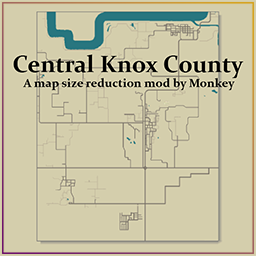
Central Knox County
von 76561198013042524
Central Knox County A world map with only the central part of Knox County. Mod by Monkey Commissioned by Europhoria I do mod commissions - Discord: _mon.key Workshop ID: 2980834238 Mod ID: CentralKnoxCounty Map Folder: Central Knox County
![Lifestyle: Guts Theme [B41/42] – Project Zomboid Mod](https://images.steamusercontent.com/ugc/16493384222304976121/41A396496A6601827CE8110E69CE896637416C6B/)
Lifestyle: Guts Theme [B41/42]
von 76561197996060085
Thank you for visiting my mod page for Lifestyle: Hobbies. Thanks to Angry for creating the mod, it's fantastic. In this mod I added the possibility to play the Guts theme song from the Berserk anime. You can play the theme song on three guitars: - Acoustic guitar (skill level 3 required); - Electric guitar (skill level 3 required); - Bass Guitar (skill level 3 required). Each type of guitar makes the music sound unique in its own way. UPD: Please note that the base mod "Lifestyle: Hobbies" exists in two versions, for b41 and b42. Choose the one that matches your game version. My mod is compatible with both b41 and b42. ------ Спасибо, что посетили страницу моего аддона для Lifestyle: Hobbies. Спасибо Angry за создание модификации, она фантастическая. В этой модификации я добавил возможность играть музыкальную тему Guts из аниме Berserk. Вы можете играть музыкальную тему на трёх гитарах: - Акустическая гитара (требуется 3 уровень навыка); - Электрическая гитара (требуется 3 уровень навыка); - Бас-гитара (требуется 3 уровень навыка). На каждом из типов гитары музыка звучит по-своему уникально. UPD: Обратите внимание, что базовый мод Lifestyle: Hobbies существует в двух вариантах, для b41 и b42. Выбирайте нужный под свою версию игры. Моя модификация совместима и с b41 и с b42. Workshop ID: 3093045288 Mod ID: LifestyleGutsTheme
![[COS] First Descendant hailey – Project Zomboid Mod](https://images.steamusercontent.com/ugc/2397691894726599245/DF22DFA24C6AC0B2FF9E28540B4A0AF304D92792/)
[COS] First Descendant hailey
von 76561199178116693
How Do I Use It? - You can go to the link below to see how to use it. - Link Recommended mode - Fashionoid - Gear Transmog - Hide All Attached Items - Clipping animation Fix How to use COS mode in build 42. - Navigate to the path where the mod is installed. - Create a 42.0 folder. - Create a common folder. - Paste the media folder / mod.info / preview.png into the 42.0 folder. The recipe code writing method has been changed in 42Build. Since COS (Costume) mode has approximately over 200 modes, converting to 42Build's recipe code is an extremely laborious task. In 42Build, you cannot create costumes in (42 build) the crafting tab. There are two methods: Spawn items in cheat mode. Select items in the clothing selection screen when creating a character. Like My Mode? - Join Our Discord If You Want Commission Workshop ID: 3324709369 Mod ID: hailey
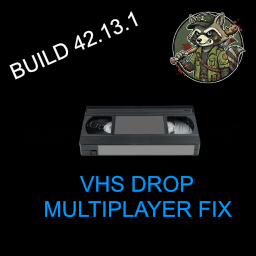
VHS MP DROP FIX
von 76561198408703178
Fixes bugged VHS tapes in multiplayer by safely forcing them out of the player’s inventory when they get stuck after being watched on a TV . The mod adds a dedicated “ Drop VHS” context-menu option that only appears for VHS tapes in the player’s personal inventory, not in external containers, to avoid duplication or desync issues . When used, it cleans the tape’s internal modData/state, unequips it from both hands and attachments, and then drops it on the ground so it behaves like a normal world item again . TESTED IN HOST A GAME NOT TESTED IN DEDICATED SERVER! THIS IS A TEMP. FIX WAITING TIS Support & Feedback Report bugs, request features, or ask questions in the discussions section! Workshop ID: 3636682188 Mod ID: VHSMultiplayerFix

TrueActions Dancing (正體中文翻譯)
von 76561198027811816
CH Translation for TrueActions Dancing. 正體中文翻譯 Workshop ID: 2853955327 Mod ID: TrueActionsDancing_ch
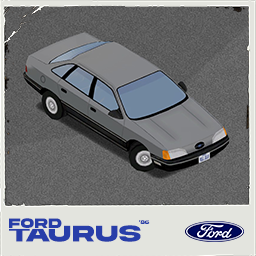
Ford Taurus
von 76561198213775531
Vehicles naturally spawn in cities and regions with realistic parking behavior. Police vehicles appear in Jefferson, Louisville, Muldraugh, Rosewood, West Point, and Valley Station with special police liveries. Vanilla Spawn Compatibility; This mod adds vehicles on top of existing vanilla police vehicles, and the vanilla vehicles will continue to spawn. If you want to completely disable vanilla spawns, enable “Ford Taurus '86 – Disable vanilla spawns” in the mod list. Workshop ID: 3633153533 Mod ID: FordTaurus86 Mod ID: FordTaurus86DS
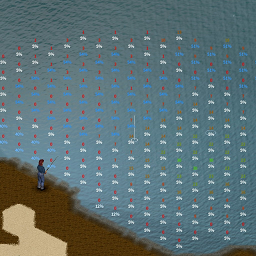
Show Fish Abundance
von 76561198378282641
Shows per-tile fish abundance and trash chance while aiming a fishing rod (B42). Color legend: - Fish abundance: red = low, green = high - Trash chance: white = low, blue = high Numbers render over nearby water tiles; percentage indicates junk probability. Workshop ID: 3571311063 Mod ID: ShowFishAbundance
![[B42/41] REARM & REUP – Project Zomboid Mod](https://images.steamusercontent.com/ugc/49077376602412457/0316ED6B8ACC4BCF6C1E83EDEDD84BA7B90059D8/)
[B42/41] REARM & REUP
von 76561198164377034
Mod is updated to B42 now with Sandbox options for container size. The B42 version needs JB Max Capacity Override. B41 remains as is and is still present in the download. BUILD 41 Description: This mod lets you roughly double the capacity of some containers that spawn on map: Military Crate 50 -> 99 Military Locker 50 -> 80 Green Wall Locker 40 -> 80 In addition, it greatly increases the spawn rate of ammo and guns inside those containers. If the rolls are high enough, the container will be filled just like vanilla but to this higher capacity. Perfect for multiplayer where the vanilla loot table is stretched too thin. Probably overkill in singleplayer, so balance accordingly to your play-style. There is a Lite version here that does not change the spawn rates of items, just the capacity of containers if you want that. LINK As far as I know, this does not conflict with an existing mod. Tested with Brita's + Arsenal26. Arsenal will override the item spawning in these spawn areas, so the Lite version will work the same in that usage. Tested in multiplayer, seems alright. Consider load order if you have other tileset mods. Should be okay to add to existing saves, would not try to remove afterwards. Uses tiledef #1254
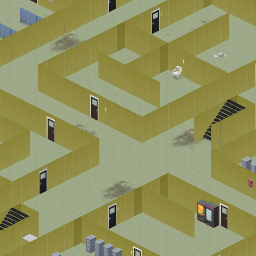
Backrooms
von 76561198039490063
Backrooms. Version 2. There is now a way out. Good luck. Workshop ID: 2396257043 Mod ID: Backrooms Map Folder: Backrooms
(B42) Blue Archive Costume
von 76561198260526822
Works only for B42 Original mod: https://steamcommunity.com/sharedfiles/filedetails/?id=3037011739 1. During mid-game - Collect 5 cash from zombies. (Check their wallet) - Buy an outfit ticket by pressing rmb on cash or checking 'Tailoring' tab in crafting - Right click the ticket or check 'Tailoring' tab in crafting to buy desired outfit - Equip it. 2. From the starting - Go to sandbox settings. (If you are not playing sandbox mode, try 1st method instead of this) - Go to player setting and check All clothes unlocked. - Now, check the shoes tab when creating character. - Select the character model you want. 3. What are (Insulated)XXXX Clothes? - These are insulated version of the clothes. Use it in case it's too cold outside but you don't want to crash your models by wearing firefighter stuffs. - These clothes only makes you warm a bit. They DON'T give extra protections compared to normals. - Bruh, just unequip every pants, outer, vest. Then your model will be fine. - You can hide the clothes instead of taking off if there's transmogrify mod that supports B42 - These models have extremely high resolutions, causing some weird bugs such as green stain on the character. Try increasing the texture resolution on settings to reduce these. - Removed most problematic stuffs for the models, making it less crashing for certain devices - Edited some strings, it's not 100% perfect, but you can now see English clothes rather than chinese. - Finally patched to make it compatible with newest B42 - And why B42 is still not releasing, it has been 2 years bro. - Fixed crafting issues (The bug where you can't craft) - Added more characters - Fixed few characters not able to buy - Added more characters - Now you need outfit ticket to buy models - Possibly fixed potential crashes from missing fonts - Added insulated version clothes. Perfect for Cryogenic winter enjoyers. Workshop ID: 3386449799 Mod ID: Blue Archive Clothes B42 Mod ID: Blue Achive-B42
![EXACT MINUTE CLOCK [B42] – Project Zomboid Mod](https://images.steamusercontent.com/ugc/16970547853933787482/3313B0DF427DA3ED76231F8B06AEFC79F3A3DF52/)
EXACT MINUTE CLOCK [B42]
von 76561198411413224
Exact Minute Clock Update - New: Show temperature / Show date - two new Mod Options to hide either (or both) from the digital watch face independently, if you only want the time. Previous update - Fixed: negative temperature looked wrong (e.g. "-09.2" could read as "89.2"). The minus sign and the digit right after it were drawn too close together - overlapping on the small clock size. Proper spacing now, minus sign and digits never touch. Older updates - Fixed: "Days Survived" missing from the character info screen. This mod hides the vanilla clock widget so it can draw its own replacement in the same spot - but the character info screen (traits/hair/zombies killed) was reading that same hidden widget to decide whether to show "Survived For". Shown correctly again now, same as vanilla, whenever you're wearing or carrying a digital clock. - Fixed: alarm never rings while sleeping, no errors. Sleeping fast-forwards time fast enough that it can skip right past the exact alarm minute - a base-game gap with no safety margin in single-player (multiplayer already had one). Added a safety net that catches the skip and forces the alarm to ring properly, same sound and wake-up as normal. Can be turned off in Mod Options ("Alarm safety net") if you'd rather use vanilla's alarm behavior as-is. Your wrist watch and alarm clock stop rounding to the nearest 10 minutes and show the real time - 06:16 instead of being stuck on 06:10 until 06:20. Same look as vanilla, down to the pixel. What it does - Exact minute - the clock/watch HUD shows every minute, not just multiples of 10. - Live weight readout - your character's actual current weight, next to the time. No decimals, just the number, always up to date. Optional, can be switched off. - Working 12/24-hour toggle - reads the game's own General Options setting correctly. - Set the alarm from the clock itself - a digital gear icon (same LCD blue as the rest of the display, size adjustable, with a forgiving click area bigger than the icon itself) below the alarm bell on digital watches opens the game's own alarm dialog, no more digging through the inventory. Click it again, click anywhere else, or just walk away to close it. Can be turned off in Mod Options if it conflicts with another mod. - Same background, same "ghost" LCD segments, same alarm bell, same date+temperature row on digital watches, same click to silence/arm the alarm - it's a full replacement, not a simplified lookalike. Mod options Find these under Options > Mod Options > Exact Minute Clock - per player, take effect on Apply, no restart needed. OptionDefault Time formatUse game setting Easy alarm setting (gear icon)On Show weight readoutOn Show temperatureOn Show dateOn Alarm-set icon sizeNormal Alarm safety net (single-player)On "Time format" lets you force 12-hour or 24-hour instead of following your own client setting - also controls whether AM/PM shows. "Easy alarm setting", "Show weight readout", "Show temperature" and "Show date" can each be switched off independently, whether to declutter the face or to avoid conflicting with another mod that also draws on it. "Alarm-set icon size" makes the gear icon bigger or smaller to make it easier to click - on the small clock size there's less room to grow, so Large may land close to Normal there. "Alarm safety net" fixes the sleep-skips-the-alarm bug described above - turn it off to use the game's alarm exactly as vanilla. Languages English, Spanish, French, Italian, German, Portuguese and Brazilian Portuguese. All Mod Options labels and tooltips - the clock/watch HUD itself has no text, so that part works in every language regardless. Compatibility - Build 42 only. - No other mods required. - Safe to add to a save already in progress. - Doesn't overwrite any vanilla file - hides the vanilla clock widget and draws its own in the same spot, using the game's own textures. - Multiplayer: Yes, if any issues let me know Server admins WorkshopItems=3778884296 Mods=ExactMinuteClock Found a bug? Any error this mod hits now prints straight to the log, no -debug needed. - Singleplayer / hosted: check console.txt in your Zomboid user folder for a line starting with . - Dedicated server: check your server's own console output/log for the same line Paste that line in the comments here and it can actually get looked at and fixed. Credits Code by PORRISV99. Workshop ID: 3778884296 Mod ID: ExactMinuteClock
![Rushed Transfer - Instant Transfer Items with Consequences! [b41/b42] – Project Zomboid Mod](https://images.steamusercontent.com/ugc/1830148925297826623/3A09FC10AB2CD2196EAAD9E8C79F17DC78284C48/)
Rushed Transfer - Instant Transfer Items with Consequences! [b41/b42]
von 76561198072923012
Features Allows your character to force transfer an item and deal with the consequences. Very useful if you are in a hurry! Or simply if you want to build your base faster. This mechanism is inspired by a similar one available in State of Decay. How does it work, what does it do? - Default key binding is (configurable in options) - Automatically sends the item to the desired inventory/bag/floor - Generate noise and endurance loss depending on item weight - Potential risk to damage the item or yourself in the process (depends of item) - Works for transferring and grabbing items timed actions - Currently only works for single item transfer (not bulk transfer yet) Consequences! Noise: Rushing transfers will cause quite the rackuss! The heavier the item is, the louder it gets. Generated sound will always be at a minimum radius of 5 squares and can carry up 20. Examples: - Pen > 5 squares - Shirt > 5 squares - Baseball Bat > Sound radius 6 squares - Plank > Sound radius 9 squares - DumbBell > Sound radius 15 squares - Propane Tank > Sound radius 20 squares - Antique Oven > Sound radius 20 squares Fatigue: Moving items in a hurry is no walk in a park. Stamina is also reduced depending on the item's weight. This is mitigated by the character’s Fitness level. For instance, instantly moving a Propane tank will cost you: - 2.5% of stamina for a Standard Character (Fitness 5) - 1.25% of stamina for a Fit Fitness Instructor (Fitness 10) - 6.25% of stamina for a Unfit Standard Character (Fitness 1) For balancing reasons: - Fitness is always considered to be between 2 and 10 - Weight taken into account does not exceed 10 Condition Degradation: Shoving items with force from one place to another is the best way to break your stuff! Rushing transfer of an item carries a chance to degrade it. Base chance to damage the item is 60% but Maintenance reduces risk of damaging the item by 10% per level in skill. Meaning a 30% chance of damaging item for character at Maintenance 3 (Starting skill of a Handy Repairman) Items that can be affected: - Weapon-typed items may lose a tenth of their durability - Containers (bags) may lose 1 point of carrying capacity - Canned goods may break open Heavy Lifting Injuries: No time to think about lifting with your legs and not your back? I feel sorry for your spine! Just like sleeping on a bad bed, rushing a transfer of heavy items may cause you back pain. Base chance for damaging your back is Item_Weight*10% with a maximum of 100%. Each Strength level reduces risk by 10% per level. Inflicted Pain and Damages also depend on the item’s weight. Example of a standard Strength 5 Character: - Shirt > 0% chance of hurting back - Plank > 0% chance of hurting back - Barbell > 10% chance of hurting back - Logs > 40% chance of hurting back - Propane Tank > 50% chance of hurting back This Means 40% chance of hurting yourself with logs at (default character) Sharps Injuries: If you don't know how to handle them, you should stay careful when manipulating blades. Rushing a transfer of a sharp weapon could lacerate your hand! Base chance for cutting yourself is 60%. Blade-related skill (Short Blade/Long blade/Axe) reduces the risk by 15% per level in each. Meaning 0% chance of damaging hands with blade for a character at Axe 3 (Starting skill of a Brawler Lumberjack) Upcoming Plans I plan to expand the system when I get more time for modding. Here are the ideas that I have not yet implemented. - More randomness on wounds location - Loaded guns and chance to shoot yourself - Fracture chances with very heavy weapons - Make the code work for bulk items transfer - More degradation to items (food, clothes, etc.) - Traits integration to odds (Lucky/Unlucky/Dextrous/AllThumbs) - Eventually fixes and balancing Extra Many thanks to those who have assisted me when I hit bumps on the road developing this. To co` for explaining that player actions are java.util.Stack objects and how to manipulate those.To Fenris_Wolf for his direct support and insights related to scopes and vanilla functions overriding, as well as for his modding guide that you can find here. Workshop ID: 2691346300 Mod ID: rushedtransfer More Mods by Onkeen:
![Vanilla Foods Expanded [B42] - Русификация – Project Zomboid Mod](https://images.steamusercontent.com/ugc/12231203277129177774/26034965A45E64860E86F14DB9CDB5491A6087EC/)
Vanilla Foods Expanded [B42] - Русификация
von 76561198414246143
Русификация Vanilla Foods Expanded Колоссальное расширение кулинарного контента, добавляющее более 1500 продуктов и рецептов, которые органично вписываются в ванильный стиль игры и лор. Что делает мод? • Огромное разнообразие: Более 1500 предметов — от консервов и специй до полуфабрикатов, свежих продуктов и десертов. У каждого своя 3D-модель. • Лор-дружелюбность: Все предметы выдержаны в стиле базовой игры. Частота появления лута не нарушена — просто стало больше вариантов. • Глубокая система готовки: Изучайте кулинарные книги, чтобы открывать сложные рецепты (рамен, карри, лазанья). Выпекайте с нуля или используйте готовые смеси. • Новые механики: Консервирование, приправление блюд, сервировка порций в тарелки и миски. • Крафт аналогов: Создавайте домашние версии ванильных продуктов. Ключевые особенности: Безграничный кулинарный выбор, полное погружение в роль повара, сохранение баланса и атмосферы игры. Dear foreign friends, this mod is only a localization of the main mod. If you came here because of the preview or text on it, you can safely go to the modification page itself. Хочу перевод Поддержать переводчика Workshop ID: 3578140897 Mod ID: VANFOODEXPARUS
Dynamic Loot Around
von 76561199116881450
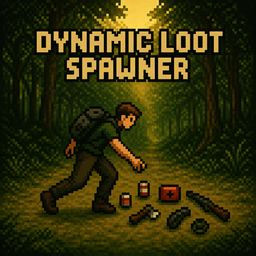
Dynamic Loot Spawner Tired of empty towns and already-looted areas? Dynamic Loot Spawner creates loot dynamically as you explore, keeping scavenging relevant even in long-running worlds and multiplayer servers. Instead of simply refilling containers, loot appears directly in the world and reacts to location, environment, room types, surfaces, skills, Hot Zones, and vanilla loot settings. The result is a more dynamic and unpredictable scavenging experience where exploring new areas continues to matter. Dynamic Loot System Loot is generated around active players while they explore. Two Spawn Modes: - Radius Mode: Loot can spawn within a configurable area around the player. - Directional Mode: Loot spawns ahead of the player, creating a more path-based scavenging experience. Loot always appears as world items and never inside containers or vehicles. Contextual Loot The environment influences what loot can appear and how frequently it is generated. Interior Context: - Buildings provide configurable loot bonuses. - Room types influence loot: kitchens favor food, garages tools, offices books, bedrooms clothing, and more. - Loot can appear naturally on valid tables, counters, shelves, and workbenches. Exterior Context: - Roads, forests, industrial areas, parking lots, rural zones and other environments influence loot. - Exterior context can combine with other bonuses and Hot Zones. Pulsating Hot Zones Hot Zones are temporary dynamic loot events that evolve over time: Appear → Expand → Stabilize → Collapse Each zone has a changing radius and loot bonus, encouraging players to explore temporary high-value areas. Available themes include: - Urban - Commercial - Industrial - Military - Forest - Residential When the Hot Zone theme matches its environment, an additional synergy bonus can be applied. Duration, intervals, radius, bonuses and available themes are fully configurable. Foraging Integration Foraging skill can increase the chance of discovering dynamic loot. The bonus scales with skill level and can be configured through Sandbox settings, rewarding characters specialized in exploration without overpowering the early game. Rarity & Customization Custom Rarity System: Junk, Common, Uncommon, Rare, Epic and Legendary. Deep Sandbox Settings: - Spawn frequency and behavior - Radius and Directional modes - Loot rarity and category probabilities - Interior and exterior multipliers - Room and surface modifiers - Foraging bonuses - Hot Zone behavior and themes - Contextual multiplier caps - Vanilla loot multiplier integration This allows the system to be balanced for anything from scarce survival games to high-loot multiplayer servers. Performance & Multiplayer - Lightweight, event-driven systems. - Only active real players trigger dynamic loot. - Anti-flood logic prevents excessive item accumulation. - Loot only appears in valid locations and surfaces. - Never spawns loot inside containers or vehicles. - Compatible with NPC mods — NPCs do not trigger loot generation. Debug Tools Advanced debug tools are available for testing and server configuration, including Hot Zone overlays, radius and state information, detected environments, contextual modifiers and active bonuses. Final Notes Dynamic Loot Spawner is not a container refill system. It creates new scavenging opportunities based on where and how you explore, allowing forests, buildings, roads, industrial areas and temporary Hot Zones to provide different experiences. Explore, move, survive — and keep the world worth scavenging. This mod's permissions fall under TIS's policy Ask for permission This mod can only be added to and extended with the express permission from the original creator. Having received permission, credit must be given to the original creator, both within the files of the mod and wherever the mod roams online. If no permission is received you may not alter the mod, and it must be treated as a mod that is 'On Lockdown'. The only exception is that servers may freely include this mod in their modpacks, with the freedom to alter it or make modifications as they see fit, as long as credits are properly given to the original creator. Support the Mod Support the Project If you enjoy this mod and want to support future updates and new systems: Your support helps expand the project and keep development active. Every contribution makes a difference. Thank you for your support! A like or favorite helps a LOT! Workshop ID: 3549517462 Mod ID: DynamicLootAround

Onii-chan Jumpscare
von 76561198047485926
Onii-chan!! instead of jumpscare sound Workshop ID: 2826463844 Mod ID: ONII-CHAN-JUMPSCARE
![Pee In A Bottle + new trait [MP] – Project Zomboid Mod](https://images.steamusercontent.com/ugc/1817766658931300495/5F5EB8326BF5E95188E571CBD413AD4972B2117E/)
Pee In A Bottle + new trait [MP]
von 76561198106790506
Dry mouth, empty water bottle and desperate? Wait no more, pee in a bottle and feel that urge go away! This mod is perfect for people who wants that extra "realistic" touch to their gameplay. When water runs out, and you no longer can find drinks, you'll only have one option, especially when you're alone, dehydrated and desperate, just grab that one empty water bottle you found earlier and pee in it, and drink it. For best effect, you should filter it before consumption. Obviously drinking pee isn't the best solution to your problem, but it might just get you just a little bit further. FUTURE PLANS: - Intervals/Timer between your last pee. (I am pretty sure people can't pee infinitly at a time... Right?) - Potential cooking usage?? No, thats disgusting... Or is it? - Custom Pee Bottle model when dropped on the floor. (Currently it's a soda can) USAGE: 1. Find a empty water bottle. 2. Right click the empty water bottle in your inventory. 3. Pee In Water Bottle. 4. You know need to filter your "Unfiltered Pee In a bottle" using a Pee Filter. (20% spawn chance when killing zombies) 5. Filter the pee using the "Pee Filter". 6. Enjoy your filtered drink. YOU CAN ALSO DRINK IT UNFILTERED, BUT YOU GAIN LESS HYDRATION AND MORE UNHAPPINESS. WITH THE "HAPPY PEE DRINKER" TRAIT YOU CAN FILTER IT WITHOUT THE PEE FILTER. Unfiltered Pee In a bottle Filtered Pee in a bottle Pee Filter FAQ Do I need to wipe my server or does it work on a existing save? - It works fine on both new and existing saves! Does it work for multiplayer? - Yes it works great on multiplayer. Why? - Imagine this... You're driving your car on the highway, low on fuel and BOOM, your car runs out of fuel in the middle of the highway, miles away from closest civilization. You then realise that you're dying from dehydration, you quickly check your backpack for water or a soda, ANYTHING, but only find a empty water bottle... Knowing well that you will not make the rest of the trip on foot... So you do the only thing you can think about... Pee in the bottle, and you do, and you drink it, managing to make that last little bit on foot.. ALIVE. (That's why) DISCLAIMER: NO OTHER MODS REQUIRED! Make sure to comment if you got any questions or suggestions, thanks for downloading the mod! Do not copy & publish this mod without permission. Thanks MrAtomicDuck for show casing my mod in your video! Check the video out HERE! Workshop ID: 2724917045 Mod ID: peeinabottle
Dog Owner
von 76561198441197216
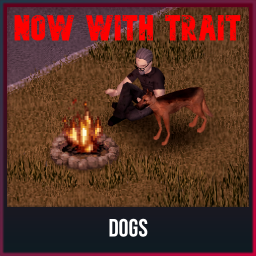
A simple mod that adds a dog owner trait for Dogs mod. How it works? You take the "Dog Owner" trait, when you start the game you will appear with a dog. Default name "Bobik", but you can change it in the sandbox menu or in the game. Так же прикрутил перевод на русский. Workshop ID: 3273039850 Mod ID: DogOwner
Project Zomboid Details →
Project Zomboid Guides
Project Zomboid Mods installieren - Workshop Guide
Installiere Project-Zomboid-Mods sauber per Steam Workshop: IDs eintragen, Reihenfolge prüfen, Server neu starten und typische Fehler beheben.
Project Zomboid Build 42 auf dem eigenen Server: Umstieg, Spielstände und Mods
Build 42 ist Stable: Spielstände aus Build 41 sind nicht kompatibel. Umstieg, legacy41-Zweig, neue Serveroptionen, Anti-Cheat und der Hotfix 42.20.1 gegen Serverlag.
Project Zomboid Server mieten – Multiplayer Guide
Project Zomboid Server einrichten: RAM, Sandbox-Einstellungen, Workshop-Mods, Admin-Rechte und typische Fehler sauber prüfen.
Project Zomboid Server mit Mod-Support
Kompatible, unterstützte Mods über das Server-Dashboard installieren.
Project Zomboid Server mieten