Mods & Plugins für Project Zomboid
Dieser Katalog listet 52.000+ Project Zomboid-Projekte von Steam Workshop. Einträge können serverseitig, clientseitig oder auf beiden Seiten erforderlich sein und auch Karten oder andere nutzergenerierte Inhalte umfassen. Prüfe vor der Installation die verlinkte Quellseite, Spielversion und Abhängigkeiten.

CangSang's music
von 76561198364655653
1 Workshop ID: 2917310408 Mod ID: cangsang's music

Pack Mule
von 76561197989461826
New trait that gives you a special backpack with 100% weight reduction and increased capacity. Workshop ID: 2557094346 Mod ID: PackMule
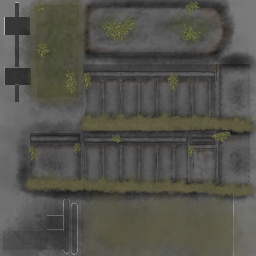
Burnt out rusty trailers and 10 Years Later trailers
von 76561199185963669
Mod adds burnt out rusty trailers and 10 Years Later trailers textures This mod was created as an addition to my mod "Burnt Cars Everywhere" Don't judge me harshly, I've never worked with textures before and it's been a long time since I painted at all. Why do trailers have tires and why does the trailer have fabric on it? - Because that's all I can do. It will probably affect wheels and fancy cars, if so, then you can remove the wheel texture. Workshop ID: 3436303450 Mod ID: BurntRustyTrailers Mod ID: BurntTrailers10YearsLater
NSZL
von 76561197980050664
Load UI for use on NSZ Servers. Workshop ID: 2758904796 Mod ID: NSZL
![[41] add Vehicle central Locking Hotkey – Project Zomboid Mod](https://images.steamusercontent.com/ugc/1861687449956031881/ED9851C849CB7E0918AE577B541684DE902AF7EC/)
[41] add Vehicle central Locking Hotkey
von 76561198073717195
new mod : https://steamcommunity.com/sharedfiles/filedetails/?id=3786522019 HOTKEY B41 Central locking from outside the vehicle with the shortcut key Shift + X, all doors and car trunk are lockable/unlockable at once. If you think this mod would be interesting for the community Workshop ID: 2811440105 Mod ID: addCentralLockingHotkey

MJ KOR PATCH
von 76561198125196482
// 이 모드는 업데이트를 중지합니다. 컴퓨터 포맷으로 인해 파일을 전부 날려서 새로 만들어서 새로 업로드한 모드를 사용해주세요. 새로운 한글 번역 모드 바로가기 물론, 이 모드도 작동은 하니 삭제는 안하겠습니다. 감사합니다. ------------------------------------------------------------------------------------------------------------------ 내가 사용하는 모드 간단하게 한글 패치 >> 한글 패치 목록 - True Actions. Act 2 - Lying - True Actions. Act 3 - Dancing - True Music - ZuperCart - Carts & Trolleys - Skill Recovery Journal - Vanilla Crafting Expanded - Weapon Condition Indicator - The Nutritionist - Containers - Vehicle Recycling - Thread and Twine - Craftable Dairy Foods - Autotsar Trailers - FuelAPI - Gas Barrels - Fuel API Version - Moar Can Openers (샌드박스 설정 번역) - Insect Recipes - Extra Map Symbols - ExtraSauce Instant Consolidation >> 추가 모드 SmartStack (한글 + 개조버전) - UI 위치가 불편하게 되어있어 수정했습니다. - 원래 이 모드를 사용했다면 해당 모드를 빼시고 이 모드를 활성화 하시면 됩니다. Dynamic Traits (한글패치) - 따로 사용을 안하는 경우가 있어 분리해놨습니다. Eris Food Expiry (한글 + 개조버전) - UI 위치 문제 수정 - 피트니스 직업으로 할 경우 영양사 특성을 가지고 있음에도 불구하고 작동이 안되는 문제 수정 - 원래 이 모드를 사용했다면 해당 모드를 빼시고 이 모드를 활성화 하시면 됩니다. Workshop ID: 2731530165 Mod ID: MJ KOREAN PATCH (41 ~) Mod ID: MJ KOREAN PATCH (41 ~) - Dynamic Traits Mod ID: MJ KOREAN PATCH (41 ~) - Eris Food Expiry Mod ID: MJ KOREAN PATCH (41 ~) - Smart Stack
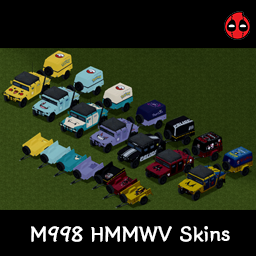
M998 HMMWV skin-Bro_HS
von 76561198442173176
M998 험비 스킨 입니다. - 스킨 목록 피카츄 꼬부기 잠만보 팬텀 데드풀 울버린 건담 해당 모드의 이미지 저작권은 원 저작자인 해소르(Bro_Hsol)에게 있으며, 모드와 관련된 모든 무단 복사를 금지합니다. Workshop ID: 3368518315 Mod ID: M998_HMMWV_skin-Bro_Hsol

Super Girl Clothes
von 76561198853792665
I really like the look of Super Girl Zombie, but I don't want zombies to have the same appearance. Having too many Super Girl Zombies on screen at once can also impact performance. - Crafted using Ripped Sheets - The same outfit comes in summer and winter versions. The summer version has an insulation value of 0.2, and the winter version has an insulation value of 0.8 - Bite and scratch defense: 30%. Provides decent protection without being overpowered - It is recommended to set to 1024 for the best experience Original Mod: https://steamcommunity.com/sharedfiles/filedetails/?id=3402496217 Recommended Mod: Better Dressed - Transmog Lets you hide or transmog worn clothing and containers. https://steamcommunity.com/sharedfiles/filedetails/?id=3599514194 Workshop ID: 3720366546 Mod ID: SuperGirlClothes
![[COS] ZOE_CLASH – Project Zomboid Mod](https://images.steamusercontent.com/ugc/2204009206496159864/C9A6C15E646F825787F0D71C51568AE87DCBCC7E/)
[COS] ZOE_CLASH
von 76561199178116693
How Do I Use It? - You can go to the link below to see how to use it. - Link Recommended mode - Fashionoid - Gear Transmog - Hide All Attached Items - Clipping animation Fix How to use COS mode in build 42. - Navigate to the path where the mod is installed. - Create a 42.0 folder. - Create a common folder. - Paste the media folder / mod.info / preview.png into the 42.0 folder. The recipe code writing method has been changed in 42Build. Since COS (Costume) mode has approximately over 200 modes, converting to 42Build's recipe code is an extremely laborious task. In 42Build, you cannot create costumes in (42 build) the crafting tab. There are two methods: Spawn items in cheat mode. Select items in the clothing selection screen when creating a character. Like My Mode? - Join Our Discord If You Want Commission
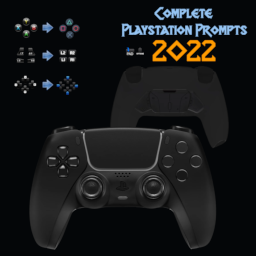
Complete Playstation UI (2022)
von 76561198101624353
This changes ALL the Xbox buttons compared to other mods which only changed the face buttons. In other words, This is a complete gamepad prompt change for people who use PS4/PS5 controllers. You can also check out the Better Gamepad UI. https://steamcommunity.com/sharedfiles/filedetails/?id=2825579266 Workshop ID: 2824754734 Mod ID: Complete_Playstation_Icons
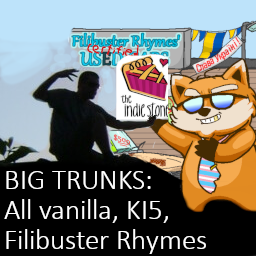
TEH Big Car Trunks (Vanilla, KI5, and Filibuster Rhymes)
von 76561198026598168
Big trunks (all vanilla and all KI5 cars and trailers up to Toyota AE92, and Filibuster Rhymes) + removed damage modifier. Only suitable for build 42. Reference values: small cars mostly unchanged, normal cars at about 75 capacity, SUV 120, SW 150, Pickups 200, 2-Seater vans 300, Step vans and trucks 400+. Trailers up to 1000. Capacities may vary depending on car, trim and manufacturer. Still rookie numbers? Check out DOUBLE sized version! Please read following important notes carefully: - This mod should be manually sorted to the bottom of the mod list (thru MOD ORDER button) to be loaded after car mods. - if added to existing save, already existing cars will be stuck with old max capacities. Only newly spawned cars will work! - Maximum load of 1000 (1300 if "Organized") is limited by the game, not this mod. - Vanilla trailers are broken (100 cap, can't change) Other notes: - Each car family is enabled by own submod. - This mod overrides several car templates. If you use other mods doing the same, consider changing mod order accordingly. - Wheel suspension may fail at about 2000 combined weight (car + cargo). In that case, unload it below the limit and drive backwards or push with some other car, or use as a stationary storage. - Please report errors or missing vehicles! Happy hauling! Update details, support and ongoing development in Discord search terms: storage, K15, кузов, багажник, КИ5, К15, maletero, baul Workshop ID: 3502122415 Mod ID: tehbigtrunk42 Mod ID: tehbigtrunk42fr Mod ID: tehbigtrunk42ki5

Zombie Glue
von 76561198996186547
Turn Zombies into glue A corpse, an empty bottle, and some hot water will give you a bottle of glue. You need a knife to cut the corpse. Glue bottles now give you an empty water bottle when empty. send me ideas https://discord.gg/xzPyyDm4Ek Workshop ID: 2653815681 Mod ID: ZombieGlue
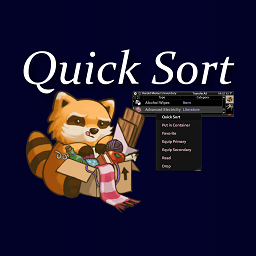
Quick Sort
von 76561197978416812
Adds a Quick Sort option to items in your inventory/bags. NOTE: This mod hasn't been tested by me beyond build 40.43. When used on a single item, it will search explored containers within 10 squares (items like Medkits and other similar containers are ignored) for ones that contain the item you're Quick Sorting. If containers with the item are found, it will transfer all non-favorited, non-equipped items from the same source inventory to those containers. This functionality was inspired by the Terraria "Quick Stack to Nearby Chests" button, which I have missed dearly. More Details/Features: - It is possible to queue multiple "Quick Sort" actions back to back to quickly sort large amounts of items. - Multiple containers will be used if multiple containers are nearby that contain the item, but one container cannot fit all of the items being sorted. - "From the same source" inventory means if you, for example, have a Book in both your main inventory and a backpack, and you use Quick Sort on the one in your main inventory, the one in your backpack will not be transferred. This applies vice-versa as well. - Using Quick Sort on an item in a backpack (or any container you access in your inventory) will first transfer the item to your main inventory, and then to the container. Disclaimers: - "Explored containers" means that you should have to have seen the inventory of the container before your character "knows" what items are there. The aim of this is to avoid being able to search for items in unexplored containers by using one you already have, without having to really look around. This seems to work, but it has not been tested long term and I'm not 100% sure on the mechanics of this. Known Issues: - Depending on the closest adjacent/open tile to a container, your character might deposit items through a wall sometimes. I might try to fix this at some point in the future but for now it seems Good Enough TM Workshop ID: 2163270729 Mod ID: RPQuickSort
![[COS] Psycho – Project Zomboid Mod](https://images.steamusercontent.com/ugc/2070009996130312110/9E9CD023F52AC73D4FB054A8275AAE9A39C55DF8/)
[COS] Psycho
von 76561199178116693
How Do I Use It? - You can go to the link below to see how to use it. - Link Recommended mode - Fashionoid - Gear Transmog - Hide All Attached Items - Clipping animation Fix How to use COS mode in build 42. - Navigate to the path where the mod is installed. - Create a 42.0 folder. - Create a common folder. - Paste the media folder / mod.info / preview.png into the 42.0 folder. The recipe code writing method has been changed in 42Build. Since COS (Costume) mode has approximately over 200 modes, converting to 42Build's recipe code is an extremely laborious task. In 42Build, you cannot create costumes in (42 build) the crafting tab. There are two methods: Spawn items in cheat mode. Select items in the clothing selection screen when creating a character. Like My Mode? - Join Our Discord If You Want Commission
![Skully's Faster Attack Speed [B42.20+] – Project Zomboid Mod](https://images.steamusercontent.com/ugc/17193588153188317391/807E4490E5612FDE9449C0DAF3269C3550BF1A3F/)
Skully's Faster Attack Speed [B42.20+]
von 76561197961658983
A mod with 2 types of modules which should speed up combat. Improves melee combat responsiveness without changing weapon identity or damage. This mod is split into two optional modules. You can use either one or both together. Modules are enabled separately as mods in your mods list. No sandbox options Module 1 – Faster Attack Recovery Reduces the delay between attacks after each swing, making combat feel smoother and more responsive. - Shorter recovery time between attacks - Faster chaining of swings - No changes to damage EXAMPLES WITHOUT FASTER SWING MODULE Module 2 – Faster Swing Speed Increases the actual speed of weapon swing animations. - Faster attack animations - More aggressive combat pacing - Weapons feel more responsive overall - Fully compatible with weapon mods - Requires restart to enable/disable modules after loading a save - Likely functions in multiplayer Feedback is welcome. Shoutout to this mod for fixing an issue for all this time that i didn't update: Fix mod My mods: Workshop ID: 3702483515 Mod ID: SkullysFasterAttackSpeed Mod ID: SkullysFasterSwingSpeed
![[ODST] – Project Zomboid Mod](https://images.steamusercontent.com/ugc/17973092550960563922/56A083B591EF0A2D73A362F472CC0DA9C96C43DB/)
[ODST]
von 76561198068788655
Orbital Drop Shock Trooper Adds the Legendary ODST Outfit to Kentucky! Found in & Around Military Locations In Knox County Should Fit All Body Types? Male Female. AVA Etc! VISOR MODES: ON / OFF ADDED! Hot Diggity Dawg it's got 512x512 optimised textures Support Free & Open Modding! You can Grab ALL of my mods including ones steam hates or has nuked Etc From report spam On My Discord! The Mod Haven Discord Project AVA V3X Is Found there :P PERMISSIONS. ASK FOR ALL MOD INQUIRIES RELATED TO PERMISSIONS: IE: do not re-upload this Mod under ANY circumstances. Not On the Workshop, or Anywhere. Support the 'Official' Release. Workshop ID: 3524472875 Mod ID: NPDM_ODST_B42
![Reward Night Combat [B42] – Project Zomboid Mod](https://images.steamusercontent.com/ugc/14071260668140339111/0B8E3BA02BCB1848227089D6B1D103384091EE4D/)
Reward Night Combat [B42]
von 76561198106717531
Original mod by Nihilist Penguin, all credits go to them! You can find the original mod here. Do you frequently find yourself wanting to venture out during the night but struggle with motivation? If so, this mod is for you. With it, you will have the opportunity to gain significantly more experience points for your combat skills during nighttime. Simply put, Rewarding Night Combat gives you additional XP Boosts at Night for Combat related actions. Updated to 42.12.0, fixes the sound not playing when toggled on as well. Defaults By default, bonus XP will be applied to combat skills between the hours of 11 PM and 6 AM as follows: Skill Multiplier XP Bonus Axe 1.5x 50% Long Blunt 1.5x 50% Short Blunt 1.75x 75% Long Blade 1.5x 50% Short Blade 1.75x 75% Spear 1.5x 50% Aiming 1.5x 50% Customization Within Rewarding Night Combat, you have the flexibility to customize various details according to your preferences using the sandbox settings. These customization options are categorized as follows: Core Sandbox Settings • Specify starting and ending hours for each season (Summer, Autumn, Winter, Spring) • Adjust bonus multipliers for all combat skills. • Set the probability of triggering at the starting hour (default: 100%, equivalent to every day). • Define the number of days before the mod begins (default: 0, meaning it starts immediately on the first day). Optional Sandbox Settings • Enable a suspenseful sound effect that plays when bonus XP is activated. • Activate an indicator icon that displays information about currently applied bonuses through its tooltip. • Make the indicator icon draggable; you can move it by clicking with the left mouse button, release it, or reset its position using the Backspace key (the new position will be saved). • Choose from among six different color options for the indicator icon. (As shown below) ? Rewarding Night Combat can be safely added/removed mid-save! ATTENTION! Rewarding Night Combat Server Options template has NOT been updated YET, i will update it's format when B42 Multiplayer officially releases. Do NOT use the Build 41 version it is not compatible with the new B42 file structure and will not work with this mod. Bug Reports & Feedback I will be maintaining this version of Rewarding Night Combat! Got bugs or errors? Send them in the comments below! Provide the full error stack using the ErrorMagnifier mod. For bugs, please detail exactly how you got the bug (what your character was doing or what action you were doing before the bug occurred). Consider donating and buy me a coffee! (Click on the image below to donate) Workshop ID: 3573119313 Mod ID: RewardingNightCombatB42 Workshop ID: 3573119313 Mod ID: RewardingNightCombatB42
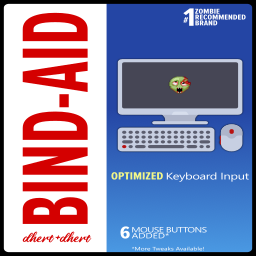
BindAid - Input Handler
von 76561197997880978
Supports B41+. Works in Multiplayer A new save is not required Input Binding Manager for Project Zomboid which provides optimizations for keyboard input events and additional Mouse button support with optional keyboard emulation. Features - Keyboard Input Optimization - Modifier key Support (Currently for Modders. Now Syncs in MP!) - Additional Mouse Button Support - Mouse Button Keyboard Emulation - Autohide the Mouse Cursor - Easy API for Modders! Modifier Key By default, Left Control is set to be the "Aim" key with the keyboard. I believe the key can be put to better use, and intend to replace the key's usage to be a Modifier. I HIGHLY RECOMMEND that you unset the default "Aim" key to nothing (you have Right Click), or change the Modifier key to something else. For now the Modifier key is mostly a Modder's tool, but in the future I plan on allowing vanilla keybindings to be set with the Modifier. Mod Options Mod Options is REQUIRED to configure this mod; however, it is not a requirement for its operation. When your first install this mod, please take some time to set up its configuration based on your own needs using Mod Options. Further information on the available options is available below. When Mod Options is NOT enabled for a save, your configuration will still be read and applied. THIS MEANS Server Owners can safely include this mod without also requiring Mod Options, and user configuration will still be used. Keyboard Input Optimization A full breakdown is available here: BindAid's Keyboard Input Optimization - What It Be, and How It Do In summary, there are 4 general events that are triggered for input handling, and each event will call multiple functions for each keypress. Event Trigger # of Functions OnKeyStartPressed When a key is pressed 10 OnKeyKeepPressed When a key is held, every frame 9 OnKeyPressed When a key is released 26 OnCustomUIKey When a key is released 1 This occurs for ALL keypresses, whether they have actions bound or not. Multiple keypresses multiply the number of functions called per frame. This is not an issue for most people, but I have organized and optimized how this is handled so only 1 function is called during the event, which then calls the keypress if applicable. This feature can be disabled in the Mod Options configuration. If changed while in-game, a restart is required. Compatibility I have created this in a way that should have maximum compatibility. If you have any issues with a vanilla key not being triggered, I would recommend disabling this optimization and letting me know. I cannot fix all mod compatibility, and some may require changes by the Modders. For Modders, please see: BindAid - Modder's Resource - Mods that add their own NEW keys are not affected. - Mods that modify vanilla functions for keypresses will be compatible as long as their changes are made no later than OnGameStart, and any modifications are forwarded. Mouse Buttons That's right, BindAid provides support for additional Mouse Buttons! Project Zomboid provides support for an additional 6 Mouse Buttons, but only has events bound on Left and Right Click. I have added Events to handle more Mouse Buttons! You will need to select the number of Mouse Buttons that you would like to have support for in the Mod Options. A restart of the game is required after you have made this change. The Mouse Buttons have 2 different modes: Mouse Button Events (default) and Keyboard Emulation. An option is available to enable both methods to run as well. Mouse Button Events When Mouse Button Events are in use, the additional Mouse Buttons are handled similarly to keybind events. Modders can hook into these events to allow additional actions to be done on a Mouse Button Press/Hold/Release. Please see: BindAid - Modder's Resource THIS MEANS, BY DEFAULT, MOUSE BUTTONS PERFORM NO NEW ACTIONS! MODDERS MUST ADD SUPPORT FOR THIS! Keyboard Emulation New in the "Key Bindings" Options Tab will be the Mouse Buttons that are supported under the "BindAid" section, each set to a key bind of "None". Setting a Key here on a Mouse Button will instead cause an emulated Keypress to be done instead of the Mouse Event! For example, you can bind "Reload" to the Middle Mouse Button. NOTE!!! The Emulated Keypress is ONLY done in Lua, so it will not trigger functions defined in Java. This means you cannot assign a key to "Move Forward" or something like that; it won't work. Actions such as Reloading, Shout/Emote, and many others are available, as well as new keybinds added by other mods (the main target). Workshop ID: 2945066057 Mod ID: BindAid
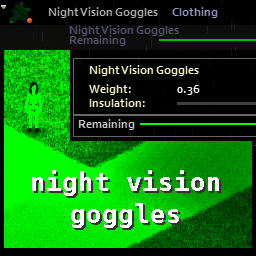
Eris' Night Vision Goggles RM update
von 76561198066517749
Original mod by Eris. All the original code and functionality is theirs, I resolved a few conflicts in the code to restore functionality, and rewrote the distributions file to work in the new procedural system. I also changed the model from a balaclava to a welder mask, because it seemed more logical to me, and removed the NV scope and taclights because they didn't have any actual functionality. Again, all original credit is to Eris. I just resurrected it. -RM UPDATE 8/26/24 Changed model to Shooting Glasses instead of welder mask. Eliminated clipping issues with hats, and there are no vanilla conflicts with glasses. Item is in the TorsoExtra slot, so it does conflict with aprons in vanilla and any mod that uses that slot. Workshop ID: 3135634599 Mod ID: eris_nightvision_goggles_RMupdate
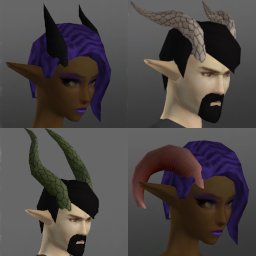
Fantasy Bodyparts
von 76561198800866700
Fantasy Bodyparts A mod for me to add various fantastical bodyparts to. Items with colour picker are also dyeable (in B42). I will no longer backport changes to this mod to B41 for the following reasons: - I've stopped playing B41 a while ago and don't plan to return (too many fun features in B42 ;) - since B42 now has MP and is creeping towards stable, I expect more and more people will start switching over anyways - B42.13 has introduced a lot of changes to identifiers (internal names for all things in the game), which makes backporting to B41 a bit of a pain, where previously it was mostly copying files into a different folder. - I am incredibly...massively...stupidly...mind-bogglingly...lazy (ok, I've always been lazy, but could motivate myself if asked nicely...however, the B42.13 reason put the last nail in the coffin for me) If you do want to backport it yourself feel free to do so (but as always, if you publish it give credit where credit is due :) Currently contains: - various horns (use Hat slot on B41/B42.12; use custom "Horns" slot on B42.13+) - unguligrade/digitigrade (with paws or claws) legs (uses Boots slot on B41; uses custom "Legs (Fantasy)" slot on B42) -- default mesh works with vanilla body -- enable "Fantasy Legs - Tomb's Body" patch (part of this mod) to use mesh compatible with Tomb's Player Body Overhaul - paw-like/claw-like hands (implemented as gloves) -- default mesh works with vanilla body -- enable "Fantasy Arms - Tomb's Body" patch (part of this mod) to use mesh compatible with Tomb's Player Body Overhaul - arm wings (bat-like, B42 only): use the Elbow L/R slots - neck fur/feathers (implemented as a scarf; four variants with various stats) - tails (reptile/dragon/demon) - elven ears and merfolk ears (B42 only) (use custom slot "Ear Base") - additional skincolours (use custom slot "Additional Skin Colour"): add a tint to the base skin colour - scaly patches (use custom slot "Additional Skin Colour") NOTE about the legs: - due to the way they are implemented, they crop (vanilla) long pants and clip through skirts -- managed to improve this quite a bit on B42 - they can be worn with socks (socks will be invisible) and on B42 also with shoes - they should be VERY durable (high condition value with low chance for damage, no holes) - I am open to feedback on balancing regarding protection, insulation, etc. Ideas for additional stuff: - still more horns? - antlers? - more "Additional Skin Colour" stuff: fur, scales, etc.? Credits (for the mod poster) - Hair: "Zarina" and "Side Swept" from the mod Spongie's Hair - Body: Tomb's Player Body Overhaul + Spongie's Character Customisation - Pointy ears: from Elf Ear Additional credits to Tomb (as in Tomb's Player Body Overhaul) for letting me use his models and textures as a basis for the unguligrade legs :) Related mods - Cat Ears and Tail - Wolf Ears and Tail - Faun Parts and Skin - Fox Ears and Tail - Harpy Parts - Draenei Parts - Fantasy Magic Workshop ID: 3589269108 Mod ID: RabenRabo_FantasyArms Mod ID: RabenRabo_FantasyArmsTombsBody Mod ID: RabenRabo_FantasyHorns Mod ID: RabenRabo_FantasyLegs Mod ID: RabenRabo_FantasyLegs_TombsBody Mod ID: RabenRabo_FantasyMisc Mod ID: RabenRabo_FantasySkins Mod ID: RabenRabo_FantasyTails
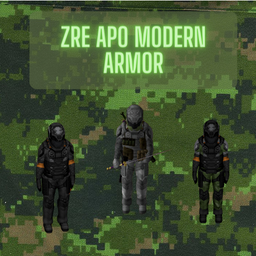
Zre Apo Modern Armor
von 76561198215872069
zRe Apo Modern Armor! craftea esta increible armadura! No es Nesario El Mod de System Absorb. pero si Quieres que tu armadura se le puedan meter Placas a lo Warzone Si! jaja. espero les Guste. Workshop ID: 3226550912 Mod ID: zReApoModernArmor
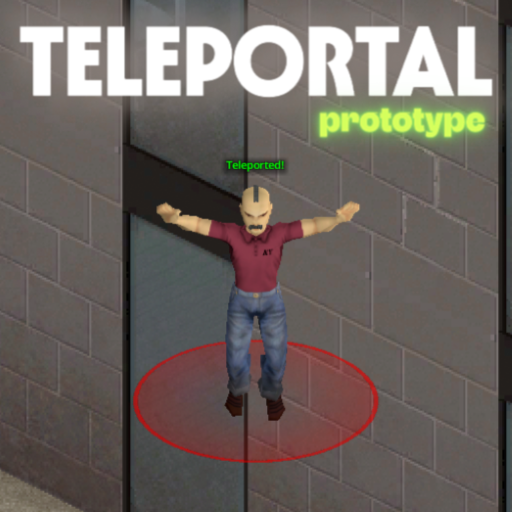
TeleportalPrototype
von 76561198104032910
Sponsors Teleportal - Prototype Teleportal allows administrators to set up a network of instant travel points for seamless movement across the map. - Instant Location-to-Location Travel: Walk through a portal and arrive at your destination in the blink of an eye. - Telecorn is a myth: Always drop corn on the source tile. - Easy-to-Spot Markers: Find your way quickly with bright color-coded markers identifying portal entrances and exits. - Safe & Convenient Routes: Connect distant bases, safe zones, or player hubs without the long, dangerous walk. - Balanced Gameplay: Customizable cooldowns between uses prevent travel spam and keep the survival challenge intact. - Reliable Travel Network: Once set up, portals provide a permanent and organized way for everyone to navigate. This mod is best for multiplayer servers and roleplay communities looking to simplify travel while keeping the experience fair and organized. New suggestion for the mod? Create a workshop discussion or open a commission via Ko-fi. > Reach my Discord Server for details - https://discord.gg/mQadasYfKA Ask for permission This mod can only be added to and extended with the express permission from the original creator. Having received permission, credit must be given to the original creator, both within the files of the mod and wherever the mod roams online. If no permission is received you may not alter the mod, and it must be treated as a mod that is 'On Lockdown'. Support the Author If you find this mod helpful, consider supporting the author on Ko-fi: https://ko-fi.com/escapepz Build 42 | Multiplayer | Utility | Admin-Tool _____ Workshop ID: 3641268718 Mod ID: esc_teleportprototype
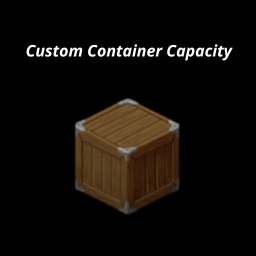
Custom Container Capacity
von 76561199106999378
Custom Container Capacity This mod was created for personal use, but maybe someone else will find it useful. Tested on: B42 (legacy_42_12) ⚠️ Known Limitations - Multiplayer B42.13+: Capacity bypass does NOT work in MP. The game has a hardcoded server-side limit (~100) that cannot be bypassed via Lua mods. This is a game limitation, not a mod bug. - Singleplayer: Works fully on B42.12.3 and B42.13.1 Description Allows you to change the capacity of individual containers via right-click menu. Each container can have its own custom capacity. How to use - Right-click on any container (cabinet, shelf, fridge, crate, etc.) - Select "Set Capacity" - Enter a custom value Options - Original - resets to default capacity - Custom - enter any value (1-10000) What it affects - ✔ Furniture (cabinets, shelves, fridges, crates, etc.) - ✔ Containers with multiple compartments (fridge + freezer) - ✘ Bags and backpacks - ✘ Floor/ground items - ✘ Vehicles - ✘ Corpses Features - Per-container customization - No limits (vanilla caps at 100, this mod bypasses it) - Works with modded furniture Compatibility - Safe to add mid-game - Safe to remove (containers revert to default on next load) Support If you'd like to support my work: ko-fi.com/bonkmods Workshop ID: 3632815544 Mod ID: CustomContainerCapacity
![[B42] March Lake [DEPRECATED] – Project Zomboid Mod](https://images.steamusercontent.com/ugc/56960672874100188/E2FABFE41F93EFC53287D878A301BCA6F9A53D33/)
[B42] March Lake [DEPRECATED]
von 76561199188020977
Ever wanted to live the knox infection in 1893? Well now you can! March lake is a small map inspired off the wild wild west, it has 2 little small towns, 1 big apple and a ghost town right next to it with a big copper mine! Sooo many places to explore eh? Happy surviving partner! IMPORTANT: The map does not support b41. It takes place in 1893 Kentucky. This is a standalone map. It is not complete, there is still alot to be done. The map does mess with the loot spawns a bit. V1.4 Workshop ID: 3409318231 Mod ID: marchlake_b42 Mod ID: marchlake_b42 Map Folder: March lake Map Folder: March lake
Project Zomboid Details →
Project Zomboid Guides
Project Zomboid Mods installieren - Workshop Guide
Installiere Project-Zomboid-Mods sauber per Steam Workshop: IDs eintragen, Reihenfolge prüfen, Server neu starten und typische Fehler beheben.
Project Zomboid Build 42 auf dem eigenen Server: Umstieg, Spielstände und Mods
Build 42 ist Stable: Spielstände aus Build 41 sind nicht kompatibel. Umstieg, legacy41-Zweig, neue Serveroptionen, Anti-Cheat und der Hotfix 42.20.1 gegen Serverlag.
Project Zomboid Server mieten – Multiplayer Guide
Project Zomboid Server einrichten: RAM, Sandbox-Einstellungen, Workshop-Mods, Admin-Rechte und typische Fehler sauber prüfen.
Project Zomboid Server mit Mod-Support
Kompatible, unterstützte Mods über das Server-Dashboard installieren.
Project Zomboid Server mieten