Project Zomboid Mods für Server
Für einen modifizierten Project-Zomboid-Server brauchst du pro Projekt die Steam-Workshop-ID und die interne Mod-ID. Prüfe zusätzlich Spiel-Build, Abhängigkeiten und Lade-Reihenfolge, bevor du deine Welt mit den Änderungen startest.
Project Zomboid Mods sicher installieren
Ein Workshop-Abo allein aktiviert eine Mod auf dem Dedicated Server nicht. Die Einträge in `WorkshopItems=` und `Mods=` müssen zusammenpassen; außerdem muss jede Mod den gewählten Build 41 oder Build 42 ausdrücklich unterstützen.
- 1. Build prüfen: Build-41- und Build-42-Mods nicht ungeprüft mischen.
- 2. Workshop-ID, Mod-ID, Abhängigkeiten und erforderliche Reihenfolge vollständig dokumentieren.
- 3. Welt und Konfiguration sichern, Server neu starten und Logs sowie den Beitritt mit einem Test-Client prüfen.
Die vollständige Schritt-für-Schritt-Anleitung findest du im Project-Zomboid-Mods-Guide. Oder starte direkt mit einem Project Zomboid Server mit Mod-Support.
Häufige Fragen zu Project Zomboid Mods
Was ist der Unterschied zwischen Workshop-ID und Mod-ID?
Die Workshop-ID bezeichnet das Steam-Workshop-Projekt und steuert den Download. Die Mod-ID aktiviert den enthaltenen Mod im Spiel. Auf dem Server müssen beide Listen vollständig und passend gepflegt sein.
Laufen Build-41-Mods automatisch mit Build 42?
Nein. Nutze eine Mod nur dann auf Build 42, wenn ihre Workshop-Seite diese Kompatibilität ausdrücklich bestätigt. Prüfe dabei auch alle Bibliotheken und weiteren Abhängigkeiten.
Wie teste ich ein Mod-Update ohne Risiko für die Welt?
Sichere zuerst Welt, Sandbox-Konfiguration und Server-INI. Aktualisiere danach die zusammengehörigen Mods, starte den Server neu und prüfe Logs, Kernfunktionen und einen vollständigen Client-Beitritt.
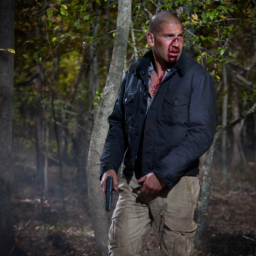
Shane Walsh - Season 2 Jacket + Pants from The Walking Dead
von 76561198072777956
The iconic jacket and cargo pants that Shane wears in Season 2 of The Walking Dead is now available in Project Zomboid! The perfect piece for roleplaying Shane Walsh! Where can I find the jacket? The jacket can be found inside wardrobes, clothing shops and lockers. If you want you can wear it from the start by using the mod "Fashion Montage - Begin with any outfit". You can find it inside the "Jacket" tab in character creation by the name "Shane Season 2 Jacket"! Is it possible to open the jacket? Yes, the jacket can be worn in two different ways, open jacket or closed jacket! Where are the pants? The pants replace the vanilla Military Desert Camo Pants! My other The Walking Dead Mods! Rick Grimes Murder Jacket - https://steamcommunity.com/sharedfiles/filedetails/?id=3185544130 Rick Grimes CRM Consignee Jacket - https://steamcommunity.com/sharedfiles/filedetails/?id=3181258786 Rick Grimes Commonwealth of Virginia Law Enforcement Uniform - https://steamcommunity.com/sharedfiles/filedetails/?id=3247341641 Rick Grimes Season 2 Jacket - https://steamcommunity.com/sharedfiles/filedetails/?id=3195231754 Rick Grimes King County Sheriff Uniform - https://steamcommunity.com/sharedfiles/filedetails/?id=3245827102 Carl Grimes Atomic Paw T-Shirt - https://steamcommunity.com/sharedfiles/filedetails/?id=3173845020 Glenn S2 Yellow T-Shirt - https://steamcommunity.com/sharedfiles/filedetails/?id=3179757406 Glenn S2 Jacket - https://steamcommunity.com/sharedfiles/filedetails/?id=3179623177 Glenn S2 Blue T-Shirt + Cap - https://steamcommunity.com/sharedfiles/filedetails/?id=3176638382 Shane Walsh Sheriff Dept. Cap - https://steamcommunity.com/sharedfiles/filedetails/?id=3280286274 Shane Walsh Police Cap - https://steamcommunity.com/sharedfiles/filedetails/?id=3177687013 Shane Walsh Sheriff T-Shirt - https://steamcommunity.com/sharedfiles/filedetails/?id=3175257570 Sophia Peletier Rainbow T-Shirt - https://steamcommunity.com/sharedfiles/filedetails/?id=3174943761 Carl Grimes TWD Voice Sound Effect - https://steamcommunity.com/sharedfiles/filedetails/?id=3143511778 Rick Grimes TWD Voice Sound Effect - https://steamcommunity.com/sharedfiles/filedetails/?id=3143510398 Daryl Dixon TWD Voice Sound Effect - https://steamcommunity.com/sharedfiles/filedetails/?id=3143513805 Shane Walsh TWD Voice Sound Effect - https://steamcommunity.com/sharedfiles/filedetails/?id=3148577212 Michonne TWD Voice Sound Effect - https://steamcommunity.com/sharedfiles/filedetails/?id=3165045380 Eugene Porter TWD Voice Sound Effect - https://steamcommunity.com/sharedfiles/filedetails/?id=3164314300 The Walking Dead 30 Songs Pack - https://steamcommunity.com/sharedfiles/filedetails/?id=2934759628 The Walking Dead Comics - https://steamcommunity.com/sharedfiles/filedetails/?id=3174374087 I deeply apologize for any bad texture. Some of the textures were really hard to get exactly as the ones on the real jacket and pants. I still hope you like it and have fun using it! Workshop ID: 3275466688 Mod ID: Shane Walsh - Season 2 Jacket + Pants (TWD)
Lifestyle Music | Plants vs Zombies Music
von 76561198106725667
This adds a number of songs from the Plants vs Zombies franchise to the Lifestyle Mod! Included Songs: Keytar: -Zombies On Your Lawn Acoustric Guitar: -Watery Graves Electric Guitar: -Moongrain Duet: Accoustic & Electric: -Moongrain Added DJ & Jukebox: - Zombies on Your Lawn - PvZ Garden Warfare Main Theme Workshop ID: 3170147542 Mod ID: PVZLifestyleAddon
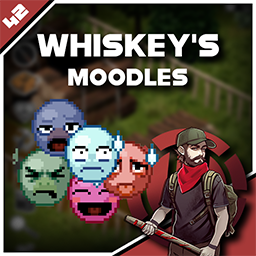
Whiskey's Moodles
von 76561198036970860
Description This mod replaces the new moodles with the old ones. I also redrew some of the old moodles 2 options borders with transparent background were added. Also, for those who like the new icons, the option to change only borders is available MOODLES EXAMPLES Borders EXAMPLES Don't forget to like and add to favorites tags=Build 41, Build 42, Framework, Interface, Misc, Pop Culture, QoL, Textures visibility=public

+300 trait points
von 76561198054443179
Just a simple attempt to work around a trait mod that wasn't working anymore in 42.13. original mod link: https://steamcommunity.com/sharedfiles/filedetails/?id=899287010 Workshop ID: 3624152030 Mod ID: 300PointsTrait2

MoneyToXP
von 76561198167650346
Oggetti convertibili in XP per il server La Resistenza https://discord.gg/uGn5Ex6uyb Workshop ID: 2800493164 Mod ID: MoneyToXP
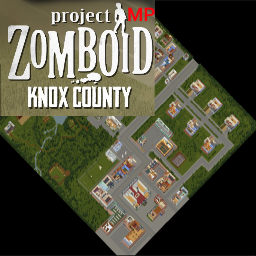
Knox County Multiplayer
von 76561197975439972
This is Knox County as a multiplayer map rather than a challenge map, full credit goes to the indie stone with minor adjustments by me. Spawn region for Knox County: { name = "Knox County, KY", file = "media/maps/KnoxCounty/spawnpoints.lua" }, MODID for Knox County: KnoxCounty Workshop ID: 669180988 Mod ID: KnoxCountyMP Map Folder: KnoxCounty
![[B42.13.2] FixMeleeHitbox Fix – Project Zomboid Mod](https://images.steamusercontent.com/ugc/16775629435439539269/4307AB13D59A85DFCFF561AA3B67DDDC30B41A1A/)
[B42.13.2] FixMeleeHitbox Fix
von 76561198821073082
🔧 Correção de “Intangibilidade” e Falhas de Hit em Armas Melee O problema de **intangibilidade** e das **falhas de acerto com armas melee** acontecia porque as modificações no *hitcone* da arma nem sempre eram persistentes. O próprio jogo pode **resetar os atributos da arma** em várias situações, como: * Trocar de arma 🔁 * Carregar o jogo 💾 * Início da sessão 🚪 * Em alguns casos, até durante ataques ⚔️ Quando isso ocorria, os valores corrigidos do ângulo de ataque eram perdidos, fazendo os zumbis parecerem “imunes” ou fora do alcance do golpe. --- 🛠️ Nova Abordagem: Active Enforcement (Reforço Ativo) Para mitigar esse problema de forma drástica, o arquivo **FixMeleeHitbox.lua** foi reescrito utilizando uma abordagem de **reforço ativo**, garantindo que o fix nunca se perca. --- 📌 O que mudou 🔄 Verificação Contínua (OnPlayerUpdate) Agora, a cada tick/frame, o script verifica se a arma melee na mão do jogador está com os valores corretos de ângulo: `MinAngle = 0.0` `MaxAngle = 1.2` Nota técnica: Essa verificação é extremamente leve (apenas leitura de dois valores), mas garante que, se o jogo recriar o objeto Java da arma ou resetar seus stats, o fix seja reaplicado **instantaneamente**. --- 🚪 Verificação ao Carregar o Jogo (OnGameStart) Foi adicionado um evento para forçar a aplicação do fix **assim que o jogador entra no jogo**, cobrindo o caso em que a arma melee já está equipada no momento do load. --- ⚡ OnEquipPrimary Mantido O evento de equipar arma foi mantido para garantir **resposta imediata** ao trocar de arma melee. 🔧 Fix for “Intangibility” and Hit Failures with Melee Weapons The issue of **intangibility** and **missed hits with melee weapons** occurred because hitcone modifications were not always persistent. The game itself can **reset weapon attributes** in several situations, such as: * Switching weapons 🔁 * Loading a save 💾 * Session start 🚪 * In some cases, even during attacks ⚔️ When this happened, the corrected attack angle values were lost, making zombies appear **“immune”** or out of the weapon’s reach. --- 🛠️ New Approach: Active Enforcement To drastically mitigate this problem, the **FixMeleeHitbox.lua** file was rewritten using an **Active Enforcement** approach, ensuring that the fix is never lost. --- 📌 What Changed 🔄 Continuous Verification (OnPlayerUpdate) Every tick/frame, the script checks whether the melee weapon currently held by the player has the correct angle values: `MinAngle = 0.0` `MaxAngle = 1.2` **Technical note:** This check is extremely lightweight (only reading two values), but it guarantees that if the game recreates the weapon’s Java object or resets its stats, the fix is **reapplied instantly**. 🚪 Verification on Game Load (OnGameStart) An event was added to force the fix to be applied **as soon as the player enters the game**, covering cases where a melee weapon is already equipped at load time. --- ⚡ OnEquipPrimary Kept The weapon equip event was kept to ensure an **immediate response** whenever a melee weapon is equipped. Workshop ID: 3650882276 Mod ID: FixMeleeHitbox

Rick's MLC Cutlery
von 76561197980074567
Use cutlery, you savage. Automatically use cutlery from a backpack and put back when finished eating. Also gives a small bit of happiness when eating like civilised person. Bonus feature: Eating a bowl of beans with a happiness bonus is now possible. Food doesn't go cold mid-eating. Many thanks to @cruel_moose for his suggestions and feedback in making this mod. Workshop ID: 3134858822 Mod ID: RicksMLC_Cutlery
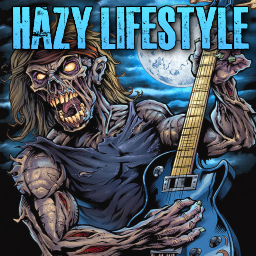
Lifestyle Addon: Hazy Lifestyle
von 76561198093830923
Mainly created for my community. Added many solo instruments and some silly songs as requested by players from my community. Expect more random solo instrument audio files or full songs to be added in on mod updates. Compatibility: Mods: Should be compatible with other Lifestyle Music Addons. Game version: Build 41.78+ Modes: Works in both MP/SP. This will only work in MP if the server has this mod installed as well as the core "Lifestyle: Hobbies" mod. Otherwise, it will not work if you have it installed as an individual for multiplayer. Make sure the server host, dedicated host owner, or whomever is hosting has this mod installed on their end so all players can download it. It should function as it should afterwards. A Note on My Mod's Authenticity: All mods that I publish stem from original ideas, often inspired by browsing the PZ workshop. On the rare occasion that a mod isn't entirely my own concept, I ensure to obtain explicit permission from the original creator before proceeding. If their workshop page allows open contributions or modifications, I honor those terms. I'm proud of the progress I've made as a self-taught novice programmer, having invested time and effort into understanding the complexities of modding for Project Zomboid. Every modder starts somewhere, and I began with basic mods, just like many others. I encourage a supportive and constructive modding community. Let's celebrate creativity, encourage growth, and refrain from baseless allegations. We're all here to contribute and enjoy the world of PZ modding. ❤️ Enjoying my mod? I'll be grateful with only two clicks from you to like and favorite my mod. Thank you! Feel free to buy a bread crumb for me. Any donation will help me not starve and continue modding. Modpacks? Yes, you may freely use my mod for your own personal, community, server, pack, mod, or any other use as long as you properly credit me wherever it roams. Workshop ID: 3016221184 Mod ID: HazyLifeStyle

ForgingWithSmelting锻造与熔炼V2.0
von 76561198406706042
-增加一个功能来锻造与冶炼 1.此mod基础代码大部分源于原版游戏 2.此mod基础代码大部分源于原版游戏 3.此mod基础代码大部分源于原版游戏 4.增加铁砧与和锻造配方。锻造需要站在铁砧旁边,并且持有锻造工具 5.增加石炉用于熔炼金属,方法为:将金属物品扔到已经点燃并有一定温度的石炉内然后等待,铁块会出现在炉子容器中(单机);对炉子右键出现熔炼菜单选择金属物品进行熔炼,铁会出现在石炉下方的地面上(联机) 6.铁桶可以用来把木头点燃后做成木炭(等待约游戏时间10小时),木炭可以用来给石炉或者烧烤架提供燃料 7.大部分金属物品可以熔炼,汽车金属配件破坏成不可用金属后也可以熔炼 8.锻造与焊接配合可以制作炉子 9.觉得不错的话,希望多多点赞 10.如有雷同,纯属巧合 更新:V1.9-V2.0 日期:2019-04-26 1.增加一种金属门:高铁丝网门 2.提高金属围栏(金属栅栏墙/门/双开门、铁丝网墙/门/双开门)的耐久值,按焊接等级提升(每等级提升耐久度1000) 3.增加维护金属围栏/门的功能,对着目标右键显示。使用喷灯,焊料和焊接面具对金属围栏/门进行维修和升级,将耐久度提升至当前焊接等级所能做到的最大值每等级提升耐久度1000) -Add a feature to forge and smelt metal objects 1.Add a feature to blacksmith and smelt metal objects update:V1.9-V2.0 Data:2019-04-26 1. Add a metal door: Big Metal Wire Gate 2. Improve the durability of the metal fence (metal fence wall / door / double door, barbed wire / door / double door), according to the welding level (extension durability of 1000 per level) 3. Increase the function of maintaining the metal fence/door and display it to the right button of the target. Repair and upgrade metal fences/doors with blowtorch, solder and solder masks to increase durability to the maximum level of current soldering grades per level and durability up to 1000) Workshop ID: 1433305962 Mod ID: ForgingWithSmelting
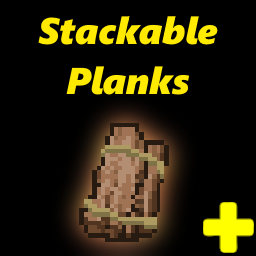
Stack Planks Fix
von 76561198082409828
Planks. Stack your planks directly from floor. Fixed (un)stacking planks giving carpentry XP. Added Three Planks Stack (model in future). Fixes of the original mod (Stackable Planks). Workshop ID: 2820828604 Mod ID: StackablePlanksFix

BFcat3_Packs 2
von 76561198068643367
WARNING!!! This mod is for my personal use and meant to be used for my personal server. Do not subscribe and use if you do not know what you are doing.
![[COS] Power – Project Zomboid Mod](https://images.steamusercontent.com/ugc/2425844467153028719/9ACD28B0ED4A3F4B3A4DD5A106D466970D6ACE8E/)
[COS] Power
von 76561199178116693
How Do I Use It? - You can go to the link below to see how to use it. - Link Recommended mode - Fashionoid - Gear Transmog - Hide All Attached Items - Clipping animation Fix How to use COS mode in build 42. - Navigate to the path where the mod is installed. - Create a 42.0 folder. - Create a common folder. - Paste the media folder / mod.info / preview.png into the 42.0 folder. The recipe code writing method has been changed in 42Build. Since COS (Costume) mode has approximately over 200 modes, converting to 42Build's recipe code is an extremely laborious task. In 42Build, you cannot create costumes in (42 build) the crafting tab. There are two methods: Spawn items in cheat mode. Select items in the clothing selection screen when creating a character. Like My Mode? - Join Our Discord If You Want Commission Workshop ID: 3360753532 Mod ID: Power
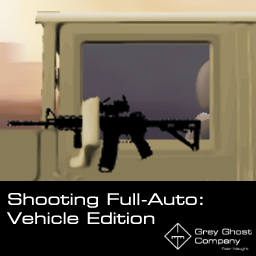
Shooting Full Auto - Vehicle Edition (Arsenal + Brita Recommended)
von 76561198106054174
Incompatibility: Real Full Auto Workshop ID: 2929791241 Mod ID: RealFullAuto - The Real Full Auto mod has been recently updated (April 19) to include the proper fire rate for vehicles, so it is now (probably) incompatible. If you DON'T use Arsenal/Brita's, please unsubscribe from this mod and subscribe over at Real Full Auto for a consistent full auto fire rate on Vanilla/other firearm mods. ***UPDATE*** -The Real Full Auto mod has been removed from the workshop for some reason. This mod is only for B41 (haven't tested it for B42) and is to be used in conjunction with Brita's weapon pack. Welcome to Grey Ghost Company, a U.S. based PMC. Today, we'll be introducing another mod: Shooting Full-Auto: Vehicle Edition. Have you ever wondered why the hell fire rates are so damn slow from within vehicles? (Assuming that you play with Arsenal/Brita's) Well, wonder no more! It's because those mods didn't touch the player-vehicle shooting animations (for full auto rifles anyway). Since it doesn't seem like this has been made yet, I've went right ahead and created one. In line with the fire rate of all full-auto firearms in Arsenal and Brita's, I've made it so that you can shoot at that same rate from within vehicles. Since it makes no sense that it's so damn slow otherwise. If you're interested in faster or slower firerates, after you download this mod, go into the mod folder and into animsets. From there, go into Player-vehicle, and then ranged. Go into the assault rifle default xml file, and go right ahead and pick a speed (<m_SpeedScale>8</m_SpeedScale>). It is currently set at 8. You may set it however you like. - Reits Recommended Mods: Arsenal GunFighter Mod Workshop ID: 2297098490 Mod ID: Arsenal(26)GunFighter Mod ID: Arsenal(26)GunFighter https://steamcommunity.com/sharedfiles/filedetails/?id=2297098490&searchtext=arsenal+26 Brita's Weapon Pack Workshop ID: 2200148440 Mod ID: Brita https://steamcommunity.com/sharedfiles/filedetails/?id=2200148440&searchtext=brita My personal mod collection: https://steamcommunity.com/sharedfiles/filedetails/?id=2938124507 Youtube Channel: https://www.youtube.com/channel/UC1FyqnuBhltr9zj5EVNudMw Workshop ID: 2963677798 Mod ID: Vehicle Full Auto
![[B42] Bandits Week One 简中汉化 – Project Zomboid Mod](https://images.steamusercontent.com/ugc/10966666473627698875/B359E87BCD23F960CEA9CDC9E8A73183C6E4A140/)
[B42] Bandits Week One 简中汉化
von 76561199103258790
使用说明: 将模组放在Bandits Week One下方或者模组排序最下面都可以,如果你加入了统一模组汉化也可以放在他下方(我更新比他快的情况下)。 汉化版本:42.17 汉化内容: 选择出生点界面汉化。 创建“自定义沙盒”时所有可调节的世界选项。 还有啥我也忘了,还没弄完先将就用着吧。 如果遇到汉化失效、部分未汉化,请在下面留言让我知道。 原MOD地址:https://steamcommunity.com/sharedfiles/filedetails/?id=3403180543&searchtext=week+one Workshop ID: 3720341675 Mod ID: BanditsWeekOne_CNJF Map Folder: Lake Fallas, KY Map Folder: Louisville, KY Map Folder: Muldraugh+, KY
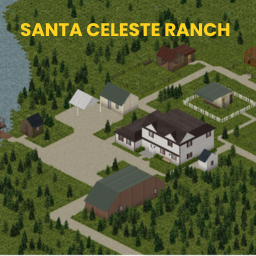
Santa Celeste Ranch - B42 (OBSOLETE)
von 76561198052493686
This is my first mod and map, made with great care, but it may contain bugs as I’m still learning. Location: Cell 32,35. Santa Celeste Ranch – Not far from the city, deep within the forest, lies the perfect place to build your survival haven. -Dedicated pens for cows, sheep, chickens, and pigs. -A fully equipped butchering area. -A peaceful fishing spot by the water. And… a secret basement laboratory, where whispers say someone once worked on a cure. Will you raise your animals in peace… or uncover the dark secrets hidden beneath the ranch? ------------------------------------------------------------------------------------------------------------------------------------------------ Este é o meu primeiro mod e mapa, feito com muito carinho, mas pode conter bugs, pois ainda estou aprendendo. Localização: Cell 32,35. Rancho Santa Celeste – Não muito longe da cidade, no coração da floresta, está o lugar perfeito para construir seu refúgio de sobrevivência. -Cercados dedicados para vacas, ovelhas, galinhas e porcos. -Uma área de abate totalmente equipada. -Um tranquilo local de pesca à beira da água. E… um laboratório secreto no porão, onde dizem que alguém já trabalhou em uma cura. Você vai criar seus animais em paz… ou descobrir os segredos sombrios escondidos sob o rancho? Workshop ID: 3546295895 Mod ID: Santa Celeste RanchMap Mod ID: SantaCelesteRanchMap Map Folder: Santa Celeste Ranch

buffy's tabletop RPG system
von 76561197995819728
This mod has reached End of Support (EOS) and will not be updated for the upcoming Build 42 Update. For Build 42 Roleplay Servers, Check out the Total Immersive Chat System by johngood! You don't need to start a new save to use this mod. Note for Existing Subscribers of the 1.0 For existing subscribers, you need not change anything! The old version of the mod is the roleplaydnd mod ID. This new one that's been added and will be described below is the roleplaydnd_update15. I highly recommend using the roleplaydnd_update15 version, as it has the latest features! _______________________________________________________ Adds a TTRPG system to the basegame skills menu. Features -Click a skill to allocate points into it. Once you're satisfied with your sheet, clicking after all points are assigned will roll the skill you clicked. Simple! -Uses your character's firstname in the rolls. Pairs best with my roleplaychat mod, that adds full RP functionality to the chatbox. -Skill point totals can be set in sandbox options. Default and maximum is 30, minimum is 10. This is the budget players get when assigning skills. -Ctrl Shift Click a dice skill to reset your skills if you'd like to go back during creation. Notifies everyone around you that you just did so. After you've assigned all of them, you'll need an admin spawned Buffy.DiceResetBook to reset them after that. Information With update15, I'm experimenting with taking what the user is wearing and using that to aid or hinder their rolls. Currently, if you have an item equipped with a bullet defense of 50 or higher, you'll get +1 to your Toughness roll. Inversely, this added protection will give you -1 to your Evasion rolls. As of this update these cap out at + or - 3. I'll be adding the ability to configure this as I continue working on the mod, as well as the ability to completely avoid using it at all. Workshop ID: 2728250841 _______________________ Outdated, old version Mod ID: roleplaydnd _______________________ Updated, latest version Mod ID: roleplaydnd_update15 _______________________ Workshop ID: 2728250841 Mod ID: roleplaydnd Mod ID: roleplaydnd_update15
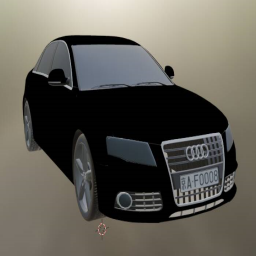
Audi
von 76561198803858826
Add Audi vehicles in the game Workshop ID: 2676728621 Mod ID: audi666
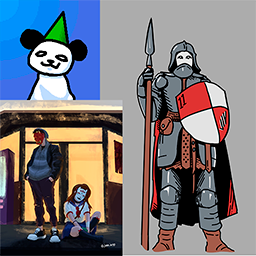
Pandita Poster
von 76561198023174289
A bunch of posters of some drawings/stuff i did in my free time. Workshop ID: 2925133865 Mod ID: panditaposters
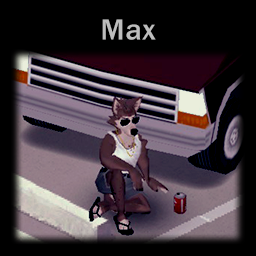
Anthro Survivor | Max
von 76561198178151163
Sub-mod to Anthro Survivors (the "Furry Mod"). This mod adds a character of my friend named Max, also belongs to him and made for. He said that if you would use it, then just rate this mod and enjoy :з. Original mod: https://steamcommunity.com/sharedfiles/filedetails/?id=2893930681 Workshop ID: 2940645045 Mod ID: MaxJackalMod
![[B41] Working Phones – Project Zomboid Mod](https://images.steamusercontent.com/ugc/11772900136171164974/91053748A2C224593C5FD7C4C052D2E90A21DCC0/)
[B41] Working Phones
von 76561199033892043
Working Phones Working Phones adds usable classic mobile phones and smartphones to Project Zomboid. Open a phone from your inventory and use its apps in-game. Every physical phone owns its number, contacts, settings and saved data. Phones can be carried, exchanged, lost or used by another player. Both phone types support multiplayer calls with working VOIP voice transmission after a call is answered. Included Phones - Classic 2210 Phone: Black, Blue and Red variants. - Generic Smartphone: Black, White and Blue variants. Classic 2210 - A monochrome keypad phone with a pixel-style display, physical UI buttons, soft keys, keypad navigation, battery and GSM indicators, classic tones, and mouse, keyboard and controller support. Generic Smartphone - A graphical phone with swipe-to-unlock, app grids, multiple home pages, status and navigation bars, touch-style controls, themes, wallpapers, app icons and modern sounds. Communication Features - A unique number assigned to each physical phone. - Phone-to-phone calls in singleplayer and multiplayer. - Working VOIP calls on classic phones and smartphones. - Synchronized ringing, answer, decline, hang-up, busy and unavailable states. - Call history with in-game dates, direction and result. - Phone-to-phone conversations powered through KnoxNet. - Contacts with direct call and message actions. - Nearby opened-phone discovery for easier contact exchange. - Phone notifications and ElyonLib toast notifications. - Nearby players can hear audible phones; ringing and alarms can attract zombies. Included Apps - Phone - dial contacts or numbers, manage calls and view call history. - Messages - create conversations, write messages and reply. - Contacts - add, edit, delete, call and message contacts. - Clock - multiple alarms with time, weekday and sound selection. - Calendar - browse complete months and dates. - Calculator - a functional calculator adapted to each display. - Journal - create, open, edit and delete phone notes. - Map - compact map/minimap view with panning, zoom and options. - Sounds - choose and preview tones, set volume, Sound, Vibrate or Silent mode. - Settings - phone settings plus smartphone themes and wallpapers. - Games Hub - supported games and persistent high scores. - Snake - classic phone and smartphone. - Tetris - classic phone and smartphone. - Chess - smartphone-only chess against AI. Smartphone Messenger The smartphone includes a graphical conversation view, multiline writing and a categorized picker with more than 1,200 emojis. Emoji tokens are transmitted so the receiving smartphone can render them correctly. Sounds And Customization - 7 Classic 2210 phone tones. - 4 smartphone ringtones. - 7 smartphone notification sounds. - 3 smartphone alarm sounds. - Short and long vibration sounds for notifications and calls. - Per-phone volume and Sound / Vibrate / Silent profiles. - Light and dark smartphone themes. - Six image wallpapers plus selectable color wallpapers. - Editable phone display names. Controls And Mod Options Use the mouse, configurable keyboard controls or automatic controller navigation. Players can continue moving while a phone is open. Optional control hints change with the last input type. Install Mod Options to configure Classic 2210 scale, smartphone scale, control-hint visibility and supported phone key bindings. How To Use - Find a classic phone naturally, spawn an item, or enable smartphone spawning in Sandbox Options. - Right-click it in your inventory and select Open Phone. - The phone receives a unique number when initialized. - Use Contacts, Messages or Phone to communicate with another phone. World Spawning Classic phones spawning is enabled by default. Smartphone spawning is disabled by default. Both phone families can be enabled or disabled independently in Sandbox Options. Container and zombie frequencies are configured separately. Enabled phones appear through lightweight replacement logic in appropriate electronics, home, office, locker, pawn-shop and similar loot locations. Sandbox Options - Enable classic-phone spawning. - Enable smartphone spawning. - Container and zombie phone spawn percentages. - Nearby opened-phone search radius. - Retained messages per contact. - Call-history limit per phone. Multiplayer And Persistence - Server-authoritative phone registration prevents duplicate numbers. - Numbers and data belong to phone items, not player accounts. - Phone messages remain separate from KnoxNet player conversations. - Accepted calls provide live VOIP between both phone users. - Game high scores support persistent world scoreboards. - History limits reduce unnecessary save and network data. Item Full Types WorkingPhones.Classic2210Phone WorkingPhones.Classic2210PhoneBlue WorkingPhones.Classic2210PhoneRed WorkingPhones.SmartphoneBlack WorkingPhones.SmartphoneWhite WorkingPhones.SmartphoneBlue Requirements - ElyonLib - KnoxNet - Mod Options - optional, recommended for UI scaling and hints. Work In Progress And Credits Working Phones is still in active development. UI, balance, multiplayer behavior and 3D/static models may continue to improve. More phone variants, models, apps, sounds and wallpapers can be added in future updates. The static 3D models used while phones are held or placed in the world are still being expanded and refined. Custom phone 3D models and phone animations are made by Sapph. Please include the console error and SP/MP context when reporting an issue. Commissioned by Kuma Khan from the Club Oasis community. I am open to commissions. Contact me on Discord at .ely0n or through the Project Zomboid Modding community. This mod uses TIS's On Lockdown permission policy. Do not modify or redistribute this mod without permission. Workshop ID: 3748031902 Mod ID: WorkingPhones

HydrocraftCNfull_41.60MP汉化补全
von 76561198071130397
Hy41.60MP汉化补全,新增3000+词条,截至2022年1月21日最新。 部分词条汉化来自机翻,但不影响使用,敬请谅解,欢迎留言建议调整。 特此感谢:半夏微凉柒染, JoJunIori在2016年所做的贡献,本mod是在原来两位的汉化基础上补全的。 建议删除以下名为CN的目录,优化体验: Steam目录下\steamapps\workshop\content\108600\2081538550\mods\Hydrocraft\media\lua\shared\Translate\CN Workshop ID: 2726335319 Mod ID: HydrocraftCNfull

tsarslib Magyarra Fordítva
von 76561197994830559
tsarslib Magyarra Fordítva Workshop ID: 3650350021 Mod ID: tsarslib
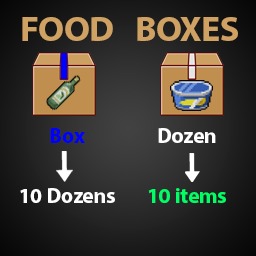
i8m Food Boxes
von 76561198127592302
Box = 10 Donzens 1 Dozen = 10 items Total items in box = 100 Blue tape = Box White tape = Dozen Main meals: ( Rice, Pasta ) Baking: ( Flour, Yeast, Baking Soda ) Condiments & Spices: ( Salt, Sugar, Pepper) Ingredients: ( Butter, Margarine, Milk, Olive Oil ) Workshop ID: 2907002091 Mod ID: i8m_FoodBoxes_N Mod ID: i8m_FoodBoxes_R
Project Zomboid Details →
Project Zomboid Guides
Project Zomboid Mods installieren - Workshop Guide
Installiere Project-Zomboid-Mods sauber per Steam Workshop: IDs eintragen, Reihenfolge prüfen, Server neu starten und typische Fehler beheben.
Project Zomboid Build 42 auf dem eigenen Server: Umstieg, Spielstände und Mods
Build 42 ist Stable: Spielstände aus Build 41 sind nicht kompatibel. Umstieg, legacy41-Zweig, neue Serveroptionen, Anti-Cheat und der Hotfix 42.20.1 gegen Serverlag.
Project Zomboid Server mieten – Multiplayer Guide
Project Zomboid Server einrichten: RAM, Sandbox-Einstellungen, Workshop-Mods, Admin-Rechte und typische Fehler sauber prüfen.
Project Zomboid Server mit Mod-Support
Kompatible, unterstützte Mods über das Server-Dashboard installieren.
Project Zomboid Server mieten