Project Zomboid Mods für Server
Für einen modifizierten Project-Zomboid-Server brauchst du pro Projekt die Steam-Workshop-ID und die interne Mod-ID. Prüfe zusätzlich Spiel-Build, Abhängigkeiten und Lade-Reihenfolge, bevor du deine Welt mit den Änderungen startest.
Project Zomboid Mods sicher installieren
Ein Workshop-Abo allein aktiviert eine Mod auf dem Dedicated Server nicht. Die Einträge in `WorkshopItems=` und `Mods=` müssen zusammenpassen; außerdem muss jede Mod den gewählten Build 41 oder Build 42 ausdrücklich unterstützen.
- 1. Build prüfen: Build-41- und Build-42-Mods nicht ungeprüft mischen.
- 2. Workshop-ID, Mod-ID, Abhängigkeiten und erforderliche Reihenfolge vollständig dokumentieren.
- 3. Welt und Konfiguration sichern, Server neu starten und Logs sowie den Beitritt mit einem Test-Client prüfen.
Die vollständige Schritt-für-Schritt-Anleitung findest du im Project-Zomboid-Mods-Guide. Oder starte direkt mit einem Project Zomboid Server mit Mod-Support.
Häufige Fragen zu Project Zomboid Mods
Was ist der Unterschied zwischen Workshop-ID und Mod-ID?
Die Workshop-ID bezeichnet das Steam-Workshop-Projekt und steuert den Download. Die Mod-ID aktiviert den enthaltenen Mod im Spiel. Auf dem Server müssen beide Listen vollständig und passend gepflegt sein.
Laufen Build-41-Mods automatisch mit Build 42?
Nein. Nutze eine Mod nur dann auf Build 42, wenn ihre Workshop-Seite diese Kompatibilität ausdrücklich bestätigt. Prüfe dabei auch alle Bibliotheken und weiteren Abhängigkeiten.
Wie teste ich ein Mod-Update ohne Risiko für die Welt?
Sichere zuerst Welt, Sandbox-Konfiguration und Server-INI. Aktualisiere danach die zusammengehörigen Mods, starte den Server neu und prüfe Logs, Kernfunktionen und einen vollständigen Client-Beitritt.
![[B42] SecretZ Pandemic [MODULAR] – Project Zomboid Mod](https://images.steamusercontent.com/ugc/14029078743816189211/F496C7F1D18DECE9AFADD0517B9DB04A7D6490FB/)
[B42] SecretZ Pandemic [MODULAR]
von 76561198018448232
LINK FOR B41 VERSION https://steamcommunity.com/sharedfiles/filedetails/?id=3017588820 ONLY B42 MODULAR VERSION This version was made specially for those who play singleplayer and want's more control over which maps would like to load or not, so every map is separated in different modules for make it easier to enable or not. Please, don't mix the mods, if you are using the modular version just unsubscribe the other one or make sure you enable the correct mod in game, even if shouldn't be problems having both versions is better to keep it clean. PLEASE READ BEFORE USE Hello everyone, for all the people who already played SecretZ and SecretZ Pandemic in B41, well you already know what it is, for all the new ones, this a map pack, adding several military checkpoints, bunkers, and some reworked vanilla places into military bases and refugee camps. In this case, for everyone who already played it, you will notice there's a lot left behind at B41, B42 still under development and official modding tools are not released yet, so this was done thanks to our skillful modding community effort and support which is trying to keep the rythm with all the new changes and so i am. Said that, still a lot of work to do, probably i was only able to get back 40% of my B41 maps, some of them are lost forever so i'll need to remake them once the stable version get's released. Tilepacks are not available yet for B42 officially, so you'll probably find that some places are somehow "empty", not at all but it will be easy to notice there are some tiles which should be there and aren't, so this is "normal" for the moment. I will keep this separated from my B41 versions, because i'll need to update this one with some frequency and still under development so, in advance take that into account, if everything goes well maybe for B42 stable release i'll be able to drop a full version updating my B41 mods and deleting this one, this is important, is just a temporary version, keep that in mind. WHAT WE HAVE HERE As you can guess, everything reworked from vanilla Louisville is lost, so main part of the maps are checkpoints around Muldraugh, the reworked Valley Station Mall, and some more checkpoints past Rosewood, plus the Military Complex of Louisville. In resume, you'll get several Military Checkpoints around the map, some reworked places as the Mall like military checkpoint/base, and some hidden underground military bunkers. Any error/bug you find, post it, so i can take a loot and try to fix it while i keep working on bring back all i can from my B41 maps. Use it with caution, i wouldn't recommend to use it on an already made world, so just in a new one. * North-East Muldraugh Checkpoint * South-East Muldraugh Checkpoint * North-West Rosewood Checkpoint * North-West Checkpoint * Deerhead Lake Military Camp * Muldraugh EVAC Point Train Depot * Military Blockade at Rosewood-Muldraught crossing * Military checkpoint at Marchridge entrance, and a research complex * Valley Station Mall as Military base RECOMMENDATIONS TO USE WITH THEY KNEW B42 Lore friendly with the theme of SecretZ, adding more special items related. KNOWN CONFLICTS In case of conflicts, just be sure to overwrite the prefered map by changing the load order. ---- Grapeseed (cell 24x45) - Reported by BrasileirinhoPe 06/07/2025 Fort Boonesborough - Reported by Metal Mario 06/09/2025 Frogtown - Reported by CELLS USED B42 44_37, 44_38, 44_39, 44_40, 44_41, 41_43, 41_44, 14_26, 14_27, 14_28, 15_26, 15_27, 15_28, 16_26, 16_27, 16_28, 53_22, 53_23, 54_22, 54_23, 55_22, 55_23, 39_46, 39_47, 39_48, 39_49, 40_46, 40_47, 40_48, 40_49, 41_46, 41_47, 41_48, 41_49, 53_7, 53_8, 54_7, 54_8, 55_7, 55_8, 56_7, 56_8, 56_10, 56_11, 57_7, 57_8, 57_9, 57_10, 57_11, 58_7, 58_8, 58_9, 58_10, 58_11,59_8, 59_9, 16_33, 16_34, 16_35, 17_32, 17_33, 17_34, 17_35, 18_32, 18_33, 18_34, 18_35, 25_43, 25_44, 26_43, 26_44, 42_43, 42_44, 43_43, 43_44, 46_31, 46_32, 47_31, 47_32, 48_31, 48_32, 23_45, 23_46, 24_45, 24_46 Workshop ID: 3733167464 Mod ID: Secretz42_Core Mod ID: SecretZ_Operations_B42 Mod ID: SZ_Bunker_3 Mod ID: SZ_Checkpoint1 Mod ID: SZ_Checkpoint5 Mod ID: SZ_Checkpoint6 Mod ID: SZ_Checkpoint8 Mod ID: SZ_DeerheadLake_Base Mod ID: SZ_ExtraSpawnPoints Mod ID: SZ_Louisville_Military_Complex Mod ID: SZ_MarchRidge_ResearchFacility Mod ID: SZ_MuldraughCrossroads_Checkpoint Mod ID: SZ_Muldraugh_Traindepot_EVAC Mod ID: SZ_North_Checkpoint Mod ID: SZ_Riverside_Checkpoint_1 Mod ID: SZ_Riverside_Checkpoint_2 Mod ID: SZ_SouthEast_LV_Checkpoint Mod ID: SZ_The_Mall Mod ID: SZ_Westpoint_Bridge_Checkpoint Map Folder: ArmyGroup_Spawn Map Folder: DeltaForce_Team_Spawn Map Folder: SZ_Bunker_3 Map Folder: SZ_Checkpoint1 Map Folder: SZ_Checkpoint5 Map Folder: SZ_Checkpoint6 Map Folder: SZ_Checkpoint8 Map Folder: SZ_DeerheadLake_Base Map Folder: SZ_ExtraSpawnPoints Map Folder: SZ_Louisville_Military_Complex Map Folder: SZ_MarchRidge_ResearchFacility Map Folder: SZ_MuldraughCrossroads_Checkpoint Map Folder: SZ_Muldraugh_Traindepot_EVAC Map Folder: SZ_North_Checkpoint Map Folder: SZ_Riverside_Checkpoint_1 Map Folder: SZ_Riverside_Checkpoint_2 Map Folder: SZ_SouthEast_LV_Checkpoint Map Folder: SZ_The_Mall Map Folder: SZ_Westpoint_Bridge_Checkpoint
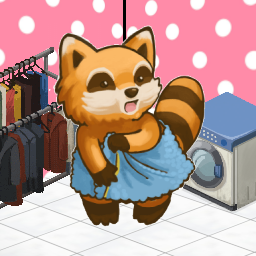
Outfit Bag
von 76561198041121447
A simple mod to quickly swap between outfits. Craft an Outfit Bag with three ripped sheets and a thread. Then you can Right-Click the bag to either store your current outfit or equip whatever is in the bag already. Only clothes will be transferred. Apparel with inventories or hotbar attachment slots won't be transferred over, like backpacks or belts. I've released a more advanced version of this mod called Easy Outfits which not only lets you use any container of your choice to act as an outfit storage, it also lets you register specific clothing pieces to an outfit and only add/remove those pieces. I'll leave this mod up but I recommend using Easy Outfits instead. Check out my other mods Workshop ID: 2803797905 Mod ID: Outfitbag
Blackwood (RU)
von 76561198212702180
Локализирует мод добавляющий город "Blackwood" (Ссылка на оригинальный мод ниже описании, для работы локализатора требуется обязательно!!!) Original author mod ( needed for working ) : https://steamcommunity.com/sharedfiles/filedetails/?id=2536865912 Оригинальный мод от автора ( без оригинального мода локализация работать не будет ) : https://steamcommunity.com/sharedfiles/filedetails/?id=2536865912 Workshop ID: 2738388220 Mod ID: BlackwoodRU
Resident Evil Item development for 41 Mod | English
von 76561198283158501
This mod was originally made by huanxi (526581483) and had some issues that altair720230 fixed but the items are in Spanish. I just took the original English text files and placed them back. I AM NOT THE CREATOR of this mod for Project Zomboid, so I won't be able to fix it if this mod does eventually break or has some issues. I only changed the text back to English, my apologies. Original Mod Spanish Version Workshop ID: 2959433265 Mod ID: REMOD Mod ID: REWMOD
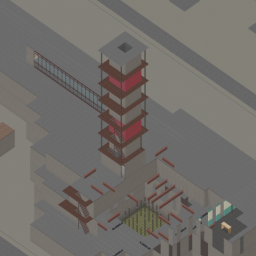
Pripyat 2.0b
von 76561198118604871
Добавляет город Припять с прилегающей к нему территорией ЧАЭС. Это не финальный продукт, данная карта доступна для тестирования и будет дорабатывать. Пожалуйста, оставляйте информацию о найденных вами ошибках. Adds the city of Pripyat with the adjacent territory of the Chernobyl nuclear power Plant. This is not the final product, this map is available for testing and will be finalized. Please leave information about the errors you found. Workshop ID: 2493225576 Mod ID: pripyatb Map Folder: Pripyat
![Skyler DrugMod 2.0 [RU] – Project Zomboid Mod](https://images.steamusercontent.com/ugc/2301965039671980054/2EC158E77AD34DC76EFE1431D2C18793C425CFD5/)
Skyler DrugMod 2.0 [RU]
von 76561198876908684
Important! This mod was added translated into Russian, all copyrights are indicated to the author of this mod: Skyler DrugMod ] After all, an effective modification only complements an existing modification. Workshop ID: 3101606229 Mod ID: DrugMod_Russificator
No Escape Ropes
von 76561198009324306
Tired of players in your server cheesing their bases by destroying stairs and putting up escape ropes in bases, or just want prevent yourself from the temptation of using it? This mod is for you. This does not remove the ropes already placed in the world, it just disables the action to set it up from the context menu. Workshop ID: 3174988956 Mod ID: NoEscapeRopes
Nature's Vengeance's Mod Pack
von 76561197979971062
Server content pack for the Nature's Vengeance Survival Server. Workshop ID: 2866086102 Mod ID: MSFBase Mod ID: nv_shops Mod ID: nv_armbands Mod ID: yelve_ship Mod ID: rbr_fix Mod ID: nv_rosewood_fix Mod ID: nv_server_scripts Map Folder: MSFBase Map Folder: YelveShip Map Folder: researchbasefix Map Folder: rosewood_map_fix
True Music Addon: K-ON! FULL ALBUM
von 76561198058436790
Aqui puedes ver todos los temas de la serie de anime K-ON! espero que lo disfrutes como yo! Workshop ID: 2868244431 Mod ID: konalbum

MRE XIII (1993) - Escape from Knox Country balance settings
von 76561197991519231
Balance settings for Escape from Knox Country Workshop ID: 2714027216 Mod ID: EFKC-MRE
Mileage Expansion Revival
von 76561197971312703
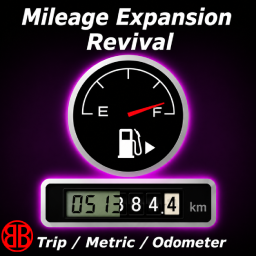
Mileage Expansion Revival is a modernized continuation of the classic Mileage Expansion mod, rebuilt and expanded for Project Zomboid Build 42.20+. Every vehicle receives a persistent odometer that records its mileage while driving. Mileage is saved with the vehicle and displayed directly on supported vehicle dashboards. Version 1.5 introduces a new interactive configuration interface, allowing the odometer to be controlled directly from the vehicle dashboard. Features Persistent Vehicle Mileage • Every vehicle tracks its own total mileage. • Mileage increases automatically while driving. • Odometer data is stored with the vehicle. • Vehicles can receive randomized starting mileage. Mechanical & LCD Odometers Two display styles are available: • Mechanical rolling-digit odometer • Monochrome LCD digital display The display type can be changed at any time from the vehicle. Metric & Imperial Units • Kilometers (km) • Miles (mi) • Units can be switched directly from the configuration interface. Trip Meter • Independent trip mileage counter • Trip display can be shown or hidden • Trip meter can be reset at any time • Trip mileage remains independent from the vehicle's total mileage Interactive Odometer Configuration Version 1.5 replaces the previous context-menu configuration with a dedicated vehicle interface. Left-click the odometer on the dashboard to open or close the configuration window. From this interface you can: • Switch between Mechanical and LCD displays • Switch between kilometers and miles • Show or hide the trip meter • Reset the trip meter Changes are immediately reflected on the vehicle dashboard. Sandbox Options The default behavior of newly initialized vehicle odometers can be customized through the Sandbox options: • Default odometer type • Default unit • Distance factor • Custom kilometer abbreviation • Custom mile abbreviation • Minimum starting odometer • Maximum starting odometer The minimum and maximum values determine the randomized initial mileage assigned to vehicles. Dashboard Integration Mileage Expansion Revival integrates the odometer directly into the vehicle dashboard instead of using a separate HUD element. Mechanical and LCD displays are positioned according to the dashboard layout to blend naturally with the vehicle instrumentation. The mod does not replace vanilla vehicle mechanics and is designed for clean integration with other vehicle and dashboard mods. Project Summer Car Compatibility Project Summer Car dashboards are supported through the optional module included with Mileage Expansion Revival: Mileage Expansion Revival - Project Summer Car When using Project Summer Car, enable: • Mileage Expansion Revival • Project Summer Car • Mileage Expansion Revival - Project Summer Car The compatibility module adapts the odometer rendering to the different Project Summer Car dashboard layouts. Compatibility Compatible with: • Vanilla Build 42 vehicles • KI5 vehicle packs • Project Summer Car — via the included compatibility module • Vehicle Turn Signals Designed for Project Zomboid Build 42.20+. Credits Mileage Expansion Revival is based on the original Mileage Expansion mod created by KONIJIMA. This Revival would not exist without the original concept and implementation. A Build 42 version was previously released but was later abandoned. Mileage Expansion Revival continues the concept with a maintained implementation designed for modern versions of Build 42. Support the Project If you enjoy my work and would like to support future updates: Ko-fi - Bukaroo_FR

God like backpack
von 76561198453564259
New trait that gives you a Godlike backpack with 100% weight reduction and Capacity of Standard 1700 with Pack Mule trait 2000. Have Fun Looting! Workshop ID: 2742511483 Mod ID: God Like Backpack
Trailers Overhaul B42
von 76561198251177900
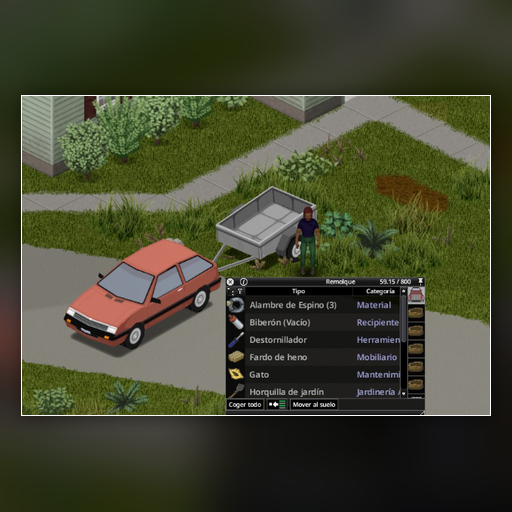
Trailers Overhaul B42 increases storage capacity for vanilla cargo trailers in Project Zomboid Build 42. - Configurable final trailer capacity: 100, 200, 300, 400, 500, 600, 700, 800, 900 or 1000. Español: Trailers Overhaul B42 aumenta la capacidad de almacenamiento de los remolques vanilla de carga en Project Zomboid Build 42. - Capacidad final configurable: 100, 200, 300, 400, 500, 600, 700, 800, 900 o 1000. Please DO NOT copy this code. NO copies este codigo por favor. Workshop ID: 3774213212 Mod ID: TrailersOverhaulB42 Workshop ID: 3774213212 Mod ID: TrailersOverhaulB42
Show Level Number
von 76561198062695591
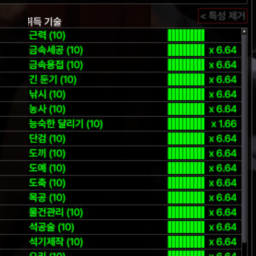
The exact numerical value of the increase is shown. Workshop ID: 3411937188 Mod ID: ShowLevelNumber
Wheelbarrow Multiplayer/Singleplayer - Carrinho de mão
von 76561198037514908
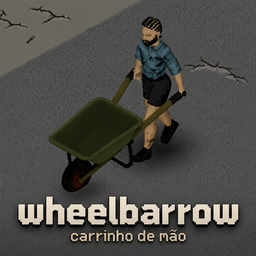
Also by me: AutoMark — marks looted buildings with an X and flags important items, automatically. Everyone does this by hand; now the mod does it for you. 🇧🇷 Português no final. A construction wheelbarrow for the loads the game punishes you for carrying: logs, generators, anvils, corpses. It is deliberately useless for ordinary loot. This is not a bigger backpack. The load - Items of 8 units and up are repacked — a fifth of the room, 95% off the weight. - Lighter items get nothing, and fill up fast. - About 21 logs, or 6 planks. Full of heavy cargo it weighs ~13 on your back. - Organized +30%, Disorganized −30%. What it costs - Both hands. No weapon while you hold it. - No running. Loaded or empty. - No fences, windows, sheet ropes or cars. Set it down first. - Doors, gates and stairs are fine. Rush it and you lose everything Picking it up and setting it down are timed actions. Interrupt one and it tips over, dumping the load and itself on the ground. Using it - E picks it up and sets it down. Like a vehicle, it is never in your inventory. - Load it: select items, right-click, Load into Wheelbarrow. - A corpse: drag the body, then right-click by the wheelbarrow. - Any action while holding it makes you park it and pick it back up automatically. The game's own limit — read this if it will not fill The game caps the total weight of items lying on a single tile. Since loading always happens with the wheelbarrow on the ground, anything else dumped on that tile counts against it — and the wheelbarrow stops accepting cargo early. Load it on a clear tile. If it will not take any more with room left on the bar, step away from your loot pile and try again. Getting one Crafting is the reliable way. MetalWelding 4, near any surface: - 2 Sheet Metal - 2 Metal Pipe - 1 Tire — any of the game's nine car tires, flat ones included - 4 Screws - 1 Welding Rod - Blow Torch and Welding Mask (tools — not consumed) Or find one: construction sites, warehouses, garages, tool stores and roadworks — but only a 3% chance per location, rolled once per save. They are meant to be a lucky find, not a plan. Also Multiplayer supported — tested against a dedicated server. 11 Sandbox options, 23 languages, no dependencies. Build 42. Removing the mod from a save that has wheelbarrows in it can cause load errors. Empty and destroy them first. PORTUGUÊS Também meu: AutoMark — marca com um X os prédios já saqueados e sinaliza itens importantes, automaticamente. Todo mundo faz isso na mão; agora o mod faz por você. Um carrinho de mão para as cargas que o jogo pune você por carregar: troncos, geradores, bigornas, cadáveres. Ele é inútil de propósito para loot comum. Isto não é uma mochila maior. A carga - Itens de 8 unidades para cima são reacondicionados — um quinto do espaço, 95% do peso a menos. - Itens mais leves não ganham nada, e enchem rápido. - Cerca de 21 troncos, ou 6 tábuas. Cheio de carga pesada pesa ~13 nas suas costas. - Organizado +30%, Desorganizado −30%. O que ele cobra - As duas mãos. Nenhuma arma enquanto você o segura. - Nada de correr. Carregado ou vazio. - Nada de cerca, janela, lençol ou carro. Largue antes. - Portas, portões e escadas funcionam normalmente. Com pressa, você perde tudo Pegar e largar são ações com animação. Interrompa uma delas e o carrinho tomba, derrubando a carga e ele mesmo no chão. Como usar - E pega e larga. Como um veículo, ele nunca fica no seu inventário. - Carregar: selecione os itens, botão direito, Carregar no Carrinho de mão. - Um cadáver: arraste o corpo, depois clique com o direito perto do carrinho. - Qualquer ação com ele na mão faz você largar e pegar de volta automaticamente. Um limite do próprio jogo — leia se ele não encher O jogo limita o peso total de itens jogados num mesmo bloco do chão. Como carregar sempre acontece com o carrinho no chão, tudo o que estiver largado naquele bloco conta junto — e o carrinho para de aceitar carga antes da hora. Carregue num bloco limpo. Se ele não aceitar mais nada com a barra ainda mostrando espaço, afaste-se da pilha de loot e tente de novo. Como conseguir um Fabricar é o caminho confiável. MetalWelding nível 4, perto de qualquer superfície: - 2 Chapas de Metal - 2 Canos de Metal - 1 Pneu — qualquer um dos nove pneus do jogo, inclusive murcho - 4 Parafusos - 1 Vareta de Solda - Maçarico e Máscara de Solda (ferramentas — não são consumidas) Ou encontrar: obras, galpões, garagens, lojas de ferramentas e obras de rua — mas só 3% de chance por lugar, sorteado uma vez por save. Ele é para ser um achado de sorte, não um plano. Também Multiplayer suportado — testado contra servidor dedicado. 11 opções de Sandbox, 23 idiomas, sem dependências. Build 42. Remover o mod de um save que tem carrinhos pode gerar erro no carregamento. Esvazie e destrua eles antes. Workshop ID: 3781716360 Mod ID: MNWheelbarrow
![[Project Fallout] The Beginning – Project Zomboid Mod](https://images.steamusercontent.com/ugc/27692334649303662/2AB41409C80464CF39EB91F26F60C616E4C34EAF/)
[Project Fallout] The Beginning
von 76561198068788655
The Beginning. A Project Fallout: Release WAR. War Never changes.. Here, On Kentucky Soil, You stand at a turning point in human history. Where Once, Humanities Combined acheivements Meant the Co-operation between Towns, Cities & Whole Nations, Now All that is left behind is Dust. Pain & Ruin. Decide Your Fate. Do you strive to Survive? Or are you satisfied with this reality. But heed this warning. For in 12 Hours, Your fate will be chosen for you. A timer will appear to count down your coming predicament. This mod will cause Unimaginable permanent Dust, Damage, grime, Death, Destruction, related damage to your game save. & Cannot be undone. It is intended that 'IF' triggered manually, it is By Your own choices, that Your world be changed forever. It is Intended This Mod Be Used Alongside 'Week One' For the best Chaotic experience Possible. It is Intended The Sub-Mod for disabling the Nuke in that Week One Mod addon, Also be used. The Beginning - From The Main Menu a New Fate has Appeared. A challenge. - You Have 12 Hours to find safety - Or You Will Die. - Will you strive to survive in this New wasteland? Or 'Opt Out' of this Doomed reality - The Choice, Dweller, Is Yours. The Beginning: will do the following Things: - Manually Triggered, Working Simulation of Nuclear Armageddon Via Vault-Tec™ Approved Initiator BriefCase - You can carry it! its Fashionable, & its the end for everyone you know at the push of a button! how Rad™ - For safety this case Must be spawned. it will not spawn in World. Project Fallout: Dev Team & Credits - Ash: Project Fallout: Team Co Lead, Design, Code, Scripting, Modeling, Sound Team Lead, WorkShop Design & implementation, UI theme Design, StoryLine, Goals & Planning - VLwsMIR: Project Fallout: Code Team, Head Lua & General Code / ~ Design Project Fallout: And its Content May Not be Released By Any Non Authorised Team Member On The Workshop And Follows PZ Permissions Listed Below Project Fallout & All Similar Mods Charge No Monetary value for development & is and always was, Free Some Limitations on Features may Exist. But i Doubt it The Project Fallout Discord Workshop ID: 3461117277 Mod ID: TheBeginning_CDDA Mod ID: TheBeginning
Quartermaster - Auto-Sort & Store Loot
von 76561198016009994
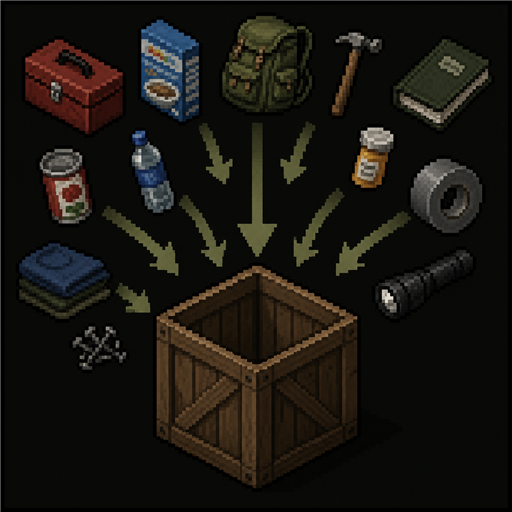
Quartermaster Tired of manually sorting every loot haul into your storage containers? Designate containers and then let your character sort everything automatically. How it works - Designate your storage. Right-click a crate, locker, or container and pick "Configure sorting...". Tick the item categories (or specific items) that box should hold. - Distribute. Open any container (a car trunk, a looted crate, even your own backpack) and hit the Distribute Loot button. - Watch (optionally Fast Forward). Your character physically carries the loot to the matching boxes, nearest first, looping back until everything's sorted. Features - Sort by the game's own item categories, or pin specific items by name (additive: a box can hold both, and a specific-item box wins over a category box). - Presets: save reusable bundles of categories/items and apply them to any box - set up "Kitchen", "Armory", etc. once and reuse across all your worlds. Editing a preset updates every box that uses it. - Overflow cascades to the next box of the same category. - Real hauling: auto-walks within a configurable range, multi-trip, as one continuous (fast-forwardable) action queue. - Works from world containers (hauled in trips) or straight from your own inventory (walked box to box). - Searches nearby floors too, not just your current one. - Craft from storage: tick "Storage" in the crafting menu and recipes light up from what's in your designated boxes; your character hauls the ingredients over, then crafts (batches and crafting-surface recipes too). Works with vanilla crafting and Neat Crafting. - Storage Manifest: craft one (a notebook/notepad + a pencil) and right-click it to open a read-only window listing the combined contents of every designated box - searchable, sortable by item / category / count, and updated live. - Controller support: distributing, the designation window, and the manifest are all usable with a gamepad. - Never touches gear you're using: equipped, favorited, and hotbar/holstered items (holstered pistol, sheathed knife, etc.) are left alone. - Anything with no matching box is left where it is. Settings (Options - Mods - Quartermaster) - Walk range (tiles) - Floors to search up / down - Max carry load (% of capacity) - cap or overburden how much is hauled per trip - Craft from designated boxes (also toggled by the "Storage" checkbox in the crafting menu) Notes - Safe to add to an existing save. - Build 42 only (will not run on 41.x). - Works in single-player and multiplayer. On a server, designated boxes and presets are owned by the world, so everyone shares them. The Storage Manifest is single-player only for now. - Early beta - bug reports and feedback very welcome! Changelog - v0.24 (beta) - Fixed presets breaking on the latest game version (42.20.4 removed a Lua function the mod relied on). - v0.23 (beta) - Single-player presets now survive being shared with someone playing in a different game language. - v0.22 (beta) - Works properly with mods that merge nearby containers into one view (e.g. Proximity Inventory). - v0.21 (beta) - See what's in a category before designating it. Item icons in the picker. - v0.20 (beta) - Box fill priority: higher fills first, 0 is normal, distance decides ties. Copying a box's sorting carries it. - v0.19 (beta) - Copy a box's sorting and paste it onto another. - v0.18 (beta) - Fixes a blank main menu on PZ 42.20.1 and newer, caused by a "%" in a settings label. - v0.17 (beta) - Multiplayer. The server owns boxes and presets, so everyone shares them and they survive a restart. Presets are per-server; your single-player library is untouched. The Storage Manifest is single-player only for now. - v0.16 (beta) - Batch crafting no longer fetches one tool per craft. - v0.15 (beta) - Distribute Loot works on ground loot - pick "Floor" in the loot window. - v0.14 (beta) - Fixed the Organized/Disorganized trait making boxes read as full, or overfill. - v0.13 (beta) - Sorting presets: reusable bundles of categories and items, usable on any box in any world. - v0.12 (beta) - Controller: closing the Storage Manifest returns focus to your inventory. - v0.11 (beta) - "Max carry load %" setting - cap what you haul per trip, or overburden on purpose. - v0.10 (beta) - Fixed a haul stalling when a carry-bag filled up mid-run. - v0.9 (beta) - Key rings, wallets and ammo straps are no longer used as haul bags. - v0.8 (beta) - Controller: closing "Configure sorting..." returns focus to your inventory. - v0.7 (beta) - A full box no longer cancels the rest of a run. - v0.6 (beta) - Craft from designated boxes - tick "Storage" in the crafting menu. - v0.5 (beta) - Distribute leaves equipped, favorited and hotbar gear alone. - v0.4 (beta) - Controller support. - v0.3 (beta) - Storage Manifest: a craftable notebook listing everything in your boxes. - v0.2 (beta) - Pin specific items by name. Fixed a fast-forward unload stall. - v0.1 (beta) - Initial release. Workshop ID: 3761216758 Mod ID: Quartermaster
![[B42.13] Wallet Fix – Project Zomboid Mod](https://images.steamusercontent.com/ugc/9376996378660937601/34B8C94DDC493653508608A989FD0163C294F49A/)
[B42.13] Wallet Fix
von 76561197986501648
We recently learned that community member ProduktFrosch is losing a battle with cancer, and will no longer be updating his mods. He has granted general permission for anyone to update his mods in his absence. Note that this updated version of his mod will only work with version and up. ProduktFrosch, thank you for your contributions to our modding community. You will be remembered and respected. Tired of your wallet being just useless weight? 💼✨ Wallet Fix breathes new life into wallets in Project Zomboid, turning them into functional storage items and crafting resources. This mod enhances your survival experience with practical new features for wallets: Features: - Organized Storage: Neatly store cash, badges, and IDs. 💸 - Crafting: Break down unused wallets to get leather strips – ideal for repairs and crafting. 🧵 - Equipable Wallets: Wallets are now equipable and can be worn like a key ring. 🗝️💼 - Badge and Card Display: Carry and display various badges and cards directly on your wallet. 🎖️📇 - Languages: The " Wallet Fix" is now available in all languages supported by Project Zomboid. 🌍 Why choose Wallet Fix? This mod is designed to improve inventory management. Whether you're collecting or crafting, wallets now have a purpose… a small one, but they have one. 😉 Compatibility: Compatible with the latest version of Project Zomboid. Works with all other mods. Please report conflicts in the comments for future updates. 💖 Special thanks to Rainmaker for sharing his wallet equip feature. Workshop ID: 3636145015 Mod ID: WalletFix
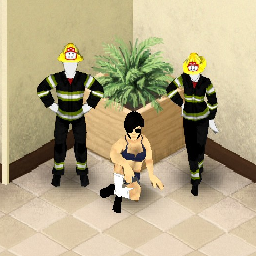
Firefighter Clothes Retexture
von 76561198088938576
I got bored and decided that 2AM was the perfect time to do stuff. Workshop ID: 2090218848 Mod ID: its3ampleasehelpme
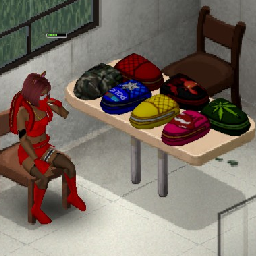
Schoolbag Bundle
von 76561198102246223
Schoolbag Bundle This mod adds different textures for schoolbag, that you can apply on a Large Backpack. All items are only craftable, in new category "Evil Inside". Updated for B42.20.0 Stable! Check out my other mods here: Workshop ID: 2980535389 Mod ID: SchoolbagBundleAlice
![[B42] Kenshi Blacksmithing – Project Zomboid Mod](https://images.steamusercontent.com/ugc/13814168428989894521/07B25979168F385957AAE3E5AEFB7607630AEF7A/)
[B42] Kenshi Blacksmithing
von 76561198053960696
Adds some of Kenshi armor and weapons as a blacksmithing reciepes. List of armor and weapons currently added: Falling Sun Iron Hat Chainmail Shirt Samurai Armor Also you can suggest your own mod ideas or report bugs here: https://discord.gg/a76tcEXkwH Workshop ID: 3746168562 Mod ID: Kenshi Blacksmithing Workshop ID: 3746168562 Mod ID: Kenshi Blacksmithing
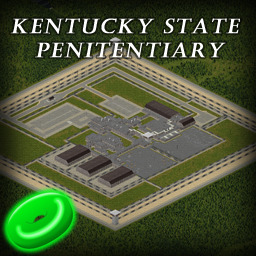
Kentucky State Penitentiary
von 76561198004137030
Kentucky State Penitentiary A large penitentiary between Louisville and Westpoint. Located close to the Crossroads Mall. There are multiple spawn points in the facility that will start you in a random cell. Inside the Penitentiary are 3 cell blocks, cafeteria, kitchen, laundry room, rec room, small library, classroom. As well as guard offices, armory, breakrooms, medical facilities, and surveillance rooms. I recommend using Wolf Custom Starting Conditions mod Workshop ID: 2796233765 to enable zombies to spawn in the starting building. Without this option, spawning in this building will result in no zombies being inside. There might be similar mods that allow a feature like this but I know this one works. This mod uses cells 48,16 and 49,16. Other mods: If you like this mod please check out my other map mods: Leavenburg - Workshop ID: 3085088928 Jasperville - Workshop ID: 3123362438 Eventure Island - Workshop ID: 3324896918 Gas Town - Workshop ID: 3370331539 Support I've opened a Ko-Fi if you would like to leave a tip, I would be very grateful for the support. Workshop ID: 3565204374 Mod ID: KentuckyStatePenitentiary Map Folder: Kentucky State Penitentiary

Last Cup Coffee
von 76561199116881450
Last Cup Coffee Bring the world of coffee to Project Zomboid with a complete coffee-making system, new recipes, professions, traits, farming, processing, and dozens of new items. Whether you are a casual coffee drinker or a true caffeine addict, Last Cup Coffee adds a new layer of immersion to your survival experience. Coffee Machines Prepare coffee using two powered coffee machines: - Coffee Machine - Deluxe Coffee Machine Both machines require electricity to operate. 27 Coffee Recipes Hot Coffee - Americano - Black Coffee - Cortado - Doppio - Espresso - Lungo - Macchiato - Ristretto Milk-Based Coffee - Breve - Caffè Latte - Cappuccino - Flat White - Latte Macchiato - Mocha Cold Coffee - Affogato - Iced Coffee - Cold Brew - Frappé - Iced Latte - Nitro Cold Brew Specialty Coffee - Aeropress - Moka Coffee - French Press - Turkish Coffee - Chemex - Pour Over Drip Coffee Brewing Prepare traditional drip coffee in multiple serving sizes: - 500ml Coffee Mug - 600ml Portable Cup - 1L Stanley Cup - 2L Portable Thermos New Profession: Barista The Barista starts with complete coffee knowledge and exclusive bonuses. Starting Items: - Ground Coffee Bag - Coffee Mug - Coffee Grinder Skills: - +2 Cooking - +1 Nimble - +1 Maintenance - +1 Foraging The Barista automatically knows every coffee recipe in the mod. Other professions must learn coffee recipes by reading the Barista Recipe Book. New Trait: Caffeine Addict +6 Points (Negative Trait) Characters require regular caffeine consumption. - Long periods without coffee slowly increase unhappiness. - Fresh coffee removes unhappiness. - Coffee can make the character happy. New Happy Moodle Drinking coffee can now improve your mood. Barista: - Removes Medium Unhappiness - Can become Happy Other Professions: - Removes Low Unhappiness Caffeine Addict: - Removes all Unhappiness - Becomes Happy after drinking coffee Coffee Freshness System Coffee now features multiple freshness states: - Fresh - Stale - Spoiled Fresh coffee provides the best mood benefits. Coffee Farming & Processing Gather and process your own coffee beans. - Forage for coffee plants - Harvest coffee berries - Dry coffee beans using vanilla drying stations - Grind beans into coffee grounds - Prepare fresh coffee from scratch New Resources: - Coffee Berry - Dried Coffee Bean - Coffee Plant with Fruit Coffee Equipment New tools and brewing equipment: - Ground Coffee Bag - Whole Bean Coffee Bag - Aeropress - Portafilter - Tamper - Precision Scale - Steam Pitcher - Cocoa Powder Shaker - French Press - Moka Pot - Turkish Coffee Pot - Chemex - Pour Over Brewer - Drip Coffee Filter - Electric Coffee Grinder - Manual Coffee Grinder Merchandise Items Decorate your collection with coffee-themed merchandise: - Coffee Mug - Portable Cup - Stanley Cup - Portable Thermos - Barista Apron Compatibility - Build 42 Compatible - Supports Multiplayer - Uses Vanilla Power System - Integrated with Vanilla Foraging and Drying Mechanics - Incompatibility with the Nature's Call mod Credits I wanted to give my full thanks to Eleasaart for designing the coffee bush tiles and contributing their knowledge about coffee to this mod for all coffee lovers. One Last Cup Before The End Of The World... When civilization collapses, a good cup of coffee still matters. This mod's permissions fall under TIS's policy Ask for permission This mod can only be added to and extended with the express permission from the original creator. Having received permission, credit must be given to the original creator, both within the files of the mod and wherever the mod roams online. If no permission is received you may not alter the mod, and it must be treated as a mod that is 'On Lockdown'. The only exception is that servers may freely include this mod in their modpacks, with the freedom to alter it or make modifications as they see fit, as long as credits are properly given to the original creator. Support the Mod Support the Project If you enjoy this mod and want to support future updates and new systems: Your support helps expand the project and keep development active. Every contribution makes a difference. Thank you for your support! ❤️ A like or favorite helps a LOT! Workshop ID: 3740865682 Mod ID: LastCupCoffee
Project Zomboid Details →
Project Zomboid Guides
Project Zomboid Mods installieren - Workshop Guide
Installiere Project-Zomboid-Mods sauber per Steam Workshop: IDs eintragen, Reihenfolge prüfen, Server neu starten und typische Fehler beheben.
Project Zomboid Build 42 auf dem eigenen Server: Umstieg, Spielstände und Mods
Build 42 ist Stable: Spielstände aus Build 41 sind nicht kompatibel. Umstieg, legacy41-Zweig, neue Serveroptionen, Anti-Cheat und der Hotfix 42.20.1 gegen Serverlag.
Project Zomboid Server mieten – Multiplayer Guide
Project Zomboid Server einrichten: RAM, Sandbox-Einstellungen, Workshop-Mods, Admin-Rechte und typische Fehler sauber prüfen.
Project Zomboid Server mit Mod-Support
Kompatible, unterstützte Mods über das Server-Dashboard installieren.
Project Zomboid Server mieten