Project Zomboid Mods für Server
Für einen modifizierten Project-Zomboid-Server brauchst du pro Projekt die Steam-Workshop-ID und die interne Mod-ID. Prüfe zusätzlich Spiel-Build, Abhängigkeiten und Lade-Reihenfolge, bevor du deine Welt mit den Änderungen startest.
Project Zomboid Mods sicher installieren
Ein Workshop-Abo allein aktiviert eine Mod auf dem Dedicated Server nicht. Die Einträge in `WorkshopItems=` und `Mods=` müssen zusammenpassen; außerdem muss jede Mod den gewählten Build 41 oder Build 42 ausdrücklich unterstützen.
- 1. Build prüfen: Build-41- und Build-42-Mods nicht ungeprüft mischen.
- 2. Workshop-ID, Mod-ID, Abhängigkeiten und erforderliche Reihenfolge vollständig dokumentieren.
- 3. Welt und Konfiguration sichern, Server neu starten und Logs sowie den Beitritt mit einem Test-Client prüfen.
Die vollständige Schritt-für-Schritt-Anleitung findest du im Project-Zomboid-Mods-Guide. Oder starte direkt mit einem Project Zomboid Server mit Mod-Support.
Häufige Fragen zu Project Zomboid Mods
Was ist der Unterschied zwischen Workshop-ID und Mod-ID?
Die Workshop-ID bezeichnet das Steam-Workshop-Projekt und steuert den Download. Die Mod-ID aktiviert den enthaltenen Mod im Spiel. Auf dem Server müssen beide Listen vollständig und passend gepflegt sein.
Laufen Build-41-Mods automatisch mit Build 42?
Nein. Nutze eine Mod nur dann auf Build 42, wenn ihre Workshop-Seite diese Kompatibilität ausdrücklich bestätigt. Prüfe dabei auch alle Bibliotheken und weiteren Abhängigkeiten.
Wie teste ich ein Mod-Update ohne Risiko für die Welt?
Sichere zuerst Welt, Sandbox-Konfiguration und Server-INI. Aktualisiere danach die zusammengehörigen Mods, starte den Server neu und prüfe Logs, Kernfunktionen und einen vollständigen Client-Beitritt.
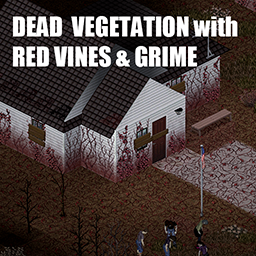
Dead Vegetation with Red Vines & Grime
von 76561198255003525
Tile replacement to make everyshing a little creepier. All trees will now be dead or red no matter what season is outside. All vines will be dead and red too. Grass should be less alive. + most of the floors will be covered in vines too. I made this for my video to pair with SecretZ lab. Adding overlays based on 10years later mod by Dane. I suppose this mod will not work with "10 years later " Workshop ID: 3370505363 Mod ID: RedVegetationAndGrime Mod ID: RedVegetationAndGrimeNoVines
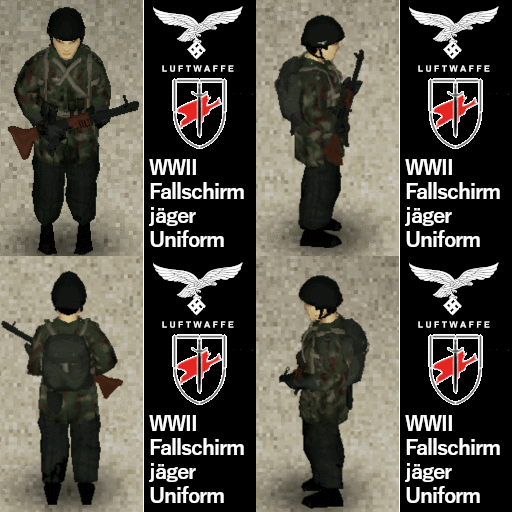
WWII Fallschirmjager Uniform - Ultraviolet
von 76561198130139709
Let us then in position, the fight then begins. We yell "Hurra Hurra!" to counterattack! FG42 in the picture is made by me: Workshop ID: 3012358156 Mod ID: UVGermanParatrooperUniform

hy的汉化
von 76561198309508753
1.0 ar完成全部翻译 2.0 de完成全部翻译 3.0 ru完成全部翻译 4.0 en完成全部翻译 5.0 cn完成全部翻译 6.0 it完成全部翻译 7.0 fr完成全部翻译 8.0 es完成全部翻译 9.0 tr完成全部翻译 10.0 完成了hy的全部翻译,可能会有遗漏,反馈给我就是了 ps:有的词语翻译出来有问题,看到了可以反映给我,我改一下 再ps:af不知道为什么再现不出来,ch也一样,可能这部分没东西 Workshop ID: 2818160230 Mod ID: 姊︾埍2
![[B42] Make Chainmail gloves/sleeves from wire – Project Zomboid Mod](https://images.steamusercontent.com/ugc/16074193669254145686/564D3FFBC5C3B75BC29CA55ADF8AA272C03E0879/)
[B42] Make Chainmail gloves/sleeves from wire
von 76561198142763662
Description: This mod adds a recipe to make Chainmail gloves and sleeves. Chainmail gloves/sleeves are rare equipment found in the original game. This recipe requires Tailoring Level 3-6, and provides small amount of exp. Workshop ID: 3480630932 Mod ID: MakeChainmailGloves
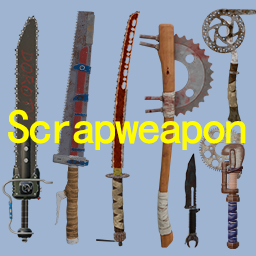
Scrapweapon 废品武器
von 76561198824849104
Operate the waste materials in your hands rationally and create powerful weapons with an apocalyptic style! 如果订阅的人多会考虑移植B42(等b42稳定以后) Workshop ID: 3462104219 Mod ID: Scrapweapon
![{B41} [English Support] Rabbit's Cosplay Shop – Project Zomboid Mod](https://images.steamusercontent.com/ugc/2017098632865322056/FBAC785090A0EE6FFC784F63FCCCB7A45C179DD9/)
{B41} [English Support] Rabbit's Cosplay Shop
von 76561198029363618
This mod is not yet supporting B42, as well as upstream didn't convert or optimised to use on that version properly. This is a translation support mod for Rabbit's Cosplay Shop (aka. 拉比特的小店) Attention, please! Previously, this translation require exact same of Steam workshop "Require Items", and now I see another versions of RCS adapted (currently known 4 versions, I'll list them below later.) With this update, this mod is no longer add require in mod.info file, now you can freely enable even you didn't installed it, Because those cosplay cards are under the Base.ItemID, that's mean it's not hardcoded to require. Usable for these versions (You must enable only one of these below) - Original version. - Without recipes version. - DuckSaysQuack with spawn options and reduced texture size. - Hard to buy version, require credit cards instead of moneys! If translation still not applied, check the mod orders and place this translation mod to load later than required mod. Remember, I didn't work on and/or copied resources from that mod, this is just a support translation that add proper English language as fallback, otherwise, you cannot see actual recipes and name of clothing items! You can also click global icon in-game to open page of original mod. Thanks to Japanese and Korean translation that correct some certain character names and costume variants into their language, I've also use as reference to re-search and corrections of my mistakes even I'll also doesn't understand non-English languages. Note: Even I've references some from other languages, I still need help from you due to I'm not understand other languages than English much and lack of finding source of certain characters in the meantime or when new updates are added, suggestions for correct character name, clothing variants and weapons are welcome, I'll appreciate your helps if you do so... Workshop ID: 2997216367 Mod ID: amm-ensupport
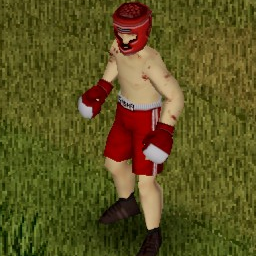
BoxingGloveMod
von 76561197982113112
Punch Zombies. I am not currently playing PZ and so not actively working on this mod. Feel free to take the current source code from github and make your own version from it. ------------------------------------------------------------------ https://github.com/basicsmods/BoxingGloveMod ------------------------------------------------------------------ New ------------------------------------------------------------------ Added pink, black, and white gloves (on top of the existing blue and red). (Didn't add those colours to the boxing shorts and helmets though so if you're looking for a full uniform, stick with blue or red.) Tweaked some of the default stats of the weapons to be a little less overpowered and quite a bit less abundant. By default, only the tier 1 gloves drop now. To get a tier 2 glove, you must get 3 tier 1 gloves in your inventory and then right click on one of them and use the Upgrade menu button. Same deal for tier 2 -> tier 3. A broken tier 3 glove can be downgraded back into a tier 1. When upgrading (or downgrading), you have the choice of which colour you'd like your new gloves to be. ------------------------------------------------------------------ Description ------------------------------------------------------------------ This mod adds the BoxingGlove weapon to the game. This weapon comes in 3 tiers (1, 2, and 3) and comes as blue, red, white, black, and pink (so 15 total items). The weapon's range is quite short (if I make it longer, you can punch zombies without physically making contact), but it can attack quite fast as compensation. The way the weapon works is that the weapon's skin is actually invisible. But whenever you equip the weapon, it simultaneously spawns and equips the real boxing glove item from the vanilla game. When you unequip the weapon, it unequips the gloves and deletes them. So you can't use this weapon AND gloves at the same time. This mod also adds the vanilla Boxing Shorts and Boxing Helmet items to the drop tables of zombies. The helmets come in 3 tiers while the shorts have a warm version (with insulation) and cold version (with no insulation). Both the helmets and shorts have blue and red versions. Currently, these weapons use a combination of the Stab animation (looks like a jab) and the Bat animation (looks like different types of swinging punches). There is a Punch animation within the game code, but I can't figure out how to assign it to a weapon. If someone can do it that would be incredible. All of the items from this mod drop off of zombies. ------------------------------------------------------------------ Customizability ------------------------------------------------------------------ To give you more control over the weapons, I added two sets of options: 1) In-game settings tab where you can control the drop rates for the three different weapon tiers. You can also set your jab:swing ratio here. 2) Server / World Sandbox settings tab where you can control the different weapon tiers' stats (damage, weight, crit chance, durability, etc.). For (1), only the server host's drop rate settings will be applied if you're in multiplayer and you MUST reload your lua after changing the drop rates or they won't apply to the world you launch into. The jab:swing ratio can be controlled by clients in single player or multiplayer worlds. For (2), one of the weapon stats you can control is knockdown %. Only the Swing animation can actually knock zombies (Stab animation cannot). So based on what knockdown % the server has set and what jab:swing ratio the client has set in their in-game settings, that will be the client's knockdown % when they get a Swing attack. For example, if the server has a knockdown % of 25% and a player has a jab:swing ratio of 0.4 (60% of their attacks will be Swings), the % chance to get a knock when the player gets a Stab attack is 0. But the % chance to get a knock when the player gets a Swing attack is 41.6%. This results in an "overall" knockdown chance of 25%. (If your knockdown % is higher than your Swing %, your overall knockdown will be capped at swing.) I tried to put the drop rate settings within the sandbox settings as well, but they don't get applied when I do that. Since single player worlds cannot alter the Sandbox settings after the world has been created (multiplayer worlds can change the server settings + sandbox settings after hitting Host, but before launching the server), I recommend you get this mod https://steamcommunity.com/sharedfiles/filedetails/?id=2829504578 . With that mod, you can alter the single player world's sandbox settings from within the world and then restart the world to get them applied. ------------------------------------------------------------------ Future ideas ------------------------------------------------------------------ - (Done) Give users the ability to tune the weapon stats + drop rate from within their game. - Change the animation to the actual punch animation that there are files for in-game. (Not sure if this one is possible at this time.) - (Done) Add stars to the icons used for the different weapon and helmet tiers so they are easy to differentiate. - (Done) After each swing, randomly select which type of swing animation will be used for the next one. (The stab animation looks like a jab which is nice, but it's one animation every attack and it also doesn't ever get knockdowns. The bat animation still looks decently appropriate and has some variety to it while also allowing for knockdowns. Causing it to randomly rotate between the two will give us the best of both worlds.) - Add a hotkey that toggles between the Bat swing animation and the Stab swing animation. Have different weapon stats associated with each swing type (so for example, stabs could be faster and cause less durability damage, but bat swings could do more damage and have a chance to knock zombies down). This one might have to become its own mod (as an extension to this one) since it would change the nature of the mod quite a bit. But it would make combat a little more interesting since you'd be choosing which type of attack to do whenever you wanted. Feel free to comment with any suggestions / requests / bug reports. Also feel free to use the github link and make comments there / contribute to the repository. Workshop ID: 2827693830 Mod ID: BoxingGloveMod
$uicideBoy$ Lifestyle Music Addon
von 76561198125241745
Adds various $uicideBoy$ instrumentals for Lifestyle: Hobbies. All songs can be played on a keytar. Available songs: Beginner - Prince Tulip (Level 3) Experienced - One Last Look At The Damage (Level 2) - ...And To Those I Love, Thanks For Sticking Around (Level 3) Skilled - Grey Magic (Level 5) - Awkward Car Drive (Level 5) Proficient - DATURA (Level 6) - Not Even Ghost Are This Empty (Level 7) Expert - Soul Doubt (Level 8) - All Dogs Go To Heaven (Level 9) Workshop ID: 3067834538 Mod ID: candySBLifestyle
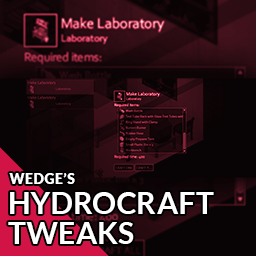
Wedge's Hydrocraft Tweaks
von 76561198010274339
Just some personal tweaks and additions to things I felt Hydrocraft and the base game were missing. Current tweaks include: - Disinfectant has more uses and can be used to disinfect more bandages or rags. - Paint buckets and plaster have more uses. - Bottles of Disinfectant and Cooking Oil become Clean Empty Bottles when depleted. - Metal detector has more uses and can be "adapted" to use normal Battery items (instead of Medium Batteries). - Crafted with aluminum; either two rubberbands or a piece of duct tape; and wire, electric wire, or copper wire. - Laboratory can be crafted using a test tube rack with test tubes with rubber bungs instead of with corks. - A new Clay Mold and smelting recipe has been added for making Welding Rods. - New Metalworking recipes have been added for welding Paint Cans from Sheet Metal. - Vehicle Batteries and Tires can be scrapped to turn into Hydrocraft Battery and Tire/Hubcap items, respectively. - Various metal items can be turned into Scrap Metal with just a Hammer, Metal Saw, and Work Gloves. - A variety of other bags can now be recycled for Nylon Cloth. - Bags and Sacks can additionally be recycled with Child Safety Scissors, Box Cutters, and a variety of knives. - Needles can be improvised with a Hammer and either a Paperclip (making a single needle) or a Wire Hanger (making 3). - Recipes that use Empty Water Bottles can be crafted using Clean Plastic Bottles, including all Juicing recipes. Requires the Item Tweaker API http://steamcommunity.com/workshop/filedetails/?id=566115016 A small personal project adding some things me or my friends wanted for our server. Use at your own risk. Workshop ID: 1165204481 Mod ID: WedgeTweaks
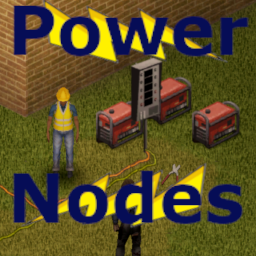
Power Nodes
von 76561197998850878
This mod Allows the extension of generator power through the use of a Switch object, extension cords, and a Power Node object. Only for B41 Works with multiplayer Power Objects The Switch and Node are crafted through the context menu and require the character to have metal cutters and pliers from the workshop mod Generators must be placed within 2 tiles of a switch and then connected to be added to the power When there is power and nodes connected to the switch a context option for power info will appear that will tell all of the details of each node connected to the switch -note that power values for lights will probably show wrong, tried a few ways to fix it but the game doesn't like really low numbers in tooltips Nodes can be turned on with a context option or left clicking on the sprite Extension Cords Extensions cords need to be added to the same tile as the switch and node and every tile leading up to it the power will not work with any breaks and will turn off if a cable is removed Extension cords are found throughout the world in various tool spawns. To place extension cords just have the item in your inventory and use the move object tool and it will be an option that can be placed, also a place option in the inventory context. They will automatically pick the sprite based on other nearby extension cord tiles and act like a drainable item that will disappear when fully used. Sandbox Options will let you modify range, number of switches and nodes in a single cable network, skill requirement, and item spawn rates. Make sure this mod loads after all of its required mods This mod was commissioned by BowlOfOodaLoops Workshop ID: 3555538237 Mod ID: PWRNODE

ZOMBIE HEALTH
von 76561199245003326
ZOMBIE HEALTH BAR Workshop ID: 2778091068 Mod ID: ModTemplate Map Folder: ModTemplateWorld1 Map Folder: ModTemplateWorld2
![[COS] nea – Project Zomboid Mod](https://images.steamusercontent.com/ugc/5109928735896484243/B71C70FFABA37E4DB4A98994530ABE07783984A5/)
[COS] nea
von 76561199178116693
How Do I Use It? - You can go to the link below to see how to use it. - Link Recommended mode - Fashionoid - Gear Transmog - Hide All Attached Items - Clipping animation Fix How to use COS mode in build 42. - Navigate to the path where the mod is installed. - Create a 42.0 folder. - Create a common folder. - Paste the media folder / mod.info / preview.png into the 42.0 folder. The recipe code writing method has been changed in 42Build. Since COS (Costume) mode has approximately over 200 modes, converting to 42Build's recipe code is an extremely laborious task. In 42Build, you cannot create costumes in (42 build) the crafting tab. There are two methods: Spawn items in cheat mode. Select items in the clothing selection screen when creating a character. Like My Mode? - Join Our Discord If You Want Commission
![ALICE Gear [B42.15] RU – Project Zomboid Mod](https://images.steamusercontent.com/ugc/17268088494563443223/249701140DEAA45FBD59667D5C8F0C5185BF8B2E/)
ALICE Gear [B42.15] RU
von 76561198270949887
Русская локализация ALICE Gear от Foxtrot. Автор оригинального мода - Nik. ALICE Gear добавляет в игру систему личной экипировки пехотинца армии США. В "ванильной" игре уже есть некоторое количество экипировки ALICE, но этот мод добавляет новые предметы, качественно расширяя возможности транспортировки снаряжения и боеприпасов. Мод содержит: - Средний полевой рюкзак ALICE объёмом 40 литров, снижающий вес на 90%. Представлен в двух расцветках. - Сухарная сумка ALICE объёмом 16 литров, снижающая вес на 95%. Представлена в двух расцветках. - Фляга из комплекта ALICE увеличенного объёма. Идеально помещается в комплектный чехол для фляги. - Армейский нож M9. Универсальный нож и штык армии США. Прочный и надёжный. Идеально помещается в комплектные ножны. - Ножны для ножа M9 из комплекта ALICE. Крепятся сзади, между полевым рюкзаком и сухарной сумкой. - РПС (ременно-плечевая система) ALICE с возможностью регулировки поясного и плечевых ремней. Включает 24 модели (12 моделей для мужских и 12 моделей для женских персонажей). Базовая РПС включает два подсумка для боекомплекта (БК) и два гранатных подсумка. Комплектацию РПС можно расширить при помощи меню рецептов, закрепив на ней подсумки для фляг, утилитарные подсумки или кобуру. Гранатные подсумки пока не используются. Новые предметы можно найти на военных объектах, а также, с небольшой вероятностью, в сельской местности. ВНИМАНИЕ: Этот мод включает в себя ТОЛЬКО локализацию. Не забудьте подписаться на оригинальный мод для корректной работы! Локализация выполнена вручную, c любовью к сообществу Project Zomboid. Приятной игры! Workshop ID: 3708546878 Mod ID: AliceGearRU
![[COS] Silverhand – Project Zomboid Mod](https://images.steamusercontent.com/ugc/2044106057044721952/FDFAD1F5C28778E7E353CF62D571D3E649D02E60/)
[COS] Silverhand
von 76561199178116693
How Do I Use It? - You can go to the link below to see how to use it. - Link Recommended mode - Fashionoid - Gear Transmog - Hide All Attached Items - Clipping animation Fix How to use COS mode in build 42. - Navigate to the path where the mod is installed. - Create a 42.0 folder. - Create a common folder. - Paste the media folder / mod.info / preview.png into the 42.0 folder. The recipe code writing method has been changed in 42Build. Since COS (Costume) mode has approximately over 200 modes, converting to 42Build's recipe code is an extremely laborious task. In 42Build, you cannot create costumes in (42 build) the crafting tab. There are two methods: Spawn items in cheat mode. Select items in the clothing selection screen when creating a character. Like My Mode? - Join Our Discord If You Want Commission
Radio Tower Basements
von 76561198015081276
Ever wished the radio towers had just a little extra? Select one or both locations with this mod. Get full generator and water systems for the whole area. For the Muldraugh site, select from a storm shelter bunker or a site that's been prepped for some serious construction. The Riverside relay offers a smaller 'normal' bunker, or a larger more extensive option. Workshop ID: 3575444405 Mod ID: DWAP_RadioRelays Map Folder: DWAP_RR_Muldraugh Map Folder: DWAP_RR_Riverside
Tick Tock TF2 Jumpscare Sound
von 76561198064944451
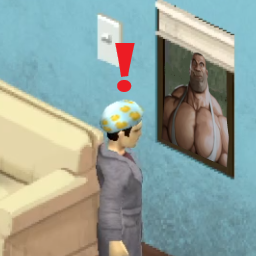
This mod plays the intro from the song Tick Tock whenever the player gets jump-scared by a zombie. If you've played enough TF2 as I have this song induces very strong emotions upon listening to it. If you know you know. I figured I wasn't getting enough anxiety already playing Zomboid so I figured I'd add this in and decided to share it with the world. You're welcome. Workshop ID: 2915762213 Mod ID: TickTockJumpscareSound

Fishing John TV Show
von 76561198254049935
This adds a Fishing TV Show directed by Fisherman John and his crappy puns. Watch the TV Show every day for six days to gain experience in Fishing. You can watch this every day at 10:00! As said before, there is six episodes. I have now added VHS tapes, they can be found in VHS stores. I do not plan on adding the VHS tapes for this mod to any other location spot. This mod can be added midsave, but the Fishing John show will not appear on the TV as it requires a new save because it manually puts in a new show. The VHS tapes however can be found in unexplored areas. Current subscribers, this will not affect your save. I have several other projects that are currently being worked on. The estimated time amount should be end of January, however it can get pushed back. Incompatibilities: I am unsure if my VHS tapes interfere with other VHS tapes mods but it is highly unlikely. This mod should be compatible with any mod. If there is issues, please write in the comments or join the discord and let me know. I will work on fixing it as soon as possible. https://discord.gg/cxVHEb9eGt Permissions: Permission is NOT given to redistribute this mod in whole or in part. I do not wish it to be reposted anywhere other than Steam. If you have questions regarding this, send me a message. My thoughts will highly unlikely change. If you plan on adding it into a MODPACK. Make it known to me and give credit. Workshop ID: 2896635494 Mod ID: FisherJohn
RV Interior cozy space addon
von 76561198348726330
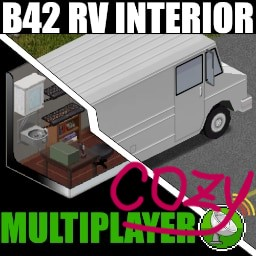
This mod gives an equally big interior space(4x12) for every car supported by Project RV Interior, so you don't need to abandon your favor only because it gets a small room. This mod only modifies RVVehicleTypes.lua, it will theoretically, not bring any bugs. Therefore if you meet any, report to original author. This mod must be placed second to Project RV Interior.
JK's Boxes Of Garbage Bags
von 76561198955543057
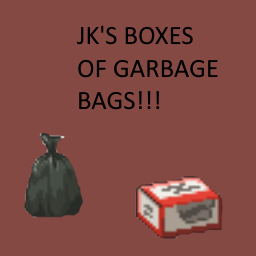
Really simple mod, just adds boxes of garbage bags that spawn in places like Gigamarts, toolstores, etc. where you would expect these things to be. Each box gives you 4 garbage bags each, normally it would be like 100 but this is made with a mix of balance and realism in mind. Update 1 - Boxes of Plastic Bags have been added. 10 plastic bags per box. Sandbox variability has been added (Thank you Sapphs Cooking mod for giving me some good reference code to look at) Workshop ID: 3084003901 Mod ID: JKGRB
Expert Driver Trait (toggle speed demon)
von 76561197968647786
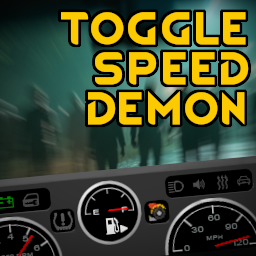
Adds a new trait, Expert Driver, that allows you to toggle the Speed Demon trait on and off using a convenient button on the dashboard. Sandbox options can be set to allow everyone to toggle speed demon on and off without needing Expert Driver. FAQ Can this mod be added/removed to an existing save? Yes, but when removing it be sure to set Speed Demon to the desired status first. Is this mod compatible with <other mod> Probably. The way this mod works means it shouldn't conflict with anything unless another mod adds a feature to the same place on the dashboard. Why are you adding/removing a character trait instead of modifying the vehicle properties? Because the vehicle code is in the java part of game, which is not easy to modify. Can you allow the trait cost to be set in sandbox options? No, because I can't figure out how to make the change between sandbox variables becoming available and the trait list being presented to the user. Workshop ID: 3403031401 Mod ID: NepToggleOverdrive
Random Profession Loadout (B42-B42.15)
von 76561199380096488
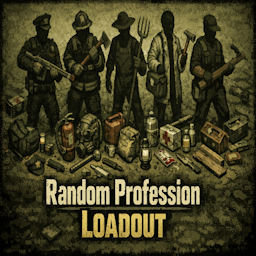
✨ Random Profession Loadout — Start with gear that fits your job! Every new character spawns with a randomly selected set of items based on their chosen profession. A police officer might find a pistol in their pocket. A farmer might grab their pitchfork. A doctor starts with a first aid kit. Or maybe nothing at all — that's the thrill! 🎽 Bags — backpacks and duffel bags matching your profession 🛠️ Tools & Misc — useful items tied to your job 🔫 Weapons — from a kitchen knife to a shotgun, if you're lucky 3 difficulty versions included: 🔴 Low — rare spawns, tough start 🟡 Normal — balanced, recommended 🟢 High — frequent spawns, easier start ⚠️ Activate only ONE of the 3 versions or it won't work! Compatible with Build 42+ — all vanilla professions supported plus the new B42 ones (Angler, Tailor, Welder, Blacksmith, and more). Workshop ID: 3554352913 Mod ID: RandomProfessionLoadout_B42 Mod ID: RandomProfessionLoadoutHigh_B42 Mod ID: RandomProfessionLoadoutLow_B42

Totally's Firearms of Asian Communism
von 76561199025597402
Totally's Firearms of Asian Communism From the start of the Korean War in 1950, through the Vietnam War, Sino-Veitnamese War, Eastern Asia was not only hotbed of conflict between the 2 great ideological of the West and East, but between The USSR and the PRC, seeing the usage a wide array of Firearms ranging from the captured colonial equipment left over, to copies of Soviet designs to the regions own designs. This mod aims to add some of these weapons seen in the hands of Chinese (PLA), North Korean (KPA) and Vietnamese (Viet Cong / NVA) troops throughout the later half of the 20th century. People's Republic of China: - Type 54 Pistol - Type 56 SKS Rifle - Type 56-2 Assault Rifle - Type 63 Assault Rifle - Type 58 Machine Gun - Norinco 213 (Norinco made export 9mm Tokarev) Democratic People's Republic of Korea (North Korea): - Type 49 PPSH Democratic Republic of Vietnam (North Vietnam): - K50M Viet Cong: - MAS 49 (Colonial Capture) - MAS 49-56 (Colonial Capture) - MAT 49 (Colonial Capture) - MAT 49M (Modified Colonial Capture) Note: This not an endorsement nor any sort of commentary of the Militaries or Nations referenced in this mod, simply I find the weapons interesting. This mod is should be Nativity compatible with B41 Firearms, Guns of 93 and Vanilla Firearms Expansion. If you have an issue with either, please raise it and i will try address it as quickly as possible. Workshop ID: 3366210711 Mod ID: TFACP
![[42.13+] [SP ONLY] Quest Remover for Week One – Project Zomboid Mod](https://images.steamusercontent.com/ugc/13071678223762081226/576871DB8B64866A8B5B5E0356D985429E3B98D5/)
[42.13+] [SP ONLY] Quest Remover for Week One
von 76561199262086144
This is a simple addon to the Week One mod by Slayer. All credit goes to him, as always. You are NOT the Chosen One! That meddling archangel won't bother you with a suicide mission any longer, allowing you to live through the collapse of civilization in "peace" and without a guilty conscience! But the government will still do everything in their power to stop the outbreak, and the nukes will still fall... This mod will remove the dreams and revert the custom intro text back to the classic "this is how you died." It's meant for players who find the dream quest repetitive, annoying, intrusive, and/or unimmersive, and want to remove it without disabling the Final Solution event completely. It is still possible to disable the nukes in the military base, but I assume that if you're downloading this mod, you're tired of being the hero. Have a fun apocalypse! Workshop ID: 3512483331 Mod ID: WeekOneQuestRemover
(B41) Beacon Mental Hospital Ambulance
von 76561198969079348
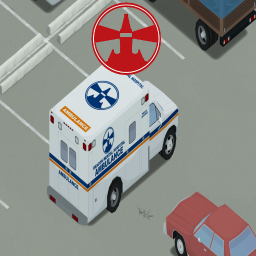
Note: More updated & expanded version can be found here (this one will not be deleted though) https://steamcommunity.com/sharedfiles/filedetails/?id=3373616238 Hi there, a small project i made while working on the big one Its a recreation of the Ambulance from The Evil Within 1 in which our heroes escaped from the Hospital at the begin of the game and later crashed it Nothing much to add here So if you like it, drop and comment and maybe a feedback on what should I try to do later and maybe even a like Workshop ID: 2652422698 Mod ID: BMHA
Project Zomboid Details →
Project Zomboid Guides
Project Zomboid Mods installieren - Workshop Guide
Installiere Project-Zomboid-Mods sauber per Steam Workshop: IDs eintragen, Reihenfolge prüfen, Server neu starten und typische Fehler beheben.
Project Zomboid Build 42 auf dem eigenen Server: Umstieg, Spielstände und Mods
Build 42 ist Stable: Spielstände aus Build 41 sind nicht kompatibel. Umstieg, legacy41-Zweig, neue Serveroptionen, Anti-Cheat und der Hotfix 42.20.1 gegen Serverlag.
Project Zomboid Server mieten – Multiplayer Guide
Project Zomboid Server einrichten: RAM, Sandbox-Einstellungen, Workshop-Mods, Admin-Rechte und typische Fehler sauber prüfen.
Project Zomboid Server mit Mod-Support
Kompatible, unterstützte Mods über das Server-Dashboard installieren.
Project Zomboid Server mieten